reset LINCOLN MKS 2016 Owner's Manual
[x] Cancel search | Manufacturer: LINCOLN, Model Year: 2016, Model line: MKS, Model: LINCOLN MKS 2016Pages: 382, PDF Size: 3.81 MB
Page 259 of 382
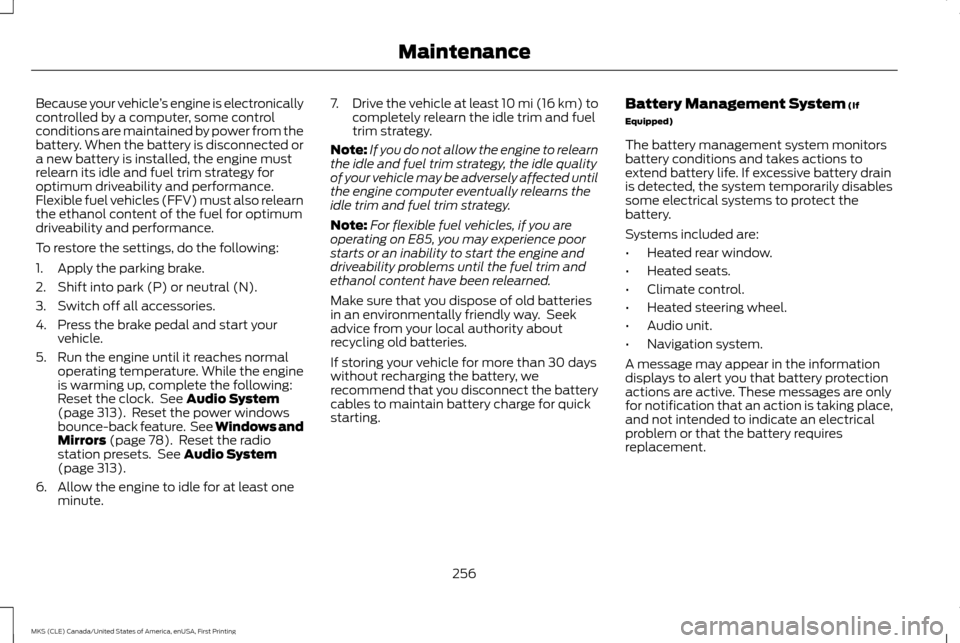
Because your vehicle
’s engine is electronically
controlled by a computer, some control
conditions are maintained by power from the
battery. When the battery is disconnected or
a new battery is installed, the engine must
relearn its idle and fuel trim strategy for
optimum driveability and performance.
Flexible fuel vehicles (FFV) must also relearn
the ethanol content of the fuel for optimum
driveability and performance.
To restore the settings, do the following:
1. Apply the parking brake.
2. Shift into park (P) or neutral (N).
3. Switch off all accessories.
4. Press the brake pedal and start your vehicle.
5. Run the engine until it reaches normal operating temperature. While the engine
is warming up, complete the following:
Reset the clock. See Audio System
(page 313). Reset the power windows
bounce-back feature. See Windows and
Mirrors
(page 78). Reset the radio
station presets. See Audio System
(page 313).
6. Allow the engine to idle for at least one minute. 7.
Drive the vehicle at least 10 mi (16 km) to
completely relearn the idle trim and fuel
trim strategy.
Note: If you do not allow the engine to relearn
the idle and fuel trim strategy, the idle quality
of your vehicle may be adversely affected until
the engine computer eventually relearns the
idle trim and fuel trim strategy.
Note: For flexible fuel vehicles, if you are
operating on E85, you may experience poor
starts or an inability to start the engine and
driveability problems until the fuel trim and
ethanol content have been relearned.
Make sure that you dispose of old batteries
in an environmentally friendly way. Seek
advice from your local authority about
recycling old batteries.
If storing your vehicle for more than 30 days
without recharging the battery, we
recommend that you disconnect the battery
cables to maintain battery charge for quick
starting. Battery Management System
(If
Equipped)
The battery management system monitors
battery conditions and takes actions to
extend battery life. If excessive battery drain
is detected, the system temporarily disables
some electrical systems to protect the
battery.
Systems included are:
• Heated rear window.
• Heated seats.
• Climate control.
• Heated steering wheel.
• Audio unit.
• Navigation system.
A message may appear in the information
displays to alert you that battery protection
actions are active. These messages are only
for notification that an action is taking place,
and not intended to indicate an electrical
problem or that the battery requires
replacement.
256
MKS (CLE) Canada/United States of America, enUSA, First Printing Maintenance
Page 272 of 382
Engine
•
Change the engine oil and filter prior to
storage because used engine oil contains
contaminates which may cause engine
damage.
• Start the engine every 15 days for a
minimum of 15 minutes. Run at fast idle
with the climate controls set to defrost
until the engine reaches normal operating
temperature.
• With your foot on the brake, shift through
all the gears while the engine is running.
• We recommend that you change the
engine oil before you use your vehicle
again.
Fuel system
• Fill the fuel tank with high-quality fuel
until the first automatic shutoff of the fuel
pump nozzle.
Cooling system
• Protect against freezing temperatures.
• When removing your vehicle from
storage, check coolant fluid level. Confirm
that there are no cooling system leaks
and that fluid is at the recommended
level. Battery
•
Check and recharge as necessary. Keep
connections clean.
• If storing your vehicle for more than 30
days without recharging the battery, we
recommend that you disconnect the
battery cables to maintain battery charge
for quick starting.
Note: It is necessary to reset memory features
if battery cables are disconnected.
Brakes
• Make sure the brakes and parking brake
release fully.
Tires
• Maintain recommended air pressure.
Miscellaneous
• Make sure all linkages, cables, levers and
pins under your vehicle are covered with
grease to prevent rust.
• Move vehicles at least 25 ft (7.5 m) every
15 days to lubricate working parts and
prevent corrosion. Removing Vehicle From Storage
When your vehicle is ready to come out of
storage, do the following:
•
Wash your vehicle to remove any dirt or
grease film build-up on window surfaces.
• Check windshield wipers for any
deterioration.
• Check under the hood for any foreign
material that may have collected during
storage such as mice or squirrel nests.
• Check the exhaust for any foreign
material that may have collected during
storage.
• Check tire pressures and set tire inflation
per the Tire Label.
• Check brake pedal operation. Drive your
vehicle 15 ft (4.5 m) back and forth to
remove rust build-up.
• Check fluid levels (including coolant, oil
and gas) to make sure there are no leaks,
and fluids are at recommended levels.
• If you remove the battery, clean the
battery cable ends and check for damage.
Contact an authorized dealer if you have any
concerns or issues.
269
MKS (CLE) Canada/United States of America, enUSA, First Printing Vehicle Care
Page 325 of 382
When the oil change message appears in the
information display, it is time for an oil
change. Make sure you perform the oil change
within two weeks or 500 miles (800
kilometers) of the message appearing. Make
sure you reset the Intelligent Oil-Life Monitor
after each oil change. See (page 89).
If your information display resets prematurely
or becomes inoperative, you should perform
the oil change interval at six months or 5000
miles (8000 kilometers) from your last oil
change. Never exceed one year or 10000
miles (16000 kilometers) between oil change
intervals.
Your vehicle is very sophisticated and built
with multiple, complex, performance
systems. Every manufacturer develops these
systems using different specifications and
performance features. That is why it is
important to rely upon your dealership to
properly diagnose and repair your vehicle. Ford Motor Company has recommended
maintenance intervals for various parts and
component systems based upon engineering
testing. Ford Motor Company relies upon this
testing to determine the most appropriate
mileage for replacement of oils and fluids to
protect your vehicle at the lowest overall cost
to you and recommends against
maintenance schedules that deviate from
the scheduled maintenance information.
We strongly recommend the use of only
genuine Ford, Motorcraft or Ford-authorized
re-manufactured replacement parts
engineered for your vehicle.
Additives and Chemicals
This owner's manual and the Ford Workshop
Manual list the recommended additives and
chemicals for your vehicle. We do not
recommend using chemicals or additives not
approved by us as part of your vehicle
’s
normal maintenance. Please consult your
warranty information. Oils, Fluids and Flushing
In many cases, fluid discoloration is a normal
operating characteristic and, by itself, does
not necessarily indicate a concern or that the
fluid needs to be changed. However, a
qualified expert, such as the factory-trained
technicians at your dealership, should inspect
discolored fluids that also show signs of
overheating or foreign material
contamination immediately.
Make sure to change your vehicle
’s oils and
fluids at the specified intervals or in
conjunction with a repair. Flushing is a viable
way to change fluid for many vehicle
sub-systems during scheduled maintenance.
It is critical that systems are flushed only with
new fluid that is the same as that required to
fill and operate the system or using a
Ford-approved flushing chemical.
Owner Checks and Services
Make sure you perform the following basic
maintenance checks and inspections every
month or at six-month intervals.
322
MKS (CLE) Canada/United States of America, enUSA, First Printing Scheduled Maintenance
Page 330 of 382
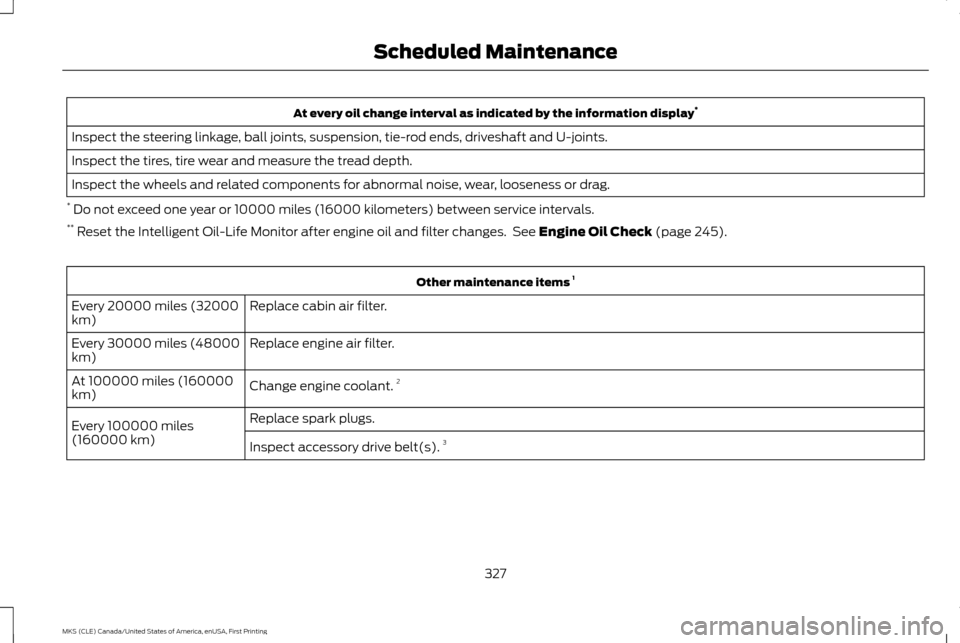
At every oil change interval as indicated by the information display
*
Inspect the steering linkage, ball joints, suspension, tie-rod ends, driveshaft and U-joints.
Inspect the tires, tire wear and measure the tread depth.
Inspect the wheels and related components for abnormal noise, wear, looseness or drag.
* Do not exceed one year or 10000 miles (16000 kilometers) between service intervals.
** Reset the Intelligent Oil-Life Monitor after engine oil and filter changes. See Engine Oil Check (page 245). Other maintenance items
1
Replace cabin air filter.
Every 20000 miles (32000
km)
Replace engine air filter.
Every 30000 miles (48000
km)
Change engine coolant.2
At 100000 miles (160000
km)
Replace spark plugs.
Every 100000 miles
(160000 km) Inspect accessory drive belt(s). 3
327
MKS (CLE) Canada/United States of America, enUSA, First Printing Scheduled Maintenance
Page 331 of 382
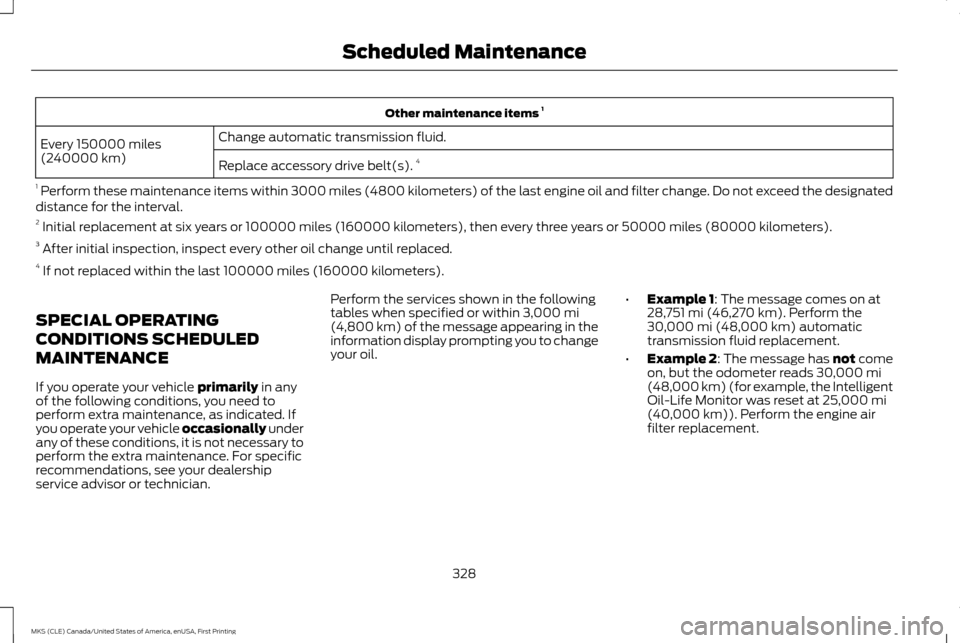
Other maintenance items
1
Change automatic transmission fluid.
Every 150000 miles
(240000 km)
Replace accessory drive belt(s). 4
1 Perform these maintenance items within 3000 miles (4800 kilometers) of the last engine oil and filter change. Do not exceed the designated
distance for the interval.
2 Initial replacement at six years or 100000 miles (160000 kilometers), then every three years or 50000 miles (80000 kilometers).
3 After initial inspection, inspect every other oil change until replaced.
4 If not replaced within the last 100000 miles (160000 kilometers).
SPECIAL OPERATING
CONDITIONS SCHEDULED
MAINTENANCE
If you operate your vehicle primarily in any
of the following conditions, you need to
perform extra maintenance, as indicated. If
you operate your vehicle occasionally under
any of these conditions, it is not necessary to
perform the extra maintenance. For specific
recommendations, see your dealership
service advisor or technician. Perform the services shown in the following
tables when specified or within
3,000 mi
(4,800 km) of the message appearing in the
information display prompting you to change
your oil. •
Example 1
: The message comes on at
28,751 mi (46,270 km). Perform the
30,000 mi (48,000 km) automatic
transmission fluid replacement.
• Example 2: The message has not come
on, but the odometer reads
30,000 mi
(48,000 km) (for example, the Intelligent
Oil-Life Monitor was reset at
25,000 mi
(40,000 km)). Perform the engine air
filter replacement.
328
MKS (CLE) Canada/United States of America, enUSA, First Printing Scheduled Maintenance
Page 333 of 382
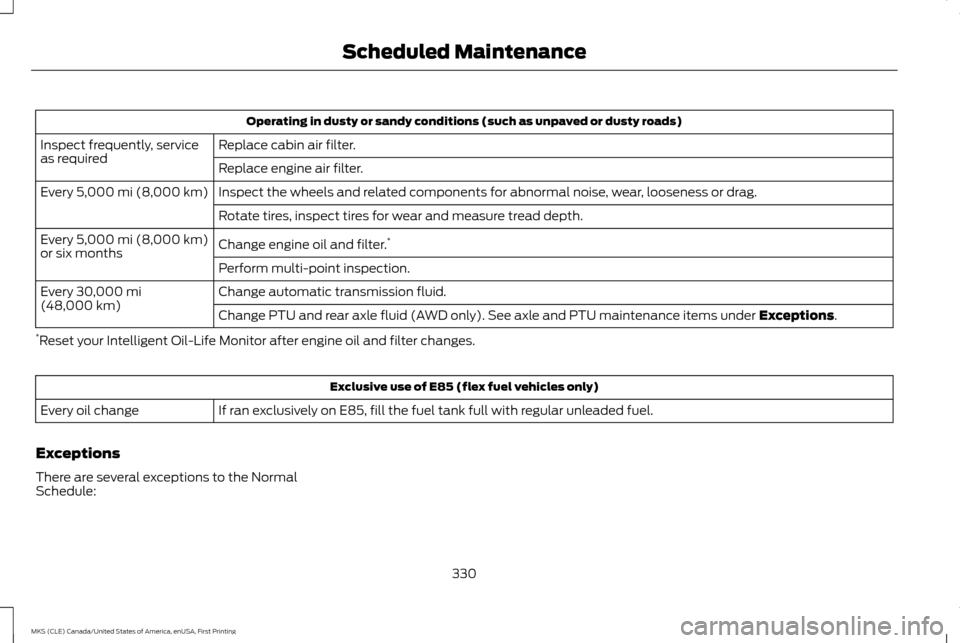
Operating in dusty or sandy conditions (such as unpaved or dusty roads)
Replace cabin air filter.
Inspect frequently, service
as required
Replace engine air filter.
Inspect the wheels and related components for abnormal noise, wear, looseness or drag.
Every 5,000 mi (8,000 km)
Rotate tires, inspect tires for wear and measure tread depth.
Change engine oil and filter. *
Every
5,000 mi (8,000 km)
or six months
Perform multi-point inspection.
Change automatic transmission fluid.
Every
30,000 mi
(48,000 km) Change PTU and rear axle fluid (AWD only). See axle and PTU maintenance items under
Exceptions.
* Reset your Intelligent Oil-Life Monitor after engine oil and filter changes. Exclusive use of E85 (flex fuel vehicles only)
If ran exclusively on E85, fill the fuel tank full with regular unleaded fuel.
Every oil change
Exceptions
There are several exceptions to the Normal
Schedule:
330
MKS (CLE) Canada/United States of America, enUSA, First Printing Scheduled Maintenance
Page 378 of 382
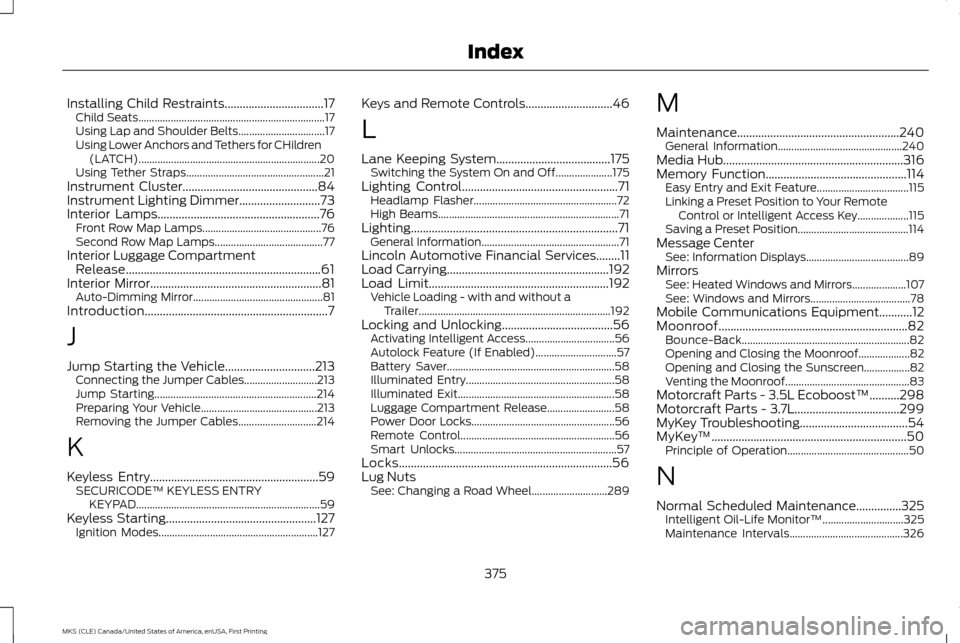
Installing Child Restraints.................................17
Child Seats..................................................................... 17
Using Lap and Shoulder Belts................................ 17
Using Lower Anchors and Tethers for CHildren (LATCH)................................................................... 20
Using Tether Straps................................................... 21
Instrument Cluster
.............................................84
Instrument Lighting Dimmer...........................73
Interior Lamps......................................................76 Front Row Map Lamps............................................ 76
Second Row Map Lamps........................................ 77
Interior Luggage Compartment Release.................................................................61
Interior Mirror
.........................................................81
Auto-Dimming Mirror................................................ 81
Introduction.............................................................7
J
Jump Starting the Vehicle..............................213 Connecting the Jumper Cables........................... 213
Jump Starting............................................................ 214
Preparing Your Vehicle........................................... 213
Removing the Jumper Cables............................. 214
K
Keyless Entry........................................................59 SECURICODE™ KEYLESS ENTRY
KEYPAD.................................................................... 59
Keyless Starting..................................................127 Ignition Modes........................................................... 127Keys and Remote Controls.............................46
L
Lane Keeping System
......................................175
Switching the System On and Off..................... 175
Lighting Control
....................................................71
Headlamp Flasher..................................................... 72
High Beams................................................................... 71
Lighting.....................................................................71 General Information................................................... 71
Lincoln Automotive Financial Services........11
Load Carrying......................................................192
Load Limit............................................................192 Vehicle Loading - with and without a
Trailer....................................................................... 192
Locking and Unlocking.....................................56 Activating Intelligent Access................................. 56
Autolock Feature (If Enabled).............................. 57
Battery Saver.............................................................. 58
Illuminated Entry....................................................... 58
Illuminated Exit.......................................................... 58
Luggage Compartment Release......................... 58
Power Door Locks..................................................... 56
Remote Control......................................................... 56
Smart Unlocks............................................................ 57
Locks.......................................................................56
Lug Nuts See: Changing a Road Wheel............................ 289M
Maintenance......................................................240
General Information.............................................. 240
Media Hub
............................................................316
Memory Function...............................................114
Easy Entry and Exit Feature.................................. 115
Linking a Preset Position to Your Remote Control or Intelligent Access Key................... 115
Saving a Preset Position......................................... 114
Message Center See: Information Displays...................................... 89
Mirrors See: Heated Windows and Mirrors.................... 107
See: Windows and Mirrors..................................... 78
Mobile Communications Equipment...........12
Moonroof...............................................................82 Bounce-Back.............................................................. 82
Opening and Closing the Moonroof................... 82
Opening and Closing the Sunscreen.................82
Venting the Moonroof.............................................. 83
Motorcraft Parts - 3.5L Ecoboost™..........298
Motorcraft Parts - 3.7L...................................299
MyKey Troubleshooting....................................54
MyKey ™
.................................................................50
Principle of Operation............................................. 50
N
Normal Scheduled Maintenance...............325 Intelligent Oil-Life Monitor™.............................. 325
Maintenance Intervals.......................................... 326
375
MKS (CLE) Canada/United States of America, enUSA, First Printing Index
Page 379 of 382
O
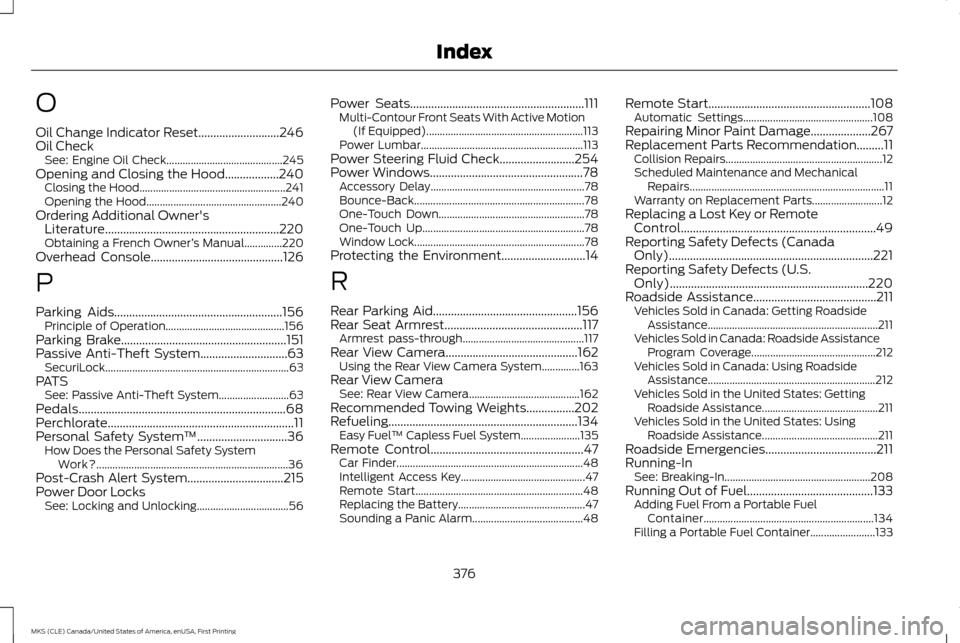
Oil Change Indicator Reset...........................246
Oil Check
See: Engine Oil Check........................................... 245
Opening and Closing the Hood..................240 Closing the Hood...................................................... 241
Opening the Hood.................................................. 240
Ordering Additional Owner's Literature..........................................................220
Obtaining a French Owner ’s Manual..............220
Overhead Console
............................................126
P
Parking Aids........................................................156 Principle of Operation............................................ 156
Parking Brake
.......................................................151
Passive Anti-Theft System.............................63 SecuriLock.................................................................... 63
PATS See: Passive Anti-Theft System.......................... 63
Pedals.....................................................................68
Perchlorate..............................................................11
Personal Safety System ™
..............................36
How Does the Personal Safety System
Work?....................................................................... 36
Post-Crash Alert System................................215
Power Door Locks See: Locking and Unlocking.................................. 56Power Seats..........................................................111
Multi-Contour Front Seats With Active Motion
(If Equipped).......................................................... 113
Power Lumbar............................................................ 113
Power Steering Fluid Check.........................254
Power Windows
...................................................78
Accessory Delay......................................................... 78
Bounce-Back............................................................... 78
One-Touch Down...................................................... 78
One-Touch Up............................................................ 78
Window Lock............................................................... 78
Protecting the Environment
............................14
R
Rear Parking Aid................................................156
Rear Seat Armrest..............................................117 Armrest pass-through............................................. 117
Rear View Camera
............................................162
Using the Rear View Camera System..............163
Rear View Camera See: Rear View Camera......................................... 162
Recommended Towing Weights................202
Refueling...............................................................134 Easy Fuel ™ Capless Fuel System...................... 135
Remote Control
...................................................47
Car Finder..................................................................... 48
Intelligent Access Key.............................................. 47
Remote Start.............................................................. 48
Replacing the Battery............................................... 47
Sounding a Panic Alarm......................................... 48Remote Start......................................................108
Automatic Settings................................................ 108
Repairing Minor Paint Damage....................267
Replacement Parts Recommendation.........11 Collision Repairs.......................................................... 12
Scheduled Maintenance and Mechanical Repairs........................................................................\
11
Warranty on Replacement Parts.......................... 12
Replacing a Lost Key or Remote Control.................................................................49
Reporting Safety Defects (Canada Only)....................................................................221
Reporting Safety Defects (U.S. Only)
..................................................................220
Roadside Assistance.........................................211
Vehicles Sold in Canada: Getting Roadside
Assistance............................................................... 211
Vehicles Sold in Canada: Roadside Assistance Program Coverage.............................................. 212
Vehicles Sold in Canada: Using Roadside Assistance.............................................................. 212
Vehicles Sold in the United States: Getting Roadside Assistance........................................... 211
Vehicles Sold in the United States: Using Roadside Assistance........................................... 211
Roadside Emergencies
.....................................211
Running-In See: Breaking-In...................................................... 208
Running Out of Fuel..........................................133 Adding Fuel From a Portable Fuel
Container............................................................... 134
Filling a Portable Fuel Container........................ 133
376
MKS (CLE) Canada/United States of America, enUSA, First Printing Index