ECU LINCOLN MKS 2016 Owner's Manual
[x] Cancel search | Manufacturer: LINCOLN, Model Year: 2016, Model line: MKS, Model: LINCOLN MKS 2016Pages: 382, PDF Size: 3.81 MB
Page 248 of 382
Battery. See Changing the 12V Battery (page 255).
E.
Power distribution box. See
Fuses (page 223).
F.
Air filter assembly. See
Changing the Engine Air Filter (page 262).
G.
Automatic transmission dipstick (under air filter assembly). See
Automatic Transmission Fluid Check (page 250).
H.
Windshield washer fluid reservoir. See
Washer Fluid Check (page 254).
I.
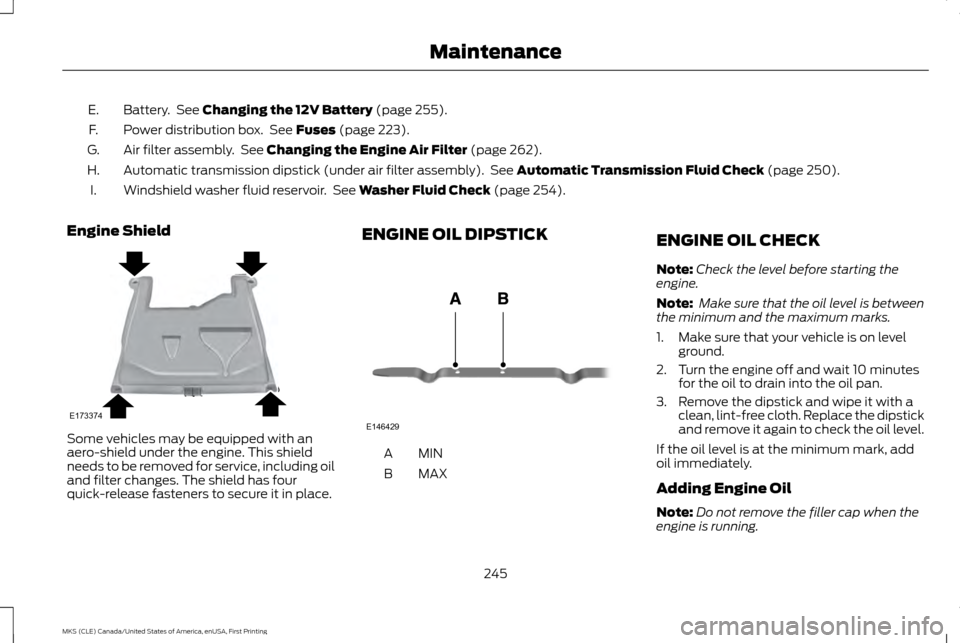
Engine Shield Some vehicles may be equipped with an
aero-shield under the engine. This shield
needs to be removed for service, including oil
and filter changes. The shield has four
quick-release fasteners to secure it in place. ENGINE OIL DIPSTICK
MINA
MAX
B ENGINE OIL CHECK
Note:
Check the level before starting the
engine.
Note: Make sure that the oil level is between
the minimum and the maximum marks.
1. Make sure that your vehicle is on level ground.
2. Turn the engine off and wait 10 minutes for the oil to drain into the oil pan.
3. Remove the dipstick and wipe it with a clean, lint-free cloth. Replace the dipstick
and remove it again to check the oil level.
If the oil level is at the minimum mark, add
oil immediately.
Adding Engine Oil
Note: Do not remove the filler cap when the
engine is running.
245
MKS (CLE) Canada/United States of America, enUSA, First Printing MaintenanceE173374 E146429
Page 263 of 382
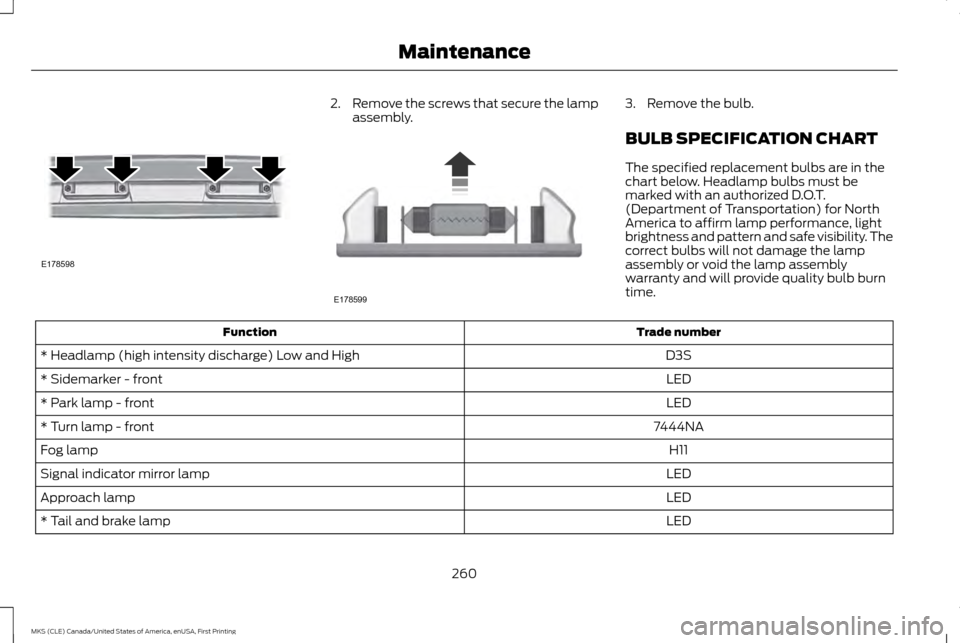
2.
Remove the screws that secure the lamp
assembly. 3. Remove the bulb.
BULB SPECIFICATION CHART
The specified replacement bulbs are in the
chart below. Headlamp bulbs must be
marked with an authorized D.O.T.
(Department of Transportation) for North
America to affirm lamp performance, light
brightness and pattern and safe visibility. The
correct bulbs will not damage the lamp
assembly or void the lamp assembly
warranty and will provide quality bulb burn
time.
Trade number
Function
D3S
* Headlamp (high intensity discharge) Low and High
LED
* Sidemarker - front
LED
* Park lamp - front
7444NA
* Turn lamp - front
H11
Fog lamp
LED
Signal indicator mirror lamp
LED
Approach lamp
LED
* Tail and brake lamp
260
MKS (CLE) Canada/United States of America, enUSA, First Printing MaintenanceE178598 E178599
Page 265 of 382
CHANGING THE ENGINE AIR
FILTER
WARNING
Do not start the engine with the air
cleaner removed. This can cause
damage not covered by the vehicle
Warranty and can result in serious injury. When changing the air filter element, use only
the air filter element listed. See Capacities
and Specifications (page 296).
For vehicles with EcoBoost engines, when
servicing the air cleaner, it is important that
no foreign material enters the air induction
system. The engine and turbocharger are
susceptible to damage from even small
particles.
Change the air filter element at the correct
interval. See
Scheduled Maintenance
(page 321).
Note: Failure to use the correct air filter
element may result in severe engine damage.
Resulting component damage may not be
covered by the vehicle Warranty.
To replace the air filter element do the
following:
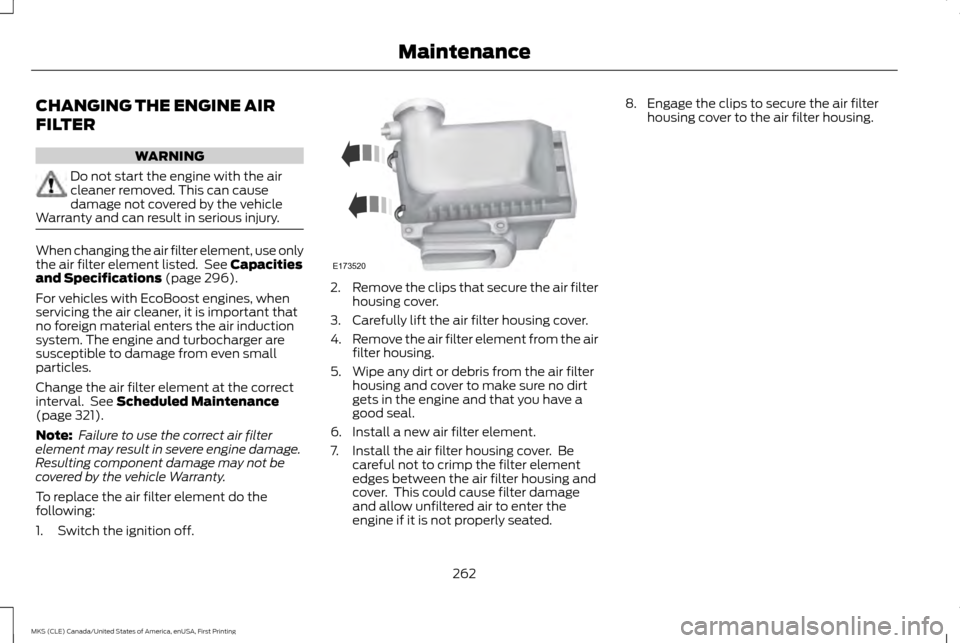
1. Switch the ignition off. 2.
Remove the clips that secure the air filter
housing cover.
3. Carefully lift the air filter housing cover.
4. Remove the air filter element from the air
filter housing.
5. Wipe any dirt or debris from the air filter housing and cover to make sure no dirt
gets in the engine and that you have a
good seal.
6. Install a new air filter element.
7. Install the air filter housing cover. Be careful not to crimp the filter element
edges between the air filter housing and
cover. This could cause filter damage
and allow unfiltered air to enter the
engine if it is not properly seated. 8. Engage the clips to secure the air filter
housing cover to the air filter housing.
262
MKS (CLE) Canada/United States of America, enUSA, First Printing MaintenanceE173520
Page 294 of 382
Tire Change Procedure
WARNINGS
When one of the front wheels is off the
ground, the transmission alone will not
prevent the vehicle from moving or
slipping off the jack, even if the transmission
is in park (P). To help prevent the vehicle from
moving when you change a tire, be sure
to place the transmission in park
(P),
set the parking brake and block (in both
directions) the wheel that is diagonally
opposite (other side and end of the vehicle)
to the tire being changed. Never get underneath a vehicle that is
supported only by a jack. If the vehicle
slips off the jack, you or someone else
could be seriously injured. Do not attempt to change a tire on the
side of the vehicle close to moving
traffic. Pull far enough off the road to
avoid the danger of being hit when operating
the jack or changing the wheel. WARNINGS
Always use the jack provided as original
equipment with your vehicle. If using a
jack other than the one provided as
original equipment with your vehicle, make
sure the jack capacity is adequate for the
vehicle weight, including any vehicle cargo
or modifications. 1. Park on a level surface, set the parking
brake and activate the hazard flashers.
2. Place the transmission in park
(P) and
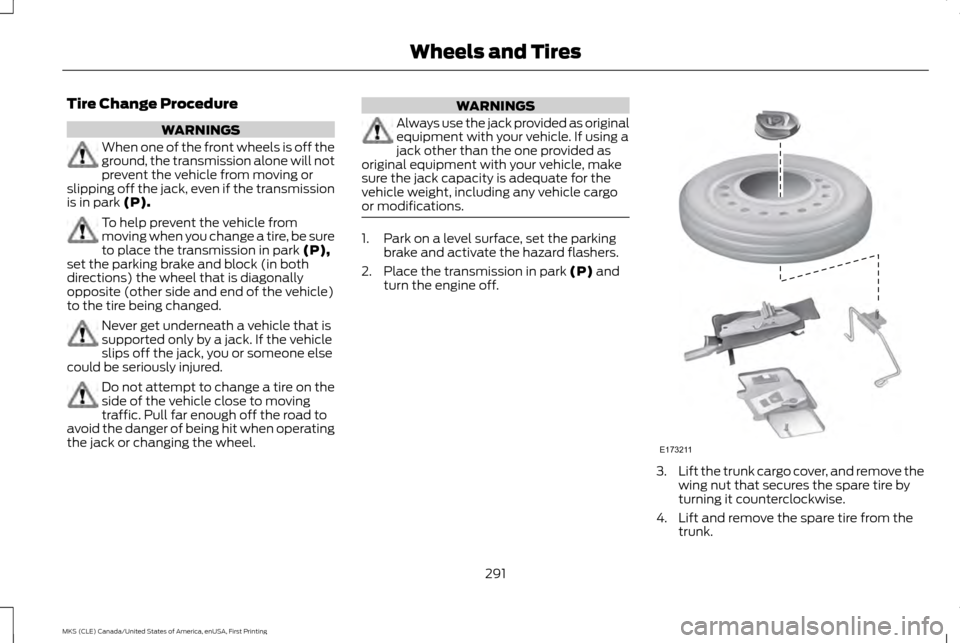
turn the engine off. 3.
Lift the trunk cargo cover, and remove the
wing nut that secures the spare tire by
turning it counterclockwise.
4. Lift and remove the spare tire from the trunk.
291
MKS (CLE) Canada/United States of America, enUSA, First Printing Wheels and TiresE173211
Page 295 of 382
5.
Remove the second wing nut that secures
the jack retention bracket by turning it
counterclockwise. Then remove the jack
kit from your vehicle.
6. Remove the jack and the wrench from the felt bag. Fold down the wrench socket
used to loosen the lug nuts and to
operate the jack.
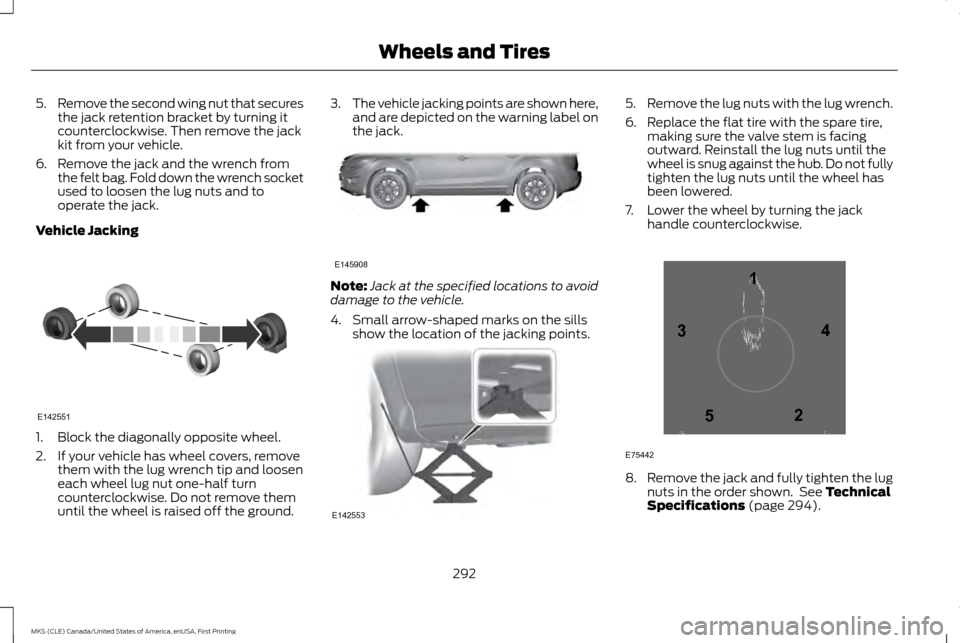
Vehicle Jacking 1. Block the diagonally opposite wheel.
2. If your vehicle has wheel covers, remove
them with the lug wrench tip and loosen
each wheel lug nut one-half turn
counterclockwise. Do not remove them
until the wheel is raised off the ground. 3.
The vehicle jacking points are shown here,
and are depicted on the warning label on
the jack. Note:
Jack at the specified locations to avoid
damage to the vehicle.
4. Small arrow-shaped marks on the sills show the location of the jacking points. 5.
Remove the lug nuts with the lug wrench.
6. Replace the flat tire with the spare tire, making sure the valve stem is facing
outward. Reinstall the lug nuts until the
wheel is snug against the hub. Do not fully
tighten the lug nuts until the wheel has
been lowered.
7. Lower the wheel by turning the jack handle counterclockwise. 8.
Remove the jack and fully tighten the lug
nuts in the order shown. See Technical
Specifications (page 294).
292
MKS (CLE) Canada/United States of America, enUSA, First Printing Wheels and TiresE142551 E145908 E142553 12
3
4
5
E75442
Page 296 of 382
9. Put the flat tire, jack and lug wrench
away. Make sure the jack is fastened so
it does not rattle when you drive. Unblock
the wheels.
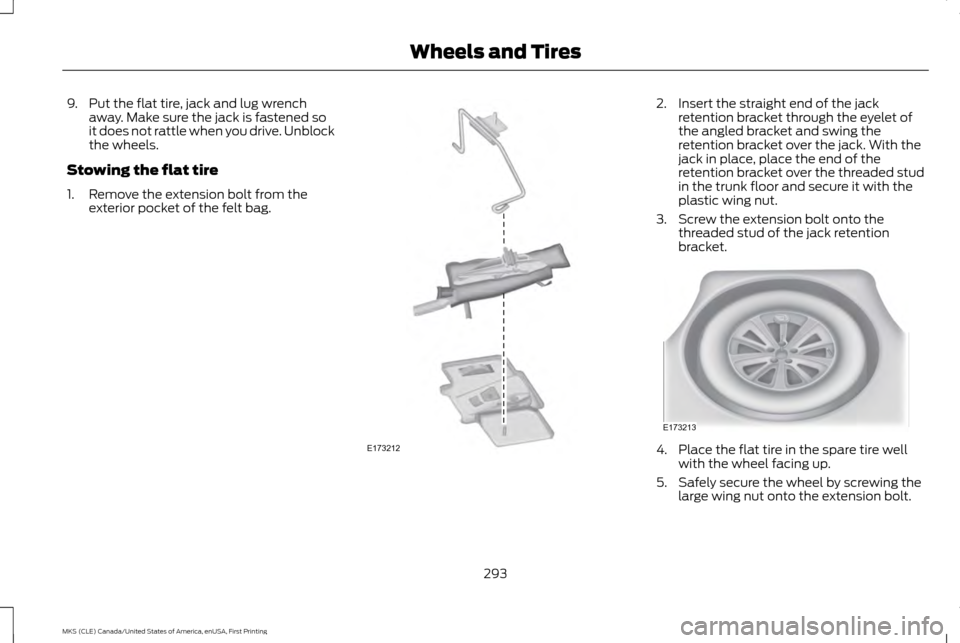
Stowing the flat tire
1. Remove the extension bolt from the exterior pocket of the felt bag. 2. Insert the straight end of the jack
retention bracket through the eyelet of
the angled bracket and swing the
retention bracket over the jack. With the
jack in place, place the end of the
retention bracket over the threaded stud
in the trunk floor and secure it with the
plastic wing nut.
3. Screw the extension bolt onto the threaded stud of the jack retention
bracket. 4. Place the flat tire in the spare tire well
with the wheel facing up.
5. Safely secure the wheel by screwing the large wing nut onto the extension bolt.
293
MKS (CLE) Canada/United States of America, enUSA, First Printing Wheels and TiresE173212 E173213
Page 297 of 382
Note:
If you are stowing the temporary spare
tire, place the tire over the jack and secure it
with the large wing nut.
TECHNICAL SPECIFICATIONS
Wheel Lug Nut Torque Specifications WARNING
When a wheel is installed, always remove any corrosion, dirt or foreign materials present on the mounting surfaces of the wheel or the
surface of the wheel hub, brake drum or brake disc that contacts the wheel. Make sure that any fasteners that attach the rotor to the
hub are secured so they do not interfere with the mounting surfaces of the wheel. Installing wheels without correct metal-to-metal
contact at the wheel mounting surfaces can cause the wheel nuts to loosen and the wheel to come off while your vehicle is in motion, resulting
in loss of control. Ib-ft (Nm)
*
Bolt size
100 (135)
1/2 x 20
* Torque specifications are for nut and bolt threads free of dirt and rust. Use only Ford recommended replacement fasteners.
Retighten the lug nuts to the specified torque within 100 miles (160 kilometers) after any wheel disturbance (such as tire rotation, changing
a flat tire, wheel removal).
294
MKS (CLE) Canada/United States of America, enUSA, First Printing Wheels and Tires
Page 320 of 382
For a complete listing of the accessories that
are available for your vehicle, please contact
your authorized dealer or visit our online store
at:
Web Address (United States)
www.Accessories.Lincoln.com Web Address (Canada)
www.LincolnCanada.com
Lincoln Motor Company will repair or replace
any properly authorized dealer-installed
Lincoln Original Accessory found to be
defective in factory-supplied materials or
workmanship during the warranty period, as
well as any component damaged by the
defective accessories.
Lincoln Motor Company will warrant your
vehicle through the warranty that provides
the greatest benefit:
• 24 months, unlimited mileage.
• The remainder of your new vehicle limited
warranty.
Contact an authorized dealer for details and
a copy of the warranty. Exterior style
•
Moonroof deflectors.
• Side-window deflectors.
• Splash guards.
Interior style
• All-weather floor mats.
• Carpeted floor mats.
• Sport pedals.
Lifestyle
• Ash cup (smoker's packages).
• Car cover*.
• Cargo area protector.
• Cargo organization and management.
Peace of mind
• Locking fuel plug.
• Wheel locks.
• Remote start.
• Vehicle security. *The accessory manufacturer designs,
develops and therefore warrants Lincoln
Licensed Accessories, and does not design
or test these accessories to Lincoln Motor
Company engineering requirements. Contact
an authorized Lincoln dealer for the
manufacturer's limited warranty details and
request a copy of the Lincoln Licensed
Accessories product limited warranty from
the accessory manufacturer.
317
MKS (CLE) Canada/United States of America, enUSA, First Printing Accessories
Page 323 of 382
Avoid the Rising Cost of Properly
Maintaining Your Vehicle!
Lincoln Extended Service Plan also offers a
Premium Maintenance Plan that covers all
scheduled maintenance, and select items
that routinely wear out. The coverage is
prepaid, so you never have to worry about
affording your vehicle maintenance. It covers
regular checkups, routine inspections,
preventive care and replacement of select
items that require periodic attention for
normal wear:
•
Windshield wiper blades.
• Spark plugs.
• The clutch disc.
• Brake pads and linings.
• Shock absorbers and struts.
• Engine cooling hoses, clamps and o-rings.
• Engine belts.
• Diesel exhaust fluid replenishment. Interest Free Finance Options Available
Take advantage of our interest free
installment payment plan. Just a 10% down
payment will provide you with an affordable,
no interest, no fee payment program allowing
you all the security and benefits Lincoln ESP
has to offer while paying over time. You are
pre-approved with no credit checks, no
hassles! To learn more, call our Lincoln ESP
specialists at 800-367-3377.
Complete the information below and mail
to:
Ford ESP
P.O. Box 321067
Detroit, MI 48232
EXTENDED SERVICE PLANS
(CANADA ONLY)
You can get more protection for your vehicle
by purchasing a Lincoln Extended Service
Plan. Lincoln Extended Service Plan is the
only service contract backed by Lincoln Motor
Company of Canada, Limited. Depending on
the plan you purchase, Lincoln Extended
Service Plan provides benefits such as:
•
Rental reimbursement.
• Coverage for certain maintenance and
wear items. •
Protection against repair costs after your
New Vehicle Limited Warranty Coverage
expires.
• Roadside Assistance benefits.
There are several Lincoln Extended Service
Plans available in various time, distance and
deductible combinations. Each plan is
tailored to fit your own driving needs,
including reimbursement for towing and
rental. When you purchase Lincoln Extended
Service Plan, you receive added
peace-of-mind protection throughout
Canada, the United States and Mexico,
provided by a network of participating
authorized Lincoln Motor Company dealers.
Note: Repairs performed outside of Canada,
the United States and Mexico are not eligible
for Lincoln Extended Service Plan coverage.
This information is subject to change. For
more information, visit your local Lincoln of
Canada dealer or www.Lincoln.ca to find the
Lincoln Extended Service Plan that is right
for you.
320
MKS (CLE) Canada/United States of America, enUSA, First Printing Extended Service Plan (ESP)
Page 364 of 382
(h) Claims or disputes must be filed
within one year.
To the extent permitted
by law, any claim or dispute under this EULA
to which this Section applies must be filed
within one year in small claims court (Section
c) or in arbitration (Section d). The one-year
period begins when the claim or dispute first
could be filed. If such a claim or dispute is not
filed within one year, it is permanently barred.
(i) Severability. If the class action waiver
(Section e) is found to be illegal or
unenforceable as to all or some parts of a
dispute, then that portion of Section e will
not apply to those parts. Instead, those parts
will be severed and proceed in a court of law,
with the remaining parts proceeding in
arbitration. If any other provision of that
portion Section e is found to be illegal or
unenforceable, that provision will be severed
with the remainder of Section e remaining in
full force and effect.
Telenav Software End User License
Agreement
Please read these terms and conditions
carefully before you use the TeleNav
Software. Your use of the TeleNav Software
indicates that you accept these terms and
conditions. If you do not accept these terms
and conditions, do not break the seal of the package, launch, or otherwise use the
TeleNav Software. TeleNav may revise this
Agreement and the privacy policy at any time,
with or http://www.telenav.com from time
to time to review the then current version of
this Agreement and of the privacy policy.
1. Safe and Lawful Use
You acknowledge that devoting attention to
the TeleNav Software may pose a risk of
injury or death to you and others in situations
that otherwise require your undivided
attention, and you therefore agree to comply
with the following when using the TeleNav
Software:
(a) observe all traffic laws and otherwise
drive safely;
(b) use your own personal judgment while
driving. If you feel that a route suggested by
the TeleNav Software instructs you to
perform an unsafe or illegal maneuver, places
you in an unsafe situation, or directs you into
an area that you consider to be unsafe, do
not follow such instructions;
(c) do not input destinations, or otherwise
manipulate the TeleNav Software, unless
your vehicle is stationary and parked;
(d) do not use the TeleNav Software for any
illegal, unauthorized, unintended, unsafe,
hazardous, or unlawful purposes, or in any
manner inconsistent with this Agreement;
(e) arrange all GPS and wireless devices and
cables necessary for use of the TeleNav
Software in a secure manner in your vehicle
so that they will not interfere with your driving
and will not prevent the operation of any
safety device (such as an airbag).
You agree to indemnify and hold TeleNav
harmless against all claims resulting from
any dangerous or otherwise inappropriate
use of the TeleNav Software in any moving
vehicle, including as a result of your failure to
comply with the directions above.
2. Account Information
You agree: (a) when registering the TeleNav
Software, to provide TeleNav with true,
accurate, current, and complete information
about yourself, and (b) to inform TeleNav
promptly of any changes to such information,
and to keep it true, accurate, current and
complete.
361
MKS (CLE) Canada/United States of America, enUSA, First Printing Appendices