ignition LINCOLN MKS 2016 Workshop Manual
[x] Cancel search | Manufacturer: LINCOLN, Model Year: 2016, Model line: MKS, Model: LINCOLN MKS 2016Pages: 382, PDF Size: 3.81 MB
Page 149 of 382
If Your Vehicle Goes Off the Edge of the
Pavement
•
If your vehicle goes off the edge of the
pavement, slow down, but avoid severe
brake application, ease the vehicle back
onto the pavement only after reducing
your speed. Do not turn the steering
wheel too sharply while returning to the
road surface.
• It may be safer to stay on the apron or
shoulder of the road and slow down
gradually before returning to the
pavement. You may lose control if you do
not slow down or if you turn the steering
wheel too sharply or abruptly.
• It often may be less risky to strike small
objects, such as highway reflectors, with
minor damage to your vehicle rather than
attempt a sudden return to the pavement
which could cause the vehicle to slide
sideways out of control or rollover.
Remember, your safety and the safety of
others should be your primary concern. If Your Vehicle Gets Stuck WARNINGS
Always set the parking brake fully and
make sure the transmission is in P
(Park). Turn the ignition to the lock
position or turn the vehicle off using the
start/stop button and remove the key
whenever you leave your vehicle. If the parking brake is fully released, but
the brake warning lamp remains
illuminated, the brakes may not be
working properly. See your authorized dealer. Do not spin the wheels at over 35 mph
(56 km/h). The tires may fail and injure
a passenger or bystander.
Note:
Do not rock the vehicle if the engine is
not at normal operating temperature or
damage to the transmission may occur.
Note: Do not rock the vehicle for more than a
few minutes or damage to the transmission
and tires may occur or the engine may
overheat.
If your vehicle gets stuck in mud or snow it
may be rocked out by shifting between
forward and reverse gears, stopping between
shifts, in a steady pattern. Press lightly on the
accelerator in each gear. If your vehicle is equipped with
AdvanceTrac® with Roll Stability Control
™,
it may be beneficial to disengage the
AdvanceTrac® with Roll Stability Control ™
system while attempting to rock the vehicle.
Emergency Maneuvers
• In an unavoidable emergency situation
where a sudden sharp turn must be
made, remember to avoid "over-driving"
your vehicle (that is, turn the steering
wheel only as rapidly and as far as
required to avoid the emergency).
Excessive steering will result in less
vehicle control, not more. Additionally,
smooth variations of the accelerator
and/or brake pedal pressure should be
utilized if changes in vehicle speed are
called for. Avoid abrupt steering,
146
MKS (CLE) Canada/United States of America, enUSA, First Printing All-Wheel Drive (If Equipped)
Page 150 of 382
acceleration or braking which could result
in an increased risk of loss of vehicle
control, vehicle rollover and/or personal
injury. Use all available road surface to
return the vehicle to a safe direction of
travel.
• In the event of an emergency stop, avoid
skidding the tires and do not attempt any
sharp steering wheel movements.
• If the vehicle goes from one type of
surface to another (that is, from concrete
to gravel) there will be a change in the
way the vehicle responds to a maneuver
(steering, acceleration or braking). Again,
avoid these abrupt inputs.
Sand
Most of the time traction control improves
tire traction by managing wheel slip through
Brake, Engine, and AWD calibrations.
However, during low speed driving, disabling
traction control in deep sand can help keep
the wheels moving to maintain vehicle
momentum.
When driving over sand, try to keep all four
wheels on the most solid area of the trail.
Avoid reducing the tire pressures but shift to
a lower gear and drive steadily through the
terrain. Apply the accelerator slowly and
avoid spinning the wheels. Do not drive your vehicle in deep sand for an
extended period of time. This could cause
the AWD system to overheat and default to
front-wheel drive. If this occurs, an AWD OFF
message displays in the information display.
To resume normal AWD function as soon as
possible, stop the vehicle in a safe location
and stop the engine for at least 10 minutes.
After the engine has been restarted and the
AWD system has adequately cooled, the
AWD OFF message turns off and normal
AWD function returns. In the event the engine
is not stopped, the AWD OFF message turns
off when the system cools and normal AWD
function returns.
When driving at slow speeds in deep sand
under high outside temperatures, use L (Low)
gear when possible. L (Low) gear operation
will maximize the engine and transmission
cooling capability.
Under severe operating conditions, the A/C
may cycle on and off to protect overheating
of the engine.
Avoid excessive speed because vehicle
momentum can work against you and cause
the vehicle to become stuck to the point that
assistance may be required from another
vehicle. Remember, you may be able to back
out the way you came if you proceed with
caution. Mud and Water
If you must drive through high water, drive
slowly. Traction or brake capability may be
limited.
When driving through water, determine the
depth; avoid water higher than the bottom
of the wheel rims (for cars) or the bottom of
the hubs (for trucks) (if possible) and
proceed slowly. If the ignition system gets
wet, the vehicle may stall.
Once through water, always try the brakes.
Wet brakes do not stop the vehicle as
effectively as dry brakes. Drying can be
improved by moving your vehicle slowly while
applying light pressure on the brake pedal.
Be cautious of sudden changes in vehicle
speed or direction when you are driving in
mud. Even AWD vehicles can lose traction in
slick mud. As when you are driving over sand,
apply the accelerator slowly and avoid
spinning your wheels. If the vehicle does slide,
steer in the direction of the slide until you
regain control of the vehicle.
After driving through mud, clean off residue
stuck to rotating driveshafts and tires. Excess
mud stuck on tires and rotating driveshafts
causes an imbalance that could damage
drive components.
147
MKS (CLE) Canada/United States of America, enUSA, First Printing All-Wheel Drive
(If Equipped)
Page 153 of 382
GENERAL INFORMATION
Note:
Occasional brake noise is normal. If a
metal-to-metal, continuous grinding or
continuous squeal sound is present, the brake
linings may be worn-out. Have the system
checked by an authorized dealer. If your vehicle
has continuous vibration or shudder in the
steering wheel while braking, have it checked
by an authorized dealer.
Note: Brake dust may accumulate on the
wheels, even under normal driving conditions.
Some dust is inevitable as the brakes wear
and does not contribute to brake noise. See
Cleaning the Alloy Wheels (page 268).
Note: Depending on applicable laws and
regulations in the country for which your
vehicle was originally built, your brake lamps
may flash during heavy braking. Following this,
your hazard lights may also flash when your
vehicle comes to a stop. See
Warning Lamps and
Indicators (page 85).
Wet brakes result in reduced braking
efficiency. Gently press the brake pedal a few
times when driving from a car wash or
standing water to dry the brakes. Brake Over Accelerator
In the event the accelerator pedal becomes
stuck or entrapped, apply steady and firm
pressure to the brake pedal to slow the
vehicle and reduce engine power. If you
experience this condition, apply the brakes
and bring your vehicle to a safe stop. Move
the transmission to park (P), switch the
engine off and apply the parking brake.
Inspect the accelerator pedal for any
interference. If none are found and the
condition persists, have your vehicle towed
to the nearest authorized dealer.
Brake Assist
Brake assist detects when you brake rapidly
by measuring the rate at which you press the
brake pedal. It provides maximum braking
efficiency as long as you press the pedal, and
can reduce stopping distances in critical
situations.
Anti-lock Brake System
This system helps you maintain steering
control during emergency stops by keeping
the brakes from locking. This lamp momentarily illuminates
when you turn the ignition on. If the
light does not illuminate during
start up, remains on or flashes, the system
may be disabled. Have the system checked
by an authorized dealer. If the anti-lock brake
system is disabled, normal braking is still
effective. If the brake warning lamp
illuminates when you release the
parking brake, have the system
checked by an authorized dealer.
HINTS ON DRIVING WITH ANTI-
LOCK BRAKES
Note: When the system is operating, the brake
pedal may pulse and may travel further.
Maintain pressure on the brake pedal. You may
also hear a noise from the system. This is
normal.
The anti-lock braking system will not
eliminate the risks when:
• You drive too closely to the vehicle in
front of you.
• Your vehicle is hydroplaning.
• You take corners too fast.
• The road surface is poor.
150
MKS (CLE) Canada/United States of America, enUSA, First Printing BrakesE144522 E144522
Page 154 of 382
PARKING BRAKE
WARNINGS
If the parking brake is fully released, but
the brake warning lamp remains
illuminated, then driving your vehicle
could result in reduced braking ability,
increased stopping distances and potential
loss of brakes. See your authorized dealer as
soon as possible. Always set the parking brake fully and
make sure the transmission is placed
in park (P). Failure to set the parking
brake and engage park could result in vehicle
roll-away, property damage or bodily injury.
Turn the ignition to the lock position and
remove the key whenever you leave your
vehicle. To set the parking brake, press the parking
brake pedal down to its fullest extent.
To release the parking brake, press the
parking brake pedal down again. HILL START ASSIST WARNINGS
The system does not replace the
parking brake. When you leave your
vehicle, always apply the parking brake.
Failure to leave your vehicle securely parked
may lead to a crash or injury. See
Parking
Brake (page 151). You must remain in your vehicle when
the system turns on. At all times, you
are responsible for controlling your
vehicle, supervising the system and
intervening, if required. Failure to take care
may result in the loss of control of your
vehicle, serious personal injury or death. The system will turn off if a malfunction
is apparent or if you rev the engine
excessively. Failure to take care may
result in the loss of control of your vehicle,
serious personal injury or death. The system makes it easier to pull away
when your vehicle is on a slope without the
need to use the parking brake.When the system is active, your vehicle
remains stationary on the slope for two to
three seconds after you release the brake
pedal. This allows time to move your foot
from the brake to the accelerator pedal. The
system releases the brakes automatically
once the engine has developed sufficient
torque to prevent your vehicle from rolling
down the slope. This is an advantage when
pulling away on a slope, for example from a
car park ramp, traffic lights or when reversing
uphill into a parking space.
Note:
The system only functions when you
bring your vehicle to a complete standstill in
an uphill gear (for example, drive (D) when
facing uphill or reverse (R) when facing
downhill).
Note: There is no warning light to indicate the
system is either on or off.
Using Hill Start Assist
1. Press the brake pedal to bring your vehicle to a complete standstill. Keep the
brake pedal pressed.
2. If the sensors detect that your vehicle is on a slope, the system activates
automatically.
151
MKS (CLE) Canada/United States of America, enUSA, First Printing Brakes
Page 155 of 382
3. When you remove your foot from the
brake pedal, your vehicle remains on the
slope without rolling away for about two
to three seconds. This hold time
automatically extends if you are in the
process of driving off.
4. Drive off in the normal manner. The system releases the brakes
automatically.
Note: When you remove your foot from the
brake pedal and press the pedal again when
the system is active, you will experience
significantly reduced brake pedal travel. This
is normal.
Switching the System On and Off
Vehicles with Manual Transmission
You can switch this feature on or off in the
information display. The system remembers
the last setting when you start your vehicle.
Vehicles with Automatic Transmission
You cannot turn the system on or off. When
you switch the ignition on, the system
automatically turns on.
152
MKS (CLE) Canada/United States of America, enUSA, First Printing Brakes
Page 156 of 382
PRINCIPLE OF OPERATION
The traction control system helps avoid drive
wheel spin and loss of traction.
If your vehicle begins to slide, the system
applies the brakes to individual wheels and,
when needed, reduces engine power at the
same time. If the wheels spin when
accelerating on slippery or loose surfaces,
the system reduces engine power in order to
increase traction.
USING TRACTION CONTROL
WARNING
The stability and traction control light
illuminates steadily if the system
detects a failure. Make sure you did not
manually disable the traction control system
using the information display controls or the
switch. If the stability control and traction
control light is still illuminating steadily, have
the system serviced by an authorized dealer
immediately. Operating your vehicle with the
traction control disabled could lead to an
increased risk of loss of vehicle control,
vehicle rollover, personal injury and death. The system automatically turns on each time
you switch the ignition on.
If your vehicle is stuck in mud or snow,
switching traction control off may be
beneficial as this allows the wheels to spin.
Note:
When you switch traction control off,
stability control remains fully active.
Switching the System Off
When you switch the system off or on, a
message appears in the information display
showing system status.
You can switch the system off by either using
the information display controls or the switch.
Using the Information Display
Controls
You can switch this feature off or on in the
information display. See Using Traction
Control (page 153).
Using a Switch
(If Equipped)
Use the traction control switch on the
instrument panel to switch the system off or
on.
The switch illuminates when traction control
is off. System Indicator Lights and
Messages The stability and traction control
light:
• Temporarily illuminates on engine
start-up.
• Flashes when a driving condition
activates either of the systems.
• Illuminates if a problem occurs in either
of the systems. The stability and traction control
off light temporarily illuminates on
engine start-up and stays on when
you switch the traction control system off.
153
MKS (CLE) Canada/United States of America, enUSA, First Printing Traction ControlE138639
Page 157 of 382
PRINCIPLE OF OPERATION
WARNINGS
Vehicle modifications involving braking
system, aftermarket roof racks,
suspension, steering system, tire
construction and wheel and tire size may
change the handling characteristics of your
vehicle and may adversely affect the
performance of the electronic stability
control system. In addition, installing any
stereo loudspeakers may interfere with and
adversely affect the electronic stability
control system. Install any aftermarket stereo
loudspeaker as far as possible from the front
center console, the tunnel, and the front
seats in order to minimize the risk of
interfering with the electronic stability control
sensors. Reducing the effectiveness of the
electronic stability control system could lead
to an increased risk of loss of vehicle control,
vehicle rollover, personal injury and death. Remember that even advanced
technology cannot defy the laws of
physics. It’
s always possible to lose
control of a vehicle due to inappropriate
driver input for the conditions. Aggressive
driving on any road condition can cause you
to lose control of your vehicle increasing the
risk of personal injury or property damage. WARNINGS
Activation of the electronic stability control
system is an indication that at least some of
the tires have exceeded their ability to grip
the road; this could reduce the operator ’s
ability to control the vehicle potentially
resulting in a loss of vehicle control, vehicle
rollover, personal injury and death. If your
electronic stability control system activates,
SLOW DOWN. The system automatically turns on each time
you switch the ignition on.
If a driving condition activates either the
stability control or the traction control system
you may experience the following conditions:
•
The stability and traction control light
flashes.
• Your vehicle slows down.
• Reduced engine power.
• A vibration in the brake pedal. •
The brake pedal is stiffer than usual.
• If the driving condition is severe and your
foot is not on the brake, the brake pedal
may move as the system applies higher
brake forces.
The stability control system has several
features built into it to help you maintain
control of your vehicle:
Electronic Stability Control
The system enhances your vehicle ’s ability
to prevent skids or lateral slides by applying
brakes to one or more of the wheels
individually and, if necessary, reducing engine
power.
154
MKS (CLE) Canada/United States of America, enUSA, First Printing Stability Control
Page 158 of 382
Traction Control
The system enhances your vehicle
’s ability
to maintain traction of the wheels by
detecting and controlling wheel spin. See
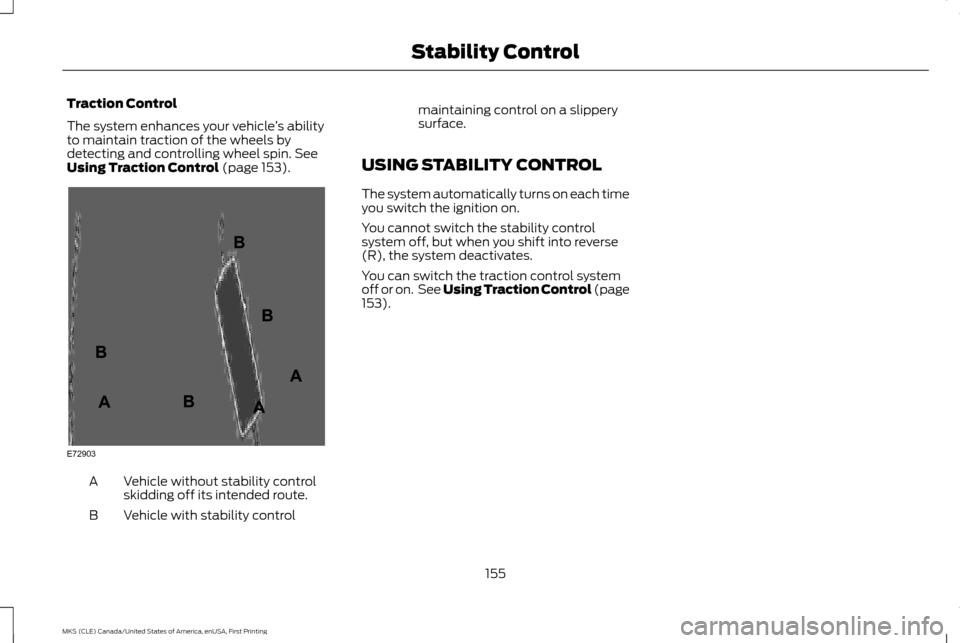
Using Traction Control (page 153). Vehicle without stability control
skidding off its intended route.
A
Vehicle with stability control
B maintaining control on a slippery
surface.
USING STABILITY CONTROL
The system automatically turns on each time
you switch the ignition on.
You cannot switch the stability control
system off, but when you shift into reverse
(R), the system deactivates.
You can switch the traction control system
off or on. See Using Traction Control (page
153
).
155
MKS (CLE) Canada/United States of America, enUSA, First Printing Stability ControlE72903A
AA
B
BB
B
Page 159 of 382
PRINCIPLE OF OPERATION
WARNINGS
To help avoid personal injury, please
read and understand the limitations of
the system as contained in this section.
Sensing is only an aid for some (generally
large and fixed) objects when moving on a
flat surface at parking speeds. Certain objects
with surfaces that absorb ultrasonic waves,
surrounding vehicle's parking aid systems,
traffic control systems, fluorescent lamps,
inclement weather, air brakes, and external
motors and fans may also affect the function
of the sensing system; this may include
reduced performance or a false activation. To help avoid personal injury, always
use caution when in reverse (R) and
when using the sensing system.
This system is not designed to prevent
contact with small or moving objects.
The system is designed to provide a
warning to assist the driver in detecting large
stationary objects to avoid damaging your
vehicle. The system may not detect smaller
objects, particularly those close to the
ground. WARNINGS
Certain add-on devices such as large
trailer hitches, bike or surfboard racks
and any device that may block the
normal detection zone of the system, may
create false beeps. Note:
Keep the sensors, located on the
bumper or fascia, free from snow, ice and large
accumulations of dirt. If the sensors are
covered, the system ’s accuracy can be
affected. Do not clean the sensors with sharp
objects.
Note: If your vehicle sustains damage to the
bumper or fascia, leaving it misaligned or bent,
the sensing zone may be altered causing
inaccurate measurement of obstacles or false
alarms.
Note: The sensing system cannot be turned
off when a MyKey is present. See Principle
of Operation (page 50).
Note: If you attach certain add-on devices
such as a trailer or bike rack, the rear sensing
system may detect that add-on device and
therefore provide warnings. It is suggested that
you disable the rear sensing system when you
attach an add-on device to your vehicle to
prevent these warnings. The sensing system warns the driver of
obstacles within a certain range of your
vehicle. The system turns on automatically
whenever you switch the ignition on.
The system can be switched off through the
information display menu or from the pop-up
message that appears once you shift the
transmission into reverse (R). See
General
Information (page 89).
If a fault is present in the system, a warning
message appears in the information display.
See
Information Messages (page 95).
REAR PARKING AID
The rear sensors are only active when the
transmission is in reverse (R). As your vehicle
moves closer to the obstacle, the rate of the
audible warning increases. When the
obstacle is less than
12 in (30 cm) away, the
warning sounds continuously. If the system
detects a stationary or receding object farther
than
12 in (30 cm) from the corners of the
bumper, the tone sounds for only three
seconds. Once the system detects an object
approaching, the warning sounds again.
156
MKS (CLE) Canada/United States of America, enUSA, First Printing Parking Aids
Page 170 of 382
Switching Cruise Control Off
Press and release OFF when the system is
in stand by mode or switch the ignition off.
Note: You erase the set speed when you
switch the system off.
USING ADAPTIVE CRUISE
CONTROL
(If Equipped) WARNINGS
Always pay close attention to changing
road conditions when using adaptive
cruise control. The system does not
replace attentive driving. Failing to pay
attention to the road may result in a crash,
serious injury or death. Adaptive cruise control is not a crash
warning or avoidance system.
Adaptive cruise control will not detect
stationary or slow moving vehicles
below 6 mph (10 km/h).
Adaptive cruise control does not detect
pedestrians or objects in the road.
Adaptive cruise control does not detect
oncoming vehicles in the same lane. WARNINGS
Do not use the adaptive cruise control
when entering or leaving a highway, in
heavy traffic or on roads that are
winding, slippery or unpaved. Do not use the system in poor visibility,
for example fog, heavy rain, spray or
snow.
Do not use adaptive cruise control
when towing a trailer that has trailer
brakes. The auto-brake component of
the adaptive cruise control system does not
operate the trailer brakes. Using adaptive
cruise control when towing a trailer that has
trailer brakes may result in the loss of vehicle
control, which could result in serious injury. Do not use tire sizes other than those
recommended because this can affect
the normal operation of the system.
Failing to do so may result in a loss of vehicle
control, which could result in serious injury. Note:
It is your responsibility to stay alert, drive
safely and be in control of the vehicle at all
times.
The system adjusts your speed to maintain
a proper distance between you and the
vehicle in front of you in the same lane. You
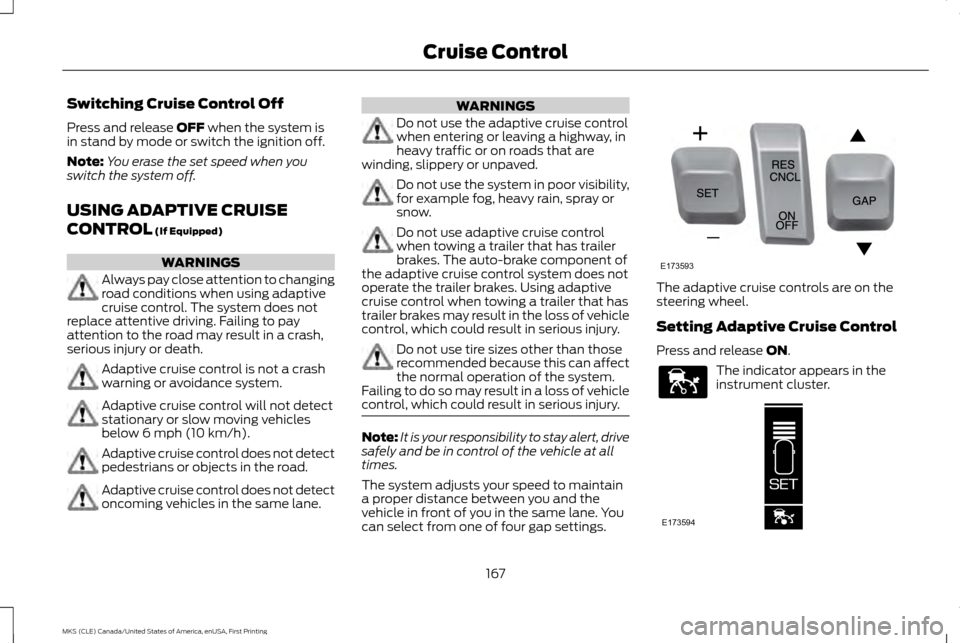
can select from one of four gap settings. The adaptive cruise controls are on the
steering wheel.
Setting Adaptive Cruise Control
Press and release
ON.
The indicator appears in the
instrument cluster.
167
MKS (CLE) Canada/United States of America, enUSA, First Printing Cruise ControlE173593 E144529 E173594