battery LINCOLN MKT 2010 Owner's Manual
[x] Cancel search | Manufacturer: LINCOLN, Model Year: 2010, Model line: MKT, Model: LINCOLN MKT 2010Pages: 430, PDF Size: 3.32 MB
Page 162 of 430
The lights will not turn off if:
•they have been turned on with the dimmer control, or
•any door is open.
Illuminated exit
•When all vehicle doors are closed, the ignition is turned off , the
interior dome lamps, parking lamps and puddle lamps (if equipped)
will illuminate.
The lights will turn off if all the doors remain closed and
•25 seconds elapse, or
•the start button is pressed.
Battery saver
The battery saver will shut off the lamps 10 minutes after the ignition
has been turned off.
•If the dome lamps were turned on using the panel dimmer control, the
battery saver will shut them off 10 minutes after the ignition has been
turned off.
•If the courtesy lamps were turned on because one of the vehicle doors
or the liftgate was opened, the battery saver will shut them off
10 minutes after the ignition has been turned off.
•The battery saver will shut off the headlamps 10 minutes after the
ignition has been turned off.
Accessory mode battery saver for Intelligent Access Keys with
Push Button Start
The battery saver will shut off the ignition approximately 45 minutes
after the vehicle is left in Accessory Mode, in order to preserve the
vehicle’s battery.
Locks and Security
162
2010 MKT(mkt)
Owners Guide, 1st Printing
USA(fus)
Page 282 of 430
There may be areas inside your vehicle where the IA key is not detected.
If the message NO KEY DETECTED appears on your message center
when you press the START/STOP button, it may be necessary to move
your IA key to another area within the vehicle. The IA key may not be
detected near the roof (between the driver or passenger sunvisor and
the roof, or in the overhead console area), or in the third row seat cup
holder and armrest area, or in the extreme corners of the rear package
tray, near your audio speakers. It is not recommended that you stow the
IA key in these locations. If you move the IA key to a location where it
has been detected before and you still see the NO KEY DETECTED
message, your IA key’s battery may be low or you may be in an area with
excessive radio frequency interference. If this occurs, you can use the
backup method to start your vehicle (see below).
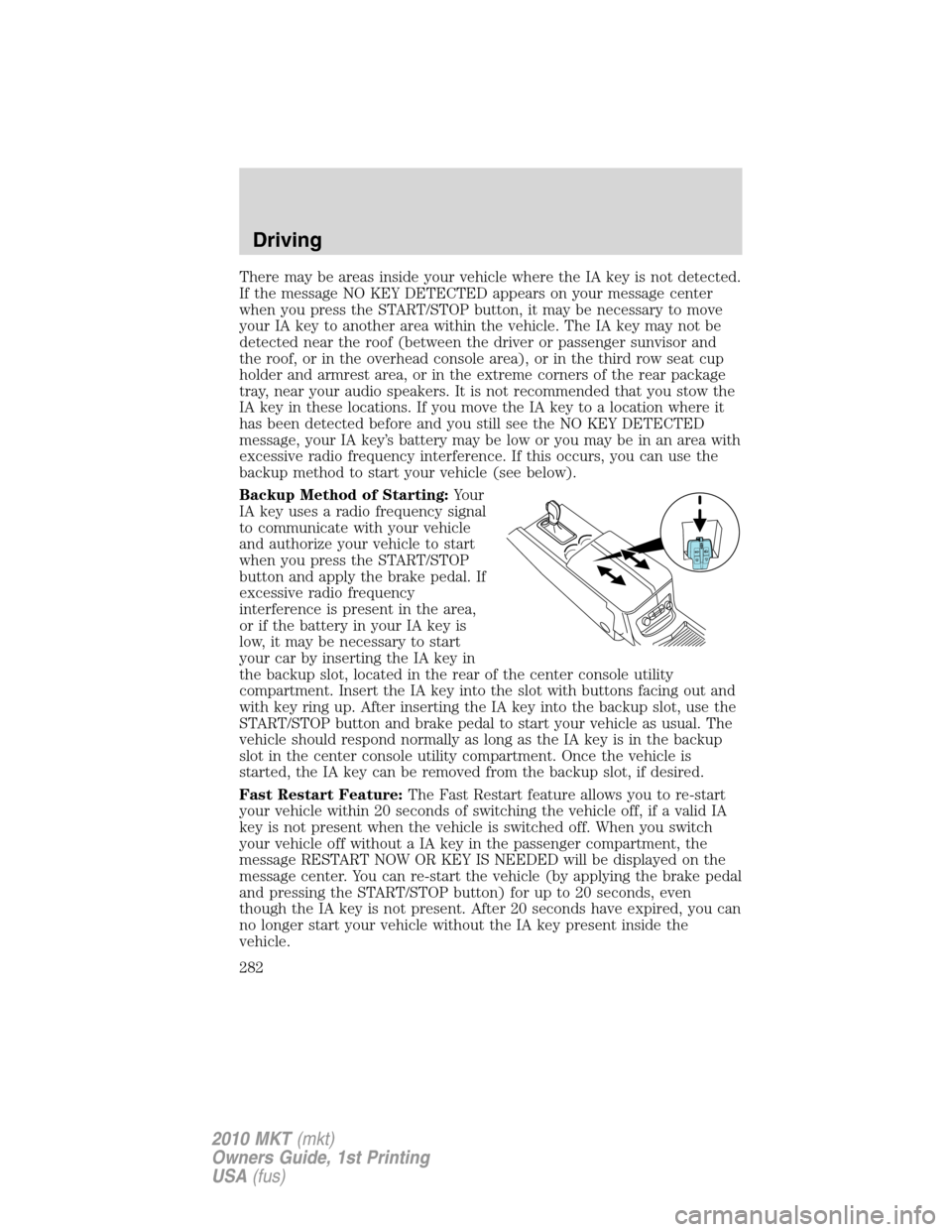
Backup Method of Starting:Your
IA key uses a radio frequency signal
to communicate with your vehicle
and authorize your vehicle to start
when you press the START/STOP
button and apply the brake pedal. If
excessive radio frequency
interference is present in the area,
or if the battery in your IA key is
low, it may be necessary to start
your car by inserting the IA key in
the backup slot, located in the rear of the center console utility
compartment. Insert the IA key into the slot with buttons facing out and
with key ring up. After inserting the IA key into the backup slot, use the
START/STOP button and brake pedal to start your vehicle as usual. The
vehicle should respond normally as long as the IA key is in the backup
slot in the center console utility compartment. Once the vehicle is
started, the IA key can be removed from the backup slot, if desired.
Fast Restart Feature:The Fast Restart feature allows you to re-start
your vehicle within 20 seconds of switching the vehicle off, if a valid IA
key is not present when the vehicle is switched off. When you switch
your vehicle off without a IA key in the passenger compartment, the
message RESTART NOW OR KEY IS NEEDED will be displayed on the
message center. You can re-start the vehicle (by applying the brake pedal
and pressing the START/STOP button) for up to 20 seconds, even
though the IA key is not present. After 20 seconds have expired, you can
no longer start your vehicle without the IA key present inside the
vehicle.
Driving
282
2010 MKT(mkt)
Owners Guide, 1st Printing
USA(fus)
Page 283 of 430
Switching the Vehicle Off when not in Park:It is recommended that
you shift into the Park position before switching your vehicle off. If you
switch your vehicle off with the shifter in any position other than Park,
the message SHIFT TO PARK will be displayed in the message center. If
the vehicle is left in this state, your key in ignition chime will activate
when the driver door is opened, and you may drain your vehicle’s
battery. In order to avoid draining your battery, it is recommended that
you always shift to park before or immediately after switching your
vehicle off.
Absence of the Intelligent Access key:Once the vehicle has started,
the vehicle will remain running until being turned off by the
START/STOP button, even if the IA key is no longer found in the vehicle.
Whenever a door is opened and then closed while the vehicle is running,
the system will search for a IA key inside the vehicle and the message
center will display NO KEY DETECTED if the IA key is no longer
present. This message is a reminder that someone else in the vehicle
may have taken the IA key when exiting the vehicle. If the IA key is no
longer present in the vehicle, you will not be able to re-start your vehicle
outside of the Fast Restart time (seeFast Restart Featureabove). It is
important to be aware of where your IA key is located in the vehicle, to
avoid becoming stranded without a IA key.
Guarding against exhaust fumes
Carbon monoxide is present in exhaust fumes. Take precautions to avoid
its dangerous effects.
WARNING:If you smell exhaust fumes inside your vehicle, have
your dealer inspect your vehicle immediately. Do not drive if you
smell exhaust fumes.
Important ventilating information
If the engine is idling while the vehicle is stopped for a long period of
time, open the windows at least 1 inch (2.5 cm) or adjust the heating or
air conditioning to bring in fresh air.
Driving
283
2010 MKT(mkt)
Owners Guide, 1st Printing
USA(fus)
Page 295 of 430
BRAKE-SHIFT INTERLOCK
This vehicle is equipped with a brake-shift interlock feature that prevents
the gearshift lever from being moved from P (Park) when the ignition is
in the on position unless the brake pedal is applied. If you cannot move
the gearshift lever out of P (Park) when the ignition is on and the brake
pedal applied, it is possible that a fuse has blown or the vehicle’s brake
lamps are not operating properly. Refer toFuses and relaysin the
Roadside Emergencieschapter.
If the fuse is not blown and the brakelamps are working properly, you
will need to have your vehicle towed to an authorized dealer.
WARNING:Do not drive your vehicle until you verify that the
brakelamps are working.
WARNING:Always set the parking brake fully and make sure
the gearshift is latched in P (Park). Switch the ignition to off,
and remove the key whenever you leave your vehicle.
WARNING:If the parking brake is fully released, but the brake
warning lamp remains illuminated, the brakes may not be
working properly. See your authorized dealer.
AUTOMATIC TRANSMISSION OPERATION
Automatic Transmission Adaptive Learning
Your transmission is equipped with an adaptive learning strategy found in
the vehicle computer. This feature is designed to increase durability and
provide consistent shift feel over the life of the vehicle. A new vehicle or
transmission may have firm and/or soft shifts. This operation is
considered normal and will not affect function or durability of the
transmission. Over time, the adaptive learning process will fully update
transmission operation. Additionally, whenever the battery is
disconnected or a new battery installed, the strategy must be relearned.
Driving
295
2010 MKT(mkt)
Owners Guide, 1st Printing
USA(fus)
Page 325 of 430
ROADSIDE ASSISTANCE
Getting roadside assistance
To fully assist you should you have a vehicle concern, Ford Motor
Company offers a complimentary roadside assistance program. This
program is separate from the New Vehicle Limited Warranty. The service
is available:
•24–hours, seven days a week
•for the coverage period listed on the Roadside Assistance Card
included in your Owner Guide portfolio.
Roadside assistance will cover:
•a flat tire change with a good spare (except vehicles that have been
supplied with a tire inflation kit)
•battery jump start
•lock-out assistance (key replacement cost is the customer’s
responsibility)
•fuel delivery – Independent Service Contractors, if not prohibited by
state, local or municipal law shall deliver up to 2.0 gallons (7.5L) of
gasoline or 5.0 gallons (18.9L) of diesel fuel to a disabled vehicle. Fuel
delivery service is limited to two no-charge occurrences within a
12-month period.
•winch out – available within 100 feet (30.5 meters) of a paved or
county maintained road, no recoveries.
•towing – Ford/Mercury/Lincoln eligible vehicle towed to an authorized
dealer within 35 miles (56 km) of the disablement location or to the
nearest authorized dealer. If a member requests to be towed to an
authorized dealer more than 35 miles (56 km) from the disablement
location, the member shall be responsible for any mileage costs in
excess of 35 miles (56 km).
Trailers shall be covered up to $200 if the disabled eligible vehicle
requires service at the nearest authorized dealer. If the trailer is disabled,
but the towing vehicle is operational, the trailer does not qualify for any
roadside services.
Canadian customers refer to your Customer Information Guide
for information on:
•coverage period
•exact fuel amounts
Roadside Emergencies
325
2010 MKT(mkt)
Owners Guide, 1st Printing
USA(fus)
Page 326 of 430
•towing of your disabled vehicle
•emergency travel expense reimbursement
•travel planning benefits
In Canada, for uninterrupted Roadside Assistance coverage, you may
purchase extended coverage prior to your Basic Warranty’s Roadside
Assistance expiring. For more information and enrollment, contact
1–877–294–2582 or visit our website at www.ford.ca.
Using roadside assistance
Complete the roadside assistance identification card and place it in your
wallet for quick reference. In the United States, this card is found in the
Owner Guide portfolio in the glove compartment. In Canada, the card is
found in theCustomer Information Guidein the glove compartment.
U.S. Ford, Mercury and Lincoln vehicle customers who require Roadside
Assistance, call 1-800-241-3673.
Canadian customers who require roadside assistance, call
1-800-665-2006.
If you need to arrange roadside assistance for yourself, Ford Motor
Company will reimburse a reasonable amount for towing to the nearest
dealership within 35 miles (56 km). To obtain reimbursement
information, U.S. Ford, Mercury and Lincoln vehicle customers call
1-800-241-3673. Customers will be asked to submit their original
receipts.
Canadian customers who need to obtain reimbursement information, call
1–800–665–2006.
HAZARD FLASHER CONTROL
The hazard flasher control is located
on the instrument panel by the
radio. The hazard flashers will
operate when the ignition is in any
position or if the key is not in the
ignition.
Press in the flasher control and all front and rear direction signals will
flash. Press the flasher control again to turn them off. Use it when your
vehicle is disabled and is creating a safety hazard for other motorists.
Note:With extended use, the flasher may run down your battery.
Roadside Emergencies
326
2010 MKT(mkt)
Owners Guide, 1st Printing
USA(fus)
Page 332 of 430
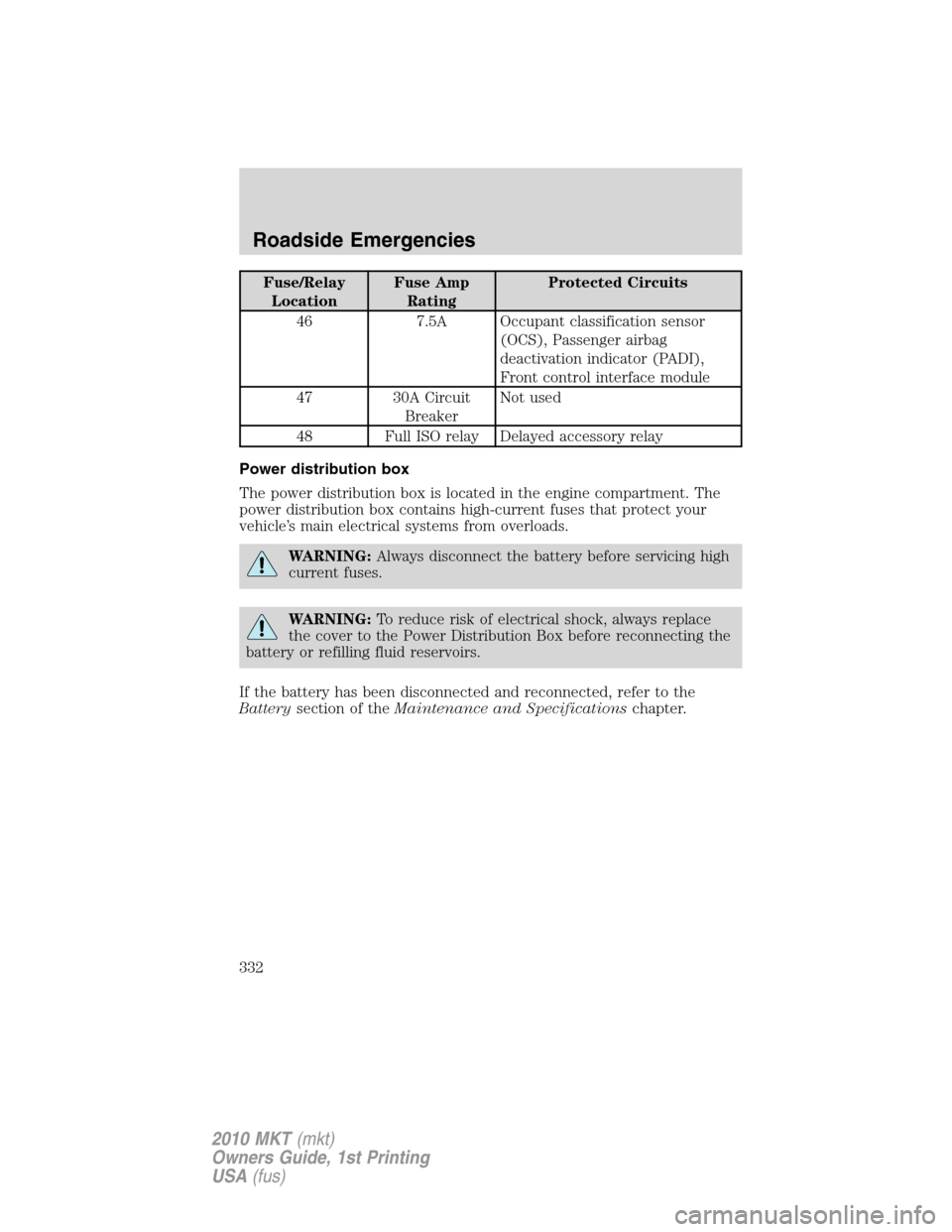
Fuse/Relay
LocationFuse Amp
RatingProtected Circuits
46 7.5A Occupant classification sensor
(OCS), Passenger airbag
deactivation indicator (PADI),
Front control interface module
47 30A Circuit
BreakerNot used
48 Full ISO relay Delayed accessory relay
Power distribution box
The power distribution box is located in the engine compartment. The
power distribution box contains high-current fuses that protect your
vehicle’s main electrical systems from overloads.
WARNING:Always disconnect the battery before servicing high
current fuses.
WARNING:To reduce risk of electrical shock, always replace
the cover to the Power Distribution Box before reconnecting the
battery or refilling fluid reservoirs.
If the battery has been disconnected and reconnected, refer to the
Batterysection of theMaintenance and Specificationschapter.
Roadside Emergencies
332
2010 MKT(mkt)
Owners Guide, 1st Printing
USA(fus)
Page 334 of 430
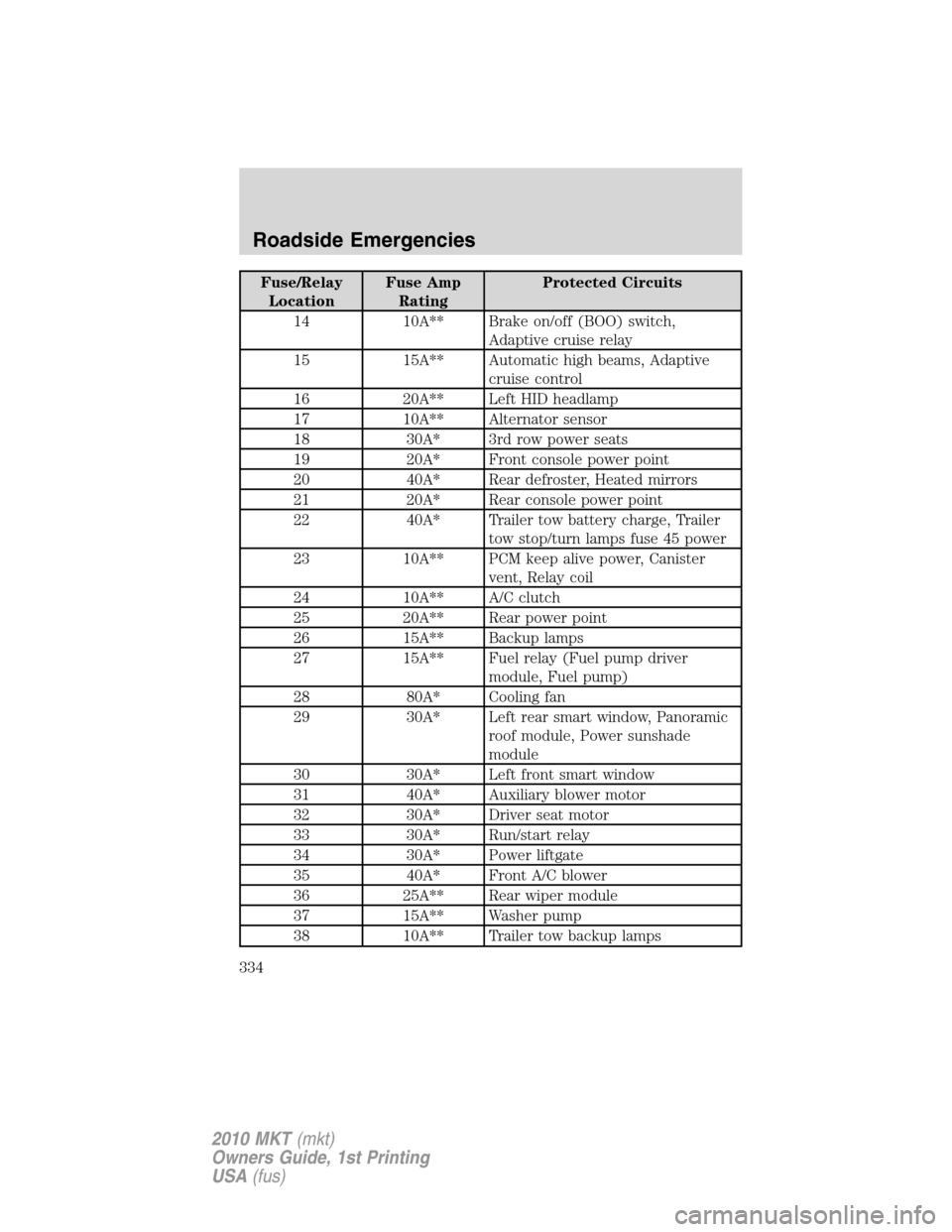
Fuse/Relay
LocationFuse Amp
RatingProtected Circuits
14 10A** Brake on/off (BOO) switch,
Adaptive cruise relay
15 15A** Automatic high beams, Adaptive
cruise control
16 20A** Left HID headlamp
17 10A** Alternator sensor
18 30A* 3rd row power seats
19 20A* Front console power point
20 40A* Rear defroster, Heated mirrors
21 20A* Rear console power point
22 40A* Trailer tow battery charge, Trailer
tow stop/turn lamps fuse 45 power
23 10A** PCM keep alive power, Canister
vent, Relay coil
24 10A** A/C clutch
25 20A** Rear power point
26 15A** Backup lamps
27 15A** Fuel relay (Fuel pump driver
module, Fuel pump)
28 80A* Cooling fan
29 30A* Left rear smart window, Panoramic
roof module, Power sunshade
module
30 30A* Left front smart window
31 40A* Auxiliary blower motor
32 30A* Driver seat motor
33 30A* Run/start relay
34 30A* Power liftgate
35 40A* Front A/C blower
36 25A** Rear wiper module
37 15A** Washer pump
38 10A** Trailer tow backup lamps
Roadside Emergencies
334
2010 MKT(mkt)
Owners Guide, 1st Printing
USA(fus)
Page 335 of 430
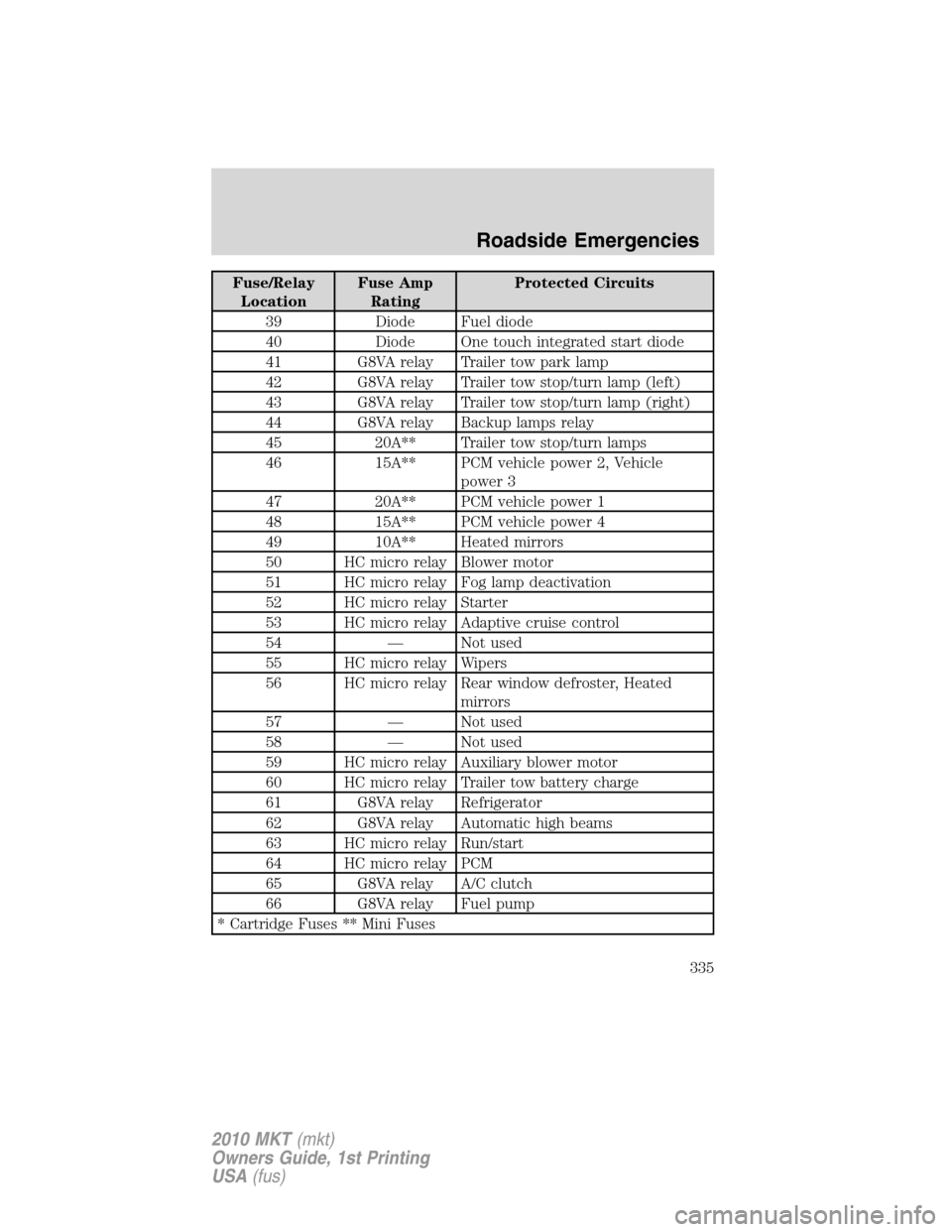
Fuse/Relay
LocationFuse Amp
RatingProtected Circuits
39 Diode Fuel diode
40 Diode One touch integrated start diode
41 G8VA relay Trailer tow park lamp
42 G8VA relay Trailer tow stop/turn lamp (left)
43 G8VA relay Trailer tow stop/turn lamp (right)
44 G8VA relay Backup lamps relay
45 20A** Trailer tow stop/turn lamps
46 15A** PCM vehicle power 2, Vehicle
power 3
47 20A** PCM vehicle power 1
48 15A** PCM vehicle power 4
49 10A** Heated mirrors
50 HC micro relay Blower motor
51 HC micro relay Fog lamp deactivation
52 HC micro relay Starter
53 HC micro relay Adaptive cruise control
54 — Not used
55 HC micro relay Wipers
56 HC micro relay Rear window defroster, Heated
mirrors
57 — Not used
58 — Not used
59 HC micro relay Auxiliary blower motor
60 HC micro relay Trailer tow battery charge
61 G8VA relay Refrigerator
62 G8VA relay Automatic high beams
63 HC micro relay Run/start
64 HC micro relay PCM
65 G8VA relay A/C clutch
66 G8VA relay Fuel pump
* Cartridge Fuses ** Mini Fuses
Roadside Emergencies
335
2010 MKT(mkt)
Owners Guide, 1st Printing
USA(fus)
Page 345 of 430
•Read the information in theTips for use of the temporary mobility
kitsection to ensure safe operation of the temporary mobility kit and
your vehicle.
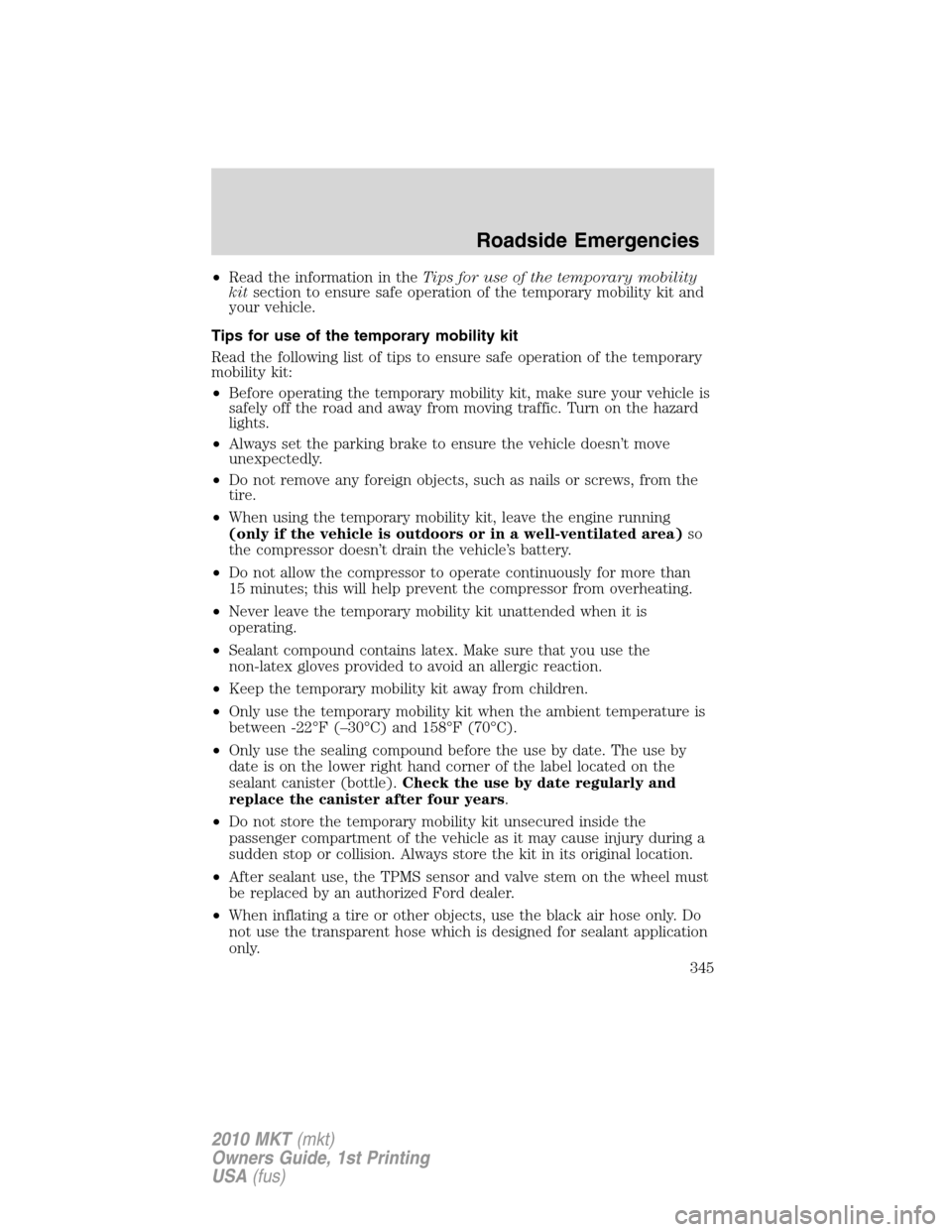
Tips for use of the temporary mobility kit
Read the following list of tips to ensure safe operation of the temporary
mobility kit:
•Before operating the temporary mobility kit, make sure your vehicle is
safely off the road and away from moving traffic. Turn on the hazard
lights.
•Always set the parking brake to ensure the vehicle doesn’t move
unexpectedly.
•Do not remove any foreign objects, such as nails or screws, from the
tire.
•When using the temporary mobility kit, leave the engine running
(only if the vehicle is outdoors or in a well-ventilated area)so
the compressor doesn’t drain the vehicle’s battery.
•Do not allow the compressor to operate continuously for more than
15 minutes; this will help prevent the compressor from overheating.
•Never leave the temporary mobility kit unattended when it is
operating.
•Sealant compound contains latex. Make sure that you use the
non-latex gloves provided to avoid an allergic reaction.
•Keep the temporary mobility kit away from children.
•Only use the temporary mobility kit when the ambient temperature is
between -22°F (–30°C) and 158°F (70°C).
•Only use the sealing compound before the use by date. The use by
date is on the lower right hand corner of the label located on the
sealant canister (bottle).Check the use by date regularly and
replace the canister after four years.
•Do not store the temporary mobility kit unsecured inside the
passenger compartment of the vehicle as it may cause injury during a
sudden stop or collision. Always store the kit in its original location.
•After sealant use, the TPMS sensor and valve stem on the wheel must
be replaced by an authorized Ford dealer.
•When inflating a tire or other objects, use the black air hose only. Do
not use the transparent hose which is designed for sealant application
only.
Roadside Emergencies
345
2010 MKT(mkt)
Owners Guide, 1st Printing
USA(fus)