ad blue LINCOLN MKT 2013 Owner's Manual
[x] Cancel search | Manufacturer: LINCOLN, Model Year: 2013, Model line: MKT, Model: LINCOLN MKT 2013Pages: 494, PDF Size: 5.97 MB
Page 450 of 494
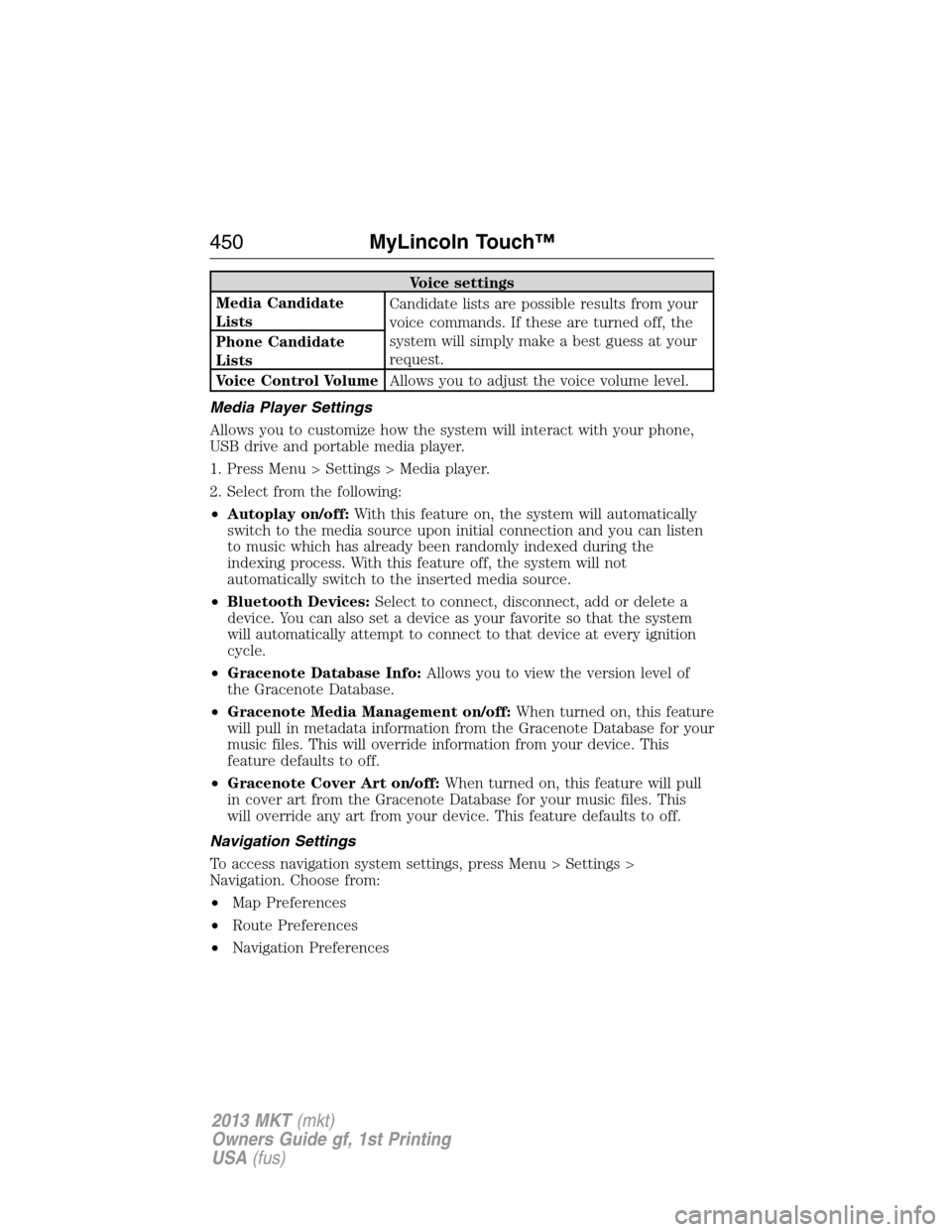
Voice settings
Media Candidate
ListsCandidate lists are possible results from your
voice commands. If these are turned off, the
system will simply make a best guess at your
request. Phone Candidate
Lists
Voice Control VolumeAllows you to adjust the voice volume level.
Media Player Settings
Allows you to customize how the system will interact with your phone,
USB drive and portable media player.
1. Press Menu > Settings > Media player.
2. Select from the following:
•Autoplay on/off:With this feature on, the system will automatically
switch to the media source upon initial connection and you can listen
to music which has already been randomly indexed during the
indexing process. With this feature off, the system will not
automatically switch to the inserted media source.
•Bluetooth Devices:Select to connect, disconnect, add or delete a
device. You can also set a device as your favorite so that the system
will automatically attempt to connect to that device at every ignition
cycle.
•Gracenote Database Info:Allows you to view the version level of
the Gracenote Database.
•Gracenote Media Management on/off:When turned on, this feature
will pull in metadata information from the Gracenote Database for your
music files. This will override information from your device. This
feature defaults to off.
•Gracenote Cover Art on/off:When turned on, this feature will pull
in cover art from the Gracenote Database for your music files. This
will override any art from your device. This feature defaults to off.
Navigation Settings
To access navigation system settings, press Menu > Settings >
Navigation. Choose from:
•Map Preferences
•Route Preferences
•Navigation Preferences
450MyLincoln Touch™
2013 MKT(mkt)
Owners Guide gf, 1st Printing
USA(fus)
Page 451 of 494
•Traffic Preferences
•Avoid Areas
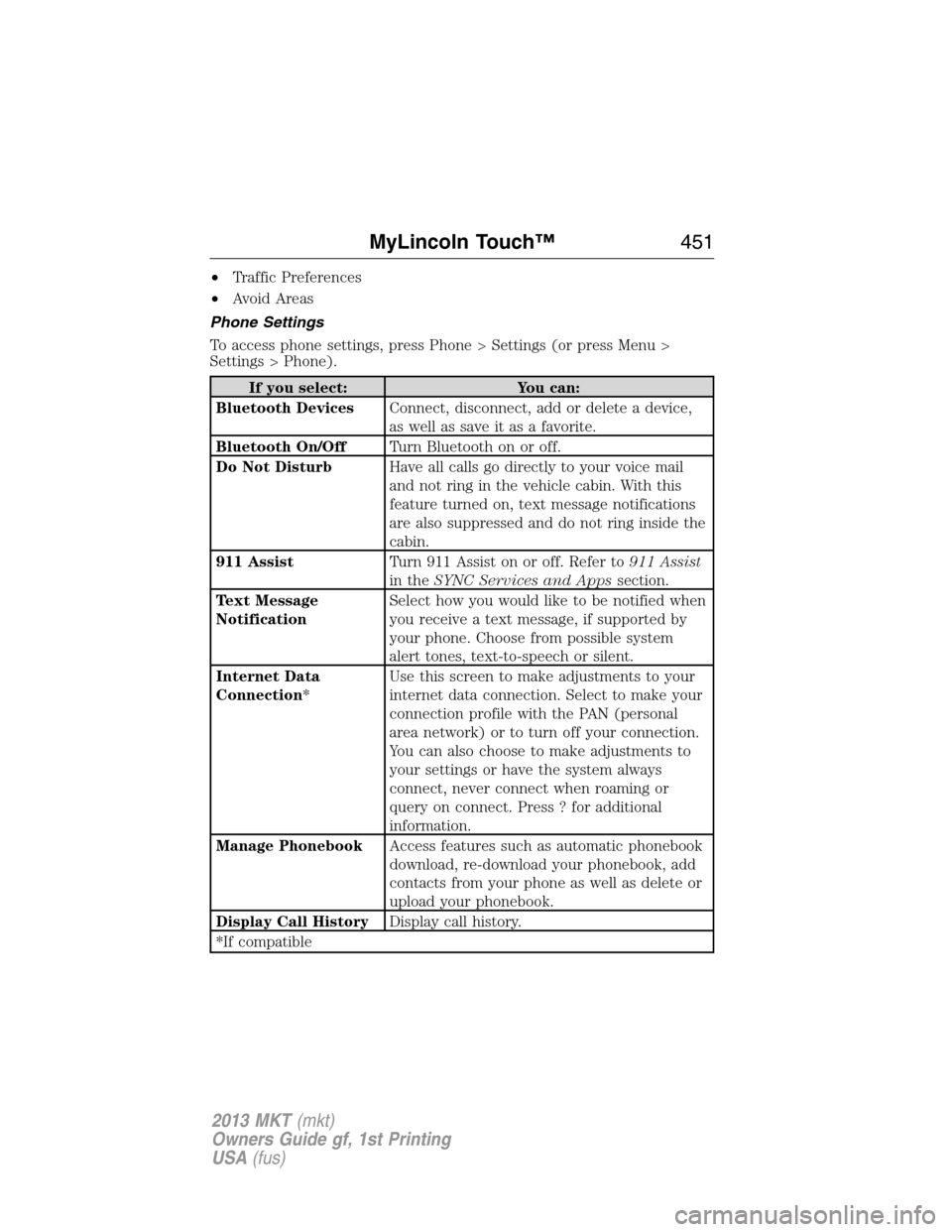
Phone Settings
To access phone settings, press Phone > Settings (or press Menu >
Settings > Phone).
If you select: You can:
Bluetooth DevicesConnect, disconnect, add or delete a device,
as well as save it as a favorite.
Bluetooth On/OffTurn Bluetooth on or off.
Do Not DisturbHave all calls go directly to your voice mail
and not ring in the vehicle cabin. With this
feature turned on, text message notifications
are also suppressed and do not ring inside the
cabin.
911 AssistTurn 911 Assist on or off. Refer to911 Assist
in theSYNC Services and Appssection.
Text Message
NotificationSelect how you would like to be notified when
you receive a text message, if supported by
your phone. Choose from possible system
alert tones, text-to-speech or silent.
Internet Data
Connection*Use this screen to make adjustments to your
internet data connection. Select to make your
connection profile with the PAN (personal
area network) or to turn off your connection.
You can also choose to make adjustments to
your settings or have the system always
connect, never connect when roaming or
query on connect. Press ? for additional
information.
Manage PhonebookAccess features such as automatic phonebook
download, re-download your phonebook, add
contacts from your phone as well as delete or
upload your phonebook.
Display Call HistoryDisplay call history.
*If compatible
MyLincoln Touch™451
2013 MKT(mkt)
Owners Guide gf, 1st Printing
USA(fus)
Page 452 of 494
Wireless & Internet
Your system is equipped with Wireless & Internet features and settings.
To access, press Menu > Settings > Wireless and Internet. From this
screen, you can select your:
•Wi-Fi settings
•Bluetooth settings
•USB mobile broadband
•Prioritize connection methods
Wi-Fi
Your system has a Wi-Fi feature which creates a wireless network within
your vehicle, thereby allowing other devices (i.e. personal computers or
phones) in your vehicle to speak to each other, share files, play games,
etc. Using this Wi-Fi feature, everyone in your vehicle can also gain
access the internet if:
•You have a USB mobile broadband connection inside the vehicle
•Your phone supports PAN (personal area networking)
•You are parked outside of a wireless hotspot
To access, press Menu > Settings > Wireless and Internet > Wi-Fi
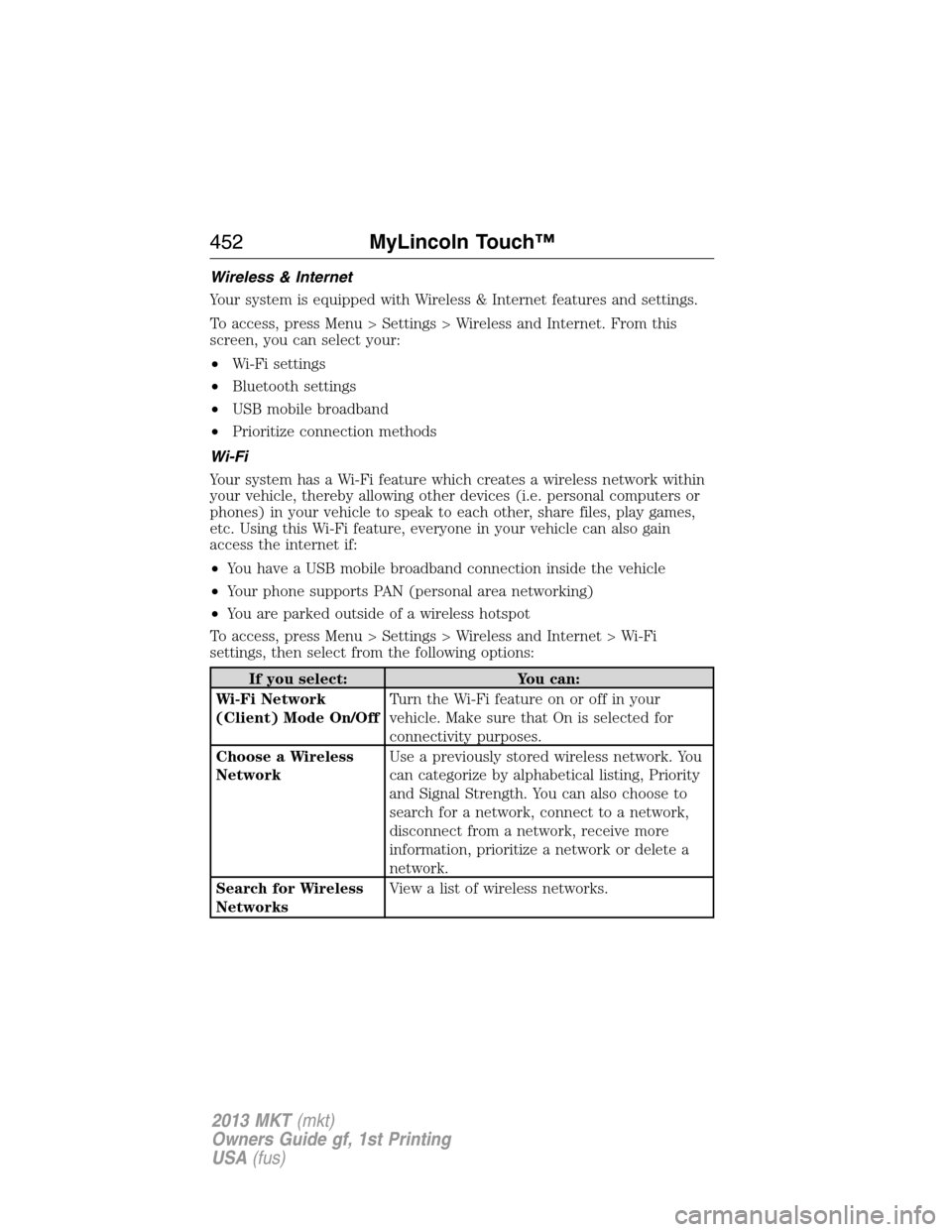
settings, then select from the following options:
If you select: You can:
Wi-Fi Network
(Client) Mode On/OffTurn the Wi-Fi feature on or off in your
vehicle. Make sure that On is selected for
connectivity purposes.
Choose a Wireless
NetworkUse a previously stored wireless network. You
can categorize by alphabetical listing, Priority
and Signal Strength. You can also choose to
search for a network, connect to a network,
disconnect from a network, receive more
information, prioritize a network or delete a
network.
Search for Wireless
NetworksView a list of wireless networks.
452MyLincoln Touch™
2013 MKT(mkt)
Owners Guide gf, 1st Printing
USA(fus)
Page 454 of 494
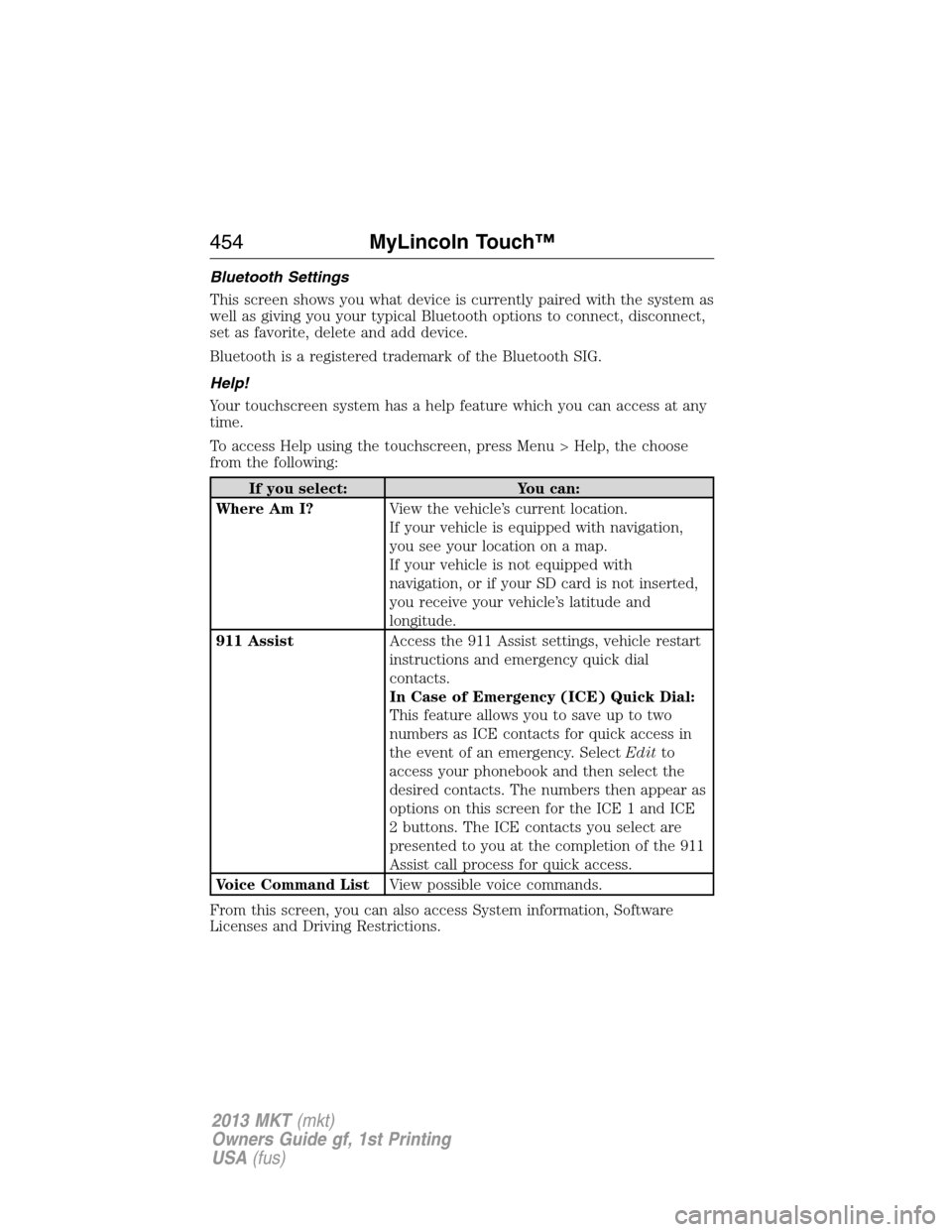
Bluetooth Settings
This screen shows you what device is currently paired with the system as
well as giving you your typical Bluetooth options to connect, disconnect,
set as favorite, delete and add device.
Bluetooth is a registered trademark of the Bluetooth SIG.
Help!
Your touchscreen system has a help feature which you can access at any
time.
To access Help using the touchscreen, press Menu > Help, the choose
from the following:
If you select: You can:
Where Am I?View the vehicle’s current location.
If your vehicle is equipped with navigation,
you see your location on a map.
If your vehicle is not equipped with
navigation, or if your SD card is not inserted,
you receive your vehicle’s latitude and
longitude.
911 AssistAccess the 911 Assist settings, vehicle restart
instructions and emergency quick dial
contacts.
In Case of Emergency (ICE) Quick Dial:
This feature allows you to save up to two
numbers as ICE contacts for quick access in
the event of an emergency. SelectEditto
access your phonebook and then select the
desired contacts. The numbers then appear as
options on this screen for the ICE 1 and ICE
2 buttons. The ICE contacts you select are
presented to you at the completion of the 911
Assist call process for quick access.
Voice Command ListView possible voice commands.
From this screen, you can also access System information, Software
Licenses and Driving Restrictions.
454MyLincoln Touch™
2013 MKT(mkt)
Owners Guide gf, 1st Printing
USA(fus)
Page 455 of 494
To access Help using the voice commands, press the voice
button, then, after the tone, say “Help”. The system provides
voice commands that can be used in the current mode.
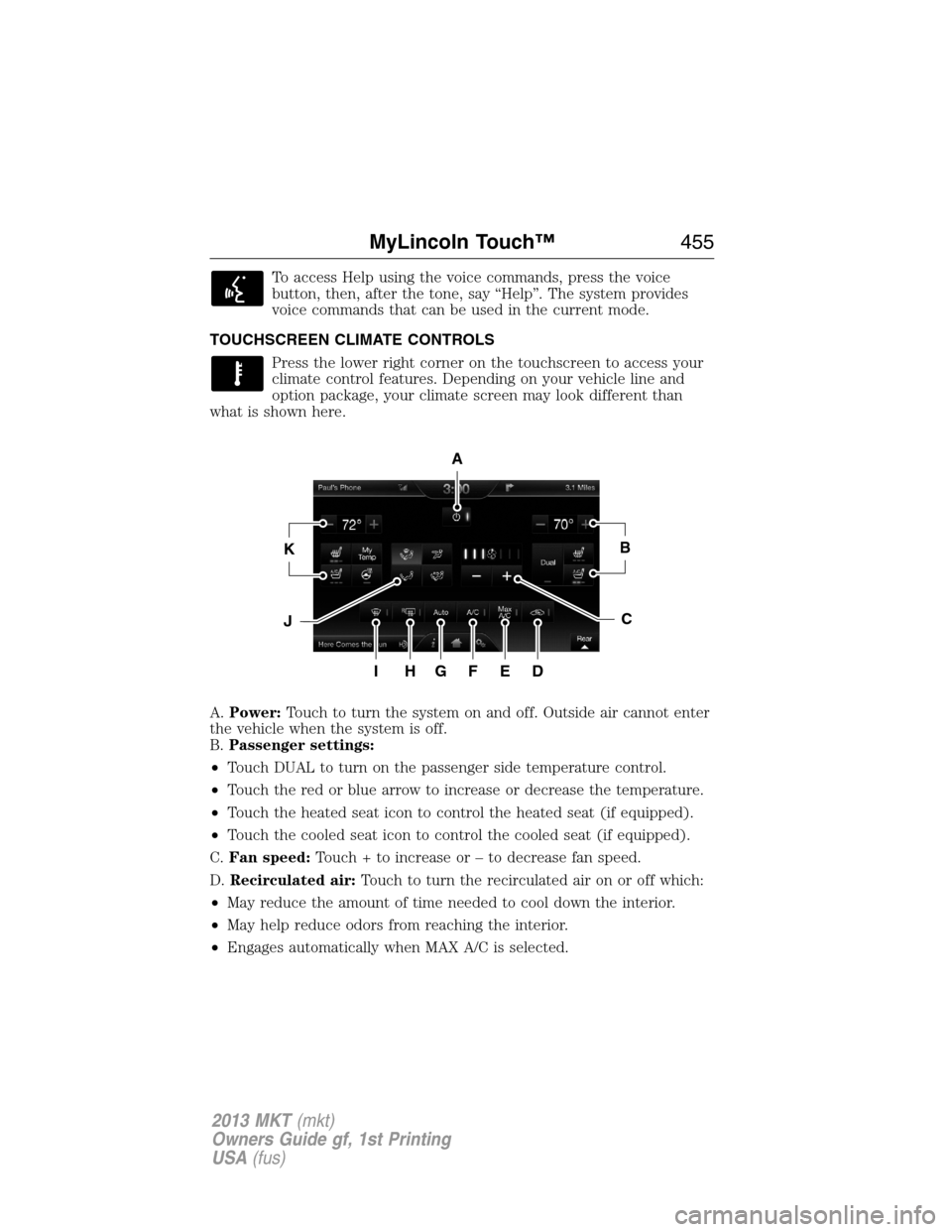
TOUCHSCREEN CLIMATE CONTROLS
Press the lower right corner on the touchscreen to access your
climate control features. Depending on your vehicle line and
option package, your climate screen may look different than
what is shown here.
A.Power:Touch to turn the system on and off. Outside air cannot enter
the vehicle when the system is off.
B.Passenger settings:
•Touch DUAL to turn on the passenger side temperature control.
•Touch the red or blue arrow to increase or decrease the temperature.
•Touch the heated seat icon to control the heated seat (if equipped).
•Touch the cooled seat icon to control the cooled seat (if equipped).
C.Fan speed:Touch + to increase or – to decrease fan speed.
D.Recirculated air:Touch to turn the recirculated air on or off which:
•May reduce the amount of time needed to cool down the interior.
•May help reduce odors from reaching the interior.
•Engages automatically when MAX A/C is selected.
A
KB
JC
IHGFED
MyLincoln Touch™455
2013 MKT(mkt)
Owners Guide gf, 1st Printing
USA(fus)
Page 457 of 494
K.Driver settings:Depending on your vehicle and option package, you
may have the following features:
•Touch the red or blue arrow to increase or decrease the temperature.
•Touch the heated seat icon to control the heated seat (if equipped).
Refer to the Seats chapter.
•Touch the cooled seat icon to control the cooled seat (if equipped).
Refer to the Seats chapter.
•Touch and hold MyTemp to select a temperature you would like the
vehicle to remember and maintain for you.
•Touch the heated steering wheel icon (if equipped) to warm the
steering wheel.
Note:If your vehicle is equipped with a wood-trimmed steering wheel,
it does not heat between the 10 o’clock and 2 o’clock positions.
Climate Control Voice Commands
The following voice commands are available at the main menu
level of a voice session. For example, press the voice button and
after the prompt, “Say a command”; say any of the following
commands:
Climate control voice commands
“Climate automatic”
“Climate my temperature”
“Climate off”
“Climate on”
“Climate temperature <15.5–29.5> degrees”
“Climate temperature <60–85> degrees”
“Help”
There are additional climate control commands but in order to access
them, you have to say “Climate” first, then when the system is ready to
listen, you may say any of the following commands:
Additional climate control voice commands
“Automatic” “Panel floor on”
“A/C off” “Panel on”
“A/C on” “Rear defrost off”
“Defrost off” “Rear defrost on”
“Defrost on” “Recirc off”
MyLincoln Touch™457
2013 MKT(mkt)
Owners Guide gf, 1st Printing
USA(fus)