brakes LINCOLN MKT 2013 Owner's Manual
[x] Cancel search | Manufacturer: LINCOLN, Model Year: 2013, Model line: MKT, Model: LINCOLN MKT 2013Pages: 494, PDF Size: 5.97 MB
Page 238 of 494
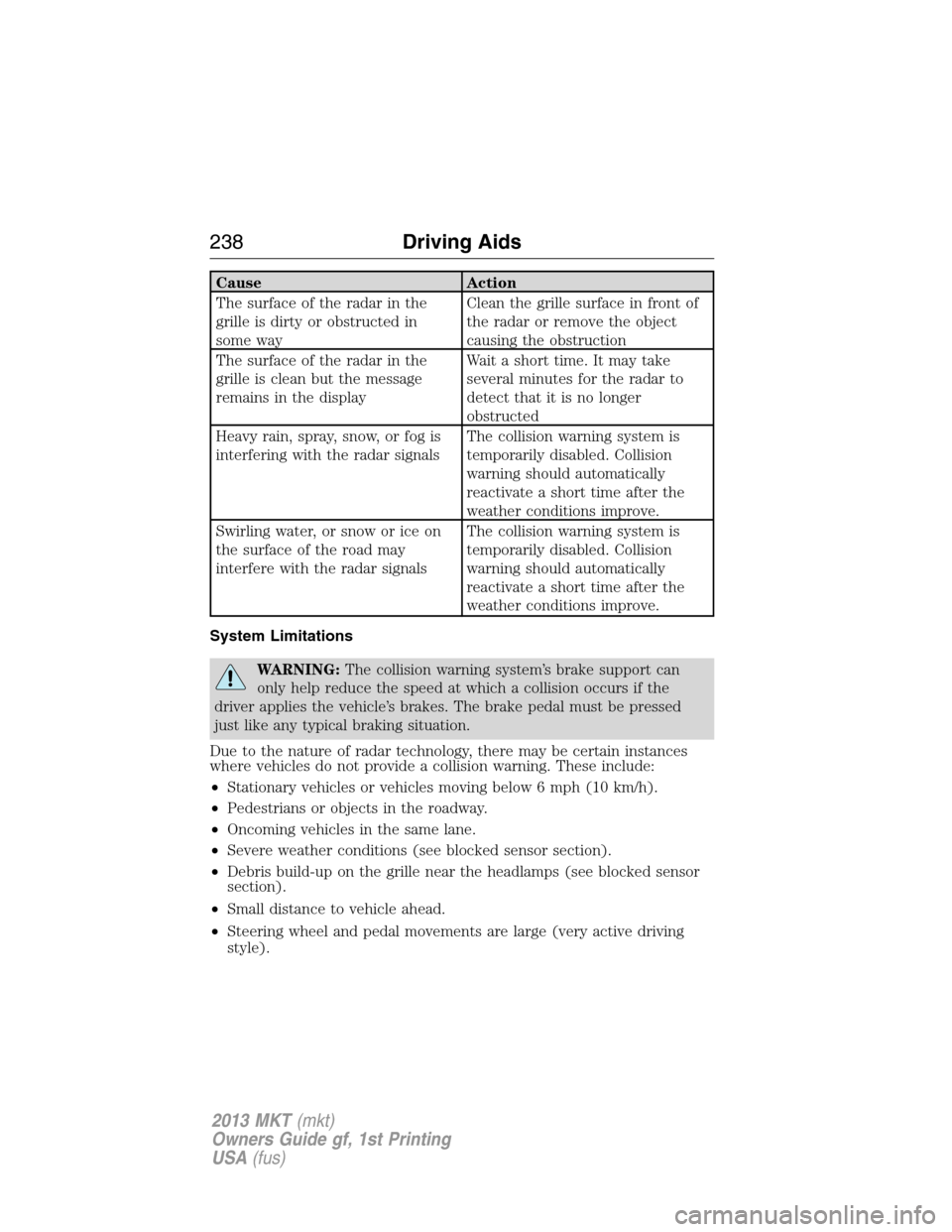
Cause Action
The surface of the radar in the
grille is dirty or obstructed in
some wayClean the grille surface in front of
the radar or remove the object
causing the obstruction
The surface of the radar in the
grille is clean but the message
remains in the displayWait a short time. It may take
several minutes for the radar to
detect that it is no longer
obstructed
Heavy rain, spray, snow, or fog is
interfering with the radar signalsThe collision warning system is
temporarily disabled. Collision
warning should automatically
reactivate a short time after the
weather conditions improve.
Swirling water, or snow or ice on
the surface of the road may
interfere with the radar signalsThe collision warning system is
temporarily disabled. Collision
warning should automatically
reactivate a short time after the
weather conditions improve.
System Limitations
WARNING:The collision warning system’s brake support can
only help reduce the speed at which a collision occurs if the
driver applies the vehicle’s brakes. The brake pedal must be pressed
just like any typical braking situation.
Due to the nature of radar technology, there may be certain instances
where vehicles do not provide a collision warning. These include:
•Stationary vehicles or vehicles moving below 6 mph (10 km/h).
•Pedestrians or objects in the roadway.
•Oncoming vehicles in the same lane.
•Severe weather conditions (see blocked sensor section).
•Debris build-up on the grille near the headlamps (see blocked sensor
section).
•Small distance to vehicle ahead.
•Steering wheel and pedal movements are large (very active driving
style).
238Driving Aids
2013 MKT(mkt)
Owners Guide gf, 1st Printing
USA(fus)
Page 248 of 494
WARNING:Exceeding the Safety Compliance Certification Label
vehicle weight rating limits could result in substandard vehicle
handling or performance, engine, transmission and/or structural
damage, serious damage to the vehicle, loss of control and personal
injury.
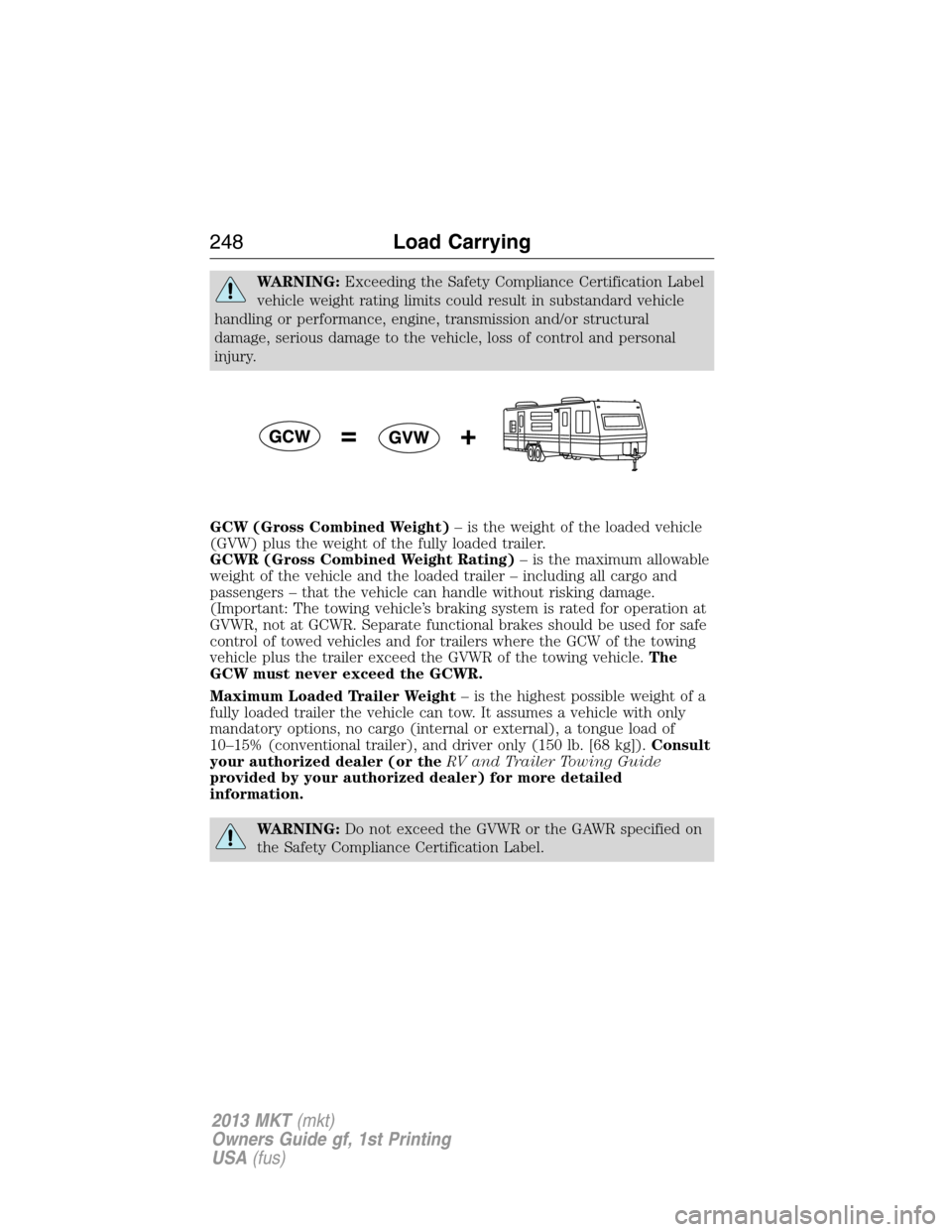
GCW (Gross Combined Weight)– is the weight of the loaded vehicle
(GVW) plus the weight of the fully loaded trailer.
GCWR (Gross Combined Weight Rating)– is the maximum allowable
weight of the vehicle and the loaded trailer – including all cargo and
passengers – that the vehicle can handle without risking damage.
(Important: The towing vehicle’s braking system is rated for operation at
GVWR, not at GCWR. Separate functional brakes should be used for safe
control of towed vehicles and for trailers where the GCW of the towing
vehicle plus the trailer exceed the GVWR of the towing vehicle.The
GCW must never exceed the GCWR.
Maximum Loaded Trailer Weight– is the highest possible weight of a
fully loaded trailer the vehicle can tow. It assumes a vehicle with only
mandatory options, no cargo (internal or external), a tongue load of
10–15% (conventional trailer), and driver only (150 lb. [68 kg]).Consult
your authorized dealer (or theRV and Trailer Towing Guide
provided by your authorized dealer) for more detailed
information.
WARNING:Do not exceed the GVWR or the GAWR specified on
the Safety Compliance Certification Label.
248Load Carrying
2013 MKT(mkt)
Owners Guide gf, 1st Printing
USA(fus)
Page 251 of 494
TOWING A TRAILER
WARNING:Do not exceed the GVWR or the GAWR specified on
the certification label.
WARNING:Towing trailers beyond the maximum recommended
gross trailer weight exceeds the limit of the vehicle and could
result in engine damage, transmission damage, structural damage, loss
of vehicle control, vehicle rollover and personal injury.
Your vehicle’s load capacity is designated by weight, not by volume, so
you cannot necessarily use all available space when loading a vehicle.
Towing a trailer places an additional load on your vehicle’s engine,
transmission, axle, brakes, tires and suspension. Inspect these
components periodically during, and after, any towing operation.
TRAILER SWAY CONTROL (IF EQUIPPED)
WARNING:Turning off the trailer sway control increases the risk
of loss of vehicle control, serious injury or death. Ford does not
recommend turning off this feature except in situations where reducing
vehicle speed may be dangerous (e.g. driving uphill) or the driver has
significant trailer towing experience and can control trailer sway and
maintain safe operation.
Note:This feature does not prevent trailer sway, but reduces it once it
begins.
Note:This feature cannot stop all trailers from swaying.
Note:In some cases, if vehicle speed is too high, the system may
activate multiple times, gradually reducing vehicle speed.
This feature applies the vehicle brakes at individual wheels and, if
necessary, reduces engine power. If the trailer begins to sway, the
traction control system light flashes andTRAILER SWAY REDUCE
SPEEDappears in the information display. The first thing to do is slow
the vehicle down, then pull safely to the side of the road and check for
proper tongue load and trailer load distribution. Refer toLoad Carrying
chapter for specific loading information.
Trailer sway control can be turned off by using the information display
control; refer to theInformation Displayschapter. The system turns
back on whenever the ignition is turned on.
Towing251
2013 MKT(mkt)
Owners Guide gf, 1st Printing
USA(fus)
Page 254 of 494
Trailer Brakes
WARNING:Do not connect a trailer’s hydraulic brake system
directly to your vehicle’s brake system. Your vehicle may not have
enough braking power and your chances of having a collision greatly
increase.
Electric brakes and manual, automatic or surge-type trailer brakes are
safe if installed properly and adjusted to the manufacturer’s
specifications. The trailer brakes must meet local and Federal
regulations.
The braking system of the tow vehicle is rated for operation at the
GVWR not GCWR.
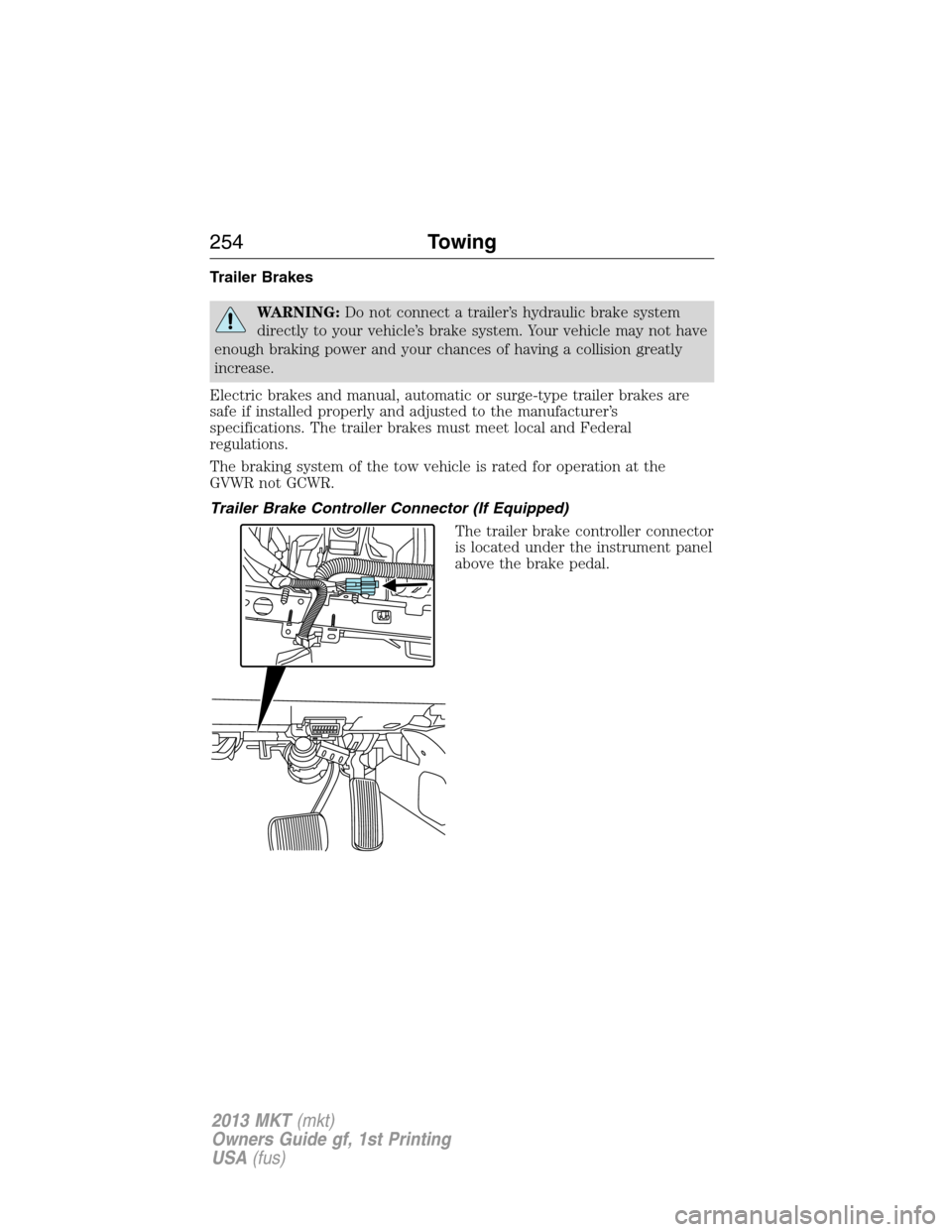
Trailer Brake Controller Connector (If Equipped)
The trailer brake controller connector
is located under the instrument panel
above the brake pedal.
254Towing
2013 MKT(mkt)
Owners Guide gf, 1st Printing
USA(fus)
Page 255 of 494
Trailer Lamps
Trailer lamps are required on most towed vehicles. Make sure all running
lights, brake lights, turn signals and hazard lights are working. Do not
connect trailer lamps directly to your vehicle’s tail lamps. This can cause
damage to your vehicle’s electrical system. Contact your authorized
dealer or trailer rental agency for proper instructions and equipment for
hooking-up trailer lamps.
WARNING:Never connect any trailer lamp wiring to the
vehicle’s tail lamp wiring; this may damage the electrical system
resulting in fire. Contact your authorized dealer as soon as possible for
assistance in proper trailer tow wiring installation. Additional electrical
equipment may be required.
Before Towing a Trailer
Practice turning, stopping and backing-up to get the feel of the
vehicle-trailer combination before starting on a trip. When turning, make
wider turns so the trailer wheels will clear curbs and other obstacles.
When Towing a Trailer
•Do not drive faster than 70 mph (113 km/h) during the first 500 miles
(800 kilometers) and do not make full-throttle starts.
•Check your hitch, electrical connections and trailer wheel lug nuts
thoroughly after you have traveled 50 miles (80 kilometers).
•Place the gearshift lever in P (Park) to aid in engine/transmission
cooling and A/C efficiency during hot weather while stopped in traffic.
•Turn off the speed control. The speed control may turn off
automatically when you are towing on long, steep grades.
•Shift to a lower gear when driving down a long or steep hill. Do not
apply the brakes continuously, as they may overheat and become less
effective.
•If your transmission is equipped with the grade assist feature, use this
feature when towing. This provides engine braking and helps eliminate
excessive transmission shifting for optimum fuel economy and
transmission cooling.
•Allow more distance for stopping with a trailer attached; anticipate
stops and brake gradually.
•Avoid parking on a grade. However, if you must park on a grade, place
wheel chocks under the trailer’s wheels.
Towing255
2013 MKT(mkt)
Owners Guide gf, 1st Printing
USA(fus)
Page 260 of 494
![LINCOLN MKT 2013 Owners Manual •Drive a heavily loaded vehicle or tow a trailer.
•Carry unnecessary weight (approximately 1 mpg [0.4 km/L] is lost for
every 400 lb [180 kg] of weight carried).
•Add particular accessories to y](/img/15/6930/w960_6930-259.png "LINCOLN MKT 2013 Owners Manual •Drive a heavily loaded vehicle or tow a trailer.
•Carry unnecessary weight (approximately 1 mpg [0.4 km/L] is lost for
every 400 lb [180 kg] of weight carried).
•Add particular accessories to y")
•Drive a heavily loaded vehicle or tow a trailer.
•Carry unnecessary weight (approximately 1 mpg [0.4 km/L] is lost for
every 400 lb [180 kg] of weight carried).
•Add particular accessories to your vehicle (e.g. bug deflectors,
rollbars/light bars, running boards, ski racks).
•Drive with the wheels out of alignment.
DRIVING THROUGH WATER
WARNING:Drive through water in an emergency only, and not
as part of normal driving.
WARNING:Engine damage can occur if water enters the air
filter.
Note:Driving through deep water may allow water into the transmission
or air intake and can cause internal vehicle damage or cause it to stall.
Note:Once through the water, always dry the brakes by moving your
vehicle slowly while applying light pressure on the brake pedal.
If driving through deep or standing water is unavoidable, proceed very
slowly. Never drive through water that is higher than the bottom of the
wheel rims (for cars) or the bottom of the hubs (for trucks).
When driving through water,
traction or brake capability may be
limited. Also, water may enter your
engine’s air intake and severely
damage your engine or your vehicle
may stall.
Wet brakes do not stop the vehicle
as quickly as dry brakes.
260Driving Hints
2013 MKT(mkt)
Owners Guide gf, 1st Printing
USA(fus)
Page 323 of 494
Engine
•The engine oil and filter should be changed prior to storage, as used
engine oil contain contaminates that may cause engine damage.
•Start the engine every 15 days. Run at fast idle until it reaches normal
operating temperature.
•With your foot on the brake, shift through all the gears while the
engine is running.
Fuel system
•Fill the fuel tank with high-quality fuel until the first automatic shutoff
of the fuel pump nozzle.
Note:During extended periods of vehicle storage (30 days or more), fuel
may deteriorate due to oxidation. Add a quality gas stabilizer product to
the vehicle fuel system whenever actual or expected storage periods
exceed 30 days. Follow the instructions on the additive label. The vehicle
should then be operated at idle speed to circulate the additive
throughout the fuel system.
Cooling system
•Protect against freezing temperatures.
•When removing vehicle from storage, check coolant fluid level.
Confirm there are no cooling system leaks, and fluid is at the
recommended level.
Battery
•Check and recharge as necessary. Keep connections clean.
•If storing your vehicle for more than 30 days without recharging the
battery, it may be advisable to disconnect the battery cables to ensure
battery charge is maintained for quick starting.
Note:If battery cables are disconnected, it will be necessary to reset
memory features.
Brakes
•Make sure brakes and parking brake are fully released.
Tires
•Maintain recommended air pressure.
Vehicle Care323
2013 MKT(mkt)
Owners Guide gf, 1st Printing
USA(fus)
Page 488 of 494
911 Assist™ .............................. 442
A
ABS (see Brakes) ..................... 201
Accessing and using your USB
port ............................................ 422
Accessing your calendar .......... 442
Accessory delay ........................ 101
Active Park Assist ..................... 207
Adaptive Cruise Control ........... 217
Adding (pairing) a phone ........ 430
Airbag supplemental restraint
system .......................................... 51
and child safety seats .............. 52
description ................................ 51
disposal ...................................... 60
driver airbag .............................. 51
passenger airbag ....................... 51
side airbag ........................... 51, 56
Air cleaner filter ....... 308–309, 363
All Wheel Drive (AWD),
driving off road ......................... 194
Ambient mood/lighting ............. 448
AM/FM ....................................... 407
Anti-lock brake system (see
Brakes) ...................................... 201
Anti-theft system .................. 82, 84
arming the system .............. 82, 84
disarming a triggered system .. 84
Audio system
Single CD ................................ 132
Audio system (see Radio) ....... 132
Automatic transmission
driving an automatic
overdrive ................................. 189
fluid, adding .................... 299–300fluid, checking ................ 299–300
fluid, refill capacities .............. 359
fluid, specification .................. 359
Selectshift (SST) .................... 191
Auxiliary Input Jack ................. 418
Auxiliary powerpoint ................ 168
A/V inputs .......................... 135, 427
B
Battery ....................................... 305
acid, treating emergencies ..... 305
jumping a disabled battery .... 265
maintenance-free .................... 305
replacement, specifications ... 363
servicing .................................. 305
Blind Spot Information
System ....................................... 231
Booster seats ............................... 22
Brakes ........................................ 200
anti-lock ................................... 201
anti-lock brake system (ABS)
warning light ........................... 201
brake warning light ................ 201
fluid, checking and adding .... 304
fluid, refill capacities .............. 359
fluid, specifications ................. 359
lubricant specifications .......... 359
parking .................................... 201
shift interlock .......................... 193
trailer ....................................... 254
C
Capacities for refilling fluids .... 359
Cargo area shade ...................... 243
Cargo net ................................... 242
CD .............................................. 132
CD player .......................... 130, 421
488Index
2013 MKT(mkt)
Owners Guide gf, 1st Printing
USA(fus)