manual transmission LINCOLN MKT 2013 Owners Manual
[x] Cancel search | Manufacturer: LINCOLN, Model Year: 2013, Model line: MKT, Model: LINCOLN MKT 2013Pages: 494, PDF Size: 5.97 MB
Page 77 of 494
Note:Cycling the ignition while the liftgate is power closing and is
6–10 inches (15–24 cm) from being latched may cause the liftgate to
reverse to full open position. Make sure that the liftgate is closed before
operating or moving the vehicle, especially in an enclosure, like a garage
or a parking structure. The liftgate or its components could be damaged.
Note:Do not drive with the liftgate open without first disabling the
power function and securing the liftgate to the vehicle.
Note:In case of operation in extreme cold -40°F (-40°C), or on extreme
inclines, manual operation of the liftgate is suggested.
The power liftgate can be enabled or disabled using the information
display. The remote control and instrument panel button will still operate
the liftgate regardless of the setting.
Opening and Closing the Power Liftgate
Note:The liftgate movement direction can be reversed with a second
press of the instrument panel, or the control button on the liftgate, or a
second double press of the transmitter button.
The liftgate will only operate with the vehicle in P (Park).
A chime will sound three times as the liftgate begins to power close. A
single chime indicates a problem with the close request, caused by:
•the ignition is on and the transmission is not in P (Park);
•or the battery voltage is below the minimum operating voltage;
•or the vehicle speed is at or above 3 mph (5 km/h).
If the liftgate reverses and starts to close after an open request, a fast
continuous chime indicates excessive load on the gate or a possible strut
failure. See your authorized dealer if you still have a fast chime after the
load is removed.
To open or close from the instrument panel:Press the
instrument panel button.
To open or close with the remote control:Press the remote
control button twice within three seconds.
Locks77
2013 MKT(mkt)
Owners Guide gf, 1st Printing
USA(fus)
Page 139 of 494
F.AUTO:Press to activate automatic control of the airflow direction in
the rear of the vehicle. The system automatically determines the airflow
distribution in order to reach and maintain the desired temperature.
G.REAR LOCK:Illuminates when the rear climate system is being
controlled by the front controls. The rear climate controls do not work
when this is illuminated.
GENERAL OPERATING TIPS
•To reduce fog build-up on the windshield during humid weather, select
Defrost. Temperature and fan speed can also be increased to improve
clearing.
•To reduce humidity build-up inside the vehicle, do not drive with the
system off or with recirculated air engaged.
•Do not put objects under the front seats that will interfere with the
airflow to the back seats.
•Remove any snow, ice or leaves from the air intake area at the base of
the windshield.
•To improve the A/C cool down, drive with the windows slightly open
for 2-3 minutes after start up or until the vehicle has been aired out.
•A small amount of air may be felt from the floor vent regardless of the
air distribution setting that is selected.
During extreme high ambient temperatures when idling stationary for
extended periods of time in gear, it is recommended to run the A/C in
the MAX A/C mode, adjust the blower fan speed to the lowest setting
and put the vehicle’s transmission into the P (Park) position to continue
to receive cool air from your A/C system.
For maximum cooling performance MAX A/C in AUTO, press MAX A/C.
For maximum cooling performance MAX A/C in manual override control:
1. Choose Panel, A/C, and recirculation controls.
2. Set the temperature to LO.
3. Set the fan to the highest blower setting.
To aid in side window defogging/demisting in cold or humid weather:
1. Select Defrost or Floor/Defrost mode. To maximize performance
select Defrost.
2. Select A/C.
3. Adjust the temperature control to maintain comfort.
4. Set the fan speed to the highest setting.
Climate Control139
2013 MKT(mkt)
Owners Guide gf, 1st Printing
USA(fus)
Page 191 of 494
L (Low)
•Provides maximum engine braking
•Will downshift to the lowest available gear for the current vehicle
speed; allows for first gear when vehicle reaches lower speeds
•Is not intended for use under extended or normal driving conditions
and results in lower fuel economy.
S (Sport)
Moving the gearshift lever to S (Sport):
•Provides additional grade (engine) braking and extends lower gear
operation to enhance performance for uphill climbs, hilly terrain or
mountainous areas. This will increase engine RPM during engine
braking.
•Provides additional lower gear operation through the automatic
transmission shift strategy which reacts to vehicle inputs (vehicle
acceleration, accelerator pedal, brake pedal and vehicle speed).
•Gears are selected more quickly and at higher engine speeds.
SelectShift Automatic™ Transmission (if equipped)
Note:Your transmission must be in
S (Sport) for SelectShift to operate
properly.
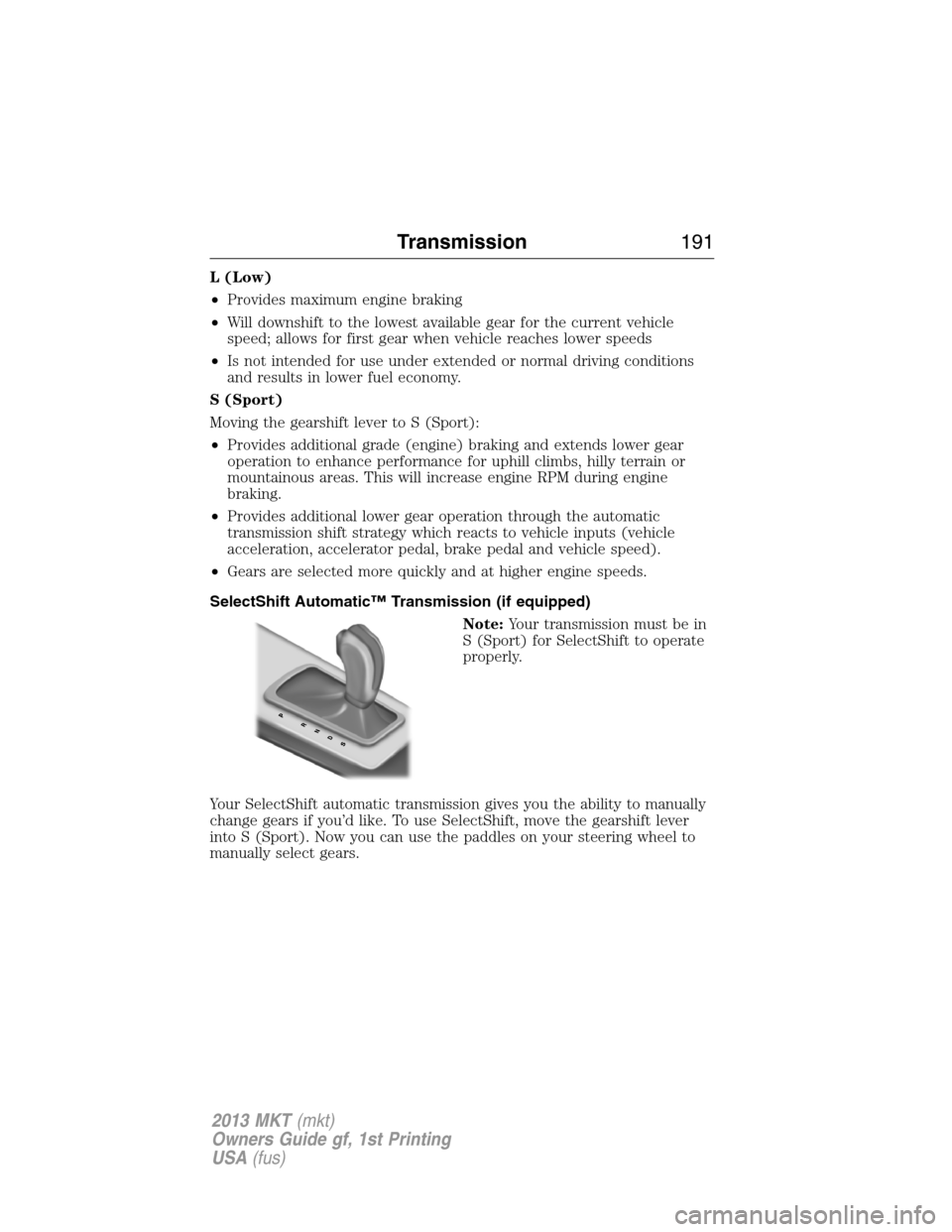
Your SelectShift automatic transmission gives you the ability to manually
change gears if you’d like. To use SelectShift, move the gearshift lever
into S (Sport). Now you can use the paddles on your steering wheel to
manually select gears.
Transmission191
2013 MKT(mkt)
Owners Guide gf, 1st Printing
USA(fus)
Page 192 of 494
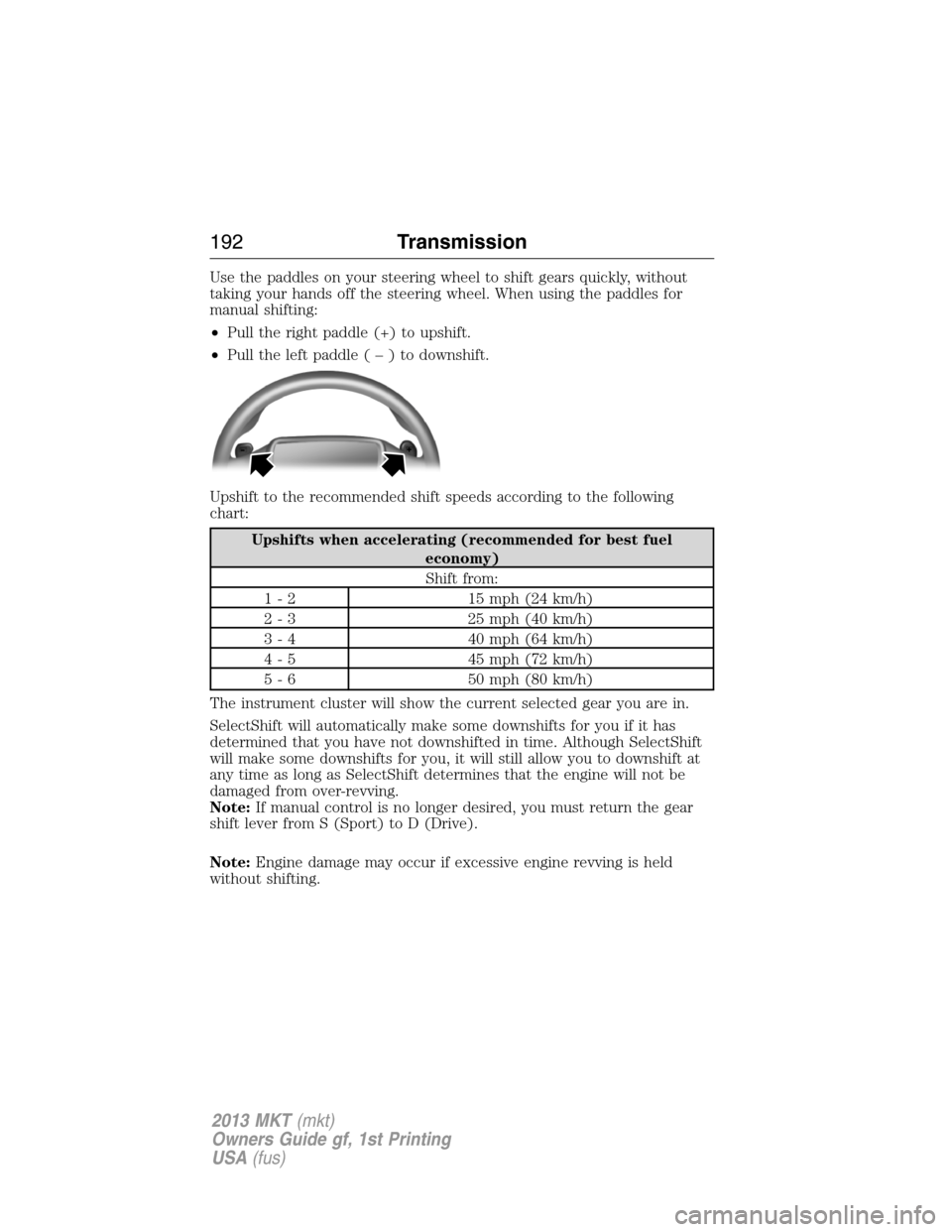
Use the paddles on your steering wheel to shift gears quickly, without
taking your hands off the steering wheel. When using the paddles for
manual shifting:
•Pull the right paddle (+) to upshift.
•Pull the left paddle(–)todownshift.
Upshift to the recommended shift speeds according to the following
chart:
Upshifts when accelerating (recommended for best fuel
economy)
Shift from:
1 - 2 15 mph (24 km/h)
2 - 3 25 mph (40 km/h)
3 - 4 40 mph (64 km/h)
4 - 5 45 mph (72 km/h)
5 - 6 50 mph (80 km/h)
The instrument cluster will show the current selected gear you are in.
SelectShift will automatically make some downshifts for you if it has
determined that you have not downshifted in time. Although SelectShift
will make some downshifts for you, it will still allow you to downshift at
any time as long as SelectShift determines that the engine will not be
damaged from over-revving.
Note:If manual control is no longer desired, you must return the gear
shift lever from S (Sport) to D (Drive).
Note:Engine damage may occur if excessive engine revving is held
without shifting.
192Transmission
2013 MKT(mkt)
Owners Guide gf, 1st Printing
USA(fus)
Page 198 of 494
Whenever driving on a hill, determine beforehand the route you will use.
Do not drive over the crest of a hill without seeing what conditions are
on the other side. Do not drive in reverse over a hill without the aid of
an observer.
Although natural obstacles may make it necessary to travel diagonally up
or down a hill or steep incline, you should always try to drive straight up
or straight down.
When climbing a steep slope or hill, start in a lower gear rather than
downshifting to a lower gear from a higher gear once the ascent has
started. This reduces strain on the engine and the possibility of stalling.
If you do stall out, do not try to turnaround because you might roll over.
It is better to back down to a safe location.
Apply just enough power to the wheels to climb the hill. Too much power
will cause the tires to slip, spin or lose traction, resulting in loss of
vehicle control.
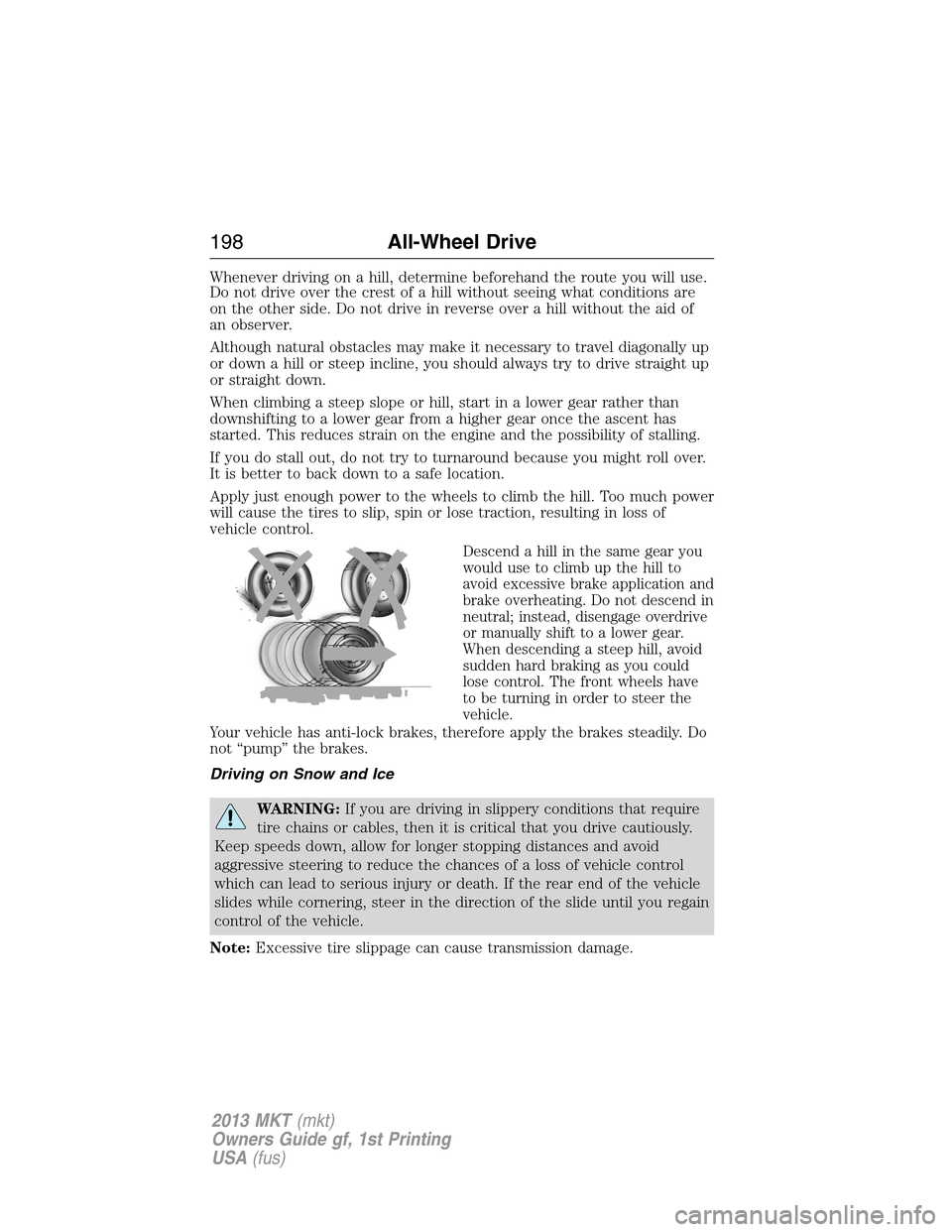
Descend a hill in the same gear you
would use to climb up the hill to
avoid excessive brake application and
brake overheating. Do not descend in
neutral; instead, disengage overdrive
or manually shift to a lower gear.
When descending a steep hill, avoid
sudden hard braking as you could
lose control. The front wheels have
to be turning in order to steer the
vehicle.
Your vehicle has anti-lock brakes, therefore apply the brakes steadily. Do
not “pump” the brakes.
Driving on Snow and Ice
WARNING:If you are driving in slippery conditions that require
tire chains or cables, then it is critical that you drive cautiously.
Keep speeds down, allow for longer stopping distances and avoid
aggressive steering to reduce the chances of a loss of vehicle control
which can lead to serious injury or death. If the rear end of the vehicle
slides while cornering, steer in the direction of the slide until you regain
control of the vehicle.
Note:Excessive tire slippage can cause transmission damage.
198All-Wheel Drive
2013 MKT(mkt)
Owners Guide gf, 1st Printing
USA(fus)
Page 210 of 494
Deactivating the Park Assist Feature
The system can be deactivated manually by:
•pressing the active park assist button
•grabbing the steering wheel
•driving above approximately 20 mph (35 km/h) for 30 seconds during
an active park search
•driving above 6 mph (10 km/h) during automatic steering
•turning off the traction control system.
Certain vehicle conditions can also deactivate the system:
•Traction control has activated on a slippery or loose surface.
•Anti-lock brake system activation or failure.
•Any door (except the driver’s) opens.
•Something touches the steering wheel.
If a problem occurs with the system, a warning message is displayed,
followed by a chime. Occasional active park assist messages may occur in
normal operation. For recurring or frequent active park assist faults,
contact an authorized dealer to have your vehicle serviced.
Troubleshooting the System
The system does not look for a space
The traction control system may be off
Any door (except the driver’s) may not be completely closed
The system does not offer a particular space
Something may be contacting the front bumper or side sensors
There is not enough room on both sides of the vehicle in order to park
There is not enough space for the parking maneuver on the opposite
side of the parking space
The vehicle is farther than 5 ft (1.5 m) from the parking space
The vehicle is closer than 16 in. (40 cm) from neighboring parked
vehicles
The transmission is in R (Reverse); the vehicle must be moving forward
to detect a parking space
210Parking Aids
2013 MKT(mkt)
Owners Guide gf, 1st Printing
USA(fus)
Page 215 of 494
Visual Park Aid Alert
Note:Visual park alert is only available when the transmission is in R
(Reverse).
Note:The reverse sensing system is not effective at speeds above 3 mph
(5 km/h) and may not detect certain angular or moving objects.
The system uses red, yellow and green highlights which appear on top of
the video image when an object is detected by the reverse sensing
system. The alert highlights the closest object detected. The reverse
sensing alert can be disabled and if visual park aid alert is enabled,
highlighted areas are still displayed.
Selectable settings for this feature are ON and OFF.
Manual Zoom
WARNING:When manual zoom is on, the full area behind the
vehicle is not shown. Be aware of your surroundings when using
the manual zoom feature.
Note:Manual zoom is only available when the transmission is in R
(Reverse).
Note:When manual zoom is enabled, only the centerline is shown.
Allows the driver to get a closer view of an object behind the vehicle.
The zoomed image keeps the bumper in the image to provide a
reference. The zoom is only active while the transmission is in R
(Reverse), When the transmission is shifted out of R (Reverse), the
feature automatically turns off and must be reset when it is used again.
Selectable settings for this feature are OFF, Level 1, Level 2 or Level 3.
Press the up and down arrows to change the view. The selection level
appears between the buttons (i.e. Level 1). The default setting for the
manual zoom is OFF.
Rear Camera Delay
When shifting the transmission out of R (Reverse) and into any gear
other than P (Park), the camera image remains in the display until the
vehicle speed reaches 5 mph (8 km/h). This occurs when the rear
camera delay feature is on, or until a radio button is selected.
Selectable settings for this feature are ON and OFF. The default setting
for the rear camera delay is OFF.
Parking Aids215
2013 MKT(mkt)
Owners Guide gf, 1st Printing
USA(fus)
Page 256 of 494
WRECKER TOWING
If you need to have your vehicle towed, contact a professional towing
service or, if you are a member of a roadside assistance program, your
roadside assistance service provider.
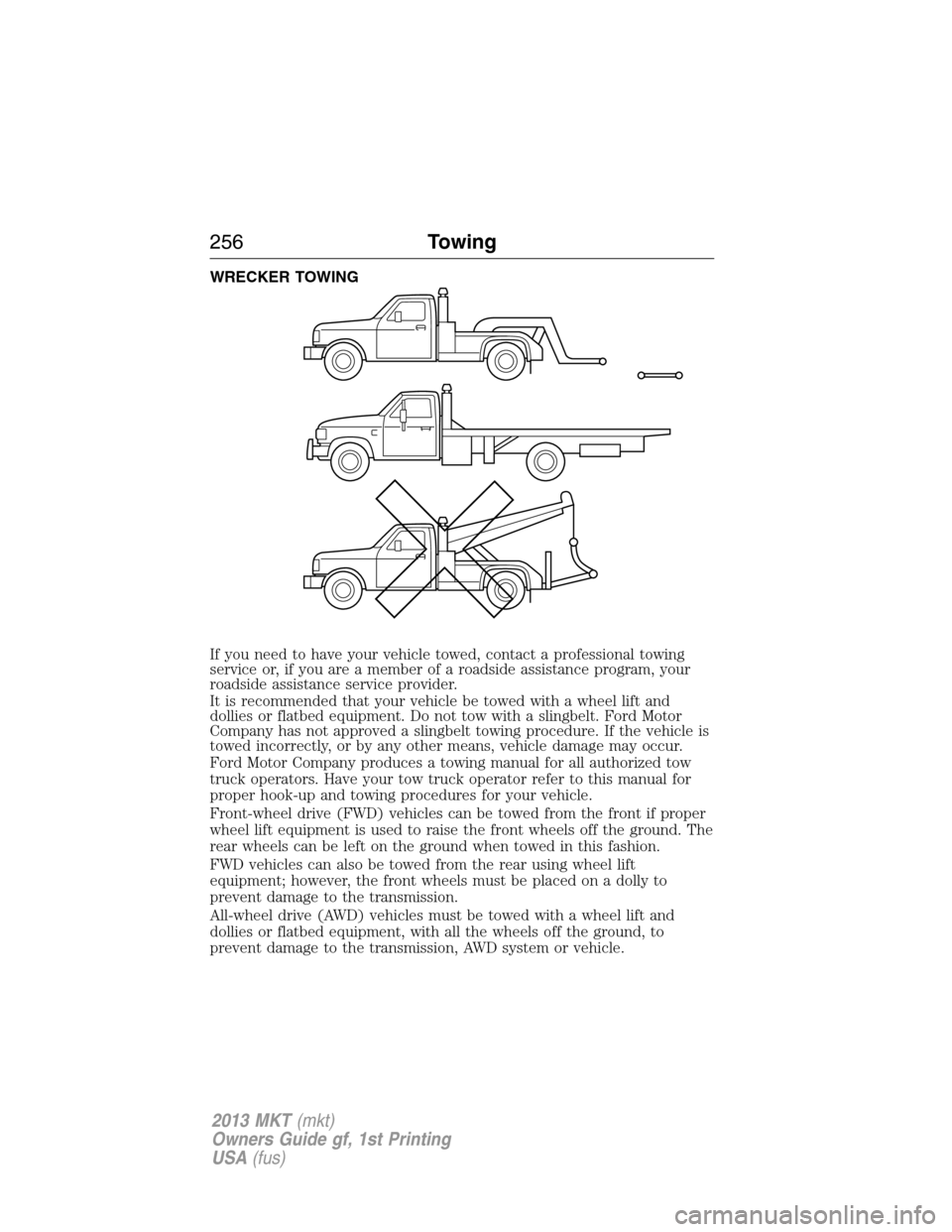
It is recommended that your vehicle be towed with a wheel lift and
dollies or flatbed equipment. Do not tow with a slingbelt. Ford Motor
Company has not approved a slingbelt towing procedure. If the vehicle is
towed incorrectly, or by any other means, vehicle damage may occur.
Ford Motor Company produces a towing manual for all authorized tow
truck operators. Have your tow truck operator refer to this manual for
proper hook-up and towing procedures for your vehicle.
Front-wheel drive (FWD) vehicles can be towed from the front if proper
wheel lift equipment is used to raise the front wheels off the ground. The
rear wheels can be left on the ground when towed in this fashion.
FWD vehicles can also be towed from the rear using wheel lift
equipment; however, the front wheels must be placed on a dolly to
prevent damage to the transmission.
All-wheel drive (AWD) vehicles must be towed with a wheel lift and
dollies or flatbed equipment, with all the wheels off the ground, to
prevent damage to the transmission, AWD system or vehicle.
256Towing
2013 MKT(mkt)
Owners Guide gf, 1st Printing
USA(fus)
Page 375 of 494
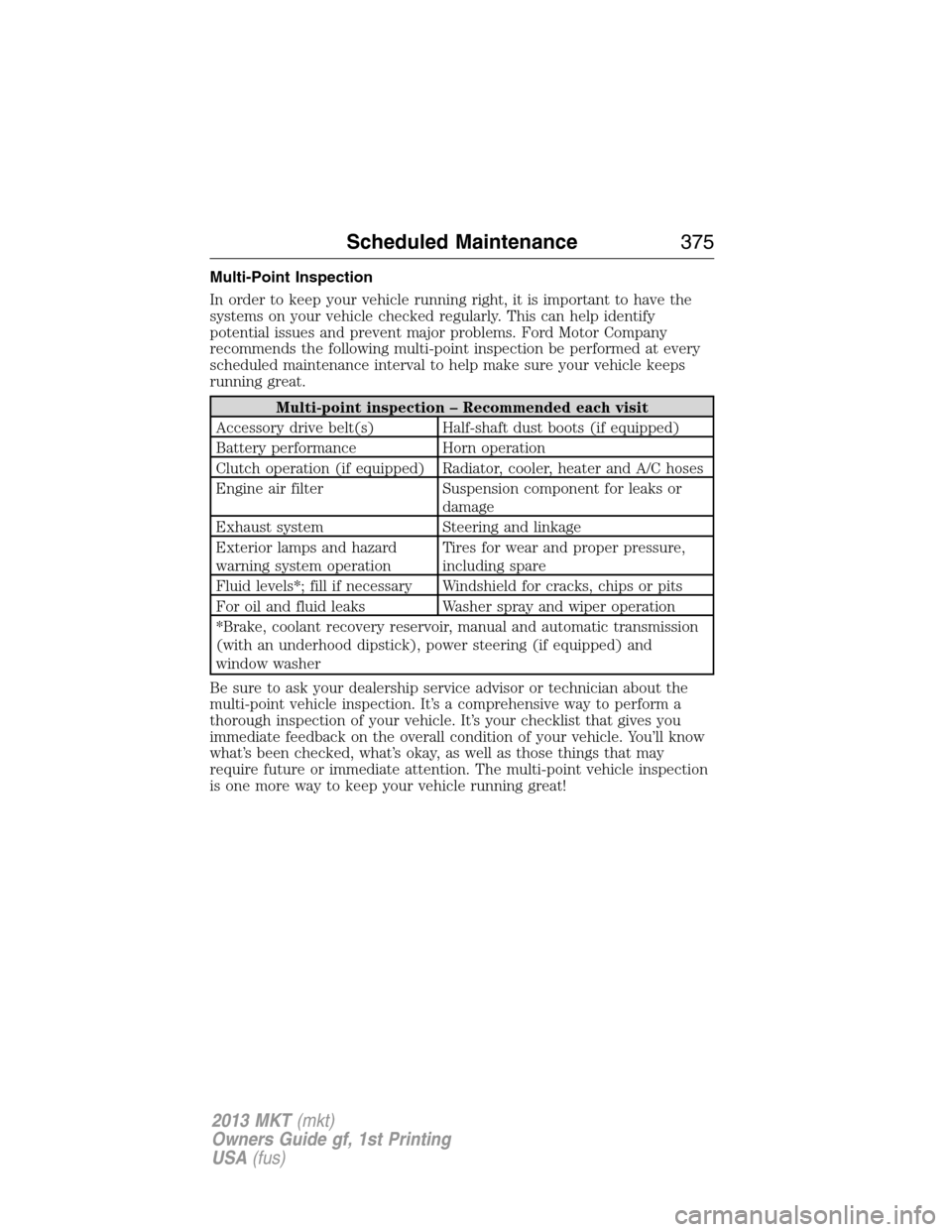
Multi-Point Inspection
In order to keep your vehicle running right, it is important to have the
systems on your vehicle checked regularly. This can help identify
potential issues and prevent major problems. Ford Motor Company
recommends the following multi-point inspection be performed at every
scheduled maintenance interval to help make sure your vehicle keeps
running great.
Multi-point inspection – Recommended each visit
Accessory drive belt(s) Half-shaft dust boots (if equipped)
Battery performance Horn operation
Clutch operation (if equipped) Radiator, cooler, heater and A/C hoses
Engine air filter Suspension component for leaks or
damage
Exhaust system Steering and linkage
Exterior lamps and hazard
warning system operationTires for wear and proper pressure,
including spare
Fluid levels*; fill if necessary Windshield for cracks, chips or pits
For oil and fluid leaks Washer spray and wiper operation
*Brake, coolant recovery reservoir, manual and automatic transmission
(with an underhood dipstick), power steering (if equipped) and
window washer
Be sure to ask your dealership service advisor or technician about the
multi-point vehicle inspection. It’s a comprehensive way to perform a
thorough inspection of your vehicle. It’s your checklist that gives you
immediate feedback on the overall condition of your vehicle. You’ll know
what’s been checked, what’s okay, as well as those things that may
require future or immediate attention. The multi-point vehicle inspection
is one more way to keep your vehicle running great!
Scheduled Maintenance375
2013 MKT(mkt)
Owners Guide gf, 1st Printing
USA(fus)
Page 379 of 494
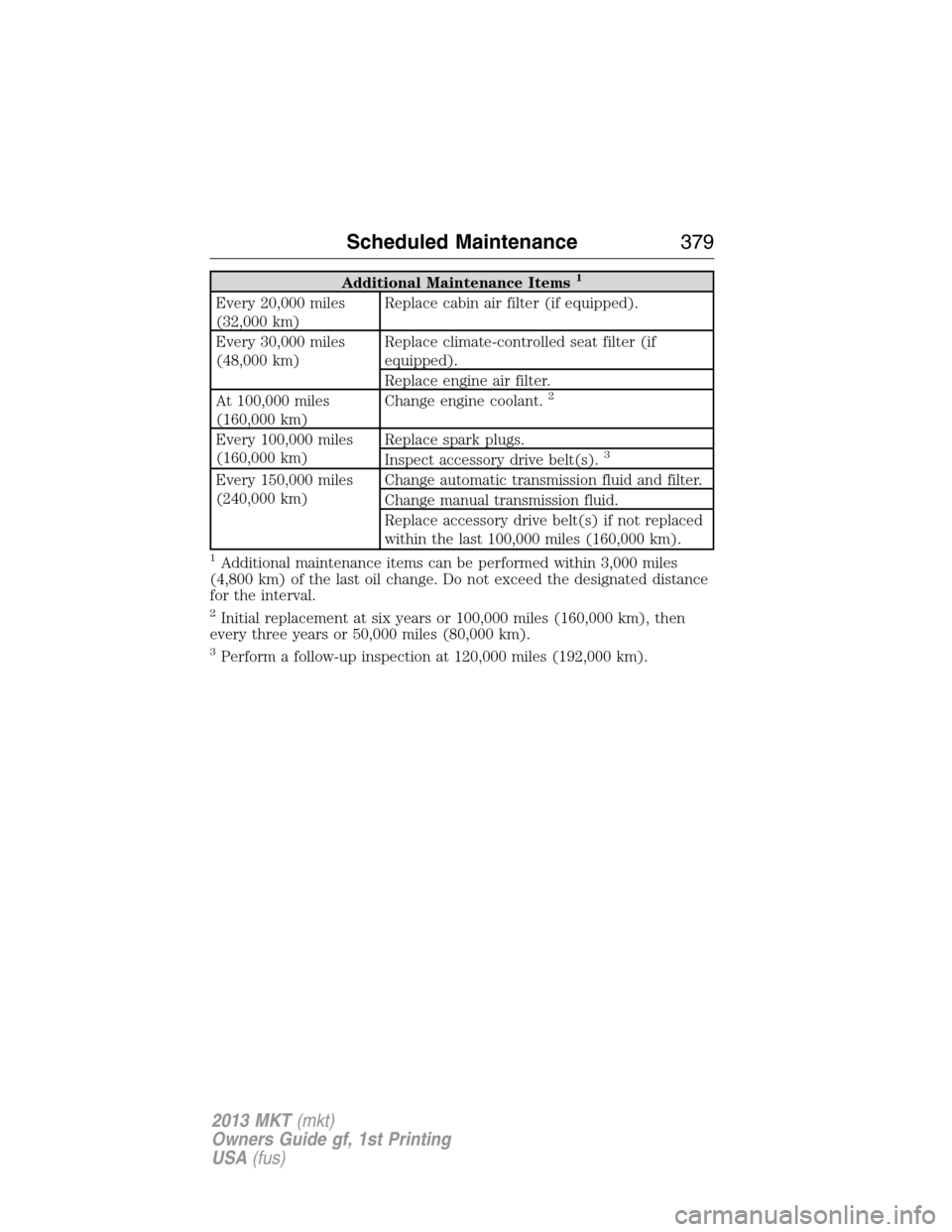
Additional Maintenance Items1
Every 20,000 miles
(32,000 km)Replace cabin air filter (if equipped).
Every 30,000 miles
(48,000 km)Replace climate-controlled seat filter (if
equipped).
Replace engine air filter.
At 100,000 miles
(160,000 km)Change engine coolant.
2
Every 100,000 miles
(160,000 km)Replace spark plugs.
Inspect accessory drive belt(s).3
Every 150,000 miles
(240,000 km)Change automatic transmission fluid and filter.
Change manual transmission fluid.
Replace accessory drive belt(s) if not replaced
within the last 100,000 miles (160,000 km).
1Additional maintenance items can be performed within 3,000 miles
(4,800 km) of the last oil change. Do not exceed the designated distance
for the interval.
2Initial replacement at six years or 100,000 miles (160,000 km), then
every three years or 50,000 miles (80,000 km).
3Perform a follow-up inspection at 120,000 miles (192,000 km).
Scheduled Maintenance379
2013 MKT(mkt)
Owners Guide gf, 1st Printing
USA(fus)