lock LINCOLN MKT 2016 Owners Manual
[x] Cancel search | Manufacturer: LINCOLN, Model Year: 2016, Model line: MKT, Model: LINCOLN MKT 2016Pages: 452, PDF Size: 4.69 MB
Page 348 of 452
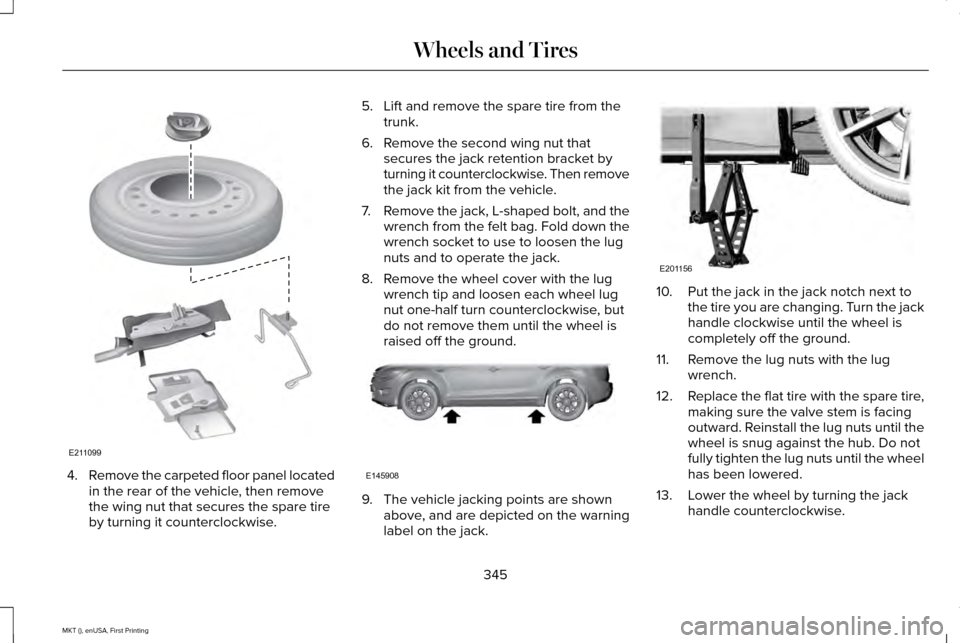
4.
Remove the carpeted floor panel located
in the rear of the vehicle, then remove
the wing nut that secures the spare tire
by turning it counterclockwise. 5. Lift and remove the spare tire from the
trunk.
6. Remove the second wing nut that secures the jack retention bracket by
turning it counterclockwise. Then remove
the jack kit from the vehicle.
7. Remove the jack, L-shaped bolt, and the
wrench from the felt bag. Fold down the
wrench socket to use to loosen the lug
nuts and to operate the jack.
8. Remove the wheel cover with the lug wrench tip and loosen each wheel lug
nut one-half turn counterclockwise, but
do not remove them until the wheel is
raised off the ground. 9. The vehicle jacking points are shown
above, and are depicted on the warning
label on the jack. 10. Put the jack in the jack notch next to
the tire you are changing. Turn the jack
handle clockwise until the wheel is
completely off the ground.
11. Remove the lug nuts with the lug wrench.
12. Replace the flat tire with the spare tire,
making sure the valve stem is facing
outward. Reinstall the lug nuts until the
wheel is snug against the hub. Do not
fully tighten the lug nuts until the wheel
has been lowered.
13. Lower the wheel by turning the jack handle counterclockwise.
345
MKT (), enUSA, First Printing Wheels and TiresE211099 E145908 E201156
Page 349 of 452
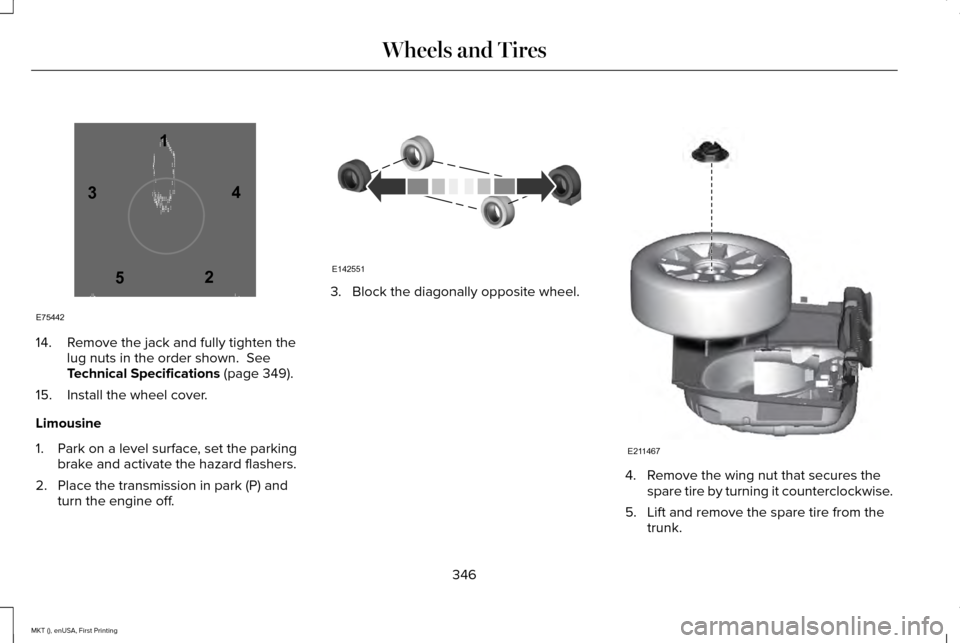
14. Remove the jack and fully tighten the
lug nuts in the order shown. See
Technical Specifications (page 349).
15. Install the wheel cover.
Limousine
1. Park on a level surface, set the parking brake and activate the hazard flashers.
2. Place the transmission in park (P) and turn the engine off. 3. Block the diagonally opposite wheel.
4. Remove the wing nut that secures the
spare tire by turning it counterclockwise.
5. Lift and remove the spare tire from the trunk.
346
MKT (), enUSA, First Printing Wheels and Tires12
3
4
5
E75442 E142551 E211467
Page 350 of 452
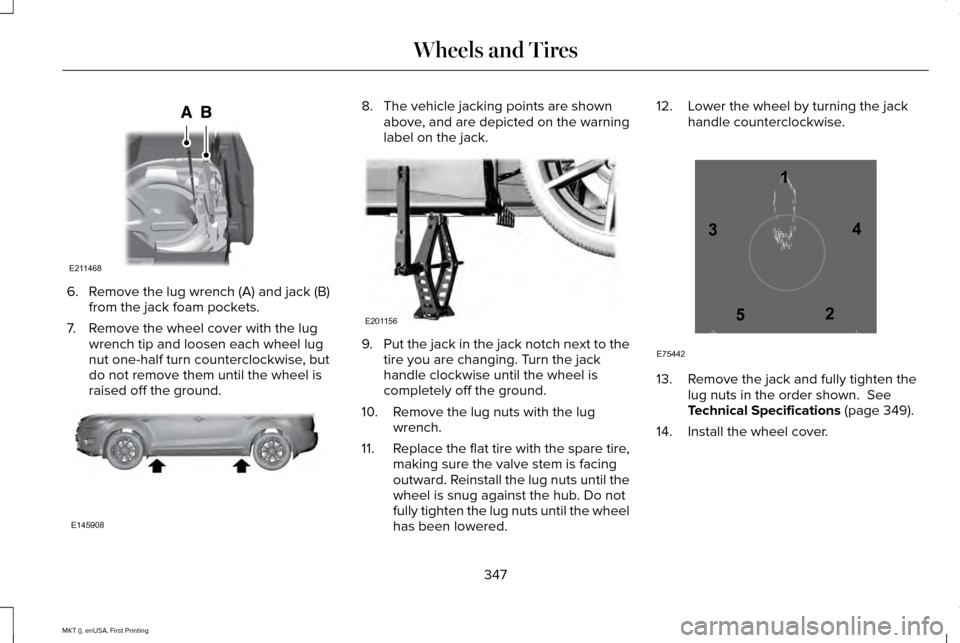
6. Remove the lug wrench (A) and jack (B)
from the jack foam pockets.
7. Remove the wheel cover with the lug wrench tip and loosen each wheel lug
nut one-half turn counterclockwise, but
do not remove them until the wheel is
raised off the ground. 8. The vehicle jacking points are shown
above, and are depicted on the warning
label on the jack. 9.
Put the jack in the jack notch next to the
tire you are changing. Turn the jack
handle clockwise until the wheel is
completely off the ground.
10. Remove the lug nuts with the lug wrench.
11. Replace the flat tire with the spare tire,
making sure the valve stem is facing
outward. Reinstall the lug nuts until the
wheel is snug against the hub. Do not
fully tighten the lug nuts until the wheel
has been lowered. 12. Lower the wheel by turning the jack
handle counterclockwise. 13. Remove the jack and fully tighten the
lug nuts in the order shown. See
Technical Specifications (page 349).
14. Install the wheel cover.
347
MKT (), enUSA, First Printing Wheels and TiresE211468 E145908 E201156 12
3
4
5
E75442
Page 351 of 452
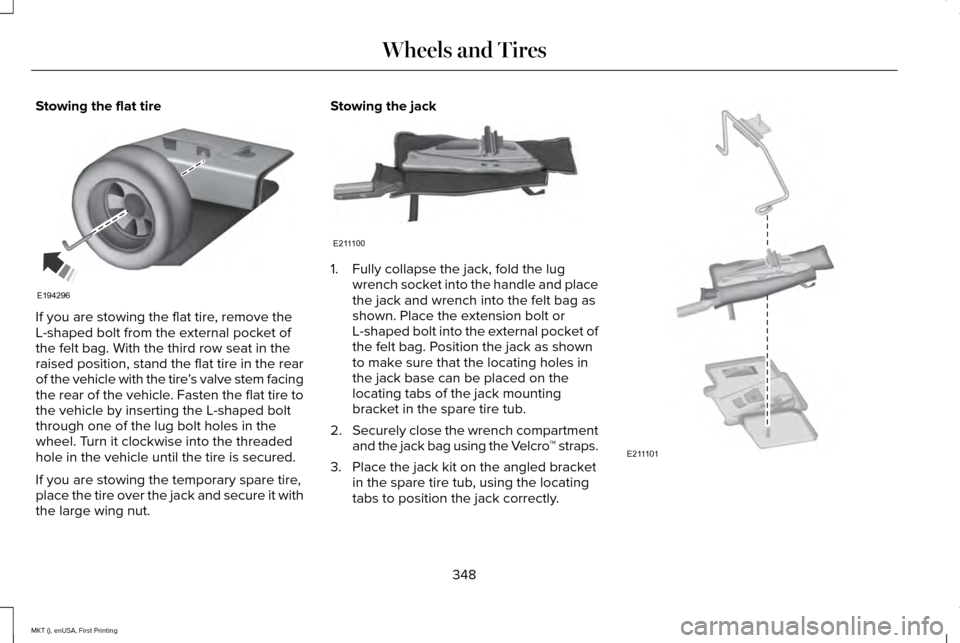
Stowing the flat tire
If you are stowing the flat tire, remove the
L-shaped bolt from the external pocket of
the felt bag. With the third row seat in the
raised position, stand the flat tire in the rear
of the vehicle with the tire
’s valve stem facing
the rear of the vehicle. Fasten the flat tire to
the vehicle by inserting the L-shaped bolt
through one of the lug bolt holes in the
wheel. Turn it clockwise into the threaded
hole in the vehicle until the tire is secured.
If you are stowing the temporary spare tire,
place the tire over the jack and secure it with
the large wing nut. Stowing the jack
1. Fully collapse the jack, fold the lug
wrench socket into the handle and place
the jack and wrench into the felt bag as
shown. Place the extension bolt or
L-shaped bolt into the external pocket of
the felt bag. Position the jack as shown
to make sure that the locating holes in
the jack base can be placed on the
locating tabs of the jack mounting
bracket in the spare tire tub.
2. Securely close the wrench compartment
and the jack bag using the Velcro ™ straps.
3. Place the jack kit on the angled bracket in the spare tire tub, using the locating
tabs to position the jack correctly. 348
MKT (), enUSA, First Printing Wheels and TiresE194296 E211100 E211101
Page 366 of 452
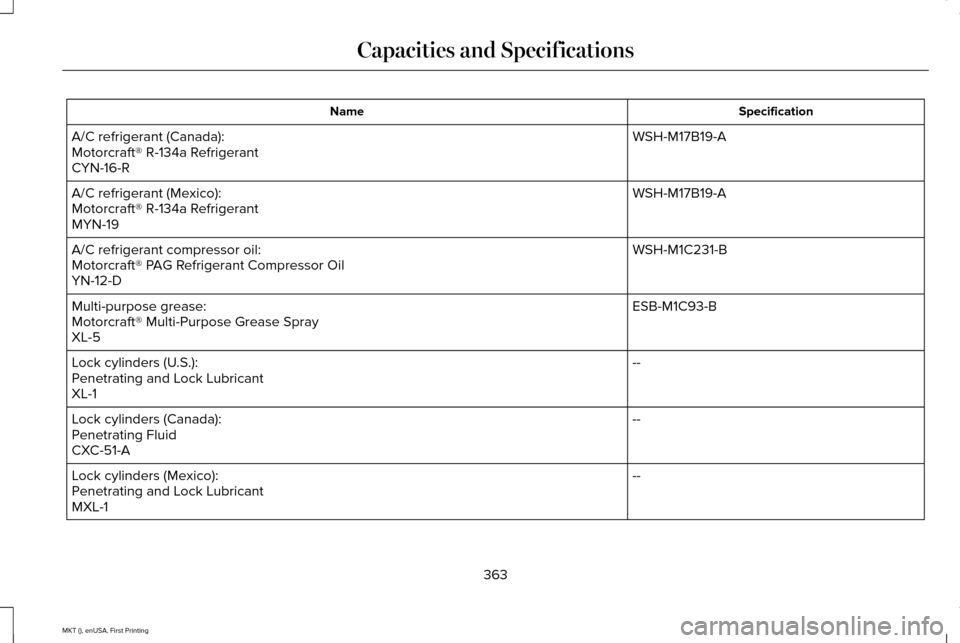
Specification
Name
WSH-M17B19-A
A/C refrigerant (Canada):
Motorcraft® R-134a Refrigerant
CYN-16-R
WSH-M17B19-A
A/C refrigerant (Mexico):
Motorcraft® R-134a Refrigerant
MYN-19
WSH-M1C231-B
A/C refrigerant compressor oil:
Motorcraft® PAG Refrigerant Compressor Oil
YN-12-D
ESB-M1C93-B
Multi-purpose grease:
Motorcraft® Multi-Purpose Grease Spray
XL-5
--
Lock cylinders (U.S.):
Penetrating and Lock Lubricant
XL-1
--
Lock cylinders (Canada):
Penetrating Fluid
CXC-51-A
--
Lock cylinders (Mexico):
Penetrating and Lock Lubricant
MXL-1
363
MKT (), enUSA, First Printing Capacities and Specifications
Page 372 of 452
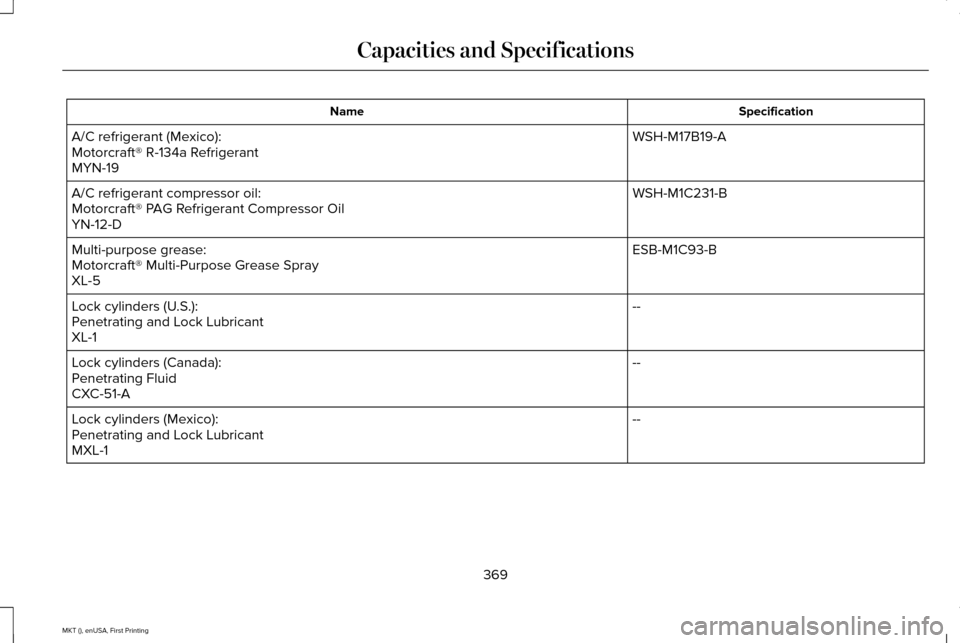
Specification
Name
WSH-M17B19-A
A/C refrigerant (Mexico):
Motorcraft® R-134a Refrigerant
MYN-19
WSH-M1C231-B
A/C refrigerant compressor oil:
Motorcraft® PAG Refrigerant Compressor Oil
YN-12-D
ESB-M1C93-B
Multi-purpose grease:
Motorcraft® Multi-Purpose Grease Spray
XL-5
--
Lock cylinders (U.S.):
Penetrating and Lock Lubricant
XL-1
--
Lock cylinders (Canada):
Penetrating Fluid
CXC-51-A
--
Lock cylinders (Mexico):
Penetrating and Lock Lubricant
MXL-1
369
MKT (), enUSA, First Printing Capacities and Specifications
Page 378 of 452
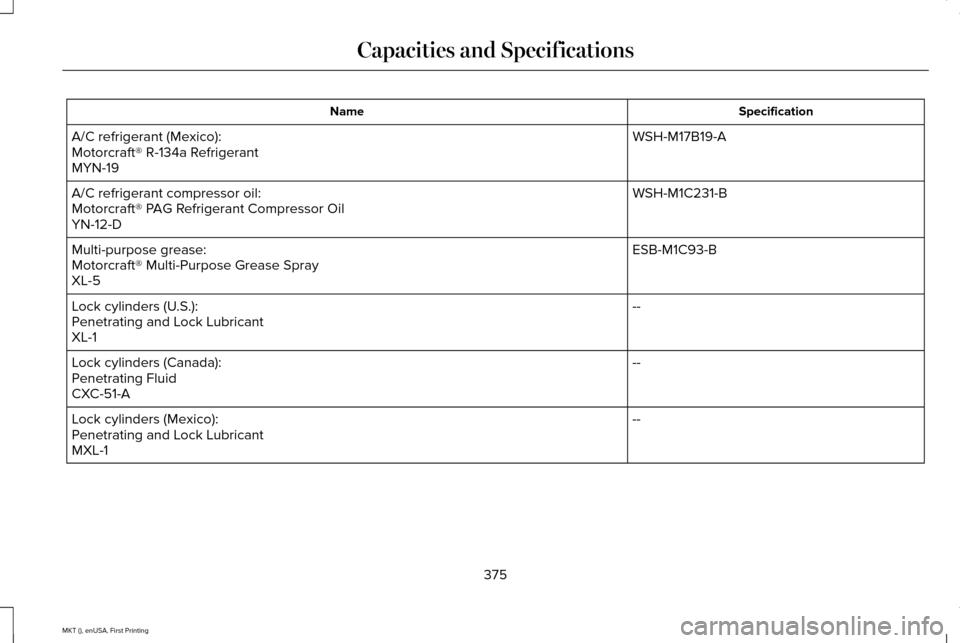
Specification
Name
WSH-M17B19-A
A/C refrigerant (Mexico):
Motorcraft® R-134a Refrigerant
MYN-19
WSH-M1C231-B
A/C refrigerant compressor oil:
Motorcraft® PAG Refrigerant Compressor Oil
YN-12-D
ESB-M1C93-B
Multi-purpose grease:
Motorcraft® Multi-Purpose Grease Spray
XL-5
--
Lock cylinders (U.S.):
Penetrating and Lock Lubricant
XL-1
--
Lock cylinders (Canada):
Penetrating Fluid
CXC-51-A
--
Lock cylinders (Mexico):
Penetrating and Lock Lubricant
MXL-1
375
MKT (), enUSA, First Printing Capacities and Specifications
Page 384 of 452
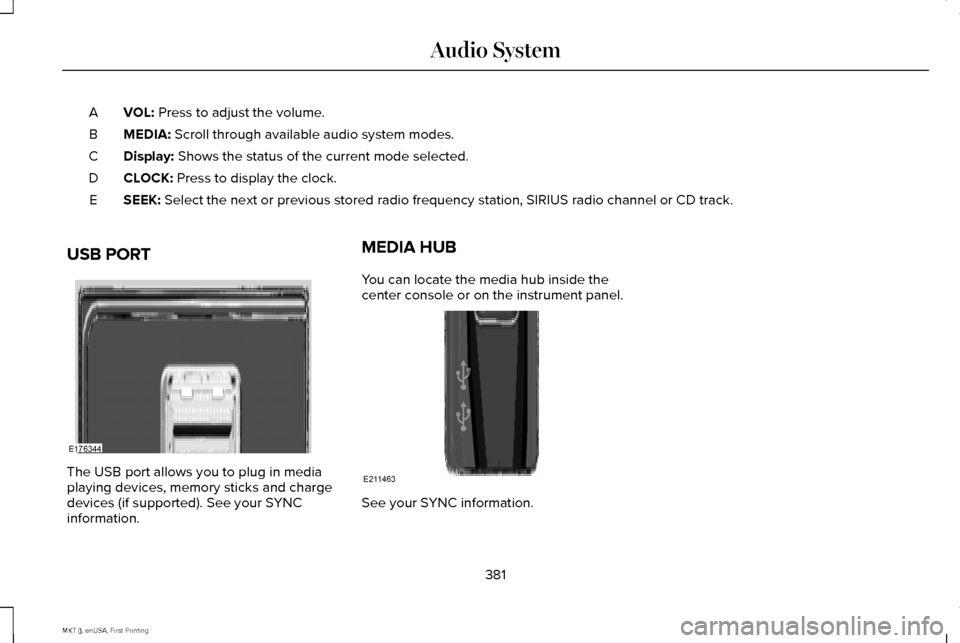
VOL: Press to adjust the volume.
A
MEDIA:
Scroll through available audio system modes.
B
Display:
Shows the status of the current mode selected.
C
CLOCK:
Press to display the clock.
D
SEEK:
Select the next or previous stored radio frequency station, SIRIUS radi\
o channel or CD track.
E
USB PORT The USB port allows you to plug in media
playing devices, memory sticks and charge
devices (if supported). See your SYNC
information. MEDIA HUB
You can locate the media hub inside the
center console or on the instrument panel.
See your SYNC information.
381
MKT (), enUSA, First Printing Audio SystemE176344 E211463
Page 385 of 452
For a complete listing of the accessories that
are available for your vehicle, please contact
your authorized dealer or visit the online
store web site:
Web Address (United States)
www.Accessories.Lincoln.com Web Address (Canada)
www.LincolnCanada.com
Lincoln Motor Company will repair or replace
any properly authorized dealer-installed
Lincoln Original Accessory found to be
defective in factory-supplied materials or
workmanship during the warranty period, as
well as any component damaged by the
defective accessories.
Lincoln Motor Company will warrant your
Lincoln Original Accessory through the
warranty that provides the greatest benefit:
• 24 months, unlimited mileage.
• The remainder of your new vehicle
limited warranty. Contact an authorized dealer for details and
a copy of the warranty.
Exterior Style
•
Side window deflectors.
Interior Style
• Floor mats.
• Rear seat entertainment*.
Lifestyle
• Ash cup or smoker's package.
• Camping tents*.
• Cargo organization and management.
• Conversation mirror.
• Hitch-mounted bike carrier*.
• Racks and carriers.
• Trailer towing accessories.
Peace of Mind
• Car cover*.
• Locking fuel plug.
• Remote start. •
Vehicle security systems.
• Wheel locks.
*Lincoln Licensed Accessory. The accessory
manufacturer designs, develops and
therefore warrants Lincoln Licensed
Accessories, and does not design or test
these accessories to Lincoln Motor Company
engineering requirements. Contact an
authorized Lincoln dealer for the
manufacturer's limited warranty details and
request a copy of the Lincoln Licensed
Accessories product limited warranty from
the accessory manufacturer.
382
MKT (), enUSA, First Printing Accessories
Page 387 of 452
PROTECT YOURSELF FROM THE RISING
COST OF VEHICLE REPAIRS WITH A FORD
EXTENDED SERVICE PLAN.
EXTENDED SERVICE PLAN (U.S. Only)
More than 32 million Ford owners have
discovered the powerful protection of Ford
Extended Service Plan. It is the extended
service plan backed by Ford Motor Company,
and provides peace of mind protection
beyond the New Vehicle Limited Warranty
coverage.
Ford ESP Can Quickly Pay for Itself
One service bill – the cost of parts and labor
– can easily exceed the price of your Ford
Extended Service Plan. With Ford ESP you
minimize your risk for unexpected repair bills
and rising repair costs.
Up to 1,000+ Covered Vehicle Components
There are four core Extended Service Plans
with different levels of coverage. Ask your
authorized dealer for details.
1.
PremiumCARE - Our most comprehensive
coverage. With over 1,000 covered
components, this plan is so complete that
we generally only discuss what’ s not
covered.
2. ExtraCARE - Covers 113 components, and
includes many high-tech items.
3. BaseCARE - Covers 84 components.
4. PowertrainCARE - Covers 29 critical components.
Ford Extended Service Plan is honored by
all authorized Ford dealers in the U.S.,
Canada and Mexico. It is the extended
service plan authorized and backed by Ford
Motor Company.
That means you get:
• Reliable, quality service at any Ford or
Lincoln dealership
• Repairs performed by factory trained
technicians, using genuine parts Rental Car Reimbursement
1st day Rental Benefit
You take advantage of replacement
transportation if your vehicle is at your
authorized dealer for same day covered
repairs.
Extended Rental Benefits
If your vehicle is kept overnight for covered
repairs, you are eligible for rental car
coverage, including bumper to bumper
warranty repairs, and Field Service Actions.
Roadside Assistance
Exclusive 24/7 roadside assistance, including:
•
Towing, flat-tire change and battery jump
starts
• Out of fuel and lock-out assistance.
• Travel expense reimbursement for
lodging, meals and rental car.
• Destination assistance for taxi, shuttle,
rental car coverage and emergency
transportation.
384
MKT (), enUSA, First Printing Extended Service Plan (ESP)