instrument cluster LINCOLN MKT 2016 User Guide
[x] Cancel search | Manufacturer: LINCOLN, Model Year: 2016, Model line: MKT, Model: LINCOLN MKT 2016Pages: 452, PDF Size: 4.69 MB
Page 182 of 452
SelectShift in sport (S):
•
Provides a permanent manual gear
selection where full control of gear
selection is required.
To exit SelectShift mode shift the
transmission into another gear (for example,
drive [D]).
The instrument cluster displays your currently
selected gear. If a gear is requested but not
available due to vehicle conditions (low
speed, too high engine speed for requested
gear selection), the current gear will flash
three times.
Note: At full accelerator pedal travel, the
transmission automatically downshifts for
maximum performance.
Note: In low traction conditions, you can pull
away in second gear using SelectShift. To
perform this operation, select drive (D) or
sport (S) mode and press the + toggle (if
equipped) or pull the + paddle (if equipped)
until 2 is displayed on the cluster. Your
vehicle is now ready to move in 2nd gear. Brake-Shift Interlock WARNINGS
Do not drive your vehicle until you
verify that the brake lamps are working.
When doing this procedure, you will
be taking your vehicle out of park (P)
which means your vehicle can roll freely. To
avoid unwanted vehicle movement, always
fully set the parking brake prior to doing this
procedure. Use wheel chocks if appropriate. If you fully release the parking brake
and the brake warning lamp remains
illuminated, the brakes may not be working
properly. See your authorized dealer. Note:
For some markets this feature will be
disabled.
Your vehicle is equipped with a brake-shift
interlock feature that prevents moving the
gearshift lever from park (P) when the ignition
is in the on position and the brake pedal is
not pressed. If you cannot move the gearshift lever out of
park (P) position with the ignition in the on
position and the brake pedal pressed, a
malfunction may have occurred. It is possible
that a fuse has blown or your vehicle
’s brake
lamps are not operating properly. See Fuse
Specification Chart (page 269).
If the fuse is not blown and the brake lamps
are working properly, the following
procedure will allow you to move the
gearshift lever from park (P):
1. Apply the parking brake, turn the ignition
off and remove the key.
179
MKT (), enUSA, First Printing Transmission
Page 194 of 452
The anti-lock braking system will not
eliminate the risks when:
•
You drive too closely to the vehicle in
front of you.
• Your vehicle is hydroplaning.
• You take corners too fast.
• The road surface is poor.
PARKING BRAKE WARNING
Always set the parking brake fully and
make sure the transmission is locked
in park (P). Failure to set the parking brake
and engage park could result in vehicle
roll-away, property damage or bodily injury. To set the parking brake, press the parking
brake pedal down to its fullest extent. The
brake warning lamp in the instrument cluster
will illuminate and remains illuminated until
the parking brake is released.
To release the parking brake, press the
parking brake pedal down again. If you are parking your vehicle on a grade or
with a trailer, press and hold the brake pedal
down, then set the parking brake. There may
be a little vehicle movement as the parking
brake sets to hold the vehicle's weight. This
is normal and should be no reason for
concern. If needed, press and hold the
service brake pedal down, then try
reapplying the parking brake. Chock the
wheels if required. If the parking brake
cannot hold the weight of the vehicle, the
parking brake may need to be serviced or
the vehicle may be overloaded.
191
MKT (), enUSA, First Printing Brakes
Page 209 of 452

PRINCIPLE OF OPERATION
Cruise control lets you maintain a set speed
without keeping your foot on the accelerator
pedal. You can use cruise control when your
vehicle speed is greater than 20 mph
(30 km/h).
USING CRUISE CONTROL WARNINGS
Do not use cruise control on winding
roads, in heavy traffic or when the road
surface is slippery. This could result in loss
of vehicle control, serious injury or death. When you are going downhill, your
vehicle speed may increase above the
set speed. The system will not apply the
brakes but a warning displays. The cruise controls are on the steering
wheel.
Switching Cruise Control On
Press and release
ON.
The indicator appears in the
instrument cluster.
Setting the Cruise Speed
1. Drive to desired speed.
2. Press and release
SET+.
3. Take your foot off the accelerator pedal.
Note: The indicator will change color. Note:
Cruise control will disengage if the
vehicle speed decreases more than 10 mph
(16 km/h)
below the set speed while driving
uphill.
Changing the Set Speed
• Press and release
SET+ or SET-. When
you select kph as the display
measurement in the information display,
the set speed changes in approximately
2 kph increments. When you select mph
as the display measurement in the
information display, the set speed
changes in approximately 1 mph
increments.
• Press the accelerator or brake pedal until
you reach the desired speed. Press and
release
SET+.
• Press and hold
SET+ or SET-. Release
the control when you reach the desired
speed.
Note: If you accelerate by pressing the
accelerator pedal, the set speed will not
change. When you release the accelerator
pedal, your vehicle returns to the speed that
you previously set.
206
MKT (), enUSA, First Printing Cruise ControlE173610 E71340
Page 220 of 452
Note:
The system may not function if the
camera is blocked or there is damage to the
windshield.
Note: When Aid mode is on and the system
detects no steering activity for a short period,
the system will alert you to put your hands
on the steering wheel. The system may
detect a light grip or touch on the steering
wheel as hands off driving.
The system notifies you to stay in your lane
through the steering system and the
instrument cluster display when the front
camera detects an unintentional drift out of
your lane is likely to occur. The system
automatically detects and tracks the road
lane markings using a camera mounted
behind the interior rear view mirror.
Switching the System On and Off
Note: The system on or off setting is stored
until it is manually changed, unless a MyKey
is detected. If the system detects a MyKey
it defaults to on and the mode is set to Alert.
Note: If a MyKey is detected, pressing the
button will not affect the on or off status of
the system. Press the button located on the
center console to switch the
system on or off.
System Settings
The system has optional setting menus
available. To view or adjust the settings, See
General Information (page 108). The system
stores the last-known selection for each of
these settings. You do not need to readjust
your settings each time you turn on the
system.
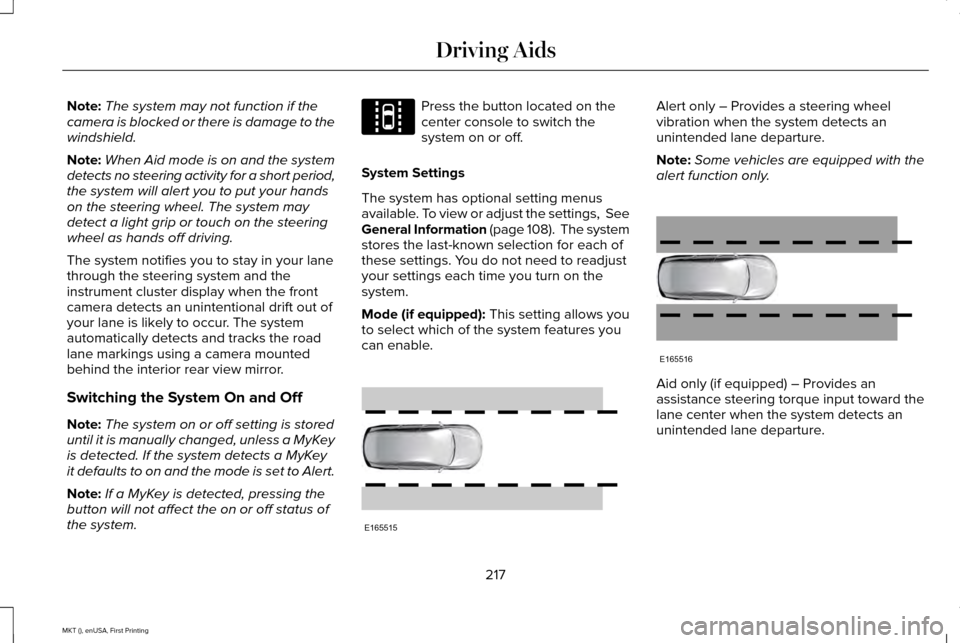
Mode (if equipped): This setting allows you
to select which of the system features you
can enable. Alert only – Provides a steering wheel
vibration when the system detects an
unintended lane departure.
Note:
Some vehicles are equipped with the
alert function only. Aid only (if equipped) – Provides an
assistance steering torque input toward the
lane center when the system detects an
unintended lane departure.
217
MKT (), enUSA, First Printing Driving AidsE144813 E165515 E165516
Page 285 of 452
Protected components
Fuse amp rating
Fuse or relay number
Not used (spare).
20A
20
Not used (spare).
10A
21
Horn relay.
20A
22
Steering wheel control module logic.
15A
23
Instrument cluster.
Steering wheel control module.
15A
24
Datalink.
Not used (spare).
15A
25
Push button ignition switch.
5A
26
Intelligent access module power.
20A
27
Not used (spare).
15A
28
Radio.
20A
29
Global positioning system module.
Front park lamps.
15A
30
Trailer tow relay for park lamps.
Front side markers.
Trailer tow brake controller.
5A
31
Smart window motors.
15A
32
282
MKT (), enUSA, First Printing Fuses
Page 298 of 452
Only use oils certified for gasoline engines
by the American Petroleum Institute (API).
An oil with this trademark symbol conforms
to the current engine and emission system
protection standards and fuel economy
requirements of the International Lubricants
Specification Advisory Council (ILSAC).
1. Remove the filler cap.
2. If the engine oil level is not within the
normal range, add engine oil that meets
Ford specifications. See Capacities and
Specifications (page 351).
3. Remove the engine oil filler cap and use
a funnel to pour the engine oil into the
opening. 4. Wipe off any spilled oil.
5. Replace the filler cap. Turn it until you
feel a strong resistance.
OIL CHANGE INDICATOR RESET
Use the information display controls on the
steering wheel to reset the oil change
indicator.
From the main menu scroll to: Action and description
Message
Press the right arrow button,
then from this menu scroll to
the following message.
Settings
Press the right arrow button,
then from this menu scroll to
the following message.
Vehicle
Press the right arrow button,
then from this menu scroll to
the following message.
Oil Life Action and description
Message
Press and hold the OK button
until the instrument cluster
displays the following
message.
Hold OK to
Reset
Reset Successful
When the oil change indicator
resets the instrument cluster
displays 100%.
Remaining Life
{00}%
If the instrument cluster
displays one of the following
messages, repeat the
process.
Not Reset
Reset Cancelled
295
MKT (), enUSA, First Printing MaintenanceE142732
Page 320 of 452
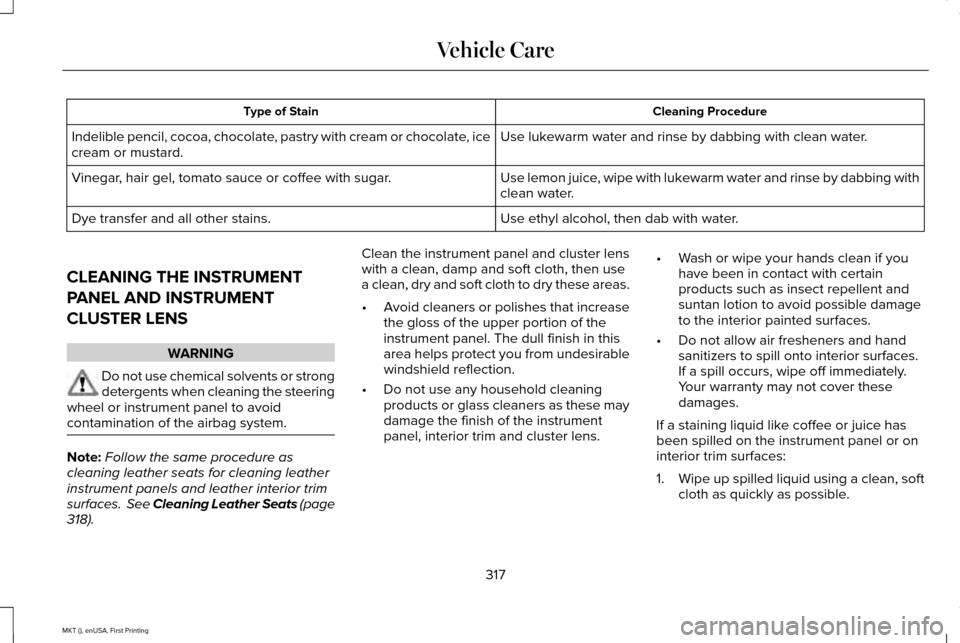
Cleaning Procedure
Type of Stain
Use lukewarm water and rinse by dabbing with clean water.
Indelible pencil, cocoa, chocolate, pastry with cream or chocolate, ice
cream or mustard.
Use lemon juice, wipe with lukewarm water and rinse by dabbing with
clean water.
Vinegar, hair gel, tomato sauce or coffee with sugar.
Use ethyl alcohol, then dab with water.
Dye transfer and all other stains.
CLEANING THE INSTRUMENT
PANEL AND INSTRUMENT
CLUSTER LENS WARNING
Do not use chemical solvents or strong
detergents when cleaning the steering
wheel or instrument panel to avoid
contamination of the airbag system. Note:
Follow the same procedure as
cleaning leather seats for cleaning leather
instrument panels and leather interior trim
surfaces. See Cleaning Leather Seats (page
318). Clean the instrument panel and cluster lens
with a clean, damp and soft cloth, then use
a clean, dry and soft cloth to dry these areas.
•
Avoid cleaners or polishes that increase
the gloss of the upper portion of the
instrument panel. The dull finish in this
area helps protect you from undesirable
windshield reflection.
• Do not use any household cleaning
products or glass cleaners as these may
damage the finish of the instrument
panel, interior trim and cluster lens. •
Wash or wipe your hands clean if you
have been in contact with certain
products such as insect repellent and
suntan lotion to avoid possible damage
to the interior painted surfaces.
• Do not allow air fresheners and hand
sanitizers to spill onto interior surfaces.
If a spill occurs, wipe off immediately.
Your warranty may not cover these
damages.
If a staining liquid like coffee or juice has
been spilled on the instrument panel or on
interior trim surfaces:
1. Wipe up spilled liquid using a clean, soft
cloth as quickly as possible.
317
MKT (), enUSA, First Printing Vehicle Care
Page 443 of 452
Auxiliary Power Points..................................157
110 Volt AC Power Point.....................................157
12 Volt DC Power Point......................................157
Locations................................................................157
AWD See: All-Wheel Drive............................................181
B
Battery See: Changing the 12V Battery.......................303
Blind Spot Information System..................221 Switching the System Off and On..................224
System Errors......................................................223
Using the System...............................................222
Bonnet Lock See: Opening and Closing the Hood............287
Booster Seats..................................................30
Types of Booster Seats........................................31
Brake Fluid Check.......................................302
Brakes..............................................................190 General Information............................................190
Breaking-In.....................................................253
Bulb Specification Chart
.............................309
C
Cabin Air Filter
................................................131 California Proposition 65................................11
Capacities and Specifications - 2.0L
EcoBoost™...................................................360
Specifications.......................................................361
Capacities and Specifications - 3.5L Ecoboost™....................................................365
Specifications......................................................366
Capacities and Specifications - 3.7L.........371 Specifications......................................................372
Capacities and Specifications....................351
Cargo Nets
.....................................................234
Car Wash See: Cleaning the Exterior................................
313
Center Console
.............................................159
Console Refrigerator and Freezer..................159
Second Row Center Console...........................159
Changing a Bulb...........................................307 Front Direction Indicator Lamp.......................308
Front Fog Lamp...................................................307
High Intensity Discharge Headlamp..............
307
LED Lamps...........................................................308
License Plate Lamp............................................308
Changing a Fuse..........................................285 Fuses.....................................................................285
Changing a Road Wheel.............................342 Dissimilar Spare Wheel and Tire Assembly
Information.......................................................343
Tire Change Procedure....................................344 Changing the 12V Battery
..........................303
Changing the Engine Air Filter....................311
Changing the Wiper Blades......................305 Front Wiper Blades............................................305
Rear Wiper Blade...............................................305
Checking MyKey System Status.................67
Checking the Wiper Blades.......................305
Child Restraint and Seatbelt Maintenance..................................................45
Child Restraint Positioning
...........................33
Child Safety.......................................................16
General Information..............................................16
Child Safety Locks..........................................34 Left-Hand Side.......................................................35
Right-Hand Side....................................................35
Cleaning Leather Seats
...............................318
Cleaning Products.........................................312
Cleaning the Alloy Wheels..........................318
Cleaning the Engine
.....................................314
Cleaning the Exterior....................................313 Exterior Chrome Parts........................................313
Exterior Plastic Parts...........................................314
Stripes or Graphics..............................................314
Underbody............................................................314
Cleaning the Instrument Panel and Instrument Cluster Lens............................317
440
MKT (), enUSA, First Printing Index
Page 447 of 452
Information Messages..................................115
Adaptive Cruise Control.....................................116
AdvanceTrac ™........................................................116
Alarm........................................................................\
117
Automatic Engine Shutdown.............................117
AWD........................................................................\
.118
Battery and Charging System...........................118
Blind Spot Information and Cross Traffic Alert System................................................................119
Brake System........................................................119
Collision Warning System.................................120
Doors and Locks.................................................120
Fuel........................................................................\
..121
Keys and Intelligent Access...............................
121
Lane Keeping System........................................122
Maintenance.........................................................122
MyKey.....................................................................123
Park Aid..................................................................124
Power Steering....................................................125
Seats.......................................................................125
Tire Pressure Monitoring System....................
126
Traction Control...................................................126
Transmission.........................................................126 Installing Child Restraints
..............................18
Child Seats...............................................................18
Using Lap and Shoulder Belts............................18
Using Lower Anchors and Tethers for
CHildren (LATCH).............................................24
Using Tether Straps..............................................26
Instrument Cluster
.........................................103
Instrument Lighting Dimmer.........................91
Interior Lamps
..................................................96
Front Row Map Lamps.........................................96
Second Row Map Lamps....................................96
Interior Mirror
.................................................100
Auto-Dimming Mirror..........................................100
Second Row Illuminated Vanity Mirror..........100
Introduction
.........................................................7
J
Jump Starting the Vehicle
..........................258
Connecting the Jumper Cables.....................259
Jump Starting......................................................259
Preparing Your Vehicle.....................................258
Removing the Jumper Cables........................260
K
Keyless Entry
....................................................76
SECURICODE™ Keyless Entry Keypad.............76 Keyless Starting
..............................................161
Ignition Modes......................................................161
Keys and Remote Controls..........................58
L
Lane Keeping System..................................216 Switching the System On and Off...................217
Lighting Control
..............................................89
Headlamp Flasher................................................90
High Beams............................................................90
Lighting..............................................................89 General Information.............................................89
Lincoln Automotive Financial Services
.......11
Load Carrying................................................234
Load Limit.......................................................235
Special Loading Instructions for Owners of
Pick-up Trucks and Utility-type
Vehicles............................................................242
Vehicle Loading - with and without a Trailer................................................................235
444
MKT (), enUSA, First Printing Index