ECU LINCOLN MKT 2017 Owner's Guide
[x] Cancel search | Manufacturer: LINCOLN, Model Year: 2017, Model line: MKT, Model: LINCOLN MKT 2017Pages: 558, PDF Size: 4.59 MB
Page 310 of 558
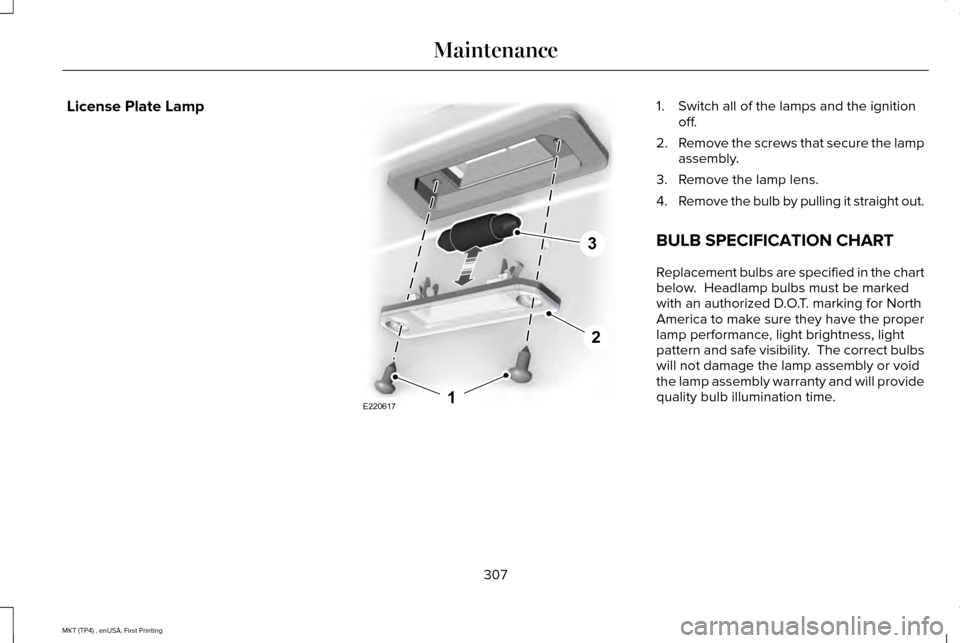
License Plate Lamp 1. Switch all of the lamps and the ignition
off.
2. Remove the screws that secure the lamp
assembly.
3. Remove the lamp lens.
4. Remove the bulb by pulling it straight out.
BULB SPECIFICATION CHART
Replacement bulbs are specified in the chart
below. Headlamp bulbs must be marked
with an authorized D.O.T. marking for North
America to make sure they have the proper
lamp performance, light brightness, light
pattern and safe visibility. The correct bulbs
will not damage the lamp assembly or void
the lamp assembly warranty and will provide
quality bulb illumination time.
307
MKT (TP4) , enUSA, First Printing MaintenanceE2206171
2
3
Page 313 of 558
CHANGING THE ENGINE AIR
FILTER
WARNING
To reduce the risk of vehicle damage
and personal burn injuries, do not start
your engine with the air cleaner removed
and do not remove it while the engine is
running. When changing the engine air filter, do not
allow debris or foreign material to enter the
air induction system. Engine components are
susceptible to damage not covered by the
vehicle Warranty.
Change the air filter element at the correct
interval. See Scheduled Maintenance (page
482).
Incorrect component use can cause damage
not covered by the vehicle Warranty.
See
Motorcraft Parts (page 353).
To replace the air filter element do the
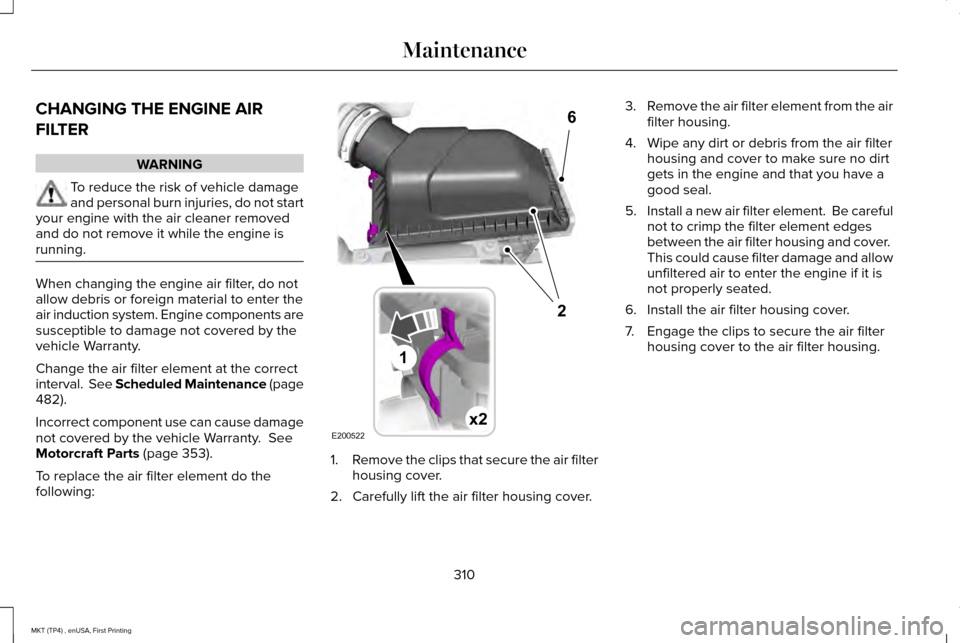
following: 1.
Remove the clips that secure the air filter
housing cover.
2. Carefully lift the air filter housing cover. 3.
Remove the air filter element from the air
filter housing.
4. Wipe any dirt or debris from the air filter housing and cover to make sure no dirt
gets in the engine and that you have a
good seal.
5. Install a new air filter element. Be careful
not to crimp the filter element edges
between the air filter housing and cover.
This could cause filter damage and allow
unfiltered air to enter the engine if it is
not properly seated.
6. Install the air filter housing cover.
7. Engage the clips to secure the air filter housing cover to the air filter housing.
310
MKT (TP4) , enUSA, First Printing MaintenanceE200522x2
6
1
2
Page 340 of 558
•
Do not install tire chains, cables, or
optional traction devices on the rear tires.
This could cause damage to the vehicle ’s
wheel house or body.
• Do not use tire chains, cables or optional
traction devices with optional 255/45R20
tires.
• Install cable chains securely, verifying
that the cables do not touch any wiring,
brake lines or fuel lines.
• Do not exceed 30 mph (48 km/h) with
tire cables on your vehicle.
• Drive cautiously. If you hear the cables
rub or bang against your vehicle, stop
and retighten the cables. If this does not
work, remove the cables to prevent
damage to your vehicle.
• Remove the tire cables when they are no
longer needed. Do not use tire cables on
dry roads. TIRE PRESSURE MONITORING
SYSTEM WARNING
The tire pressure monitoring system is
not a substitute for manually checking
tire pressures. You should periodically check
tire pressures using a pressure gauge.
Failure to correctly maintain tire pressures
could increase the risk of tire failure, loss of
control, vehicle rollover and personal injury. Each tire, including the spare (if
provided), should be checked
monthly when cold and inflated to
the inflation pressure recommended by the
vehicle manufacturer on the vehicle placard
or tire inflation pressure label. (If your vehicle
has tires of a different size than the size
indicated on the vehicle placard or tire
inflation pressure label, you should
determine the proper tire inflation pressure
for those tires.) As an added safety feature, your vehicle has
been equipped with a Tire Pressure
Monitoring System (TPMS) that illuminates a
low tire pressure telltale when one or more
of your tires is significantly under-inflated.
Accordingly, when the low tire pressure
telltale illuminates, you should stop and
check your tires as soon as possible, and
inflate them to the proper pressure. Driving
on a significantly under-inflated tire causes
the tire to overheat and can lead to tire
failure. Under-inflation also reduces fuel
efficiency and tire tread life, and may affect
the vehicle
’s handling and stopping ability.
Please note that the TPMS is not a substitute
for proper tire maintenance, and it is the
driver’ s responsibility to maintain correct tire
pressure, even if under-inflation has not
reached the level to trigger illumination of
the TPMS low tire pressure telltale.
337
MKT (TP4) , enUSA, First Printing Wheels and Tires
Page 346 of 558
When driving with the full-size dissimilar
spare wheel and tire assembly additional
caution should be given to:
•
Towing a trailer.
• Driving vehicles equipped with a camper
body.
• Driving vehicles with a load on the cargo
rack.
Drive cautiously when using a full-size
dissimilar spare wheel and tire assembly and
seek service as soon as possible.
Tire Change Procedure WARNINGS
When one of the front wheels is off the
ground, the transmission alone will not
prevent the vehicle from moving or slipping
off the jack, even if the transmission is in park
(P). WARNINGS
To help prevent your vehicle from
moving when changing a wheel, shift
the transmission into park (P), set the parking
brake and use an appropriate block or wheel
chock to secure the wheel diagonally
opposite to the wheel being changed. For
example, when changing the front left wheel,
place an appropriate block or wheel chock
on the right rear wheel. No person should place any portion of
their body under a vehicle that is
supported by a jack. Do not attempt to change a tire on the
side of the vehicle close to moving
traffic. Pull far enough off the road to avoid
the danger of being hit when operating the
jack or changing the wheel. Always use the jack provided as
original equipment with your vehicle.
If using a jack other than the one provided,
make sure the jack capacity is adequate for
the vehicle weight, including any vehicle
cargo or modifications. If you are unsure if
the jack capacity is adequate, contact the
authorized dealer. Note:
Passengers should not remain in your
vehicle when the vehicle is being jacked.
Note: Jack at the specified locations to avoid
damage to the vehicle.
Note: If your vehicle came equipped with an
extra full size wheel and tire assembly
(placed in the cargo area), be sure to store
the wheel and tire assembly outside of the
vehicle after delivery (livery vehicles only).
Non-Limousine
Note: If the third row seat is stowed in the
floor, you will need to unstow it to access
the spare tire.
1. Park on a level surface, set the parking brake and activate the hazard flashers.
2. Place the transmission in park (P) and turn the engine off.
343
MKT (TP4) , enUSA, First Printing Wheels and Tires
Page 347 of 558
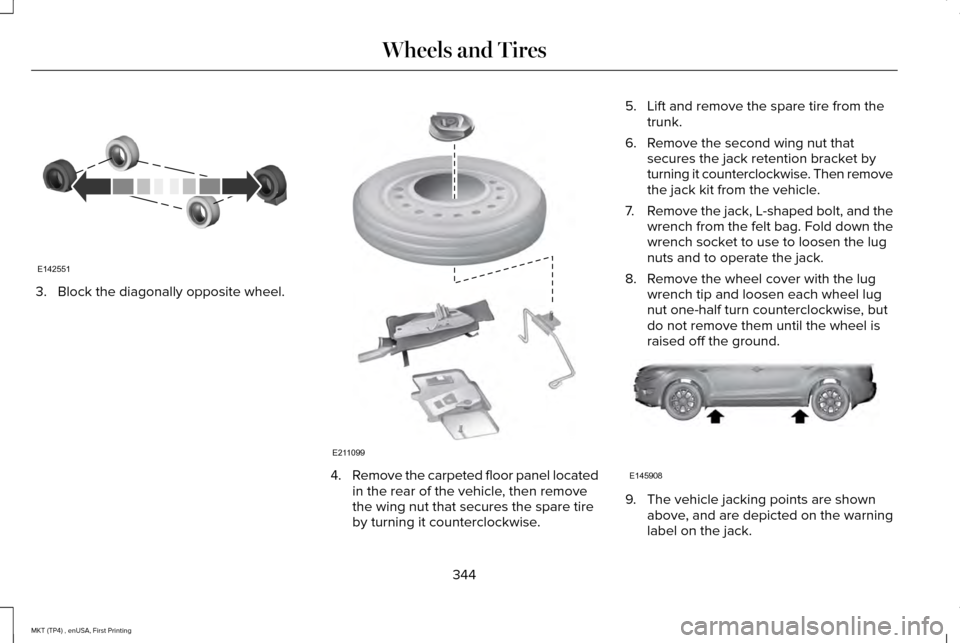
3. Block the diagonally opposite wheel.
4.
Remove the carpeted floor panel located
in the rear of the vehicle, then remove
the wing nut that secures the spare tire
by turning it counterclockwise. 5. Lift and remove the spare tire from the
trunk.
6. Remove the second wing nut that secures the jack retention bracket by
turning it counterclockwise. Then remove
the jack kit from the vehicle.
7. Remove the jack, L-shaped bolt, and the
wrench from the felt bag. Fold down the
wrench socket to use to loosen the lug
nuts and to operate the jack.
8. Remove the wheel cover with the lug wrench tip and loosen each wheel lug
nut one-half turn counterclockwise, but
do not remove them until the wheel is
raised off the ground. 9. The vehicle jacking points are shown
above, and are depicted on the warning
label on the jack.
344
MKT (TP4) , enUSA, First Printing Wheels and TiresE142551 E211099 E145908
Page 349 of 558
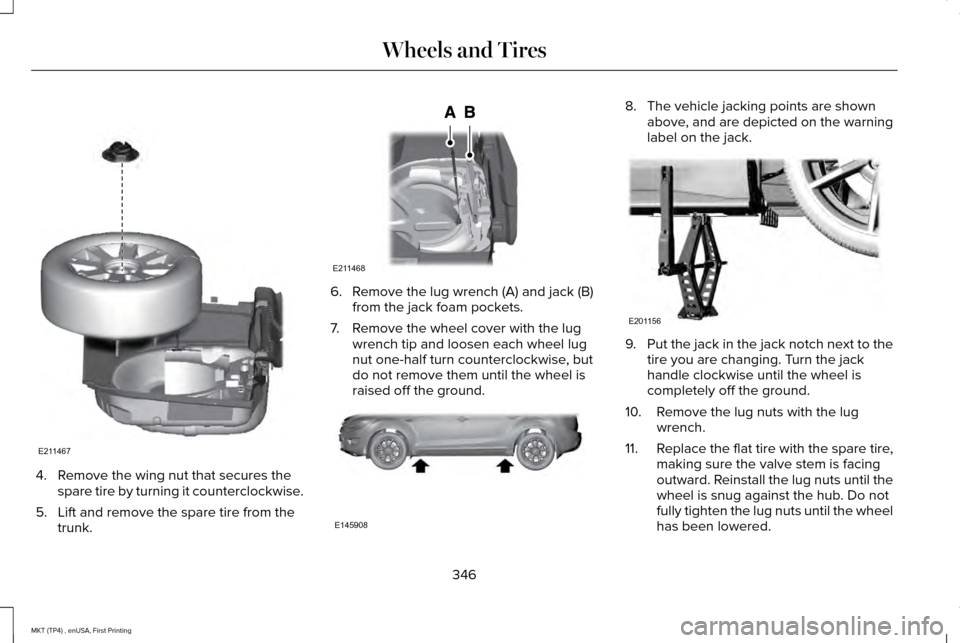
4. Remove the wing nut that secures the
spare tire by turning it counterclockwise.
5. Lift and remove the spare tire from the trunk. 6. Remove the lug wrench (A) and jack (B)
from the jack foam pockets.
7. Remove the wheel cover with the lug wrench tip and loosen each wheel lug
nut one-half turn counterclockwise, but
do not remove them until the wheel is
raised off the ground. 8. The vehicle jacking points are shown
above, and are depicted on the warning
label on the jack. 9.
Put the jack in the jack notch next to the
tire you are changing. Turn the jack
handle clockwise until the wheel is
completely off the ground.
10. Remove the lug nuts with the lug wrench.
11. Replace the flat tire with the spare tire,
making sure the valve stem is facing
outward. Reinstall the lug nuts until the
wheel is snug against the hub. Do not
fully tighten the lug nuts until the wheel
has been lowered.
346
MKT (TP4) , enUSA, First Printing Wheels and TiresE211467 E211468 E145908 E201156
Page 350 of 558
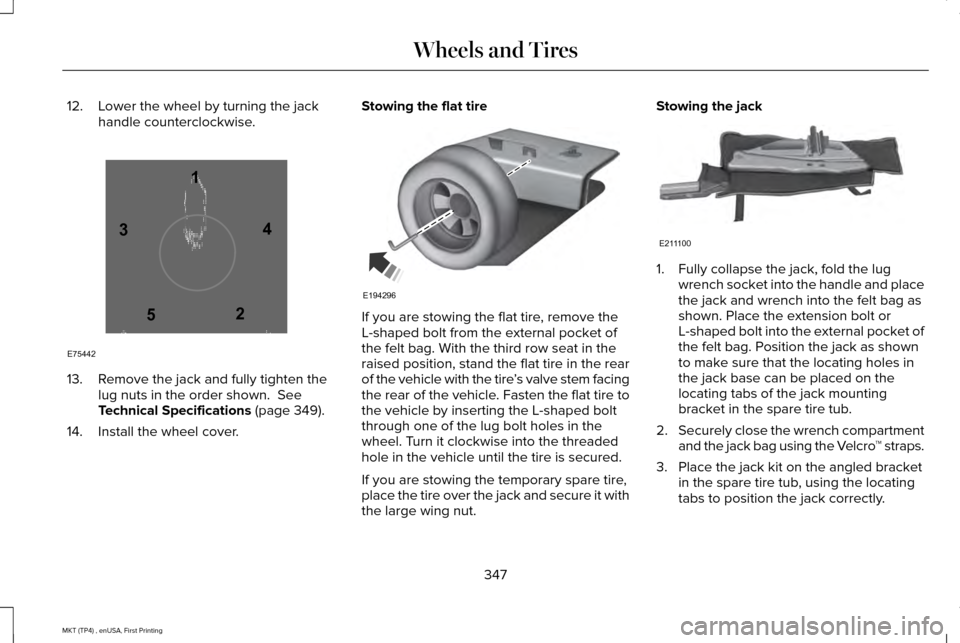
12. Lower the wheel by turning the jack
handle counterclockwise. 13. Remove the jack and fully tighten the
lug nuts in the order shown. See
Technical Specifications (page 349).
14. Install the wheel cover. Stowing the flat tire
If you are stowing the flat tire, remove the
L-shaped bolt from the external pocket of
the felt bag. With the third row seat in the
raised position, stand the flat tire in the rear
of the vehicle with the tire
’s valve stem facing
the rear of the vehicle. Fasten the flat tire to
the vehicle by inserting the L-shaped bolt
through one of the lug bolt holes in the
wheel. Turn it clockwise into the threaded
hole in the vehicle until the tire is secured.
If you are stowing the temporary spare tire,
place the tire over the jack and secure it with
the large wing nut. Stowing the jack
1. Fully collapse the jack, fold the lug
wrench socket into the handle and place
the jack and wrench into the felt bag as
shown. Place the extension bolt or
L-shaped bolt into the external pocket of
the felt bag. Position the jack as shown
to make sure that the locating holes in
the jack base can be placed on the
locating tabs of the jack mounting
bracket in the spare tire tub.
2. Securely close the wrench compartment
and the jack bag using the Velcro ™ straps.
3. Place the jack kit on the angled bracket in the spare tire tub, using the locating
tabs to position the jack correctly.
347
MKT (TP4) , enUSA, First Printing Wheels and Tires12
3
4
5
E75442 E194296 E211100
Page 351 of 558
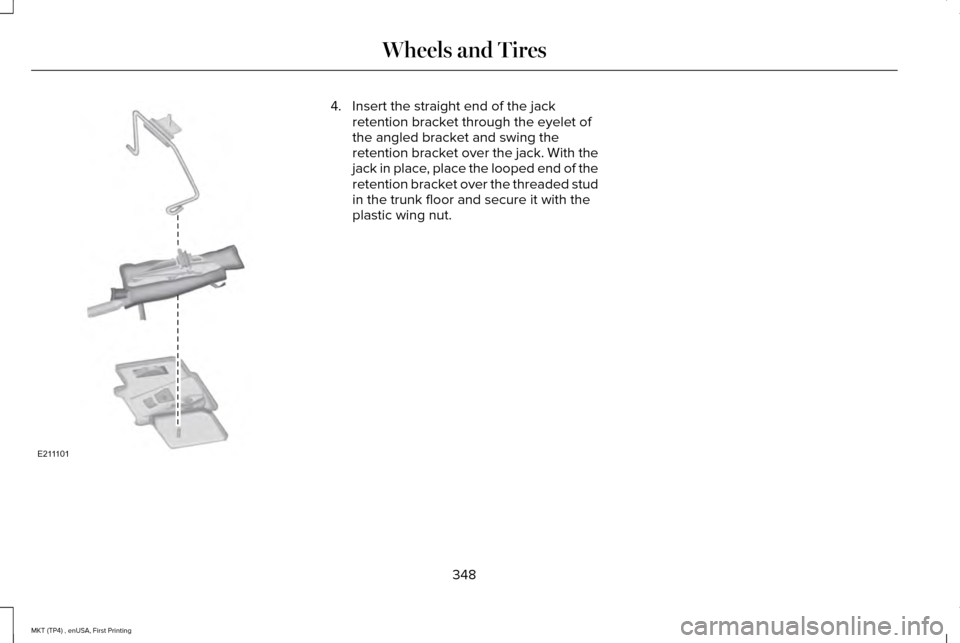
4. Insert the straight end of the jack
retention bracket through the eyelet of
the angled bracket and swing the
retention bracket over the jack. With the
jack in place, place the looped end of the
retention bracket over the threaded stud
in the trunk floor and secure it with the
plastic wing nut.
348
MKT (TP4) , enUSA, First Printing Wheels and TiresE211101
Page 352 of 558

TECHNICAL SPECIFICATIONS
Wheel Lug Nut Torque Specifications
WARNING
When you install a wheel, always remove any corrosion, dirt or foreign m\
aterials present on the mounting surfaces of the wheel or the
surface of the wheel hub, brake drum or brake disc that contacts the wheel. Make sure to secure any fasteners that attach the rotor to
the hub so they do not interfere with the mounting surfaces of the wheel\
. Installing wheels without correct metal-to-metal contact at the wheel
mounting surfaces can cause the wheel nuts to loosen and the wheel to co\
me off while your vehicle is in motion, resulting in loss of vehicle
control, personal injury or death. lb.ft (Nm) *
Bolt size
100 lb.ft (135 Nm)
1/2 x 20
150 lb.ft (204 Nm)
M14 x 1.5 (Limousine only)
*Torque specifications are for nut and bolt threads free of dirt and rust.\
Use only Ford recommended replacement fasteners.
Retighten the lug nuts to the specified torque within 100 miles (160 kil\
ometers) after any wheel disturbance (such as tire rotation, changing \
a
flat tire, wheel removal).
349
MKT (TP4) , enUSA, First Printing Wheels and Tires
Page 389 of 558
•
DISP: Switch the display on or off. You
can also touch the screen to switch the
display back on.
• Temperature, fan and climate control
buttons:
Control the temperature, fan
speed or settings of the climate control
system. See Climate Control (page 130).
911 Assist WARNINGS
Unless the 911 Assist setting is set on
before a crash, the system will not dial
for help which could delay response time,
potentially increasing the risk of serious
injury or death after a crash. setting is set on
before a crash, the system will not dial for
help which could delay response time,
potentially increasing the risk of serious
injury or death after a crash. WARNINGS
Do not wait for 911 Assist to make an
emergency call if you can do it yourself.
Dial emergency services immediately to
avoid delayed response time which could
increase the risk of serious injury or death
after a crash. If you do not hear 911 Assist
within five seconds of the crash, the system
or phone may be damaged or non-functional. Always place your phone in a secure
location in your vehicle so it does not
become a projectile or get damaged in a
crash. Failure to do so may cause serious
injury to someone or damage the phone
which could prevent 911 Assist from working
properly. Note:
The SYNC 911 Assist feature must be
set on before the incident.
Note: The SYNC 911 Assist feature only
operates in the U.S., Canada or in a territory
in which 911 is the emergency number.
Note: Before setting this feature on, make
sure that you read the 911 Assist Privacy
Notice later in this section for important
information. Note:
If any user sets 911 Assist to on or off,
that setting applies for all paired phones. If
911 Assist is switched off and the phone is
connected to SYNC, an icon displays on the
status bar.
Note: Every phone operates differently.
While SYNC 911 Assist works with most
cellular phones, some may have trouble
using this feature.
If a crash deploys an airbag (excluding knee
airbags and rear inflatable safety belts [if
equipped]) or activates the fuel pump
shut-off, your SYNC-equipped vehicle may
be able to contact emergency services by
dialing 911 through a paired and connected
Bluetooth-enabled phone. You can learn
more about the 911 Assist feature, by visiting: Website
www.owner.lincoln.com
www.syncmyride.ca
386
MKT (TP4) , enUSA, First Printing SYNC™ 3