lock LINCOLN MKT 2017 Workshop Manual
[x] Cancel search | Manufacturer: LINCOLN, Model Year: 2017, Model line: MKT, Model: LINCOLN MKT 2017Pages: 558, PDF Size: 4.59 MB
Page 148 of 558
Note:
When you switch the ignition off, the
power fold feature works until the battery
saver turns it off after 10 minutes. You can
reactivate the power seats by pressing the
unlock button on the remote entry key fob
or by using the unlock procedure on the
keyless entry keypad. See Doors and Locks
(page 72). Keep the key in the accessory or
run position to prevent the feature from
timing out.
Rear Seat Armrest (Livery vehicle) WARNING
Use only soft cups in the cup holders.
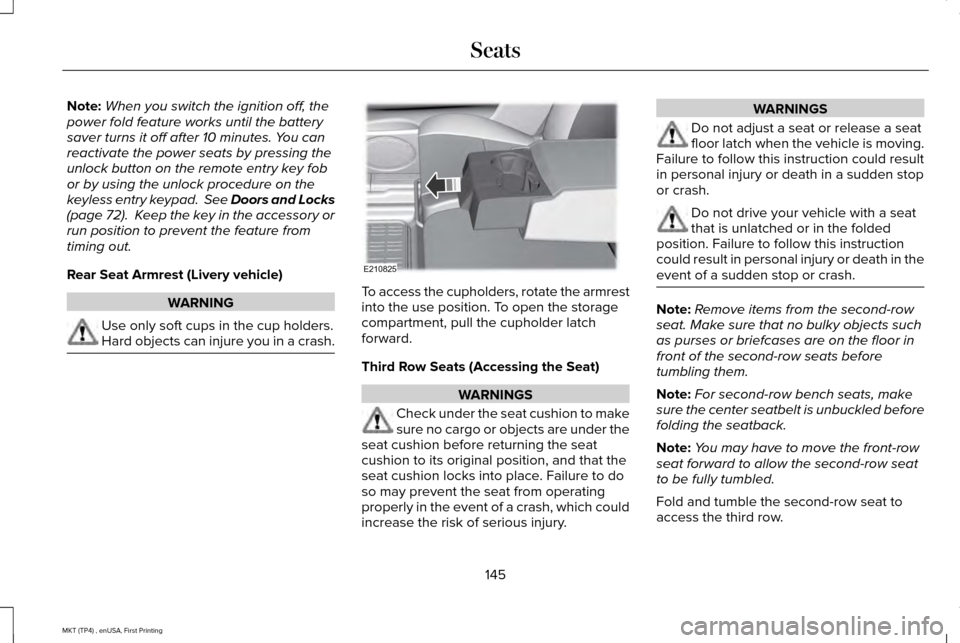
Hard objects can injure you in a crash. To access the cupholders, rotate the armrest
into the use position. To open the storage
compartment, pull the cupholder latch
forward.
Third Row Seats (Accessing the Seat)
WARNINGS
Check under the seat cushion to make
sure no cargo or objects are under the
seat cushion before returning the seat
cushion to its original position, and that the
seat cushion locks into place. Failure to do
so may prevent the seat from operating
properly in the event of a crash, which could
increase the risk of serious injury. WARNINGS
Do not adjust a seat or release a seat
floor latch when the vehicle is moving.
Failure to follow this instruction could result
in personal injury or death in a sudden stop
or crash. Do not drive your vehicle with a seat
that is unlatched or in the folded
position. Failure to follow this instruction
could result in personal injury or death in the
event of a sudden stop or crash. Note:
Remove items from the second-row
seat. Make sure that no bulky objects such
as purses or briefcases are on the floor in
front of the second-row seats before
tumbling them.
Note: For second-row bench seats, make
sure the center seatbelt is unbuckled before
folding the seatback.
Note: You may have to move the front-row
seat forward to allow the second-row seat
to be fully tumbled.
Fold and tumble the second-row seat to
access the third row.
145
MKT (TP4) , enUSA, First Printing SeatsE210825
Page 149 of 558
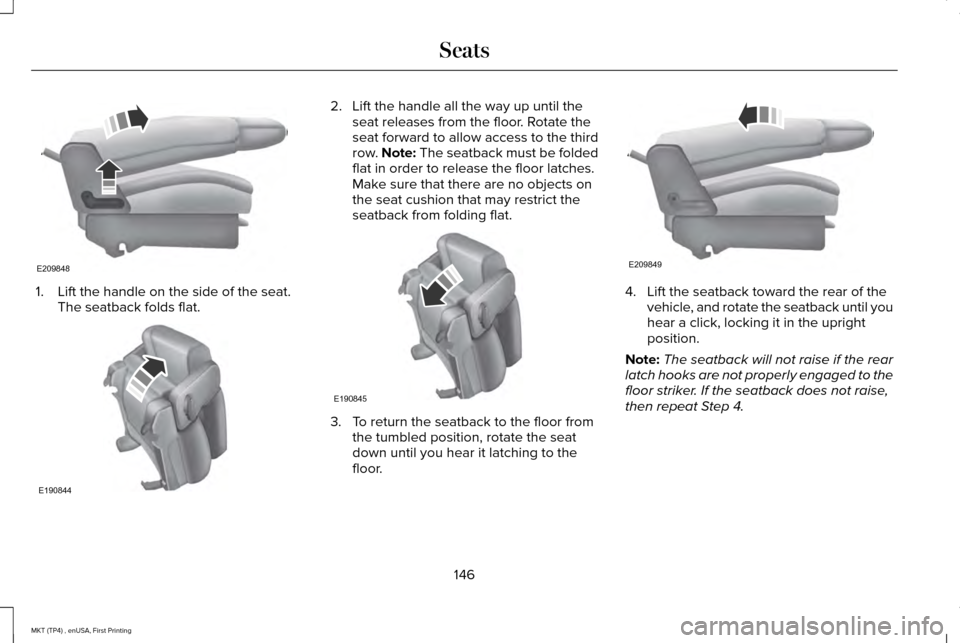
1. Lift the handle on the side of the seat.
The seatback folds flat. 2. Lift the handle all the way up until the
seat releases from the floor. Rotate the
seat forward to allow access to the third
row. Note: The seatback must be folded
flat in order to release the floor latches.
Make sure that there are no objects on
the seat cushion that may restrict the
seatback from folding flat. 3. To return the seatback to the floor from
the tumbled position, rotate the seat
down until you hear it latching to the
floor. 4. Lift the seatback toward the rear of the
vehicle, and rotate the seatback until you
hear a click, locking it in the upright
position.
Note: The seatback will not raise if the rear
latch hooks are not properly engaged to the
floor striker. If the seatback does not raise,
then repeat Step 4.
146
MKT (TP4) , enUSA, First Printing SeatsE209848 E190844 E190845 E209849
Page 150 of 558
Third Row Seat Exit
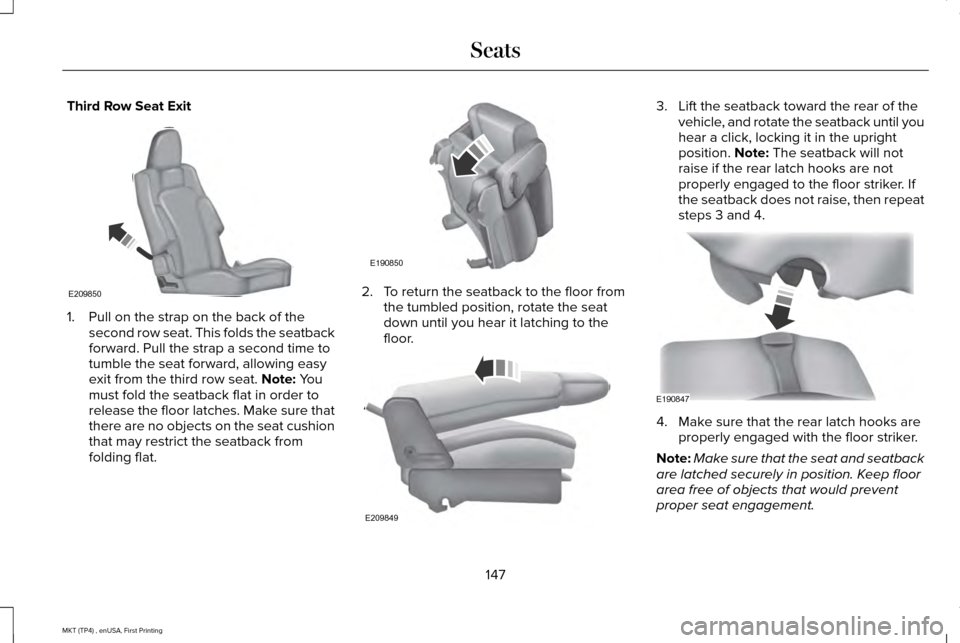
1. Pull on the strap on the back of the
second row seat. This folds the seatback
forward. Pull the strap a second time to
tumble the seat forward, allowing easy
exit from the third row seat. Note: You
must fold the seatback flat in order to
release the floor latches. Make sure that
there are no objects on the seat cushion
that may restrict the seatback from
folding flat. 2. To return the seatback to the floor from
the tumbled position, rotate the seat
down until you hear it latching to the
floor. 3. Lift the seatback toward the rear of the
vehicle, and rotate the seatback until you
hear a click, locking it in the upright
position.
Note: The seatback will not
raise if the rear latch hooks are not
properly engaged to the floor striker. If
the seatback does not raise, then repeat
steps 3 and 4. 4. Make sure that the rear latch hooks are
properly engaged with the floor striker.
Note: Make sure that the seat and seatback
are latched securely in position. Keep floor
area free of objects that would prevent
proper seat engagement.
147
MKT (TP4) , enUSA, First Printing SeatsE209850 E190850 E209849 E190847
Page 152 of 558
Unstowing the Third Row Seat
WARNING
Make sure the seat fully locks into
place by rocking it backward and
forward. Not securing the seat into the
locked position can be dangerous in a crash
and could cause serious personal injury or
death. Note:
Make sure that there are no objects
such as books, purses or brief cases on the
load floor before unstowing the seat. Failure
to remove all objects from the top of the load
floor prior to unstowing it may cause
damage to the seat.
Note: Make sure the area under the forward
portion of the load floor is free of objects
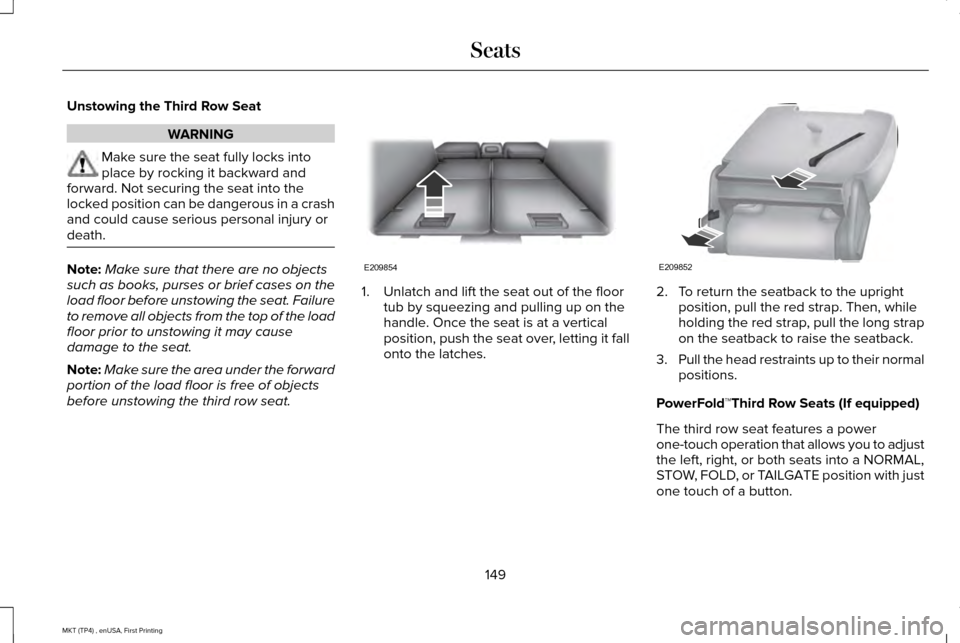
before unstowing the third row seat. 1. Unlatch and lift the seat out of the floor
tub by squeezing and pulling up on the
handle. Once the seat is at a vertical
position, push the seat over, letting it fall
onto the latches. 2. To return the seatback to the upright
position, pull the red strap. Then, while
holding the red strap, pull the long strap
on the seatback to raise the seatback.
3. Pull the head restraints up to their normal
positions.
PowerFold™Third Row Seats (If equipped)
The third row seat features a power
one-touch operation that allows you to adjust
the left, right, or both seats into a NORMAL,
STOW, FOLD, or TAILGATE position with just
one touch of a button.
149
MKT (TP4) , enUSA, First Printing SeatsE209854 E209852
Page 153 of 558
Note:
The power fold seats work only when
the transmission is in park (P) and the
tailgate is open. If the ignition is off and the
feature is still running, the battery saver turns
it off after 10 minutes. You can reactivate the
power seats by pressing the unlock button
on the remote entry key fob or by using the
unlock procedure on the keyless entry
keypad. See Keyless Entry (page 78). Keep
the key in the accessory or run position to
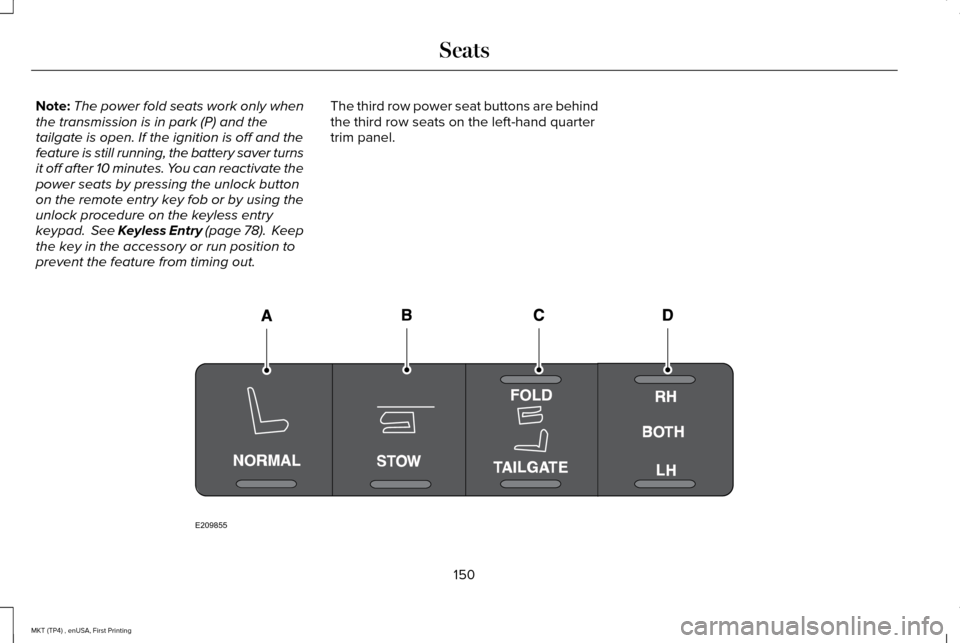
prevent the feature from timing out. The third row power seat buttons are behind
the third row seats on the left-hand quarter
trim panel.
150
MKT (TP4) , enUSA, First Printing SeatsE209855
Page 156 of 558
Note:
You must switch the ignition on to use
this feature. Press the heated seat symbol to cycle
through the various heat settings and off.
More indicator lights indicate warmer
settings.
CLIMATE CONTROLLED SEATS (If
Equipped)
Heated Seats WARNING
People who are unable to feel pain to
their skin because of advanced age,
chronic illness, diabetes, spinal cord injury,
medication, alcohol use, exhaustion or other
physical conditions, must use caution when
using the heated seat. The heated seat may
cause burns even at low temperatures,
especially if used for long periods of time.
Do not place anything on the seat that may
block the heat, such as a blanket or cushion.
This can cause the heated seat to overheat.
Do not puncture the seat with pins, needles
or other pointed objects. This damages the
heating element and can cause the heated
seat to overheat. An overheated seat may
cause serious personal injury. Do not do the following:
•
Place heavy objects on the seat.
• Operate the heated seat if water or any
other liquid spills on the seat. Allow the
seat to dry thoroughly.
Note: You must switch the ignition on to use
this feature. Press the heated seat symbol to cycle
through the various heat settings and off.
More indicator lights indicate warmer
settings.
Cooled Seats
Note:
You must switch the ignition on to use
this feature.
153
MKT (TP4) , enUSA, First Printing SeatsE146322 E146322
Page 158 of 558
HomeLink Wireless Control System
WARNINGS
Make sure that the garage door and
security device are free from
obstruction when you are programming. Do
not program the system with the vehicle in
the garage. Do not use the system with any garage
door opener that does not have the
safety stop and reverse feature as required
by U.S. Federal Safety Standards (this
includes any garage door opener
manufactured before April 1, 1982). A garage
door opener which cannot detect an object,
signaling the door to stop and reverse, does
not meet current federal safety standards.
Using a garage door opener without these
features increases the risk of serious injury
or death. Note:
Make sure you keep the original
remote control transmitter for use in other
vehicles as well as for future system
programming. Note:
We recommend that upon the sale or
lease termination of your vehicle, you erase
the programmed function buttons for security
reasons. See Erasing the Function Button
Codes.
Note: You can program a maximum of three
devices. To change or replace any of the
three devices after it has been initially
programmed, you must first erase the current
settings. See
Erasing the Function Button
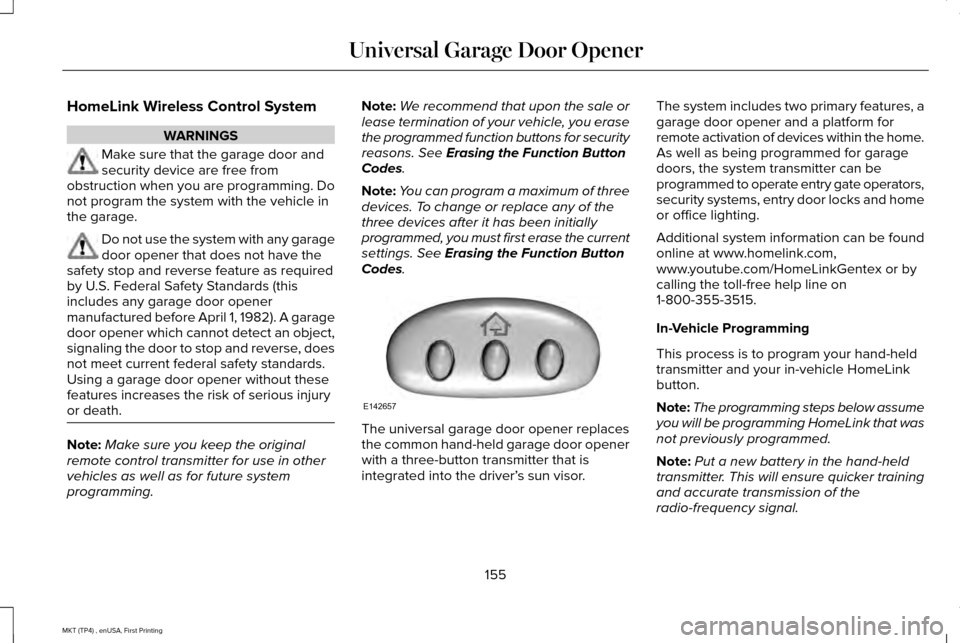
Codes. The universal garage door opener replaces
the common hand-held garage door opener
with a three-button transmitter that is
integrated into the driver’
s sun visor.The system includes two primary features, a
garage door opener and a platform for
remote activation of devices within the home.
As well as being programmed for garage
doors, the system transmitter can be
programmed to operate entry gate operators,
security systems, entry door locks and home
or office lighting.
Additional system information can be found
online at www.homelink.com,
www.youtube.com/HomeLinkGentex or by
calling the toll-free help line on
1-800-355-3515.
In-Vehicle Programming
This process is to program your hand-held
transmitter and your in-vehicle HomeLink
button.
Note:
The programming steps below assume
you will be programming HomeLink that was
not previously programmed.
Note: Put a new battery in the hand-held
transmitter. This will ensure quicker training
and accurate transmission of the
radio-frequency signal.
155
MKT (TP4) , enUSA, First Printing Universal Garage Door OpenerE142657
Page 170 of 558
Automatic Engine Shutdown
For vehicles with a keyless ignition, this
feature automatically shuts down the engine
if it has been idling for an extended period.
The ignition also turns off to save battery
power. Before your vehicle shuts down, a
message appears in the information display
showing a timer counting down. If you do
not intervene within 30 seconds, your vehicle
shuts down. Another message appears in
the information display to inform you that
your vehicle has shut down to save fuel.
Start your vehicle as normal.
Automatic Engine Shutdown Override
Note:
You cannot permanently switch off
the automatic shutdown. When you switch
it off temporarily, it turns on at the next
ignition cycle. You can stop the shutdown, or reset the
timer, at any point before the 30-second
countdown has expired by doing any of the
following:
•
Interacting with your vehicle, for example
pressing the brake or accelerator pedal.
• You can temporarily switch off the
shutdown feature any time the ignition is
on using the information display. See
Information Displays (page 110). The
feature only remains off for the current
ignition cycle.
• During the 30-second countdown, the
system prompts you to press OK or
RESET to temporarily switch the feature
off for the current ignition cycle only.
Stopping the Engine When Your
Vehicle is Stationary
1. Shift into park (P).
2. Press the push button ignition switch.
3. Apply the parking brake.
Note: The ignition, all electrical circuits and
all warning lamps and indicators will be
turned off. Note:
If the engine is idling for 30 minutes,
the ignition and engine automatically shuts
down.
Stopping the Engine When Your
Vehicle is Moving WARNING
Switching off the engine when the
vehicle is still moving will result in a
loss of brake and steering assistance. The
steering will not lock, but higher effort will
be required. When the ignition is switched
off, some electrical circuits, including air
bags, warning lamps and indicators may also
be off. If the ignition was turned off
accidentally, you can shift into neutral (N) and
re-start the engine. 1. Shift into neutral and use the brakes to
bring your vehicle to a safe stop.
2. When your vehicle has stopped, shift into
park (P).
3. Press and hold the push button ignition switch, or press it three times within two
seconds.
167
MKT (TP4) , enUSA, First Printing Starting and Stopping the Engine
Page 171 of 558
4. Apply the parking brake.
Guarding Against Exhaust Fumes
WARNING
If you smell exhaust fumes inside your
vehicle, have your vehicle checked by
your authorized dealer immediately. Do not
drive your vehicle if you smell exhaust fumes.
Carbon monoxide is present in exhaust
fumes. Take precautions to avoid its
dangerous effects. Important Ventilating Information
If you stop your vehicle and then leave the
engine idling for long periods, we
recommend that you do one of the following:
•
Open the windows at least 1 in (3 cm).
• Set your climate control to outside air. ENGINE BLOCK HEATER
(If Equipped) WARNINGS
Failure to follow engine block heater
instructions could result in property
damage or serious personal injury. Do not use your heater with
ungrounded electrical systems or
two-pronged adapters. There is a risk of
electrical shock. Do not fully close the hood, or allow it
to drop under its own weight when
using the engine block heater. This could
damage the power cable and may cause an
electrical short resulting in fire, injury and
property damage. Note:
The heater is most effective when
outdoor temperatures are below 0°F (-18°C).
The heater acts as a starting aid by warming
the engine coolant. This allows the climate
control system to respond quickly. The
equipment includes a heater element
(installed in the engine block) and a wire
harness. You can connect the system to a
grounded 120-volt AC electrical source. We recommend that you do the following for
a safe and correct operation:
•
Use a 16-gauge outdoor extension cord
that is product certified by Underwriter’ s
Laboratory (UL) or Canadian Standards
Association (CSA). This extension cord
must be suitable for use outdoors, in cold
temperatures, and be clearly marked
Suitable for Use with Outdoor
Appliances. Do not use an indoor
extension cord outdoors. This could
result in an electric shock or become a
fire hazard.
• Use as short an extension cord as
possible.
• Do not use multiple extension cords.
• Make sure that when in operation, the
extension cord plug and heater cord plug
connections are free and clear of water.
This could cause an electric shock or fire.
• Make sure your vehicle is parked in a
clean area, clear of combustibles.
• Make sure the heater, heater cord and
extension cord are firmly connected.
168
MKT (TP4) , enUSA, First Printing Starting and Stopping the Engine
Page 172 of 558
•
Check for heat anywhere in the electrical
hookup once the system has been
operating for approximately 30 minutes.
• Make sure the system is unplugged and
properly stowed before starting and
driving your vehicle. Make sure the
protective cover seals the prongs of the
block heater cord plug when not in use.
• Make sure the heater system is checked
for proper operation before winter.
Using the Engine Block Heater
Make sure the receptacle terminals are clean
and dry prior to use. Clean them with a dry
cloth if necessary.
The heater uses 0.4 to 1.0 kilowatt-hours of
energy per hour of use. The system does not
have a thermostat. It achieves maximum
temperature after approximately three hours
of operation. Using the heater longer than
three hours does not improve system
performance and unnecessarily uses
electricity.
169
MKT (TP4) , enUSA, First Printing Starting and Stopping the Engine