lock LINCOLN MKT 2017 User Guide
[x] Cancel search | Manufacturer: LINCOLN, Model Year: 2017, Model line: MKT, Model: LINCOLN MKT 2017Pages: 558, PDF Size: 4.59 MB
Page 39 of 558
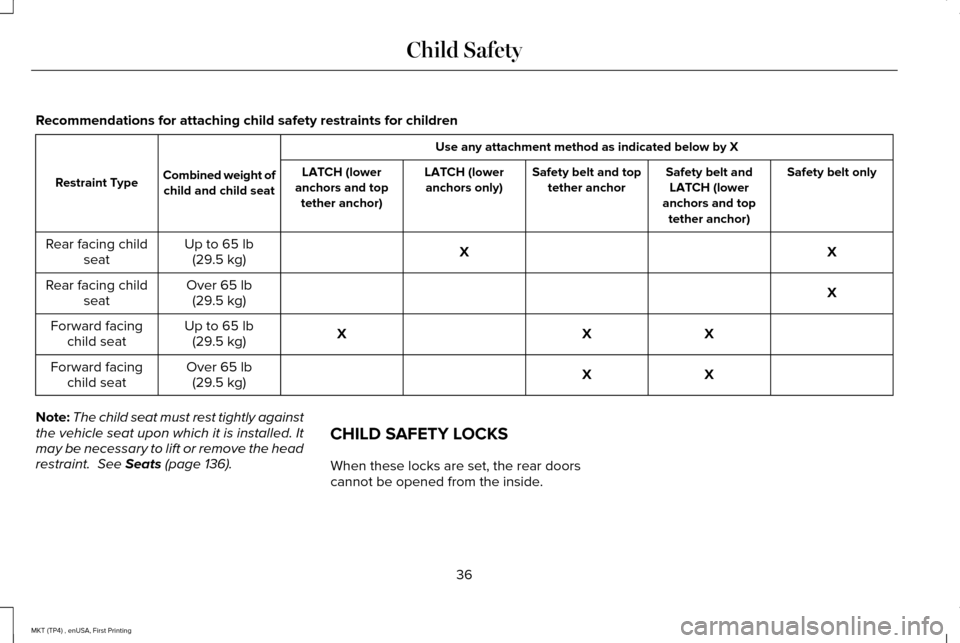
Recommendations for attaching child safety restraints for children
Use any attachment method as indicated below by X
Combined weight of child and child seat
Restraint Type Safety belt only
Safety belt and
LATCH (lower
anchors and top tether anchor)
Safety belt and top
tether anchor
LATCH (lower
anchors only)
LATCH (lower
anchors and top tether anchor)
X
X
Up to 65 lb
(29.5 kg)
Rear facing child
seat
X
Over
65 lb
(29.5 kg)
Rear facing child
seat
X
X
X
Up to
65 lb
(29.5 kg)
Forward facing
child seat
X
X
Over
65 lb
(29.5 kg)
Forward facing
child seat
Note: The child seat must rest tightly against
the vehicle seat upon which it is installed. It
may be necessary to lift or remove the head
restraint.
See Seats (page 136). CHILD SAFETY LOCKS
When these locks are set, the rear doors
cannot be opened from the inside.
36
MKT (TP4) , enUSA, First Printing Child Safety
Page 40 of 558
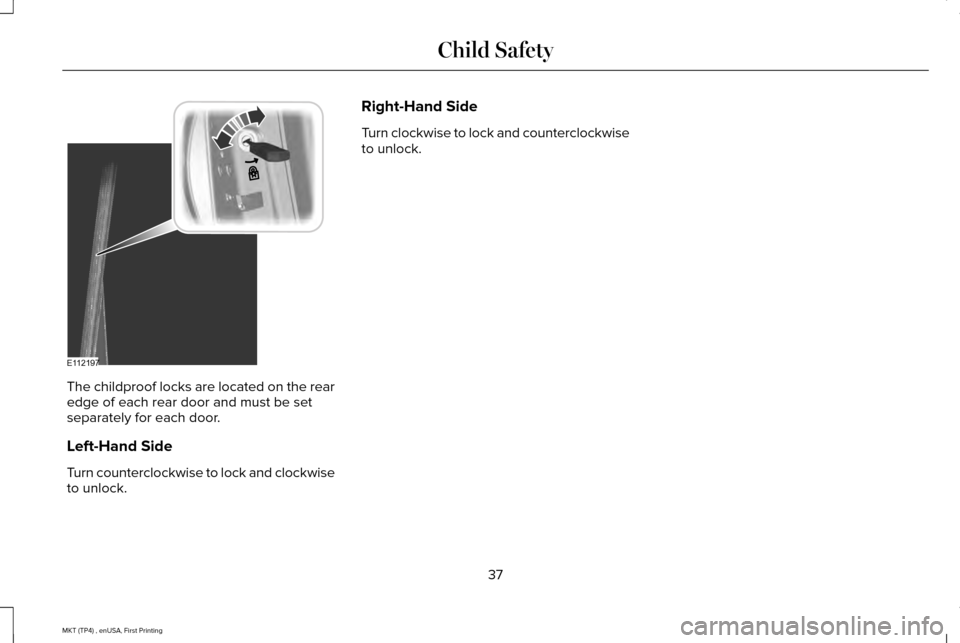
The childproof locks are located on the rear
edge of each rear door and must be set
separately for each door.
Left-Hand Side
Turn counterclockwise to lock and clockwise
to unlock. Right-Hand Side
Turn clockwise to lock and counterclockwise
to unlock.
37
MKT (TP4) , enUSA, First Printing Child SafetyE112197
Page 42 of 558
The safety belt system consists of:
•
Lap and shoulder safety belts.
• Shoulder safety belt with automatic
locking mode, (except driver safety belt
and rear inflatable safety belt).
• Height adjuster at the front outboard
seating positions.
• Safety belt pretensioner at the front
outboard seating positions.
• Belt tension sensor at the front outboard
passenger seating position. •
Safety belt warning light and chime. •
Crash sensors and monitoring system
with readiness indicator.
The safety belt pretensioners and rear
inflatable safety belts are designed to
activate in frontal, near-frontal and side
crashes, and in rollovers. The safety belt
pretensioners at the front seating positions
are designed to tighten the safety belts firmly against the occupant’
s body when activated.
This helps increase the effectiveness of the
safety belts. In frontal crashes, the safety belt
pretensioners can be activated alone or, if
the crash is of sufficient severity, together
with the front airbags.
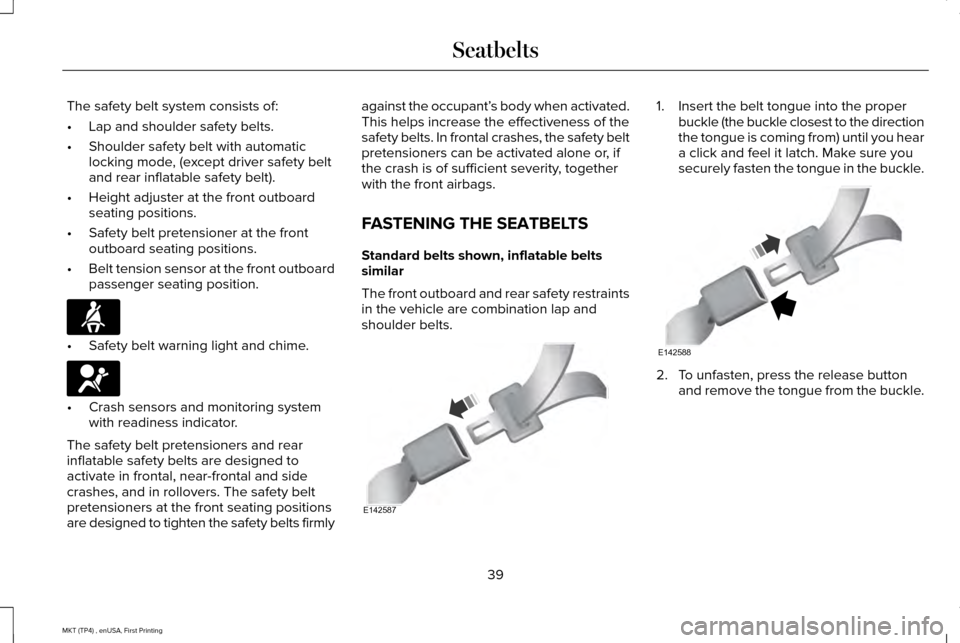
FASTENING THE SEATBELTS
Standard belts shown, inflatable belts
similar
The front outboard and rear safety restraints
in the vehicle are combination lap and
shoulder belts. 1. Insert the belt tongue into the proper
buckle (the buckle closest to the direction
the tongue is coming from) until you hear
a click and feel it latch. Make sure you
securely fasten the tongue in the buckle. 2. To unfasten, press the release button
and remove the tongue from the buckle.
39
MKT (TP4) , enUSA, First Printing SeatbeltsE71880 E67017 E142587 E142588
Page 44 of 558
Keep the outer and inner shoulder belts
together in the stowage clip to prevent the
potential of wrinkling the cargo shade.
Seatbelt Locking Modes
WARNINGS
After a crash, have a qualified
technician check all the seatbelts to
make sure the seatbelts including the
automatic locking retractor feature for child
restraints operate properly. We recommend
replacing any system that has damage or
does not operate properly. Failure to do so
can result in personal injury or death in the
event of a sudden stop or another crash. You must replace the seatbelt if the
automatic locking retractor or any other
seatbelt function is not operating correctly.
Failure to replace the seatbelt and retractor
assembly could increase the risk of injury in
a crash. All safety restraints in the vehicle are
combination lap and shoulder belts. The
driver seatbelt has the vehicle sensitive
locking mode. The front outboard passenger
and rear seatbelts have both the vehicle
sensitive locking mode and the automatic
locking mode.
Vehicle Sensitive Mode
This is the normal retractor mode, which
allows free shoulder belt length adjustment
to your movements and locking in response
to vehicle movement. For example, if the
driver brakes suddenly or turns a corner
sharply, or the vehicle receives an impact of
about 5 mph (8 km/h) or more, the
combination seatbelts lock to help reduce
forward movement of the driver and
passengers.
In addition, the retractor is designed to lock
if you pull the webbing out too quickly. If this
occurs, let the belt retract slightly and pull
the webbing out again in a slow and
controlled manner. Automatic Locking Mode
In this mode, the shoulder belt automatically
pre-locks. The belt retracts to remove any
slack in the shoulder belt. The automatic
locking mode is not available on the driver
seatbelt.
When to Use the Automatic Locking Mode
Use this mode any time a child safety seat,
except a booster, is installed in passenger
front or rear seating positions. Properly
restrain children 12 years old and under in a
rear seating position whenever possible.
See
Child Safety (page 18).
How to Use the Automatic Locking Mode
Non-inflatable seatbelts
41
MKT (TP4) , enUSA, First Printing Seatbelts
Page 45 of 558
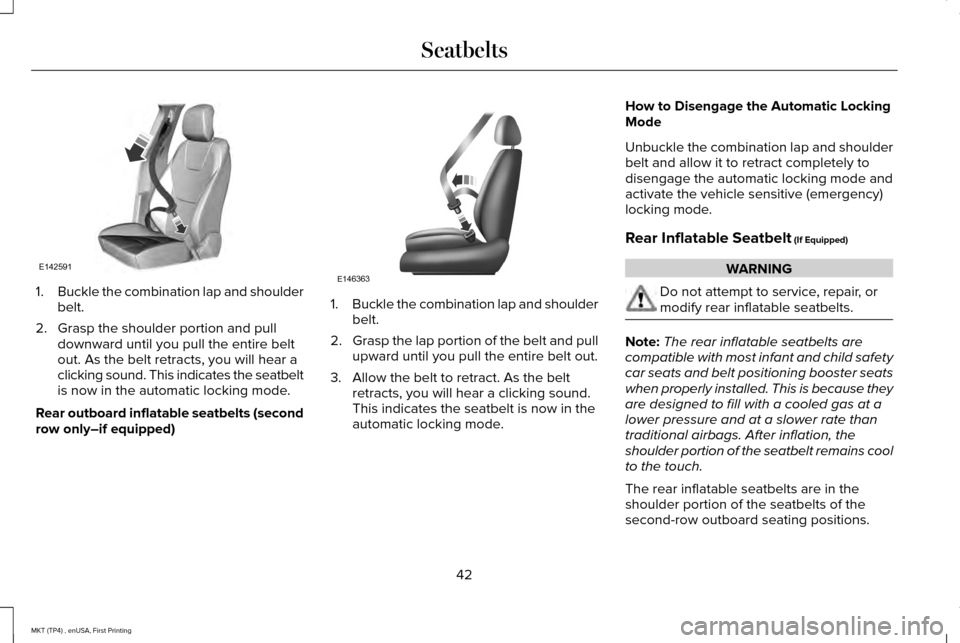
1.
Buckle the combination lap and shoulder
belt.
2. Grasp the shoulder portion and pull downward until you pull the entire belt
out. As the belt retracts, you will hear a
clicking sound. This indicates the seatbelt
is now in the automatic locking mode.
Rear outboard inflatable seatbelts (second
row only–if equipped) 1.
Buckle the combination lap and shoulder
belt.
2. Grasp the lap portion of the belt and pull
upward until you pull the entire belt out.
3. Allow the belt to retract. As the belt retracts, you will hear a clicking sound.
This indicates the seatbelt is now in the
automatic locking mode. How to Disengage the Automatic Locking
Mode
Unbuckle the combination lap and shoulder
belt and allow it to retract completely to
disengage the automatic locking mode and
activate the vehicle sensitive (emergency)
locking mode.
Rear Inflatable Seatbelt (If Equipped) WARNING
Do not attempt to service, repair, or
modify rear inflatable seatbelts.
Note:
The rear inflatable seatbelts are
compatible with most infant and child safety
car seats and belt positioning booster seats
when properly installed. This is because they
are designed to fill with a cooled gas at a
lower pressure and at a slower rate than
traditional airbags. After inflation, the
shoulder portion of the seatbelt remains cool
to the touch.
The rear inflatable seatbelts are in the
shoulder portion of the seatbelts of the
second-row outboard seating positions.
42
MKT (TP4) , enUSA, First Printing SeatbeltsE142591 E146363
Page 46 of 558
The rear inflatable seatbelt consists of the
following:
•
An inflatable bag in the shoulder seatbelt
webbing.
• Lap seatbelt webbing with automatic
locking mode.
• Crash sensors and monitoring system
with readiness indicator. See Crash
Sensors and Airbag Indicator (page 57).
How does the rear inflatable seatbelt
system work? WARNING
If the rear inflatable seatbelt has
deployed, it will not function again and
must be replaced immediately. If the seatbelt
is not replaced, the unrepaired area will
increase the risk of injury in a crash. The rear inflatable seatbelts functions like
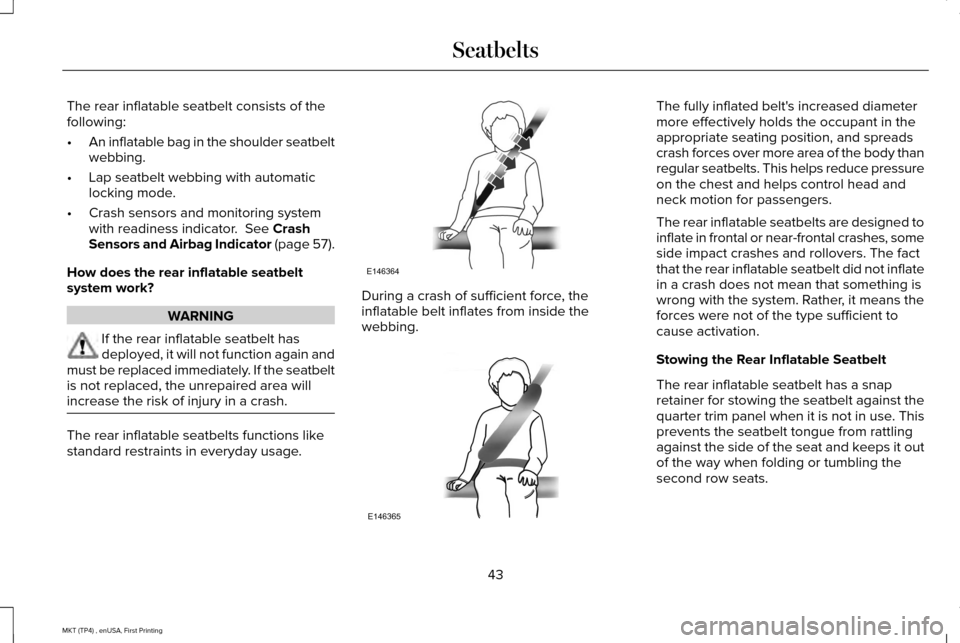
standard restraints in everyday usage. During a crash of sufficient force, the
inflatable belt inflates from inside the
webbing. The fully inflated belt's increased diameter
more effectively holds the occupant in the
appropriate seating position, and spreads
crash forces over more area of the body than
regular seatbelts. This helps reduce pressure
on the chest and helps control head and
neck motion for passengers.
The rear inflatable seatbelts are designed to
inflate in frontal or near-frontal crashes, some
side impact crashes and rollovers. The fact
that the rear inflatable seatbelt did not inflate
in a crash does not mean that something is
wrong with the system. Rather, it means the
forces were not of the type sufficient to
cause activation.
Stowing the Rear Inflatable Seatbelt
The rear inflatable seatbelt has a snap
retainer for stowing the seatbelt against the
quarter trim panel when it is not in use. This
prevents the seatbelt tongue from rattling
against the side of the seat and keeps it out
of the way when folding or tumbling the
second row seats.
43
MKT (TP4) , enUSA, First Printing SeatbeltsE146364 E146365
Page 47 of 558
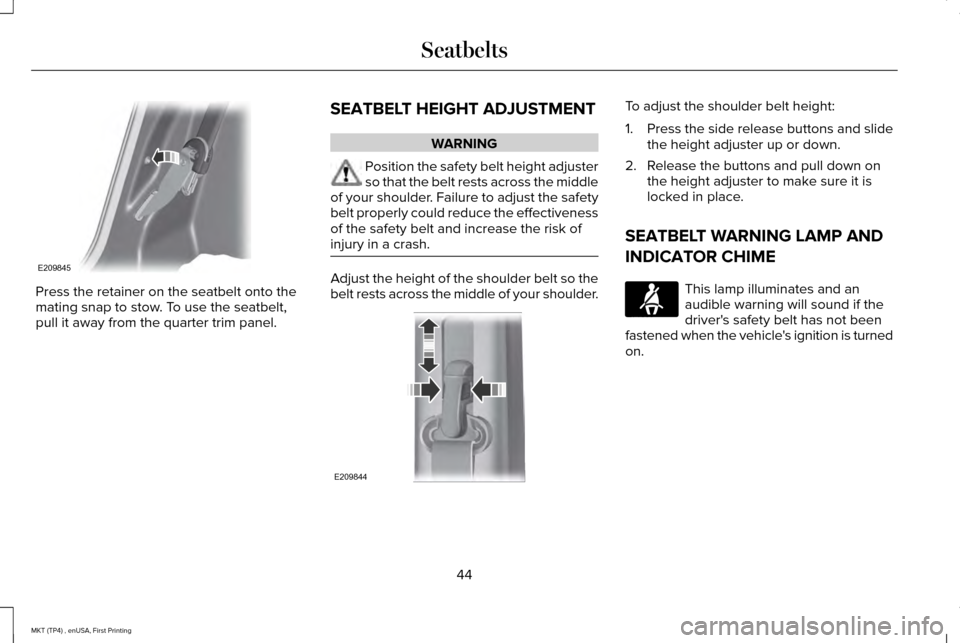
Press the retainer on the seatbelt onto the
mating snap to stow. To use the seatbelt,
pull it away from the quarter trim panel.
SEATBELT HEIGHT ADJUSTMENT WARNING
Position the safety belt height adjuster
so that the belt rests across the middle
of your shoulder. Failure to adjust the safety
belt properly could reduce the effectiveness
of the safety belt and increase the risk of
injury in a crash. Adjust the height of the shoulder belt so the
belt rests across the middle of your shoulder. To adjust the shoulder belt height:
1.
Press the side release buttons and slide
the height adjuster up or down.
2. Release the buttons and pull down on the height adjuster to make sure it is
locked in place.
SEATBELT WARNING LAMP AND
INDICATOR CHIME This lamp illuminates and an
audible warning will sound if the
driver's safety belt has not been
fastened when the vehicle's ignition is turned
on.
44
MKT (TP4) , enUSA, First Printing SeatbeltsE209845 E209844 E71880
Page 63 of 558
GENERAL INFORMATION ON
RADIO FREQUENCIES
This device complies with Part 15 of the FCC
Rules and with Industry Canada
license-exempt RSS standard(s). Operation
is subject to the following two conditions: (1)
This device may not cause harmful
interference, and (2) This device must accept
any interference received, including
interference that may cause undesired
operation.
Note:
Changes or modifications not
expressively approved by the party
responsible for compliance could void the
user's authority to operate the equipment.
The term IC before the radio certification
number only signifies that Industry Canada
technical specifications were met. The typical operating range for your
transmitter is approximately 33 feet (10
meters). Vehicles with the remote start
feature will have a greater range. One of the
following could cause a decrease in
operating range:
•
weather conditions
• nearby radio towers
• structures around the vehicle
• other vehicles parked next to your
vehicle
Other short-distance radio transmitters, such
as amateur radios, medical equipment,
wireless headphones, remote controls and
alarm systems may operate on the same
frequency as your remote control. If other
transmitters are operating on those
frequencies, you may not be able to use your
remote control. Using your remote control
near some types of electronic equipment,
such as USB devices, computers or cell
phones can interfere with remote operation.
Operating your remote control near metal or
metallic-finished purses, bags or clothing can
interfere with remote operation. You can lock
and unlock the doors with the key. Note:
Make sure to lock your vehicle before
leaving it unattended.
Note: If you are in range, the remote control
will operate if you press any button
unintentionally.
Intelligent Access
The system uses a radio frequency signal to
communicate with your vehicle and authorize
your vehicle to unlock when one of the
following conditions are met:
• You touch the inside of any exterior door
handle within
3 ft (1 m) proximity of an
intelligent access key.
• You press the luggage compartment
button.
• You press a button on the transmitter.
If excessive radio frequency interference is
present in the area or if the transmitter
battery is low, you may need to mechanically
unlock your door. You can use the
mechanical key blade in your intelligent
access key to open the driver door in this
situation.
See Remote Control (page 61).
60
MKT (TP4) , enUSA, First Printing Keys and Remote Controls
Page 64 of 558
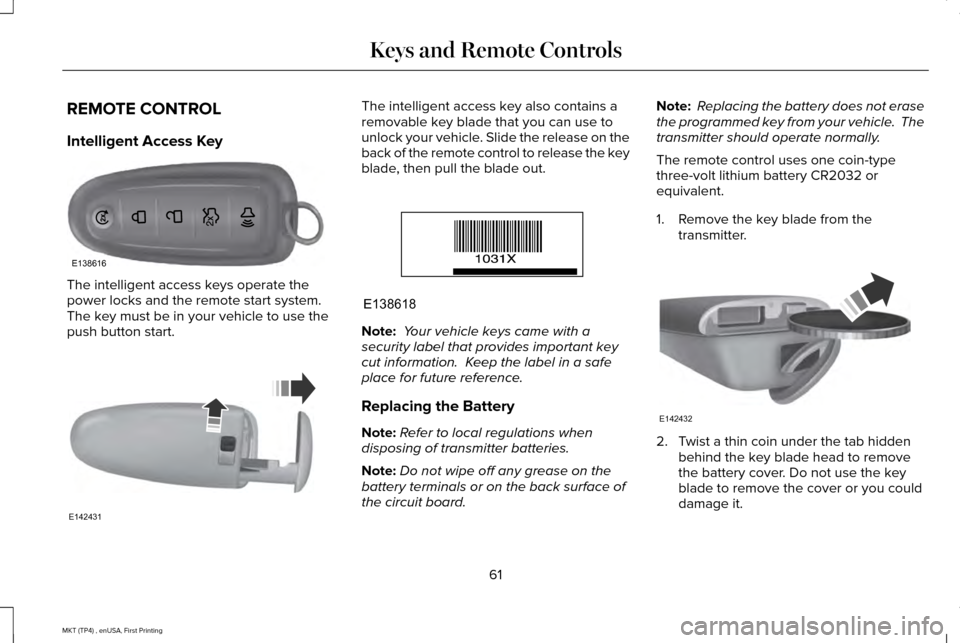
REMOTE CONTROL
Intelligent Access Key
The intelligent access keys operate the
power locks and the remote start system.
The key must be in your vehicle to use the
push button start. The intelligent access key also contains a
removable key blade that you can use to
unlock your vehicle. Slide the release on the
back of the remote control to release the key
blade, then pull the blade out.
Note:
Your vehicle keys came with a
security label that provides important key
cut information. Keep the label in a safe
place for future reference.
Replacing the Battery
Note: Refer to local regulations when
disposing of transmitter batteries.
Note: Do not wipe off any grease on the
battery terminals or on the back surface of
the circuit board. Note:
Replacing the battery does not erase
the programmed key from your vehicle. The
transmitter should operate normally.
The remote control uses one coin-type
three-volt lithium battery CR2032 or
equivalent.
1. Remove the key blade from the transmitter. 2. Twist a thin coin under the tab hidden
behind the key blade head to remove
the battery cover. Do not use the key
blade to remove the cover or you could
damage it.
61
MKT (TP4) , enUSA, First Printing Keys and Remote ControlsE138616 E142431 E138618 E142432
Page 66 of 558
Remote Starting your Vehicle
Note:
You must press each button within
three seconds of each other. If you do not
follow this sequence, your vehicle does not
start remotely, the direction indicators do
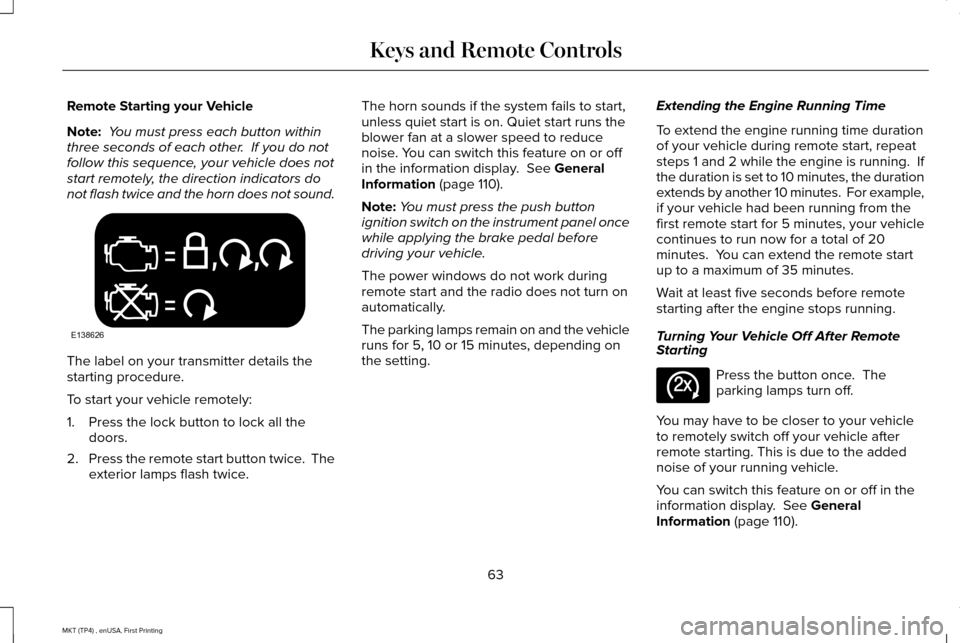
not flash twice and the horn does not sound. The label on your transmitter details the
starting procedure.
To start your vehicle remotely:
1. Press the lock button to lock all the
doors.
2. Press the remote start button twice. The
exterior lamps flash twice. The horn sounds if the system fails to start,
unless quiet start is on. Quiet start runs the
blower fan at a slower speed to reduce
noise. You can switch this feature on or off
in the information display. See General
Information (page 110).
Note: You must press the push button
ignition switch on the instrument panel once
while applying the brake pedal before
driving your vehicle.
The power windows do not work during
remote start and the radio does not turn on
automatically.
The parking lamps remain on and the vehicle
runs for 5, 10 or 15 minutes, depending on
the setting. Extending the Engine Running Time
To extend the engine running time duration
of your vehicle during remote start, repeat
steps 1 and 2 while the engine is running. If
the duration is set to 10 minutes, the duration
extends by another 10 minutes. For example,
if your vehicle had been running from the
first remote start for 5 minutes, your vehicle
continues to run now for a total of 20
minutes. You can extend the remote start
up to a maximum of 35 minutes.
Wait at least five seconds before remote
starting after the engine stops running.
Turning Your Vehicle Off After Remote
Starting
Press the button once. The
parking lamps turn off.
You may have to be closer to your vehicle
to remotely switch off your vehicle after
remote starting. This is due to the added
noise of your running vehicle.
You can switch this feature on or off in the
information display.
See General
Information (page 110).
63
MKT (TP4) , enUSA, First Printing Keys and Remote ControlsE138626 E138625