remote start LINCOLN MKT 2018 User Guide
[x] Cancel search | Manufacturer: LINCOLN, Model Year: 2018, Model line: MKT, Model: LINCOLN MKT 2018Pages: 564, PDF Size: 4.66 MB
Page 86 of 564
If programming was unsuccessful, wait 10
seconds and repeat Steps 1 through 7. If
programming remains unsuccessful, contact
an authorized dealer.
ANTI-THEFT ALARM
The system will warn you of an unauthorized
entry to your vehicle. It will be triggered if
any door, the luggage compartment or the
hood is opened without using the key,
remote control or keyless entry keypad.
The direction indicators will flash and the
horn will sound if unauthorized entry is
attempted while the alarm is armed.
Take all remote controls to an authorized
dealer if there is any potential alarm problem
with your vehicle.
Arming the Alarm
The alarm is ready to arm when there is not
a key in your vehicle. Electronically lock your
vehicle to arm the alarm.
Disarming the Alarm
Disarm the alarm by any of the following
actions:
•
Unlock the doors or luggage
compartment with the remote control or
keyless entry keypad.
• Switch your vehicle on or start your
vehicle.
• Use a key in the driver door to unlock
your vehicle, then switch your vehicle on
within 12 seconds.
Note: Pressing the panic button on the
remote control will stop the horn and signal
indicators, but will not disarm the system.
83
MKT (TP4) , enUSA, Edition date: 201703, First Printing Security
Page 99 of 564
The system has a power-up movement check
feature. When you start your vehicle, the
lamps track left to right, then back to center
to alert the driver that the system is working
properly.
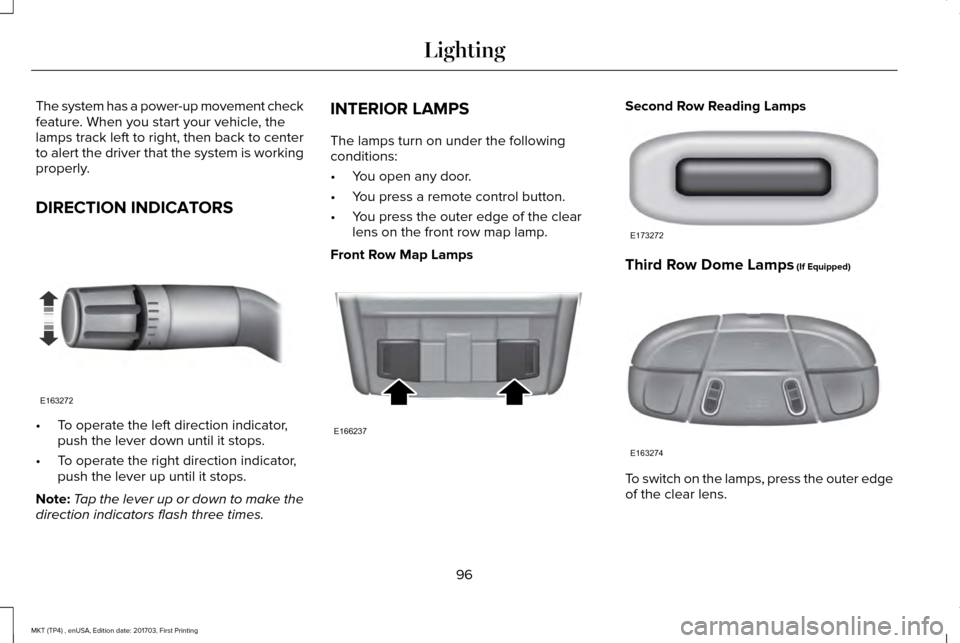
DIRECTION INDICATORS
•
To operate the left direction indicator,
push the lever down until it stops.
• To operate the right direction indicator,
push the lever up until it stops.
Note: Tap the lever up or down to make the
direction indicators flash three times. INTERIOR LAMPS
The lamps turn on under the following
conditions:
•
You open any door.
• You press a remote control button.
• You press the outer edge of the clear
lens on the front row map lamp.
Front Row Map Lamps Second Row Reading Lamps
Third Row Dome Lamps (If Equipped)
To switch on the lamps, press the outer edge
of the clear lens.
96
MKT (TP4) , enUSA, Edition date: 201703, First Printing LightingE163272 E166237 E173272 E163274
Page 102 of 564
Accessory Delay
The window switches remain operational for
several minutes when you switch the ignition
off or until you open either front door.
GLOBAL OPENING AND CLOSING
You can use the remote control to operate
the windows with the ignition off.
Note:
You can enable or disable this feature
in the information display or see an
authorized dealer. See General Information
(page 109).
Note: To operate this feature, accessory
delay must not be active.
Opening the Windows
You can only open the windows for a short
time after you unlock your vehicle with the
remote control. After you unlock your vehicle,
press and hold the remote control unlock
button to open the windows and vent the
moonroof. Release the button once
movement starts. Press the lock or unlock
button to stop movement. Closing the Windows WARNING
When closing the windows and
moonroof, you should verify they are
free of obstructions and make sure that
children and pets are not in the proximity of
the window openings. To close the windows and moonroof, press
and hold the remote control lock button.
Release the button once movement starts.
Press the lock or unlock button to stop
movement.
EXTERIOR MIRRORS
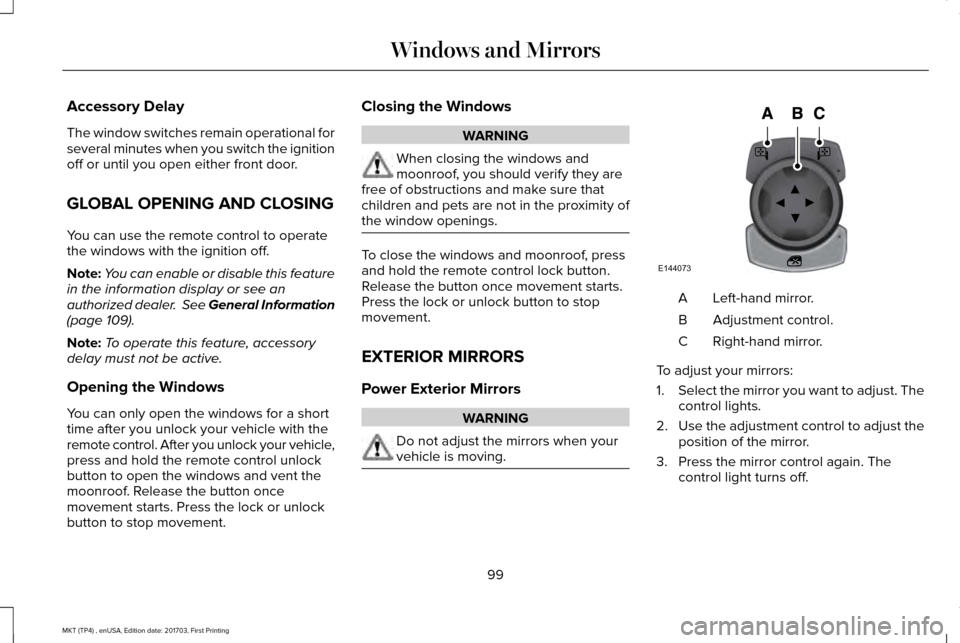
Power Exterior Mirrors
WARNING
Do not adjust the mirrors when your
vehicle is moving. Left-hand mirror.
A
Adjustment control.
B
Right-hand mirror.
C
To adjust your mirrors:
1. Select the mirror you want to adjust. The
control lights.
2. Use the adjustment control to adjust the
position of the mirror.
3. Press the mirror control again. The control light turns off.
99
MKT (TP4) , enUSA, Edition date: 201703, First Printing Windows and MirrorsE144073
Page 117 of 564
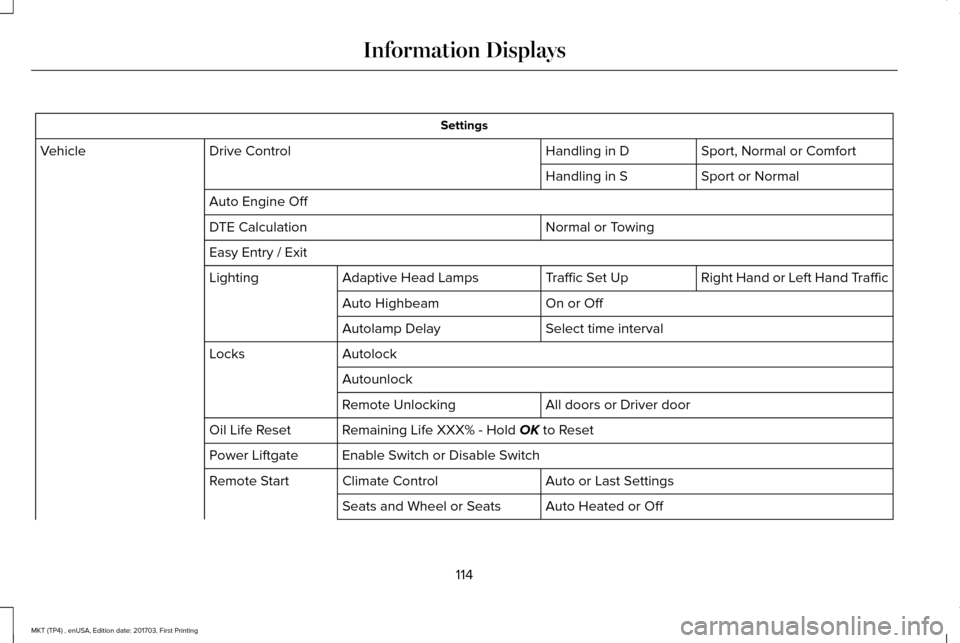
Settings
Sport, Normal or Comfort
Handling in D
Drive Control
Vehicle
Sport or Normal
Handling in S
Auto Engine Off Normal or Towing
DTE Calculation
Easy Entry / Exit
Right Hand or Left Hand Traffic
Traffic Set Up
Adaptive Head Lamps
Lighting
On or Off
Auto Highbeam
Select time interval
Autolamp Delay
Autolock
Locks
Autounlock All doors or Driver door
Remote Unlocking
Remaining Life XXX% - Hold OK to Reset
Oil Life Reset
Enable Switch or Disable Switch
Power Liftgate
Auto or Last Settings
Climate Control
Remote Start
Auto Heated or Off
Seats and Wheel or Seats
114
MKT (TP4) , enUSA, Edition date: 201703, First Printing Information Displays
Page 137 of 564
Note:
Make sure you have a cabin air filter
installed at all times. This prevents foreign
objects from entering the system. Running
the system without a filter in place could
result in degradation or damage to the
system.
Replace the filter at regular intervals. See
Scheduled Maintenance (page 483).
For additional cabin air filter information, or
to replace the filter, see an authorized dealer.
REMOTE START
You can switch this feature on or off and
adjust the settings using the information
display.
The system adjusts the interior temperature
depending on your chosen settings during
remote start.
You cannot adjust the climate control setting
during remote start operation. When you
switch the ignition on, the climate control
system returns to the previous settings. You
can now make adjustments. You need to switch on certain
vehicle-dependent features, such as:
•
Heated seats.
• Cooled seats.
• Heated steering wheel.
• Heated mirrors.
• Heated rear window.
Automatic Settings
In hot weather, the system sets to
72°F
(22°C). The cooled seats are set to high (if
available, and AUTO is on in the information
display).
In moderate weather, the system either heats
or cools (based on previous settings). The
rear defroster, heated mirrors and heated or
cooled seats do not turn on.
In cold weather, the system sets to
72°F
(22°C). The heated seats are set to high (if
available, and AUTO is on in the information
display). The heated rear window and heated
mirrors turn on.
134
MKT (TP4) , enUSA, Edition date: 201703, First Printing Climate Control
Page 218 of 564
Action
Cause
Do not use the system in these conditions because it may not detect
any vehicles ahead.
Water, snow or ice on the surface of the road may interfere with the
radar signals.
Wait a short time or switch to normal cruise control.
You are in a desert or remote area with no other vehicles and no
roadside objects.
Due to the nature of radar technology, it is possible to get a blockage warning with no actual block. This ha\
ppens, for example, when driving
in sparse rural or desert environments. A false blocked condition either self clears, or clears after you restart your vehicl\
e.
Switching to Normal Cruise Control WARNING
Normal cruise control will not brake
when your vehicle is approaching
slower vehicles. Always be aware of which
mode you have selected and apply the
brakes when necessary. You can change from adaptive cruise control
to normal cruise control through the
information display. The cruise control indicator light
replaces the adaptive cruise
control indicator light if you select
normal cruise control. The gap setting does
not display, and the system does not respond
to lead vehicles. Automatic braking remains
active to maintain set speed.
215
MKT (TP4) , enUSA, Edition date: 201703, First Printing Cruise ControlE71340
Page 260 of 564
3. Once the disabled vehicle has been
started, run both vehicle engines for an
additional three minutes before
disconnecting the jumper cables.
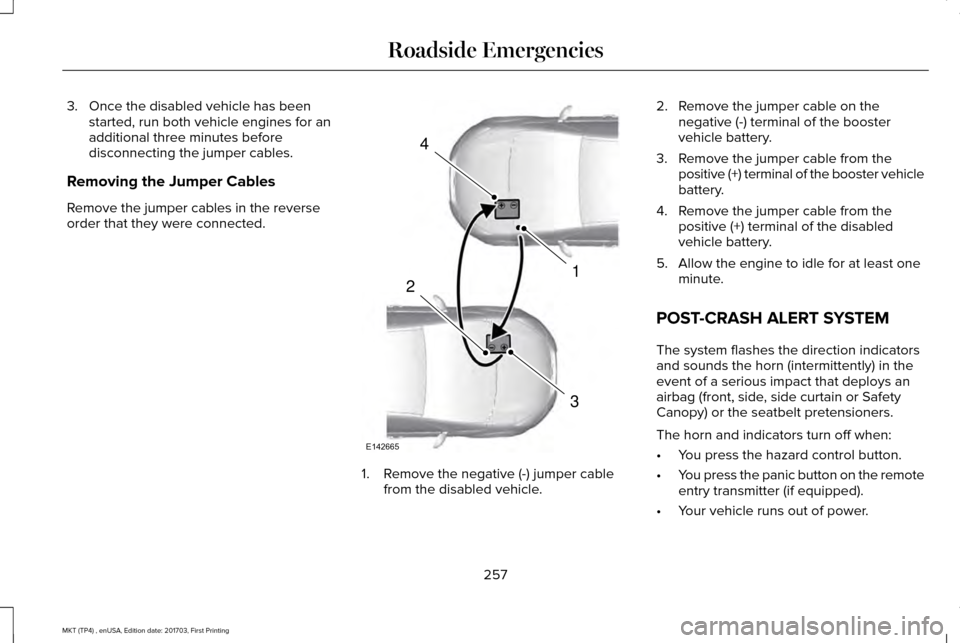
Removing the Jumper Cables
Remove the jumper cables in the reverse
order that they were connected. 1. Remove the negative (-) jumper cable
from the disabled vehicle. 2. Remove the jumper cable on the
negative (-) terminal of the booster
vehicle battery.
3. Remove the jumper cable from the positive (+) terminal of the booster vehicle
battery.
4. Remove the jumper cable from the positive (+) terminal of the disabled
vehicle battery.
5. Allow the engine to idle for at least one minute.
POST-CRASH ALERT SYSTEM
The system flashes the direction indicators
and sounds the horn (intermittently) in the
event of a serious impact that deploys an
airbag (front, side, side curtain or Safety
Canopy) or the seatbelt pretensioners.
The horn and indicators turn off when:
• You press the hazard control button.
• You press the panic button on the remote
entry transmitter (if equipped).
• Your vehicle runs out of power.
257
MKT (TP4) , enUSA, Edition date: 201703, First Printing Roadside Emergencies4
1
3
2
E142665
Page 336 of 564
WARNINGS
2. Lubricate the tire bead and wheel
bead seat area again.
3. Stand at a minimum of 12 ft (3.66 m)
away from the wheel and tire assembly.
4. Use both eye and ear protection.
For a mounting pressure more than
20 psi (1.38 bar)
greater than the
maximum pressure, a Ford dealer or
other tire service professional should do
the mounting.
Always inflate steel carcass tires with a
remote air fill with the person inflating
standing at a minimum of
12 ft (3.66 m)
away from the wheel and tire assembly. Important:
Remember to replace the
wheel valve stems when the road tires
are replaced on your vehicle. It is recommended that the two front
tires or two rear tires generally be
replaced as a pair.
The tire pressure sensors mounted in
the wheels (originally installed on your
vehicle) are not designed to be used in
aftermarket wheels.
The use of wheels or tires not
recommended by Ford Motor Company
may affect the operation of your tire
pressure monitoring system.
If the tire pressure monitoring system
indicator is flashing, your system is
malfunctioning. Your replacement tire
might be incompatible with your tire
pressure monitoring system, or some
component of the system may be
damaged.
Safety Practices WARNINGS
If your vehicle is stuck in snow,
mud or sand, do not rapidly spin
the tires; spinning the tires can tear the
tire and cause an explosion. A tire can
explode in as little as three to five
seconds. Do not spin the wheels at over
34 mph (55 km/h)
. The tires may
fail and injure a passenger or bystander. Driving habits have a great deal to do
with your tire mileage and safety.
*Observe posted speed limits
*Avoid fast starts, stops and turns
*Avoid potholes and objects on the road
*Do not run over curbs or hit the tire
against a curb when parking
333
MKT (TP4) , enUSA, Edition date: 201703, First Printing Wheels and Tires
Page 481 of 564
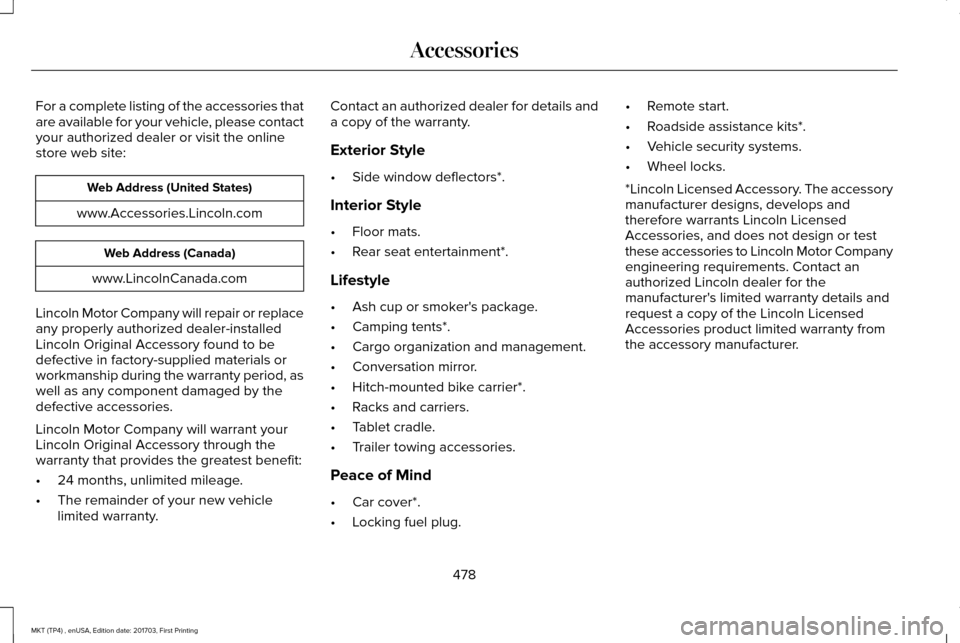
For a complete listing of the accessories that
are available for your vehicle, please contact
your authorized dealer or visit the online
store web site:
Web Address (United States)
www.Accessories.Lincoln.com Web Address (Canada)
www.LincolnCanada.com
Lincoln Motor Company will repair or replace
any properly authorized dealer-installed
Lincoln Original Accessory found to be
defective in factory-supplied materials or
workmanship during the warranty period, as
well as any component damaged by the
defective accessories.
Lincoln Motor Company will warrant your
Lincoln Original Accessory through the
warranty that provides the greatest benefit:
• 24 months, unlimited mileage.
• The remainder of your new vehicle
limited warranty. Contact an authorized dealer for details and
a copy of the warranty.
Exterior Style
•
Side window deflectors*.
Interior Style
• Floor mats.
• Rear seat entertainment*.
Lifestyle
• Ash cup or smoker's package.
• Camping tents*.
• Cargo organization and management.
• Conversation mirror.
• Hitch-mounted bike carrier*.
• Racks and carriers.
• Tablet cradle.
• Trailer towing accessories.
Peace of Mind
• Car cover*.
• Locking fuel plug. •
Remote start.
• Roadside assistance kits*.
• Vehicle security systems.
• Wheel locks.
*Lincoln Licensed Accessory. The accessory
manufacturer designs, develops and
therefore warrants Lincoln Licensed
Accessories, and does not design or test
these accessories to Lincoln Motor Company
engineering requirements. Contact an
authorized Lincoln dealer for the
manufacturer's limited warranty details and
request a copy of the Lincoln Licensed
Accessories product limited warranty from
the accessory manufacturer.
478
MKT (TP4) , enUSA, Edition date: 201703, First Printing Accessories
Page 559 of 564
Transmission.........................................................128
Installing Child Restraints.............................20 Child Seats.............................................................20
Using Lap and Shoulder Belts...........................20
Using Lower Anchors and Tethers for
CHildren (LATCH).............................................26
Using Tether Straps..............................................28
Instrument Cluster.........................................104
Instrument Lighting Dimmer........................92
Instrument Panel Overview...........................16
Interior Lamps
..................................................96
Third Row Dome Lamps......................................96
Interior Mirror
..................................................101
Auto-Dimming Mirror...........................................101
Second Row Illuminated Vanity Mirror...........
101
Introduction
.........................................................7
J
Jump Starting the Vehicle..........................255 Connecting the Jumper Cables.....................256
Jump Starting......................................................256
Preparing Your Vehicle.....................................255
Removing the Jumper Cables.........................
257 K
Keyless Entry
....................................................75
SECURICODE™ Keyless Entry Keypad.............75
Keyless Starting
.............................................162
Ignition Modes.....................................................162
Keys and Remote Controls..........................60
L
Lane Keeping System..................................218 Switching the System On and Off...................218
Liftgate...............................................................78
Lighting Control..............................................90 Headlamp Flasher.................................................91
High Beams.............................................................91
Lighting.............................................................90 General Information.............................................90
Lincoln Automotive Financial Services......12
Lincoln Protect..............................................480 Lincoln Protect (CANADA ONLY).....................481
Lincoln Protect Extended Service Plans (U.S.
Only)..................................................................480
Load Carrying
................................................235
Load Limit.......................................................236 Special Loading Instructions for Owners of
Pick-up Trucks and Utility-type
Vehicles............................................................240 Vehicle Loading - with and without a
Trailer................................................................236
Locking and Unlocking..................................72 Activating Intelligent Access..............................
73
Autolock..................................................................74
Autounlock..............................................................74
Battery Saver..........................................................75
Enabling or Disabling Autolock and Autounlock.........................................................74
Illuminated Entry....................................................75
Illuminated Exit......................................................75
Locking and Unlocking the Doors with the Key Blade............................................................72
Opening a Rear Door From the Inside............73
Power Door Locks................................................72
Remote Control.....................................................72
Smart Unlocks for Intelligent Access Keys......................................................................73
Luggage Covers
...........................................235
Lug Nuts See: Changing a Road Wheel.........................340
M
Maintenance..................................................286 General Information...........................................286
Memory Function
..........................................140
Easy Entry and Exit Feature...............................141
556
MKT (TP4) , enUSA, Edition date: 201703, First Printing Index