door lock LINCOLN MKT 2018 Owner's Manual
[x] Cancel search | Manufacturer: LINCOLN, Model Year: 2018, Model line: MKT, Model: LINCOLN MKT 2018Pages: 564, PDF Size: 4.66 MB
Page 147 of 564
Note:
When you switch the ignition off, the
power fold feature works until the battery
saver turns it off after 10 minutes. You can
reactivate the power seats by pressing the
unlock button on the remote entry key fob
or by using the unlock procedure on the
keyless entry keypad. See Doors and Locks
(page 72). Keep the key in the accessory or
run position to prevent the feature from
timing out.
Rear Seat Armrest (Livery) WARNING
Use only soft cups in the cup holders.
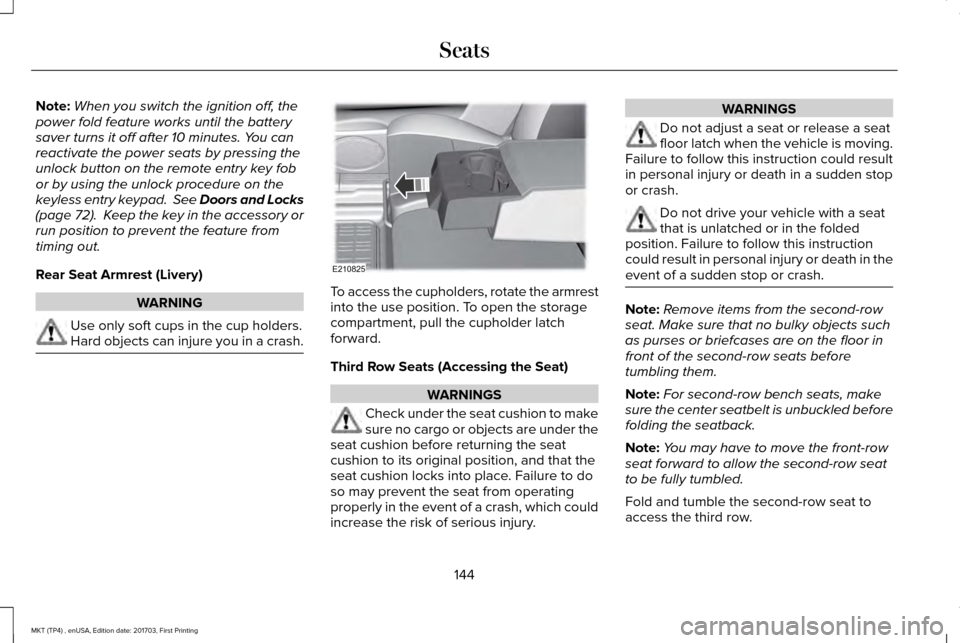
Hard objects can injure you in a crash. To access the cupholders, rotate the armrest
into the use position. To open the storage
compartment, pull the cupholder latch
forward.
Third Row Seats (Accessing the Seat)
WARNINGS
Check under the seat cushion to make
sure no cargo or objects are under the
seat cushion before returning the seat
cushion to its original position, and that the
seat cushion locks into place. Failure to do
so may prevent the seat from operating
properly in the event of a crash, which could
increase the risk of serious injury. WARNINGS
Do not adjust a seat or release a seat
floor latch when the vehicle is moving.
Failure to follow this instruction could result
in personal injury or death in a sudden stop
or crash. Do not drive your vehicle with a seat
that is unlatched or in the folded
position. Failure to follow this instruction
could result in personal injury or death in the
event of a sudden stop or crash. Note:
Remove items from the second-row
seat. Make sure that no bulky objects such
as purses or briefcases are on the floor in
front of the second-row seats before
tumbling them.
Note: For second-row bench seats, make
sure the center seatbelt is unbuckled before
folding the seatback.
Note: You may have to move the front-row
seat forward to allow the second-row seat
to be fully tumbled.
Fold and tumble the second-row seat to
access the third row.
144
MKT (TP4) , enUSA, Edition date: 201703, First Printing SeatsE210825
Page 157 of 564
HomeLink Wireless Control System
WARNINGS
Make sure that the garage door and
security device are free from
obstruction when you are programming. Do
not program the system with the vehicle in
the garage. Do not use the system with any garage
door opener that does not have the
safety stop and reverse feature as required
by U.S. Federal Safety Standards (this
includes any garage door opener
manufactured before April 1, 1982). A garage
door opener which cannot detect an object,
signaling the door to stop and reverse, does
not meet current federal safety standards.
Using a garage door opener without these
features increases the risk of serious injury
or death. Note:
Make sure you keep the original
remote control transmitter for use in other
vehicles as well as for future system
programming. Note:
We recommend that upon the sale or
lease termination of your vehicle, you erase
the programmed function buttons for security
reasons. See Erasing the Function Button
Codes later in this section.
Note: You can program a maximum of three
devices. To change or replace any of the
three devices after it has been initially
programmed, you must first erase the current
settings. See
Erasing the Function Button
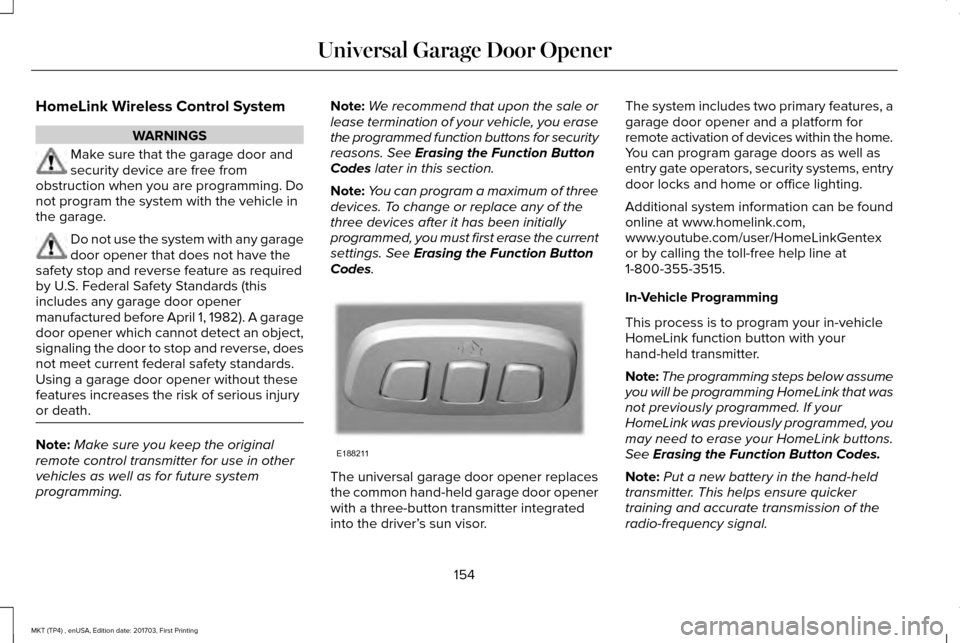
Codes. The universal garage door opener replaces
the common hand-held garage door opener
with a three-button transmitter integrated
into the driver’
s sun visor. The system includes two primary features, a
garage door opener and a platform for
remote activation of devices within the home.
You can program garage doors as well as
entry gate operators, security systems, entry
door locks and home or office lighting.
Additional system information can be found
online at www.homelink.com,
www.youtube.com/user/HomeLinkGentex
or by calling the toll-free help line at
1-800-355-3515.
In-Vehicle Programming
This process is to program your in-vehicle
HomeLink function button with your
hand-held transmitter.
Note:
The programming steps below assume
you will be programming HomeLink that was
not previously programmed. If your
HomeLink was previously programmed, you
may need to erase your HomeLink buttons.
See
Erasing the Function Button Codes.
Note: Put a new battery in the hand-held
transmitter. This helps ensure quicker
training and accurate transmission of the
radio-frequency signal.
154
MKT (TP4) , enUSA, Edition date: 201703, First Printing Universal Garage Door OpenerE188211
Page 169 of 564
4. Apply the parking brake.
Guarding Against Exhaust Fumes
WARNING
If you smell exhaust fumes inside your
vehicle, have your vehicle checked by
your authorized dealer immediately. Do not
drive your vehicle if you smell exhaust fumes.
Carbon monoxide is present in exhaust
fumes. Take precautions to avoid its
dangerous effects. Important Ventilating Information
If you stop your vehicle and then leave the
engine idling for long periods, we
recommend that you do one of the following:
•
Open the windows at least 1 in (3 cm).
• Set your climate control to outside air. ENGINE BLOCK HEATER
(If Equipped) WARNINGS
Failure to follow engine block heater
instructions could result in property
damage or serious personal injury. Do not use your heater with
ungrounded electrical systems or
two-pronged adapters. There is a risk of
electrical shock. Do not fully close the hood, or allow it
to drop under its own weight when
using the engine block heater. This could
damage the power cable and may cause an
electrical short resulting in fire, injury and
property damage. Note:
The heater is most effective when
outdoor temperatures are below 0°F (-18°C).
The heater acts as a starting aid by warming
the engine coolant. This allows the climate
control system to respond quickly. The
equipment includes a heater element
(installed in the engine block) and a wire
harness. You can connect the system to a
grounded 120-volt AC electrical source. We recommend that you do the following for
a safe and correct operation:
•
Use a 16-gauge outdoor extension cord
that is product certified by Underwriter’ s
Laboratory (UL) or Canadian Standards
Association (CSA). This extension cord
must be suitable for use outdoors, in cold
temperatures, and be clearly marked
Suitable for Use with Outdoor
Appliances. Do not use an indoor
extension cord outdoors. This could
result in an electric shock or become a
fire hazard.
• Use as short an extension cord as
possible.
• Do not use multiple extension cords.
• Make sure that when in operation, the
extension cord plug and heater cord plug
connections are free and clear of water.
This could cause an electric shock or fire.
• Make sure your vehicle is parked in a
clean area, clear of combustibles.
• Make sure the heater, heater cord and
extension cord are firmly connected.
166
MKT (TP4) , enUSA, Edition date: 201703, First Printing Starting and Stopping the Engine
Page 221 of 564
•
Switching the ignition off and on.
• Stopping the vehicle and then opening
and closing the driver’ s door.
LANE KEEPING SYSTEM (If Equipped) WARNINGS
The system is designed to aid the
driver. It is not intended to replace your
attention and judgment. You are still
responsible to drive with due care and
attention. Always drive with due care and
attention when using and operating the
controls and features on your vehicle. At all times, you are responsible for
controlling your vehicle, supervising
the system and intervening, if required.
Failure to take care may result in the loss of
control of your vehicle, serious personal
injury or death. In cold and severe weather conditions
the system may not function. Rain,
snow and spray can all limit sensor
performance. WARNINGS
The system will not operate if the
sensor cannot track the road lane
markings. The sensor may incorrectly track lane
markings as other structures or objects.
This can result in a false or missed warning. The system may not operate properly
if the sensor is blocked. Keep the
windshield free from obstruction. If damage occurs in the immediate area
surrounding the sensor, have your
vehicle checked as soon as possible. Note:
The system works above
40 mph
(64 km/h).
Note: The system works as long as the
camera can detect one lane marking.
Note: When Aid or both modes are selected
and the system detects no steering activity
for a short period, the system alerts you to
put your hands on the steering wheel. The
system may detect a light grip or touch on
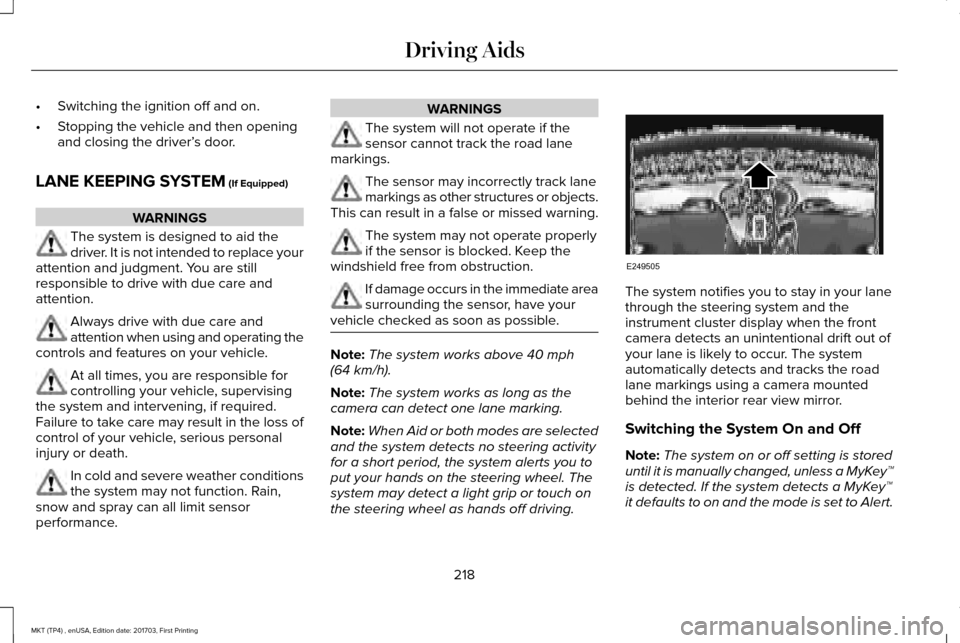
the steering wheel as hands off driving. The system notifies you to stay in your lane
through the steering system and the
instrument cluster display when the front
camera detects an unintentional drift out of
your lane is likely to occur. The system
automatically detects and tracks the road
lane markings using a camera mounted
behind the interior rear view mirror.
Switching the System On and Off
Note:
The system on or off setting is stored
until it is manually changed, unless a MyKey™
is detected. If the system detects a MyKey™
it defaults to on and the mode is set to Alert.
218
MKT (TP4) , enUSA, Edition date: 201703, First Printing Driving AidsE249505
Page 251 of 564

Recreational Towing
Note:
Put your climate control system in
recirculated air mode to prevent exhaust
fumes from entering the vehicle. See
Climate Control (page 129).
Follow these guidelines if you have a need
for recreational (RV) towing. An example of
recreational towing would be towing your
vehicle behind a motorhome. We designed
these guidelines to prevent damage to your
transmission.
You can tow your 3.5L EcoBoost or 3.7L
Duratec equipped vehicle with all four
wheels on the ground.
If you tow your vehicle with all four wheels
on the ground:
• Tow only in the forward direction.
• Release the parking brake.
Vehicles with Keyless Start
1. Start the vehicle by pressing the brake pedal, and then pressing the keyless start
button until the vehicle starts. 2. Press the brake pedal and shift the
gearshift into neutral (N).
3. Turn the vehicle off by pressing the keyless start button once.
4. Disconnect the negative (black) cable from the battery. You need the door key
to lock and unlock doors when the
battery cable is disconnected.
See
Changing the 12V Battery (page 301).
Note: The anti-theft system does not work
until you reconnect the battery cable.
Start the engine within 15 minutes of
reconnecting the battery cable.
Vehicles with an Ignition Key
1. Start the vehicle by pressing the brake pedal, and then turning the ignition key
until the vehicle starts.
2. Press the brake pedal and shift the transmission into neutral (N).
3. Turn off your vehicle by turning the ignition key past the accessory position.
The key position is between the
accessory and off positions. 4. Disconnect the negative (black) cable
from the battery. See Changing the 12V
Battery
(page 301).
Note: The anti-theft system does not work
until you reconnect the battery cable.
Start the engine within 15 minutes of
reconnecting the battery cable.
All Vehicles
• Do not exceed
65 mph (105 km/h).
• Start the engine and allow it to run for
five minutes at the beginning of each day
and every six hours thereafter. With the
engine running and your foot on the
brake, shift into drive (D) and then into
reverse (R) before shifting back into
neutral (N).
Front-wheel Drive Vehicles
Alternatively, you can tow your front-wheel
drive vehicle with the front wheels off the
ground by using a tow dolly, or with all four
wheels off the ground using a vehicle
transport trailer. If you are using a tow dolly,
follow the instructions specified by the
equipment provider.
248
MKT (TP4) , enUSA, Edition date: 201703, First Printing Towing
Page 316 of 564
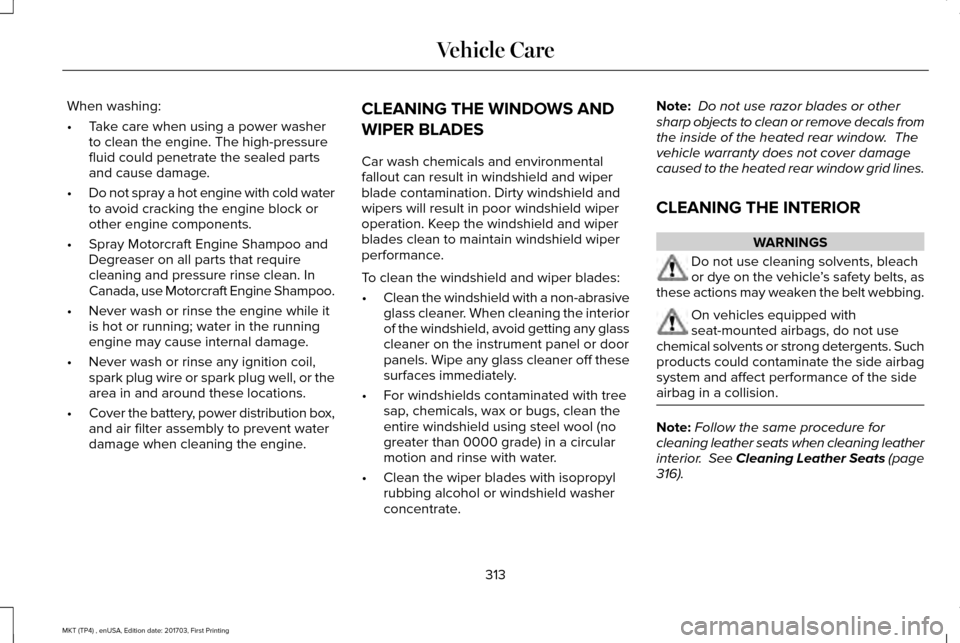
When washing:
•
Take care when using a power washer
to clean the engine. The high-pressure
fluid could penetrate the sealed parts
and cause damage.
• Do not spray a hot engine with cold water
to avoid cracking the engine block or
other engine components.
• Spray Motorcraft Engine Shampoo and
Degreaser on all parts that require
cleaning and pressure rinse clean. In
Canada, use Motorcraft Engine Shampoo.
• Never wash or rinse the engine while it
is hot or running; water in the running
engine may cause internal damage.
• Never wash or rinse any ignition coil,
spark plug wire or spark plug well, or the
area in and around these locations.
• Cover the battery, power distribution box,
and air filter assembly to prevent water
damage when cleaning the engine. CLEANING THE WINDOWS AND
WIPER BLADES
Car wash chemicals and environmental
fallout can result in windshield and wiper
blade contamination. Dirty windshield and
wipers will result in poor windshield wiper
operation. Keep the windshield and wiper
blades clean to maintain windshield wiper
performance.
To clean the windshield and wiper blades:
•
Clean the windshield with a non-abrasive
glass cleaner. When cleaning the interior
of the windshield, avoid getting any glass
cleaner on the instrument panel or door
panels. Wipe any glass cleaner off these
surfaces immediately.
• For windshields contaminated with tree
sap, chemicals, wax or bugs, clean the
entire windshield using steel wool (no
greater than 0000 grade) in a circular
motion and rinse with water.
• Clean the wiper blades with isopropyl
rubbing alcohol or windshield washer
concentrate. Note:
Do not use razor blades or other
sharp objects to clean or remove decals from
the inside of the heated rear window. The
vehicle warranty does not cover damage
caused to the heated rear window grid lines.
CLEANING THE INTERIOR WARNINGS
Do not use cleaning solvents, bleach
or dye on the vehicle
’s safety belts, as
these actions may weaken the belt webbing. On vehicles equipped with
seat-mounted airbags, do not use
chemical solvents or strong detergents. Such
products could contaminate the side airbag
system and affect performance of the side
airbag in a collision. Note:
Follow the same procedure for
cleaning leather seats when cleaning leather
interior. See Cleaning Leather Seats (page
316).
313
MKT (TP4) , enUSA, Edition date: 201703, First Printing Vehicle Care
Page 380 of 564

Action and Description
Menu Item
Item
This bar displays icons and messages pertaining to current system activi\
ties including climate
settings, voice commands and phone functions such as text messages.
Status Bar
A
This button is available on the main screens. Pressing it takes you to the home screen view.
Home
B
This shows the current time. You can set the clock manually or have it controlled by the vehicle's
GPS location. See Settings (page 443).
Clock
C
This displays the current outside temperature.
Outside Temperature
D
You can touch any of the buttons on this bar to select a feature.
Feature Bar
E
The touchscreen allows you quick access to
all of your comfort, navigation,
communication and entertainment options.
Using the status and feature bar you can
quickly select the feature you want to use. Note:
Your system is equipped with a feature
that allows you to access and control audio
features for 10 minutes after you switch the
ignition off (and no doors open). The Status Bar
Additional icons also display in the status bar
depending on market, vehicle options and
current operation. If a feature is not active,
the icon does not display. Certain icons may
move to the left or right depending on what
options are active.
377
MKT (TP4) , enUSA, Edition date: 201703, First Printing SYNC™ 3
Page 465 of 564
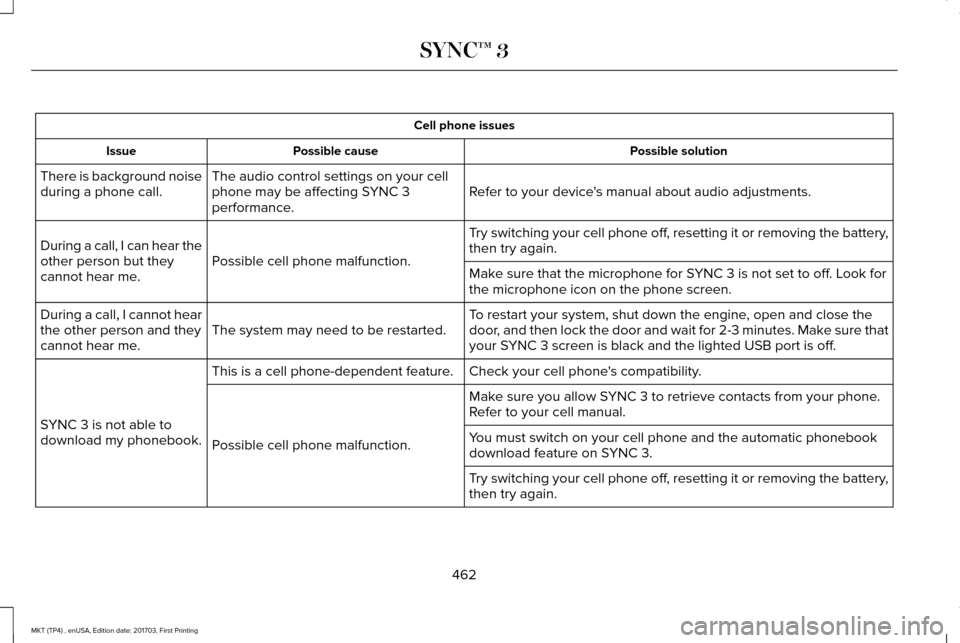
Cell phone issues
Possible solution
Possible cause
Issue
Refer to your device's manual about audio adjustments.
The audio control settings on your cell
phone may be affecting SYNC 3
performance.
There is background noise
during a phone call.
Try switching your cell phone off, resetting it or removing the battery,
then try again.
Possible cell phone malfunction.
During a call, I can hear the
other person but they
cannot hear me.
Make sure that the microphone for SYNC 3 is not set to off. Look for
the microphone icon on the phone screen.
To restart your system, shut down the engine, open and close the
door, and then lock the door and wait for 2-3 minutes. Make sure that
your SYNC 3 screen is black and the lighted USB port is off.
The system may need to be restarted.
During a call, I cannot hear
the other person and they
cannot hear me.
Check your cell phone's compatibility.
This is a cell phone-dependent feature.
SYNC 3 is not able to
download my phonebook. Make sure you allow SYNC 3 to retrieve contacts from your phone.
Refer to your cell manual.
Possible cell phone malfunction. You must switch on your cell phone and the automatic phonebook
download feature on SYNC 3.
Try switching your cell phone off, resetting it or removing the battery,
then try again.
462
MKT (TP4) , enUSA, Edition date: 201703, First Printing SYNC™ 3
Page 488 of 564
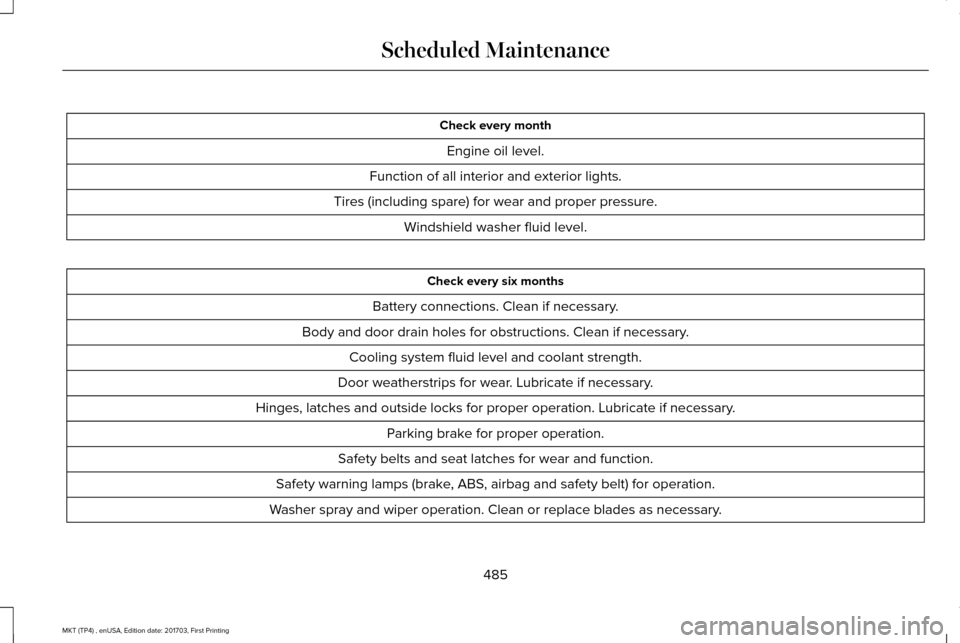
Check every month
Engine oil level.
Function of all interior and exterior lights.
Tires (including spare) for wear and proper pressure. Windshield washer fluid level. Check every six months
Battery connections. Clean if necessary.
Body and door drain holes for obstructions. Clean if necessary. Cooling system fluid level and coolant strength.
Door weatherstrips for wear. Lubricate if necessary.
Hinges, latches and outside locks for proper operation. Lubricate if necessary. Parking brake for proper operation.
Safety belts and seat latches for wear and function.
Safety warning lamps (brake, ABS, airbag and safety belt) for operation.
Washer spray and wiper operation. Clean or replace blades as necessary.
485
MKT (TP4) , enUSA, Edition date: 201703, First Printing Scheduled Maintenance
Page 556 of 564
Underbody............................................................312
Under Hood..........................................................312
Cleaning the Instrument Panel and Instrument Cluster Lens............................315
Cleaning the Interior.....................................313
Cleaning Black Label or Presidential
Interior................................................................314
Cleaning the Wheels
....................................316
Cleaning the Windows and Wiper Blades............................................................313
Clearing All MyKeys
.......................................67
Climate.............................................................417
Climate Control
..............................................129
Climate Controlled Seats............................152 Cooled Seats........................................................152
Heated Seats........................................................152
Collision Warning System..........................230 PRINCIPLE OF OPERATION............................230
Coolant Check See: Engine Coolant Check............................
293
Crash Sensors and Airbag Indicator
..........57
Creating a MyKey...........................................66 Programming/Changing Configurable
Settings...............................................................66
Cross Traffic Alert.........................................226 False Alerts..........................................................229
Switching the System Off and On..................229
System Errors......................................................229 System Lights, Messages and Audible
Alerts.................................................................228
System Limitations.............................................228
Using the System...............................................226
Cruise Control
.................................................85
Principle of Operation.......................................208
Type One................................................................85
Type Two.................................................................86
Cruise control See: Using Cruise Control...............................208
Customer Assistance
..................................259
D
Data Recording
..................................................9
Event Data Recording...........................................10
Service Data Recording.........................................9
Daytime Running Lamps...............................93
Direction Indicators
........................................96
Doors and Locks.............................................72
Drive Control
.................................................233
LINCOLN DRIVE CONTROL............................233
Driver Alert......................................................216 Using Driver Alert................................................217
Driver and Passenger Airbags.....................51 Children and Airbags...........................................52
Proper Driver and Front Passenger Seating
Adjustment.........................................................52 Driving Aids
....................................................216
Driving Hints..................................................250
Driving Through Water...............................250
DRL See: Daytime Running Lamps...........................93
E
Economical Driving
......................................250
Electromagnetic Compatibility...................515
Emission Law..................................................175
Noise Emissions Warranty, Prohibited
Tampering Acts and Maintenance..............176
Tampering With a Noise Control System......175
End User License Agreement..................520 VEHICLE SOFTWARE END USER LICENSE
AGREEMENT (EULA) ....................................
520
Engine Block Heater....................................166 Using the Engine Block Heater.......................167
Engine Coolant Check
................................293
Adding Coolant...................................................294
Coolant Change.................................................296
Engine Coolant Temperature
Management...................................................297
Fail-Safe Cooling................................................296
Recycled Coolant...............................................295
Severe Climates.................................................295
Engine Emission Control.............................175
553
MKT (TP4) , enUSA, Edition date: 201703, First Printing Index