key LINCOLN MKT 2018 Workshop Manual
[x] Cancel search | Manufacturer: LINCOLN, Model Year: 2018, Model line: MKT, Model: LINCOLN MKT 2018Pages: 564, PDF Size: 4.66 MB
Page 222 of 564
Note:
If a MyKey™ is detected, pressing the
button will not affect the on or off status of
the system. Press the button located on the
center console to switch the
system on or off.
System Settings
The system has optional setting menus
available. To view or adjust the settings, See
General Information (page 109). The system
stores the last-known selection for each of
these settings. You do not need to readjust
your settings each time you turn on the
system.
Mode (if equipped): This setting allows you
to select which of the system features you
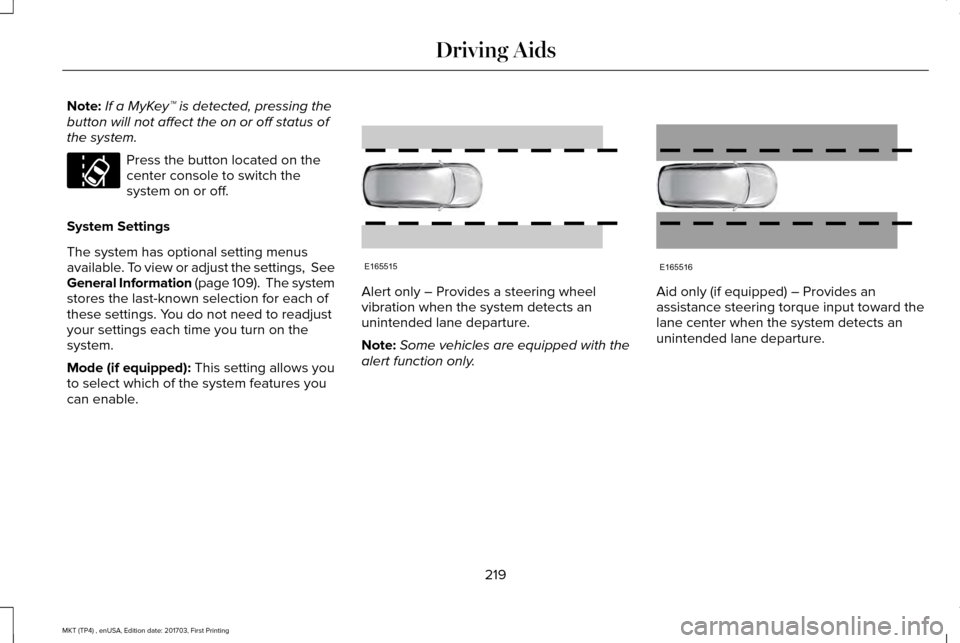
can enable. Alert only – Provides a steering wheel
vibration when the system detects an
unintended lane departure.
Note:
Some vehicles are equipped with the
alert function only. Aid only (if equipped) – Provides an
assistance steering torque input toward the
lane center when the system detects an
unintended lane departure.
219
MKT (TP4) , enUSA, Edition date: 201703, First Printing Driving AidsE173233 E165515 E165516
Page 237 of 564

Using Lincoln Drive Control
You can configure which of the Drive Control
modes are active when your vehicle is in
drive (D) or in sport (S). The configuration
remains active until modified from the main
menu on the information display.
These systems have a range of modes which
you can choose from in order to customize
your ideal driving experience:
•
Comfort – Provides a more relaxed
driving experience, maximizing comfort.
Your steering effort decreases and the
suspension movement is more fluid.
Comfort mode is ideal when you desire
enhanced traveling comfort.
• Normal – Delivers a balanced
combination of comfortable, controlled
ride and confident handling. This mode
provides an engaging drive experience
and a direct connection to the road
without sacrificing any of the composure
demanded from a luxury vehicle.
• Sport – Provides a sportier driving
experience. The suspension stiffens, with
an emphasis on handling and control.
The engine responds more directly to
your inputs and takes on a more powerful
tone. Sport mode is ideal for use during
more spirited driving.
You can change your vehicle's Drive Control
settings from the menu on the display
screen. See General Information (page 109). Note:
Not all settings may be available.
Note: Lincoln Drive Control has diagnostic
checks that continuously monitor the system
to ensure proper operation. Certain types of
system errors will gray out the mode
selections within the information display,
preventing you from changing states when
the gear position is changed. Other types of
errors produce a temporary message in the
information display. See Information
Messages (page 116). If either condition
persists for multiple key cycles, have your
vehicle checked by an authorized dealer.
234
MKT (TP4) , enUSA, Edition date: 201703, First Printing Driving Aids
Page 251 of 564

Recreational Towing
Note:
Put your climate control system in
recirculated air mode to prevent exhaust
fumes from entering the vehicle. See
Climate Control (page 129).
Follow these guidelines if you have a need
for recreational (RV) towing. An example of
recreational towing would be towing your
vehicle behind a motorhome. We designed
these guidelines to prevent damage to your
transmission.
You can tow your 3.5L EcoBoost or 3.7L
Duratec equipped vehicle with all four
wheels on the ground.
If you tow your vehicle with all four wheels
on the ground:
• Tow only in the forward direction.
• Release the parking brake.
Vehicles with Keyless Start
1. Start the vehicle by pressing the brake pedal, and then pressing the keyless start
button until the vehicle starts. 2. Press the brake pedal and shift the
gearshift into neutral (N).
3. Turn the vehicle off by pressing the keyless start button once.
4. Disconnect the negative (black) cable from the battery. You need the door key
to lock and unlock doors when the
battery cable is disconnected.
See
Changing the 12V Battery (page 301).
Note: The anti-theft system does not work
until you reconnect the battery cable.
Start the engine within 15 minutes of
reconnecting the battery cable.
Vehicles with an Ignition Key
1. Start the vehicle by pressing the brake pedal, and then turning the ignition key
until the vehicle starts.
2. Press the brake pedal and shift the transmission into neutral (N).
3. Turn off your vehicle by turning the ignition key past the accessory position.
The key position is between the
accessory and off positions. 4. Disconnect the negative (black) cable
from the battery. See Changing the 12V
Battery
(page 301).
Note: The anti-theft system does not work
until you reconnect the battery cable.
Start the engine within 15 minutes of
reconnecting the battery cable.
All Vehicles
• Do not exceed
65 mph (105 km/h).
• Start the engine and allow it to run for
five minutes at the beginning of each day
and every six hours thereafter. With the
engine running and your foot on the
brake, shift into drive (D) and then into
reverse (R) before shifting back into
neutral (N).
Front-wheel Drive Vehicles
Alternatively, you can tow your front-wheel
drive vehicle with the front wheels off the
ground by using a tow dolly, or with all four
wheels off the ground using a vehicle
transport trailer. If you are using a tow dolly,
follow the instructions specified by the
equipment provider.
248
MKT (TP4) , enUSA, Edition date: 201703, First Printing Towing
Page 256 of 564
ROADSIDE ASSISTANCE
Vehicles Sold in the United States:
Getting Roadside Assistance
To fully assist you should you have a vehicle
concern, Lincoln Motor Company offers a
complimentary roadside assistance program.
This program is separate from the New
Vehicle Limited Warranty.
The service is available:
•
Throughout the life of the vehicle for
original owners.
• For six years or 70,000 mi (110,000 km)
(whichever comes first) for subsequent
owners.
Roadside Assistance covers:
• A flat tire change with a good spare
(except vehicles supplied with a tire
inflation kit).
• Battery jump start.
• Lock-out assistance (key replacement
cost is the client's responsibility). •
Fuel delivery — independent service
contractors, if not prohibited by state,
local or municipal law shall deliver up to
2 gal (8 L)
of gasoline or 5 gal (20 L) of
diesel fuel to a disabled vehicle.
Roadside Assistance limits fuel delivery
service to two no-charge occurrences
within a 12-month period.
• Winch out — available within 100 ft (30 m)
of a paved or county maintained road,
no recoveries. •
Towing — independent service
contractors, if not prohibited by state,
local or municipal law shall tow Lincoln
eligible vehicles to the client's selling or
preferred dealer within 100 mi (160 km)
of the disablement location or to the
nearest Lincoln dealer. If a client requests
a tow to a selling or preferred dealer that
is more than
100 mi (160 km) from the
disablement location, the client is
responsible for any mileage costs in
excess of
100 mi (160 km).
• Roadside Assistance includes up to $200
for a towed trailer if the disabled eligible
vehicle requires service at the nearest
authorized dealer. If the towing vehicle
is operational but the trailer is not, then
the trailer does not qualify for any
roadside services.
Vehicles Sold in the United States:
Using Roadside Assistance
United States clients who require roadside
assistance, call 1-800-521-4140.
253
MKT (TP4) , enUSA, Edition date: 201703, First Printing Roadside Emergencies
Page 257 of 564
If you need to arrange roadside assistance
for yourself, Lincoln Motor Company
reimburses a reasonable amount for towing
to the nearest Lincoln dealership within
100 mi (160 km). To obtain reimbursement
information, United States clients, call
1-800-521-4140. Clients need to submit their
original receipts.
Vehicles Sold in Canada: Getting
Roadside Assistance
To fully assist you should you have a vehicle
concern, Lincoln Motor Company offers a
complimentary roadside assistance program.
This program is eligible within Canada or the
continental United States.
This program is separate from the New
Vehicle Limited Warranty, beginning from
the original warranty start date and lasts the
life of the vehicle for the original owner.
Subsequent owners receive coverage that
is concurrent with the 6 years or
70,000 mi
(110,000 km) (whichever occurs first)
powertrain warranty coverage period. If you purchased your vehicle in Canada and
require roadside assistance, please call
1-800-387-9333.
Vehicles Sold in Canada: Using
Roadside Assistance
Complete the roadside assistance
identification card and place it in your wallet
for quick reference.
In Canada, this card is found in the Warranty
Guide in the glove compartment of your
vehicle.
Vehicles Sold in Canada: Roadside
Assistance Program Coverage
The service is available 24 hours a day,
seven days a week.
Canadian roadside coverage and benefits
may differ from the U.S. coverage.
For complete program coverage details
review your warranty guide, contact your
dealer, call us in Canada at 1-800-387-9333,
or visit our website at
www.lincolncanada.com.HAZARD FLASHERS
Note:
The hazard flashers operate when the
ignition is in any position, or if the key is not
in the ignition. If used when the vehicle is not
running, the battery loses charge. As a result,
there may be insufficient power to restart
your vehicle. The flasher control is on the
instrument panel. Use your hazard
flashers when your vehicle is
creating a safety hazard for other motorists.
• Press the flasher control and all front and
rear direction indicators flash.
• Press the button again to switch them off.
FUEL SHUTOFF WARNING
If your vehicle has been involved in a
crash, have the fuel system checked.
Failure to follow this instruction could result
in fire, personal injury or death. 254
MKT (TP4) , enUSA, Edition date: 201703, First Printing Roadside Emergencies
Page 258 of 564
Note:
When you try to restart your vehicle
after a fuel shutoff, the vehicle makes sure
that various systems are safe to restart.
Once the vehicle determines the systems
are safe, then the vehicle allows you to
restart.
Note: In the event that your vehicle does
not restart after your third attempt, contact
a qualified technician.
The fuel pump shutoff stops the flow of fuel
to the engine in the event of a moderate to
severe crash. Not every impact causes a
shutoff.
Should your vehicle shut off after a crash,
you may restart your vehicle.
If your vehicle has a key system:
1. Switch off the vehicle.
2. Switch on the vehicle.
3. Repeat steps 1 and 2 to re-enable the fuel pump. If your vehicle has a push button start
system:
1. Press START/STOP to switch off your
vehicle.
2. Press the brake pedal and
START/STOP
to switch on your vehicle.
3. Remove your foot from the brake pedal and press
START/STOP to switch off
your vehicle.
4. You can attempt to start the vehicle by pressing the brake pedal and
START/STOP
, or press START/STOP
without pressing the brake pedal.
JUMP STARTING THE VEHICLE WARNINGS
Batteries normally produce explosive
gases which can cause personal injury.
Therefore, do not allow flames, sparks or
lighted substances to come near the battery.
When working near the battery, always shield
your face and protect your eyes. Always
provide correct ventilation. WARNINGS
Keep batteries out of reach of children.
Batteries contain sulfuric acid. Avoid
contact with skin, eyes or clothing. Shield
your eyes when working near the battery to
protect against possible splashing of acid
solution. In case of acid contact with skin or
eyes, flush immediately with water for a
minimum of 15 minutes and get prompt
medical attention. If acid is swallowed, call a
physician immediately. Use only adequately sized cables with
insulated clamps.
Preparing Your Vehicle
Do not attempt to push-start your automatic
transmission vehicle.
Note:
Attempting to push-start a vehicle with
an automatic transmission may cause
transmission damage.
Note: Use only a 12-volt supply to start your
vehicle.
Note: Do not disconnect the battery of the
disabled vehicle as this could damage the
vehicle electrical system.
255
MKT (TP4) , enUSA, Edition date: 201703, First Printing Roadside Emergencies
Page 281 of 564
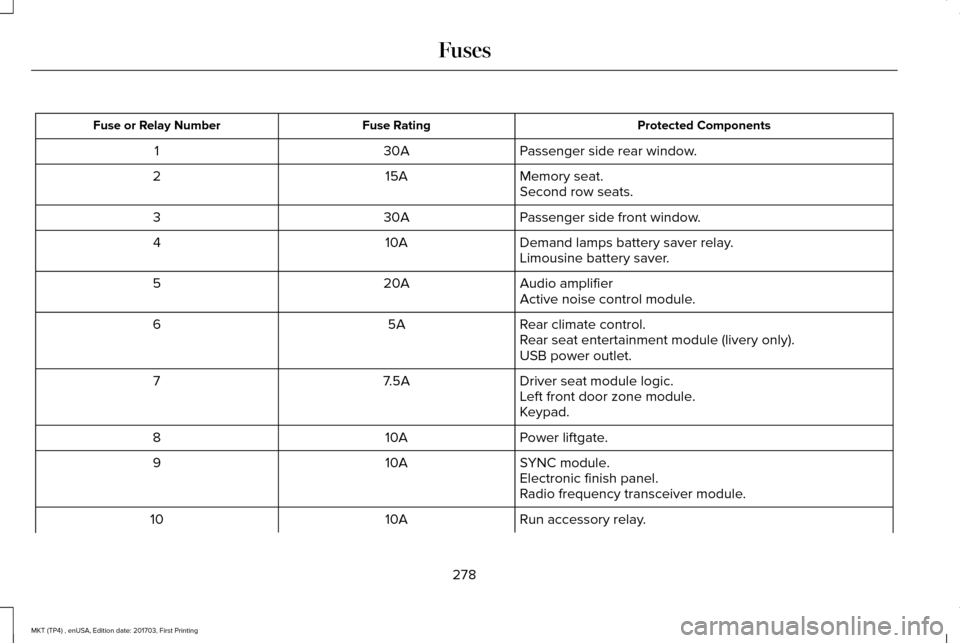
Protected Components
Fuse Rating
Fuse or Relay Number
Passenger side rear window.
30A
1
Memory seat.
15A
2
Second row seats.
Passenger side front window.
30A
3
Demand lamps battery saver relay.
10A
4
Limousine battery saver.
Audio amplifier
20A
5
Active noise control module.
Rear climate control.
5A
6
Rear seat entertainment module (livery only).
USB power outlet.
Driver seat module logic.
7.5A
7
Left front door zone module.
Keypad.
Power liftgate.
10A
8
SYNC module.
10A
9
Electronic finish panel.
Radio frequency transceiver module.
Run accessory relay.
10A
10
278
MKT (TP4) , enUSA, Edition date: 201703, First Printing Fuses
Page 282 of 564
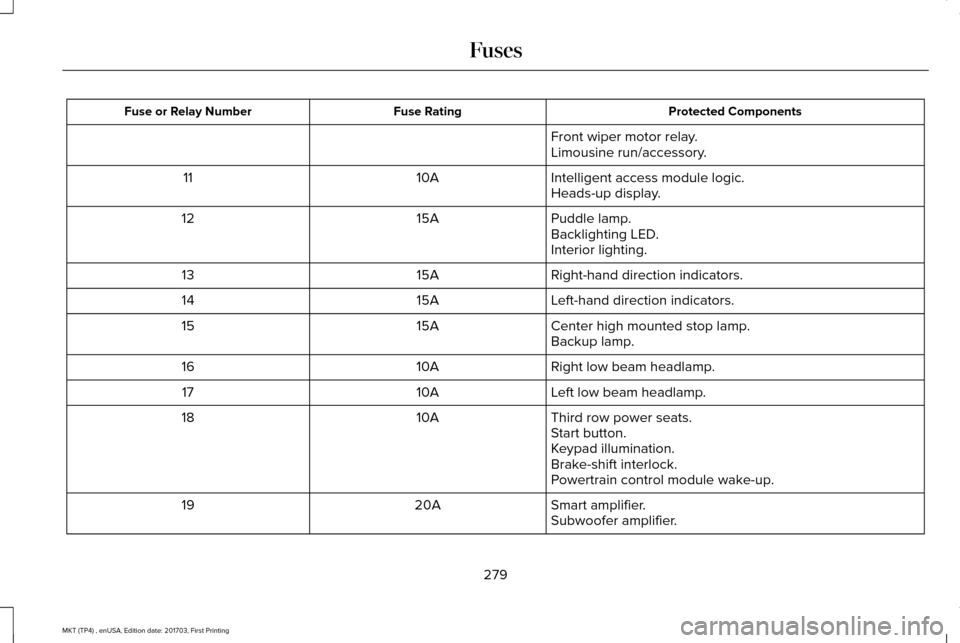
Protected Components
Fuse Rating
Fuse or Relay Number
Front wiper motor relay.
Limousine run/accessory.
Intelligent access module logic.
10A
11
Heads-up display.
Puddle lamp.
15A
12
Backlighting LED.
Interior lighting.
Right-hand direction indicators.
15A
13
Left-hand direction indicators.
15A
14
Center high mounted stop lamp.
15A
15
Backup lamp.
Right low beam headlamp.
10A
16
Left low beam headlamp.
10A
17
Third row power seats.
10A
18
Start button.
Keypad illumination.
Brake-shift interlock.
Powertrain control module wake-up.
Smart amplifier.
20A
19
Subwoofer amplifier.
279
MKT (TP4) , enUSA, Edition date: 201703, First Printing Fuses
Page 390 of 564
of electronically or verbally disclosing to 911
operators your vehicle location or other
details about your vehicle or crash to assist
911 operators to provide the most appropriate
emergency services. If you do not want to
disclose this information, do not switch the
feature on.
Safety Information
WARNING
Driving while distracted can result in
loss of vehicle control, crash and injury.
We strongly recommend that you use
extreme caution when using any device that
may take your focus off the road. Your
primary responsibility is the safe operation
of your vehicle. We recommend against the
use of any hand-held device while driving
and encourage the use of voice-operated
systems when possible. Make sure you are
aware of all applicable local laws that may
affect the use of electronic devices while
driving. •
Do not attempt to service or repair the
system. Have an authorized dealer check
your vehicle.
• Do not operate playing devices if the
power cords or cables are broken, split
or damaged. Place cords and cables out
of the way, so they do not interfere with
the operation of pedals, seats,
compartments or safe driving abilities.
• Do not leave playing devices in your
vehicle during extreme conditions as it
could cause them damage. See your
device's user guide for further
information.
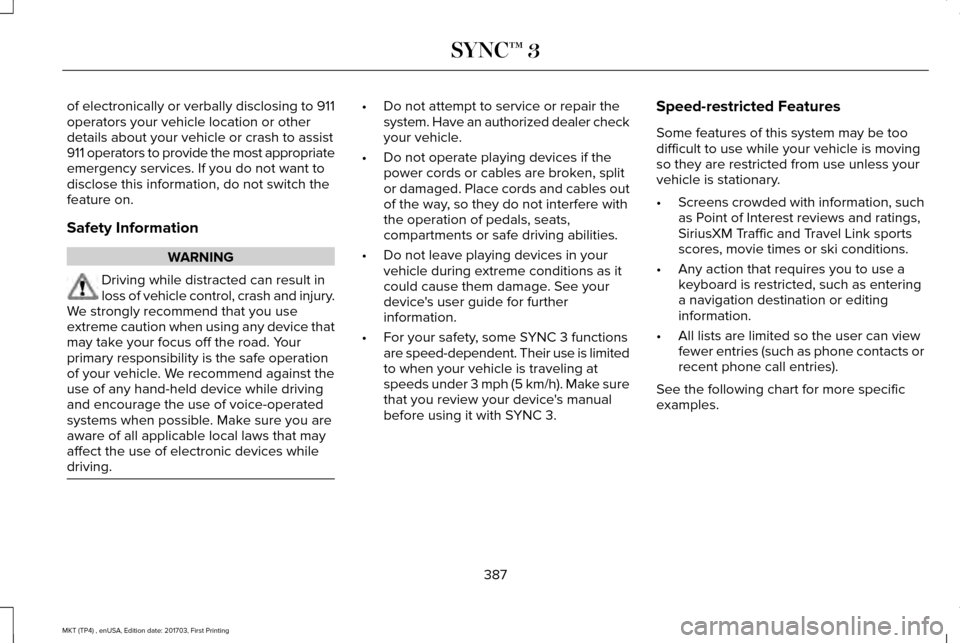
• For your safety, some SYNC 3 functions
are speed-dependent. Their use is limited
to when your vehicle is traveling at
speeds under 3 mph (5 km/h). Make sure
that you review your device's manual
before using it with SYNC 3. Speed-restricted Features
Some features of this system may be too
difficult to use while your vehicle is moving
so they are restricted from use unless your
vehicle is stationary.
•
Screens crowded with information, such
as Point of Interest reviews and ratings,
SiriusXM Traffic and Travel Link sports
scores, movie times or ski conditions.
• Any action that requires you to use a
keyboard is restricted, such as entering
a navigation destination or editing
information.
• All lists are limited so the user can view
fewer entries (such as phone contacts or
recent phone call entries).
See the following chart for more specific
examples.
387
MKT (TP4) , enUSA, Edition date: 201703, First Printing SYNC™ 3
Page 391 of 564

Restricted features
Pairing a Bluetooth phone.
Cellular Phone
Browsing of list entries is limited for phone contacts and recent phone \
calls.
Editing the keypad code.
System Functionality
Enabling Valet Mode.
Editing settings while the rear view camera or active park assist are ac\
tive.
Editing Wi-Fi settings.
Wi-Fi
Editing the list of wireless networks.
Connecting to a new Wi-Fi network.
Viewing received text messages.
Text Messages
Using the keyboard to enter a destination.
Navigation
Adding or editing Navigation Favorites entries or Avoid Areas.
Creating a SYNC Owner Account
Why do I need a SYNC owner account? •
Essential for keeping up with the latest
software and connected features.
• Access to customer support for any
questions you may have.
• Maintain account permissions. Visit the website to sign up and register. Website
www.owner.lincoln.com
www.syncmyride.ca
388
MKT (TP4) , enUSA, Edition date: 201703, First Printing SYNC™ 3