child lock LINCOLN MKT 2019 User Guide
[x] Cancel search | Manufacturer: LINCOLN, Model Year: 2019, Model line: MKT, Model: LINCOLN MKT 2019Pages: 575, PDF Size: 4.66 MB
Page 41 of 575
PRINCIPLE OF OPERATION
WARNING: Always drive and ridewith your seatback upright and the lap beltsnug and low across the hips.
WARNING: Children must always beproperly restrained.
WARNING: Never let a passengerhold a child on his or her lap while thevehicle is moving. The passenger cannotprotect the child from injury in a crash.
WARNING: All occupants of yourvehicle, including the driver, should alwaysproperly wear their seatbelts, even whenan airbag supplemental restraint system isprovided. Failure to properly wear yourseatbelt could seriously increase the riskof injury or death.
WARNING: It is extremely dangerousto ride in a cargo area, inside or outside ofa vehicle. In a crash, people riding in theseareas are more likely to be seriouslyinjured or killed. Do not allow people toride in any area of your vehicle that is notequipped with seats and seatbelts. Makesure everyone in your vehicle is in a seatand properly using a seatbelt. Failure tofollow this warning could result in seriouspersonal injury or death.
WARNING: In a rollover crash, anunbelted person is significantly more likelyto die than a person wearing a seatbelt.
WARNING: Each seating position inyour vehicle has a specific seatbeltassembly made up of one buckle and onetongue designed to be used as a pair. Usethe shoulder belt on the outside shoulderonly. Never wear the shoulder belt underthe arm. Never use a single seatbelt formore than one person.
WARNING: Even with advancedrestraints systems, properly restrainchildren 12 and under in a rear seatingposition. Failure to follow this couldseriously increase the risk of injury ordeath.
WARNING: Seatbelts and seats maybe hot in a vehicle that is in the sunshine.The hot seatbelts or seats may burn a smallchild. Check seat covers and bucklesbefore you place a child anywhere nearthem.
All seating positions in your vehicle have lapand shoulder seatbelts. All occupants of thevehicle should always properly wear theirseatbelts, even when an airbag supplementalrestraint system is provided.
The seatbelt system consists of:
•Lap and shoulder seatbelts.
•Shoulder seatbelt with automatic lockingmode, (except driver seatbelt and rearinflatable seatbelt).
38
MKT (TP4) , enUSA, Edition date: 201803, Second-Printing
Seatbelts
Page 44 of 575
All safety restraints in the vehicle arecombination lap and shoulder belts. Thedriver seatbelt has the vehicle sensitivelocking mode. The front outboard passengerand rear seatbelts have both the vehiclesensitive locking mode and the automaticlocking mode.
Vehicle Sensitive Mode
This is the normal retractor mode, whichallows free shoulder belt length adjustmentto your movements and locking in responseto vehicle movement. For example, if thedriver brakes suddenly or turns a cornersharply, or the vehicle receives an impact ofabout 5 mph (8 km/h) or more, thecombination seatbelts lock to help reduceforward movement of the driver andpassengers.
In addition, the retractor is designed to lockif you pull the webbing out too quickly. If theseatbelt retractor locks, slowly lower theheight adjuster to allow the seatbelt toretract. If the retractor does not unlock, pullthe seatbelt out slowly then feed a small
length of webbing back toward the stowedposition. For rear seatbelts, recline the rearseat backrest or push the seat backrestcushion away from the seatbelt. Feed a smalllength of webbing back toward the stowedposition.
Automatic Locking Mode
In this mode, the shoulder belt automaticallypre-locks. The belt retracts to remove anyslack in the shoulder belt. The automaticlocking mode is not available on the driverseatbelt.
When to Use the Automatic Locking Mode
Use this mode any time a child safety seat,except a booster, is installed in passengerfront or rear seating positions. Properlyrestrain children 12 years old and under in arear seating position whenever possible.See Child Safety (page 18).
How to Use the Automatic Locking Mode
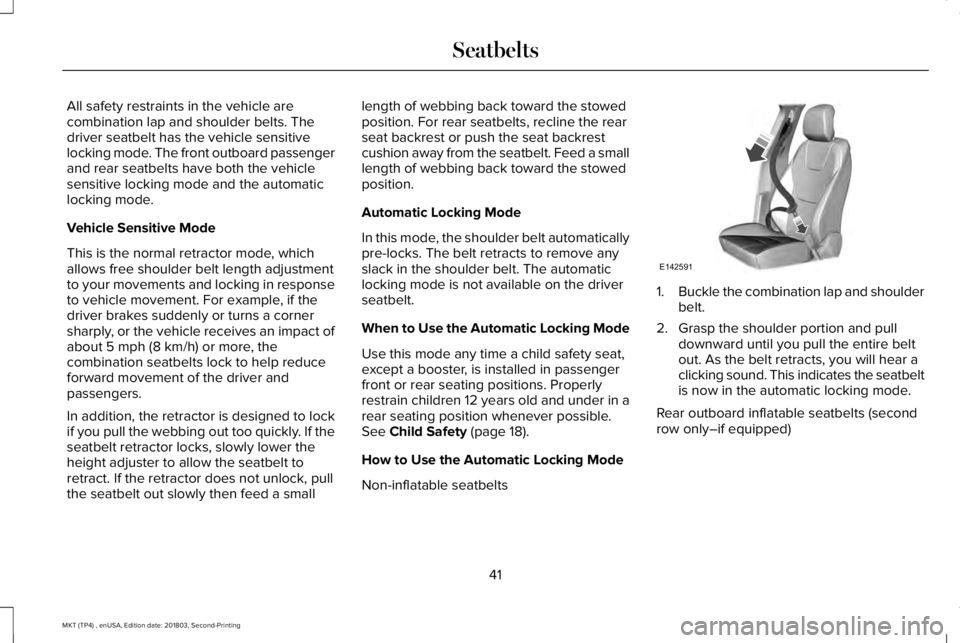
Non-inflatable seatbelts
1.Buckle the combination lap and shoulderbelt.
2. Grasp the shoulder portion and pulldownward until you pull the entire beltout. As the belt retracts, you will hear aclicking sound. This indicates the seatbeltis now in the automatic locking mode.
Rear outboard inflatable seatbelts (secondrow only–if equipped)
41
MKT (TP4) , enUSA, Edition date: 201803, Second-Printing
SeatbeltsE142591
Page 45 of 575
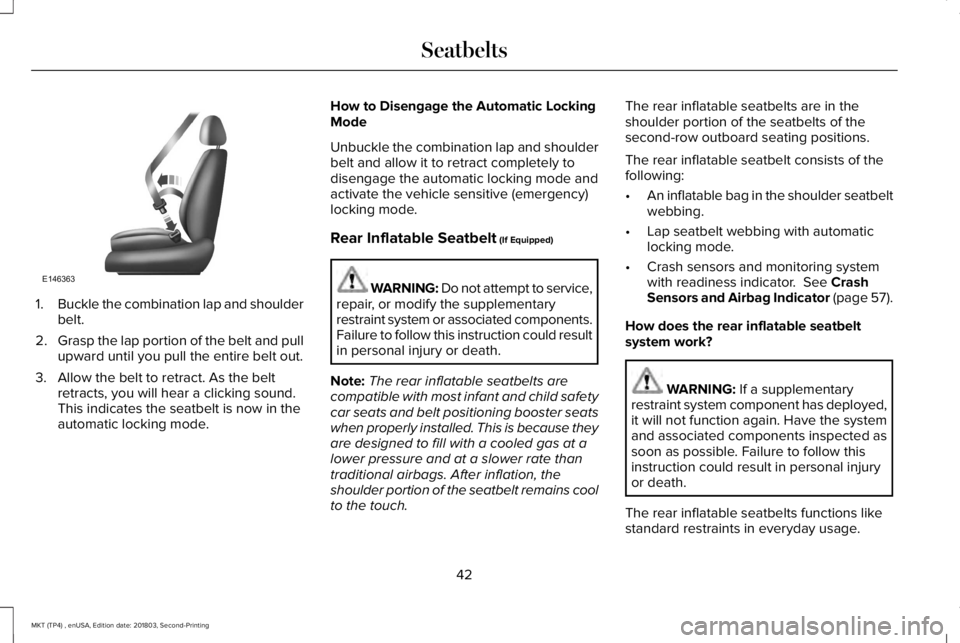
1.Buckle the combination lap and shoulderbelt.
2.Grasp the lap portion of the belt and pullupward until you pull the entire belt out.
3. Allow the belt to retract. As the beltretracts, you will hear a clicking sound.This indicates the seatbelt is now in theautomatic locking mode.
How to Disengage the Automatic LockingMode
Unbuckle the combination lap and shoulderbelt and allow it to retract completely todisengage the automatic locking mode andactivate the vehicle sensitive (emergency)locking mode.
Rear Inflatable Seatbelt (If Equipped)
WARNING: Do not attempt to service,repair, or modify the supplementaryrestraint system or associated components.Failure to follow this instruction could resultin personal injury or death.
Note:The rear inflatable seatbelts arecompatible with most infant and child safetycar seats and belt positioning booster seatswhen properly installed. This is because theyare designed to fill with a cooled gas at alower pressure and at a slower rate thantraditional airbags. After inflation, theshoulder portion of the seatbelt remains coolto the touch.
The rear inflatable seatbelts are in theshoulder portion of the seatbelts of thesecond-row outboard seating positions.
The rear inflatable seatbelt consists of thefollowing:
•An inflatable bag in the shoulder seatbeltwebbing.
•Lap seatbelt webbing with automaticlocking mode.
•Crash sensors and monitoring systemwith readiness indicator. See CrashSensors and Airbag Indicator (page 57).
How does the rear inflatable seatbeltsystem work?
WARNING: If a supplementaryrestraint system component has deployed,it will not function again. Have the systemand associated components inspected assoon as possible. Failure to follow thisinstruction could result in personal injuryor death.
The rear inflatable seatbelts functions likestandard restraints in everyday usage.
42
MKT (TP4) , enUSA, Edition date: 201803, Second-Printing
SeatbeltsE146363
Page 71 of 575
LOCKING AND UNLOCKING
You can use the power door lock control orthe remote control to lock and unlock yourvehicle.
Power Door Locks
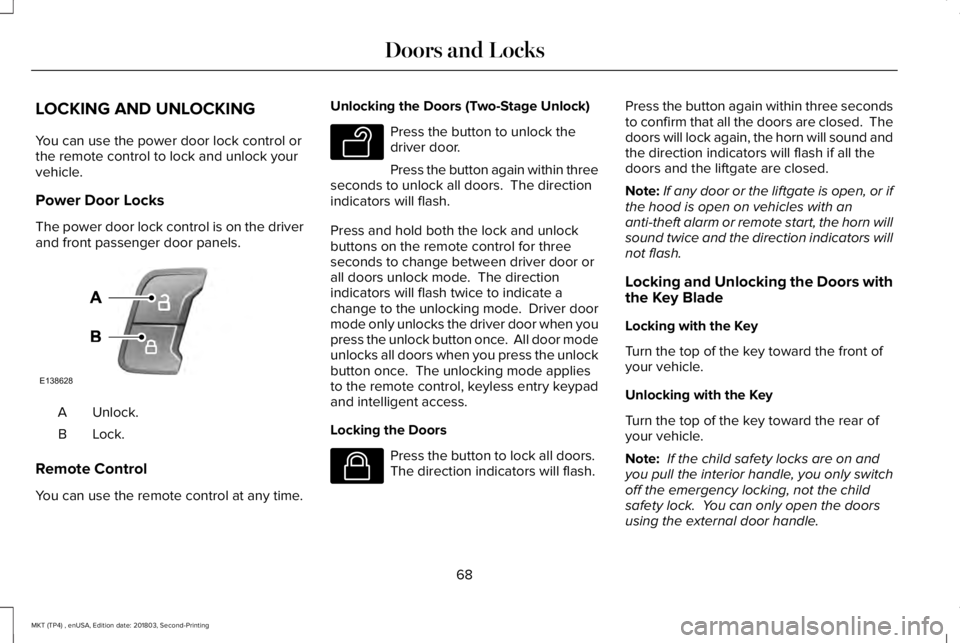
The power door lock control is on the driverand front passenger door panels.
Unlock.A
Lock.B
Remote Control
You can use the remote control at any time.
Unlocking the Doors (Two-Stage Unlock)
Press the button to unlock thedriver door.
Press the button again within threeseconds to unlock all doors. The directionindicators will flash.
Press and hold both the lock and unlockbuttons on the remote control for threeseconds to change between driver door orall doors unlock mode. The directionindicators will flash twice to indicate achange to the unlocking mode. Driver doormode only unlocks the driver door when youpress the unlock button once. All door modeunlocks all doors when you press the unlockbutton once. The unlocking mode appliesto the remote control, keyless entry keypadand intelligent access.
Locking the Doors
Press the button to lock all doors. The direction indicators will flash.
Press the button again within three secondsto confirm that all the doors are closed. Thedoors will lock again, the horn will sound andthe direction indicators will flash if all thedoors and the liftgate are closed.
Note:If any door or the liftgate is open, or ifthe hood is open on vehicles with ananti-theft alarm or remote start, the horn willsound twice and the direction indicators willnot flash.
Locking and Unlocking the Doors withthe Key Blade
Locking with the Key
Turn the top of the key toward the front ofyour vehicle.
Unlocking with the Key
Turn the top of the key toward the rear ofyour vehicle.
Note: If the child safety locks are on andyou pull the interior handle, you only switchoff the emergency locking, not the childsafety lock. You can only open the doorsusing the external door handle.
68
MKT (TP4) , enUSA, Edition date: 201803, Second-Printing
Doors and LocksE138628 E138629 E138623
Page 97 of 575
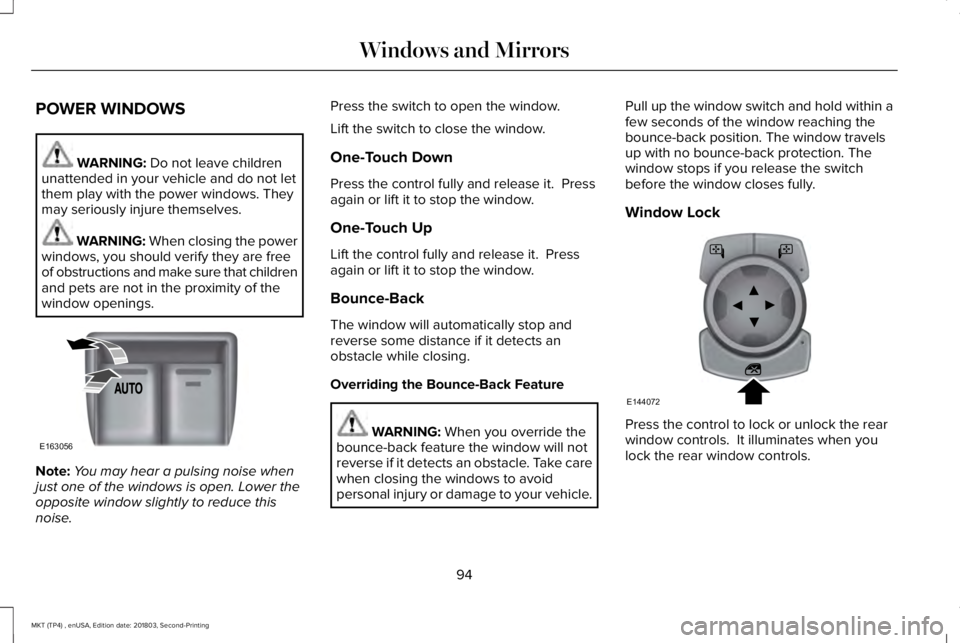
POWER WINDOWS
WARNING: Do not leave childrenunattended in your vehicle and do not letthem play with the power windows. Theymay seriously injure themselves.
WARNING: When closing the powerwindows, you should verify they are freeof obstructions and make sure that childrenand pets are not in the proximity of thewindow openings.
Note:You may hear a pulsing noise whenjust one of the windows is open. Lower theopposite window slightly to reduce thisnoise.
Press the switch to open the window.
Lift the switch to close the window.
One-Touch Down
Press the control fully and release it. Pressagain or lift it to stop the window.
One-Touch Up
Lift the control fully and release it. Pressagain or lift it to stop the window.
Bounce-Back
The window will automatically stop andreverse some distance if it detects anobstacle while closing.
Overriding the Bounce-Back Feature
WARNING: When you override thebounce-back feature the window will notreverse if it detects an obstacle. Take carewhen closing the windows to avoidpersonal injury or damage to your vehicle.
Pull up the window switch and hold within afew seconds of the window reaching thebounce-back position. The window travelsup with no bounce-back protection. Thewindow stops if you release the switchbefore the window closes fully.
Window Lock
Press the control to lock or unlock the rearwindow controls. It illuminates when youlock the rear window controls.
94
MKT (TP4) , enUSA, Edition date: 201803, Second-Printing
Windows and MirrorsE163056 E144072
Page 98 of 575
Accessory Delay
The window switches remain operational forseveral minutes when you switch the ignitionoff or until you open either front door.
GLOBAL OPENING AND CLOSING
You can use the remote control to operatethe windows with the ignition off.
Note:You can enable or disable this featurein the information display or see anauthorized dealer. See General Information(page 105).
Note:To operate this feature, accessorydelay must not be active.
Opening the Windows
You can only open the windows for a shorttime after you unlock your vehicle with theremote control. After you unlock your vehicle,press and hold the remote control unlockbutton to open the windows and vent themoonroof. Release the button oncemovement starts. Press the lock or unlockbutton to stop movement.
Closing the Windows
WARNING: When closing thewindows and moonroof, you should verifythey are free of obstructions and makesure that children and pets are not in theproximity of the window openings.
To close the windows and moonroof, pressand hold the remote control lock button.Release the button once movement starts.Press the lock or unlock button to stopmovement.
EXTERIOR MIRRORS
Power Exterior Mirrors
WARNING: Do not adjust the mirrorswhen your vehicle is moving.
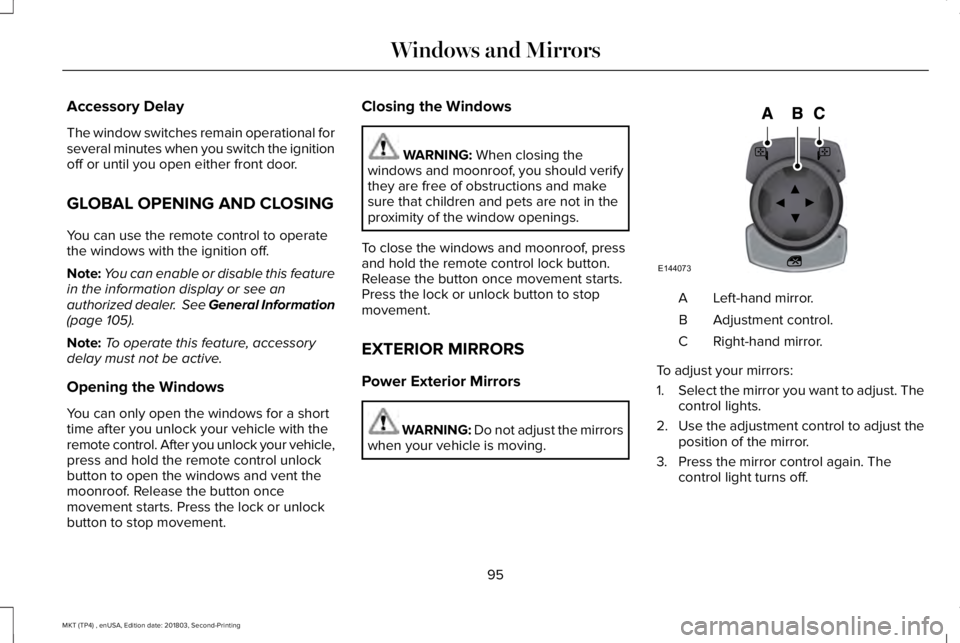
Left-hand mirror.A
Adjustment control.B
Right-hand mirror.C
To adjust your mirrors:
1.Select the mirror you want to adjust. Thecontrol lights.
2.Use the adjustment control to adjust theposition of the mirror.
3. Press the mirror control again. Thecontrol light turns off.
95
MKT (TP4) , enUSA, Edition date: 201803, Second-Printing
Windows and MirrorsE144073
Page 299 of 575
WARNING: When lifting aplastic-cased battery, excessive pressureon the end walls could cause acid to flowthrough the vent caps, resulting in personalinjury and damage to the vehicle or battery.Lift the battery with a battery carrier or withyour hands on opposite corners.
WARNING: Keep batteries out ofreach of children. Batteries contain sulfuricacid. Avoid contact with skin, eyes orclothing. Shield your eyes when workingnear the battery to protect against possiblesplashing of acid solution. In case of acidcontact with skin or eyes, flush immediatelywith water for a minimum of 15 minutes andget prompt medical attention. If acid isswallowed, call a physician immediately.
WARNING: Battery posts, terminalsand related accessories contain lead andlead compounds. Wash hands afterhandling.
WARNING: For vehicles withAuto-Start-Stop the battery requirement isdifferent. You must replace the battery withone of exactly the same specification.
Your vehicle is fitted with a Motorcraftmaintenance-free battery which normallydoes not require additional water.
When a battery replacement is required, youmust use a recommended replacementbattery that matches the electricalrequirements of the vehicle.
Note:If your vehicle has a battery cover,after cleaning or replacing the battery, makesure you reinstall it.
Note:See an authorized dealer for batteryaccess, testing, or replacement.
To make sure the battery managementsystem works correctly, do not connect anelectrical device ground connection directlyto the battery negative post. This can causeinaccurate measurements of the batterycondition and potential incorrect systemoperation.
Note:If you add electrical accessories orcomponents to the vehicle, it may adverselyaffect battery performance and durability.This may also affect the performance ofother electrical systems in the vehicle.
If you see any corrosion on the battery orterminals, remove the cables from theterminals and clean with a wire brush. Youcan neutralize the acid with a solution ofbaking soda and water.
Because your vehicle’s engine iselectronically-controlled by a computer,some engine control settings are maintainedby power from the battery. Some enginecomputer settings, like the idle trim and fueltrim strategy, optimize the driveability andperformance of the engine. The clock andradio station presets are also maintained inmemory by power from the low-voltagebattery. These settings are erased when atechnician disconnects and connects thelow-voltage battery.
To restore the settings, do the following:
296
MKT (TP4) , enUSA, Edition date: 201803, Second-Printing
Maintenance
Page 566 of 575
Changing the 12V Battery..........................295Changing the Engine Air Filter..................301Changing the Wiper Blades.......................297Front Wiper Blades............................................298Rear Window Wiper Blade...............................298
Checking MyKey System Status.................66MyKey Distance....................................................66Number of Admin Keys.......................................66Number of MyKeys...............................................66
Checking the Wiper Blades.......................297Child Restraint and SeatbeltMaintenance..................................................46Child Restraint Positioning...........................35Child Safety.......................................................18General Information..............................................18
Child Safety Locks..........................................37Left-Hand Side.......................................................37Right-Hand Side....................................................37
Cleaning Leather Seats..............................309Cleaning Products........................................303Materials...............................................................303
Cleaning the Engine....................................306Cleaning the Exterior..................................304Cleaning the Headlamps..................................304Exterior Chrome Parts.......................................305Exterior Plastic Parts..........................................305Stripes or Graphics............................................305Underbody...........................................................305
Under Hood.........................................................305
Cleaning the Instrument Panel andInstrument Cluster Lens...........................309Cleaning the Interior....................................307Cleaning Black Label or PresidentialInterior...............................................................307
Cleaning the Wheels....................................310Cleaning the Windows and WiperBlades...........................................................306Clearing All MyKeys.......................................66Climate.............................................................410Climate Control..............................................125Climate Controlled Seats.............................147Cooled Seats........................................................148Heated Seats........................................................147
Collision Warning System..........................226PRINCIPLE OF OPERATION............................226
Coolant CheckSee: Engine Coolant Check............................288
Crash Sensors and Airbag Indicator..........57Creating a MyKey...........................................65Programming and Changing ConfigurableSettings...............................................................65
Cross Traffic Alert.........................................222False Alerts..........................................................225Switching the System Off and On..................225System Errors......................................................225
System Lights, Messages and AudibleAlerts.................................................................224System Limitations.............................................224Using the System...............................................222
Cruise Control...................................................81Principle of Operation.......................................203
Cruise controlSee: Using Cruise Control...............................203
Customer Assistance..................................254
D
Data Recording................................................10Event Data Recording...........................................10Service Data Recording.......................................10
Daytime Running Lamps...............................89Direction Indicators........................................92Doors and Locks.............................................68Drive Control.................................................229Lincoln Drive Control........................................229
Driver Alert......................................................212Using Driver Alert................................................213
Driver and Passenger Airbags....................50Children and Airbags............................................51Proper Driver and Front Passenger SeatingAdjustment..........................................................51
Driving Aids....................................................212Driving Hints..................................................245
563
MKT (TP4) , enUSA, Edition date: 201803, Second-Printing
Index
Page 569 of 575
I
In California (U.S. Only)...............................255Information Display Control.........................82Information Displays.....................................105General Information............................................105
Information Messages..................................112Adaptive Cruise Control.....................................113AdvanceTrac™........................................................113Alarm........................................................................114Automatic Engine Shutdown.............................114AWD.........................................................................115Battery and Charging System...........................116Blind Spot Information and Cross Traffic AlertSystem................................................................117Brake System.........................................................117Collision Warning System..................................118Doors and Locks...................................................118Fuel..........................................................................119Keys and Intelligent Access...............................119Lane Keeping System........................................120Maintenance.........................................................120MyKey......................................................................121Park Aid..................................................................122Power Steering....................................................123Seats.......................................................................123Tire Pressure Monitoring System....................124Traction Control...................................................124
Transmission.........................................................124
Installing Child Restraints.............................20Child Seats.............................................................20Using Lap and Shoulder Belts...........................20Using Lower Anchors and Tethers forCHildren (LATCH).............................................26Using Tether Straps..............................................28
Instrument Cluster........................................100Instrument Lighting Dimmer........................88Instrument Panel Overview...........................16Interior Lamps..................................................92Third Row Dome Lamps......................................92
Interior Mirror...................................................97Auto-Dimming Mirror............................................97Second Row Illuminated Vanity Mirror............97
Introduction.........................................................7
J
Jump Starting the Vehicle..........................250Connecting the Jumper Cables.....................250Jump Starting.......................................................251Preparing Your Vehicle.....................................250Removing the Jumper Cables........................252
K
Keyless Entry.....................................................71SECURICODE™ Keyless Entry Keypad..............71
Keyless Starting.............................................158Ignition Modes.....................................................158
Keys and Remote Controls..........................59
L
Lane Keeping System..................................214Switching the System On and Off...................215
Liftgate...............................................................74Lighting Control..............................................86Flashing the Headlamp High Beam.................87Headlamp High Beam.........................................87
Lighting..............................................................86General Information.............................................86
Lincoln Automotive Financial Services......12Lincoln Protect..............................................476Lincoln Protect (CANADA ONLY)....................477Lincoln Protect Extended Service Plans (U.S.Only)..................................................................476
Load Carrying.................................................231Load Limit.......................................................232Special Loading Instructions for Owners ofPick-up Trucks and Utility-typeVehicles............................................................236
566
MKT (TP4) , enUSA, Edition date: 201803, Second-Printing
Index