clock LINCOLN MKT 2019 User Guide
[x] Cancel search | Manufacturer: LINCOLN, Model Year: 2019, Model line: MKT, Model: LINCOLN MKT 2019Pages: 575, PDF Size: 4.66 MB
Page 300 of 575
Note:Until you switch the ignition to the onposition, you will receive a message in yourinformation display stating that your vehicleis not in park.
1. Apply the parking brake.
2. Shift into park (P) or neutral (N).
3. Switch off all accessories.
4. Press the brake pedal and start yourvehicle.
5. Run the engine until it reaches normaloperating temperature. While the engineis warming up, complete the following:Reset the clock. See Audio Unit (page366). Reset the power windowsbounce-back feature. See PowerWindows (page 94). Reset the radiostation presets. See Audio Unit (page366).
6. Allow the engine to idle for at least oneminute.
7.Drive the vehicle at least 10 mi (16 km) tocompletely relearn the idle trim and fueltrim strategy.
Note:If you do not allow the engine torelearn the idle and fuel trim strategy, theidle quality of your vehicle may be adverselyaffected until the engine computereventually relearns the idle trim and fuel trimstrategy.
Note:Certain features may not operate ifthe battery monitor system is not reset witha scan tool following a jump start or batteryreplacement. Normal electrical accessoryoperation should resume after your vehicleis left undisturbed for 8 hours.
Make sure that you dispose of old batteriesin an environmentally friendly way. Seekadvice from your local authority aboutrecycling old batteries.
If storing your vehicle for more than 30 dayswithout recharging the battery, werecommend that you disconnect the batterycables to maintain battery charge for quickstarting.
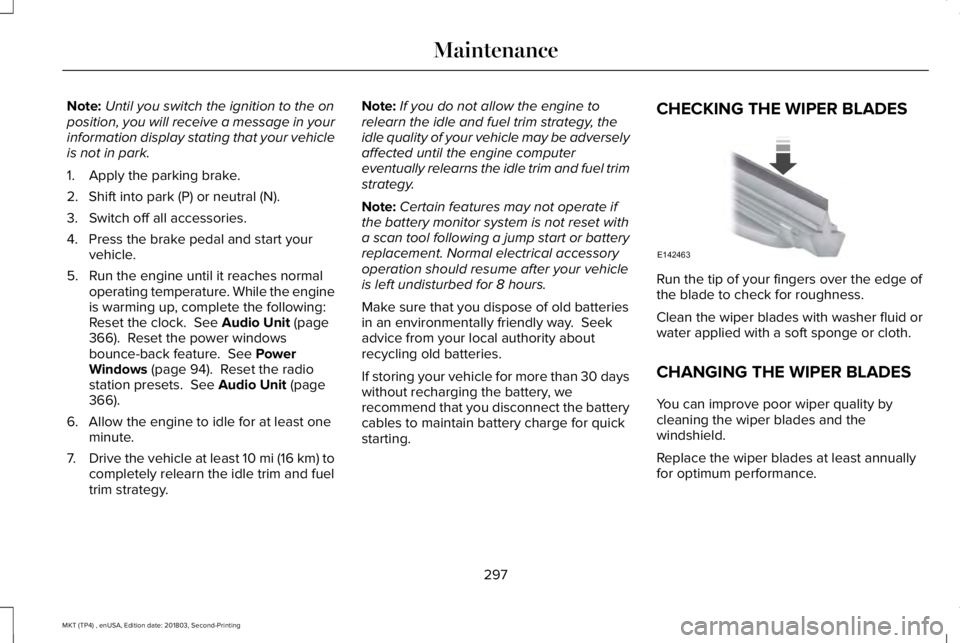
CHECKING THE WIPER BLADES
Run the tip of your fingers over the edge ofthe blade to check for roughness.
Clean the wiper blades with washer fluid orwater applied with a soft sponge or cloth.
CHANGING THE WIPER BLADES
You can improve poor wiper quality bycleaning the wiper blades and thewindshield.
Replace the wiper blades at least annuallyfor optimum performance.
297
MKT (TP4) , enUSA, Edition date: 201803, Second-Printing
MaintenanceE142463
Page 302 of 575
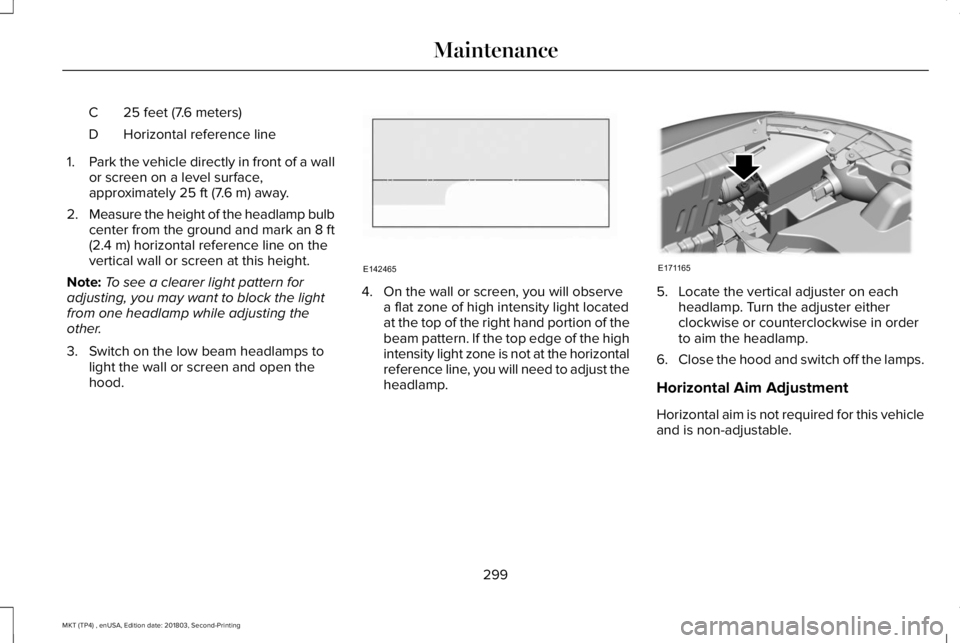
25 feet (7.6 meters)C
Horizontal reference lineD
1.Park the vehicle directly in front of a wallor screen on a level surface,approximately 25 ft (7.6 m) away.
2.Measure the height of the headlamp bulbcenter from the ground and mark an 8 ft(2.4 m) horizontal reference line on thevertical wall or screen at this height.
Note:To see a clearer light pattern foradjusting, you may want to block the lightfrom one headlamp while adjusting theother.
3. Switch on the low beam headlamps tolight the wall or screen and open thehood.
4. On the wall or screen, you will observea flat zone of high intensity light locatedat the top of the right hand portion of thebeam pattern. If the top edge of the highintensity light zone is not at the horizontalreference line, you will need to adjust theheadlamp.
5. Locate the vertical adjuster on eachheadlamp. Turn the adjuster eitherclockwise or counterclockwise in orderto aim the headlamp.
6.Close the hood and switch off the lamps.
Horizontal Aim Adjustment
Horizontal aim is not required for this vehicleand is non-adjustable.
299
MKT (TP4) , enUSA, Edition date: 201803, Second-Printing
MaintenanceE142465 E171165
Page 303 of 575
REMOVING A HEADLAMP
To gain access to the headlamp securingbolts and to remove the headlamp assembly,you must first remove the front fascia andfront bumper assemblies. We recommendyou see an authorized dealer.
CHANGING A BULB
WARNING: Switch the lamps and theignition off. Failure to do so could result inserious personal injury.
WARNING: Bulbs can become hot.Let the bulb cool down before removingit. Failure to do so could result in personalinjury.
Use the correct specification bulb. See BulbSpecification Chart (page 362).
Install in the reverse order unless otherwisestated.
High Intensity Discharge Headlamp
These lamps operate at a high voltage. Seean authorized dealer if they fail.
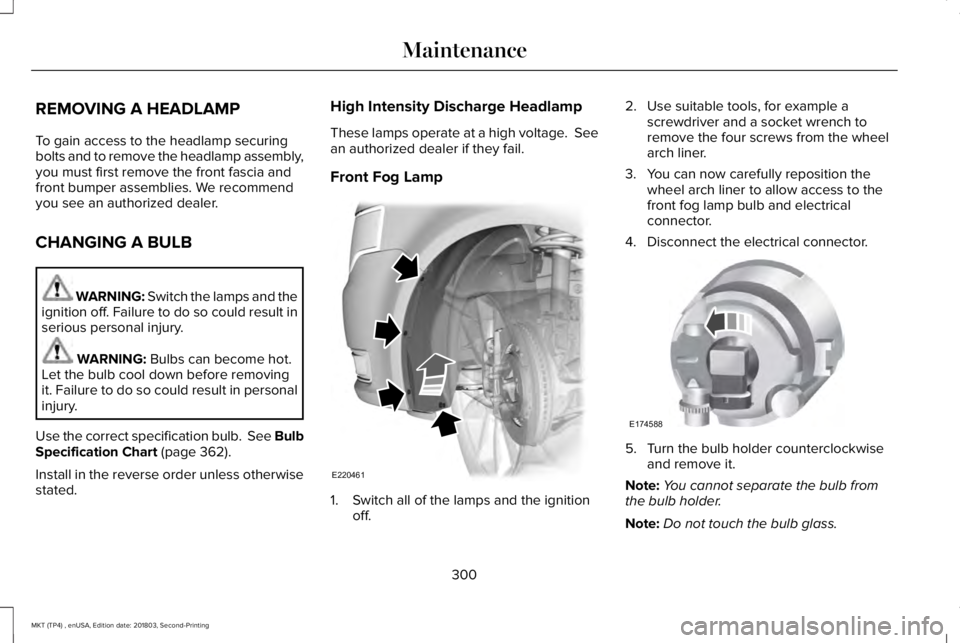
Front Fog Lamp
1. Switch all of the lamps and the ignitionoff.
2. Use suitable tools, for example ascrewdriver and a socket wrench toremove the four screws from the wheelarch liner.
3. You can now carefully reposition thewheel arch liner to allow access to thefront fog lamp bulb and electricalconnector.
4. Disconnect the electrical connector.
5. Turn the bulb holder counterclockwiseand remove it.
Note:You cannot separate the bulb fromthe bulb holder.
Note:Do not touch the bulb glass.
300
MKT (TP4) , enUSA, Edition date: 201803, Second-Printing
MaintenanceE220461 E174588
Page 339 of 575
Non-Limousine
Note:If the third row seat is stowed in thefloor, you will need to unstow it to accessthe spare tire.
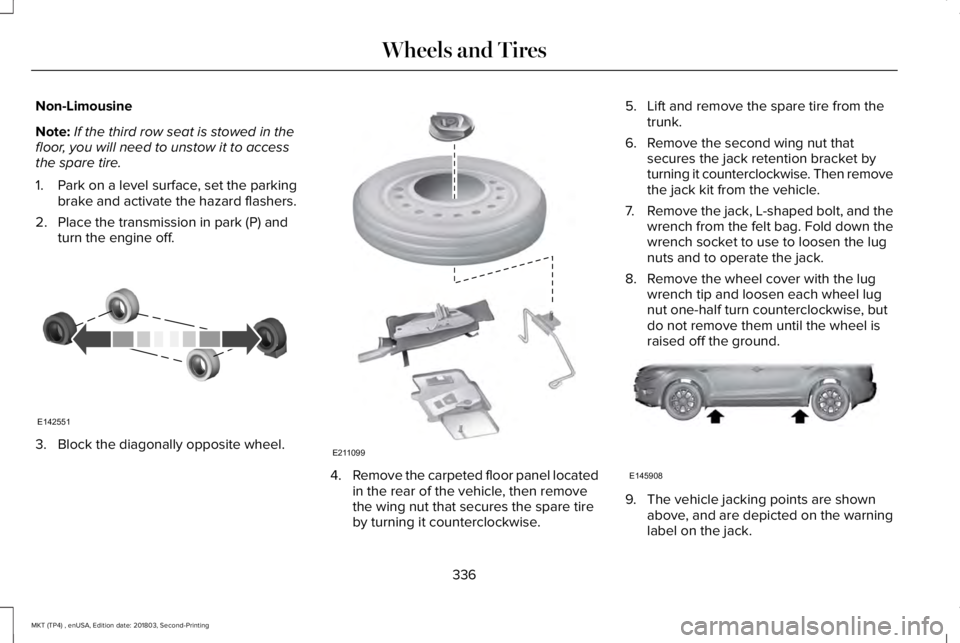
1. Park on a level surface, set the parkingbrake and activate the hazard flashers.
2. Place the transmission in park (P) andturn the engine off.
3. Block the diagonally opposite wheel.
4.Remove the carpeted floor panel locatedin the rear of the vehicle, then removethe wing nut that secures the spare tireby turning it counterclockwise.
5. Lift and remove the spare tire from thetrunk.
6. Remove the second wing nut thatsecures the jack retention bracket byturning it counterclockwise. Then removethe jack kit from the vehicle.
7.Remove the jack, L-shaped bolt, and thewrench from the felt bag. Fold down thewrench socket to use to loosen the lugnuts and to operate the jack.
8. Remove the wheel cover with the lugwrench tip and loosen each wheel lugnut one-half turn counterclockwise, butdo not remove them until the wheel israised off the ground.
9. The vehicle jacking points are shownabove, and are depicted on the warninglabel on the jack.
336
MKT (TP4) , enUSA, Edition date: 201803, Second-Printing
Wheels and TiresE142551 E211099 E145908
Page 340 of 575
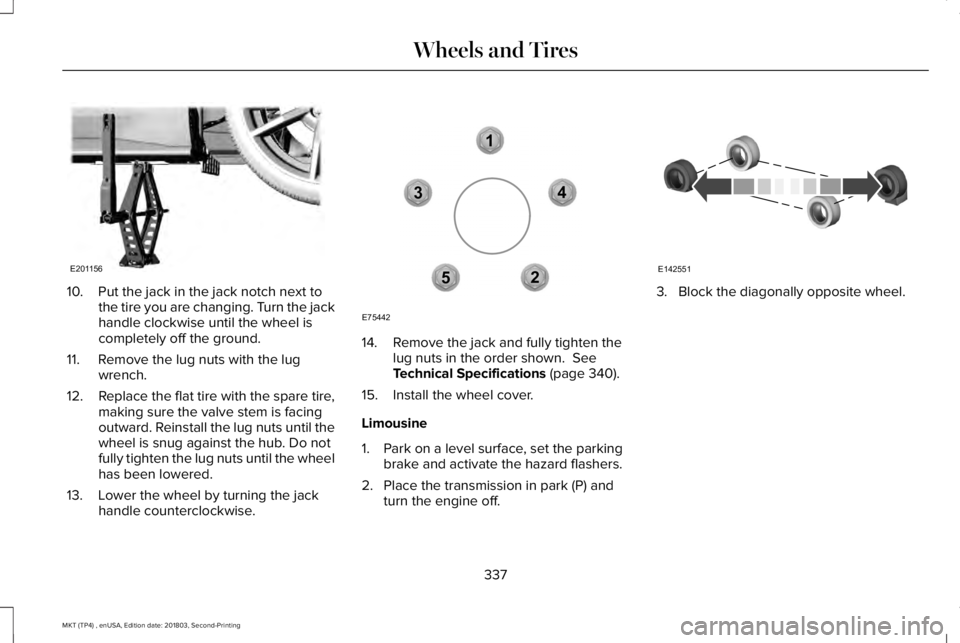
10. Put the jack in the jack notch next tothe tire you are changing. Turn the jackhandle clockwise until the wheel iscompletely off the ground.
11. Remove the lug nuts with the lugwrench.
12.Replace the flat tire with the spare tire,making sure the valve stem is facingoutward. Reinstall the lug nuts until thewheel is snug against the hub. Do notfully tighten the lug nuts until the wheelhas been lowered.
13. Lower the wheel by turning the jackhandle counterclockwise.
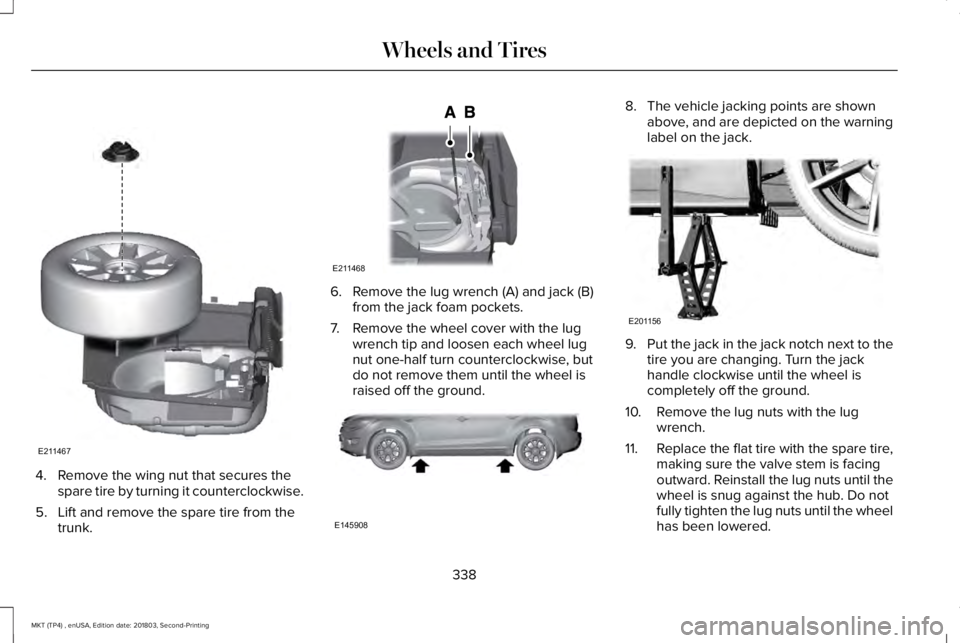
14. Remove the jack and fully tighten thelug nuts in the order shown. SeeTechnical Specifications (page 340).
15. Install the wheel cover.
Limousine
1. Park on a level surface, set the parkingbrake and activate the hazard flashers.
2. Place the transmission in park (P) andturn the engine off.
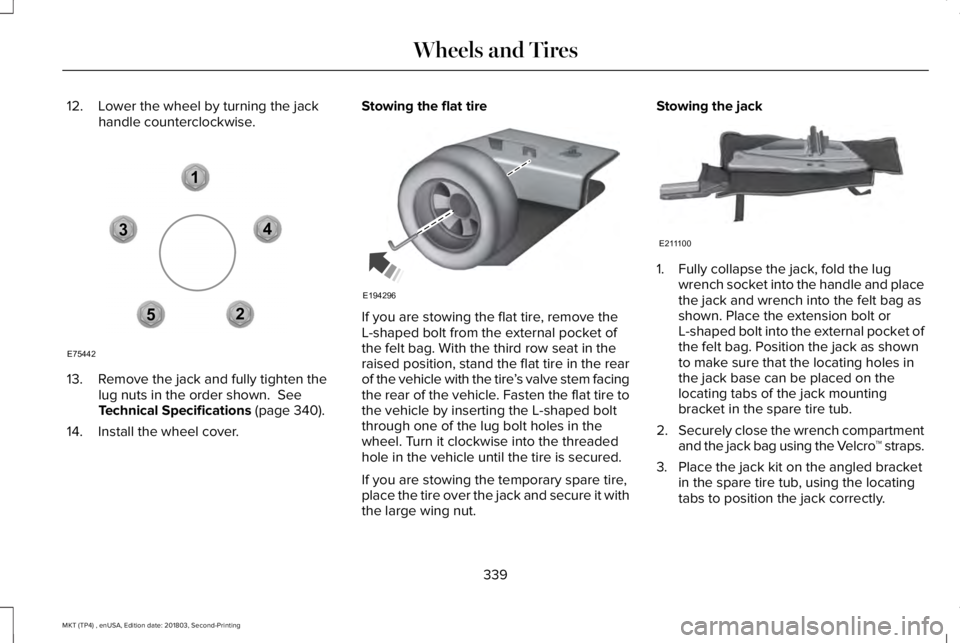
3. Block the diagonally opposite wheel.
337
MKT (TP4) , enUSA, Edition date: 201803, Second-Printing
Wheels and TiresE201156 12
3
4
5
E75442 E142551
Page 341 of 575
4. Remove the wing nut that secures thespare tire by turning it counterclockwise.
5. Lift and remove the spare tire from thetrunk.
6. Remove the lug wrench (A) and jack (B)from the jack foam pockets.
7. Remove the wheel cover with the lugwrench tip and loosen each wheel lugnut one-half turn counterclockwise, butdo not remove them until the wheel israised off the ground.
8. The vehicle jacking points are shownabove, and are depicted on the warninglabel on the jack.
9.Put the jack in the jack notch next to thetire you are changing. Turn the jackhandle clockwise until the wheel iscompletely off the ground.
10. Remove the lug nuts with the lugwrench.
11.Replace the flat tire with the spare tire,making sure the valve stem is facingoutward. Reinstall the lug nuts until thewheel is snug against the hub. Do notfully tighten the lug nuts until the wheelhas been lowered.
338
MKT (TP4) , enUSA, Edition date: 201803, Second-Printing
Wheels and TiresE211467 E211468 E145908 E201156
Page 342 of 575
12. Lower the wheel by turning the jackhandle counterclockwise.
13. Remove the jack and fully tighten thelug nuts in the order shown. SeeTechnical Specifications (page 340).
14. Install the wheel cover.
Stowing the flat tire
If you are stowing the flat tire, remove theL-shaped bolt from the external pocket ofthe felt bag. With the third row seat in theraised position, stand the flat tire in the rearof the vehicle with the tire’s valve stem facingthe rear of the vehicle. Fasten the flat tire tothe vehicle by inserting the L-shaped boltthrough one of the lug bolt holes in thewheel. Turn it clockwise into the threadedhole in the vehicle until the tire is secured.
If you are stowing the temporary spare tire,place the tire over the jack and secure it withthe large wing nut.
Stowing the jack
1. Fully collapse the jack, fold the lugwrench socket into the handle and placethe jack and wrench into the felt bag asshown. Place the extension bolt orL-shaped bolt into the external pocket ofthe felt bag. Position the jack as shownto make sure that the locating holes inthe jack base can be placed on thelocating tabs of the jack mountingbracket in the spare tire tub.
2.Securely close the wrench compartmentand the jack bag using the Velcro™ straps.
3. Place the jack kit on the angled bracketin the spare tire tub, using the locatingtabs to position the jack correctly.
339
MKT (TP4) , enUSA, Edition date: 201803, Second-Printing
Wheels and Tires12
3
4
5
E75442 E194296 E211100
Page 370 of 575
Displaying the Clock
Press and release the button todisplay the clock.
Selecting the Audio Modes
Press and release the button toscroll through available audiosystem modes.
Using Seek
Press and release the togglebutton upward or downward toselect the next or previous storedradio frequency station, satellite radiochannel or CD track.
USB PORT
WARNING: Driving while distractedcan result in loss of vehicle control, crashand injury. We strongly recommend thatyou use extreme caution when using anydevice that may take your focus off theroad. Your primary responsibility is the safeoperation of your vehicle. We recommendagainst the use of any hand-held devicewhile driving and encourage the use ofvoice-operated systems when possible.Make sure you are aware of all applicablelocal laws that may affect the use ofelectronic devices while driving.
The USB port allows you to plug in mediaplaying devices, memory sticks and chargedevices, if supported.
MEDIA HUB
WARNING: Driving while distractedcan result in loss of vehicle control, crashand injury. We strongly recommend thatyou use extreme caution when using anydevice that may take your focus off theroad. Your primary responsibility is the safeoperation of your vehicle. We recommend
367
MKT (TP4) , enUSA, Edition date: 201803, Second-Printing
Audio SystemE265278 E265035 E265273 E201595
Page 374 of 575
Action and DescriptionMenu ItemItem
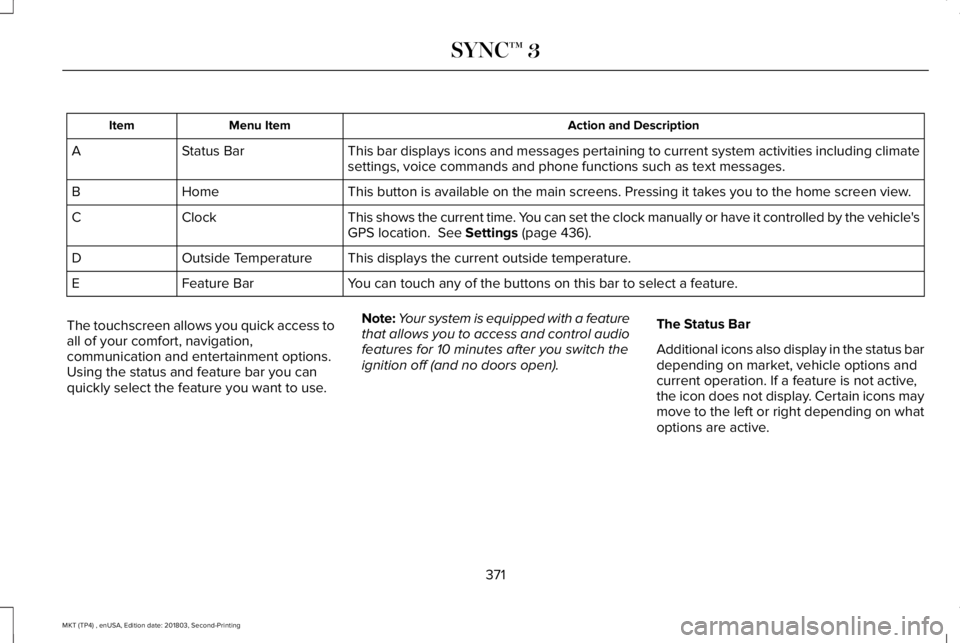
This bar displays icons and messages pertaining to current system activities including climatesettings, voice commands and phone functions such as text messages.Status BarA
This button is available on the main screens. Pressing it takes you to the home screen view.HomeB
This shows the current time. You can set the clock manually or have it controlled by the vehicle'sGPS location. See Settings (page 436).ClockC
This displays the current outside temperature.Outside TemperatureD
You can touch any of the buttons on this bar to select a feature.Feature BarE
The touchscreen allows you quick access toall of your comfort, navigation,communication and entertainment options.Using the status and feature bar you canquickly select the feature you want to use.
Note:Your system is equipped with a featurethat allows you to access and control audiofeatures for 10 minutes after you switch theignition off (and no doors open).
The Status Bar
Additional icons also display in the status bardepending on market, vehicle options andcurrent operation. If a feature is not active,the icon does not display. Certain icons maymove to the left or right depending on whatoptions are active.
371
MKT (TP4) , enUSA, Edition date: 201803, Second-Printing
SYNC™ 3
Page 441 of 575
Action and DescriptionMenu Item
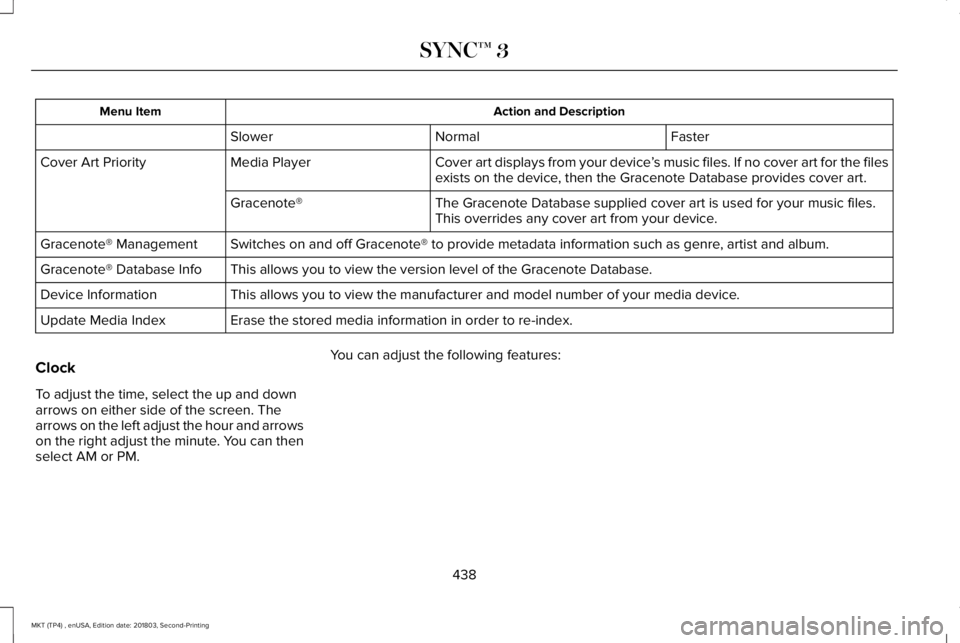
FasterNormalSlower
Cover art displays from your device’s music files. If no cover art for the filesexists on the device, then the Gracenote Database provides cover art.Media PlayerCover Art Priority
The Gracenote Database supplied cover art is used for your music files.This overrides any cover art from your device.Gracenote®
Switches on and off Gracenote® to provide metadata information such as genre, artist and album.Gracenote® Management
This allows you to view the version level of the Gracenote Database.Gracenote® Database Info
This allows you to view the manufacturer and model number of your media device.Device Information
Erase the stored media information in order to re-index.Update Media Index
Clock
To adjust the time, select the up and downarrows on either side of the screen. Thearrows on the left adjust the hour and arrowson the right adjust the minute. You can thenselect AM or PM.
You can adjust the following features:
438
MKT (TP4) , enUSA, Edition date: 201803, Second-Printing
SYNC™ 3