door lock LINCOLN MKT 2019 User Guide
[x] Cancel search | Manufacturer: LINCOLN, Model Year: 2019, Model line: MKT, Model: LINCOLN MKT 2019Pages: 575, PDF Size: 4.66 MB
Page 75 of 575
You can operate the keypad with thefactory-set five-digit entry code. The codeis on the owner’s wallet card in the glove boxand is available from an authorized dealer. You can also program up to five of your ownfive-digit personal entry codes.
Programming a Personal Entry Code
1. Enter the factory-set five-digit code.
2. Press 1·2 on the keypad within fiveseconds.
3.Enter your personal five-digit code. Youmust enter each number within fiveseconds of each other.
4.Press 1·2 on the keypad to save personalcode 1.
The doors lock then unlock to confirm thatprogramming was successful.
To program additional personal entry codes,repeat steps 1 through 3, then for step 4:
•Press 3·4 to save personal code 2.
•Press 5·6 to save personal code 3.
•Press 7·8 to save personal code 4.
•Press 9·0 to save personal code 5.
Hints:
•Do not set a code that uses five of thesame number.
•Do not use five numbers in sequentialorder.
•The factory-set code works even if youhave set your own personal code.
Recalling Memory Positions
The programmed entry codes recall drivermemory positions as follows:
•Entry code 1 recalls driver 1 memorypositions.
•Entry code 2 recalls driver 2 memorypositions.
•Entry code 3 recalls driver 3 memorypositions.
Note:Personal entry codes 4 and 5 will notrecall memory positions.
Erasing a Personal Code
1. Enter the factory-set five-digit code.
2. Press and release 1·2 on the keypadwithin five seconds.
3. Press and hold 1·2 for two seconds. Youmust do this within five seconds ofcompleting step 2.
All personal codes erase and only thefactory-set five-digit code works.
Anti-Scan Feature
The keypad goes into an anti-scan mode ifyou enter the wrong code seven times. Thismode turns off the keypad for one minuteand the keypad lamp flashes.
The anti-scan feature turns off after any ofthe following occur:
•One minute of keypad inactivity.
•You press the unlock button on theremote control.
•You switch your vehicle on.
•You unlock the vehicle using intelligentaccess.
72
MKT (TP4) , enUSA, Edition date: 201803, Second-Printing
Doors and Locks
Page 76 of 575
Locking and Unlocking the Doors
Locking All Doors
Press and hold 7·8 and 9·0 on the keypadsimultaneously with the driver door closed.You do not need to enter a code first.
Unlocking All Doors
Enter the factory-set code or your personalcode, then press 3·4 on the keypad withinfive seconds.
Unlocking Only the Driver Door
Enter the factory-set or your personalfive-digit code. You must press each numberwithin five seconds of each other. Theinterior lamps illuminate.
Note:All doors unlock if the two-stageunlocking feature is turned off. See Lockingand Unlocking (page 68).
73
MKT (TP4) , enUSA, Edition date: 201803, Second-Printing
Doors and Locks
Page 78 of 575
Note:Be careful when opening or closingthe liftgate in a garage or other enclosedarea to avoid damaging the liftgate.
Note:This could damage the liftgate and itscomponents. Do not leave the liftgate openwhile driving.
From the Instrument Panel
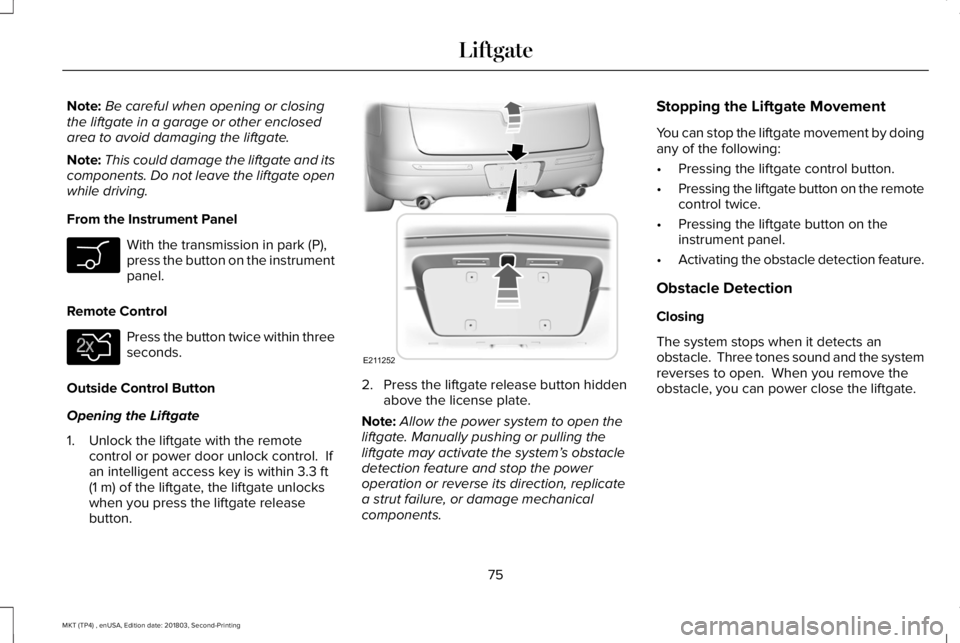
With the transmission in park (P),press the button on the instrumentpanel.
Remote Control
Press the button twice within threeseconds.
Outside Control Button
Opening the Liftgate
1. Unlock the liftgate with the remotecontrol or power door unlock control. Ifan intelligent access key is within 3.3 ft(1 m) of the liftgate, the liftgate unlockswhen you press the liftgate releasebutton.
2. Press the liftgate release button hiddenabove the license plate.
Note:Allow the power system to open theliftgate. Manually pushing or pulling theliftgate may activate the system’s obstacledetection feature and stop the poweroperation or reverse its direction, replicatea strut failure, or damage mechanicalcomponents.
Stopping the Liftgate Movement
You can stop the liftgate movement by doingany of the following:
•Pressing the liftgate control button.
•Pressing the liftgate button on the remotecontrol twice.
•Pressing the liftgate button on theinstrument panel.
•Activating the obstacle detection feature.
Obstacle Detection
Closing
The system stops when it detects anobstacle. Three tones sound and the systemreverses to open. When you remove theobstacle, you can power close the liftgate.
75
MKT (TP4) , enUSA, Edition date: 201803, Second-Printing
Liftgate E138630 E211252
Page 80 of 575
PASSIVE ANTI-THEFT SYSTEM
Note: The system is not compatible withnon-Ford aftermarket remote start systems. Use of these systems may result in enginestarting problems and a loss of securityprotection.
Note: Metallic objects, electronic devicesor a second coded key on the same keychain may result in vehicle starting problems,especially if they are too close to the keywhen starting your vehicle. Prevent theseobjects from touching the coded key whenstarting your vehicle. Switch the ignition off,move all objects on the key chain away fromthe coded key and restart your vehicle if aproblem occurs.
Note: Do not leave a duplicate coded keyin your vehicle. Always take your keys andlock all doors when leaving your vehicle.
SecuriLock®
The system helps prevent the engine fromstarting unless you use a coded keyprogrammed to your vehicle. Using thewrong key may prevent your vehicle fromstarting. A message may appear in theinformation display.
If you are unable to start your vehicle with acoded key, it is not operating correctly. Amessage may appear in the informationdisplay.
Automatic Arming
The system arms when you switch theignition off.
Automatic Disarming
The system disarms when you switch theignition on with a coded key.
Replacement Keys
Note:Your vehicle comes with two keys.
The intelligent access key functions as aprogrammed key that operates the driverdoor lock and turns on the intelligent accesswith push button start system, as well as aremote control.
If your coded keys are lost or stolen and youdo not have an extra coded key, you needto erase the key codes from your vehicle andprogram new coded keys. Contact anauthorized dealer.
Store a spare intelligent access key awayfrom your vehicle in a safe place. You canpurchase replacement keys or remotecontrols from an authorized dealer.
Programming a Spare Intelligent AccessKey
Note:You can program a maximum of fourkeys to your vehicle.
You must have two previously programmedintelligent access keys inside your vehicleand the new unprogrammed intelligentaccess keys readily accessible. Contact anauthorized dealer to have the spare keyprogrammed if two previously programmedkeys are not available.
77
MKT (TP4) , enUSA, Edition date: 201803, Second-Printing
Security
Page 82 of 575
If programming was unsuccessful, wait 10seconds and repeat Steps 1 through 7. Ifprogramming remains unsuccessful, contactan authorized dealer.
ANTI-THEFT ALARM
The system will warn you of an unauthorizedentry to your vehicle. It will be triggered ifany door, the luggage compartment or thehood is opened without using the key,remote control or keyless entry keypad.
The direction indicators will flash and thehorn will sound if unauthorized entry isattempted while the alarm is armed.
Take all remote controls to an authorizeddealer if there is any potential alarm problemwith your vehicle.
Arming the Alarm
The alarm is ready to arm when there is nota key in your vehicle. Electronically lock yourvehicle to arm the alarm.
Disarming the Alarm
Disarm the alarm by any of the followingactions:
•Unlock the doors or luggagecompartment with the remote control orkeyless entry keypad.
•Switch your vehicle on or start yourvehicle.
•Use a key in the driver door to unlockyour vehicle, then switch your vehicle onwithin 12 seconds.
Note:Pressing the panic button on theremote control will stop the horn and signalindicators, but will not disarm the system.
79
MKT (TP4) , enUSA, Edition date: 201803, Second-Printing
Security
Page 98 of 575
Accessory Delay
The window switches remain operational forseveral minutes when you switch the ignitionoff or until you open either front door.
GLOBAL OPENING AND CLOSING
You can use the remote control to operatethe windows with the ignition off.
Note:You can enable or disable this featurein the information display or see anauthorized dealer. See General Information(page 105).
Note:To operate this feature, accessorydelay must not be active.
Opening the Windows
You can only open the windows for a shorttime after you unlock your vehicle with theremote control. After you unlock your vehicle,press and hold the remote control unlockbutton to open the windows and vent themoonroof. Release the button oncemovement starts. Press the lock or unlockbutton to stop movement.
Closing the Windows
WARNING: When closing thewindows and moonroof, you should verifythey are free of obstructions and makesure that children and pets are not in theproximity of the window openings.
To close the windows and moonroof, pressand hold the remote control lock button.Release the button once movement starts.Press the lock or unlock button to stopmovement.
EXTERIOR MIRRORS
Power Exterior Mirrors
WARNING: Do not adjust the mirrorswhen your vehicle is moving.
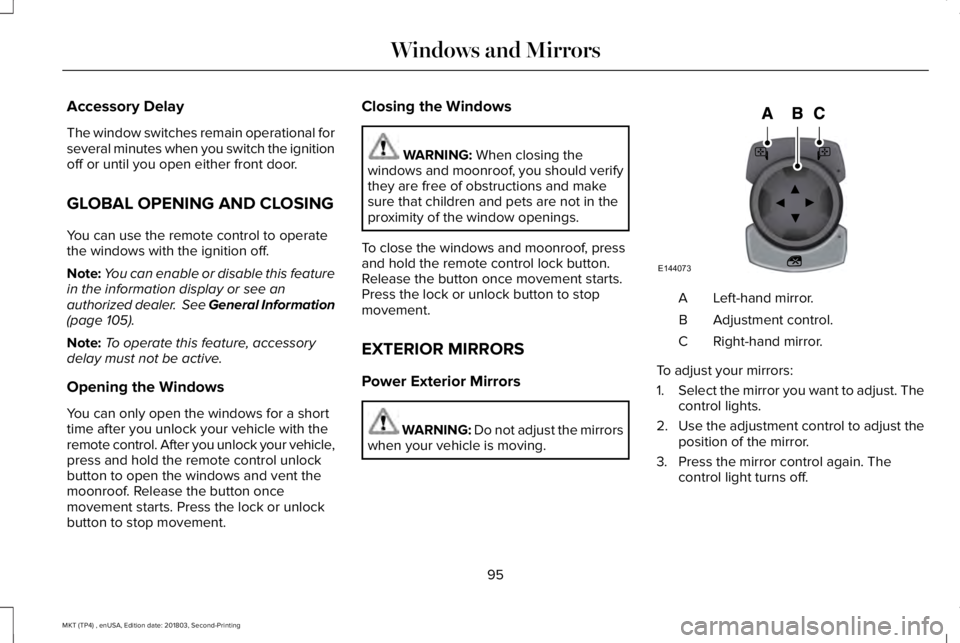
Left-hand mirror.A
Adjustment control.B
Right-hand mirror.C
To adjust your mirrors:
1.Select the mirror you want to adjust. Thecontrol lights.
2.Use the adjustment control to adjust theposition of the mirror.
3. Press the mirror control again. Thecontrol light turns off.
95
MKT (TP4) , enUSA, Edition date: 201803, Second-Printing
Windows and MirrorsE144073
Page 99 of 575
Fold-Away Exterior Mirrors
Push the mirror toward the door windowglass. Make sure that you fully engage themirror in its support when returning it to itsoriginal position.
Heated Exterior Mirrors
See Heated Exterior Mirrors (page 128).
Memory Mirrors
You can save and recall the mirror positionsthrough the memory function. See MemoryFunction (page 135).
Auto-dimming Feature
The driver exterior mirror automatically dimswith the auto-dimming interior mirror.
Direction Indicator Mirrors
While the vehicle is running, theforward-facing portion of the appropriatemirror housing blinks when you switch onthe direction indicator.
Puddle Lamps
The lamps on the bottom part of the mirrorhousing light when you use your transmitterto unlock the doors or when you open adoor.
Integrated Blind Spot Mirror (If Equipped)
WARNING: Objects in the blind spotmirror are closer than they appear.
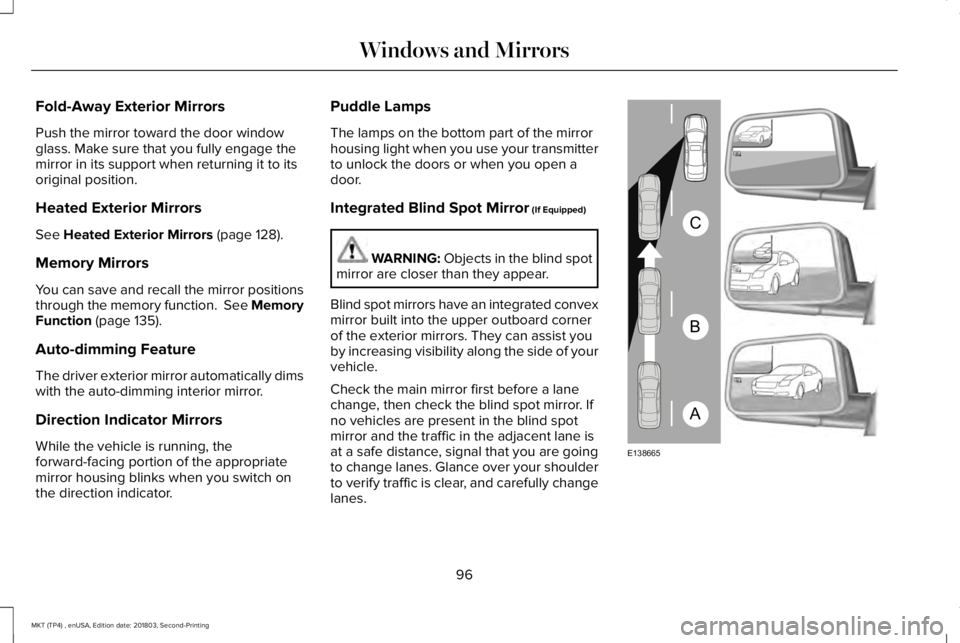
Blind spot mirrors have an integrated convexmirror built into the upper outboard cornerof the exterior mirrors. They can assist youby increasing visibility along the side of yourvehicle.
Check the main mirror first before a lanechange, then check the blind spot mirror. Ifno vehicles are present in the blind spotmirror and the traffic in the adjacent lane isat a safe distance, signal that you are goingto change lanes. Glance over your shoulderto verify traffic is clear, and carefully changelanes.
96
MKT (TP4) , enUSA, Edition date: 201803, Second-Printing
Windows and MirrorsA
B
C
E138665
Page 113 of 575
Settings
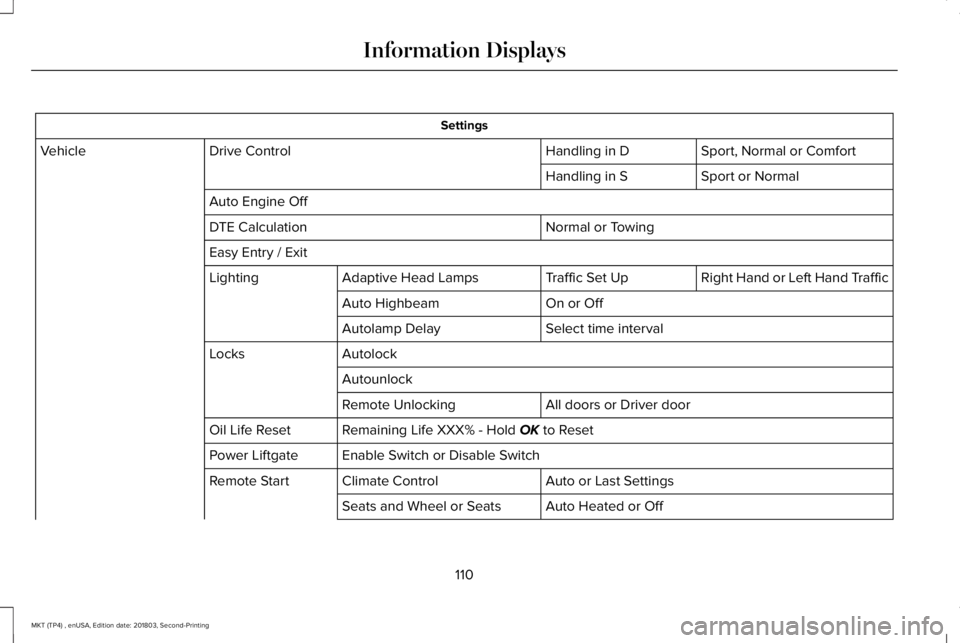
Sport, Normal or ComfortHandling in DDrive ControlVehicle
Sport or NormalHandling in S
Auto Engine Off
Normal or TowingDTE Calculation
Easy Entry / Exit
Right Hand or Left Hand TrafficTraffic Set UpAdaptive Head LampsLighting
On or OffAuto Highbeam
Select time intervalAutolamp Delay
AutolockLocks
Autounlock
All doors or Driver doorRemote Unlocking
Remaining Life XXX% - Hold OK to ResetOil Life Reset
Enable Switch or Disable SwitchPower Liftgate
Auto or Last SettingsClimate ControlRemote Start
Auto Heated or OffSeats and Wheel or Seats
110
MKT (TP4) , enUSA, Edition date: 201803, Second-Printing
Information Displays
Page 121 of 575
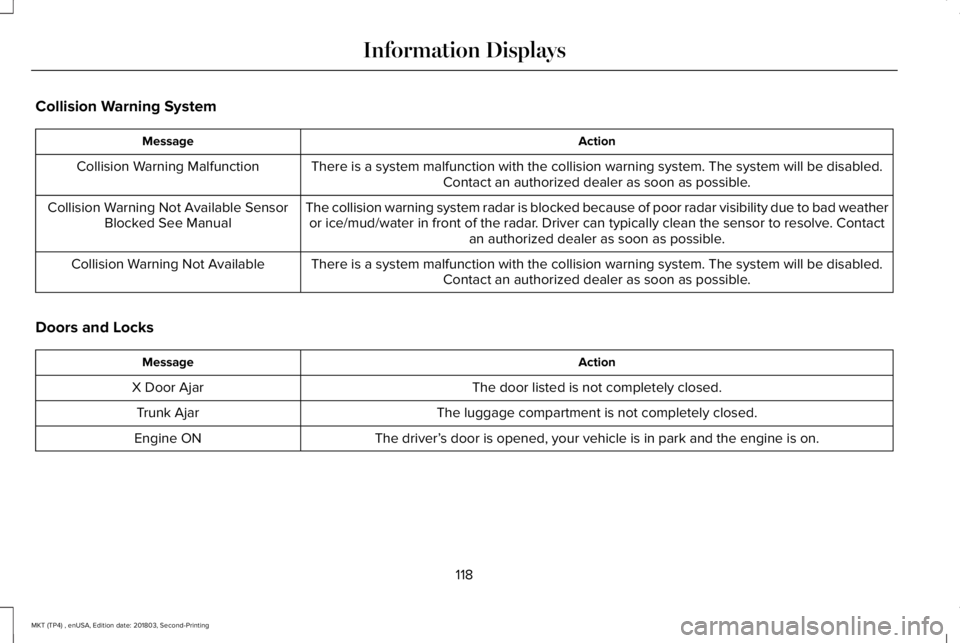
Collision Warning System
ActionMessage
There is a system malfunction with the collision warning system. The system will be disabled.Contact an authorized dealer as soon as possible.Collision Warning Malfunction
The collision warning system radar is blocked because of poor radar visibility due to bad weatheror ice/mud/water in front of the radar. Driver can typically clean the sensor to resolve. Contactan authorized dealer as soon as possible.
Collision Warning Not Available SensorBlocked See Manual
There is a system malfunction with the collision warning system. The system will be disabled.Contact an authorized dealer as soon as possible.Collision Warning Not Available
Doors and Locks
ActionMessage
The door listed is not completely closed.X Door Ajar
The luggage compartment is not completely closed.Trunk Ajar
The driver’s door is opened, your vehicle is in park and the engine is on.Engine ON
118
MKT (TP4) , enUSA, Edition date: 201803, Second-Printing
Information Displays
Page 142 of 575

Note:When you switch the ignition off, thepower fold feature works until the batterysaver turns it off after 10 minutes. You canreactivate the power seats by pressing theunlock button on the remote entry key fobor by using the unlock procedure on thekeyless entry keypad. See Doors and Locks(page 68). Keep the key in the accessory orrun position to prevent the feature fromtiming out.
Rear Seat Armrest (Livery)
WARNING: Use only soft cups in thecup holders. Hard objects can injure youin a crash.
To access the cupholders, rotate the armrestinto the use position. To open the storagecompartment, pull the cupholder latchforward.
Third Row Seats (Accessing the Seat)
WARNING: Check under the seatcushion to make sure no cargo or objectsare under the seat cushion beforereturning the seat cushion to its originalposition, and that the seat cushion locksinto place. Failure to do so may preventthe seat from operating properly in theevent of a crash, which could increase therisk of serious injury.
WARNING: Do not adjust a seat orrelease a seat floor latch when the vehicleis moving. Failure to follow this instructioncould result in personal injury or death ina sudden stop or crash.
WARNING: Do not drive your vehiclewith a seat that is unlatched or in thefolded position. Failure to follow thisinstruction could result in personal injuryor death in the event of a sudden stop orcrash.
139
MKT (TP4) , enUSA, Edition date: 201803, Second-Printing
SeatsE210825