mirror LINCOLN MKT 2019 User Guide
[x] Cancel search | Manufacturer: LINCOLN, Model Year: 2019, Model line: MKT, Model: LINCOLN MKT 2019Pages: 575, PDF Size: 4.66 MB
Page 138 of 575
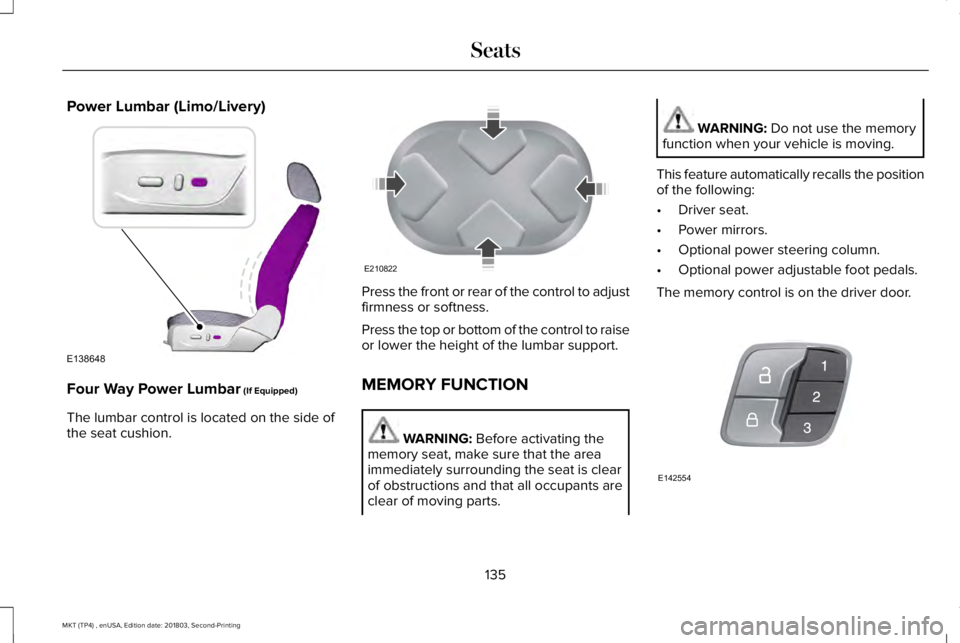
Power Lumbar (Limo/Livery)
Four Way Power Lumbar (If Equipped)
The lumbar control is located on the side ofthe seat cushion.
Press the front or rear of the control to adjustfirmness or softness.
Press the top or bottom of the control to raiseor lower the height of the lumbar support.
MEMORY FUNCTION
WARNING: Before activating thememory seat, make sure that the areaimmediately surrounding the seat is clearof obstructions and that all occupants areclear of moving parts.
WARNING: Do not use the memoryfunction when your vehicle is moving.
This feature automatically recalls the positionof the following:
•Driver seat.
•Power mirrors.
•Optional power steering column.
•Optional power adjustable foot pedals.
The memory control is on the driver door.
135
MKT (TP4) , enUSA, Edition date: 201803, Second-Printing
SeatsE138648 E210822 E142554
Page 202 of 575
REAR VIEW CAMERA
WARNING: The rear view camerasystem is a reverse aid supplement devicethat still requires the driver to use it inconjunction with the interior and exteriormirrors for maximum coverage.
WARNING: Objects that are close toeither corner of the bumper or under thebumper, might not be seen on the screendue to the limited coverage of the camerasystem.
WARNING: Use caution when therear cargo door is ajar. If the rear cargodoor is ajar, the camera will be out ofposition and the video image may beincorrect. All guidelines disappear whenthe rear cargo door is ajar. Failure to followthis instruction could result in personalinjury.
WARNING: Reverse your vehicleslowly. Failure to follow this instructioncould result in the loss of control of yourvehicle, personal injury or death.
WARNING: Do not switch the camerafeatures on or off when your vehicle ismoving.
The rear view camera system provides avideo image of the area behind your vehicle.During operation, lines appear in the displaywhich represent your vehicle’s path andproximity to objects behind your vehicle.
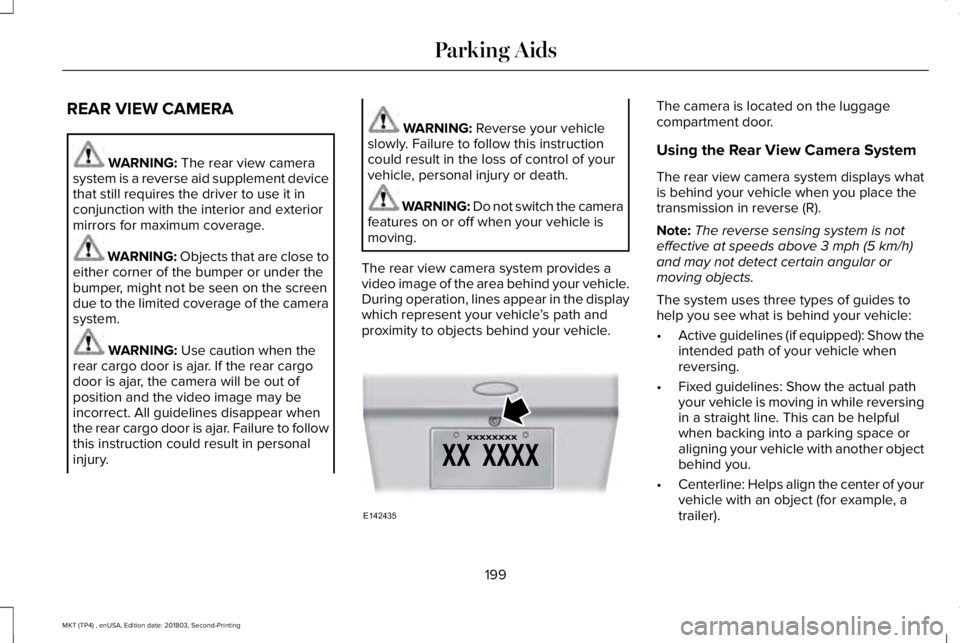
The camera is located on the luggagecompartment door.
Using the Rear View Camera System
The rear view camera system displays whatis behind your vehicle when you place thetransmission in reverse (R).
Note:The reverse sensing system is noteffective at speeds above 3 mph (5 km/h)and may not detect certain angular ormoving objects.
The system uses three types of guides tohelp you see what is behind your vehicle:
•Active guidelines (if equipped): Show theintended path of your vehicle whenreversing.
•Fixed guidelines: Show the actual pathyour vehicle is moving in while reversingin a straight line. This can be helpfulwhen backing into a parking space oraligning your vehicle with another objectbehind you.
•Centerline: Helps align the center of yourvehicle with an object (for example, atrailer).
199
MKT (TP4) , enUSA, Edition date: 201803, Second-Printing
Parking AidsE142435
Page 204 of 575
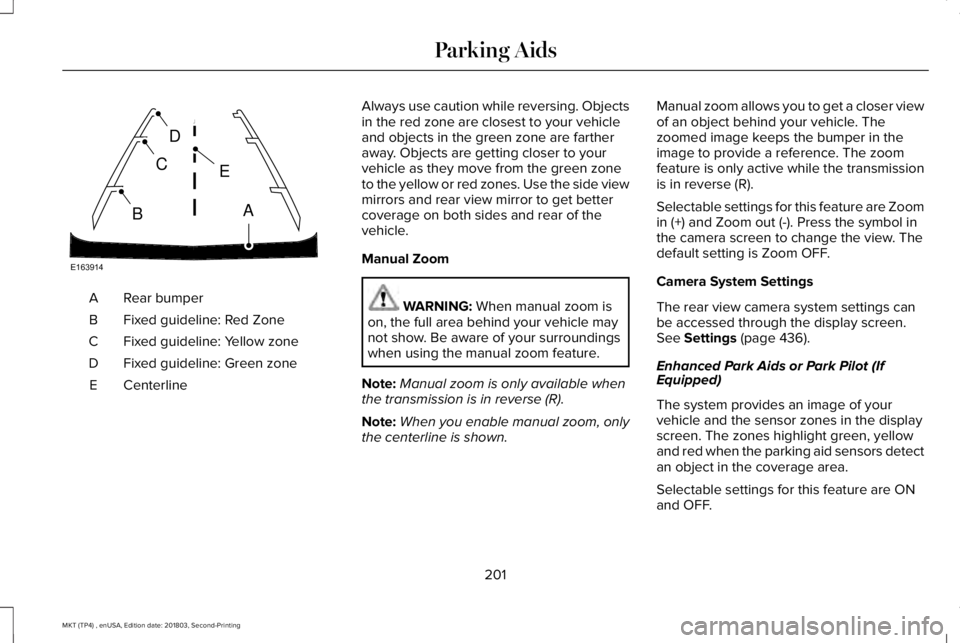
Rear bumperA
Fixed guideline: Red ZoneB
Fixed guideline: Yellow zoneC
Fixed guideline: Green zoneD
CenterlineE
Always use caution while reversing. Objectsin the red zone are closest to your vehicleand objects in the green zone are fartheraway. Objects are getting closer to yourvehicle as they move from the green zoneto the yellow or red zones. Use the side viewmirrors and rear view mirror to get bettercoverage on both sides and rear of thevehicle.
Manual Zoom
WARNING: When manual zoom ison, the full area behind your vehicle maynot show. Be aware of your surroundingswhen using the manual zoom feature.
Note:Manual zoom is only available whenthe transmission is in reverse (R).
Note:When you enable manual zoom, onlythe centerline is shown.
Manual zoom allows you to get a closer viewof an object behind your vehicle. Thezoomed image keeps the bumper in theimage to provide a reference. The zoomfeature is only active while the transmissionis in reverse (R).
Selectable settings for this feature are Zoomin (+) and Zoom out (-). Press the symbol inthe camera screen to change the view. Thedefault setting is Zoom OFF.
Camera System Settings
The rear view camera system settings canbe accessed through the display screen.See Settings (page 436).
Enhanced Park Aids or Park Pilot (IfEquipped)
The system provides an image of yourvehicle and the sensor zones in the displayscreen. The zones highlight green, yellowand red when the parking aid sensors detectan object in the coverage area.
Selectable settings for this feature are ONand OFF.
201
MKT (TP4) , enUSA, Edition date: 201803, Second-Printing
Parking AidsE163914
A
E
D
C
B
Page 222 of 575
Why does the vehicle not come back toward the middle of the lane, as expected, in the Aid or Aid + Alert mode?
High cross winds are present.
There is a large road crown.
Rough roads, grooves or shoulder drop-offs.
Heavy uneven loading of the vehicle or improper tire inflation pressure.
The tires have been changed, or the suspension has been modified.
BLIND SPOT INFORMATION
SYSTEM (If Equipped)
WARNING: Never use the Blind SpotInformation System as a replacement forusing the interior and exterior mirrors orlooking over your shoulder beforechanging lanes. The Blind Spot InformationSystem is not a replacement for carefuldriving.
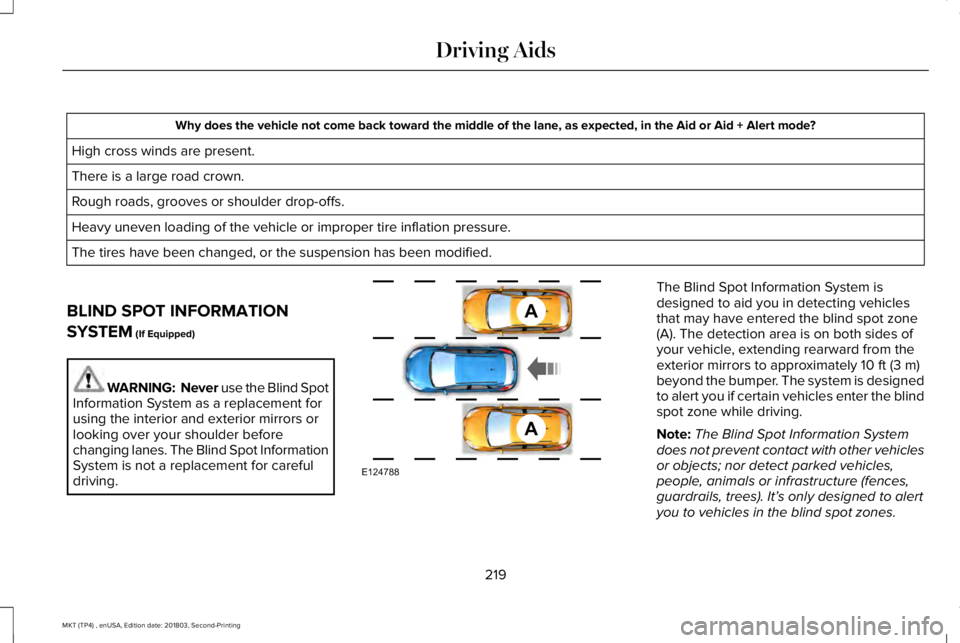
The Blind Spot Information System isdesigned to aid you in detecting vehiclesthat may have entered the blind spot zone(A). The detection area is on both sides ofyour vehicle, extending rearward from theexterior mirrors to approximately 10 ft (3 m)beyond the bumper. The system is designedto alert you if certain vehicles enter the blindspot zone while driving.
Note:The Blind Spot Information Systemdoes not prevent contact with other vehiclesor objects; nor detect parked vehicles,people, animals or infrastructure (fences,guardrails, trees). It’s only designed to alertyou to vehicles in the blind spot zones.
219
MKT (TP4) , enUSA, Edition date: 201803, Second-Printing
Driving AidsA
A
E124788
Page 223 of 575
Note:When a vehicle passes quickly throughthe blind spot zone, typically fewer than twoseconds, the system does not trigger.
Using the System
The Blind Spot Information System turns onwhen you start the engine and you drive yourvehicle forward above 3 mph (5 km/h).
For automatic transmissions, the Blind SpotInformation System remains on while thetransmission is in drive (D). If shifted intoreverse (R) or park (P) the Blind SpotInformation System turns off. Once shiftedback into drive (D), the Blind Spot InformationSystem turns back on when you drive yourvehicle above 3 mph (5 km/h).
For manual transmissions, the Blind SpotInformation System is on for all gears exceptthe reverse (R).
Note:The Blind Spot Information Systemdoes not function in reverse (R) or park (P).
System Lights and Messages
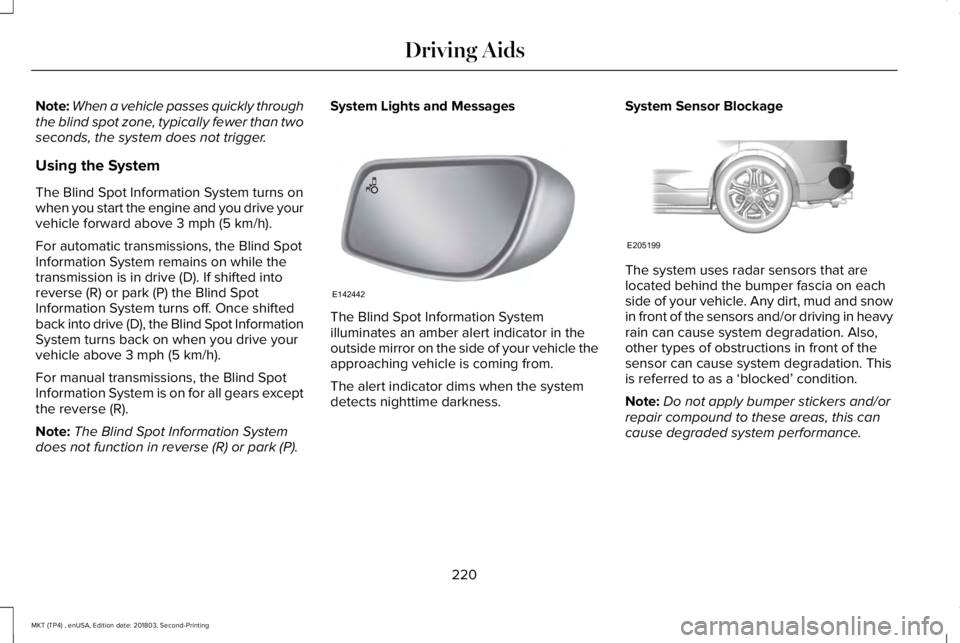
The Blind Spot Information Systemilluminates an amber alert indicator in theoutside mirror on the side of your vehicle theapproaching vehicle is coming from.
The alert indicator dims when the systemdetects nighttime darkness.
System Sensor Blockage
The system uses radar sensors that arelocated behind the bumper fascia on eachside of your vehicle. Any dirt, mud and snowin front of the sensors and/or driving in heavyrain can cause system degradation. Also,other types of obstructions in front of thesensor can cause system degradation. Thisis referred to as a ‘blocked’ condition.
Note:Do not apply bumper stickers and/orrepair compound to these areas, this cancause degraded system performance.
220
MKT (TP4) , enUSA, Edition date: 201803, Second-Printing
Driving AidsE142442 E205199
Page 225 of 575
CROSS TRAFFIC ALERT (If Equipped)
WARNING: Never use the CrossTraffic Alert system as a replacement forusing the interior and exterior mirrors andlooking over your shoulder before backingout of a parking space. Cross Traffic Alertis not a replacement for careful driving.
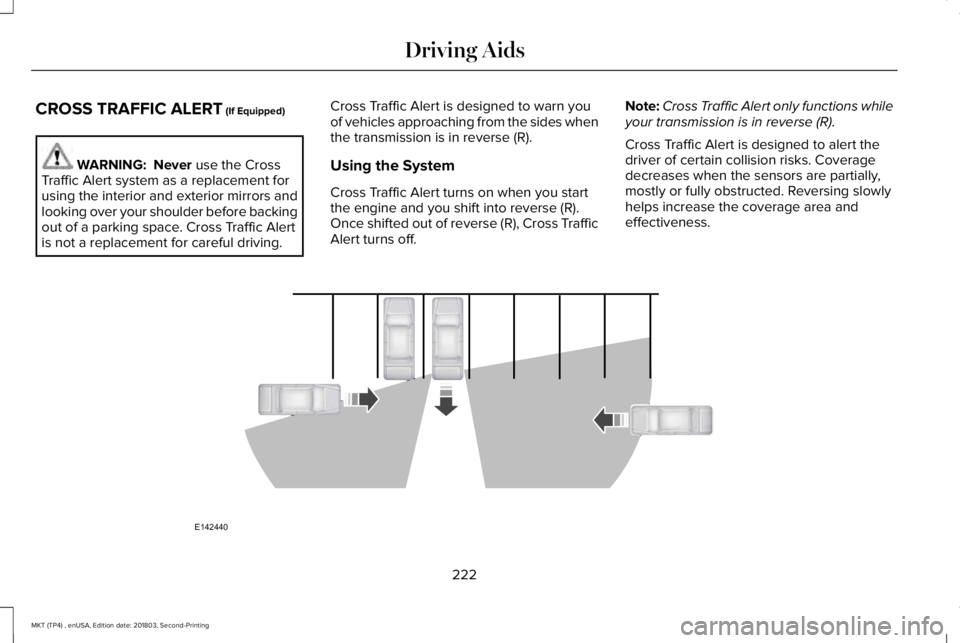
Cross Traffic Alert is designed to warn youof vehicles approaching from the sides whenthe transmission is in reverse (R).
Using the System
Cross Traffic Alert turns on when you startthe engine and you shift into reverse (R).Once shifted out of reverse (R), Cross TrafficAlert turns off.
Note:Cross Traffic Alert only functions whileyour transmission is in reverse (R).
Cross Traffic Alert is designed to alert thedriver of certain collision risks. Coveragedecreases when the sensors are partially,mostly or fully obstructed. Reversing slowlyhelps increase the coverage area andeffectiveness.
222
MKT (TP4) , enUSA, Edition date: 201803, Second-Printing
Driving AidsE142440
Page 227 of 575
System Lights, Messages and AudibleAlerts
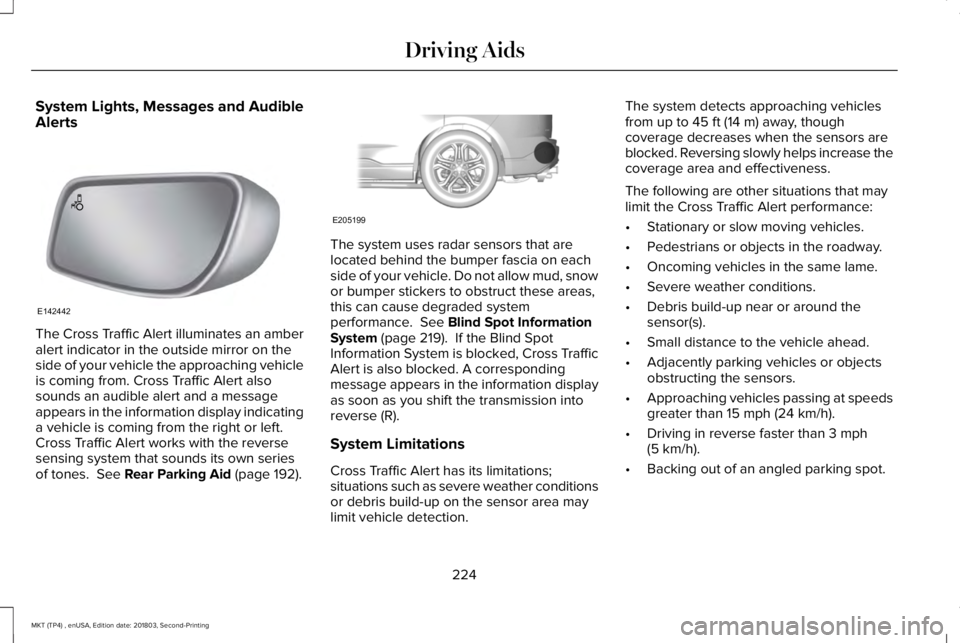
The Cross Traffic Alert illuminates an amberalert indicator in the outside mirror on theside of your vehicle the approaching vehicleis coming from. Cross Traffic Alert alsosounds an audible alert and a messageappears in the information display indicatinga vehicle is coming from the right or left.Cross Traffic Alert works with the reversesensing system that sounds its own seriesof tones. See Rear Parking Aid (page 192).
The system uses radar sensors that arelocated behind the bumper fascia on eachside of your vehicle. Do not allow mud, snowor bumper stickers to obstruct these areas,this can cause degraded systemperformance. See Blind Spot InformationSystem (page 219). If the Blind SpotInformation System is blocked, Cross TrafficAlert is also blocked. A correspondingmessage appears in the information displayas soon as you shift the transmission intoreverse (R).
System Limitations
Cross Traffic Alert has its limitations;situations such as severe weather conditionsor debris build-up on the sensor area maylimit vehicle detection.
The system detects approaching vehiclesfrom up to 45 ft (14 m) away, thoughcoverage decreases when the sensors areblocked. Reversing slowly helps increase thecoverage area and effectiveness.
The following are other situations that maylimit the Cross Traffic Alert performance:
•Stationary or slow moving vehicles.
•Pedestrians or objects in the roadway.
•Oncoming vehicles in the same lame.
•Severe weather conditions.
•Debris build-up near or around thesensor(s).
•Small distance to the vehicle ahead.
•Adjacently parking vehicles or objectsobstructing the sensors.
•Approaching vehicles passing at speedsgreater than 15 mph (24 km/h).
•Driving in reverse faster than 3 mph(5 km/h).
•Backing out of an angled parking spot.
224
MKT (TP4) , enUSA, Edition date: 201803, Second-Printing
Driving AidsE142442 E205199
Page 268 of 575
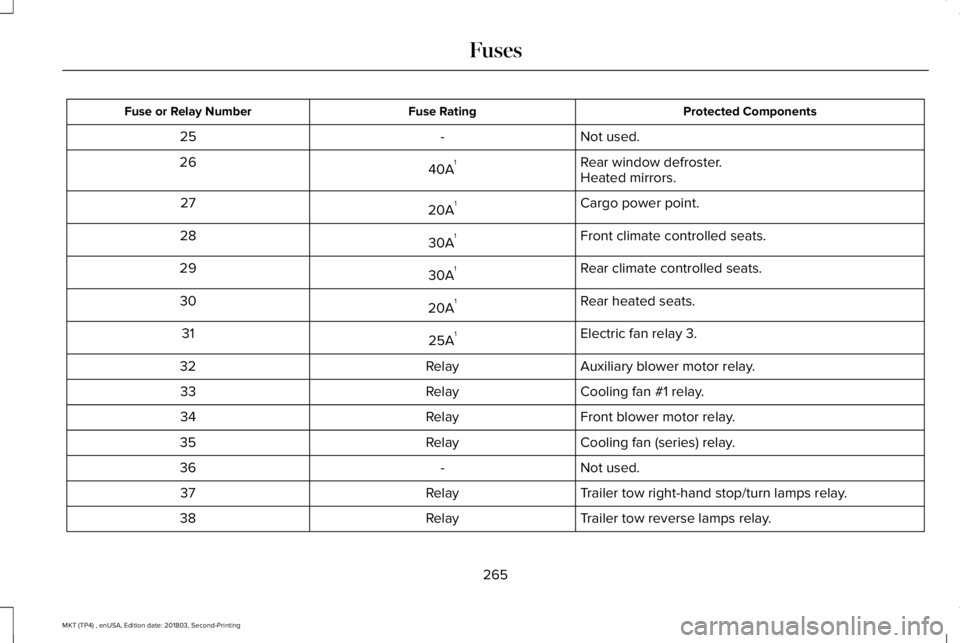
Protected ComponentsFuse RatingFuse or Relay Number
Not used.-25
Rear window defroster.40A126Heated mirrors.
Cargo power point.20A127
Front climate controlled seats.30A128
Rear climate controlled seats.30A129
Rear heated seats.20A130
Electric fan relay 3.25A131
Auxiliary blower motor relay.Relay32
Cooling fan #1 relay.Relay33
Front blower motor relay.Relay34
Cooling fan (series) relay.Relay35
Not used.-36
Trailer tow right-hand stop/turn lamps relay.Relay37
Trailer tow reverse lamps relay.Relay38
265
MKT (TP4) , enUSA, Edition date: 201803, Second-Printing
Fuses
Page 269 of 575
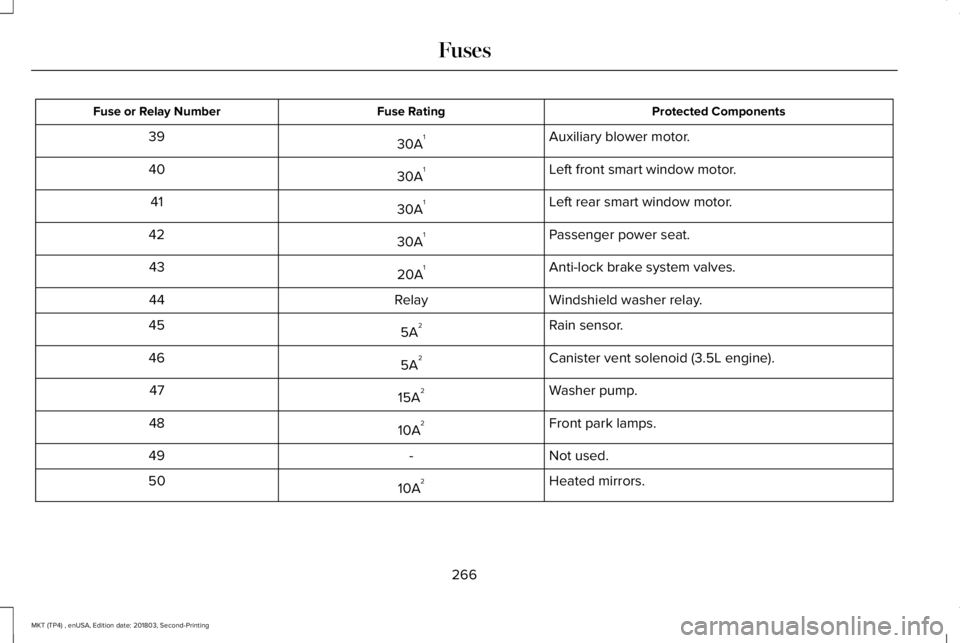
Protected ComponentsFuse RatingFuse or Relay Number
Auxiliary blower motor.30A139
Left front smart window motor.30A140
Left rear smart window motor.30A141
Passenger power seat.30A142
Anti-lock brake system valves.20A143
Windshield washer relay.Relay44
Rain sensor.5A245
Canister vent solenoid (3.5L engine).5A246
Washer pump.15A247
Front park lamps.10A248
Not used.-49
Heated mirrors.10A250
266
MKT (TP4) , enUSA, Edition date: 201803, Second-Printing
Fuses
Page 278 of 575
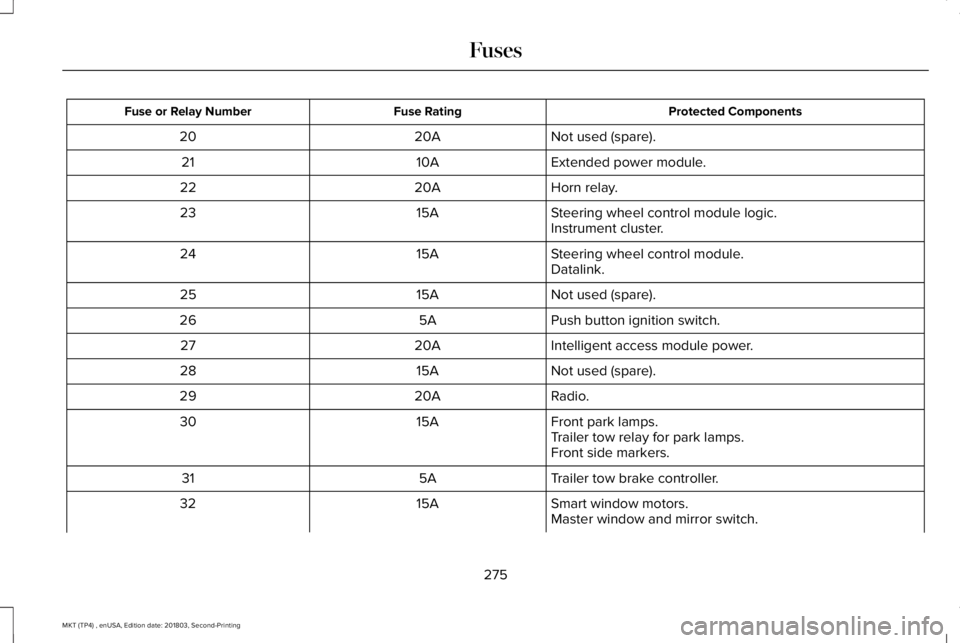
Protected ComponentsFuse RatingFuse or Relay Number
Not used (spare).20A20
Extended power module.10A21
Horn relay.20A22
Steering wheel control module logic.15A23Instrument cluster.
Steering wheel control module.15A24Datalink.
Not used (spare).15A25
Push button ignition switch.5A26
Intelligent access module power.20A27
Not used (spare).15A28
Radio.20A29
Front park lamps.15A30Trailer tow relay for park lamps.Front side markers.
Trailer tow brake controller.5A31
Smart window motors.15A32Master window and mirror switch.
275
MKT (TP4) , enUSA, Edition date: 201803, Second-Printing
Fuses