transmission LINCOLN MKT 2019 User Guide
[x] Cancel search | Manufacturer: LINCOLN, Model Year: 2019, Model line: MKT, Model: LINCOLN MKT 2019Pages: 575, PDF Size: 4.66 MB
Page 110 of 575
Round tachometer
Indicates the engine speed in revolutionsper minute. Driving with your tachometerpointer continuously at the top of the scalemay damage the engine. During SelectShiftAutomatic™ transmission (SST) use, thecurrently selected gear will appear in thedisplay.
Engine coolant temperature gauge
Indicates engine coolant temperature. Atnormal operating temperature, the levelindicator will be in the normal range. If theengine coolant temperature exceeds thenormal range, stop your vehicle as soon assafely possible, switch off the engine and letthe engine cool.
Trip 1 & 2
Choose between the following trip displays.
Trip 1 & 2
Trip distance
Average fuel economy
Elapsed trip time
Hold OK to Reset
Note:Press and hold OK to reset thecurrently displayed trip information.
Trip distance
Shows the accumulated trip distance.
Average fuel economy
Shows the average fuel economy for a giventrip.
Elapsed trip time
When you switch off your vehicle the timerstops and restarts when you restart yourvehicle.
Fuel Economy
Use the left or right arrow buttons to choosethe desired fuel economy display.
107
MKT (TP4) , enUSA, Edition date: 201803, Second-Printing
Information Displays
Page 118 of 575
AWD
ActionMessage
Displays if the AWD system disables to protect itself. This may occur if you operate the vehicleafter installing the compact spare tire, if the system is overheating or if there is an issue withanother vehicle system that prevents the AWD system from operating. The AWD system resumesnormal operation and clears this message after you install the road tire and you switch the ignitionon and off, or after you allow the system to cool. If this message remains on, have a qualifiedtechnician service your vehicle to repair other vehicle systems.
AWD OFF
Displayed in conjunction with the Throttle Control / Transmission / AWD light when the AWDsystem is not operating properly. See Warning Lamps and Indicators (page 101). If the warningstays illuminated or continues to illuminate, contact an authorized dealer as soon as possible.
Check AWD
115
MKT (TP4) , enUSA, Edition date: 201803, Second-Printing
Information Displays
Page 125 of 575
ActionMessage
Displayed when a MyKey is in use and the optional setting is on and the vehicle exceeds apreselected speed.Check Speed Drive Safely
A MyKey is in use and Belt-Minder is activated.Buckle Up to Unmute Audio
An attempt is made to program a spare key using two existing MyKeys.Could Not Program Integrated Key
Park Aid
ActionMessage
Displayed when the transmission is in R (Reverse) and the park aid is disabled. See Rear ParkingAid (page 192).Check Park Aid
Displayed when the transmission is in R (Reverse) and the park aid is disabled. See Rear ParkingAid (page 192).Check Rear Park Aid
The park aid status.Rear Park Aid On Off
122
MKT (TP4) , enUSA, Edition date: 201803, Second-Printing
Information Displays
Page 127 of 575
Tire Pressure Monitoring System
ActionMessage
One or more tires on your vehicle have low tire pressure. See Tire Pressure Monitoring System(page 329).Tire Pressure Low
The tire pressure monitoring system is malfunctioning. If the warning stays on or continues tocome on, contact an authorized dealer. See Tire Pressure Monitoring System (page 329).Tire Pressure Monitor Fault
A tire pressure sensor is malfunctioning, or your spare tire is in use. For more information onhow the system operates under these conditions, See Tire Pressure Monitoring System (page329). If the warning stays on or continues to come on, contact an authorized dealer as soon aspossible.
Tire Pressure Sensor Fault
Traction Control
ActionMessage
Displays the status of the traction control system. See Using Traction Control (page 189).Traction Control Off
Transmission
ActionMessage
You switched the engine off and shift select lever is in any position other than P (Park).Shift to Park
124
MKT (TP4) , enUSA, Edition date: 201803, Second-Printing
Information Displays
Page 139 of 575
Saving a PreSet Position
1. Switch the ignition on.
2. Adjust the memory features to yourdesired position.
3.Press and hold the desired preset buttonuntil you hear a single tone.
You can save up to three preset memorypositions. You can save a memory preset atany time.
Recalling a PreSet Position
Press and release the preset buttonassociated with your desired driving position.The memory features move to the positionstored for that preset.
You can recall a programmed memoryposition:
•Only in park (P) or neutral (N) if theignition is on.
•In any gearshift position if the ignition isnot on.
You can also recall a programmed memoryposition by:
•Pressing your remote control transmitterunlock button (if the remote control isprogrammed to a memory position).
•Unlocking your vehicle with an intelligentaccess key (if it is programmed to amemory position).
Note:Using a linked keyfob to recall yourmemory position when the ignition is offmoves the seat to the Easy Entry position.
Note:Adjusting any active memory featureor pressing a memory switch during amemory recall cancels the operation.
Linking a PreSet Position to yourRemote Control or Intelligent AccessKey Fob
Your vehicle can save the preset memorypositions for up to two remote controls.
1. With the ignition on, move the memoryfeatures to the desired positions.
2.Press and hold the desired preset buttonfor about five seconds. A tone soundsafter about two seconds. Continueholding until you hear a second tone.
3. Within three seconds, press the lockbutton on the remote control you arelinking.
To unlink a remote control, follow the sameprocedure – except in step 3, press theunlock button on the remote control.
Note:If more than one linked remote controlor intelligent access key is in range, thememory function moves to the settings ofthe first key to initiate a memory recall.
Easy Entry and Exit Feature
This feature adjusts the position of the seatand steering column to allow easier exit andentry to the vehicle.
The driver seat automatically moves 2 in(5 cm) rearward when the transmission is inpark (P) and you switch the ignition off.
The driver seat and steering wheel return totheir previous positions when you switch theignition on.
136
MKT (TP4) , enUSA, Edition date: 201803, Second-Printing
Seats
Page 147 of 575
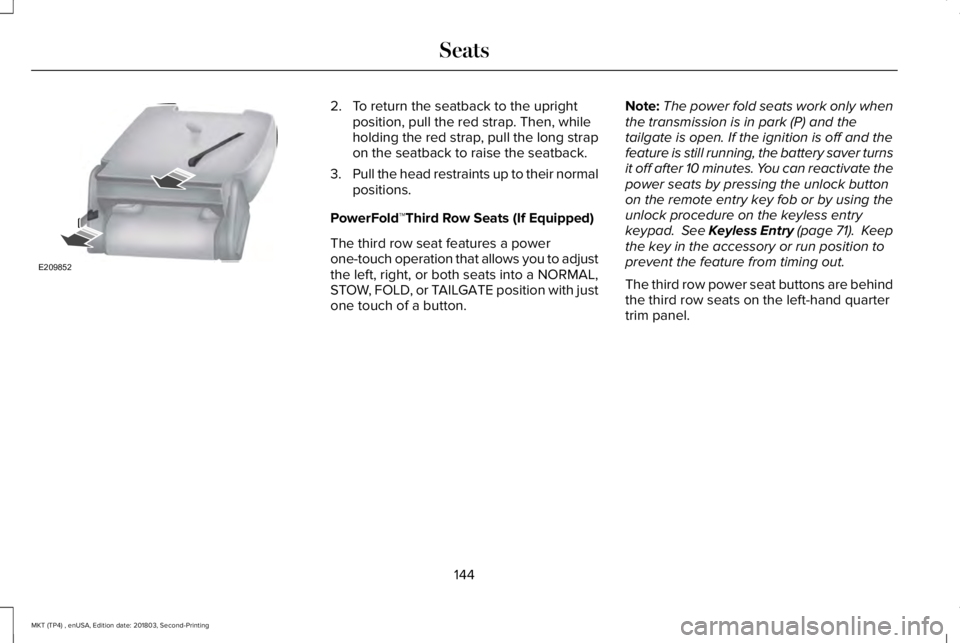
2. To return the seatback to the uprightposition, pull the red strap. Then, whileholding the red strap, pull the long strapon the seatback to raise the seatback.
3.Pull the head restraints up to their normalpositions.
PowerFold™Third Row Seats (If Equipped)
The third row seat features a powerone-touch operation that allows you to adjustthe left, right, or both seats into a NORMAL,STOW, FOLD, or TAILGATE position with justone touch of a button.
Note:The power fold seats work only whenthe transmission is in park (P) and thetailgate is open. If the ignition is off and thefeature is still running, the battery saver turnsit off after 10 minutes. You can reactivate thepower seats by pressing the unlock buttonon the remote entry key fob or by using theunlock procedure on the keyless entrykeypad. See Keyless Entry (page 71). Keepthe key in the accessory or run position toprevent the feature from timing out.
The third row power seat buttons are behindthe third row seats on the left-hand quartertrim panel.
144
MKT (TP4) , enUSA, Edition date: 201803, Second-Printing
SeatsE209852
Page 152 of 575
HomeLink Wireless Control System
WARNING: Do not use the systemwith any garage door opener that does nothave the safety stop and reverse featureas required by U.S. Federal SafetyStandards (this includes any garage dooropener manufactured before April 1, 1982).A garage door opener which cannot detectan object, signaling the door to stop andreverse, does not meet current federalsafety standards. Using a garage dooropener without these features increasesthe risk of serious injury or death.
Note:Make sure that the garage door andsecurity device are free from obstructionwhen you are programming. Do not programthe system with the vehicle in the garage.
Note:Make sure you keep the originalremote control transmitter for use in othervehicles as well as for future systemprogramming.
Note:We recommend that upon the sale orlease termination of your vehicle, you erasethe programmed function buttons for securityreasons. See Erasing the Function ButtonCodes.
Note:You can program a maximum of threedevices. To change or replace any of thethree devices after it has been initiallyprogrammed, you must first erase the currentsettings. See Erasing the Function ButtonCodes.
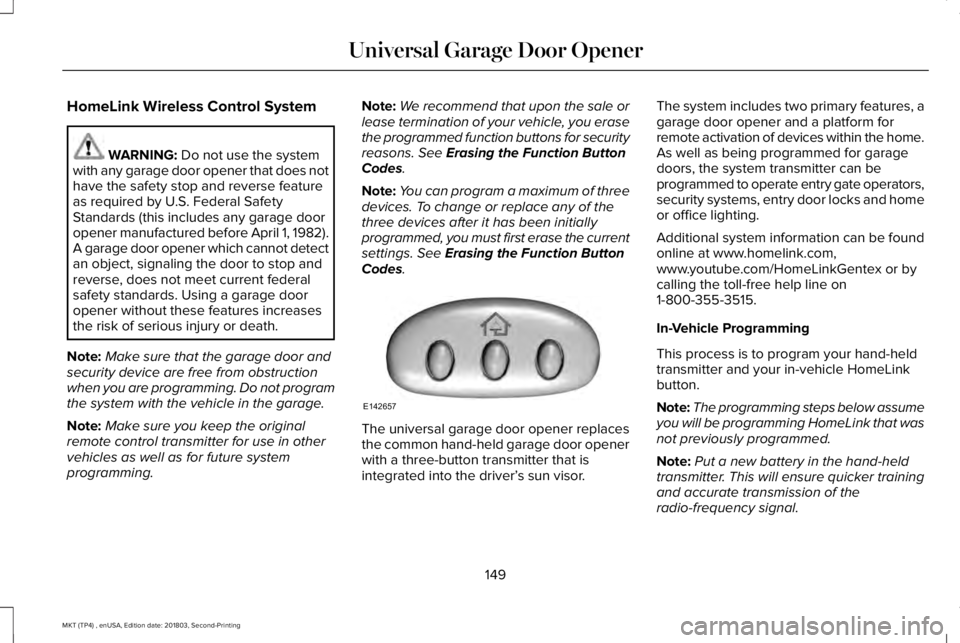
The universal garage door opener replacesthe common hand-held garage door openerwith a three-button transmitter that isintegrated into the driver’s sun visor.
The system includes two primary features, agarage door opener and a platform forremote activation of devices within the home.As well as being programmed for garagedoors, the system transmitter can beprogrammed to operate entry gate operators,security systems, entry door locks and homeor office lighting.
Additional system information can be foundonline at www.homelink.com,www.youtube.com/HomeLinkGentex or bycalling the toll-free help line on1-800-355-3515.
In-Vehicle Programming
This process is to program your hand-heldtransmitter and your in-vehicle HomeLinkbutton.
Note:The programming steps below assumeyou will be programming HomeLink that wasnot previously programmed.
Note:Put a new battery in the hand-heldtransmitter. This will ensure quicker trainingand accurate transmission of theradio-frequency signal.
149
MKT (TP4) , enUSA, Edition date: 201803, Second-Printing
Universal Garage Door OpenerE142657
Page 154 of 575
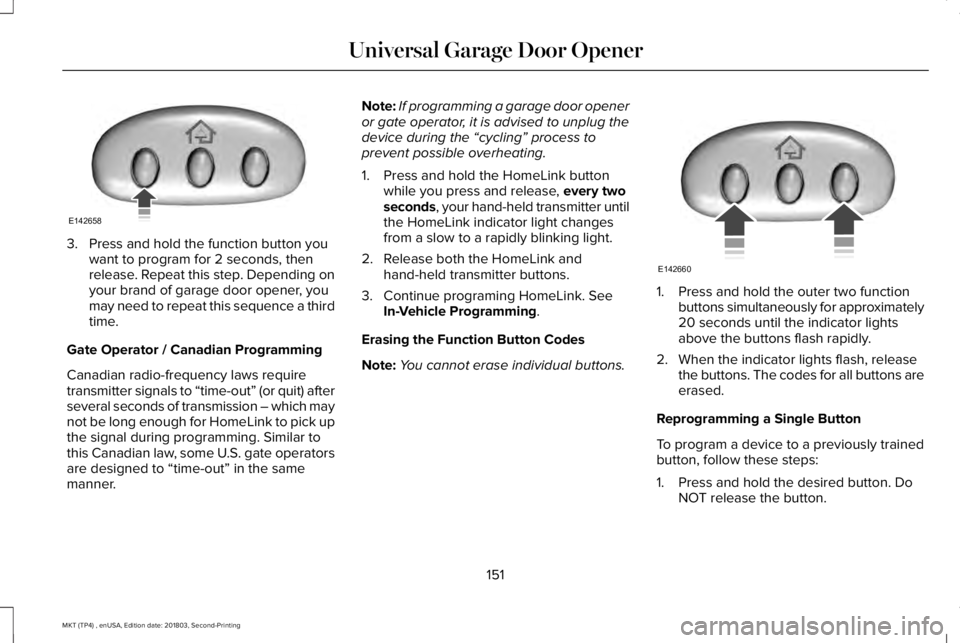
3. Press and hold the function button youwant to program for 2 seconds, thenrelease. Repeat this step. Depending onyour brand of garage door opener, youmay need to repeat this sequence a thirdtime.
Gate Operator / Canadian Programming
Canadian radio-frequency laws requiretransmitter signals to “time-out” (or quit) afterseveral seconds of transmission – which maynot be long enough for HomeLink to pick upthe signal during programming. Similar tothis Canadian law, some U.S. gate operatorsare designed to “time-out” in the samemanner.
Note:If programming a garage door openeror gate operator, it is advised to unplug thedevice during the “cycling” process toprevent possible overheating.
1. Press and hold the HomeLink buttonwhile you press and release, every twoseconds, your hand-held transmitter untilthe HomeLink indicator light changesfrom a slow to a rapidly blinking light.
2. Release both the HomeLink andhand-held transmitter buttons.
3. Continue programing HomeLink. SeeIn-Vehicle Programming.
Erasing the Function Button Codes
Note:You cannot erase individual buttons.
1. Press and hold the outer two functionbuttons simultaneously for approximately20 seconds until the indicator lightsabove the buttons flash rapidly.
2. When the indicator lights flash, releasethe buttons. The codes for all buttons areerased.
Reprogramming a Single Button
To program a device to a previously trainedbutton, follow these steps:
1. Press and hold the desired button. DoNOT release the button.
151
MKT (TP4) , enUSA, Edition date: 201803, Second-Printing
Universal Garage Door OpenerE142658 E142660
Page 162 of 575
•Without applying the brake pedal, pressand release the button once when theignition is in the on mode, or when theengine is running but the vehicle is notmoving.
On: All electrical circuits are operational andthe warning lamps and indicators illuminate.
•Without applying the brake pedal, pressand release the button once.
Note:You may have to press the pushbutton ignition switch twice to switch theignition on.
Start: Starts the engine.
•Press the brake pedal, and then pressthe button for any length of time. Anindicator light on the button illuminateswhen then ignition is on and when theengine starts.
STARTING A GASOLINE ENGINE
When you start the engine, the idle speedincreases. This helps to warm up the engine.If the engine idle speed does not slow downautomatically, have your vehicle checked byan authorized dealer.
Note: You can crank the engine for a totalof 60 seconds without the engine startingbefore the starting system temporarilydisables. The 60 seconds does not have tobe all at once. For example, if you crank theengine three times for 20 seconds each time,without the engine starting, you reached the60-second time limit. A message appearsin the information display alerting you thatyou exceeded the cranking time. Youcannot attempt to start the engine for atleast 15 minutes. After 15 minutes, you arelimited to a 15-second engine cranking time. You need to wait 60 minutes before you cancrank the engine for 60 seconds again.
Before starting your vehicle, check thefollowing:
•Make sure all occupants have fastenedtheir safety belts.
•Make sure the headlamps and electricalaccessories are off.
•Make sure the parking brake is on.
•Make sure the transmission is in park (P).
Note:Do not touch the accelerator pedal.
Note:You must have your intelligent accesskey in your vehicle to shift the transmissionout of park (P).
1. Fully depress the brake pedal.
2. Press the push button ignition switch.
The system does not function if:
•The passive key frequencies are jammed.
•The key battery has no charge.
If you are unable to start your vehicle, do thefollowing:
159
MKT (TP4) , enUSA, Edition date: 201803, Second-Printing
Starting and Stopping the Engine
Page 177 of 575
If the service engine soon indicator remainson, have your vehicle serviced at the firstavailable opportunity. Although somemalfunctions detected by the OBD-II may nothave symptoms that are apparent, continueddriving with the service engine soon indicatoron can result in increased emissions, lowerfuel economy, reduced engine andtransmission smoothness and lead to morecostly repairs.
Readiness for Inspection andMaintenance (I/M) Testing
Some state and provincial and localgovernments may haveInspection/Maintenance (I/M) programs toinspect the emission control equipment onyour vehicle. Failure to pass this inspectioncould prevent you from getting a vehicleregistration.
If the service engine soon indicatoris on or the bulb does not work,your vehicle may need service.See On-Board Diagnostics.
Your vehicle may not pass the I/M test if theservice engine soon indicator is on or notworking properly (bulb is burned out), or ifthe OBD-II system has determined that someof the emission control systems have notbeen properly checked. In this case, thevehicle is not ready for I/M testing.
If the vehicle’s engine or transmission hasjust been serviced, or the battery hasrecently run down or been replaced, theOBD-II system may indicate that the vehicleis not ready for I/M testing. To determine ifthe vehicle is ready for I/M testing, turn theignition key to the on position for 15 secondswithout cranking the engine. If the serviceengine soon indicator blinks eight times, itmeans that the vehicle is not ready for I/Mtesting; if the service engine soon indicatorstays on solid, it means that your vehicle isready for I/M testing.
The OBD-II system checks the emissioncontrol system during normal driving. Acomplete check may take several days.
If the vehicle is not ready for I/M testing, youcan perform the following driving cycleconsisting of mixed city and highway driving:
1. 15 minutes of steady driving on anexpressway or highway followed by 20minutes of stop-and-go driving with atleast four 30-second idle periods.
2.Allow your vehicle to sit for at least eighthours with the ignition off. Then, start thevehicle and complete the above drivingcycle. The vehicle must warm up to itsnormal operating temperature. Oncestarted, do not turn off the vehicle untilthe above driving cycle is complete.
If the vehicle is still not ready for I/M testing,you need to repeat the above driving cycle.
174
MKT (TP4) , enUSA, Edition date: 201803, Second-Printing
Engine Emission Control