remote control LINCOLN MKT 2019 Owner's Manual
[x] Cancel search | Manufacturer: LINCOLN, Model Year: 2019, Model line: MKT, Model: LINCOLN MKT 2019Pages: 575, PDF Size: 4.66 MB
Page 113 of 575
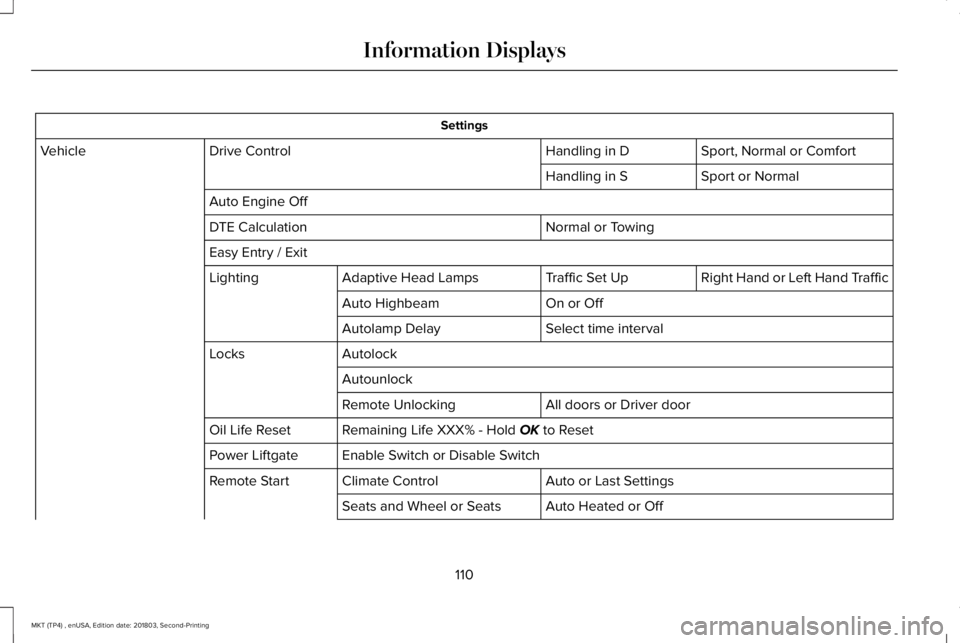
Settings
Sport, Normal or ComfortHandling in DDrive ControlVehicle
Sport or NormalHandling in S
Auto Engine Off
Normal or TowingDTE Calculation
Easy Entry / Exit
Right Hand or Left Hand TrafficTraffic Set UpAdaptive Head LampsLighting
On or OffAuto Highbeam
Select time intervalAutolamp Delay
AutolockLocks
Autounlock
All doors or Driver doorRemote Unlocking
Remaining Life XXX% - Hold OK to ResetOil Life Reset
Enable Switch or Disable SwitchPower Liftgate
Auto or Last SettingsClimate ControlRemote Start
Auto Heated or OffSeats and Wheel or Seats
110
MKT (TP4) , enUSA, Edition date: 201803, Second-Printing
Information Displays
Page 114 of 575
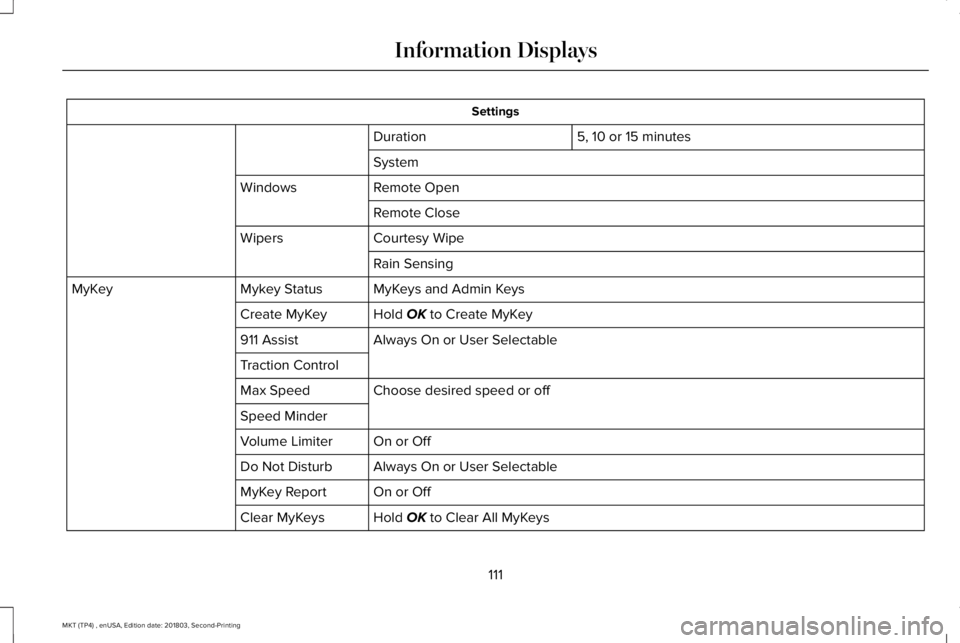
Settings
5, 10 or 15 minutesDuration
System
Remote OpenWindows
Remote Close
Courtesy WipeWipers
Rain Sensing
MyKeys and Admin KeysMykey StatusMyKey
Hold OK to Create MyKeyCreate MyKey
Always On or User Selectable911 Assist
Traction Control
Choose desired speed or offMax Speed
Speed Minder
On or OffVolume Limiter
Always On or User SelectableDo Not Disturb
On or OffMyKey Report
Hold OK to Clear All MyKeysClear MyKeys
111
MKT (TP4) , enUSA, Edition date: 201803, Second-Printing
Information Displays
Page 132 of 575
CABIN AIR FILTER
Your vehicle is equipped with a cabin airfilter, which gives you and your passengersthe following benefits:
•It improves your driving comfort byreducing particle concentration.
•It improves the interior compartmentcleanliness.
•It protects the climate controlcomponents from particle deposits.
You can locate the cabin air filter behind theglove box.
Note:Make sure you have a cabin air filterinstalled at all times. This prevents foreignobjects from entering the system. Runningthe system without a filter in place couldresult in degradation or damage to thesystem.
Replace the filter at regular intervals. SeeScheduled Maintenance (page 479).
For additional cabin air filter information, orto replace the filter, see an authorized dealer.
REMOTE START
You can switch this feature on or off andadjust the settings using the informationdisplay.
The system adjusts the interior temperaturedepending on your chosen settings duringremote start.
You cannot adjust the climate control settingduring remote start operation. When youswitch the ignition on, the climate controlsystem returns to the previous settings. Youcan now make adjustments.
You need to switch on certainvehicle-dependent features, such as:
•Heated seats.
•Cooled seats.
•Heated steering wheel.
•Heated mirrors.
•Heated rear window.
Automatic Settings
In hot weather, the system sets to 72°F(22°C). The cooled seats are set to high (ifavailable, and AUTO is on in the informationdisplay).
In moderate weather, the system either heatsor cools (based on previous settings). Therear defroster, heated mirrors and heated orcooled seats do not turn on.
In cold weather, the system sets to 72°F(22°C). The heated seats are set to high (ifavailable, and AUTO is on in the informationdisplay). The heated rear window and heatedmirrors turn on.
129
MKT (TP4) , enUSA, Edition date: 201803, Second-Printing
Climate Control
Page 139 of 575
Saving a PreSet Position
1. Switch the ignition on.
2. Adjust the memory features to yourdesired position.
3.Press and hold the desired preset buttonuntil you hear a single tone.
You can save up to three preset memorypositions. You can save a memory preset atany time.
Recalling a PreSet Position
Press and release the preset buttonassociated with your desired driving position.The memory features move to the positionstored for that preset.
You can recall a programmed memoryposition:
•Only in park (P) or neutral (N) if theignition is on.
•In any gearshift position if the ignition isnot on.
You can also recall a programmed memoryposition by:
•Pressing your remote control transmitterunlock button (if the remote control isprogrammed to a memory position).
•Unlocking your vehicle with an intelligentaccess key (if it is programmed to amemory position).
Note:Using a linked keyfob to recall yourmemory position when the ignition is offmoves the seat to the Easy Entry position.
Note:Adjusting any active memory featureor pressing a memory switch during amemory recall cancels the operation.
Linking a PreSet Position to yourRemote Control or Intelligent AccessKey Fob
Your vehicle can save the preset memorypositions for up to two remote controls.
1. With the ignition on, move the memoryfeatures to the desired positions.
2.Press and hold the desired preset buttonfor about five seconds. A tone soundsafter about two seconds. Continueholding until you hear a second tone.
3. Within three seconds, press the lockbutton on the remote control you arelinking.
To unlink a remote control, follow the sameprocedure – except in step 3, press theunlock button on the remote control.
Note:If more than one linked remote controlor intelligent access key is in range, thememory function moves to the settings ofthe first key to initiate a memory recall.
Easy Entry and Exit Feature
This feature adjusts the position of the seatand steering column to allow easier exit andentry to the vehicle.
The driver seat automatically moves 2 in(5 cm) rearward when the transmission is inpark (P) and you switch the ignition off.
The driver seat and steering wheel return totheir previous positions when you switch theignition on.
136
MKT (TP4) , enUSA, Edition date: 201803, Second-Printing
Seats
Page 152 of 575
HomeLink Wireless Control System
WARNING: Do not use the systemwith any garage door opener that does nothave the safety stop and reverse featureas required by U.S. Federal SafetyStandards (this includes any garage dooropener manufactured before April 1, 1982).A garage door opener which cannot detectan object, signaling the door to stop andreverse, does not meet current federalsafety standards. Using a garage dooropener without these features increasesthe risk of serious injury or death.
Note:Make sure that the garage door andsecurity device are free from obstructionwhen you are programming. Do not programthe system with the vehicle in the garage.
Note:Make sure you keep the originalremote control transmitter for use in othervehicles as well as for future systemprogramming.
Note:We recommend that upon the sale orlease termination of your vehicle, you erasethe programmed function buttons for securityreasons. See Erasing the Function ButtonCodes.
Note:You can program a maximum of threedevices. To change or replace any of thethree devices after it has been initiallyprogrammed, you must first erase the currentsettings. See Erasing the Function ButtonCodes.
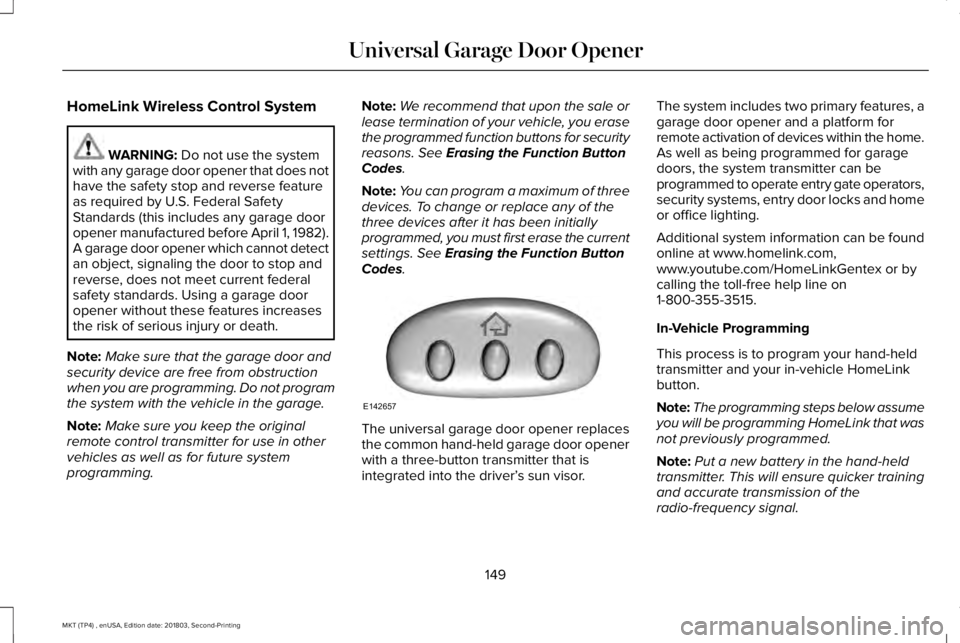
The universal garage door opener replacesthe common hand-held garage door openerwith a three-button transmitter that isintegrated into the driver’s sun visor.
The system includes two primary features, agarage door opener and a platform forremote activation of devices within the home.As well as being programmed for garagedoors, the system transmitter can beprogrammed to operate entry gate operators,security systems, entry door locks and homeor office lighting.
Additional system information can be foundonline at www.homelink.com,www.youtube.com/HomeLinkGentex or bycalling the toll-free help line on1-800-355-3515.
In-Vehicle Programming
This process is to program your hand-heldtransmitter and your in-vehicle HomeLinkbutton.
Note:The programming steps below assumeyou will be programming HomeLink that wasnot previously programmed.
Note:Put a new battery in the hand-heldtransmitter. This will ensure quicker trainingand accurate transmission of theradio-frequency signal.
149
MKT (TP4) , enUSA, Edition date: 201803, Second-Printing
Universal Garage Door OpenerE142657
Page 213 of 575
Possible Causes and Actions for This Message Displaying:
ActionCause
Clean the grille surface in front of the radar or remove the objectcausing the obstruction.The surface of the radar is dirty or obstructed.
Wait a short time. It may take several minutes for the radar to detectthat it is free from obstruction.The surface of the radar is clean but the message remains in thedisplay.
Do not use the system in these conditions because it may not detectany vehicles ahead.Heavy rain or snow is interfering with the radar signals.
Do not use the system in these conditions because it may not detectany vehicles ahead.Water, snow or ice on the surface of the road may interfere with theradar signals.
Wait a short time or switch to normal cruise control.You are in a desert or remote area with no other vehicles and noroadside objects.
Due to the nature of radar technology, it is possible to get a blockage warning with no actual block. A false blocked condition either selfclears, or clears after you restart your vehicle.
210
MKT (TP4) , enUSA, Edition date: 201803, Second-Printing
Cruise Control
Page 255 of 575
Removing the Jumper Cables
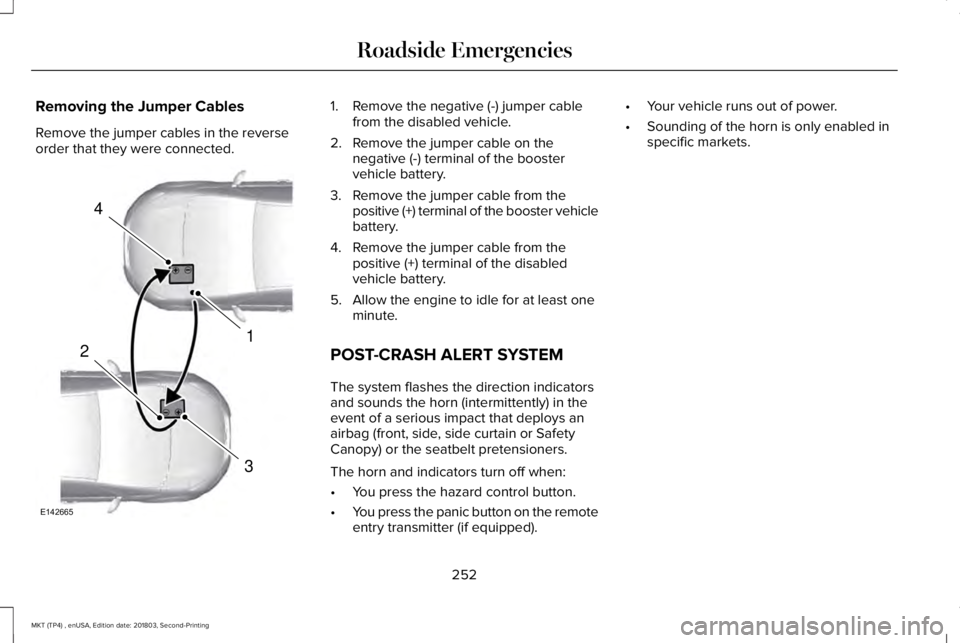
Remove the jumper cables in the reverseorder that they were connected.
1. Remove the negative (-) jumper cablefrom the disabled vehicle.
2. Remove the jumper cable on thenegative (-) terminal of the boostervehicle battery.
3. Remove the jumper cable from thepositive (+) terminal of the booster vehiclebattery.
4. Remove the jumper cable from thepositive (+) terminal of the disabledvehicle battery.
5. Allow the engine to idle for at least oneminute.
POST-CRASH ALERT SYSTEM
The system flashes the direction indicatorsand sounds the horn (intermittently) in theevent of a serious impact that deploys anairbag (front, side, side curtain or SafetyCanopy) or the seatbelt pretensioners.
The horn and indicators turn off when:
•You press the hazard control button.
•You press the panic button on the remoteentry transmitter (if equipped).
•Your vehicle runs out of power.
•Sounding of the horn is only enabled inspecific markets.
252
MKT (TP4) , enUSA, Edition date: 201803, Second-Printing
Roadside Emergencies4
1
3
2
E142665
Page 328 of 575
Tire Replacement Requirements
Your vehicle is equipped with tiresdesigned to provide a safe ride andhandling capability.
WARNING: Only use replacementtires and wheels that are the samesize, load index, speed rating and type(such as P-metric versus LT-metric orall-season versus all-terrain) as thoseoriginally provided by Ford. Therecommended tire and wheel size maybe found on either the SafetyCompliance Certification Label (affixedto either the door hinge pillar,door-latch post, or the door edge thatmeets the door-latch post, next to thedriver's seating position), or the TireLabel which is located on the B-Pillaror edge of the driver's door. If thisinformation is not found on theselabels, then you should contact yourauthorized dealer as soon as possible.Use of any tire or wheel not
recommended by Ford can affect thesafety and performance of yourvehicle, which could result in anincreased risk of loss of vehiclecontrol, vehicle rollover, personalinjury and death.
WARNING: To reduce the risk ofserious injury, when mountingreplacement tires and wheels, youshould not exceed the maximumpressure indicated on the sidewall ofthe tire to set the beads withoutadditional precautions listed below. Ifthe beads do not seat at the maximumpressure indicated, re-lubricate andtry again.
WARNING: For a mounting
pressure more than 20 psi (1.38 bar)greater than the maximum pressure,a Ford dealer or other tire serviceprofessional should do the mounting.
WARNING: Always inflate steelcarcass tires with a remote air fill withthe person inflating standing at aminimum of 12 ft (3.66 m) away fromthe wheel and tire assembly.
WARNING: When inflating thetire for mounting pressures up to20 psi (1.38 bar) greater than themaximum pressure on the tire sidewall,the following precautions must betaken to protect the person mountingthe tire:
•Make sure that you have the correcttire and wheel size.
•Lubricate the tire bead and wheelbead seat area again.
•Stand at a minimum of 12 ft (3.66 m)away from the wheel and tireassembly.
•Use both eye and ear protection.
Important: Remember to replace thewheel valve stems when the road tiresare replaced on your vehicle.
325
MKT (TP4) , enUSA, Edition date: 201803, Second-Printing
Wheels and Tires
Page 562 of 575
Radio Frequency Certifications forBody Control Module
Canada
IC: 7812A-A2C738448
Model # : M : A2C750526
Model # : M : A2C750561
United States of America
FCC ID: M3NA2C738448
Model # : M : A2C750526
Model # : M : A2C750561
Radio Frequency Certification for Keysand Remote Controls
Canada
FCC ID : M3N-A2C931423
IC : 7812A-A2C931423
FCC ID : M3N-A2C931426
IC: 7812A-A2C931426
FCC ID : N5F-A08TAA
IC: 3248A-A08TAA
FCC ID : N5F-A08TDA
IC: 3248A-A08TDA
United States of America
FCC ID : M3N-A2C931423
FCC ID : M3N-A2C931426
FCC ID : N5F-A08TAA
FCC ID : N5F-A08TDA
Radio Frequency Statement for AudioUnit
Canada
IC: 3043A-UP375AHU
United States
FCC ID: NT8-16UP375AHU
559
MKT (TP4) , enUSA, Edition date: 201803, Second-Printing
Appendices
Page 569 of 575
I
In California (U.S. Only)...............................255Information Display Control.........................82Information Displays.....................................105General Information............................................105
Information Messages..................................112Adaptive Cruise Control.....................................113AdvanceTrac™........................................................113Alarm........................................................................114Automatic Engine Shutdown.............................114AWD.........................................................................115Battery and Charging System...........................116Blind Spot Information and Cross Traffic AlertSystem................................................................117Brake System.........................................................117Collision Warning System..................................118Doors and Locks...................................................118Fuel..........................................................................119Keys and Intelligent Access...............................119Lane Keeping System........................................120Maintenance.........................................................120MyKey......................................................................121Park Aid..................................................................122Power Steering....................................................123Seats.......................................................................123Tire Pressure Monitoring System....................124Traction Control...................................................124
Transmission.........................................................124
Installing Child Restraints.............................20Child Seats.............................................................20Using Lap and Shoulder Belts...........................20Using Lower Anchors and Tethers forCHildren (LATCH).............................................26Using Tether Straps..............................................28
Instrument Cluster........................................100Instrument Lighting Dimmer........................88Instrument Panel Overview...........................16Interior Lamps..................................................92Third Row Dome Lamps......................................92
Interior Mirror...................................................97Auto-Dimming Mirror............................................97Second Row Illuminated Vanity Mirror............97
Introduction.........................................................7
J
Jump Starting the Vehicle..........................250Connecting the Jumper Cables.....................250Jump Starting.......................................................251Preparing Your Vehicle.....................................250Removing the Jumper Cables........................252
K
Keyless Entry.....................................................71SECURICODE™ Keyless Entry Keypad..............71
Keyless Starting.............................................158Ignition Modes.....................................................158
Keys and Remote Controls..........................59
L
Lane Keeping System..................................214Switching the System On and Off...................215
Liftgate...............................................................74Lighting Control..............................................86Flashing the Headlamp High Beam.................87Headlamp High Beam.........................................87
Lighting..............................................................86General Information.............................................86
Lincoln Automotive Financial Services......12Lincoln Protect..............................................476Lincoln Protect (CANADA ONLY)....................477Lincoln Protect Extended Service Plans (U.S.Only)..................................................................476
Load Carrying.................................................231Load Limit.......................................................232Special Loading Instructions for Owners ofPick-up Trucks and Utility-typeVehicles............................................................236
566
MKT (TP4) , enUSA, Edition date: 201803, Second-Printing
Index