seats LINCOLN MKT 2019 Owner's Manual
[x] Cancel search | Manufacturer: LINCOLN, Model Year: 2019, Model line: MKT, Model: LINCOLN MKT 2019Pages: 575, PDF Size: 4.66 MB
Page 59 of 575
WARNING: All occupants of yourvehicle, including the driver, should alwaysproperly wear their seatbelts, even whenan airbag supplemental restraint system isprovided. Failure to properly wear yourseatbelt could seriously increase the riskof injury or death.
WARNING: To reduce risk of injury,do not obstruct or place objects in thedeployment path of the airbag.
WARNING: If a supplementaryrestraint system component has deployed,it will not function again. Have the systemand associated components inspected assoon as possible. Failure to follow thisinstruction could result in personal injuryor death.
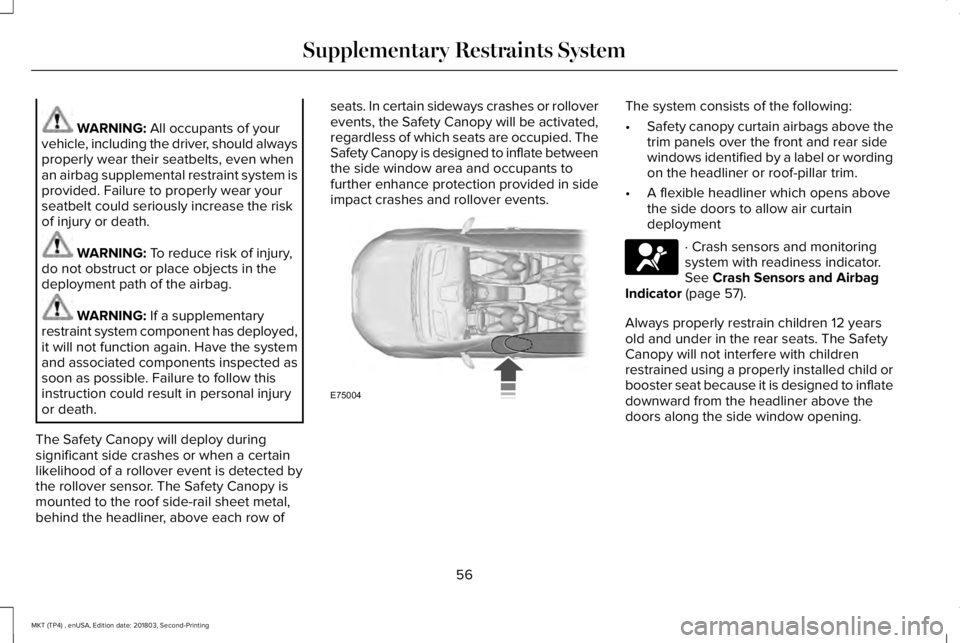
The Safety Canopy will deploy duringsignificant side crashes or when a certainlikelihood of a rollover event is detected bythe rollover sensor. The Safety Canopy ismounted to the roof side-rail sheet metal,behind the headliner, above each row of
seats. In certain sideways crashes or rolloverevents, the Safety Canopy will be activated,regardless of which seats are occupied. TheSafety Canopy is designed to inflate betweenthe side window area and occupants tofurther enhance protection provided in sideimpact crashes and rollover events.
The system consists of the following:
•Safety canopy curtain airbags above thetrim panels over the front and rear sidewindows identified by a label or wordingon the headliner or roof-pillar trim.
•A flexible headliner which opens abovethe side doors to allow air curtaindeployment
· Crash sensors and monitoringsystem with readiness indicator.See Crash Sensors and AirbagIndicator (page 57).
Always properly restrain children 12 yearsold and under in the rear seats. The SafetyCanopy will not interfere with childrenrestrained using a properly installed child orbooster seat because it is designed to inflatedownward from the headliner above thedoors along the side window opening.
56
MKT (TP4) , enUSA, Edition date: 201803, Second-Printing
Supplementary Restraints SystemE75004 E67017
Page 77 of 575
POWER LIFTGATE
WARNING: It is extremely dangerousto ride in a cargo area, inside or outside ofa vehicle. In a crash, people riding in theseareas are more likely to be seriouslyinjured or killed. Do not allow people toride in any area of your vehicle that is notequipped with seats and seatbelts. Makesure everyone in your vehicle is in a seatand properly using a seatbelt. Failure tofollow this warning could result in seriouspersonal injury or death.
WARNING: Make sure to close andlatch the liftgate to prevent drawingexhaust fumes into your vehicle. This willalso prevent passengers and cargo fromfalling out. If you must drive with the liftgateopen, keep the vents or windows open sooutside air comes into your vehicle. Failureto follow this warning could result inserious personal injury.
WARNING: Keep keys out of reachof children. Do not allow children tooperate or play near an open or movingpower liftgate. You should supervise theoperation of the power liftgate at all times.
Note: Make sure that you close the liftgatebefore operating or moving your vehicle,especially in an enclosure, like a garage ora parking structure. This could damage theliftgate and its components.
Note: Do not hang anything, for example abike rack, from the glass or liftgate. Thiscould damage the liftgate and itscomponents.
The liftgate only operates with thetransmission in park (P).
Three warning tones sound as the liftgatebegins to power close. If there is a problemwith the open or close request, one of thefollowing may occur:
•One tone sounds if the ignition is on andthe transmission is not in park (P).
•Three tones sound if the battery voltageis below the minimum operating voltage.
•One tone sounds if the vehicle speed isat or above 3.1 mph (5 km/h)
If the liftgate starts to close after it has fullyopened, this indicates there may beexcessive weight on the liftgate or a possiblegas strut failure. A repetitive tone soundsand the liftgate closes under control. Removeany excessive weight from the liftgate. If theliftgate continues to close after opening,have the system checked by an authorizeddealer
Opening and Closing the Liftgate
WARNING: Make sure all personsare clear of the power liftgate area beforeusing the power liftgate control.
74
MKT (TP4) , enUSA, Edition date: 201803, Second-Printing
Liftgate
Page 113 of 575
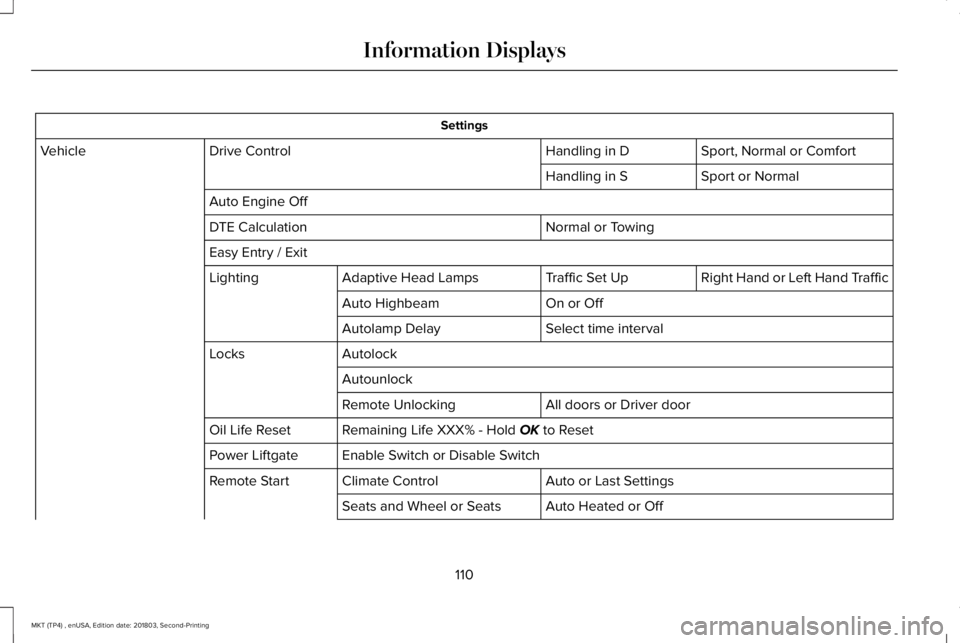
Settings
Sport, Normal or ComfortHandling in DDrive ControlVehicle
Sport or NormalHandling in S
Auto Engine Off
Normal or TowingDTE Calculation
Easy Entry / Exit
Right Hand or Left Hand TrafficTraffic Set UpAdaptive Head LampsLighting
On or OffAuto Highbeam
Select time intervalAutolamp Delay
AutolockLocks
Autounlock
All doors or Driver doorRemote Unlocking
Remaining Life XXX% - Hold OK to ResetOil Life Reset
Enable Switch or Disable SwitchPower Liftgate
Auto or Last SettingsClimate ControlRemote Start
Auto Heated or OffSeats and Wheel or Seats
110
MKT (TP4) , enUSA, Edition date: 201803, Second-Printing
Information Displays
Page 126 of 575
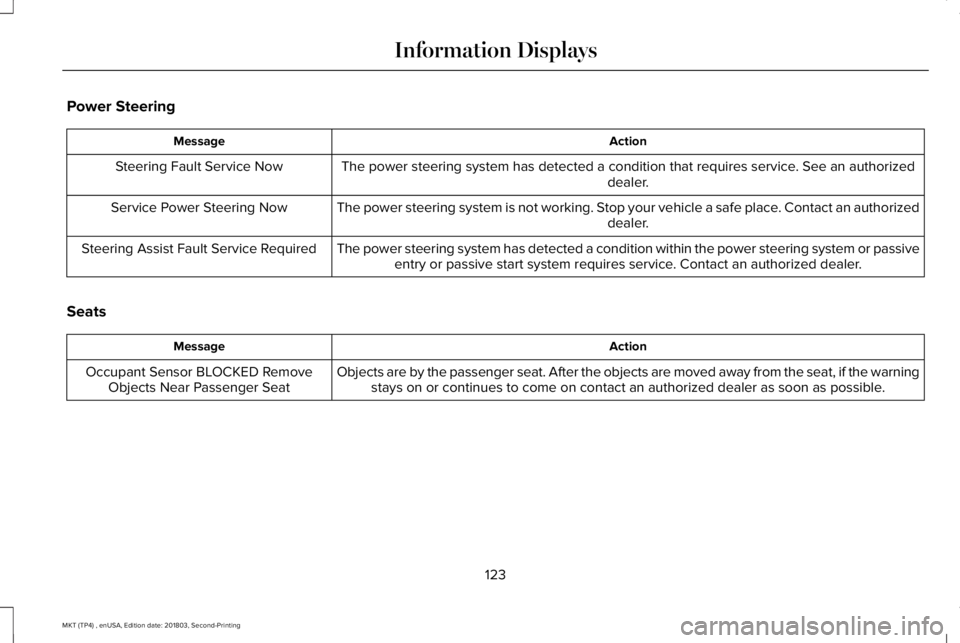
Power Steering
ActionMessage
The power steering system has detected a condition that requires service. See an authorizeddealer.Steering Fault Service Now
The power steering system is not working. Stop your vehicle a safe place. Contact an authorizeddealer.Service Power Steering Now
The power steering system has detected a condition within the power steering system or passiveentry or passive start system requires service. Contact an authorized dealer.Steering Assist Fault Service Required
Seats
ActionMessage
Objects are by the passenger seat. After the objects are moved away from the seat, if the warningstays on or continues to come on contact an authorized dealer as soon as possible.Occupant Sensor BLOCKED RemoveObjects Near Passenger Seat
123
MKT (TP4) , enUSA, Edition date: 201803, Second-Printing
Information Displays
Page 129 of 575
The air currently in the passengercompartment recirculates. This may reducethe time needed to cool the interior, whenused with A/C, and reduce unwanted odorsfrom entering your vehicle.
Note:Recirculated air may turn off, orprevent you from switching on, in all air flowmodes except MAX A/C to reduce the riskof fogging. Recirculation may also turn onand off in various air distribution controlcombinations during hot weather in order toimprove cooling efficiency.
HINTS ON CONTROLLING THE
INTERIOR CLIMATE
General Hints
Note:Prolonged use of recirculated air maycause the windows to fog up.
Note:You may feel a small amount of airfrom the footwell air vents regardless of theair distribution setting.
Note:To reduce humidity build-up insideyour vehicle, do not drive with the systemswitched off or with recirculated air alwaysswitched on.
Note:Do not place objects under the frontseats as this may interfere with the airflowto the rear seats.
Note:Remove any snow, ice or leaves fromthe air intake area at the base of thewindshield.
Note:To improve the time to reach acomfortable temperature in hot weather,drive with the windows open until you feelcold air through the air vents.
Automatic Climate Control
Note:Adjusting the settings when yourvehicle interior is extremely hot or cold is notnecessary.
Note:The system adjusts to heat or cool theinterior to the temperature you select asquickly as possible.
Note:For the system to function efficiently,the instrument panel and side air ventsshould be fully open.
Note:If you select AUTO during cold outsidetemperatures, the system directs air flow tothe windshield and side window air vents. Inaddition, the blower motor may run at aslower speed until the engine warms up.
Note:If you select AUTO during hottemperatures and the inside of the vehicleis hot, the system uses recirculated air tomaximize interior cooling. Blower motorspeed may also reduce until the air cools.
Quickly Heating the Interior
1. Press and release AUTO.
2. Adjust the temperature function to thesetting you prefer.
Recommended Settings for Heating
1. Press and release AUTO.
2. Adjust the temperature function to thesetting you prefer. Use 72°F (22°C) as astarting point, then adjust the setting asnecessary.
Quickly Cooling the Interior
1. Press and release MAX A/C.
126
MKT (TP4) , enUSA, Edition date: 201803, Second-Printing
Climate Control
Page 131 of 575
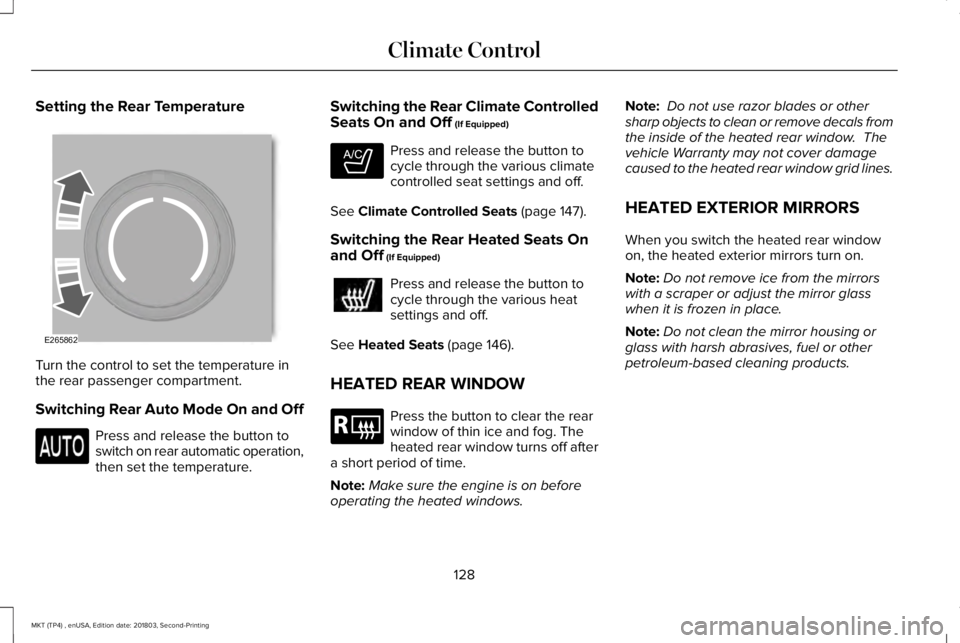
Setting the Rear Temperature
Turn the control to set the temperature inthe rear passenger compartment.
Switching Rear Auto Mode On and Off
Press and release the button toswitch on rear automatic operation,then set the temperature.
Switching the Rear Climate ControlledSeats On and Off (If Equipped)
Press and release the button tocycle through the various climatecontrolled seat settings and off.
See Climate Controlled Seats (page 147).
Switching the Rear Heated Seats Onand Off (If Equipped)
Press and release the button tocycle through the various heatsettings and off.
See Heated Seats (page 146).
HEATED REAR WINDOW
Press the button to clear the rearwindow of thin ice and fog. Theheated rear window turns off aftera short period of time.
Note:Make sure the engine is on beforeoperating the heated windows.
Note: Do not use razor blades or othersharp objects to clean or remove decals fromthe inside of the heated rear window. Thevehicle Warranty may not cover damagecaused to the heated rear window grid lines.
HEATED EXTERIOR MIRRORS
When you switch the heated rear windowon, the heated exterior mirrors turn on.
Note:Do not remove ice from the mirrorswith a scraper or adjust the mirror glasswhen it is frozen in place.
Note:Do not clean the mirror housing orglass with harsh abrasives, fuel or otherpetroleum-based cleaning products.
128
MKT (TP4) , enUSA, Edition date: 201803, Second-Printing
Climate ControlE265862 E265282 E184884
Page 132 of 575
CABIN AIR FILTER
Your vehicle is equipped with a cabin airfilter, which gives you and your passengersthe following benefits:
•It improves your driving comfort byreducing particle concentration.
•It improves the interior compartmentcleanliness.
•It protects the climate controlcomponents from particle deposits.
You can locate the cabin air filter behind theglove box.
Note:Make sure you have a cabin air filterinstalled at all times. This prevents foreignobjects from entering the system. Runningthe system without a filter in place couldresult in degradation or damage to thesystem.
Replace the filter at regular intervals. SeeScheduled Maintenance (page 479).
For additional cabin air filter information, orto replace the filter, see an authorized dealer.
REMOTE START
You can switch this feature on or off andadjust the settings using the informationdisplay.
The system adjusts the interior temperaturedepending on your chosen settings duringremote start.
You cannot adjust the climate control settingduring remote start operation. When youswitch the ignition on, the climate controlsystem returns to the previous settings. Youcan now make adjustments.
You need to switch on certainvehicle-dependent features, such as:
•Heated seats.
•Cooled seats.
•Heated steering wheel.
•Heated mirrors.
•Heated rear window.
Automatic Settings
In hot weather, the system sets to 72°F(22°C). The cooled seats are set to high (ifavailable, and AUTO is on in the informationdisplay).
In moderate weather, the system either heatsor cools (based on previous settings). Therear defroster, heated mirrors and heated orcooled seats do not turn on.
In cold weather, the system sets to 72°F(22°C). The heated seats are set to high (ifavailable, and AUTO is on in the informationdisplay). The heated rear window and heatedmirrors turn on.
129
MKT (TP4) , enUSA, Edition date: 201803, Second-Printing
Climate Control
Page 133 of 575
SITTING IN THE CORRECT
POSITION
WARNING: Sitting improperly, out ofposition or with the seatback reclined toofar can take weight off the seat cushionand affect the decision of the passengersensing system, resulting in serious injuryor death in the event of a crash. Always situpright against your seat back, with yourfeet on the floor.
WARNING: Do not recline theseatback too far as this can cause theoccupant to slide under the seatbelt,resulting in serious injury in the event of acollision.
WARNING: Do not place objectshigher than the top of the seat backrest.Failure to follow this instruction could resultin personal injury or death in the event ofa sudden stop or crash.
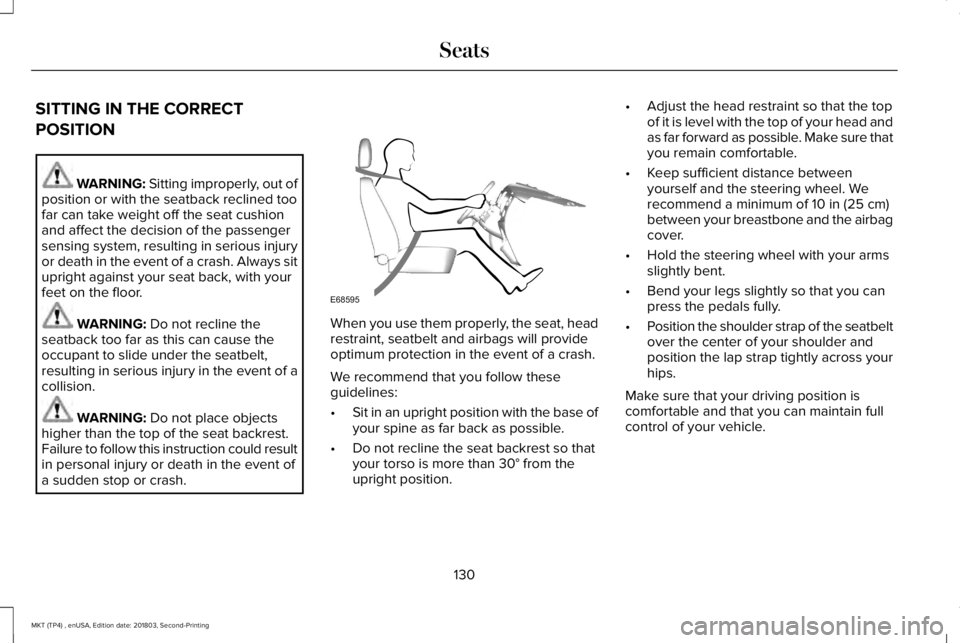
When you use them properly, the seat, headrestraint, seatbelt and airbags will provideoptimum protection in the event of a crash.
We recommend that you follow theseguidelines:
•Sit in an upright position with the base ofyour spine as far back as possible.
•Do not recline the seat backrest so thatyour torso is more than 30° from theupright position.
•Adjust the head restraint so that the topof it is level with the top of your head andas far forward as possible. Make sure thatyou remain comfortable.
•Keep sufficient distance betweenyourself and the steering wheel. Werecommend a minimum of 10 in (25 cm)between your breastbone and the airbagcover.
•Hold the steering wheel with your armsslightly bent.
•Bend your legs slightly so that you canpress the pedals fully.
•Position the shoulder strap of the seatbeltover the center of your shoulder andposition the lap strap tightly across yourhips.
Make sure that your driving position iscomfortable and that you can maintain fullcontrol of your vehicle.
130
MKT (TP4) , enUSA, Edition date: 201803, Second-Printing
SeatsE68595
Page 134 of 575
HEAD RESTRAINTS
WARNING: Fully adjust the headrestraint before you sit in or operate yourvehicle. This will help minimize the risk ofneck injury in the event of a crash. Do notadjust the head restraint when your vehicleis moving.
WARNING: The head restraint is asafety device. Whenever possible it shouldbe installed and properly adjusted whenthe seat is occupied. Failure to adjust thehead restraint properly could reduce itseffectiveness during certain impacts.
Note:Adjust the seat backrest to an uprightdriving position before adjusting the headrestraint. Adjust the head restraint so thatthe top of it is level with the top of your headand as far forward as possible. Make surethat you remain comfortable. If you areextremely tall, adjust the head restraint toits highest position.
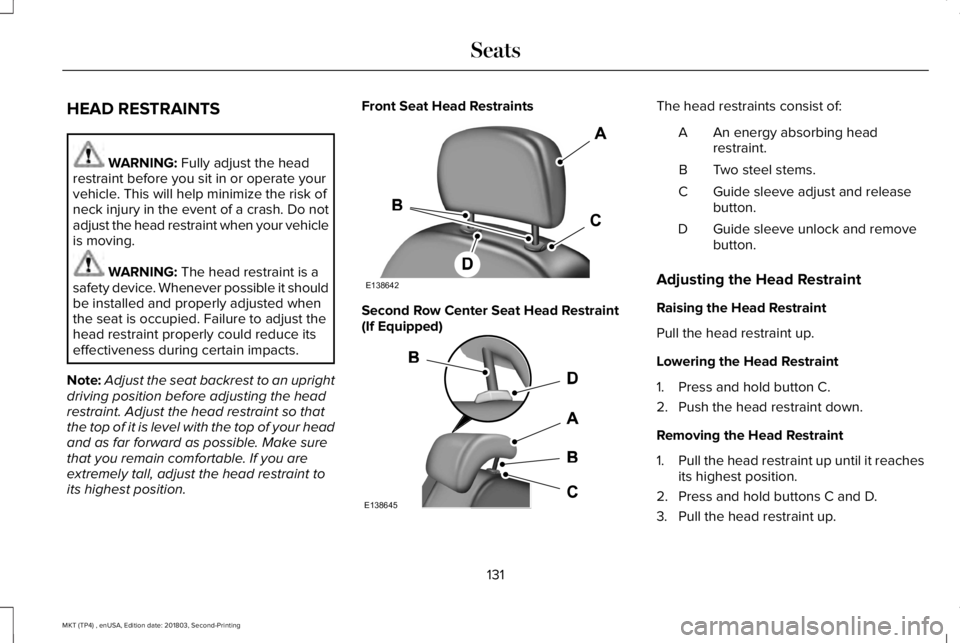
Front Seat Head Restraints
Second Row Center Seat Head Restraint(If Equipped)
The head restraints consist of:
An energy absorbing headrestraint.A
Two steel stems.B
Guide sleeve adjust and releasebutton.C
Guide sleeve unlock and removebutton.D
Adjusting the Head Restraint
Raising the Head Restraint
Pull the head restraint up.
Lowering the Head Restraint
1. Press and hold button C.
2. Push the head restraint down.
Removing the Head Restraint
1.Pull the head restraint up until it reachesits highest position.
2. Press and hold buttons C and D.
3. Pull the head restraint up.
131
MKT (TP4) , enUSA, Edition date: 201803, Second-Printing
SeatsE138642 E138645
Page 135 of 575
Installing the Head Restraint
1. Align the steel stems into the guidesleeves.
2. Press and hold buttons C and D.
3. Push the head restraint down until itlocks.
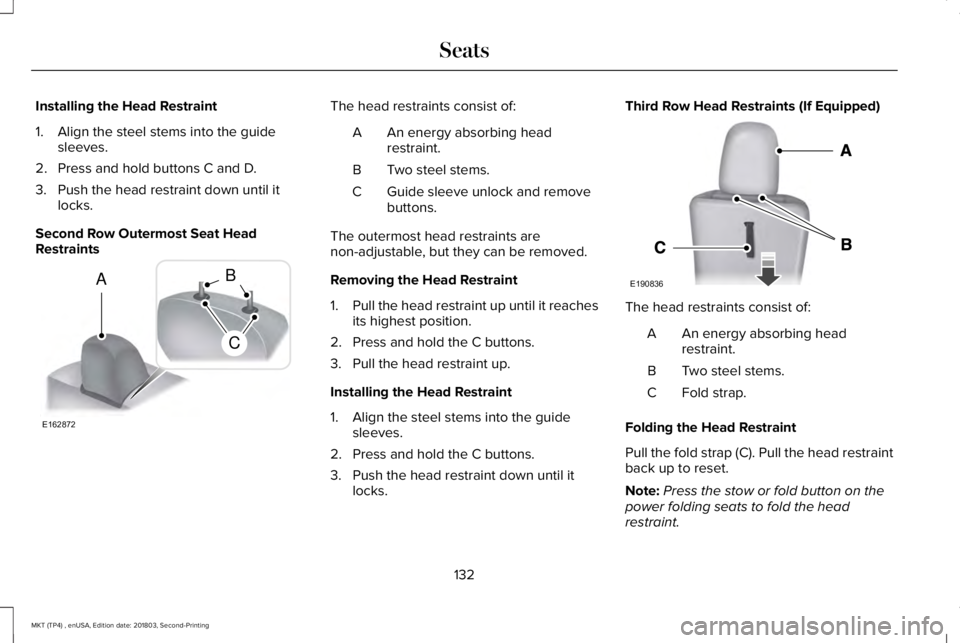
Second Row Outermost Seat HeadRestraints
The head restraints consist of:
An energy absorbing headrestraint.A
Two steel stems.B
Guide sleeve unlock and removebuttons.C
The outermost head restraints arenon-adjustable, but they can be removed.
Removing the Head Restraint
1.Pull the head restraint up until it reachesits highest position.
2. Press and hold the C buttons.
3. Pull the head restraint up.
Installing the Head Restraint
1. Align the steel stems into the guidesleeves.
2. Press and hold the C buttons.
3. Push the head restraint down until itlocks.
Third Row Head Restraints (If Equipped)
The head restraints consist of:
An energy absorbing headrestraint.A
Two steel stems.B
Fold strap.C
Folding the Head Restraint
Pull the fold strap (C). Pull the head restraintback up to reset.
Note:Press the stow or fold button on thepower folding seats to fold the headrestraint.
132
MKT (TP4) , enUSA, Edition date: 201803, Second-Printing
SeatsE162872
A
C
B E190836