seats LINCOLN MKT 2019 Workshop Manual
[x] Cancel search | Manufacturer: LINCOLN, Model Year: 2019, Model line: MKT, Model: LINCOLN MKT 2019Pages: 575, PDF Size: 4.66 MB
Page 277 of 575
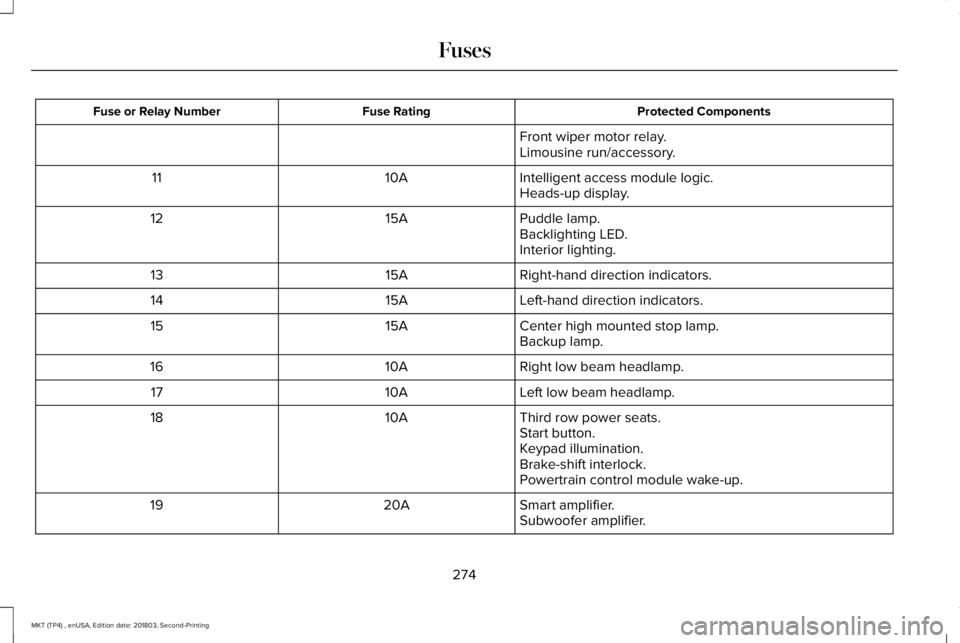
Protected ComponentsFuse RatingFuse or Relay Number
Front wiper motor relay.Limousine run/accessory.
Intelligent access module logic.10A11Heads-up display.
Puddle lamp.15A12Backlighting LED.Interior lighting.
Right-hand direction indicators.15A13
Left-hand direction indicators.15A14
Center high mounted stop lamp.15A15Backup lamp.
Right low beam headlamp.10A16
Left low beam headlamp.10A17
Third row power seats.10A18Start button.Keypad illumination.Brake-shift interlock.Powertrain control module wake-up.
Smart amplifier.20A19Subwoofer amplifier.
274
MKT (TP4) , enUSA, Edition date: 201803, Second-Printing
Fuses
Page 310 of 575
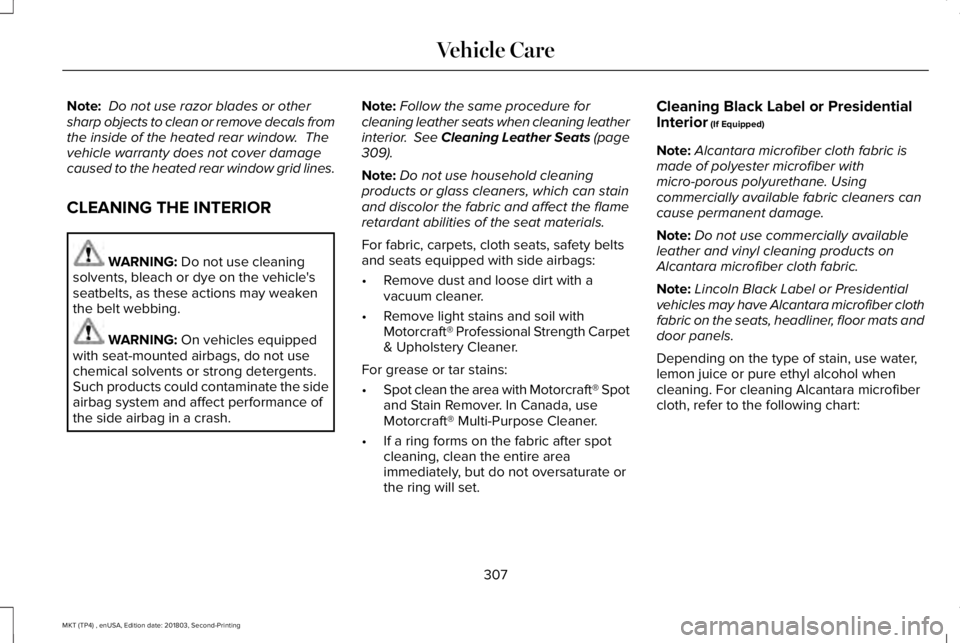
Note: Do not use razor blades or othersharp objects to clean or remove decals fromthe inside of the heated rear window. Thevehicle warranty does not cover damagecaused to the heated rear window grid lines.
CLEANING THE INTERIOR
WARNING: Do not use cleaningsolvents, bleach or dye on the vehicle'sseatbelts, as these actions may weakenthe belt webbing.
WARNING: On vehicles equippedwith seat-mounted airbags, do not usechemical solvents or strong detergents.Such products could contaminate the sideairbag system and affect performance ofthe side airbag in a crash.
Note:Follow the same procedure forcleaning leather seats when cleaning leatherinterior. See Cleaning Leather Seats (page309).
Note:Do not use household cleaningproducts or glass cleaners, which can stainand discolor the fabric and affect the flameretardant abilities of the seat materials.
For fabric, carpets, cloth seats, safety beltsand seats equipped with side airbags:
•Remove dust and loose dirt with avacuum cleaner.
•Remove light stains and soil withMotorcraft® Professional Strength Carpet& Upholstery Cleaner.
For grease or tar stains:
•Spot clean the area with Motorcraft® Spotand Stain Remover. In Canada, useMotorcraft® Multi-Purpose Cleaner.
•If a ring forms on the fabric after spotcleaning, clean the entire areaimmediately, but do not oversaturate orthe ring will set.
Cleaning Black Label or PresidentialInterior (If Equipped)
Note:Alcantara microfiber cloth fabric ismade of polyester microfiber withmicro-porous polyurethane. Usingcommercially available fabric cleaners cancause permanent damage.
Note:Do not use commercially availableleather and vinyl cleaning products onAlcantara microfiber cloth fabric.
Note:Lincoln Black Label or Presidentialvehicles may have Alcantara microfiber clothfabric on the seats, headliner, floor mats anddoor panels.
Depending on the type of stain, use water,lemon juice or pure ethyl alcohol whencleaning. For cleaning Alcantara microfibercloth, refer to the following chart:
307
MKT (TP4) , enUSA, Edition date: 201803, Second-Printing
Vehicle Care
Page 312 of 575
CLEANING THE INSTRUMENT
PANEL AND INSTRUMENT
CLUSTER LENS
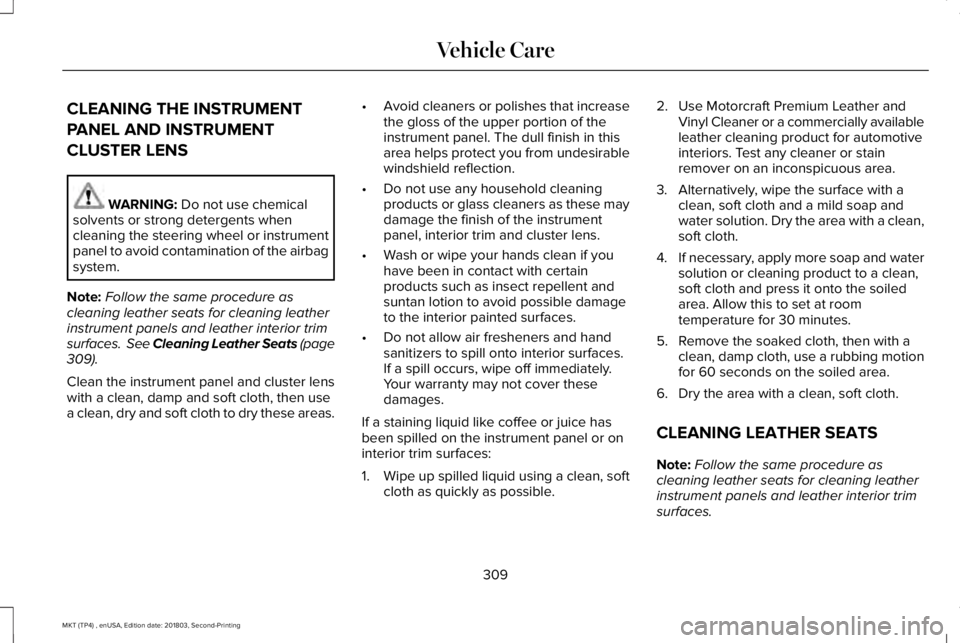
WARNING: Do not use chemicalsolvents or strong detergents whencleaning the steering wheel or instrumentpanel to avoid contamination of the airbagsystem.
Note:Follow the same procedure ascleaning leather seats for cleaning leatherinstrument panels and leather interior trimsurfaces. See Cleaning Leather Seats (page309).
Clean the instrument panel and cluster lenswith a clean, damp and soft cloth, then usea clean, dry and soft cloth to dry these areas.
•Avoid cleaners or polishes that increasethe gloss of the upper portion of theinstrument panel. The dull finish in thisarea helps protect you from undesirablewindshield reflection.
•Do not use any household cleaningproducts or glass cleaners as these maydamage the finish of the instrumentpanel, interior trim and cluster lens.
•Wash or wipe your hands clean if youhave been in contact with certainproducts such as insect repellent andsuntan lotion to avoid possible damageto the interior painted surfaces.
•Do not allow air fresheners and handsanitizers to spill onto interior surfaces.If a spill occurs, wipe off immediately.Your warranty may not cover thesedamages.
If a staining liquid like coffee or juice hasbeen spilled on the instrument panel or oninterior trim surfaces:
1.Wipe up spilled liquid using a clean, softcloth as quickly as possible.
2. Use Motorcraft Premium Leather andVinyl Cleaner or a commercially availableleather cleaning product for automotiveinteriors. Test any cleaner or stainremover on an inconspicuous area.
3. Alternatively, wipe the surface with aclean, soft cloth and a mild soap andwater solution. Dry the area with a clean,soft cloth.
4.If necessary, apply more soap and watersolution or cleaning product to a clean,soft cloth and press it onto the soiledarea. Allow this to set at roomtemperature for 30 minutes.
5. Remove the soaked cloth, then with aclean, damp cloth, use a rubbing motionfor 60 seconds on the soiled area.
6. Dry the area with a clean, soft cloth.
CLEANING LEATHER SEATS
Note:Follow the same procedure ascleaning leather seats for cleaning leatherinstrument panels and leather interior trimsurfaces.
309
MKT (TP4) , enUSA, Edition date: 201803, Second-Printing
Vehicle Care
Page 383 of 575
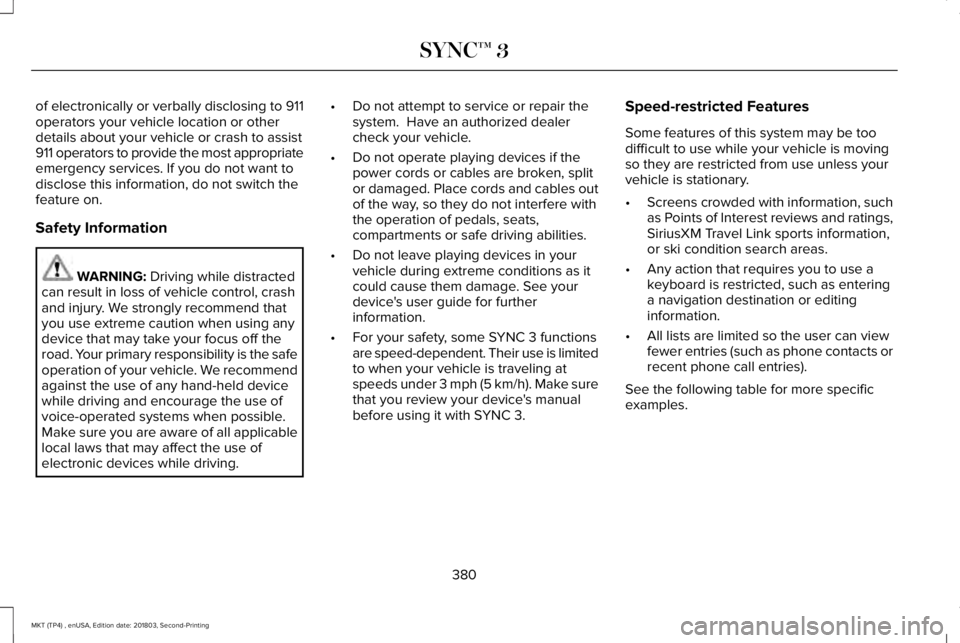
of electronically or verbally disclosing to 911operators your vehicle location or otherdetails about your vehicle or crash to assist911 operators to provide the most appropriateemergency services. If you do not want todisclose this information, do not switch thefeature on.
Safety Information
WARNING: Driving while distractedcan result in loss of vehicle control, crashand injury. We strongly recommend thatyou use extreme caution when using anydevice that may take your focus off theroad. Your primary responsibility is the safeoperation of your vehicle. We recommendagainst the use of any hand-held devicewhile driving and encourage the use ofvoice-operated systems when possible.Make sure you are aware of all applicablelocal laws that may affect the use ofelectronic devices while driving.
•Do not attempt to service or repair thesystem. Have an authorized dealercheck your vehicle.
•Do not operate playing devices if thepower cords or cables are broken, splitor damaged. Place cords and cables outof the way, so they do not interfere withthe operation of pedals, seats,compartments or safe driving abilities.
•Do not leave playing devices in yourvehicle during extreme conditions as itcould cause them damage. See yourdevice's user guide for furtherinformation.
•For your safety, some SYNC 3 functionsare speed-dependent. Their use is limitedto when your vehicle is traveling atspeeds under 3 mph (5 km/h). Make surethat you review your device's manualbefore using it with SYNC 3.
Speed-restricted Features
Some features of this system may be toodifficult to use while your vehicle is movingso they are restricted from use unless yourvehicle is stationary.
•Screens crowded with information, suchas Points of Interest reviews and ratings,SiriusXM Travel Link sports information,or ski condition search areas.
•Any action that requires you to use akeyboard is restricted, such as enteringa navigation destination or editinginformation.
•All lists are limited so the user can viewfewer entries (such as phone contacts orrecent phone call entries).
See the following table for more specificexamples.
380
MKT (TP4) , enUSA, Edition date: 201803, Second-Printing
SYNC™ 3
Page 416 of 575
Passenger heated and climatecontrolled seats:H
Touch the heated seat icon toadjust the heated seat off and on(if equipped).
Touch the climate-controlled seaticon to adjust theclimate-controlled seat off and on(if equipped).
Fan speed: Touch up or down toincrease or decrease the volumeof air circulated in your vehicle.
I
Rear: A pop up appears on thescreen to display the rear controloptions.
J
Touch the power icon to switch therear climate control functions offand on.
Touch Rear Control to allow therear seat passengers to adjust therear climate settings. Touch itagain to prevent the rear seatpassengers from adjusting thesettings. Rear Controlautomatically turns off when youuse the touchscreen to adjust therear climate settings.
If your vehicle has automaticclimate controls, select Auto toconnect the rear climate settingsto the Auto settings of the driver.
Touch the up and down arrows toadjust the temperature.
Manual airflow distributioncontrols: Select these controlsindividually or together to directthe air flow to the desired area.
K
Panel: Distributes air through theinstrument panel vents.
Floor: Distributes air through thedemister vents, floor vents and rearseat floor vents.
A/C: A pop-up appears on thescreen to display the airconditioning options.
L
MAX A/C: Touch to cool yourvehicle with recirculated air. Touchagain for normal A/C operation.MAX A/C distributes air throughinstrument panel vents and mayhelp reduce odors from enteringyour vehicle. MAX A/C is moreeconomical and efficient thannormal A/C mode.
A/C: Touch to switch the airconditioning on or off. Use A/Cwith recirculated air to improvecooling performance andefficiency. A/C engagesautomatically in MAX A/C, defrostand footwell/defrost.
Recirculated air: Touch to switchthe recirculated air on or off whichmay reduce the amount of timeneeded to cool down the interiorand help reduce odors fromreaching the interior. Recirculated
413
MKT (TP4) , enUSA, Edition date: 201803, Second-Printing
SYNC™ 3
Page 417 of 575
air also engages automaticallywhen you select MAX A/C. You canengage this manually in any airflowmode except defrost. It may alsoturn off in all airflow modes exceptMAX A/C to reduce fog potential.
Driver heated and climatecontrolled seats:M
Touch the heated seat icon toadjust the heated seat off and on(if equipped).
Touch the climate-controlled seaticon to adjust theclimate-controlled seat off and on(if equipped).
PHONE
WARNING: Driving while distractedcan result in loss of vehicle control, crashand injury. We strongly recommend thatyou use extreme caution when using anydevice that may take your focus off theroad. Your primary responsibility is the safeoperation of your vehicle. We recommendagainst the use of any hand-held devicewhile driving and encourage the use ofvoice-operated systems when possible.Make sure you are aware of all applicablelocal laws that may affect the use ofelectronic devices while driving.
Hands-free calling is one of the main featuresof the system. Once you pair your cell phone,you can access many options using thetouchscreen or voice commands. While thesystem supports a variety of features, manyare dependent on your cell phone’sfunctionality.
Pairing Your Cell Phone for the FirstTime
Pair your Bluetooth enabled phone with thesystem before using the functions inhands-free mode.
Switch on Bluetooth on your device to beginpairing. See your phone’s manual ifnecessary.
To add a phone, select:
Menu Item
Add a Bluetooth Device
1. Follow the on-screen instructions.
2. A prompt alerts you to search for thesystem on your phone.
3. Select your vehicle on your phone.
4. Confirm that the six-digit numberappearing on your phone matches thesix-digit number on the touchscreen.
5. The touchscreen indicates when thepairing is successful.
414
MKT (TP4) , enUSA, Edition date: 201803, Second-Printing
SYNC™ 3
Page 514 of 575
ELECTROMAGNETIC
COMPATIBILITY
WARNING: Do not place objects ormount equipment on or near the airbagcover, on the side of the seatbacks (of thefront seats), or in front seat areas that maycome into contact with a deploying airbag.Failure to follow these instructions mayincrease the risk of personal injury in theevent of a crash.
WARNING: Do not fasten antennacables to original vehicle wiring, fuel pipesand brake pipes.
WARNING: Keep antenna and powercables at least 4 in (10 cm) from anyelectronic modules and airbags.
Note:We test and certify your vehicle tomeet electromagnetic compatibilitylegislation (UNECE Regulation 10 or otherapplicable local requirements). It is yourresponsibility to make sure that anyequipment an authorized dealer installs onyour vehicle complies with applicable locallegislation and other requirements.
Note:Any radio frequency transmitterequipment in your vehicle (such as cellulartelephones and amateur radio transmitters)must keep to the parameters in the followingtable. We do not provide special provisionsor conditions for installations or use.
511
MKT (TP4) , enUSA, Edition date: 201803, Second-Printing
Appendices
Page 565 of 575
Switching the Climate Control On andOff.......................................................................125
Automatic High Beam Control....................89Switching the System On and Off....................90
Automatic Transmission...............................175Automatic Transmission AdaptiveLearning.............................................................178Brake-Shift Interlock............................................177If Your Vehicle Gets Stuck In Mud orSnow...................................................................178SelectShift Automatic™ Transmission.............176Understanding the Positions of YourAutomatic Transmission................................175
Automatic Transmission FluidCheck...........................................................292Adding Transmission Fluid .............................293Checking the Transmission Fluid Level........293
Autowipers.......................................................84Auxiliary Power Points.................................154110 Volt AC Power Point.....................................15412 Volt DC Power Point......................................154Locations...............................................................154
AWDSee: All-Wheel Drive...........................................179
B
BatterySee: Changing the 12V Battery......................295
Blind Spot Information System..................219Switching the System Off and On...................221System Errors.......................................................221System Limitations..............................................221Using the System...............................................220
BLISSee: Blind Spot Information System...............219
Body Styling Kits............................................312Bonnet LockSee: Opening and Closing the Hood............282
Booster Seats..................................................32Types of Booster Seats.......................................33
Brake Fluid Check........................................294Brakes...............................................................187General Information............................................187
Breaking-In.....................................................245Bulb Specification Chart.............................362
C
Cabin Air Filter...............................................129Capacities and Specifications - 3.5L.......349Alternative Engine Oil for Extremely ColdClimates............................................................354
Specifications......................................................350
Capacities and Specifications - 3.7L........355Alternative Engine Oil for Extremely ColdClimates...........................................................360Specifications......................................................357
Capacities and Specifications...................343Cargo Nets......................................................231Car WashSee: Cleaning the Exterior...............................304
Catalytic Converter.......................................172On-Board Diagnostics (OBD-II)........................173Readiness for Inspection and Maintenance(I/M) Testing.......................................................174
Center Console.............................................156Console Refrigerator and Freezer..................156Second Row Center Console...........................156
Changing a Bulb...........................................300Front Direction Indicator Lamp........................301Front Fog Lamp..................................................300High Intensity Discharge Headlamp.............300LED Lamps............................................................301License Plate Lamp.............................................301
Changing a Fuse..........................................278Fuses.....................................................................278
Changing a Road Wheel.............................333Dissimilar Spare Wheel and Tire AssemblyInformation.......................................................334Tire Change Procedure....................................335
562
MKT (TP4) , enUSA, Edition date: 201803, Second-Printing
Index
Page 566 of 575
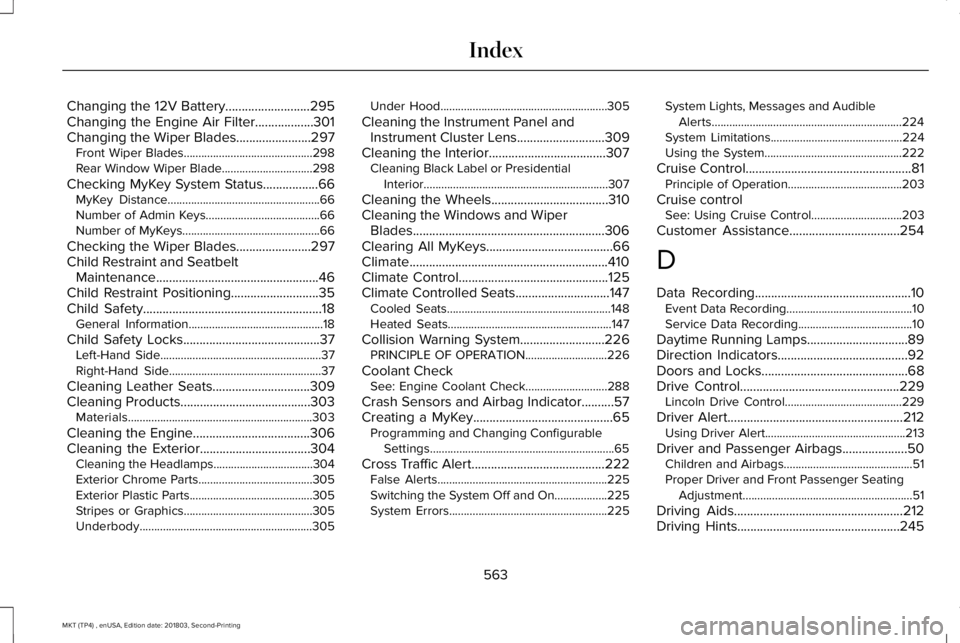
Changing the 12V Battery..........................295Changing the Engine Air Filter..................301Changing the Wiper Blades.......................297Front Wiper Blades............................................298Rear Window Wiper Blade...............................298
Checking MyKey System Status.................66MyKey Distance....................................................66Number of Admin Keys.......................................66Number of MyKeys...............................................66
Checking the Wiper Blades.......................297Child Restraint and SeatbeltMaintenance..................................................46Child Restraint Positioning...........................35Child Safety.......................................................18General Information..............................................18
Child Safety Locks..........................................37Left-Hand Side.......................................................37Right-Hand Side....................................................37
Cleaning Leather Seats..............................309Cleaning Products........................................303Materials...............................................................303
Cleaning the Engine....................................306Cleaning the Exterior..................................304Cleaning the Headlamps..................................304Exterior Chrome Parts.......................................305Exterior Plastic Parts..........................................305Stripes or Graphics............................................305Underbody...........................................................305
Under Hood.........................................................305
Cleaning the Instrument Panel andInstrument Cluster Lens...........................309Cleaning the Interior....................................307Cleaning Black Label or PresidentialInterior...............................................................307
Cleaning the Wheels....................................310Cleaning the Windows and WiperBlades...........................................................306Clearing All MyKeys.......................................66Climate.............................................................410Climate Control..............................................125Climate Controlled Seats.............................147Cooled Seats........................................................148Heated Seats........................................................147
Collision Warning System..........................226PRINCIPLE OF OPERATION............................226
Coolant CheckSee: Engine Coolant Check............................288
Crash Sensors and Airbag Indicator..........57Creating a MyKey...........................................65Programming and Changing ConfigurableSettings...............................................................65
Cross Traffic Alert.........................................222False Alerts..........................................................225Switching the System Off and On..................225System Errors......................................................225
System Lights, Messages and AudibleAlerts.................................................................224System Limitations.............................................224Using the System...............................................222
Cruise Control...................................................81Principle of Operation.......................................203
Cruise controlSee: Using Cruise Control...............................203
Customer Assistance..................................254
D
Data Recording................................................10Event Data Recording...........................................10Service Data Recording.......................................10
Daytime Running Lamps...............................89Direction Indicators........................................92Doors and Locks.............................................68Drive Control.................................................229Lincoln Drive Control........................................229
Driver Alert......................................................212Using Driver Alert................................................213
Driver and Passenger Airbags....................50Children and Airbags............................................51Proper Driver and Front Passenger SeatingAdjustment..........................................................51
Driving Aids....................................................212Driving Hints..................................................245
563
MKT (TP4) , enUSA, Edition date: 201803, Second-Printing
Index
Page 568 of 575
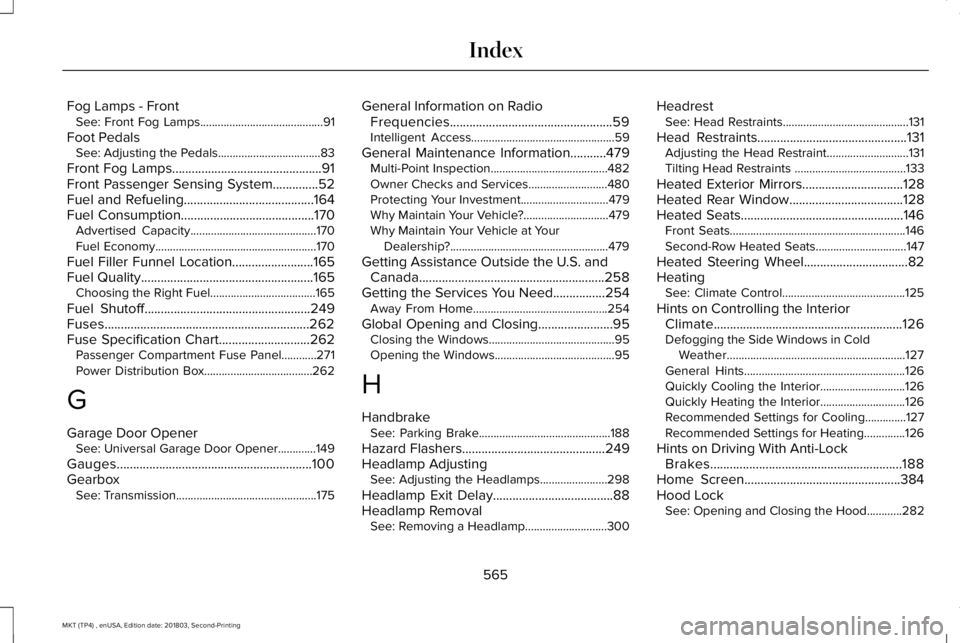
Fog Lamps - FrontSee: Front Fog Lamps..........................................91
Foot PedalsSee: Adjusting the Pedals...................................83
Front Fog Lamps..............................................91Front Passenger Sensing System..............52Fuel and Refueling........................................164Fuel Consumption.........................................170Advertised Capacity...........................................170Fuel Economy.......................................................170
Fuel Filler Funnel Location.........................165Fuel Quality.....................................................165Choosing the Right Fuel....................................165
Fuel Shutoff...................................................249Fuses...............................................................262Fuse Specification Chart............................262Passenger Compartment Fuse Panel............271Power Distribution Box.....................................262
G
Garage Door OpenerSee: Universal Garage Door Opener.............149
Gauges............................................................100GearboxSee: Transmission................................................175
General Information on RadioFrequencies..................................................59Intelligent Access.................................................59
General Maintenance Information...........479Multi-Point Inspection........................................482Owner Checks and Services...........................480Protecting Your Investment..............................479Why Maintain Your Vehicle?.............................479Why Maintain Your Vehicle at YourDealership?......................................................479
Getting Assistance Outside the U.S. andCanada.........................................................258Getting the Services You Need................254Away From Home..............................................254
Global Opening and Closing.......................95Closing the Windows...........................................95Opening the Windows.........................................95
H
HandbrakeSee: Parking Brake.............................................188
Hazard Flashers............................................249Headlamp AdjustingSee: Adjusting the Headlamps.......................298
Headlamp Exit Delay.....................................88Headlamp RemovalSee: Removing a Headlamp............................300
HeadrestSee: Head Restraints...........................................131
Head Restraints..............................................131Adjusting the Head Restraint............................131Tilting Head Restraints ......................................133
Heated Exterior Mirrors...............................128Heated Rear Window...................................128Heated Seats..................................................146Front Seats............................................................146Second-Row Heated Seats...............................147
Heated Steering Wheel................................82HeatingSee: Climate Control..........................................125
Hints on Controlling the InteriorClimate..........................................................126Defogging the Side Windows in ColdWeather.............................................................127General Hints.......................................................126Quickly Cooling the Interior.............................126Quickly Heating the Interior.............................126Recommended Settings for Cooling..............127Recommended Settings for Heating..............126
Hints on Driving With Anti-LockBrakes...........................................................188Home Screen................................................384Hood LockSee: Opening and Closing the Hood............282
565
MKT (TP4) , enUSA, Edition date: 201803, Second-Printing
Index