navigation LINCOLN MKT 2019 Owner's Guide
[x] Cancel search | Manufacturer: LINCOLN, Model Year: 2019, Model line: MKT, Model: LINCOLN MKT 2019Pages: 575, PDF Size: 4.66 MB
Page 453 of 575
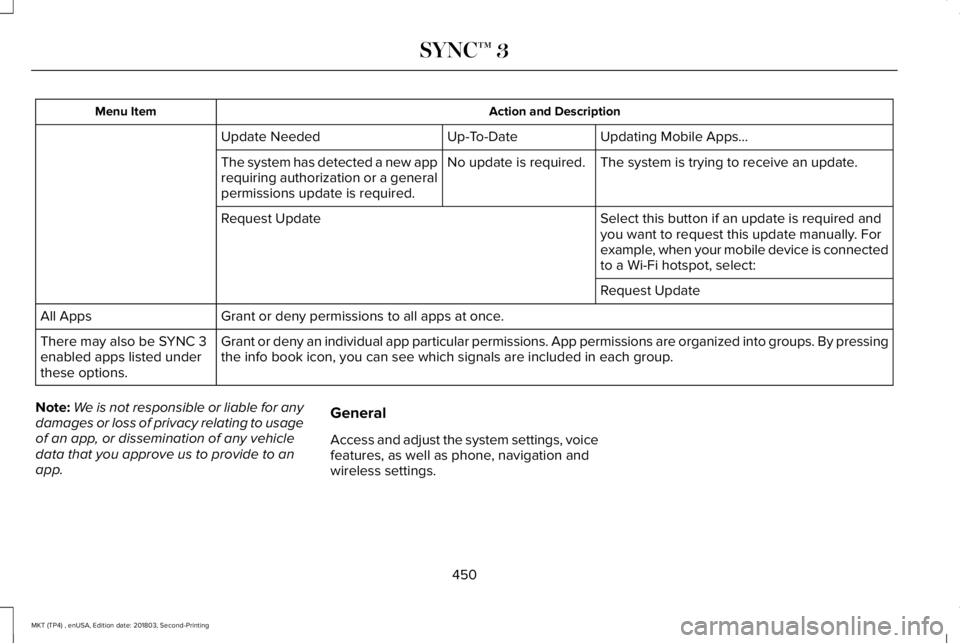
Action and DescriptionMenu Item
Updating Mobile Apps…Up-To-DateUpdate Needed
The system is trying to receive an update.No update is required.The system has detected a new apprequiring authorization or a generalpermissions update is required.
Select this button if an update is required andyou want to request this update manually. Forexample, when your mobile device is connectedto a Wi-Fi hotspot, select:
Request Update
Request Update
Grant or deny permissions to all apps at once.All Apps
Grant or deny an individual app particular permissions. App permissions are organized into groups. By pressingthe info book icon, you can see which signals are included in each group.There may also be SYNC 3enabled apps listed underthese options.
Note:We is not responsible or liable for anydamages or loss of privacy relating to usageof an app, or dissemination of any vehicledata that you approve us to provide to anapp.
General
Access and adjust the system settings, voicefeatures, as well as phone, navigation andwireless settings.
450
MKT (TP4) , enUSA, Edition date: 201803, Second-Printing
SYNC™ 3
Page 524 of 575
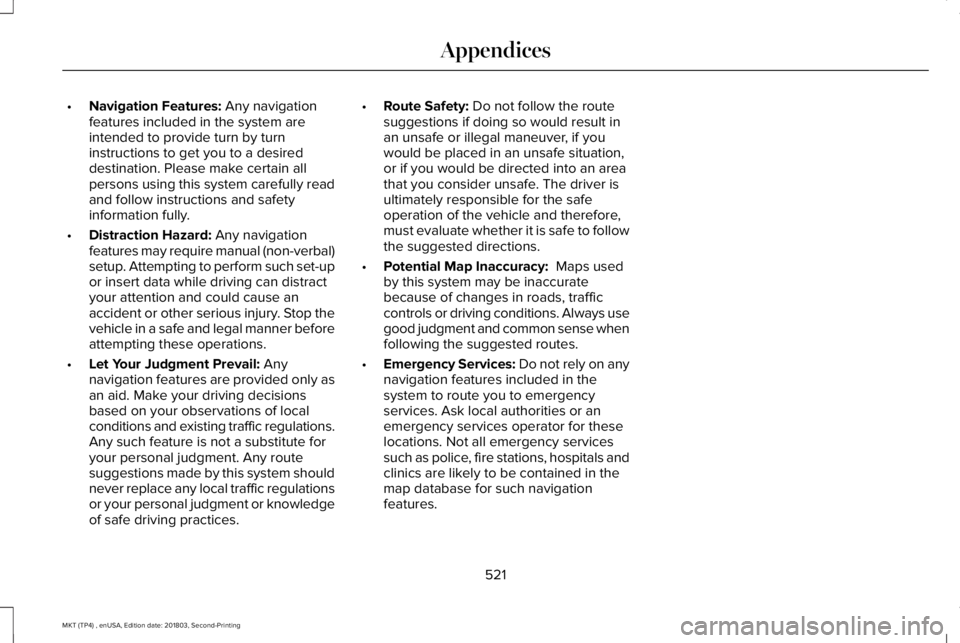
•Navigation Features: Any navigationfeatures included in the system areintended to provide turn by turninstructions to get you to a desireddestination. Please make certain allpersons using this system carefully readand follow instructions and safetyinformation fully.
•Distraction Hazard: Any navigationfeatures may require manual (non-verbal)setup. Attempting to perform such set-upor insert data while driving can distractyour attention and could cause anaccident or other serious injury. Stop thevehicle in a safe and legal manner beforeattempting these operations.
•Let Your Judgment Prevail: Anynavigation features are provided only asan aid. Make your driving decisionsbased on your observations of localconditions and existing traffic regulations.Any such feature is not a substitute foryour personal judgment. Any routesuggestions made by this system shouldnever replace any local traffic regulationsor your personal judgment or knowledgeof safe driving practices.
•Route Safety: Do not follow the routesuggestions if doing so would result inan unsafe or illegal maneuver, if youwould be placed in an unsafe situation,or if you would be directed into an areathat you consider unsafe. The driver isultimately responsible for the safeoperation of the vehicle and therefore,must evaluate whether it is safe to followthe suggested directions.
•Potential Map Inaccuracy: Maps usedby this system may be inaccuratebecause of changes in roads, trafficcontrols or driving conditions. Always usegood judgment and common sense whenfollowing the suggested routes.
•Emergency Services: Do not rely on anynavigation features included in thesystem to route you to emergencyservices. Ask local authorities or anemergency services operator for theselocations. Not all emergency servicessuch as police, fire stations, hospitals andclinics are likely to be contained in themap database for such navigationfeatures.
521
MKT (TP4) , enUSA, Edition date: 201803, Second-Printing
Appendices
Page 530 of 575
(b) use your own personal judgment whiledriving. If you feel that a route suggested bythe TeleNav Software instructs you toperform an unsafe or illegal maneuver,places you in an unsafe situation, or directsyou into an area that you consider to beunsafe, do not follow such instructions;
(c) do not input destinations, or otherwisemanipulate the TeleNav Software, unlessyour vehicle is stationary and parked;
(d) do not use the TeleNav Software for anyillegal, unauthorized, unintended, unsafe,hazardous, or unlawful purposes, or in anymanner inconsistent with this Agreement;
(e) arrange all GPS and wireless devices andcables necessary for use of the TeleNavSoftware in a secure manner in your vehicleso that they will not interfere with yourdriving and will not prevent the operation ofany safety device (such as an airbag).
You agree to indemnify and hold TeleNavharmless against all claims resulting from anydangerous or otherwise inappropriate useof the TeleNav Software in any movingvehicle, including as a result of your failureto comply with the directions above.
2. Account Information
You agree: (a) when registering the TeleNavSoftware, to provide TeleNav with true,accurate, current, and complete informationabout yourself, and (b) to inform TeleNavpromptly of any changes to such information,and to keep it true, accurate, current andcomplete.
3. Software License
•Subject to your compliance with theterms of this Agreement, TeleNav herebygrants to you a personal, non-exclusive,non-transferable license (except asexpressly permitted below in connectionwith your permanent transfer of theTeleNav Software license), without theright to sublicense, to use the TeleNavSoftware (in object code form only) inorder to access and use the TeleNavSoftware. This license shall terminateupon any termination or expiration of thisAgreement. You agree that you will usethe TeleNav Software only for yourpersonal business or leisure purposes,and not to provide commercial navigationservices to other parties.
3.1 License Limitations
•(a) reverse engineer, decompile,disassemble, translate, modify, alter orotherwise change the TeleNav Softwareor any part thereof; (b) attempt to derivethe source code, audio library orstructure of the TeleNav Software withoutthe prior express written consent ofTeleNav; (c) remove from the TeleNavSoftware, or alter, any of TeleNav's or itssuppliers' trademarks, trade names,logos, patent or copyright notices, orother notices or markings; (d) distribute,sublicense or otherwise transfer theTeleNav Software to others, except aspart of your permanent transfer of theTeleNav Software; or (e) use the TeleNavSoftware in any manner that
I. infringes the intellectual property orproprietary rights, rights of publicity orprivacy or other rights of any party,
ii. violates any law, statute, ordinance orregulation, including but not limited to lawsand regulations related to spamming, privacy,consumer and child protection, obscenity ordefamation, or
527
MKT (TP4) , enUSA, Edition date: 201803, Second-Printing
Appendices
Page 531 of 575
iii. is harmful, threatening, abusive, harassing,tortuous, defamatory, vulgar, obscene,libelous, or otherwise objectionable; and (f )lease, rent out, or otherwise permitunauthorized access by third parties to theTeleNav Software without advanced writtenpermission of TeleNav.
4. Disclaimers
•To the fullest extent permissible pursuantto applicable law, in no event willTeleNav, its licensors and suppliers, oragents or employees of any of theforegoing, be liable for any decisionmade or action taken by you or anyoneelse in reliance on the informationprovided by the TeleNav Software.TeleNav also does not warrant theaccuracy of the map or other data usedfor the TeleNav Software. Such data maynot always reflect reality due to, amongother things, road closures, construction,weather, new roads and other changingconditions. You are responsible for theentire risk arising out of your use of theTeleNav Software. For example butwithout limitation, you agree not to rely
on the TeleNav Software for criticalnavigation in areas where the well-beingor survival of you or others is dependenton the accuracy of navigation, as themaps or functionality of the TeleNavSoftware are not intended to supportsuch high risk applications, especially inmore remote geographical areas.
•TELENAV EXPRESSLY DISCLAIMS ANDEXCLUDES ALL WARRANTIES INCONNECTION WITH THE TELENAVSOFTWARE, WHETHER STATUTORY,EXPRESS OR IMPLIED, INCLUDING ALLWARRANTIES WHICH MAY ARISE FROMCOURSE OF DEALING, CUSTOM ORTRADE AND INCLUDING, BUT NOTLIMITED TO, THE IMPLIED WARRANTIESOF MERCHANTABILITY, FITNESS FORA PARTICULAR PURPOSE ANDNON-INFRINGEMENT OF THIRD PARTYRIGHTS WITH RESPECT TO THETELENAV SOFTWARE.
•Certain jurisdictions do not permit thedisclaimer of certain warranties, so thislimitation may not apply to you.
5. Limitation of Liability
•TO THE EXTENT PERMITTED UNDERAPPLICABLE LAW, UNDER NOCIRCUMSTANCES SHALL TELENAV ORITS LICENSORS AND SUPPLIERS BELIABLE TO YOU OR TO ANY THIRDPARTY FOR ANY INDIRECT,INCIDENTAL, CONSEQUENTIAL,SPECIAL OR EXEMPLARY DAMAGES(INCLUDING IN EACH CASE, BUT NOTLIMITED TO, DAMAGES FOR THEINABILITY TO USE THE EQUIPMENT ORACCESS DATA, LOSS OF DATA, LOSSOF BUSINESS, LOSS OF PROFITS,BUSINESS INTERRUPTION OR THE LIKE)ARISING OUT OF THE USE OF ORINABILITY TO USE THE TELENAVSOFTWARE, EVEN IF TELENAV HASBEEN ADVISED OF THE POSSIBILITY OFSUCH DAMAGES. NOTWITHSTANDINGANY DAMAGES THAT YOU MIGHTINCUR FOR ANY REASONWHATSOEVER (INCLUDING, WITHOUTLIMITATION, ALL DAMAGESREFERENCED HEREIN AND ALL DIRECTOR GENERAL DAMAGES IN CONTRACT,TORT (INCLUDING NEGLIGENCE) OR
528
MKT (TP4) , enUSA, Edition date: 201803, Second-Printing
Appendices
Page 534 of 575
9.1 End User Terms Required by HERENorth America, LLC
The data (“Data”) is provided for yourpersonal, internal use only and not for resale.It is protected by copyright, and is subject tothe following terms and conditions which areagreed to by you, on the one hand, andTelenav (“Telenav”) and its licensors(including their licensors and suppliers) onthe other hand.
© 2013 HERE. All rights reserved.
The Data for areas of Canada includesinformation taken with permission fromCanadian authorities, including: © HerMajesty the Queen in Right of Canada, ©Queen's Printer for Ontario, © Canada PostCorporation, GeoBase®, © Department ofNatural Resources Canada.
HERE holds a non-exclusive license from theUnited States Postal Service® to publish andsell ZIP+4® information.
©United States Postal Service® 2014. Pricesare not established, controlled or approvedby the United States Postal Service®. Thefollowing trademarks and registrations areowned by the USPS: United States PostalService, USPS, and ZIP+4
The Data for Mexico includes certain datafrom Instituto Nacional de Estadística yGeografía.
9.2 End User Terms Required by NAV2(Shanghai) Co., Ltd
The data (“Data”) is provided for yourpersonal, internal use only and not for resale.It is protected by copyright, and is subject tothe following terms and conditions which areagreed to by you, on the one hand, andNAV2 (Shanghai) Co., Ltd (“NAV2”) and itslicensors (including their licensors andsuppliers) on the other hand. 20xx. All rightsreserved
Terms and Conditions
Permitted Use. You agree to use this Datatogether with the Telenav Software solelyfor the internal business and personalpurposes for which you were licensed, andnot for service bureau, time-sharing or othersimilar purposes. Accordingly, but subject tothe restrictions set forth in the followingparagraphs, you agree not to otherwisereproduce, copy, modify, decompile,disassemble, create any derivative works of,or reverse engineer any portion of this Data,and may not transfer or distribute it in anyform, for any purpose, except to the extentpermitted by mandatory laws.
Restrictions. Except where you have beenspecifically licensed to do so by Telenav, andwithout limiting the preceding paragraph,you may not use this Data (a) with anyproducts, systems, or applications installedor otherwise connected to or incommunication with vehicles, capable ofvehicle navigation, positioning, dispatch, realtime route guidance, fleet management orsimilar applications; or (b) with or in
531
MKT (TP4) , enUSA, Edition date: 201803, Second-Printing
Appendices
Page 544 of 575
it, and (ii) save it, provided that you do notremove any copyright notices that appearand do not modify the Data in any way. Youagree not to otherwise reproduce, copy,modify, decompile, disassemble or reverseengineer any portion of this Data, and maynot transfer or distribute it in any form, forany purpose, except to the extent permittedby mandatory laws.
Restrictions
Except where you have been specificallylicensed to do so by NAV2 , and withoutlimiting the preceding paragraph, you maynot (a) use this Data with any products,systems, or applications installed orotherwise connected to or in communicationwith vehicles, capable of vehicle navigation,positioning, dispatch, real time routeguidance, fleet management or similarapplications; or (b) with or in communicationwith any positioning devices or any mobileor wireless-connected electronic or computer
devices, including without limitation cellularphones, palmtop and handheld computers,pagers, and personal digital assistants orPDAs. You agree to cease using this Data ifyou fail to comply with these terms andconditions.
Limited Warranty
NAV2 warrants that (a) the Data will performsubstantially in accordance with theaccompanying written materials for a periodof ninety (90) days from the date of receipt,and (b) any support services provided byNAV2 shall be substantially as described inapplicable written materials provided to youby NAV2, and NAV2’s support engineers willmake commercially reasonable efforts tosolve any problem issues.
rigCustomer Remedies
NAV2 and its suppliers’ entire liability andyour exclusive remedy shall be, at NAV2’ssole discretion, either (a) return of the pricepaid, if any, or (b) repair or replacement ofthe Data that do not meet NAV2’s LimitedWarranty and that are returned to NAV2 witha copy of your receipt. This Limited Warranty
is void if failure of the Data has resulted fromaccident, abuse, or misapplication. Anyreplacement Data will be warranted for theremainder of the original warranty period orthirty (30) days, whichever is longer. Neitherthese remedies nor any product supportservices offered by NAV2 are availablewithout proof of purchase from an authorizedinternational source.
No Other Warranty:
EXCEPT FOR THE LMITED WARRANTY SETFORTH ABOVE AND TO THE EXTENTPERMITTED BY APPLICABLE LAW, NAV2AND ITS LICENSORS (INCLUDING THEIRLICENSORS AND SUPPLIERS) DISCLAIMANY WARRANTIES, EXPRESS OR IMPLIED,OF QUALITY, PERFORMANCE,MERCHANTABILITY, FITNESS FOR APARTICULAR PURPOSE, OWNERSHIP ORNON-INFRINGEMENT. Certain warrantyexclusions may not be permitted underapplicable law, so to that extent the aboveexclusion may not apply to you.
541
MKT (TP4) , enUSA, Edition date: 201803, Second-Printing
Appendices
Page 570 of 575
Vehicle Loading - with and without aTrailer................................................................232
Locking and Unlocking.................................68Activating Intelligent Access.............................69Autolock..................................................................70Autounlock.............................................................70Battery Saver...........................................................71Enabling or Disabling Autounlock....................70Illuminated Entry.....................................................71Illuminated Exit........................................................71Locking and Unlocking the Doors with theKey Blade...........................................................68Opening a Rear Door From the Inside............69Power Door Locks................................................68Remote Control.....................................................68Smart Unlocks for Intelligent AccessKeys.....................................................................69
Luggage Covers............................................231Lug NutsSee: Changing a Road Wheel.........................333
M
Maintenance...................................................281General Information............................................281
Media Hub......................................................367Memory Function..........................................135Easy Entry and Exit Feature..............................136
Linking a PreSet Position to your RemoteControl or Intelligent Access Key Fob.............................................................................136Saving a PreSet Position...................................136
Message CenterSee: Information Displays.................................105
MirrorsSee: Windows and Mirrors.................................94
Mobile Communications Equipment...........14Moonroof..........................................................98Closing the Moonroof and Sunshades...........99Opening the Sunshade and Moonroof...........98Venting the Moonroof.........................................99
Motorcraft Parts - 3.5L.................................345Motorcraft Parts - 3.7L.................................346MyKey Troubleshooting................................66MyKey™..............................................................64Principle of Operation..........................................64
N
Navigation......................................................422cityseeker..............................................................431Destination Mode...............................................423Map Mode............................................................422Navigation Map Updates..................................432Navigation Menu................................................428SiriusXM Traffic and Travel Link......................432
SYNC AppLink......................................................431Waypoints.............................................................430
Normal Scheduled Maintenance..............483Intelligent Oil-Life Monitor™..............................483Normal Maintenance Intervals........................485
O
Oil Change Indicator Reset........................287Oil CheckSee: Engine Oil Check......................................286
Opening and Closing the Hood...............282Closing the Hood...............................................282Opening the Hood.............................................282
Ordering Additional Owner'sLiterature.....................................................260Obtaining a French Owner’s Manual............260
Overhead Console........................................157
P
Parking Aids....................................................192Principle of Operation........................................192
Parking Brake.................................................188Passive Anti-Theft System............................77SecuriLock®............................................................77
PATSSee: Passive Anti-Theft System.........................77
567
MKT (TP4) , enUSA, Edition date: 201803, Second-Printing
Index
Page 572 of 575
Reporting Safety Defects (CanadaOnly)...............................................................261Reporting Safety Defects (U.S. Only)......260Roadside Assistance...................................248Vehicles Sold in Canada: Getting RoadsideAssistance.......................................................249Vehicles Sold in the United States: GettingRoadside Assistance.....................................248Vehicles Sold in the United States: UsingRoadside Assistance.....................................248
Roadside Emergencies...............................248Running-InSee: Breaking-In.................................................245
Running Out of Fuel.....................................166Adding Fuel From a Portable FuelContainer..........................................................166Filling a Portable Fuel Container.....................166
S
Safety Canopy™...............................................55Safety Precautions........................................164Scheduled Maintenance Record..............490Scheduled Maintenance.............................479Seatbelt Extension..........................................47Seatbelt Height Adjustment.........................43Seatbelt Reminder..........................................45Belt-Minder™...........................................................45
Seatbelts...........................................................38Principle of Operation..........................................38
Seatbelt Warning Lamp and IndicatorChime..............................................................44Conditions of operation......................................44
Seats.................................................................130Security..............................................................77Settings...........................................................436911 Assist...............................................................444Ambient Lighting................................................453Bluetooth..............................................................439Clock......................................................................438Display...................................................................455General.................................................................450Media Player........................................................437Mobile Apps.........................................................449Navigation............................................................446Phone....................................................................439Radio......................................................................445SiriusXM................................................................446Sound....................................................................436Valet Mode...........................................................456Vehicle...................................................................453Voice Control.......................................................455Wi-Fi & Hotspot....................................................451
Side Airbags.....................................................54Sitting in the Correct Position....................130
Snow ChainsSee: Using Snow Chains..................................328
Spare WheelSee: Changing a Road Wheel.........................333
Special Notices.................................................13New Vehicle Limited Warranty...........................13On Board Diagnostics Data LinkConnector............................................................13Special Instructions...............................................13
Special Operating Conditions ScheduledMaintenance...............................................487Exceptions............................................................489
Speed ControlSee: Cruise Control...........................................203
Stability Control.............................................190Principle of Operation........................................190
Starting a Gasoline Engine.........................159Automatic Engine Shutdown.............................161Failure to Start......................................................160Guarding Against Exhaust Fumes..................162Important Ventilating Information...................162Stopping the Engine When Your Vehicle isMoving................................................................161Stopping the Engine When Your Vehicle isStationary...........................................................161
Starting and Stopping the Engine.............158General Information............................................158
569
MKT (TP4) , enUSA, Edition date: 201803, Second-Printing
Index
Page 574 of 575

Changing the Set Speed..................................207Detection Issues.................................................208Following a Vehicle...........................................205Hilly Condition Usage.......................................208Overriding the Set Speed................................207Resuming the Set Speed..................................207Setting the Adaptive Cruise Speed...............205Setting the Gap Distance.................................206Switching Adaptive Cruise Control Off........208Switching Adaptive Cruise Control On........205Switching to Normal Cruise Control................211System Not Available........................................209
Using All-Wheel Drive..................................179Driving In Special Conditions With All-WheelDrive (AWD).......................................................181Operating AWD Vehicles With MismatchedTires.....................................................................181Operating AWD Vehicles With SpareTires...................................................................180
Using Cruise Control...................................203Canceling the Set Speed.................................204Changing the Set Speed..................................203Resuming the Set Speed.................................204Setting the Cruise Speed.................................203Switching Cruise Control Off...........................204Switching Cruise Control On...........................203
Using MyKey With Remote StartSystems..........................................................66
Using Snow Chains......................................328Using Stability Control..................................191Using Traction Control.................................189Switching the System Off..................................189System Indicator Lights and Messages.........189Using a Switch.....................................................189Using the Information Display Controls........189
Using Voice Recognition............................386Audio Voice Commands...................................388Climate Voice Commands................................389Mobile App Voice Commands........................394Navigation Voice Commands..........................392Phone Voice Commands..................................389SiriusXM Traffic and Travel Link VoiceCommands......................................................394Voice Settings Commands..............................395
Utilizing the Mediation/Arbitration Program(Canada Only).............................................257
V
Vehicle Care..................................................303General Information...........................................303
Vehicle Certification Label.........................347Vehicle Identification Number...................347Vehicle Storage...............................................311Battery....................................................................312Body.........................................................................311
Brakes....................................................................312Cooling system....................................................312Engine.....................................................................311Fuel system............................................................311General....................................................................311Miscellaneous......................................................312Removing Vehicle From Storage.....................312Tires........................................................................312
VentilationSee: Climate Control..........................................125
VINSee: Vehicle Identification Number...............347
Voice Control....................................................81
W
Warning Lamps and Indicators...................101Adaptive Cruise Control.....................................101Airbag Readiness.................................................101Anti-Lock Braking System..................................101Battery.....................................................................101Brake System Warning Light............................102Charging System.................................................102Cruise Control......................................................102Direction Indicator..............................................102Door Ajar...............................................................102Engine Coolant Temperature...........................102Engine Oil..............................................................102
571
MKT (TP4) , enUSA, Edition date: 201803, Second-Printing
Index