stop start LINCOLN MKT 2019 Owner's Guide
[x] Cancel search | Manufacturer: LINCOLN, Model Year: 2019, Model line: MKT, Model: LINCOLN MKT 2019Pages: 575, PDF Size: 4.66 MB
Page 299 of 575
WARNING: When lifting aplastic-cased battery, excessive pressureon the end walls could cause acid to flowthrough the vent caps, resulting in personalinjury and damage to the vehicle or battery.Lift the battery with a battery carrier or withyour hands on opposite corners.
WARNING: Keep batteries out ofreach of children. Batteries contain sulfuricacid. Avoid contact with skin, eyes orclothing. Shield your eyes when workingnear the battery to protect against possiblesplashing of acid solution. In case of acidcontact with skin or eyes, flush immediatelywith water for a minimum of 15 minutes andget prompt medical attention. If acid isswallowed, call a physician immediately.
WARNING: Battery posts, terminalsand related accessories contain lead andlead compounds. Wash hands afterhandling.
WARNING: For vehicles withAuto-Start-Stop the battery requirement isdifferent. You must replace the battery withone of exactly the same specification.
Your vehicle is fitted with a Motorcraftmaintenance-free battery which normallydoes not require additional water.
When a battery replacement is required, youmust use a recommended replacementbattery that matches the electricalrequirements of the vehicle.
Note:If your vehicle has a battery cover,after cleaning or replacing the battery, makesure you reinstall it.
Note:See an authorized dealer for batteryaccess, testing, or replacement.
To make sure the battery managementsystem works correctly, do not connect anelectrical device ground connection directlyto the battery negative post. This can causeinaccurate measurements of the batterycondition and potential incorrect systemoperation.
Note:If you add electrical accessories orcomponents to the vehicle, it may adverselyaffect battery performance and durability.This may also affect the performance ofother electrical systems in the vehicle.
If you see any corrosion on the battery orterminals, remove the cables from theterminals and clean with a wire brush. Youcan neutralize the acid with a solution ofbaking soda and water.
Because your vehicle’s engine iselectronically-controlled by a computer,some engine control settings are maintainedby power from the battery. Some enginecomputer settings, like the idle trim and fueltrim strategy, optimize the driveability andperformance of the engine. The clock andradio station presets are also maintained inmemory by power from the low-voltagebattery. These settings are erased when atechnician disconnects and connects thelow-voltage battery.
To restore the settings, do the following:
296
MKT (TP4) , enUSA, Edition date: 201803, Second-Printing
Maintenance
Page 329 of 575
It is recommended that the two fronttires or two rear tires generally bereplaced as a pair.
The tire pressure sensors mounted inthe wheels (originally installed on yourvehicle) are not designed to be used inaftermarket wheels.
The use of wheels or tires notrecommended by Ford Motor Companymay affect the operation of your tirepressure monitoring system.
If the tire pressure monitoring systemindicator is flashing, your system ismalfunctioning. Your replacement tiremight be incompatible with your tirepressure monitoring system, or somecomponent of the system may bedamaged.
Safety Practices
WARNING: If your vehicle is stuckin snow, mud or sand, do not rapidlyspin the tires; spinning the tires cantear the tire and cause an explosion.A tire can explode in as little as threeto five seconds.
WARNING: Do not spin thewheels at over 34 mph (55 km/h). Thetires may fail and injure a passengeror bystander.
Driving habits have a great deal to dowith your tire mileage and safety.
*Observe posted speed limits
*Avoid fast starts, stops and turns
*Avoid potholes and objects on the road
*Do not run over curbs or hit the tireagainst a curb when parking
Highway Hazards
No matter how carefully you drive, thereis always the possibility that you mayeventually have a flat tire on thehighway. Drive slowly to the closest safearea out of traffic. This may furtherdamage the flat tire, but your safety ismore important.
If you feel a sudden vibration or ridedisturbance while driving, or you suspectyour tire or vehicle has been damaged,immediately reduce your speed. Drivewith caution until you can safely pull offthe road. Stop and inspect the tires fordamage. If a tire is under-inflated ordamaged, deflate it, remove wheel andreplace it with your spare tire and wheel.If you cannot detect a cause, have the
vehicle towed to the nearest repairfacility or tire dealer to have the vehicleinspected.
326
MKT (TP4) , enUSA, Edition date: 201803, Second-Printing
Wheels and Tires
Page 332 of 575
TIRE PRESSURE MONITORING
SYSTEM
WARNING: The tire pressuremonitoring system is not a substitute formanually checking tire pressures. Youshould periodically check tire pressuresusing a pressure gauge. Failure to correctlymaintain tire pressures could increase therisk of tire failure, loss of control, vehiclerollover and personal injury.
Note: You should only use tire sealants inroadside emergencies as they may causedamage to the tire pressure monitoringsystem sensor.
Note: If the tire pressure monitoring systemsensor becomes damaged, it may notfunction.
Each tire, including the spare (ifprovided), should be checkedmonthly when cold and inflated tothe inflation pressure recommended by thevehicle manufacturer on the vehicle placardor tire inflation pressure label. (If your vehiclehas tires of a different size than the sizeindicated on the vehicle placard or tireinflation pressure label, you shoulddetermine the proper tire inflation pressurefor those tires).
As an added safety feature, your vehicle hasbeen equipped with a Tire PressureMonitoring System (TPMS) that illuminates alow tire pressure telltale when one or moreof your tires is significantly under-inflated.Accordingly, when the low tire pressuretelltale illuminates, you should stop andcheck your tires as soon as possible, andinflate them to the proper pressure. Drivingon a significantly under-inflated tire causesthe tire to overheat and can lead to tirefailure. Under-inflation also reduces fuelefficiency and tire tread life, and may affectthe vehicle’s handling and stopping ability.
Please note that the TPMS is not a substitutefor proper tire maintenance, and it is thedriver’s responsibility to maintain correct tirepressure, even if under-inflation has notreached the level to trigger illumination ofthe TPMS low tire pressure telltale.
Your vehicle has also been equipped with aTPMS malfunction indicator to indicate whenthe system is not operating properly. TheTPMS malfunction indicator is combined withthe low tire pressure telltale. When thesystem detects a malfunction, the telltale willflash for approximately one minute and thenremain continuously illuminated. Thissequence will continue upon subsequentvehicle start-ups as long as the malfunctionexists.
When the malfunction indicator is illuminated,the system may not be able to detect orsignal low tire pressure as intended. TPMSmalfunctions may occur for a variety ofreasons, including the installation ofreplacement or alternate tires or wheels onthe vehicle that prevent the TPMS from
329
MKT (TP4) , enUSA, Edition date: 201803, Second-Printing
Wheels and Tires
Page 380 of 575
Note:If your vehicle is not equipped withnavigation, compass appears in the displayinstead of navigation. If you press the rightarrow to go into the compass menu, you cansee the compass graphic. The compassdisplays the direction in which the vehicle istraveling, not true direction (for example, ifthe vehicle is traveling west, the middle ofthe compass graphic displays west; northdisplays to the left of west though its truedirection is to the right of west).
Using the Controls on the SteeringWheel
Depending on your vehicle and optionpackage, you can use different controls onyour steering wheel to interact with thetouchscreen system in different ways.
VOL: Control the volume of audio output.
Mute: Mute the audio output.
Voice: Press to start a voice session. Pressagain to stop the voice prompt andimmediately begin speaking. Press and holdto end a voice session.
SEEK NEXT:
•While in radio mode, press to seekbetween memory presets.
•While in USB, Bluetooth Audio or CDmode, press to seek between songs orpress and hold to fast seek.
SEEK PREVIOUS:
•While in radio mode, press to seekbetween memory presets.
•While in USB, Bluetooth Audio or CDmode, press to seek between songs orpress and hold to fast seek.
PHONE ACCEPT: Press to answer a call orswitch between calls.
PHONE REJECT: Press to end a call or rejectan incoming call.
Note:On some models, SEEK NEXT may becombined with PHONE REJECT and SEEKPREVIOUS may be combined with PHONEACCEPT.
M: Touch the control repeatedly to switchbetween media sources (modes).
See Steering Wheel (page 80).
Using Your Bezel Controls
Depending on your vehicle and optionpackage, you may also have these controlson your instrument panel:
•Power: Switch the audio system on andoff.
•VOL: Control the volume of playingaudio.
•Seek and Tune: Use as you normallywould in audio modes.
•Eject: Eject a CD from the audio system.
•SOURCE or MEDIA: Press repeatedly toadvance through available media modes.
•SOUND: Press to access the Soundmenu where you can adjust sound andother audio settings.
•1-6: Press and hold to store or press toselect an AM, FM or SIRIUS memorypreset. See Audio System (page 364).
377
MKT (TP4) , enUSA, Edition date: 201803, Second-Printing
SYNC™ 3
Page 426 of 575
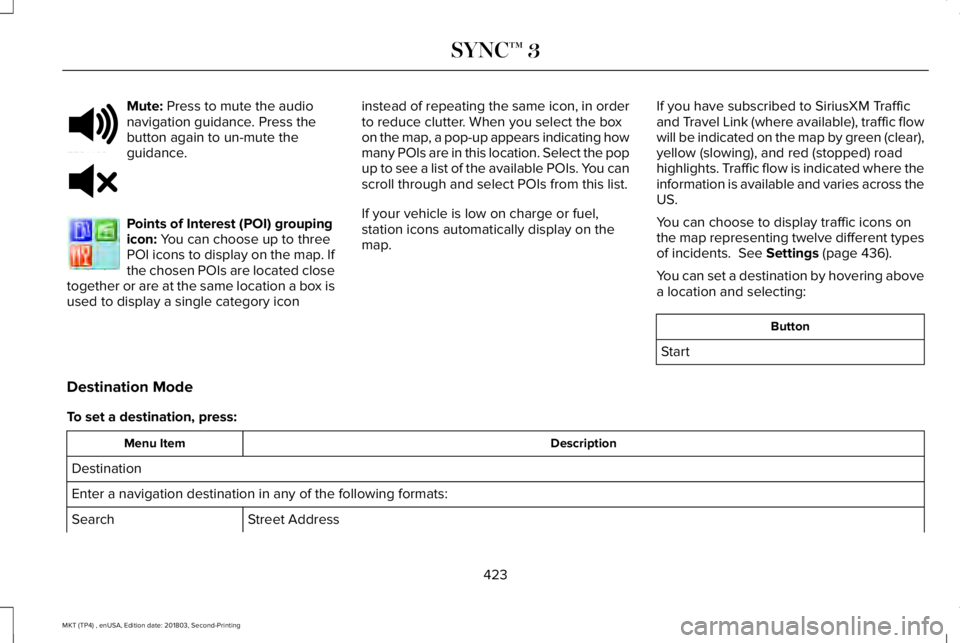
Mute: Press to mute the audionavigation guidance. Press thebutton again to un-mute theguidance.
Points of Interest (POI) groupingicon: You can choose up to threePOI icons to display on the map. Ifthe chosen POIs are located closetogether or are at the same location a box isused to display a single category icon
instead of repeating the same icon, in orderto reduce clutter. When you select the boxon the map, a pop-up appears indicating howmany POIs are in this location. Select the popup to see a list of the available POIs. You canscroll through and select POIs from this list.
If your vehicle is low on charge or fuel,station icons automatically display on themap.
If you have subscribed to SiriusXM Trafficand Travel Link (where available), traffic flowwill be indicated on the map by green (clear),yellow (slowing), and red (stopped) roadhighlights. Traffic flow is indicated where theinformation is available and varies across theUS.
You can choose to display traffic icons onthe map representing twelve different typesof incidents. See Settings (page 436).
You can set a destination by hovering abovea location and selecting:
Button
Start
Destination Mode
To set a destination, press:
DescriptionMenu Item
Destination
Enter a navigation destination in any of the following formats:
Street AddressSearch
423
MKT (TP4) , enUSA, Edition date: 201803, Second-Printing
SYNC™ 3E251780 E251779 E207754
Page 468 of 575
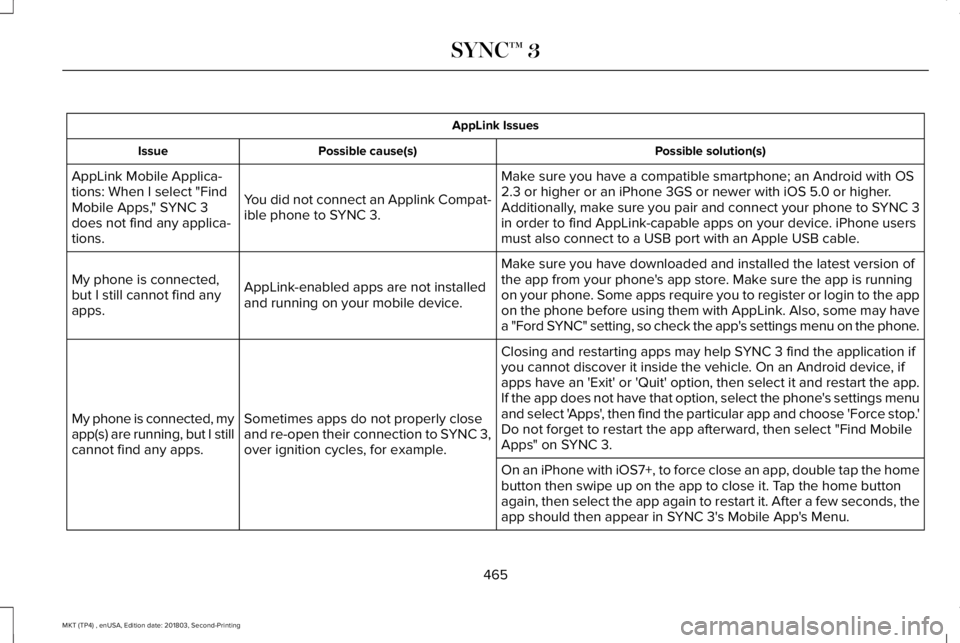
AppLink Issues
Possible solution(s)Possible cause(s)Issue
Make sure you have a compatible smartphone; an Android with OS2.3 or higher or an iPhone 3GS or newer with iOS 5.0 or higher.Additionally, make sure you pair and connect your phone to SYNC 3in order to find AppLink-capable apps on your device. iPhone usersmust also connect to a USB port with an Apple USB cable.
You did not connect an Applink Compat-ible phone to SYNC 3.
AppLink Mobile Applica-tions: When I select "FindMobile Apps," SYNC 3does not find any applica-tions.
Make sure you have downloaded and installed the latest version ofthe app from your phone's app store. Make sure the app is runningon your phone. Some apps require you to register or login to the appon the phone before using them with AppLink. Also, some may havea "Ford SYNC" setting, so check the app's settings menu on the phone.
AppLink-enabled apps are not installedand running on your mobile device.
My phone is connected,but I still cannot find anyapps.
Closing and restarting apps may help SYNC 3 find the application ifyou cannot discover it inside the vehicle. On an Android device, ifapps have an 'Exit' or 'Quit' option, then select it and restart the app.If the app does not have that option, select the phone's settings menuand select 'Apps', then find the particular app and choose 'Force stop.'Do not forget to restart the app afterward, then select "Find MobileApps" on SYNC 3.
Sometimes apps do not properly closeand re-open their connection to SYNC 3,over ignition cycles, for example.
My phone is connected, myapp(s) are running, but I stillcannot find any apps.
On an iPhone with iOS7+, to force close an app, double tap the homebutton then swipe up on the app to close it. Tap the home buttonagain, then select the app again to restart it. After a few seconds, theapp should then appear in SYNC 3's Mobile App's Menu.
465
MKT (TP4) , enUSA, Edition date: 201803, Second-Printing
SYNC™ 3
Page 571 of 575
Pedals................................................................83Perchlorate........................................................12Personal Safety System™..............................48How Does the Personal Safety SystemWork?...................................................................48
Phone...............................................................414During a Phone Call............................................419Making Calls.........................................................418Pairing Your Cell Phone for the FirstTime....................................................................414Phone Menu.........................................................415Receiving Calls.....................................................419Smartphone Connectivity..................................421Text Messaging...................................................420
Post-Crash Alert System............................252Power Door LocksSee: Locking and Unlocking..............................68
Power Liftgate..................................................74Obstacle Detection...............................................75Opening and Closing the Liftgate.....................74Stopping the Liftgate Movement......................75
Power Seats....................................................133Four Way Power Lumbar...................................135Power Lumbar (Limo/Livery).............................135
Power Steering Fluid Check.....................295Power Windows..............................................94Accessory Delay...................................................95Bounce-Back..........................................................94
One-Touch Down..................................................94One-Touch Up.......................................................94Window Lock..........................................................94
Protecting the Environment..........................15PunctureSee: Changing a Road Wheel.........................333
R
Rear Parking Aid............................................192Rear Passenger Climate Controls.............127Directing Air to the Overhead Air Vents orRear Footwell Air Vents.................................127Rear Climate Control Lock Indicator...............127Setting the Rear Blower Motor Speed...........127Setting the Rear Temperature..........................128Switching Rear Auto Mode On and Off.........128Switching the Rear Climate Controlled SeatsOn and Off........................................................128Switching the Rear Heated Seats On andOff.......................................................................128
Rear Seats.......................................................137Adjusting the Rear Seats...................................137
Rear Under Floor Storage...........................231Rear View Camera........................................199Using the Rear View Camera System............199
Rear View CameraSee: Rear View Camera.....................................199
Rear Window Wiper and Washers..............85Rear Camera Washer...........................................85Rear Window Washer..........................................85Rear Window Wiper Blade.................................85
Recommended Towing Weights..............238Refueling..........................................................167Refueling System Overview..............................167Refueling System Warning................................169Refueling Your Vehicle.......................................168
Remote Control...............................................60Car Finder................................................................61Intelligent Access Key.........................................60Memory Feature....................................................63Remote Start...........................................................61Replacing the Battery..........................................60Sounding the Panic Alarm...................................61
Remote Start...................................................129Automatic Settings..............................................129
Removing a Headlamp...............................300Repairing Minor Paint Damage..................310Replacement Parts Recommendation........12Collision Repairs.....................................................13Scheduled Maintenance and MechanicalRepairs.................................................................12Warranty on Replacement Parts.........................13
Replacing a Lost Key or RemoteControl............................................................63
568
MKT (TP4) , enUSA, Edition date: 201803, Second-Printing
Index
Page 572 of 575
Reporting Safety Defects (CanadaOnly)...............................................................261Reporting Safety Defects (U.S. Only)......260Roadside Assistance...................................248Vehicles Sold in Canada: Getting RoadsideAssistance.......................................................249Vehicles Sold in the United States: GettingRoadside Assistance.....................................248Vehicles Sold in the United States: UsingRoadside Assistance.....................................248
Roadside Emergencies...............................248Running-InSee: Breaking-In.................................................245
Running Out of Fuel.....................................166Adding Fuel From a Portable FuelContainer..........................................................166Filling a Portable Fuel Container.....................166
S
Safety Canopy™...............................................55Safety Precautions........................................164Scheduled Maintenance Record..............490Scheduled Maintenance.............................479Seatbelt Extension..........................................47Seatbelt Height Adjustment.........................43Seatbelt Reminder..........................................45Belt-Minder™...........................................................45
Seatbelts...........................................................38Principle of Operation..........................................38
Seatbelt Warning Lamp and IndicatorChime..............................................................44Conditions of operation......................................44
Seats.................................................................130Security..............................................................77Settings...........................................................436911 Assist...............................................................444Ambient Lighting................................................453Bluetooth..............................................................439Clock......................................................................438Display...................................................................455General.................................................................450Media Player........................................................437Mobile Apps.........................................................449Navigation............................................................446Phone....................................................................439Radio......................................................................445SiriusXM................................................................446Sound....................................................................436Valet Mode...........................................................456Vehicle...................................................................453Voice Control.......................................................455Wi-Fi & Hotspot....................................................451
Side Airbags.....................................................54Sitting in the Correct Position....................130
Snow ChainsSee: Using Snow Chains..................................328
Spare WheelSee: Changing a Road Wheel.........................333
Special Notices.................................................13New Vehicle Limited Warranty...........................13On Board Diagnostics Data LinkConnector............................................................13Special Instructions...............................................13
Special Operating Conditions ScheduledMaintenance...............................................487Exceptions............................................................489
Speed ControlSee: Cruise Control...........................................203
Stability Control.............................................190Principle of Operation........................................190
Starting a Gasoline Engine.........................159Automatic Engine Shutdown.............................161Failure to Start......................................................160Guarding Against Exhaust Fumes..................162Important Ventilating Information...................162Stopping the Engine When Your Vehicle isMoving................................................................161Stopping the Engine When Your Vehicle isStationary...........................................................161
Starting and Stopping the Engine.............158General Information............................................158
569
MKT (TP4) , enUSA, Edition date: 201803, Second-Printing
Index