instrument panel LINCOLN MKT 2019 Owners Manual
[x] Cancel search | Manufacturer: LINCOLN, Model Year: 2019, Model line: MKT, Model: LINCOLN MKT 2019Pages: 575, PDF Size: 4.66 MB
Page 4 of 575
Introduction
About This Manual...........................................7
Symbols Glossary.............................................7
Data Recording...............................................10
Perchlorate.......................................................12
Lincoln Automotive Financial Services..........................................................................12
Replacement Parts Recommendation..........................................................................12
Special Notices...............................................13
Mobile Communications Equipment.........14
Export Unique Options..................................14
Environment
Protecting the Environment.........................15
At a Glance
Instrument Panel Overview..........................16
Child Safety
General Information.......................................18
Installing Child Restraints............................20
Booster Seats.................................................32
Child Restraint Positioning..........................35
Child Safety Locks.........................................37
Seatbelts
Principle of Operation..................................38
Fastening the Seatbelts...............................39
Seatbelt Height Adjustment........................43
Seatbelt Warning Lamp and IndicatorChime...........................................................44
Seatbelt Reminder.........................................45
Child Restraint and Seatbelt Maintenance.........................................................................46
Seatbelt Extension.........................................47
Personal Safety System™
Personal Safety System™.............................48
Supplementary Restraints System
Principle of Operation..................................49
Driver and Passenger Airbags...................50
Front Passenger Sensing System.............52
Side Airbags....................................................54
Safety Canopy™..............................................55
Crash Sensors and Airbag Indicator.........57
Airbag Disposal..............................................58
Keys and Remote Controls
General Information on Radio Frequencies........................................................................59
Remote Control..............................................60
Replacing a Lost Key or Remote Control.........................................................................63
MyKey™
Principle of Operation..................................64
Creating a MyKey..........................................65
Clearing All MyKeys......................................66
Checking MyKey System Status................66
Using MyKey With Remote Start Systems........................................................................66
MyKey Troubleshooting...............................66
Doors and Locks
Locking and Unlocking................................68
Keyless Entry....................................................71
1
MKT (TP4) , enUSA, Edition date: 201803, Second-Printing
Table of Contents
Page 8 of 575
Changing the Engine Air Filter.................301
Vehicle Care
General Information....................................303
Cleaning Products......................................303
Cleaning the Exterior.................................304
Waxing...........................................................305
Cleaning the Engine...................................306
Cleaning the Windows and Wiper Blades......................................................................306
Cleaning the Interior...................................307
Cleaning the Instrument Panel andInstrument Cluster Lens........................309
Cleaning Leather Seats.............................309
Repairing Minor Paint Damage.................310
Cleaning the Wheels...................................310
Vehicle Storage.............................................311
Body Styling Kits...........................................312
Wheels and Tires
General Information.....................................313
Tire Care.........................................................315
Using Snow Chains....................................328
Tire Pressure Monitoring System...........329
Changing a Road Wheel............................333
Technical Specifications............................340
Capacities and Specifications
Engine Specifications - 3.5L.....................343
Engine Specifications - 3.7L......................344
Motorcraft Parts - 3.5L...............................345
Motorcraft Parts - 3.7L................................346
Vehicle Identification Number..................347
Vehicle Certification Label........................347
Transmission Code Designation.............348
Capacities and Specifications - 3.5L......349
Capacities and Specifications - 3.7L......355
Bulb Specification Chart............................362
Audio System
General Information....................................364
Audio Unit.....................................................366
USB Port........................................................367
Media Hub.....................................................367
SYNC™ 3
General Information...................................369
Home Screen...............................................384
Using Voice Recognition...........................386
Entertainment...............................................396
Climate............................................................410
Phone..............................................................414
Navigation.....................................................422
Apps................................................................433
Settings..........................................................436
SYNC™ 3 Troubleshooting........................456
Accessories
Accessories...................................................474
Lincoln Protect
Lincoln Protect.............................................476
Scheduled Maintenance
General Maintenance Information..........479
Normal Scheduled Maintenance............483
Special Operating Conditions ScheduledMaintenance.............................................487
5
MKT (TP4) , enUSA, Edition date: 201803, Second-Printing
Table of Contents
Page 19 of 575
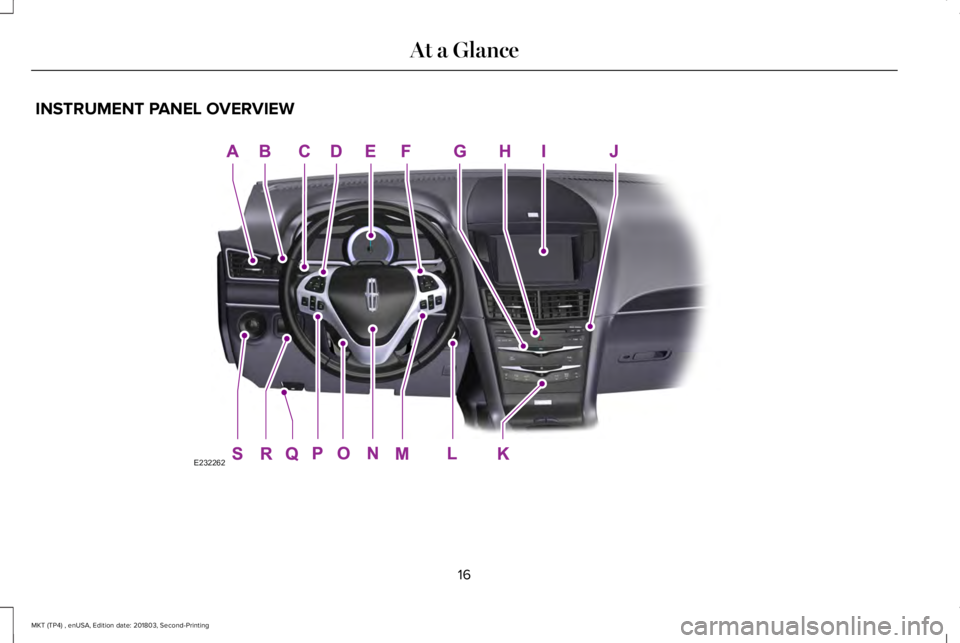
INSTRUMENT PANEL OVERVIEW
16
MKT (TP4) , enUSA, Edition date: 201803, Second-Printing
At a GlanceE232262
Page 20 of 575
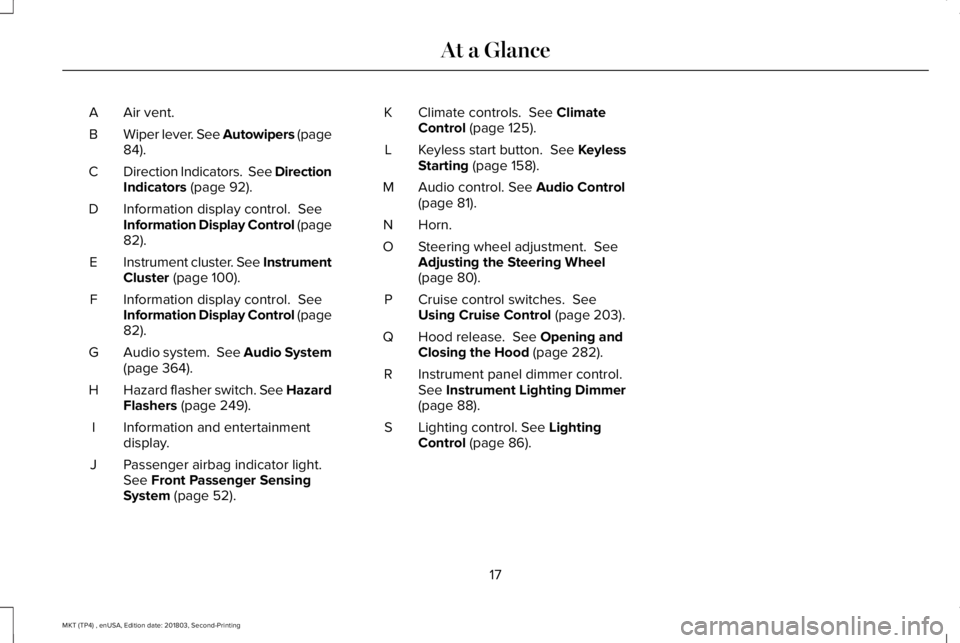
Air vent.A
Wiper lever. See Autowipers (page84).B
Direction Indicators. See DirectionIndicators (page 92).C
Information display control. SeeInformation Display Control (page82).
D
Instrument cluster. See InstrumentCluster (page 100).E
Information display control. SeeInformation Display Control (page82).
F
Audio system. See Audio System(page 364).G
Hazard flasher switch. See HazardFlashers (page 249).H
Information and entertainmentdisplay.I
Passenger airbag indicator light.See Front Passenger SensingSystem (page 52).
J
Climate controls. See ClimateControl (page 125).K
Keyless start button. See KeylessStarting (page 158).L
Audio control. See Audio Control(page 81).M
Horn.N
Steering wheel adjustment. SeeAdjusting the Steering Wheel(page 80).
O
Cruise control switches. SeeUsing Cruise Control (page 203).P
Hood release. See Opening andClosing the Hood (page 282).Q
Instrument panel dimmer control.See Instrument Lighting Dimmer(page 88).
R
Lighting control. See LightingControl (page 86).S
17
MKT (TP4) , enUSA, Edition date: 201803, Second-Printing
At a Glance
Page 55 of 575
FRONT PASSENGER SENSING
SYSTEM
WARNING: Even with advancedrestraints systems, properly restrainchildren 12 and under in a rear seatingposition. Failure to follow this couldseriously increase the risk of injury ordeath.
WARNING: Sitting improperly, out ofposition or with the seatback reclined toofar can take weight off the seat cushionand affect the decision of the passengersensing system, resulting in serious injuryor death in the event of a crash. Always situpright against your seat back, with yourfeet on the floor.
WARNING: Any alteration ormodification to the front passenger seatmay affect the performance of the frontpassenger sensing system. This couldseriously increase the risk of injury ordeath.
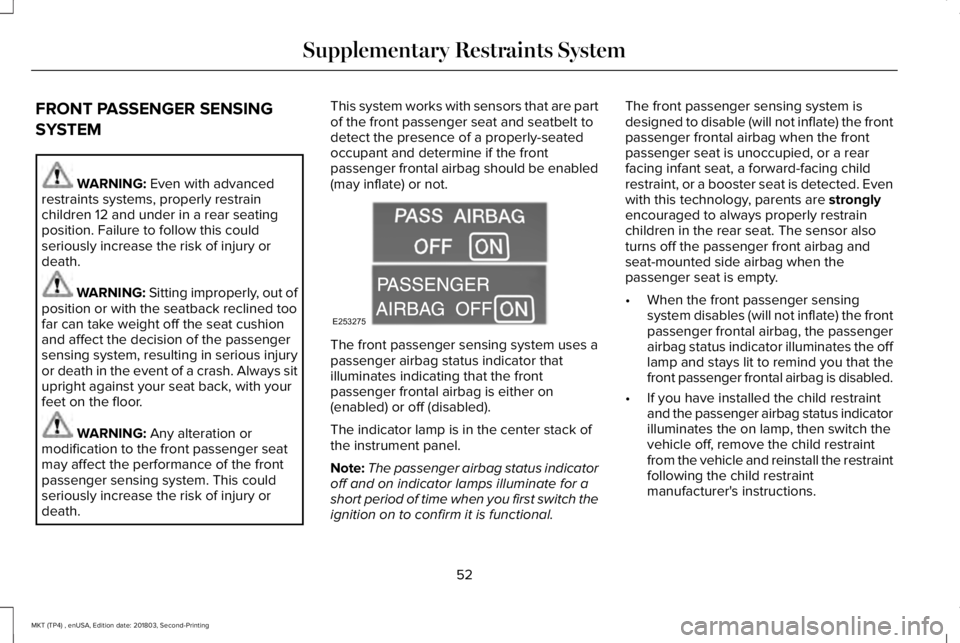
This system works with sensors that are partof the front passenger seat and seatbelt todetect the presence of a properly-seatedoccupant and determine if the frontpassenger frontal airbag should be enabled(may inflate) or not.
The front passenger sensing system uses apassenger airbag status indicator thatilluminates indicating that the frontpassenger frontal airbag is either on(enabled) or off (disabled).
The indicator lamp is in the center stack ofthe instrument panel.
Note:The passenger airbag status indicatoroff and on indicator lamps illuminate for ashort period of time when you first switch theignition on to confirm it is functional.
The front passenger sensing system isdesigned to disable (will not inflate) the frontpassenger frontal airbag when the frontpassenger seat is unoccupied, or a rearfacing infant seat, a forward-facing childrestraint, or a booster seat is detected. Evenwith this technology, parents are stronglyencouraged to always properly restrainchildren in the rear seat. The sensor alsoturns off the passenger front airbag andseat-mounted side airbag when thepassenger seat is empty.
•When the front passenger sensingsystem disables (will not inflate) the frontpassenger frontal airbag, the passengerairbag status indicator illuminates the offlamp and stays lit to remind you that thefront passenger frontal airbag is disabled.
•If you have installed the child restraintand the passenger airbag status indicatorilluminates the on lamp, then switch thevehicle off, remove the child restraintfrom the vehicle and reinstall the restraintfollowing the child restraintmanufacturer's instructions.
52
MKT (TP4) , enUSA, Edition date: 201803, Second-Printing
Supplementary Restraints SystemE253275
Page 65 of 575
•The battery voltage is below theminimum operating voltage.
•The service engine soon indicator wason the last time your vehicle was driven.
Remote Starting your Vehicle
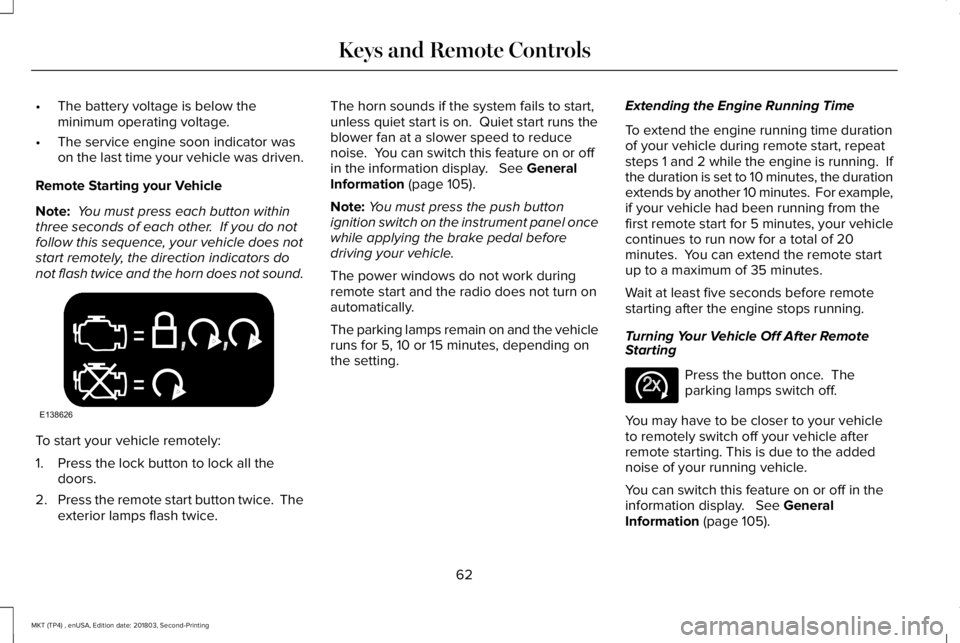
Note: You must press each button withinthree seconds of each other. If you do notfollow this sequence, your vehicle does notstart remotely, the direction indicators donot flash twice and the horn does not sound.
To start your vehicle remotely:
1. Press the lock button to lock all thedoors.
2.Press the remote start button twice. Theexterior lamps flash twice.
The horn sounds if the system fails to start,unless quiet start is on. Quiet start runs theblower fan at a slower speed to reducenoise. You can switch this feature on or offin the information display. See GeneralInformation (page 105).
Note:You must press the push buttonignition switch on the instrument panel oncewhile applying the brake pedal beforedriving your vehicle.
The power windows do not work duringremote start and the radio does not turn onautomatically.
The parking lamps remain on and the vehicleruns for 5, 10 or 15 minutes, depending onthe setting.
Extending the Engine Running Time
To extend the engine running time durationof your vehicle during remote start, repeatsteps 1 and 2 while the engine is running. Ifthe duration is set to 10 minutes, the durationextends by another 10 minutes. For example,if your vehicle had been running from thefirst remote start for 5 minutes, your vehiclecontinues to run now for a total of 20minutes. You can extend the remote startup to a maximum of 35 minutes.
Wait at least five seconds before remotestarting after the engine stops running.
Turning Your Vehicle Off After RemoteStarting
Press the button once. Theparking lamps switch off.
You may have to be closer to your vehicleto remotely switch off your vehicle afterremote starting. This is due to the addednoise of your running vehicle.
You can switch this feature on or off in theinformation display. See GeneralInformation (page 105).
62
MKT (TP4) , enUSA, Edition date: 201803, Second-Printing
Keys and Remote ControlsE138626 E138625
Page 78 of 575
Note:Be careful when opening or closingthe liftgate in a garage or other enclosedarea to avoid damaging the liftgate.
Note:This could damage the liftgate and itscomponents. Do not leave the liftgate openwhile driving.
From the Instrument Panel
With the transmission in park (P),press the button on the instrumentpanel.
Remote Control
Press the button twice within threeseconds.
Outside Control Button
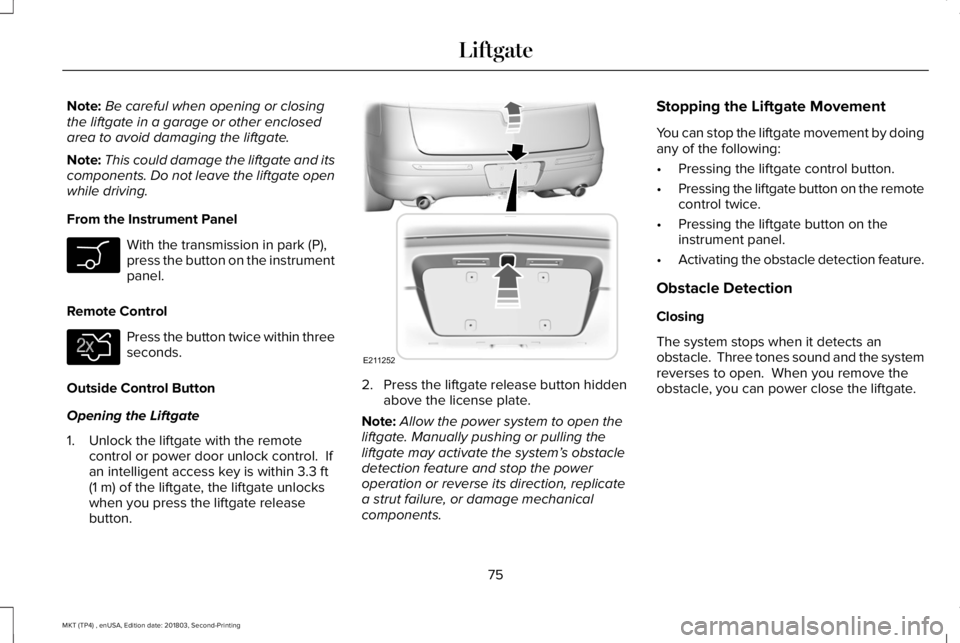
Opening the Liftgate
1. Unlock the liftgate with the remotecontrol or power door unlock control. Ifan intelligent access key is within 3.3 ft(1 m) of the liftgate, the liftgate unlockswhen you press the liftgate releasebutton.
2. Press the liftgate release button hiddenabove the license plate.
Note:Allow the power system to open theliftgate. Manually pushing or pulling theliftgate may activate the system’s obstacledetection feature and stop the poweroperation or reverse its direction, replicatea strut failure, or damage mechanicalcomponents.
Stopping the Liftgate Movement
You can stop the liftgate movement by doingany of the following:
•Pressing the liftgate control button.
•Pressing the liftgate button on the remotecontrol twice.
•Pressing the liftgate button on theinstrument panel.
•Activating the obstacle detection feature.
Obstacle Detection
Closing
The system stops when it detects anobstacle. Three tones sound and the systemreverses to open. When you remove theobstacle, you can power close the liftgate.
75
MKT (TP4) , enUSA, Edition date: 201803, Second-Printing
Liftgate E138630 E211252
Page 89 of 575
GENERAL INFORMATION
Condensation in the Exterior FrontLamps and Rear Lamps
Exterior front lamps and rear lamps havevents to accommodate normal changes inair pressure.
Condensation can be a natural by-productof this design. When moist air enters thelamp assembly through the vents, there is apossibility that condensation can occur whenthe temperature is cold. When normalcondensation occurs, a fine mist can form onthe interior of the lens. The fine misteventually clears and exits through the ventsduring normal operation.
Clearing time may take as long as 48 hoursunder dry weather conditions.
Examples of acceptable condensation are:
•The presence of a fine mist (no streaks,drip marks or large droplets).
•A fine mist covers less than 50% of thelens.
Examples of unacceptable condensation are:
•A water puddle inside the lamp.
•Streaks, drip marks or large dropletspresent on the interior of the lens.
If you see any unacceptable condensation,have your vehicle checked by an authorizeddealer.
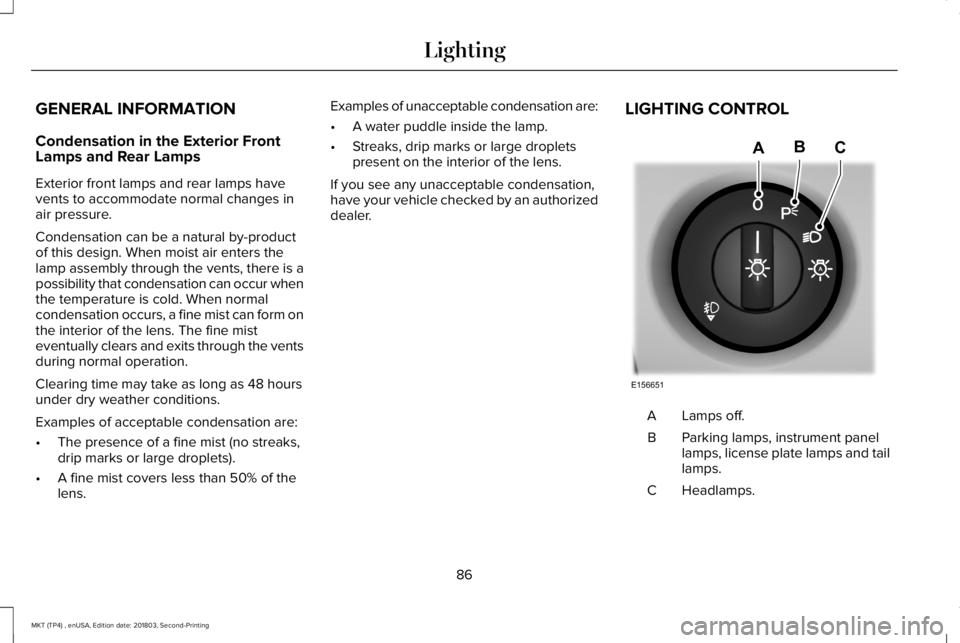
LIGHTING CONTROL
Lamps off.A
Parking lamps, instrument panellamps, license plate lamps and taillamps.
B
Headlamps.C
86
MKT (TP4) , enUSA, Edition date: 201803, Second-Printing
LightingE156651
ABC
Page 91 of 575
Windshield Wiper Activated Headlamps
When you switch the autolamps on, theheadlamps turn on within 10 seconds ofswitching the wipers on. They turn offapproximately 60 seconds after you switchthe windshield wipers off.
The headlamps do not turn on with thewipers:
•During a single wipe.
•When you use the windshield washer.
Note:If you switch the autolamps and theautowipers on, the headlamps turn on whenthe windshield wipers continuously operate.
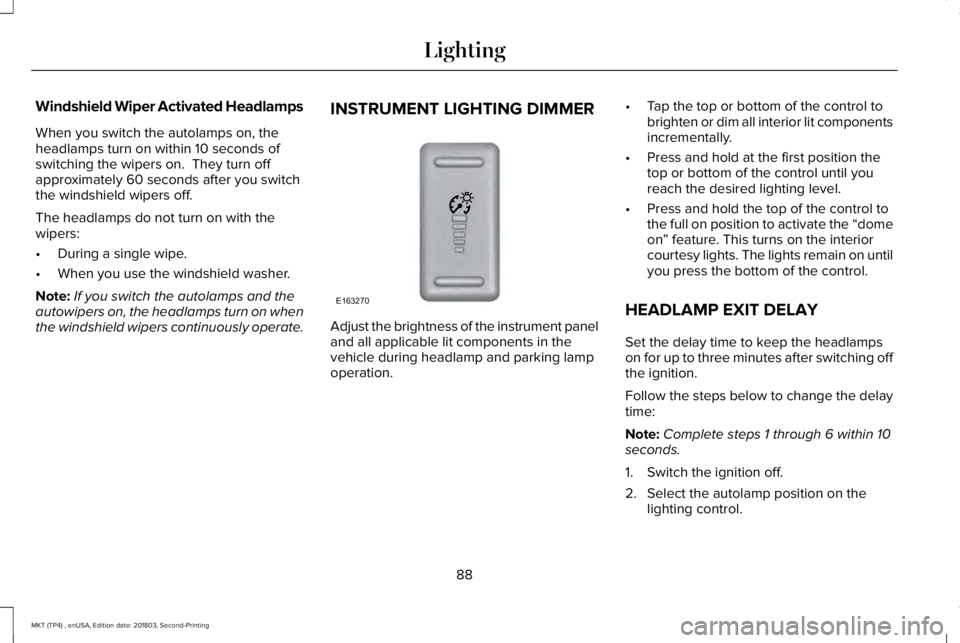
INSTRUMENT LIGHTING DIMMER
Adjust the brightness of the instrument paneland all applicable lit components in thevehicle during headlamp and parking lampoperation.
•Tap the top or bottom of the control tobrighten or dim all interior lit componentsincrementally.
•Press and hold at the first position thetop or bottom of the control until youreach the desired lighting level.
•Press and hold the top of the control tothe full on position to activate the “domeon” feature. This turns on the interiorcourtesy lights. The lights remain on untilyou press the bottom of the control.
HEADLAMP EXIT DELAY
Set the delay time to keep the headlampson for up to three minutes after switching offthe ignition.
Follow the steps below to change the delaytime:
Note:Complete steps 1 through 6 within 10seconds.
1. Switch the ignition off.
2. Select the autolamp position on thelighting control.
88
MKT (TP4) , enUSA, Edition date: 201803, Second-Printing
LightingE163270
Page 128 of 575
AUTOMATIC CLIMATE CONTROL
Note: You can switch temperature unitsbetween Fahrenheit and Celsius.
Setting the Blower Motor Speed
Press and release to adjust thevolume of air circulated in thevehicle.
Setting the Temperature
Press and release + or - on the left-hand sideof the climate control to set the left-handtemperature.
Note:This control also adjusts the right-handside temperature when you switch off dualzone mode.
Press and release + or - on the right-handside of the climate control to set theright-hand temperature.
Switching Auto Mode On and Off
Press and release the button toswitch on automatic operation,then set the temperature.
The system adjusts the blower motor speed,air distribution, air conditioning operation,and outside or recirculated air to reach andmaintain the temperature you have set.
Note:You can also switch off dual zonemode by pressing and holding the button formore than two seconds.
Switching the Air Conditioning On andOff
Press and release the button toswitch the air conditioning on oroff.
Use air conditioning with recirculated air toimprove cooling performance and efficiency.
Note:In certain conditions, for example,maximum defrost, the air conditioningcompressor may continue to operate eventhough you switch off the air conditioning.
Switching the Climate Control On andOff
Press and release the button.
Switching Defrost On and Off
Press and release the button todistribute air through thewindshield air vents and de-mister.
Air directed to the instrument panel andfootwell air vents turns off. You can also usethis setting to defog and clear the windshieldof a thin covering of ice.
Switching Maximum Air ConditioningOn and Off
Press and release the button formaximum cooling.
The left-hand and right-hand settings set toLO, recirculated air flows through theinstrument panel air vents, air conditioningturns on and the blower motor adjusts to thehighest speed.
Switching Recirculated Air On and Off
Press and release the button toswitch between outside air andrecirculated air.
125
MKT (TP4) , enUSA, Edition date: 201803, Second-Printing
Climate Control