center console LINCOLN MKT 2019 Owners Manual
[x] Cancel search | Manufacturer: LINCOLN, Model Year: 2019, Model line: MKT, Model: LINCOLN MKT 2019Pages: 575, PDF Size: 4.66 MB
Page 6 of 575
Memory Function.........................................135
Rear Seats......................................................137
Heated Seats.................................................146
Climate Controlled Seats...........................147
Universal Garage Door Opener
Universal Garage Door Opener...............149
Auxiliary Power Points
Auxiliary Power Points................................154
Storage Compartments
Center Console............................................156
Overhead Console.......................................157
Starting and Stopping the Engine
General Information....................................158
Keyless Starting............................................158
Starting a Gasoline Engine........................159
Engine Block Heater...................................162
Fuel and Refueling
Safety Precautions.......................................164
Fuel Quality...................................................165
Fuel Filler Funnel Location........................165
Running Out of Fuel....................................166
Refueling.........................................................167
Fuel Consumption........................................170
Engine Emission Control
Emission Law..................................................171
Catalytic Converter......................................172
Transmission
Automatic Transmission..............................175
All-Wheel Drive
Using All-Wheel Drive.................................179
Brakes
General Information.....................................187
Hints on Driving With Anti-Lock Brakes.......................................................................188
Parking Brake................................................188
Traction Control
Principle of Operation.................................189
Using Traction Control................................189
Stability Control
Principle of Operation.................................190
Using Stability Control.................................191
Parking Aids
Principle of Operation.................................192
Rear Parking Aid...........................................192
Active Park Assist.........................................193
Rear View Camera.......................................199
Cruise Control
Principle of Operation................................203
Using Cruise Control..................................203
Using Adaptive Cruise Control................204
Driving Aids
Driver Alert.....................................................212
Lane Keeping System.................................214
Blind Spot Information System.................219
3
MKT (TP4) , enUSA, Edition date: 201803, Second-Printing
Table of Contents
Page 101 of 575
Rotate the sun visor toward the side windowand extend it rearward for extra shade.
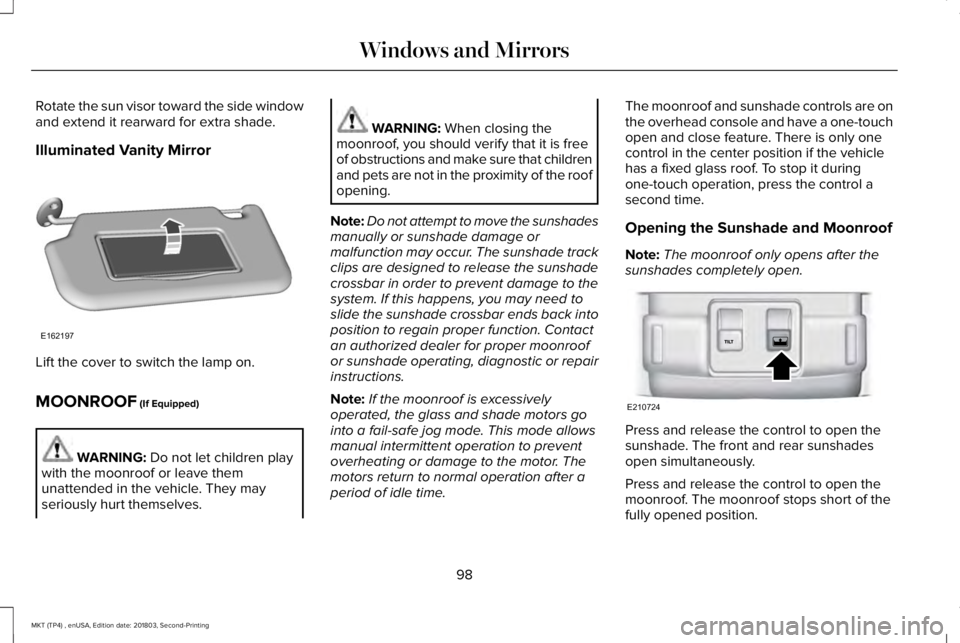
Illuminated Vanity Mirror
Lift the cover to switch the lamp on.
MOONROOF (If Equipped)
WARNING: Do not let children playwith the moonroof or leave themunattended in the vehicle. They mayseriously hurt themselves.
WARNING: When closing themoonroof, you should verify that it is freeof obstructions and make sure that childrenand pets are not in the proximity of the roofopening.
Note:Do not attempt to move the sunshadesmanually or sunshade damage ormalfunction may occur. The sunshade trackclips are designed to release the sunshadecrossbar in order to prevent damage to thesystem. If this happens, you may need toslide the sunshade crossbar ends back intoposition to regain proper function. Contactan authorized dealer for proper moonroofor sunshade operating, diagnostic or repairinstructions.
Note:If the moonroof is excessivelyoperated, the glass and shade motors gointo a fail-safe jog mode. This mode allowsmanual intermittent operation to preventoverheating or damage to the motor. Themotors return to normal operation after aperiod of idle time.
The moonroof and sunshade controls are onthe overhead console and have a one-touchopen and close feature. There is only onecontrol in the center position if the vehiclehas a fixed glass roof. To stop it duringone-touch operation, press the control asecond time.
Opening the Sunshade and Moonroof
Note:The moonroof only opens after thesunshades completely open.
Press and release the control to open thesunshade. The front and rear sunshadesopen simultaneously.
Press and release the control to open themoonroof. The moonroof stops short of thefully opened position.
98
MKT (TP4) , enUSA, Edition date: 201803, Second-Printing
Windows and MirrorsE162197 E210724
Page 157 of 575
12 Volt DC Power Point
WARNING: Do not plug optionalelectrical accessories into the cigar lightersocket. Incorrect use of the cigar lightercan cause damage not covered by thevehicle warranty, and can result in fire orserious injury.
Note:When you switch the ignition on, youcan use the socket to power 12 voltappliances with a maximum current ratingof 15 amps.
If the power supply does not work after youswitch the ignition off, switch the ignition on.Note:Do not hang any accessory from theaccessory plug.
Note:Do not use the power point over thevehicle capacity of 12 volt DC 180 watts ora fuse may blow.
Note:Always keep the power point capsclosed when not in use.
Do not insert objects other than an accessoryplug into the power point. This damages thepower point and may blow the fuse.
Run the vehicle for full capacity use of thepower point.
To prevent the battery from running out ofcharge:
•Do not use the power point longer thannecessary when the vehicle is notrunning.
•Do not leave devices plugged inovernight or when you park your vehiclefor extended periods.
Locations
Power points may be in the followinglocations:
•Near the floor inside the front consolebin.
•Inside the center console.
•On the rear of the center console.
•Inside the luggage compartment.
110 Volt AC Power Point (If Equipped)
WARNING: Do not keep electricaldevices plugged in the power pointwhenever the device is not in use. Do notuse any extension cord with the 110 voltAC power point, since it will defeat thesafety protection design. Doing so maycause the power point to overload due topowering multiple devices that can reachbeyond the 150 watt load limit and couldresult in fire or serious injury.
Note:The power point turns off when youswitch the ignition off, or when the batteryvoltage drops below 11 volts.
You can use the power point for electricdevices that require up to 150 watts. It is onthe rear of the center console.
154
MKT (TP4) , enUSA, Edition date: 201803, Second-Printing
Auxiliary Power Points
Page 159 of 575
CENTER CONSOLE
Stow items in the cup holder carefully asitems may become loose during hardbraking, acceleration or crashes, includinghot drinks which may spill.
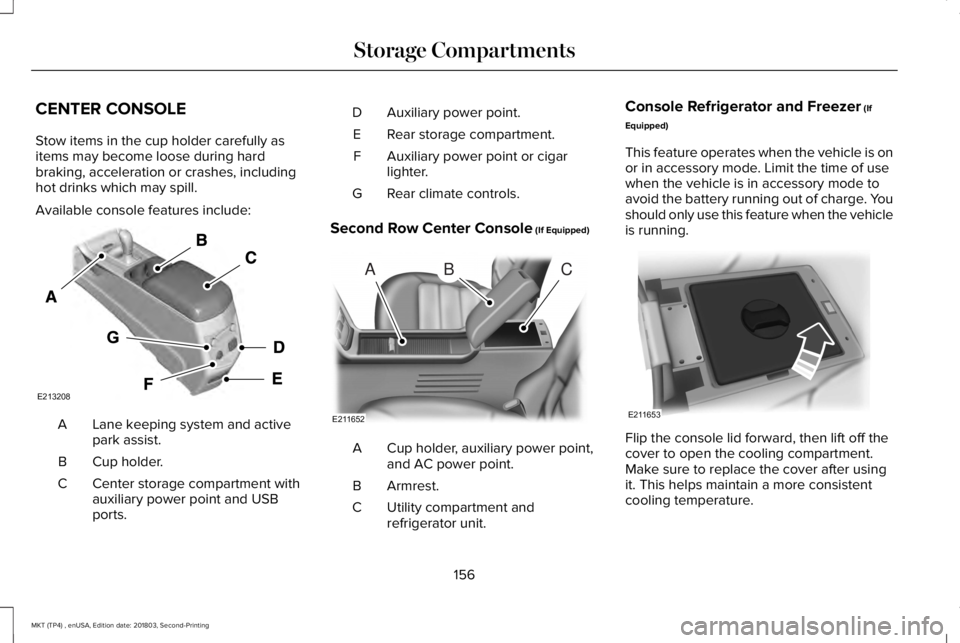
Available console features include:
Lane keeping system and activepark assist.A
Cup holder.B
Center storage compartment withauxiliary power point and USBports.
C
Auxiliary power point.D
Rear storage compartment.E
Auxiliary power point or cigarlighter.F
Rear climate controls.G
Second Row Center Console (If Equipped)
Cup holder, auxiliary power point,and AC power point.A
Armrest.B
Utility compartment andrefrigerator unit.C
Console Refrigerator and Freezer (If
Equipped)
This feature operates when the vehicle is onor in accessory mode. Limit the time of usewhen the vehicle is in accessory mode toavoid the battery running out of charge. Youshould only use this feature when the vehicleis running.
Flip the console lid forward, then lift off thecover to open the cooling compartment.Make sure to replace the cover after usingit. This helps maintain a more consistentcooling temperature.
156
MKT (TP4) , enUSA, Edition date: 201803, Second-Printing
Storage CompartmentsE213208 ABC
E211652 E211653
Page 181 of 575
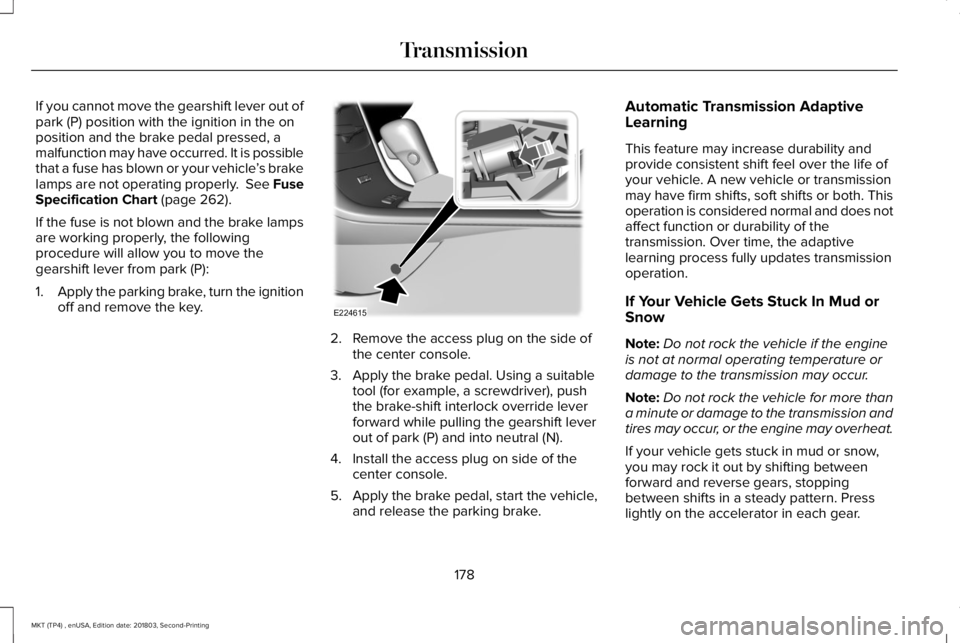
If you cannot move the gearshift lever out ofpark (P) position with the ignition in the onposition and the brake pedal pressed, amalfunction may have occurred. It is possiblethat a fuse has blown or your vehicle’s brakelamps are not operating properly. See FuseSpecification Chart (page 262).
If the fuse is not blown and the brake lampsare working properly, the followingprocedure will allow you to move thegearshift lever from park (P):
1.Apply the parking brake, turn the ignitionoff and remove the key.
2. Remove the access plug on the side ofthe center console.
3. Apply the brake pedal. Using a suitabletool (for example, a screwdriver), pushthe brake-shift interlock override leverforward while pulling the gearshift leverout of park (P) and into neutral (N).
4. Install the access plug on side of thecenter console.
5. Apply the brake pedal, start the vehicle,and release the parking brake.
Automatic Transmission AdaptiveLearning
This feature may increase durability andprovide consistent shift feel over the life ofyour vehicle. A new vehicle or transmissionmay have firm shifts, soft shifts or both. Thisoperation is considered normal and does notaffect function or durability of thetransmission. Over time, the adaptivelearning process fully updates transmissionoperation.
If Your Vehicle Gets Stuck In Mud orSnow
Note:Do not rock the vehicle if the engineis not at normal operating temperature ordamage to the transmission may occur.
Note:Do not rock the vehicle for more thana minute or damage to the transmission andtires may occur, or the engine may overheat.
If your vehicle gets stuck in mud or snow,you may rock it out by shifting betweenforward and reverse gears, stoppingbetween shifts in a steady pattern. Presslightly on the accelerator in each gear.
178
MKT (TP4) , enUSA, Edition date: 201803, Second-Printing
TransmissionE224615
Page 193 of 575
PRINCIPLE OF OPERATION
WARNING: Vehicle modificationsinvolving braking system, aftermarket roofracks, suspension, steering system, tireconstruction and wheel and tire size maychange the handling characteristics of yourvehicle and may adversely affect theperformance of the electronic stabilitycontrol system. In addition, installing anystereo loudspeakers may interfere withand adversely affect the electronic stabilitycontrol system. Install any aftermarketstereo loudspeaker as far as possible fromthe front center console, the tunnel, andthe front seats in order to minimize the riskof interfering with the electronic stabilitycontrol sensors. Reducing theeffectiveness of the electronic stabilitycontrol system could lead to an increasedrisk of loss of vehicle control, vehiclerollover, personal injury and death.
WARNING: Remember that evenadvanced technology cannot defy the lawsof physics. It’s always possible to losecontrol of a vehicle due to inappropriatedriver input for the conditions. Aggressivedriving on any road condition can causeyou to lose control of your vehicleincreasing the risk of personal injury orproperty damage. Activation of theelectronic stability control system is anindication that at least some of the tireshave exceeded their ability to grip theroad; this could reduce the operator’sability to control the vehicle potentiallyresulting in a loss of vehicle control, vehiclerollover, personal injury and death. If yourelectronic stability control system activates,SLOW DOWN.
The system automatically turns on each timeyou switch the ignition on.
If a fault occurs in either the stability controlor the traction control system, you mayexperience the following conditions:
•The stability and traction control lightilluminates steadily.
•The stability control and traction controlsystems do not enhance your vehicle'sability to maintain traction of the wheels.
If a driving condition activates either thestability control or the traction control systemyou may experience the following conditions:
•The stability and traction control lightflashes.
•Your vehicle slows down.
•Reduced engine power.
•A vibration in the brake pedal.
•The brake pedal is stiffer than usual.
•If the driving condition is severe and yourfoot is not on the brake, the brake pedalmay move as the system applies higherbrake force.
The stability control system has severalfeatures built into it to help you maintaincontrol of your vehicle:
190
MKT (TP4) , enUSA, Edition date: 201803, Second-Printing
Stability Control
Page 218 of 575
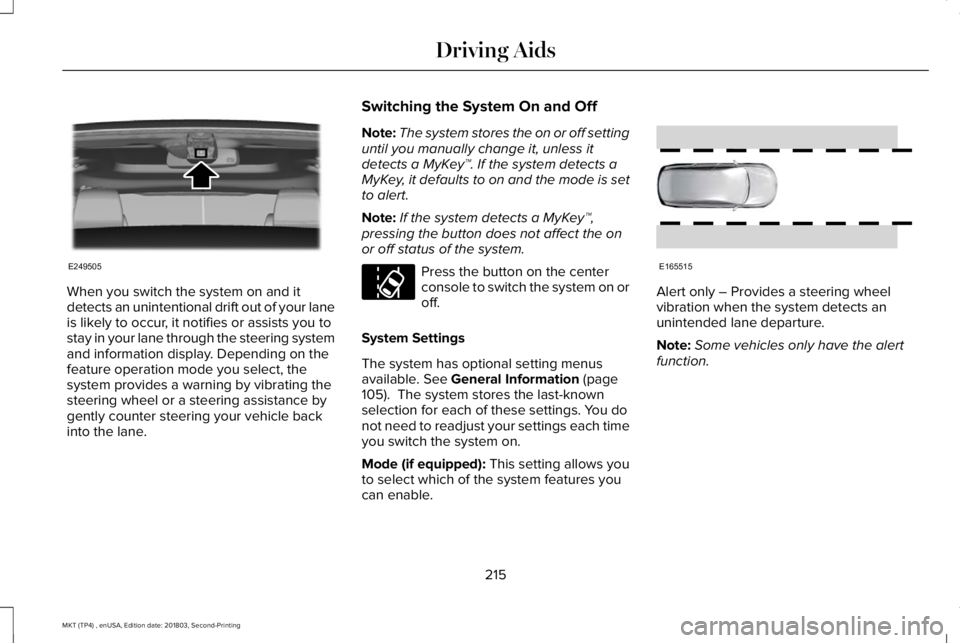
When you switch the system on and itdetects an unintentional drift out of your laneis likely to occur, it notifies or assists you tostay in your lane through the steering systemand information display. Depending on thefeature operation mode you select, thesystem provides a warning by vibrating thesteering wheel or a steering assistance bygently counter steering your vehicle backinto the lane.
Switching the System On and Off
Note:The system stores the on or off settinguntil you manually change it, unless itdetects a MyKey™. If the system detects aMyKey, it defaults to on and the mode is setto alert.
Note:If the system detects a MyKey™,pressing the button does not affect the onor off status of the system.
Press the button on the centerconsole to switch the system on oroff.
System Settings
The system has optional setting menusavailable. See General Information (page105). The system stores the last-knownselection for each of these settings. You donot need to readjust your settings each timeyou switch the system on.
Mode (if equipped): This setting allows youto select which of the system features youcan enable.
Alert only – Provides a steering wheelvibration when the system detects anunintended lane departure.
Note:Some vehicles only have the alertfunction.
215
MKT (TP4) , enUSA, Edition date: 201803, Second-Printing
Driving AidsE249505 E173233 E165515
Page 371 of 575
against the use of any hand-held devicewhile driving and encourage the use ofvoice-operated systems when possible.Make sure you are aware of all applicablelocal laws that may affect the use ofelectronic devices while driving.
The media hub may be on the instrumentpanel or center console.
The media hub may contain one or more ofthe following inputs:
See USB Port (page 367).
368
MKT (TP4) , enUSA, Edition date: 201803, Second-Printing
Audio System
Page 413 of 575
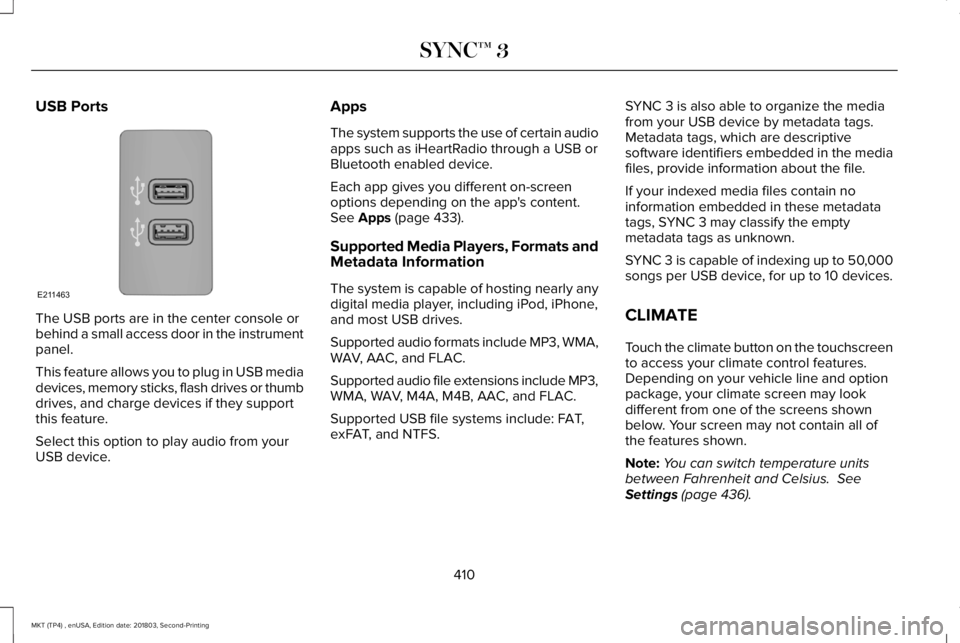
USB Ports
The USB ports are in the center console orbehind a small access door in the instrumentpanel.
This feature allows you to plug in USB mediadevices, memory sticks, flash drives or thumbdrives, and charge devices if they supportthis feature.
Select this option to play audio from yourUSB device.
Apps
The system supports the use of certain audioapps such as iHeartRadio through a USB orBluetooth enabled device.
Each app gives you different on-screenoptions depending on the app's content.See Apps (page 433).
Supported Media Players, Formats andMetadata Information
The system is capable of hosting nearly anydigital media player, including iPod, iPhone,and most USB drives.
Supported audio formats include MP3, WMA,WAV, AAC, and FLAC.
Supported audio file extensions include MP3,WMA, WAV, M4A, M4B, AAC, and FLAC.
Supported USB file systems include: FAT,exFAT, and NTFS.
SYNC 3 is also able to organize the mediafrom your USB device by metadata tags.Metadata tags, which are descriptivesoftware identifiers embedded in the mediafiles, provide information about the file.
If your indexed media files contain noinformation embedded in these metadatatags, SYNC 3 may classify the emptymetadata tags as unknown.
SYNC 3 is capable of indexing up to 50,000songs per USB device, for up to 10 devices.
CLIMATE
Touch the climate button on the touchscreento access your climate control features.Depending on your vehicle line and optionpackage, your climate screen may lookdifferent from one of the screens shownbelow. Your screen may not contain all ofthe features shown.
Note:You can switch temperature unitsbetween Fahrenheit and Celsius. SeeSettings (page 436).
410
MKT (TP4) , enUSA, Edition date: 201803, Second-Printing
SYNC™ 3E211463
Page 565 of 575
Switching the Climate Control On andOff.......................................................................125
Automatic High Beam Control....................89Switching the System On and Off....................90
Automatic Transmission...............................175Automatic Transmission AdaptiveLearning.............................................................178Brake-Shift Interlock............................................177If Your Vehicle Gets Stuck In Mud orSnow...................................................................178SelectShift Automatic™ Transmission.............176Understanding the Positions of YourAutomatic Transmission................................175
Automatic Transmission FluidCheck...........................................................292Adding Transmission Fluid .............................293Checking the Transmission Fluid Level........293
Autowipers.......................................................84Auxiliary Power Points.................................154110 Volt AC Power Point.....................................15412 Volt DC Power Point......................................154Locations...............................................................154
AWDSee: All-Wheel Drive...........................................179
B
BatterySee: Changing the 12V Battery......................295
Blind Spot Information System..................219Switching the System Off and On...................221System Errors.......................................................221System Limitations..............................................221Using the System...............................................220
BLISSee: Blind Spot Information System...............219
Body Styling Kits............................................312Bonnet LockSee: Opening and Closing the Hood............282
Booster Seats..................................................32Types of Booster Seats.......................................33
Brake Fluid Check........................................294Brakes...............................................................187General Information............................................187
Breaking-In.....................................................245Bulb Specification Chart.............................362
C
Cabin Air Filter...............................................129Capacities and Specifications - 3.5L.......349Alternative Engine Oil for Extremely ColdClimates............................................................354
Specifications......................................................350
Capacities and Specifications - 3.7L........355Alternative Engine Oil for Extremely ColdClimates...........................................................360Specifications......................................................357
Capacities and Specifications...................343Cargo Nets......................................................231Car WashSee: Cleaning the Exterior...............................304
Catalytic Converter.......................................172On-Board Diagnostics (OBD-II)........................173Readiness for Inspection and Maintenance(I/M) Testing.......................................................174
Center Console.............................................156Console Refrigerator and Freezer..................156Second Row Center Console...........................156
Changing a Bulb...........................................300Front Direction Indicator Lamp........................301Front Fog Lamp..................................................300High Intensity Discharge Headlamp.............300LED Lamps............................................................301License Plate Lamp.............................................301
Changing a Fuse..........................................278Fuses.....................................................................278
Changing a Road Wheel.............................333Dissimilar Spare Wheel and Tire AssemblyInformation.......................................................334Tire Change Procedure....................................335
562
MKT (TP4) , enUSA, Edition date: 201803, Second-Printing
Index