wheel LINCOLN MKX 2012 User Guide
[x] Cancel search | Manufacturer: LINCOLN, Model Year: 2012, Model line: MKX, Model: LINCOLN MKX 2012Pages: 364, PDF Size: 3.64 MB
Page 26 of 364
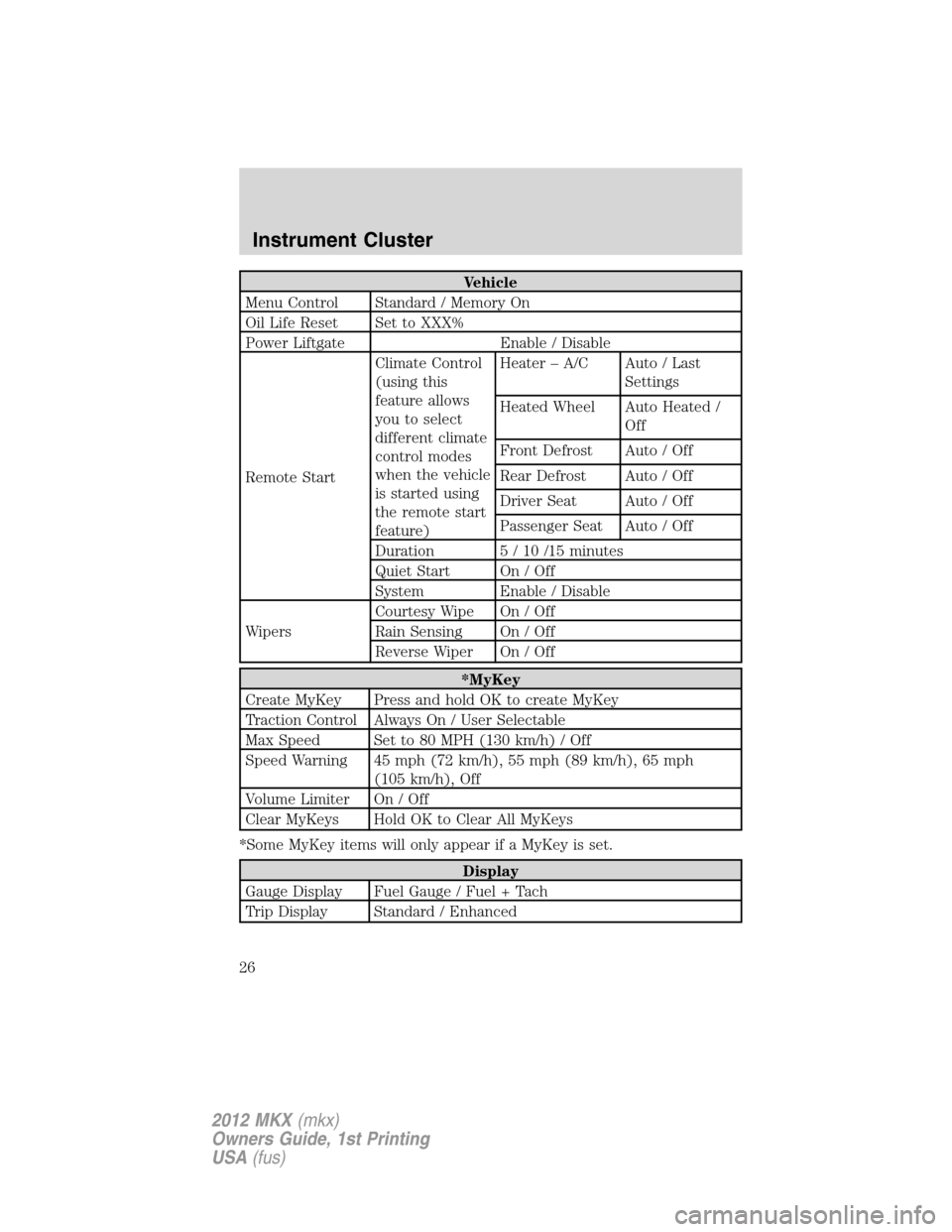
Vehicle
Menu Control Standard / Memory On
Oil Life Reset Set to XXX%
Power Liftgate Enable / Disable
Remote StartClimate Control
(using this
feature allows
you to select
different climate
control modes
when the vehicle
is started using
the remote start
feature)Heater – A/C Auto / Last
Settings
Heated Wheel Auto Heated /
Off
Front Defrost Auto / Off
Rear Defrost Auto / Off
Driver Seat Auto / Off
Passenger Seat Auto / Off
Duration 5 / 10 /15 minutes
Quiet Start On / Off
System Enable / Disable
WipersCourtesy Wipe On / Off
Rain Sensing On / Off
Reverse Wiper On / Off
*MyKey
Create MyKey Press and hold OK to create MyKey
Traction Control Always On / User Selectable
Max Speed Set to 80 MPH (130 km/h) / Off
Speed Warning 45 mph (72 km/h), 55 mph (89 km/h), 65 mph
(105 km/h), Off
Volume Limiter On / Off
Clear MyKeys Hold OK to Clear All MyKeys
*Some MyKey items will only appear if a MyKey is set.
Display
Gauge Display Fuel Gauge / Fuel + Tach
Trip Display Standard / Enhanced
Instrument Cluster
26
2012 MKX(mkx)
Owners Guide, 1st Printing
USA(fus)
Page 34 of 364
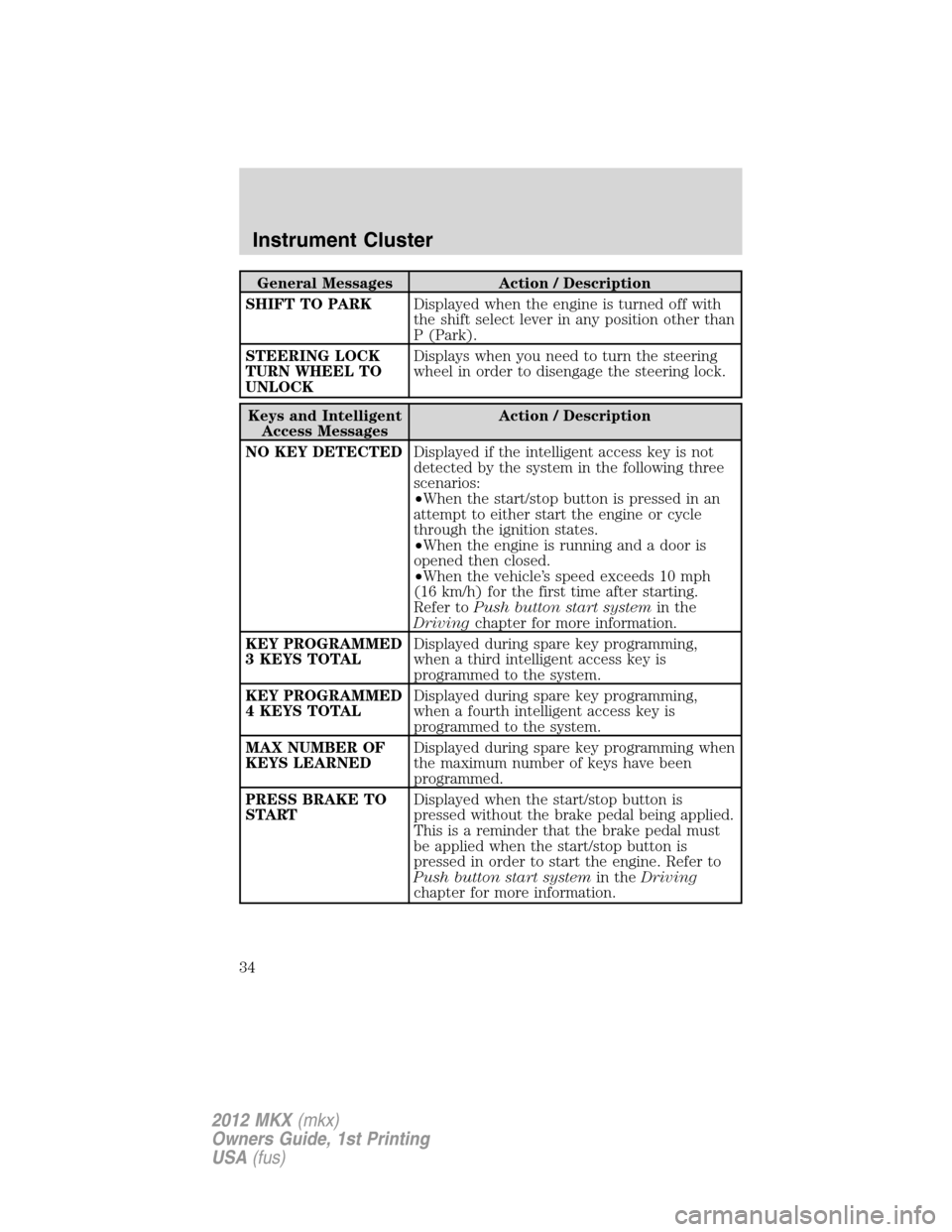
General Messages Action / Description
SHIFT TO PARKDisplayed when the engine is turned off with
the shift select lever in any position other than
P (Park).
STEERING LOCK
TURN WHEEL TO
UNLOCKDisplays when you need to turn the steering
wheel in order to disengage the steering lock.
Keys and Intelligent
Access MessagesAction / Description
NO KEY DETECTEDDisplayed if the intelligent access key is not
detected by the system in the following three
scenarios:
•When the start/stop button is pressed in an
attempt to either start the engine or cycle
through the ignition states.
•When the engine is running and a door is
opened then closed.
•When the vehicle’s speed exceeds 10 mph
(16 km/h) for the first time after starting.
Refer toPush button start systemin the
Drivingchapter for more information.
KEY PROGRAMMED
3 KEYS TOTALDisplayed during spare key programming,
when a third intelligent access key is
programmed to the system.
KEY PROGRAMMED
4 KEYS TOTALDisplayed during spare key programming,
when a fourth intelligent access key is
programmed to the system.
MAX NUMBER OF
KEYS LEARNEDDisplayed during spare key programming when
the maximum number of keys have been
programmed.
PRESS BRAKE TO
STARTDisplayed when the start/stop button is
pressed without the brake pedal being applied.
This is a reminder that the brake pedal must
be applied when the start/stop button is
pressed in order to start the engine. Refer to
Push button start systemin theDriving
chapter for more information.
Instrument Cluster
34
2012 MKX(mkx)
Owners Guide, 1st Printing
USA(fus)
Page 37 of 364
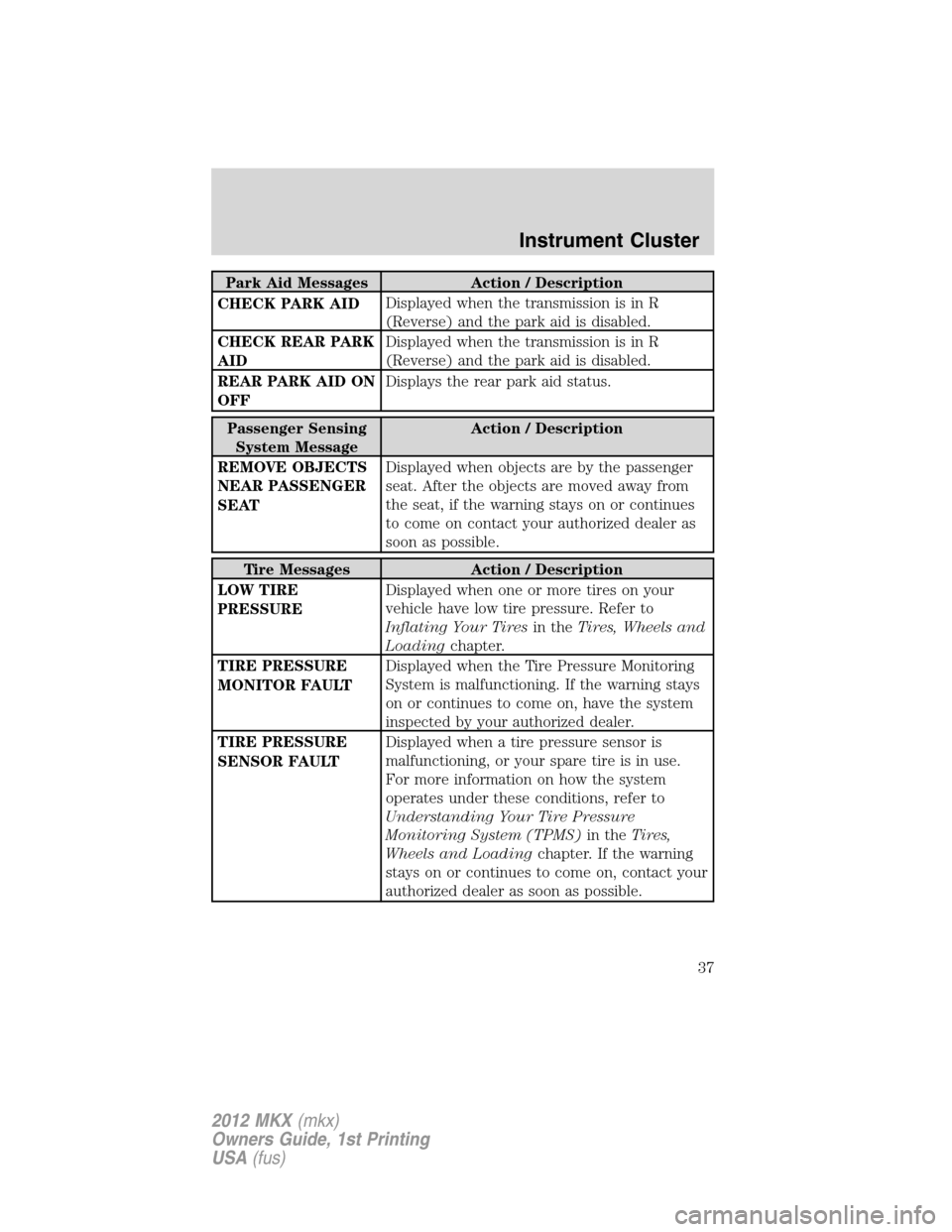
Park Aid Messages Action / Description
CHECK PARK AIDDisplayed when the transmission is in R
(Reverse) and the park aid is disabled.
CHECK REAR PARK
AIDDisplayed when the transmission is in R
(Reverse) and the park aid is disabled.
REAR PARK AID ON
OFFDisplays the rear park aid status.
Passenger Sensing
System MessageAction / Description
REMOVE OBJECTS
NEAR PASSENGER
SEATDisplayed when objects are by the passenger
seat. After the objects are moved away from
the seat, if the warning stays on or continues
to come on contact your authorized dealer as
soon as possible.
Tire Messages Action / Description
LOW TIRE
PRESSUREDisplayed when one or more tires on your
vehicle have low tire pressure. Refer to
Inflating Your Tiresin theTires, Wheels and
Loadingchapter.
TIRE PRESSURE
MONITOR FAULTDisplayed when the Tire Pressure Monitoring
System is malfunctioning. If the warning stays
on or continues to come on, have the system
inspected by your authorized dealer.
TIRE PRESSURE
SENSOR FAULTDisplayed when a tire pressure sensor is
malfunctioning, or your spare tire is in use.
For more information on how the system
operates under these conditions, refer to
Understanding Your Tire Pressure
Monitoring System (TPMS)in theTires,
Wheels and Loadingchapter. If the warning
stays on or continues to come on, contact your
authorized dealer as soon as possible.
Instrument Cluster
37
2012 MKX(mkx)
Owners Guide, 1st Printing
USA(fus)
Page 43 of 364
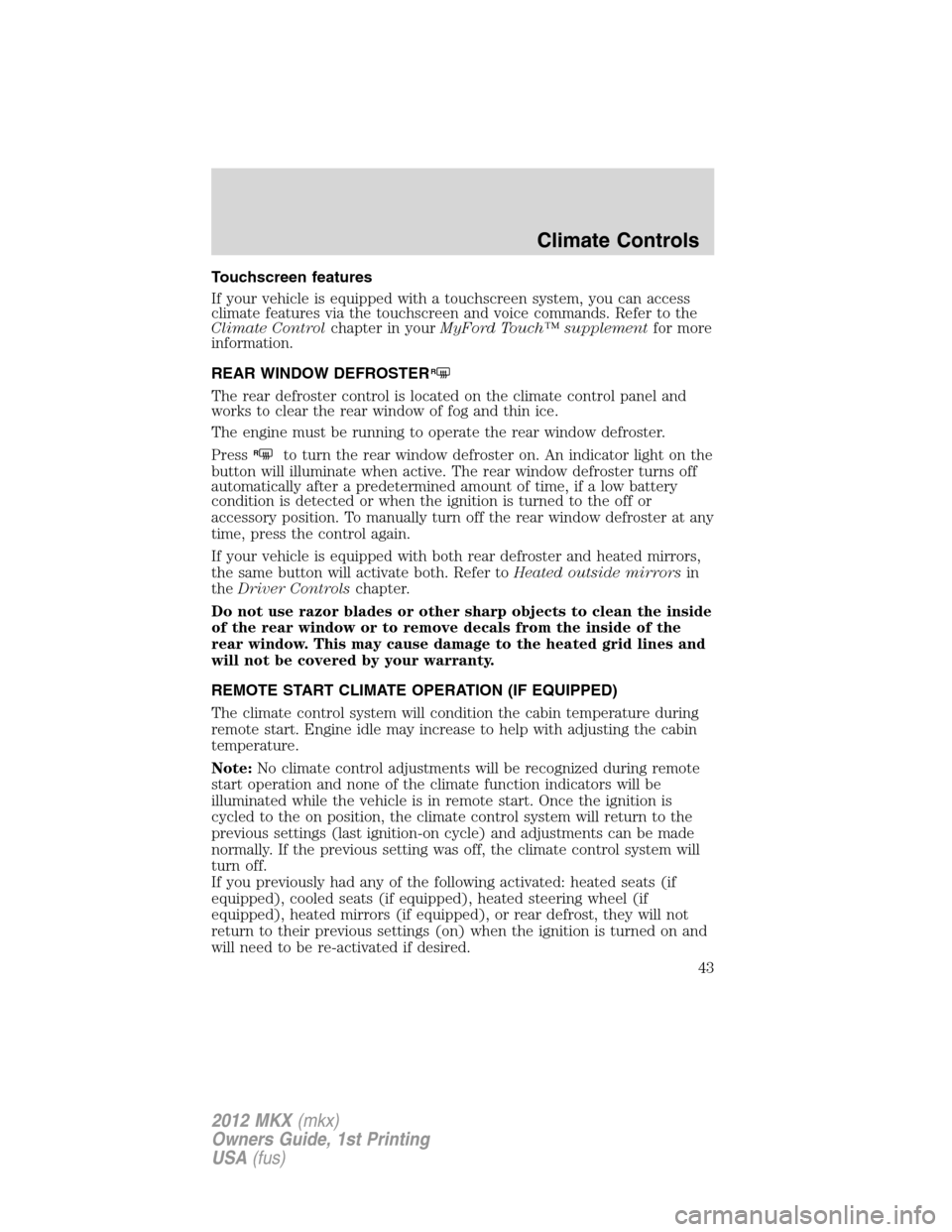
Touchscreen features
If your vehicle is equipped with a touchscreen system, you can access
climate features via the touchscreen and voice commands. Refer to the
Climate Controlchapter in yourMyFord Touch™ supplementfor more
information.
REAR WINDOW DEFROSTER
R
The rear defroster control is located on the climate control panel and
works to clear the rear window of fog and thin ice.
The engine must be running to operate the rear window defroster.
Press
Rto turn the rear window defroster on. An indicator light on the
button will illuminate when active. The rear window defroster turns off
automatically after a predetermined amount of time, if a low battery
condition is detected or when the ignition is turned to the off or
accessory position. To manually turn off the rear window defroster at any
time, press the control again.
If your vehicle is equipped with both rear defroster and heated mirrors,
the same button will activate both. Refer toHeated outside mirrorsin
theDriver Controlschapter.
Do not use razor blades or other sharp objects to clean the inside
of the rear window or to remove decals from the inside of the
rear window. This may cause damage to the heated grid lines and
will not be covered by your warranty.
REMOTE START CLIMATE OPERATION (IF EQUIPPED)
The climate control system will condition the cabin temperature during
remote start. Engine idle may increase to help with adjusting the cabin
temperature.
Note:No climate control adjustments will be recognized during remote
start operation and none of the climate function indicators will be
illuminated while the vehicle is in remote start. Once the ignition is
cycled to the on position, the climate control system will return to the
previous settings (last ignition-on cycle) and adjustments can be made
normally. If the previous setting was off, the climate control system will
turn off.
If you previously had any of the following activated: heated seats (if
equipped), cooled seats (if equipped), heated steering wheel (if
equipped), heated mirrors (if equipped), or rear defrost, they will not
return to their previous settings (on) when the ignition is turned on and
will need to be re-activated if desired.
Climate Controls
43
2012 MKX(mkx)
Owners Guide, 1st Printing
USA(fus)
Page 45 of 364
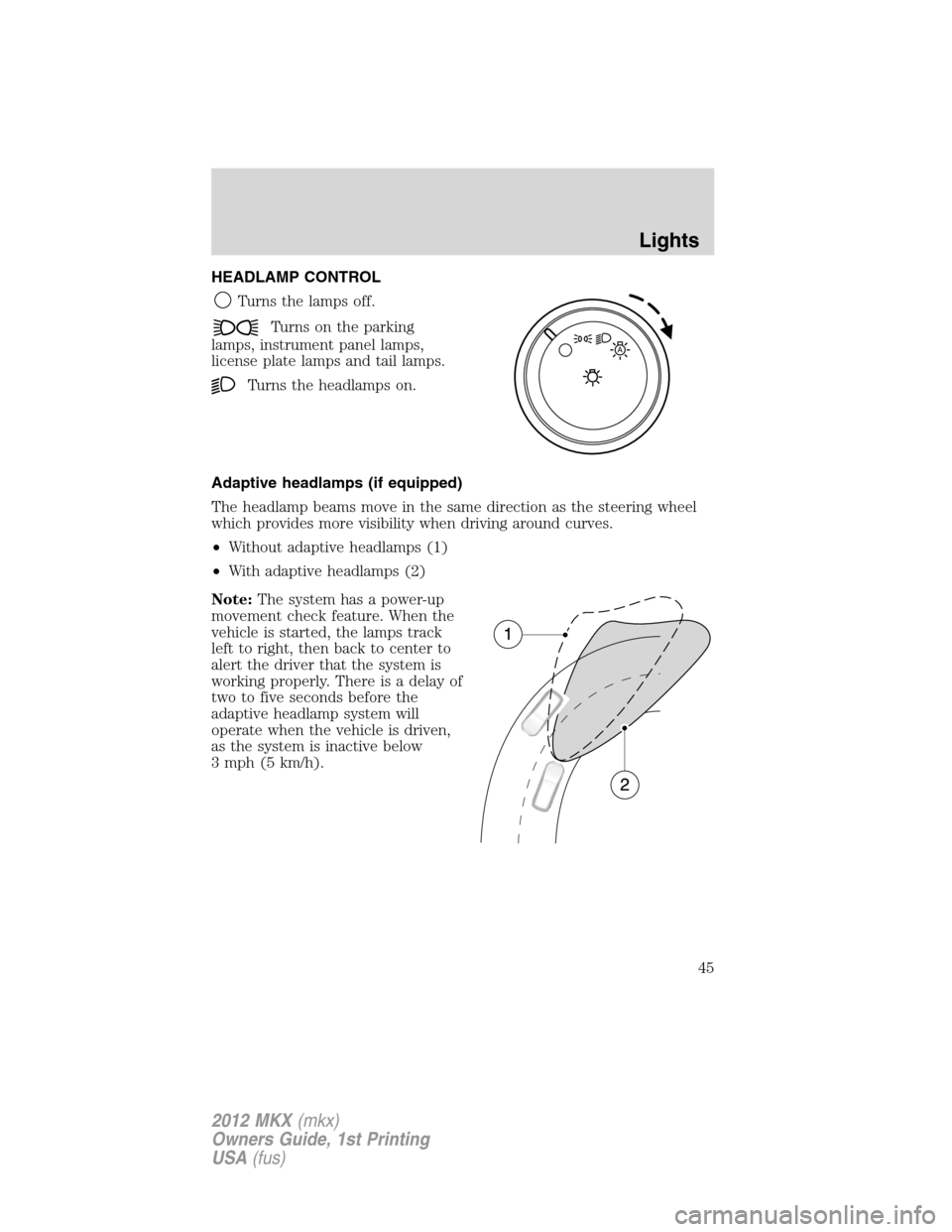
HEADLAMP CONTROL
Turns the lamps off.
Turns on the parking
lamps, instrument panel lamps,
license plate lamps and tail lamps.
Turns the headlamps on.
Adaptive headlamps (if equipped)
The headlamp beams move in the same direction as the steering wheel
which provides more visibility when driving around curves.
•Without adaptive headlamps (1)
•With adaptive headlamps (2)
Note:The system has a power-up
movement check feature. When the
vehicle is started, the lamps track
left to right, then back to center to
alert the driver that the system is
working properly. There is a delay of
two to five seconds before the
adaptive headlamp system will
operate when the vehicle is driven,
as the system is inactive below
3 mph (5 km/h).
A
Lights
45
2012 MKX(mkx)
Owners Guide, 1st Printing
USA(fus)
Page 55 of 364
Replacing HID headlamp bulbs (if equipped)
The low beam headlamps on your vehicle use a “high intensity discharge”
source. These lamps operate at a high voltage. When the bulb is burned
out, the bulb and starter capsule assembly must be replaced by your
authorized dealer.
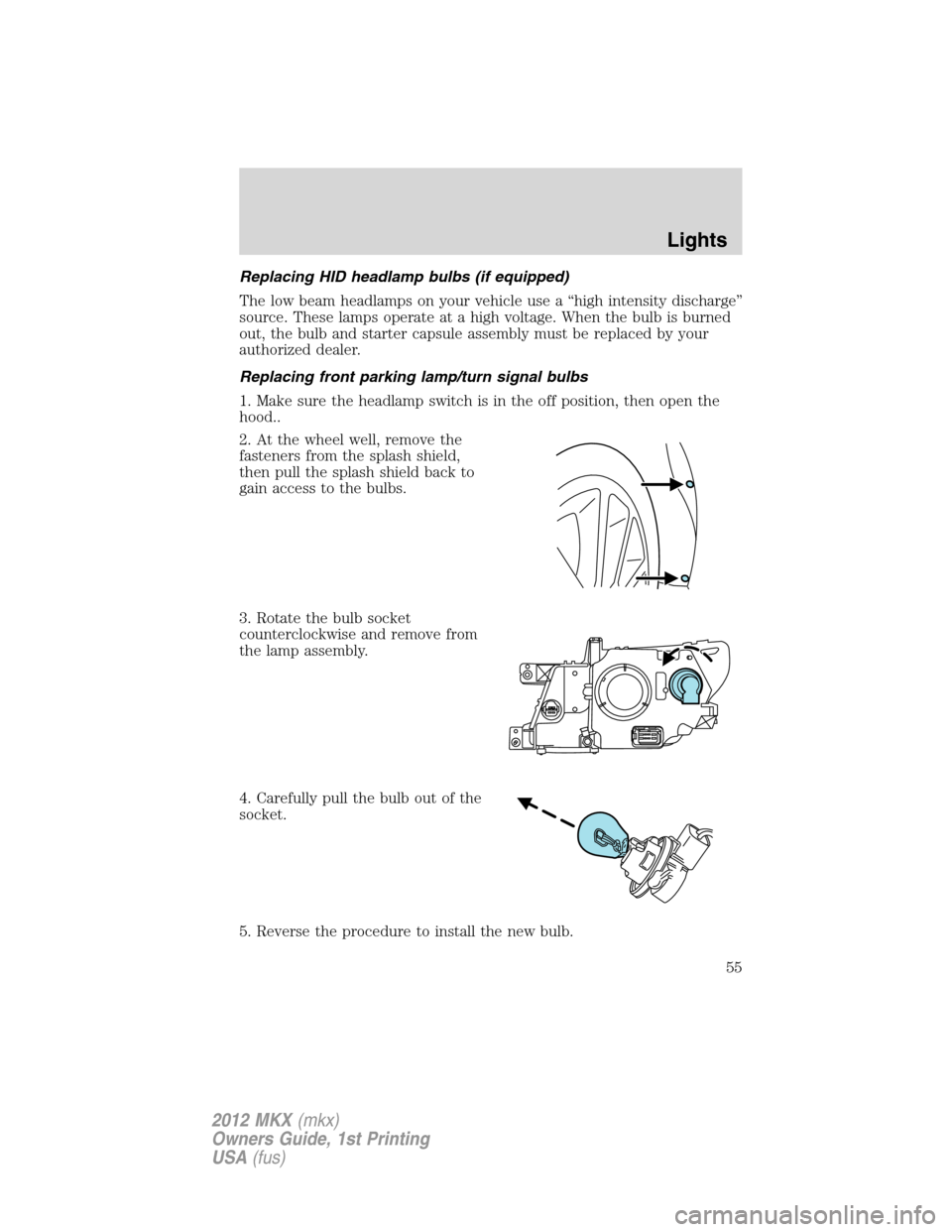
Replacing front parking lamp/turn signal bulbs
1. Make sure the headlamp switch is in the off position, then open the
hood..
2. At the wheel well, remove the
fasteners from the splash shield,
then pull the splash shield back to
gain access to the bulbs.
3. Rotate the bulb socket
counterclockwise and remove from
the lamp assembly.
4. Carefully pull the bulb out of the
socket.
5. Reverse the procedure to install the new bulb.
Lights
55
2012 MKX(mkx)
Owners Guide, 1st Printing
USA(fus)
Page 60 of 364
From either position, the control will automatically return to the 2 or O
(off) position.
Reverse wiper feature:The rear wiper will be automatically activated
in an intermittent setting when shifting into R (Reverse) if the front
wipers are activated. This feature may be enabled/disabled through the
message center. Refer toMessage centerin theInstrument Cluster
chapter.
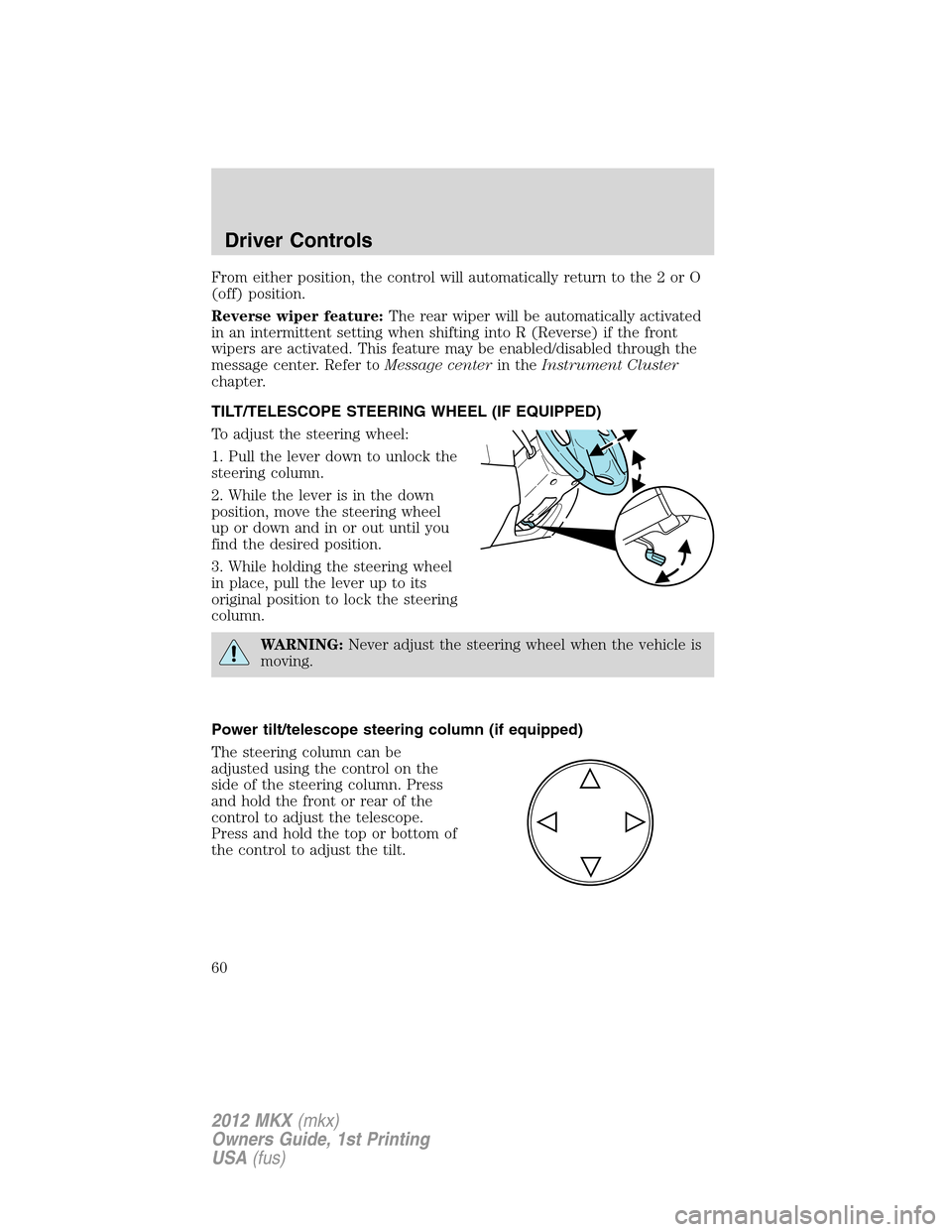
TILT/TELESCOPE STEERING WHEEL (IF EQUIPPED)
To adjust the steering wheel:
1. Pull the lever down to unlock the
steering column.
2. While the lever is in the down
position, move the steering wheel
up or down and in or out until you
find the desired position.
3. While holding the steering wheel
in place, pull the lever up to its
original position to lock the steering
column.
WARNING:Never adjust the steering wheel when the vehicle is
moving.
Power tilt/telescope steering column (if equipped)
The steering column can be
adjusted using the control on the
side of the steering column. Press
and hold the front or rear of the
control to adjust the telescope.
Press and hold the top or bottom of
the control to adjust the tilt.
Driver Controls
60
2012 MKX(mkx)
Owners Guide, 1st Printing
USA(fus)
Page 61 of 364
Easy entry/exit feature
When the ignition is turned off, the column will move to the full up and
in position if this feature is activated through the message center. Refer
toMessage centerin theInstrument Clusterchapter. When the ignition
is turned on, the column will return to the previous setting.
Note:The easy entry/exit feature will prevent the steering wheel from
returning to the memory position until the ignition is turned off.
Memory feature
The steering column positions are saved when doing a memory set
function and can be recalled along with the vehicle personality features
when a memory position is selected through the remote entry
transmitter, keyless entry keypad or memory switch on the instrument
panel. Refer toFront seatsin theSeating and Safety Restraints
chapter.
If the steering column adjustment control is pressed during memory
recall it will cancel the automatic operation and the column will respond
to manual adjustment of the control.
WARNING:Never adjust the steering column when the vehicle
is moving.
On vehicles with memory feature, to prevent damage to the steering
column, the steering column is designed to set a stopping position just
short of the end of the column position. If the steering column
encounters an object while moving up or down, a new stopping position
will be set. To reset the steering column to its normal stopping position:
•After encountering the new stopping position, press the steering
column control again to override.
•Continue pressing the control until it reaches the end of the column
position.
•A new soft stop will be automatically set. The next time the steering
column is tilted it will stop just short of the end of the column
position.
Driver Controls
61
2012 MKX(mkx)
Owners Guide, 1st Printing
USA(fus)
Page 69 of 364
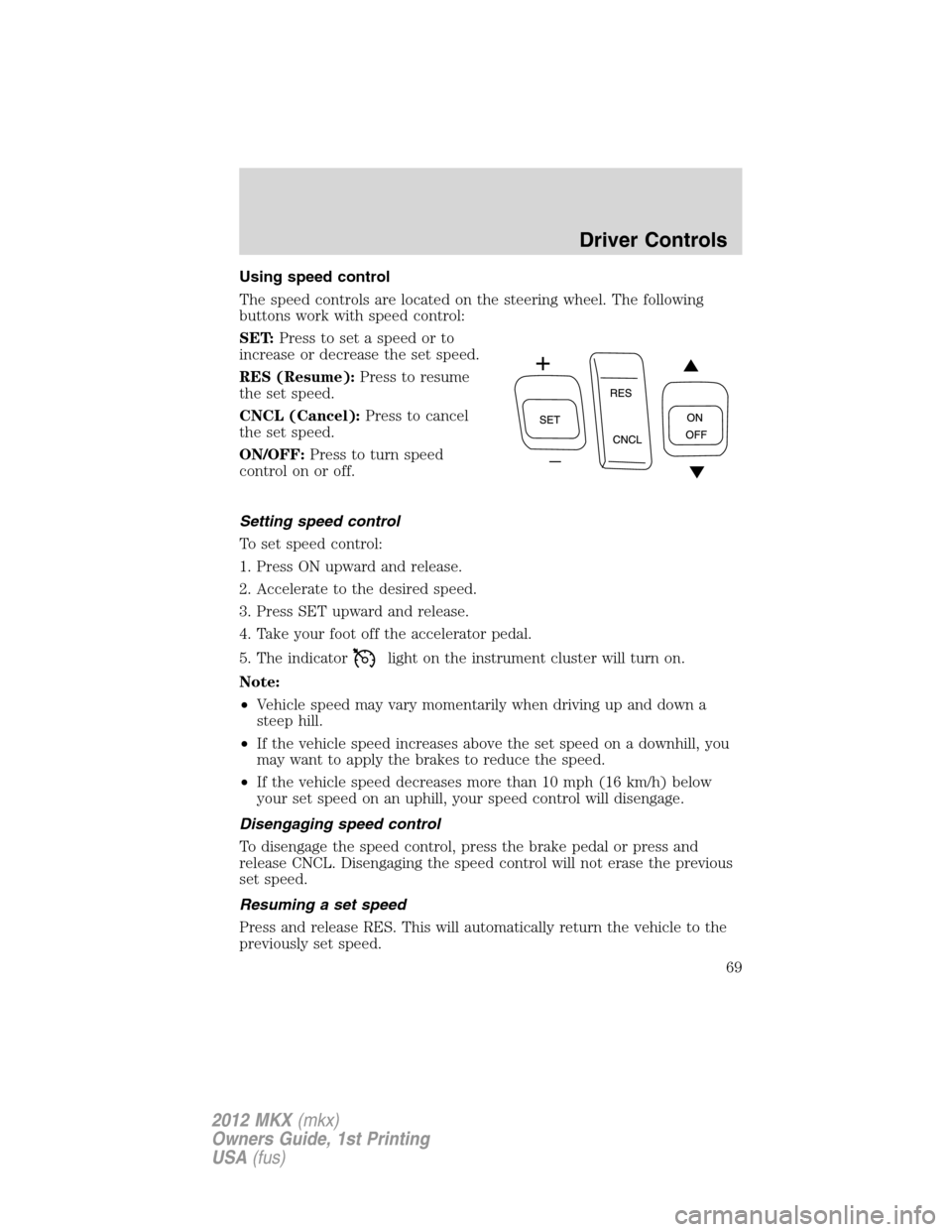
Using speed control
The speed controls are located on the steering wheel. The following
buttons work with speed control:
SET:Press to set a speed or to
increase or decrease the set speed.
RES (Resume):Press to resume
the set speed.
CNCL (Cancel):Press to cancel
the set speed.
ON/OFF:Press to turn speed
control on or off.
Setting speed control
To set speed control:
1. Press ON upward and release.
2. Accelerate to the desired speed.
3. Press SET upward and release.
4. Take your foot off the accelerator pedal.
5. The indicator
light on the instrument cluster will turn on.
Note:
•Vehicle speed may vary momentarily when driving up and down a
steep hill.
•If the vehicle speed increases above the set speed on a downhill, you
may want to apply the brakes to reduce the speed.
•If the vehicle speed decreases more than 10 mph (16 km/h) below
your set speed on an uphill, your speed control will disengage.
Disengaging speed control
To disengage the speed control, press the brake pedal or press and
release CNCL. Disengaging the speed control will not erase the previous
set speed.
Resuming a set speed
Press and release RES. This will automatically return the vehicle to the
previously set speed.
Driver Controls
69
2012 MKX(mkx)
Owners Guide, 1st Printing
USA(fus)
Page 70 of 364
Increasing speed while using speed control
To set a higher speed:
•Press SET upward and hold until you get to the desired speed, then
release. You can also use SET to operate the tap-up function. Press
SET upward and release to increase the vehicle set speed in 1 mph
(1.6 km/h) increments.
•Use the accelerator pedal to get to the desired speed then press SET
upward and release.
Reducing speed while using speed control
To reduce a set speed:
•Press SET downward and hold until you get to the desired speed,
then release. You can also use SET to operate the tap-down function.
Press SET downward and release to decrease the vehicle set speed in
1 mph (1.6 km/h) increments.
•Press the brake pedal until the desired vehicle speed is reached then
press SET downward and release.
Turning off speed control
To turn off the speed control, press OFF downward or turn off the
ignition.
Note:When you turn off the speed control or the ignition, your speed
control set speed memory is erased.
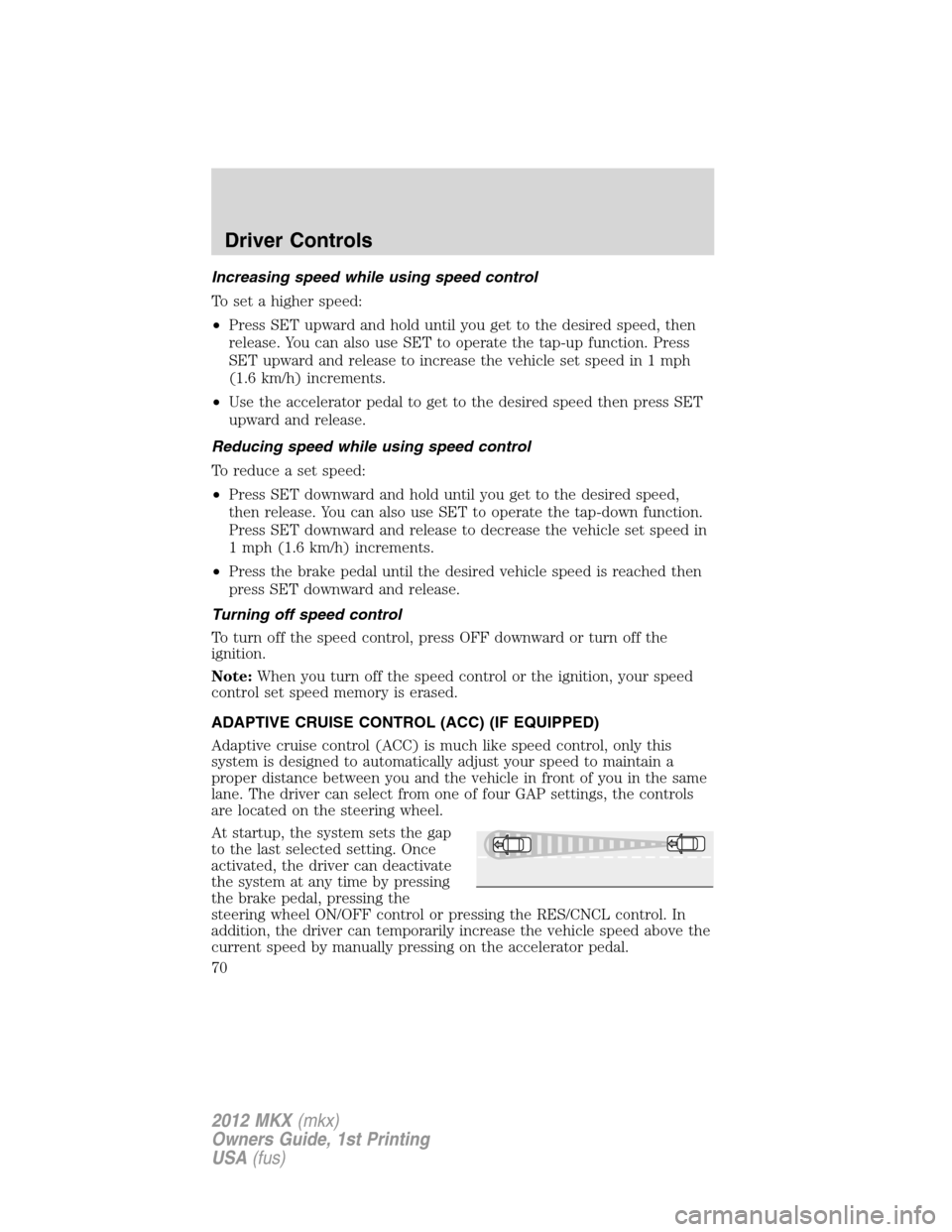
ADAPTIVE CRUISE CONTROL (ACC) (IF EQUIPPED)
Adaptive cruise control (ACC) is much like speed control, only this
system is designed to automatically adjust your speed to maintain a
proper distance between you and the vehicle in front of you in the same
lane. The driver can select from one of four GAP settings, the controls
are located on the steering wheel.
At startup, the system sets the gap
to the last selected setting. Once
activated, the driver can deactivate
the system at any time by pressing
the brake pedal, pressing the
steering wheel ON/OFF control or pressing the RES/CNCL control. In
addition, the driver can temporarily increase the vehicle speed above the
current speed by manually pressing on the accelerator pedal.
Driver Controls
70
2012 MKX(mkx)
Owners Guide, 1st Printing
USA(fus)