wheel LINCOLN MKX 2014 Owners Manual
[x] Cancel search | Manufacturer: LINCOLN, Model Year: 2014, Model line: MKX, Model: LINCOLN MKX 2014Pages: 455, PDF Size: 6.1 MB
Page 377 of 455
If your vehicle is equipped with Navigation, SYNC Services downloads
your requested destination to the navigation system. The navigation
system then calculates the route and provides driving instructions. See
theNavigation systemsection for more information.
Disconnecting from SYNC Services
1. Press and hold the phone button on the steering wheel.
2. Say “Good-bye” from the SYNC Services main menu.
SYNC Services quick tips
PersonalizingYou can personalize your Services feature to
provide quicker access to your most used or
favorite information. You can save address
points, such as work or home. You can also
save favorite information like sports teams,
such as Detroit Lions, or a news category. You
can learn more about personalization by
logging onto www.SYNCMyRide.com.
Push to interruptPress the voice button at any time (while
connected to SYNC Services) to interrupt a
voice prompt or an audio clip (such as a
sports report) and say your voice command.
PortableYour subscription is associated with your
Bluetooth-enabled cellular phone number, not
your VIN (Vehicle Identification Number). You
can pair and connect your phone to any
vehicle equipped with SYNC Services and
continue enjoying your personalized services.
SYNC Services Voice Commands
When a route has been downloaded (non-navigation systems),
press the voice button on the steering wheel control. When
prompted, say any of the following commands:
“SERVICES”
“Cancel route”
“Navigation voice off”
“Navigation voice on”
“Next turn”
376MyLincoln Touch™
2014 MKX(mkx)
Owners Guide gf, 2nd Printing, March 2014
USA(fus)
Page 379 of 455
Fuel Prices
Touch this button to view fuel prices at stations close to your vehicle’s
location or on an active navigation route.
Movie Listings
Touch this button to view nearby movie theaters and their show times, if
available.
Weather
Touch this button to view the nearby weather, current weather, or the
five day forecast for the chosen area. SelectMapto see the weather
map, which can show storms, radar information, charts and winds. Select
Areato select from a listing of weather locations.
Sports Info
Touch this button to view scores and schedules from a variety of sports.
You can also save up to 10 favorite teams for easier access. The score
automatically refreshes when a game is in progress.
Ski Conditions
Touch this button to view ski conditions for a specific area.
Sirius Travel Link Voice Commands
Note:In order to use Sirius Travel Link, your vehicle must be equipped
with navigation and your navigation SD card must be in the SD card slot.
Press the voice button on the steering wheel controls and, when
prompted, say any of the following:
Travel Link voice commands
“5–day weather forecast” “Sports scores”*
“Fuel prices” “Traffic”
“Movie listings” “Travel Link”**
“Sports headlines”*“Weather”
“Sports schedule”*“Weather map”
*If you have said, “Sports headlines”, “Sports schedule” or “Sports
scores”, you may say any of the commands in the “Sports headlines,
Sports schedules and Sports scores” commands chart:
**If you have said, “Travel Link”, you may say any of the commands in
the “Travel Link” chart:
378MyLincoln Touch™
2014 MKX(mkx)
Owners Guide gf, 2nd Printing, March 2014
USA(fus)
Page 383 of 455
•A connected Bluetooth-enabled phone must have adequate network
coverage, battery power and signal strength.
•The vehicle must have battery power and be located in the United
States, Canada or in a territory in which 911 is the emergency
number.
In the Event of a Crash
Not all crashes deploy an airbag or activate the fuel pump shut-off
(which would trigger 911 Assist); however, SYNC tries to contact
emergency services if 911 Assist triggers. If a connected phone sustains
damage or loses connection to SYNC, SYNC searches for, and tries to
connect to, any available previously paired phone and tries to make the
call to 911.
Before making the call:
•SYNC provides a short window of time (about 10 seconds) to cancel
the call. If you fail to cancel the call, SYNC attempts to dial 911.
•SYNC says the following, or a similar message: “SYNC will attempt to
call 911, to cancel the call, press Cancel on your screen or press and
hold the phone button on your steering wheel.”
If you do not cancel the call, and SYNC makes a successful call, a
pre-recorded message plays for the 911 operator, and then the
occupant(s) in your vehicle is able to talk with the operator. Be prepared
to provide your name, phone number and location immediately, because
not all 911 systems are capable of receiving this information
electronically.
911 Assist May Not Work If
•Your cellular phone or 911 Assist hardware sustains damage in a
crash.
•The vehicle’s battery or SYNC system has no power.
•The phone(s) thrown from your vehicle are the ones paired and
connected to the system.
911 Assist Privacy Notice
When you turn on 911 Assist, it may disclose to emergency services that
your vehicle has been in a crash involving the deployment of an airbag or
activation of the fuel pump shut-off. Certain versions or updates to 911
Assist may also be capable of electronically or verbally disclosing to 911
operators your vehicle location or other details about your vehicle or
crash to assist 911 operators to provide the most appropriate emergency
services. If you do not want to disclose this information, do not turn the
feature on.
382MyLincoln Touch™
2014 MKX(mkx)
Owners Guide gf, 2nd Printing, March 2014
USA(fus)
Page 385 of 455
Making a Report
If your vehicle is equipped with Navigation, touch the i
(Information) button to access these features. If your vehicle is
not equipped with Navigation, touch the corner of the
touchscreen with the green tab.
If you want to run a report by using the touchscreen, touchApps>
Vehicle Health Report.
To run a report by voice command, press the voice button on
the steering wheel and, when prompted, say “Vehicle health
report”.
Vehicle Health Report Privacy Notice
When you create a Vehicle Health Report, Ford Motor Company may
collect your cellular phone number (to process your report request) and
diagnostic information about your vehicle. Certain versions or updates to
Vehicle Health Report may also collect more vehicle information. Ford
may use your vehicle information it collects for any purpose. If you do
not want to disclose your cellular phone number or vehicle information,
do not run the feature or set up your Vehicle Health Report profile at
www.SYNCMyRide.com. See www.SYNCMyRide.com (Vehicle Health
Report Terms and Conditions, and Privacy Statement) for more
information.
384MyLincoln Touch™
2014 MKX(mkx)
Owners Guide gf, 2nd Printing, March 2014
USA(fus)
Page 387 of 455
You can also turn the outside air temperature display on and off. It
appears at the top center of the touchscreen, next to the time and date.
The system automatically saves any updates you make to the settings.
Display
You can adjust the touchscreen display through the touchscreen or by
pressing the voice button on your steering wheel controls and when
prompted, say, “Display settings”.
Press the Settings icon >Display,to access and make
adjustments using the touchscreen.
•Brightnessallows you to make the screen display brighter or
dimmer.
•Auto DIM, when set toOn,lets you use the Auto Dim Manual Offset
feature. When set toOff,screen brightness does not change.
•Modeallows you to set the screen to a certain brightness or have the
system automatically change based on the outside light level, or turn
the display off.
•If you selectAUTOorNIGHT,you have the options of turning
the display’s Auto Dim feature on or off and changing the Auto
Dim Manual Offset feature.
•Auto Dim Manual Offsetallows you to adjust screen dimming as
the outside lighting conditions change from day to night. This feature
also allows you to adjust screen brightness using the instrument panel
dimming control.
Edit Wallpaper
•You can have your touchscreen display the default photo or upload
your own.
Uploading Photos for Your Home Screen Wallpaper
Note:You cannot load photos directly from your camera. You must
access the photos either from your USB mass storage device or from an
SD card.
Note:Photographs with extremely large dimensions (such as 2048 x
1536) may not be compatible and appear as a blank (black) image on the
display.
Your system allows you to upload and view up to 32 photos.
To access, press the Settings icon >Display>Edit Wallpaper,and
then follow the system prompts to upload your photographs.
386MyLincoln Touch™
2014 MKX(mkx)
Owners Guide gf, 2nd Printing, March 2014
USA(fus)
Page 400 of 455
•Touch and holdMyTempto select a temperature you would like your
vehicle to remember and maintain for you.
•If your vehicle is equipped with a heated steering wheel, touch the
heated steering wheel icon to warm the steering wheel.
Note:If your vehicle is equipped with a wood-trimmed steering wheel, it
does not heat between the 10 o’clock and 2 o’clock positions.
Climate Control Voice Commands
The following voice commands are available at the main menu
level of a voice session. For example, press the voice button
and after the prompt, “Say a command”; say any of the
following commands:
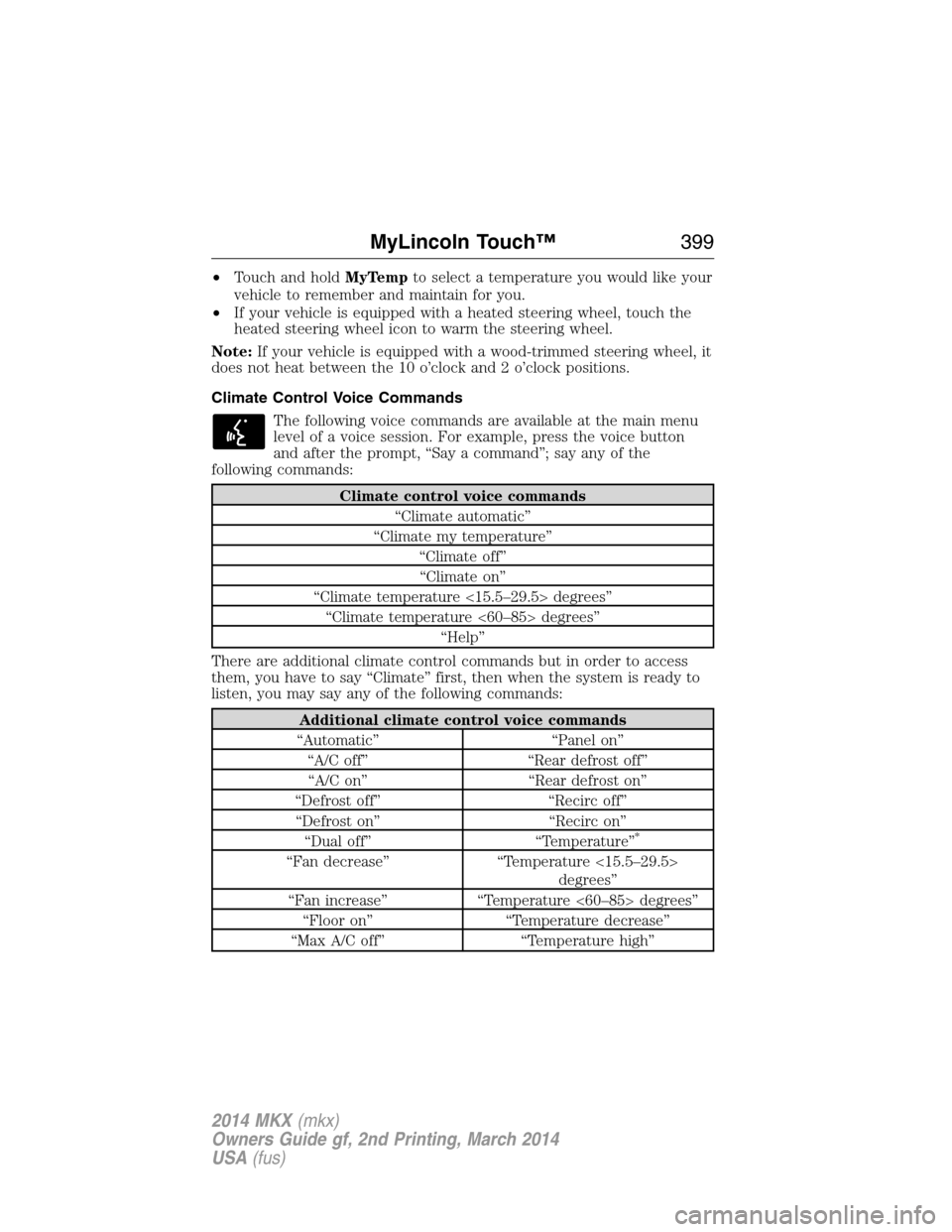
Climate control voice commands
“Climate automatic”
“Climate my temperature”
“Climate off”
“Climate on”
“Climate temperature <15.5–29.5> degrees”
“Climate temperature <60–85> degrees”
“Help”
There are additional climate control commands but in order to access
them, you have to say “Climate” first, then when the system is ready to
listen, you may say any of the following commands:
Additional climate control voice commands
“Automatic” “Panel on”
“A/C off” “Rear defrost off”
“A/C on” “Rear defrost on”
“Defrost off” “Recirc off”
“Defrost on” “Recirc on”
“Dual off” “Temperature”
*
“Fan decrease” “Temperature <15.5–29.5>
degrees”
“Fan increase” “Temperature <60–85> degrees”
“Floor on” “Temperature decrease”
“Max A/C off” “Temperature high”
MyLincoln Touch™399
2014 MKX(mkx)
Owners Guide gf, 2nd Printing, March 2014
USA(fus)
Page 411 of 455
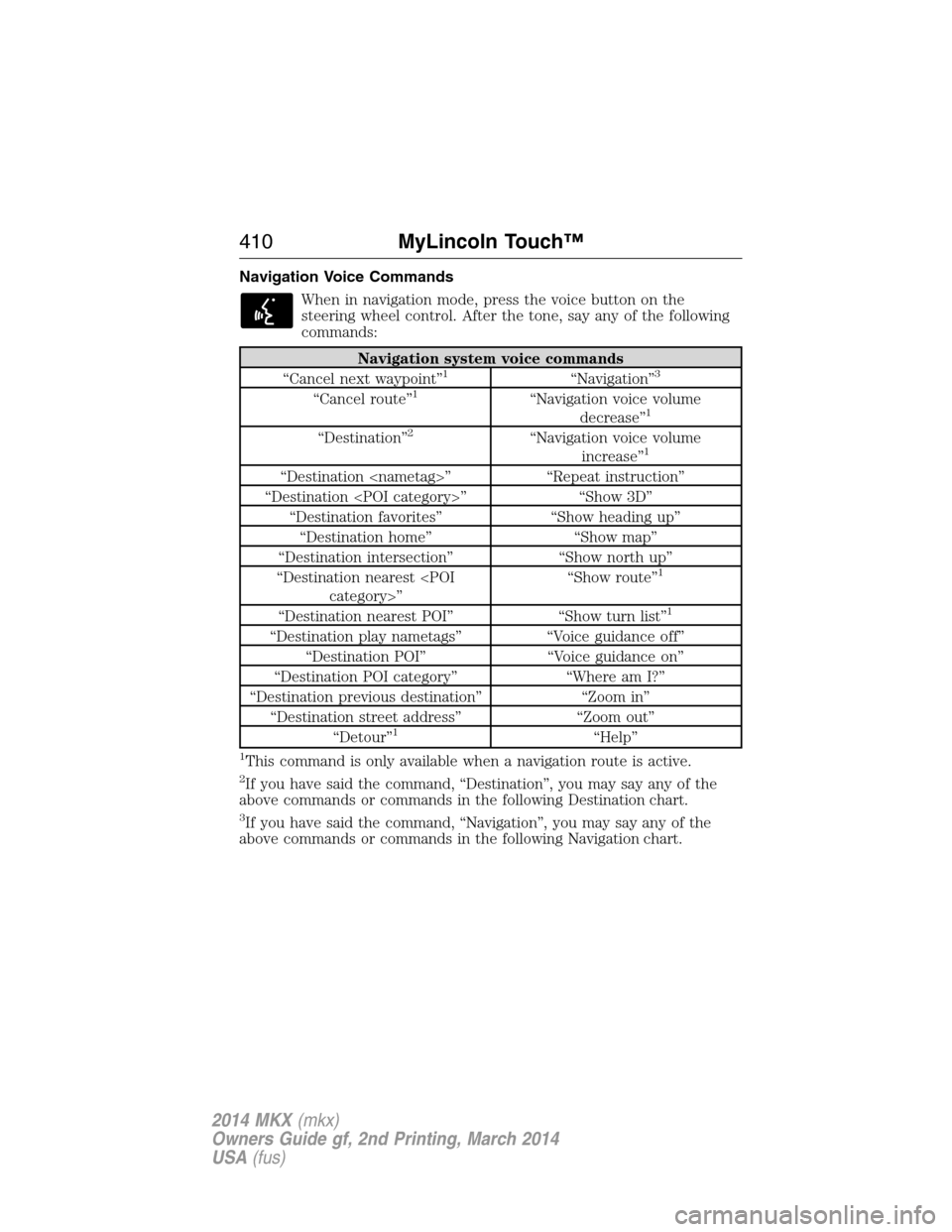
Navigation Voice Commands
When in navigation mode, press the voice button on the
steering wheel control. After the tone, say any of the following
commands:
Navigation system voice commands
“Cancel next waypoint”1“Navigation”3
“Cancel route”1“Navigation voice volume
decrease”1
“Destination”2“Navigation voice volume
increase”1
“Destination
“Destination
“Destination favorites” “Show heading up”
“Destination home” “Show map”
“Destination intersection” “Show north up”
“Destination nearest
1
“Destination nearest POI” “Show turn list”1
“Destination play nametags” “Voice guidance off”
“Destination POI” “Voice guidance on”
“Destination POI category” “Where am I?”
“Destination previous destination” “Zoom in”
“Destination street address” “Zoom out”
“Detour”
1“Help”
1This command is only available when a navigation route is active.
2If you have said the command, “Destination”, you may say any of the
above commands or commands in the following Destination chart.
3If you have said the command, “Navigation”, you may say any of the
above commands or commands in the following Navigation chart.
410MyLincoln Touch™
2014 MKX(mkx)
Owners Guide gf, 2nd Printing, March 2014
USA(fus)
Page 418 of 455
•THERE ARE NO WARRANTIES OTHER THAN THOSE THAT MAY
EXPRESSLY BE PROVIDED FOR YOUR NEW VEHICLE.
End user notice
Microsoft® Windows® Mobile for Automotive Important Safety
Information
This system Ford SYNC™ contains software that is licensed to
Manufacturer FORD MOTOR COMPANY by an affiliate of Microsoft
Corporation pursuant to a license agreement. Any removal, reproduction,
reverse engineering or other unauthorized use of the software from this
system in violation of the license agreement is strictly prohibited and
may subject you to legal action.
Read and follow instructions
Before using your Windows Automotive-based system, read and follow all
instructions and safety information provided in this end user manual
(“User’s Guide”). Not following precautions found in this User’s Guide
can lead to an accident or other serious consequences.
Keep User’s Guide in Vehicle
When kept in the vehicle, the User’s Guide will be a ready reference for
you and other users unfamiliar with the Windows Automotive-based
system. Please make certain that before using the system for the first
time, all persons have access to the User’s Guide and read its
instructions and safety information carefully.
WARNING:Operating certain parts of this system while driving
can distract your attention away from the road, and possibly
cause an accident or other serious consequences. Do not change
system settings or enter data non-verbally (using your hands) while
driving. Stop the vehicle in a safe and legal manner before attempting
these operations. This is important since while setting up or changing
some functions you might be required to distract your attention away
from the road and remove your hands from the wheel.
General operation
Voice Command Control
Functions within the Windows Automotive-based system may be
accomplished using only voice commands. Using voice commands while
driving allows you to operate the system without removing your hands
from the wheel.
Appendices417
2014 MKX(mkx)
Owners Guide gf, 2nd Printing, March 2014
USA(fus)
Page 438 of 455
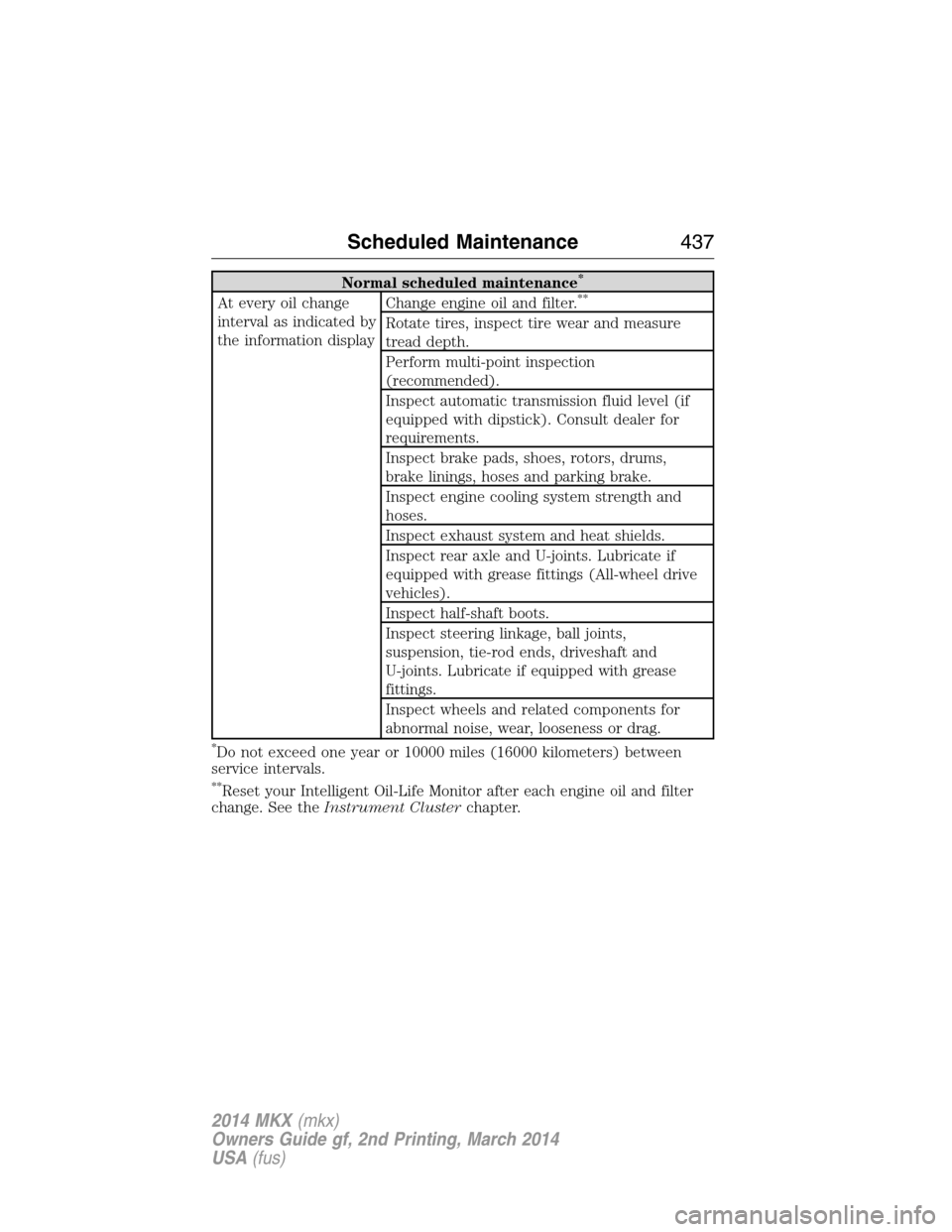
Normal scheduled maintenance*
At every oil change
interval as indicated by
the information displayChange engine oil and filter.**
Rotate tires, inspect tire wear and measure
tread depth.
Perform multi-point inspection
(recommended).
Inspect automatic transmission fluid level (if
equipped with dipstick). Consult dealer for
requirements.
Inspect brake pads, shoes, rotors, drums,
brake linings, hoses and parking brake.
Inspect engine cooling system strength and
hoses.
Inspect exhaust system and heat shields.
Inspect rear axle and U-joints. Lubricate if
equipped with grease fittings (All-wheel drive
vehicles).
Inspect half-shaft boots.
Inspect steering linkage, ball joints,
suspension, tie-rod ends, driveshaft and
U-joints. Lubricate if equipped with grease
fittings.
Inspect wheels and related components for
abnormal noise, wear, looseness or drag.
*Do not exceed one year or 10000 miles (16000 kilometers) between
service intervals.
**Reset your Intelligent Oil-Life Monitor after each engine oil and filter
change. See theInstrument Clusterchapter.
Scheduled Maintenance437
2014 MKX(mkx)
Owners Guide gf, 2nd Printing, March 2014
USA(fus)
Page 444 of 455
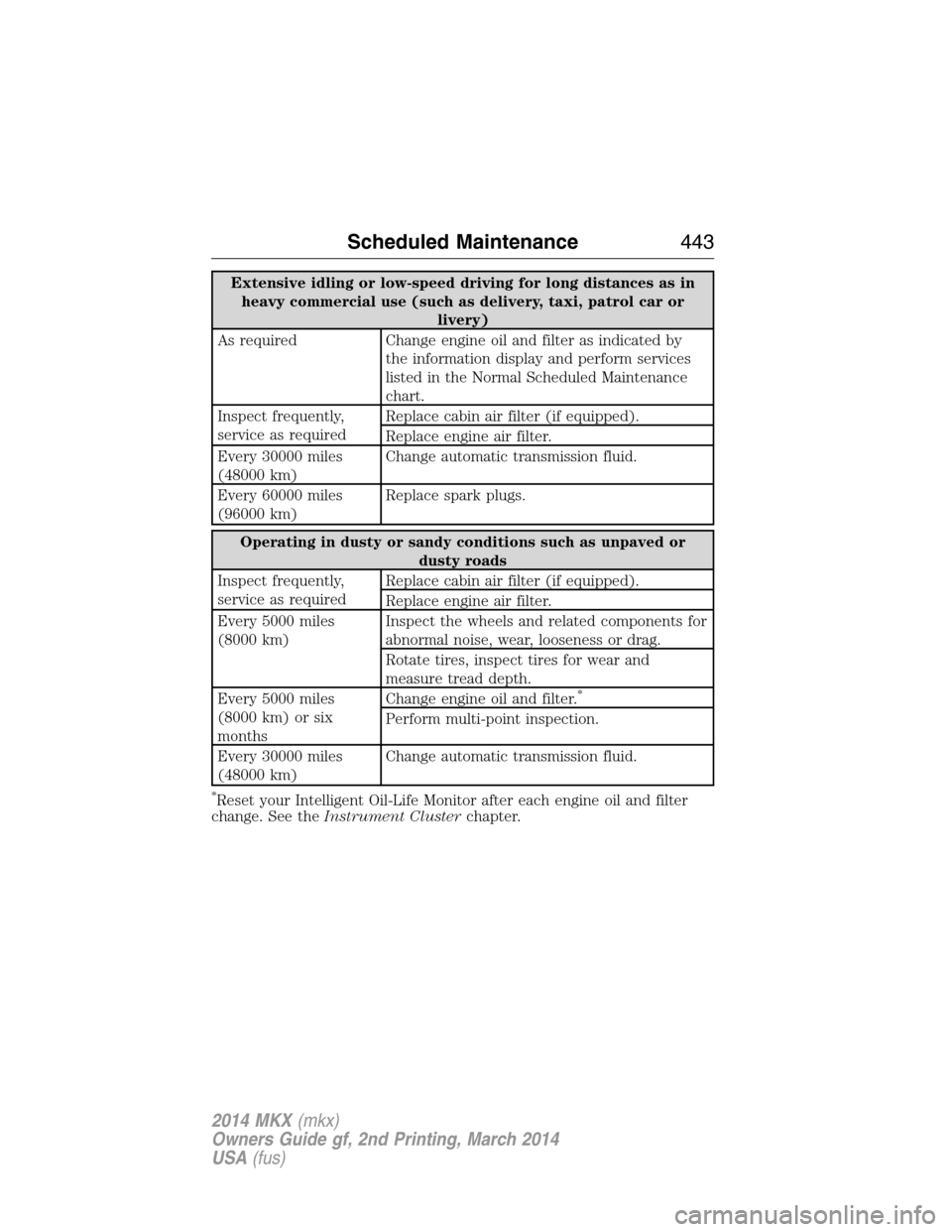
Extensive idling or low-speed driving for long distances as in
heavy commercial use (such as delivery, taxi, patrol car or
livery)
As required Change engine oil and filter as indicated by
the information display and perform services
listed in the Normal Scheduled Maintenance
chart.
Inspect frequently,
service as requiredReplace cabin air filter (if equipped).
Replace engine air filter.
Every 30000 miles
(48000 km)Change automatic transmission fluid.
Every 60000 miles
(96000 km)Replace spark plugs.
Operating in dusty or sandy conditions such as unpaved or
dusty roads
Inspect frequently,
service as requiredReplace cabin air filter (if equipped).
Replace engine air filter.
Every 5000 miles
(8000 km)Inspect the wheels and related components for
abnormal noise, wear, looseness or drag.
Rotate tires, inspect tires for wear and
measure tread depth.
Every 5000 miles
(8000 km) or six
monthsChange engine oil and filter.
*
Perform multi-point inspection.
Every 30000 miles
(48000 km)Change automatic transmission fluid.
*Reset your Intelligent Oil-Life Monitor after each engine oil and filter
change. See theInstrument Clusterchapter.
Scheduled Maintenance443
2014 MKX(mkx)
Owners Guide gf, 2nd Printing, March 2014
USA(fus)