climate control LINCOLN MKX 2014 Owner's Manual
[x] Cancel search | Manufacturer: LINCOLN, Model Year: 2014, Model line: MKX, Model: LINCOLN MKX 2014Pages: 455, PDF Size: 6.1 MB
Page 336 of 455
Using the Touch-sensitive Controls on Your System
To turn a feature on and off, just touch the graphic with your finger. To
get the best performance from the touch-sensitive controls, keep in
mind:
•Do not press hard on the controls. They are sensitive to light touch.
•Use your bare finger to touch the center of a touch-control graphic.
Touching off-center of the graphic may affect operation of a nearby
control.
•Make sure your hands are clean and dry.
•Keep metal and other conductive material away from the surface of
the touchscreen as this may cause electronic interference (for
example, inadvertently turning on a feature other than the one you
meant to turn on).
Depending on your vehicle and option package, you may also have these
controls on your bezel:
•Power: Switch the media or climate features off and on.
•VOLand fan slider bars: Slide your finger over the rear slider area to
control the volume of playing media or the climate system fan.
•Seek and Tune buttons: Use as you normally would in media modes.
•Eject: Eject a CD from the entertainment system.
•SOURCE:Touch the word repeatedly to see all available media
modes. The screen does not change, but you see the media change in
the lower left status bar.
•SOUND:Touch the word to access the Sound menu where you can
adjust settings such as: Bass, Treble, Midrange, Balance and Fade,
THX Deep note Demo, DSP (Digital Signal Processing), Occupancy
Mode and Speed Compensated Volume. (Your vehicle may not have
all of these sound options.)
•Hazard flasher: Switch the hazard flashers off and on.
Cleaning the Touchscreen Display
Use a clean, soft cloth such as one used for cleaning glasses. If dirt or
fingerprints are still visible, apply a small amount of alcohol to the cloth.
Do not pour or spray alcohol onto the display. Do not use detergent or
any type of solvent to clean the display.
MyLincoln Touch™335
2014 MKX(mkx)
Owners Guide gf, 2nd Printing, March 2014
USA(fus)
Page 343 of 455
Accessing a List of Available Commands
•If you use the touchscreen, press the Settings icon >Help>Voice
Command List.
•If you use the steering wheel control, press the voice icon. After the
tone, speak your command clearly.
Voice command list
“Audio list of commands”
“Bluetooth audio list of commands”
“Browse list of commands”
“CD list of commands”
“Climate control list of commands”
“List of commands”
“Navigation list of commands”
*
“Phone list of commands”
“Radio list of commands”
“SD card list of commands”
“Sirius satellite list of commands”
**
“Travel link list of commands”*
“USB list of commands”
“Voice instructions list of commands”
“Voice settings list of commands”
“Help”
*This command is only available when your vehicle is equipped with the
navigation system, and the navigation system SD card is in the card slot.
**This command is only available when you have an active Sirius satellite
radio subscription.
Voice Settings
Voice settings allow you to customize the level of system interaction,
help and feedback. The system defaults to standard interaction that uses
candidate lists and confirmation prompts as these provide the highest
level of guidance and feedback.
Interaction Mode:Novice mode provides detailed interaction and
guidance while the advanced mode has less audible interaction and more
tone prompts.
342MyLincoln Touch™
2014 MKX(mkx)
Owners Guide gf, 2nd Printing, March 2014
USA(fus)
Page 390 of 455
System
Touch Screen Button
BeepSelect to have the system beep to confirm
choices made through the touchscreen.
Touch Panel Button
BeepSelect to have the system beep to confirm
button choices made through the climate or
audio system.
Keyboard LayoutHave the touchscreen keyboard display in
QWERTY or ABC format.
Install ApplicationsInstall any downloaded applications or view
the current software licenses.
Master ResetSelect to restore factory defaults. This erases
all personal settings and personal data.
Voice Control
Press the Settings icon >Settings>Voice Control,then
select from the following:
Voice control
Interaction ModeStandard interaction mode provides more
detailed interaction and guidance. Advanced
mode has less audible interaction and more
tone prompts.
Confirmation
PromptsHave the system ask you short questions if it
has not clearly heard or understood your
request.
Note:Even with confirmation prompts turned
off, the system may occasionally ask you to
confirm settings.
Media Candidate
ListsCandidate lists are possible results from your
voice commands. The system simply makes a
best guess at your request with these turned
off.
Phone Candidate
ListsCandidate lists are possible results from your
voice commands. The system simply makes a
best guess at your request with these turned
off.
Voice Control VolumeThis allows you to adjust the system’s voice
volume level.
MyLincoln Touch™389
2014 MKX(mkx)
Owners Guide gf, 2nd Printing, March 2014
USA(fus)
Page 398 of 455
To access Help using the voice commands, press the voice button, then,
after the tone, say “Help”. The system provides allowable voice
commands for the current mode.
CLIMATE
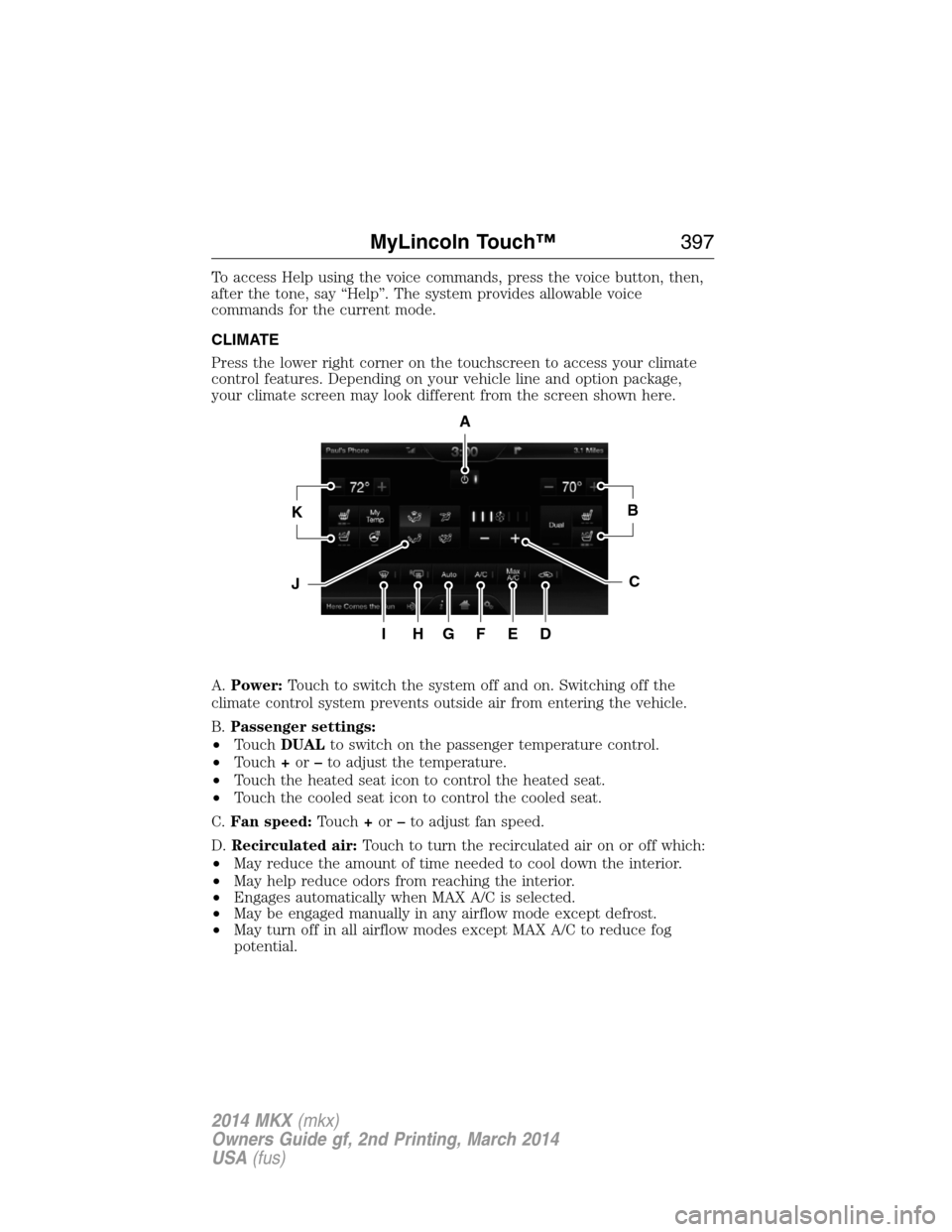
Press the lower right corner on the touchscreen to access your climate
control features. Depending on your vehicle line and option package,
your climate screen may look different from the screen shown here.
A.Power:Touch to switch the system off and on. Switching off the
climate control system prevents outside air from entering the vehicle.
B.Passenger settings:
•TouchDUALto switch on the passenger temperature control.
•Touch+or–to adjust the temperature.
•Touch the heated seat icon to control the heated seat.
•Touch the cooled seat icon to control the cooled seat.
C.Fan speed:Touch+or–to adjust fan speed.
D.Recirculated air:Touch to turn the recirculated air on or off which:
•May reduce the amount of time needed to cool down the interior.
•May help reduce odors from reaching the interior.
•Engages automatically when MAX A/C is selected.
•May be engaged manually in any airflow mode except defrost.
•May turn off in all airflow modes except MAX A/C to reduce fog
potential.
A
KB
JC
IHGFED
MyLincoln Touch™397
2014 MKX(mkx)
Owners Guide gf, 2nd Printing, March 2014
USA(fus)
Page 400 of 455
•Touch and holdMyTempto select a temperature you would like your
vehicle to remember and maintain for you.
•If your vehicle is equipped with a heated steering wheel, touch the
heated steering wheel icon to warm the steering wheel.
Note:If your vehicle is equipped with a wood-trimmed steering wheel, it
does not heat between the 10 o’clock and 2 o’clock positions.
Climate Control Voice Commands
The following voice commands are available at the main menu
level of a voice session. For example, press the voice button
and after the prompt, “Say a command”; say any of the
following commands:
Climate control voice commands
“Climate automatic”
“Climate my temperature”
“Climate off”
“Climate on”
“Climate temperature <15.5–29.5> degrees”
“Climate temperature <60–85> degrees”
“Help”
There are additional climate control commands but in order to access
them, you have to say “Climate” first, then when the system is ready to
listen, you may say any of the following commands:
Additional climate control voice commands
“Automatic” “Panel on”
“A/C off” “Rear defrost off”
“A/C on” “Rear defrost on”
“Defrost off” “Recirc off”
“Defrost on” “Recirc on”
“Dual off” “Temperature”
*
“Fan decrease” “Temperature <15.5–29.5>
degrees”
“Fan increase” “Temperature <60–85> degrees”
“Floor on” “Temperature decrease”
“Max A/C off” “Temperature high”
MyLincoln Touch™399
2014 MKX(mkx)
Owners Guide gf, 2nd Printing, March 2014
USA(fus)
Page 401 of 455
Additional climate control voice commands
“Max A/C on” “Temperature increase”
“My temp” “Temperature low”
“Off” “Windshield floor on”
“On” “Help”
“Panel floor on”
*If you have said “Temperature”, you can say any of the commands in the
following “Temperature” chart.
“TEMPERATURE”
“High”
“Low”
“<15.5–29.5> degrees”
“<60–85> degrees”
“Help”
NAVIGATION SYSTEM (IF EQUIPPED)
Note:The navigation SD card must be in the SD card slot to operate the
navigation system. If you need a replacement SD card, see your
authorized dealer.
Note:The SD card slot is spring-loaded. To remove the SD card, just
push the card in and release it. Do not attempt to pull the card out to
remove it; this could cause damage.
Your navigation system is comprised of two main features, destination
mode and map mode.
To set a destination, press the green corner of your touchscreen, then
Destwhen it appears. SeeSetting a destinationlater in this chapter.
To view the navigation map and your vehicle’s current location, touch the
green bar in the upper right hand corner of the touchscreen, or, press
Dest>Map.SeeMap modelater in this chapter.
400MyLincoln Touch™
2014 MKX(mkx)
Owners Guide gf, 2nd Printing, March 2014
USA(fus)
Page 450 of 455
Cargo management system ......206
Cargo net ...................................205
CD ..............................................330
CD player ..........................328, 358
CD voice commands .................358
Cell phone use ............................15
Changing a tire .........................308
Child safety restraints ..........28, 30
Child safety seats
attaching with tether straps ....30
automatic locking mode
(retractor) .................................36
LATCH .......................................28
Child safety seats - booster
seats .............................................22
Cleaning the touchscreen ........335
Cleaning your vehicle ...............276
engine compartment ..............278
instrument panel ....................280
interior .....................................280
plastic parts ............................277
washing ....................................276
waxing .....................................278
wheels ......................................282
wiper blades ............................279
Climate voice commands .........399
Clock ..................................330, 385
Collision Warning System .........200
Console ......................................144
overhead ..................................144
Coolant ......................................256
checking and adding ..............256
refill capacities ........................317
specifications ..........................317
Cross Traffic Alert ....................195
Cruise control ...........................185Customer Assistance ................228
Ford Extended Service
Plan ..........................................325
Getting roadside assistance ...228
Getting the service you
need .........................................234
Ordering additional owner’s
literature .................................240
Utilizing the
Mediation/Arbitration
Program ...................................238
D
Defrost .......................................122
rear window ............................124
Dipstick
automatic transmission
fluid ..........................................261
engine oil .................................255
Display settings .........................386
Driving under special
conditions ..................165, 167, 170
sand .........................................168
snow and ice ...........................171
through water .................169, 226
Dual automatic temperature
control (DATC) .........................122
E
Electronic message center .......107
Electronic stability control ......178
Emergencies, roadside
jump-starting ..........................230
running out of fuel .................153
Emergency brake (see Parking
brake) ........................................174
Emission control system ..........157
End user license agreement ....412
Index449
2014 MKX(mkx)
Owners Guide gf, 2nd Printing, March 2014
USA(fus)
Page 454 of 455
safety belt maintenance ...........42
seat belt maintenance ..............42
warning light and chime ..........39
Safety restraints - LATCH
anchors ........................................28
Safety seats for children ............24
Safety Compliance
Certification Label ....................321
Satellite Radio ...................330, 352
Scheduled Maintenance Guide
Normal Scheduled
Maintenance and Log .............436
SD card ......................331, 359, 400
Seat belts (see Safety
restraints) ....................................35
Seats ..........................................135
child safety seats ......................24
climate control ........................134
easy access/easyout feature ..133
front seats .......................130, 133
heated ......................................136
memory seat .....................59, 132
second row seats ....................135
Second-row power fold seat ....135
SecuriCode keyless entry
system ..........................................75
SecuriLock passive anti-theft
system ..........................................77
Sending new text messages .....369
Setting a destination ................400
Setting a destination by
voice ...........................................401
Settings ......................................385
Setting the clock ...............330, 385
Side air curtain ...........................53
Side-curtain airbags system .......53SIRIUS® satellite radio ............352
SIRIUS satellite radio voice
commands .................................354
SIRIUS Travel Link ...................377
SIRIUS Travel Link voice
commands .................................378
SOS Post Crash Alert .................45
Spark plugs,
specifications .....................316, 320
Specification chart,
lubricants ...................................317
Stability system .........................178
Starting your vehicle ................146
jump starting ..........................230
push button start system .......145
Steering wheel ............................80
controls ......................................82
tilting .........................................80
Supplemental Restraint System
(SRS) (see airbags) ....................46
Supported media file types ......362
Supported player, media
formats and metadata
information ................................362
SYNC® customer support ........336
SYNC® Services ........................373
System settings .........................388
T
Temperature control (see
Climate control) ................122, 397
Text messaging .........................369
Tilt steering wheel ......................80
Tires ...........................288–289, 308
alignment ................................302
Index453
2014 MKX(mkx)
Owners Guide gf, 2nd Printing, March 2014
USA(fus)
Page 455 of 455
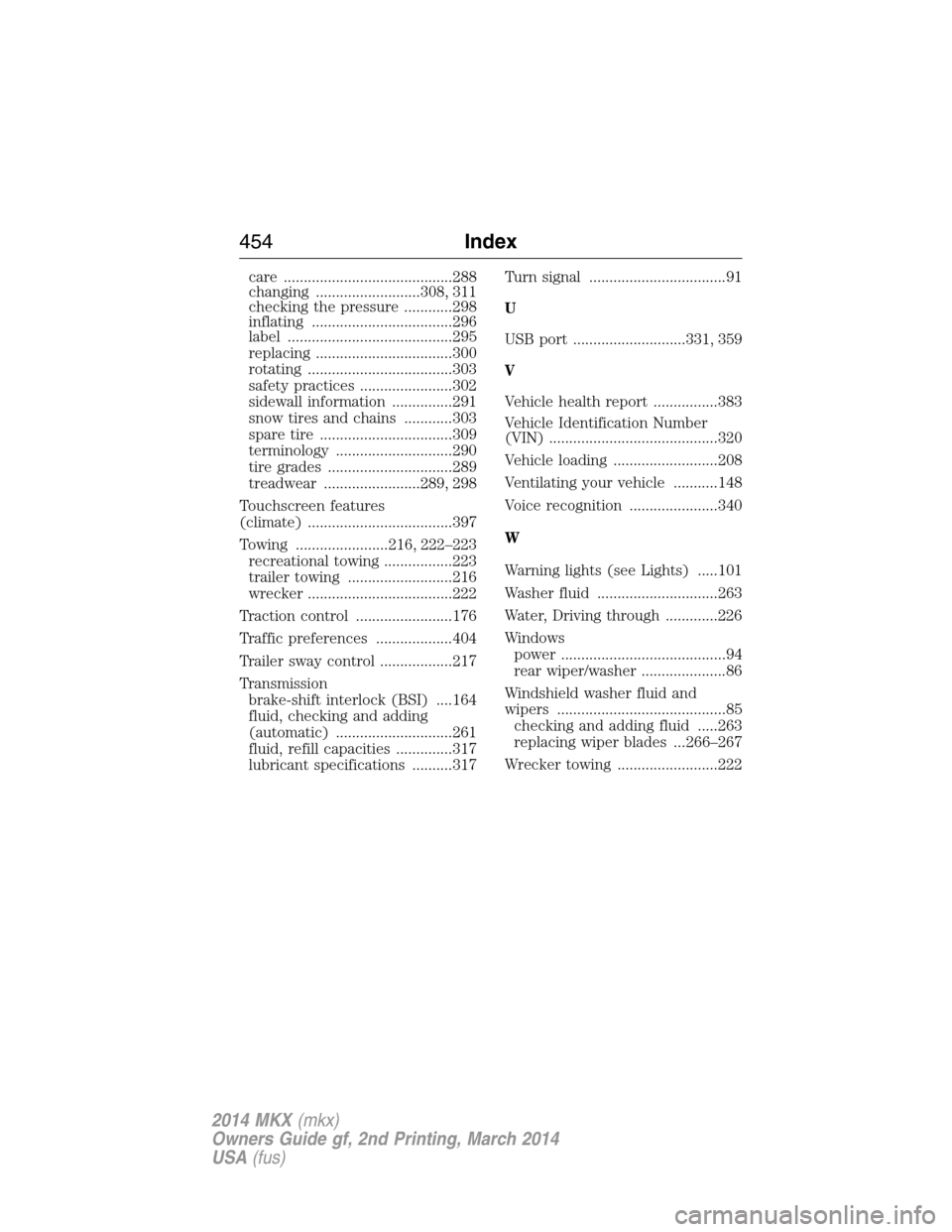
care ..........................................288
changing ..........................308, 311
checking the pressure ............298
inflating ...................................296
label .........................................295
replacing ..................................300
rotating ....................................303
safety practices .......................302
sidewall information ...............291
snow tires and chains ............303
spare tire .................................309
terminology .............................290
tire grades ...............................289
treadwear ........................289, 298
Touchscreen features
(climate) ....................................397
Towing .......................216, 222–223
recreational towing .................223
trailer towing ..........................216
wrecker ....................................222
Traction control ........................176
Traffic preferences ...................404
Trailer sway control ..................217
Transmission
brake-shift interlock (BSI) ....164
fluid, checking and adding
(automatic) .............................261
fluid, refill capacities ..............317
lubricant specifications ..........317Turn signal ..................................91
U
USB port ............................331, 359
V
Vehicle health report ................383
Vehicle Identification Number
(VIN) ..........................................320
Vehicle loading ..........................208
Ventilating your vehicle ...........148
Voice recognition ......................340
W
Warning lights (see Lights) .....101
Washer fluid ..............................263
Water, Driving through .............226
Windows
power .........................................94
rear wiper/washer .....................86
Windshield washer fluid and
wipers ..........................................85
checking and adding fluid .....263
replacing wiper blades ...266–267
Wrecker towing .........................222
454Index
2014 MKX(mkx)
Owners Guide gf, 2nd Printing, March 2014
USA(fus)