ECU LINCOLN MKX 2014 Owner's Guide
[x] Cancel search | Manufacturer: LINCOLN, Model Year: 2014, Model line: MKX, Model: LINCOLN MKX 2014Pages: 455, PDF Size: 6.1 MB
Page 305 of 455
Note:The suspension insulation and bumpers will help prevent vehicle
damage. Do not remove these components from your vehicle when using
snow tires and chains.
The tires on your vehicle have all-weather treads to provide traction in
rain and snow. However, in some climates, you may need to use snow
tires and chains.
Follow these guidelines when using snow tires and cable chains:
•If possible, avoid fully loading your vehicle.
•Use only SAE Class S cables or equivalent.
•Use SAE Class S cables only on the front axle on vehicles equipped
with P245/60R18 tires.
•Do not use tire cables or optional traction devices with P245/50R20 or
P265/40R22 tires.
•Install cables securely, verifying that the cables do not touch any
wiring, brake lines or fuel lines.
•Drive cautiously. If you hear the cable chains rub or bang against your
vehicle, stop and retighten the cables. If this does not work, remove
the cables to prevent damage to your vehicle.
•Do not exceed 30 mph (48 km/h) with tire cables on your vehicle.
•Remove the tire cables when they are no longer needed. Do not use
tire cables on dry roads.
TIRE PRESSURE MONITORING SYSTEM
WARNING:The tire pressure monitoring system is NOT a
substitute for manually checking tire pressure. The tire pressure
should be checked periodically (at least monthly) using a tire gauge.
SeeInflating Your Tiresin this chapter. Failure to properly maintain
your tire pressure could increase the risk of tire failure, loss of control,
vehicle rollover and personal injury.
304Wheels and Tires
2014 MKX(mkx)
Owners Guide gf, 2nd Printing, March 2014
USA(fus)
Page 313 of 455
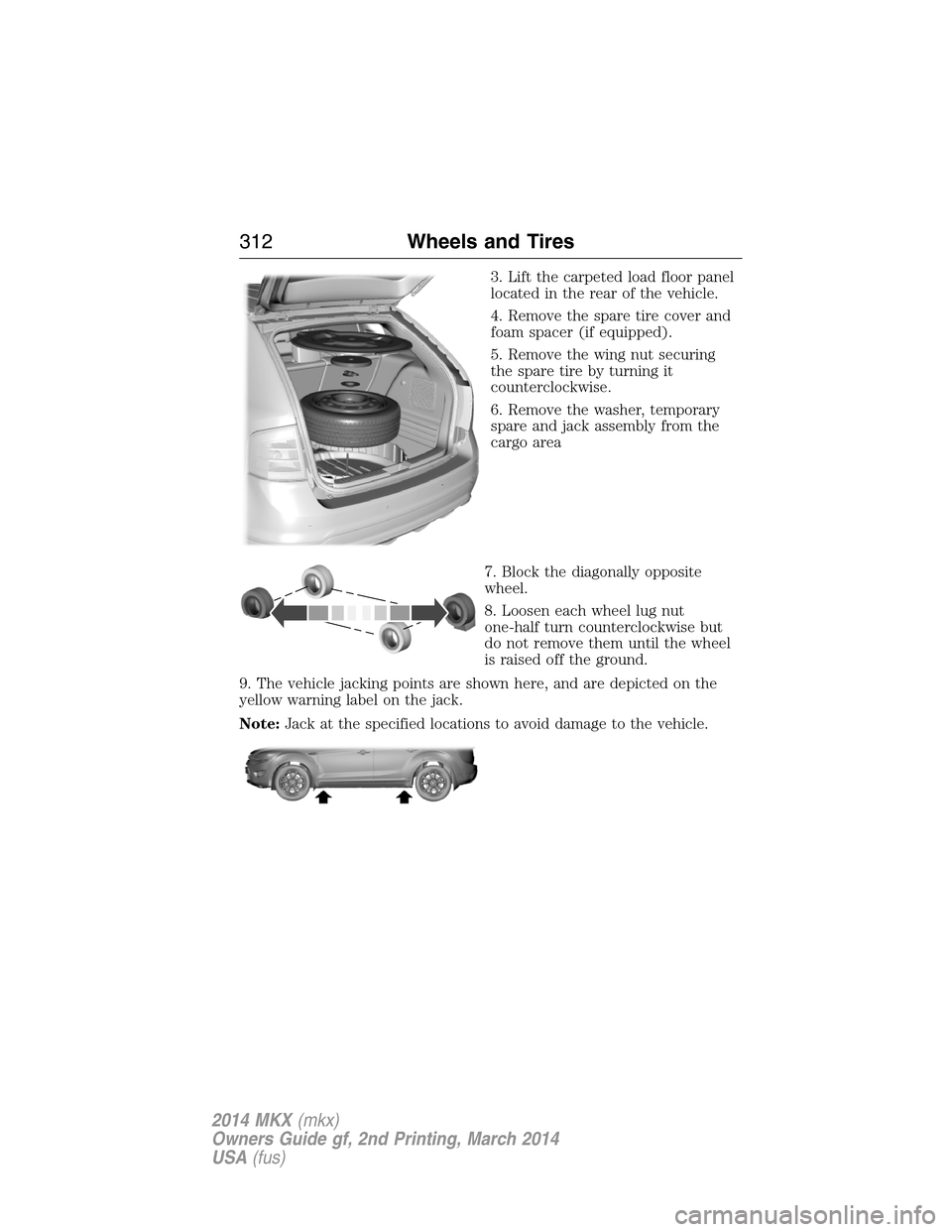
3. Lift the carpeted load floor panel
located in the rear of the vehicle.
4. Remove the spare tire cover and
foam spacer (if equipped).
5. Remove the wing nut securing
the spare tire by turning it
counterclockwise.
6. Remove the washer, temporary
spare and jack assembly from the
cargo area
7. Block the diagonally opposite
wheel.
8. Loosen each wheel lug nut
one-half turn counterclockwise but
do not remove them until the wheel
is raised off the ground.
9. The vehicle jacking points are shown here, and are depicted on the
yellow warning label on the jack.
Note:Jack at the specified locations to avoid damage to the vehicle.
312Wheels and Tires
2014 MKX(mkx)
Owners Guide gf, 2nd Printing, March 2014
USA(fus)
Page 315 of 455
Note:If you are stowing the spare tire, place the spare in the spare tire
well in its original position.
1. Put the flat tire, jack and lug wrench away. Make sure the jack kit is
secured in its original location and orientation in the jack kit recess
under the flat or spare tire. Unblock the wheels.
2. Secure the wheel by replacing the washer and the wing nut and
turning the wing nut clockwise.
TECHNICAL SPECIFICATIONS
Wheel Lug Nut Torque Specifications
WARNING:When a wheel is installed, always remove any
corrosion, dirt or foreign materials present on the mounting
surfaces of the wheel or the surface of the wheel hub, brake drum or
brake disc that contacts the wheel. Make sure that any fasteners that
attach the rotor to the hub are secured so they do not interfere with
the mounting surfaces of the wheel. Installing wheels without correct
metal-to-metal contact at the wheel mounting surfaces can cause the
wheel nuts to loosen and the wheel to come off while your vehicle is in
motion, resulting in loss of control.
Retighten the lug nuts to the specified torque within 100 miles
(160 kilometers) after any wheel disturbance (such as rotation, flat tire,
wheel removal).
Lug nut socket
size/Bolt sizeWheel lug nut torque*
ft-lb N•m
12x 20 100 135
* Torque specifications are for nut and bolt threads free of dirt and
rust. Use only Ford recommended replacement fasteners.
314Wheels and Tires
2014 MKX(mkx)
Owners Guide gf, 2nd Printing, March 2014
USA(fus)
Page 324 of 455
ACCESSORIES
For a complete listing of the accessories that are available for your
vehicle, please contact an authorized dealer or visit our online store at:
www.Accessories.Lincoln.com (United States only).
Lincoln Motor Company will repair or replace any properly authorized
dealer-installed Lincoln Genuine Accessory found to be defective in
factory-supplied materials or workmanship during the warranty period, as
well as any component damaged by the defective accessories.
Lincoln Motor Company will warrant your accessory through the
warranty that provides the greatest benefit:
•24 months, unlimited mileage.
•The remainder of your new vehicle limited warranty.
Contact an authorized dealer for details and a copy of the warranty.
Exterior style
•Side window deflectors
•Splash guards
Interior style
•Ambient lighting
•Sport pedals
•Floor mats
•Rear seat entertainment*
Lifestyle
•Ash cup / coin holder
•Cross bars and roof rails
•Trailer hitches, wiring harnesses and accessories
•Cargo organization and management
•Roof rack and carriers*
•SUV camping tent*
Peace of mind
•Vehicle security
•Locking fuel plug
•Cargo security shade
Accessories323
2014 MKX(mkx)
Owners Guide gf, 2nd Printing, March 2014
USA(fus)
Page 327 of 455
Roadside Assistance
Exclusive 24/7 roadside assistance, including:
•Towing, flat-tire change and battery jump starts.
•Out of fuel and lock-out assistance.
•Travel expense reimbursement for lodging, meals and rental car.
•Destination assistance for taxi, shuttle, rental car coverage and
emergency transportation.
Transferable Coverage
If you sell your vehicle before your Lincoln Extended Service Plan
coverage expires, you can transfer any remaining coverage to the new
owner. Whenever you sell your vehicle, prospective buyers may have a
higher degree of confidence that vehicle was properly maintained with
Lincoln ESP, thereby improving resale value.
Avoid the Rising Cost of Properly Maintaining Your Vehicle!
Lincoln Extended Service Plan also offers a Premium Maintenance Plan
that covers all scheduled maintenance, and select items that routinely
wear out. The coverage is prepaid, so you never have to worry about
affording your vehicle maintenance. It covers regular checkups, routine
inspections, preventive care and replacement of select items that require
periodic attention for normal wear:
•Windshield wiper blades.
•Spark plugs (except in California).
•The clutch disc.
•Brake pads and linings.
•Shock absorbers.
•Belts and hoses.
•Diesel exhaust fluid replenishment.
Interest Free Finance Options Available
Take advantage of our interest free installment payment plan. Just a 10%
down payment will provide you with an affordable, no interest, no fee
payment program allowing you all the security and benefits Lincoln ESP
has to offer while paying over time. You are pre-approved with no credit
checks, no hassles! To learn more, call our Lincoln ESP specialists at
800-367-3377.
Lincoln ESP
P.O. Box 8072
Royal Oak, MI 48068-0039
326Extended Service Plan
2014 MKX(mkx)
Owners Guide gf, 2nd Printing, March 2014
USA(fus)
Page 365 of 455
WARNING:Store the portable music player in a secure location,
such as the center console or the glove box, when your vehicle is
in motion. Hard objects may become projectiles in a crash or sudden
stop, which may increase the risk of serious injury. The audio extension
cable must be long enough to allow the portable music player to be
safely stored while your vehicle is moving.
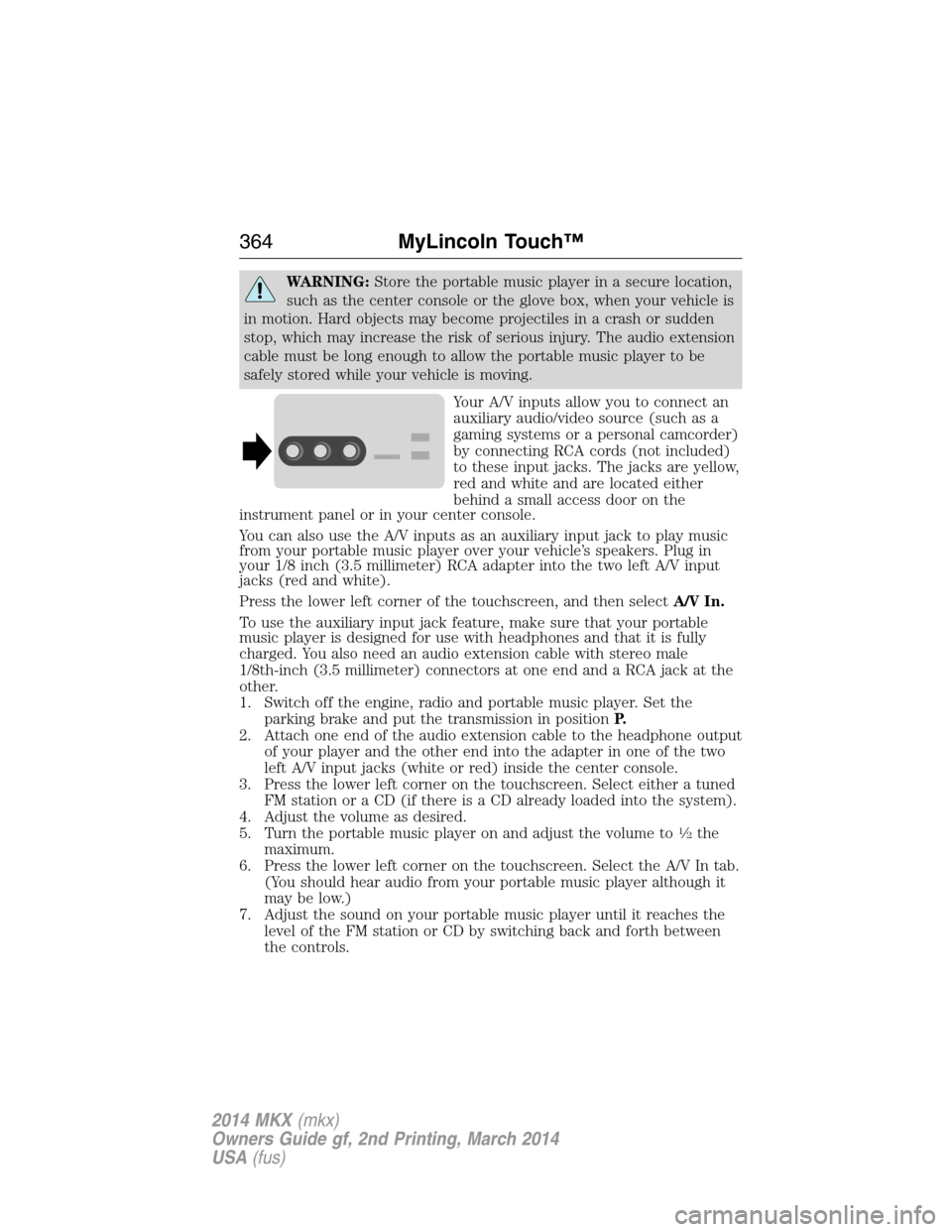
Your A/V inputs allow you to connect an
auxiliary audio/video source (such as a
gaming systems or a personal camcorder)
by connecting RCA cords (not included)
to these input jacks. The jacks are yellow,
red and white and are located either
behind a small access door on the
instrument panel or in your center console.
You can also use the A/V inputs as an auxiliary input jack to play music
from your portable music player over your vehicle’s speakers. Plug in
your 1/8 inch (3.5 millimeter) RCA adapter into the two left A/V input
jacks (red and white).
Press the lower left corner of the touchscreen, and then selectA/V In.
To use the auxiliary input jack feature, make sure that your portable
music player is designed for use with headphones and that it is fully
charged. You also need an audio extension cable with stereo male
1/8th-inch (3.5 millimeter) connectors at one end and a RCA jack at the
other.
1. Switch off the engine, radio and portable music player. Set the
parking brake and put the transmission in positionP.
2. Attach one end of the audio extension cable to the headphone output
of your player and the other end into the adapter in one of the two
left A/V input jacks (white or red) inside the center console.
3. Press the lower left corner on the touchscreen. Select either a tuned
FM station or a CD (if there is a CD already loaded into the system).
4. Adjust the volume as desired.
5. Turn the portable music player on and adjust the volume to
12the
maximum.
6. Press the lower left corner on the touchscreen. Select the A/V In tab.
(You should hear audio from your portable music player although it
may be low.)
7. Adjust the sound on your portable music player until it reaches the
level of the FM station or CD by switching back and forth between
the controls.
364MyLincoln Touch™
2014 MKX(mkx)
Owners Guide gf, 2nd Printing, March 2014
USA(fus)
Page 368 of 455
2. Make sure that Bluetooth is set toOnand that your cellular phone is
in the proper mode. See your phone’s manual if necessary.
•SelectSYNC,and a six-digit PIN appears on your device.
3. If you are prompted to enter a PIN on your device, it does not
support Secure Simple Pairing. To pair, enter the PIN displayed on
the touchscreen. Skip the next step.
4. When prompted on your phone’s display, confirm that the PIN
provided by SYNC matches the PIN displayed on your cellular phone.
5. The display indicates when the pairing is successful.
SYNC may prompt you with more phone options. For more information
on your phone’s capability, see your phone’s manual and visit the
website.
Pairing Subsequent Phones
Note:Put the transmission in positionP.Turn on your vehicle ignition
and the radio.
1. Press thePhonecorner of the touchscreen >Settings>BT
Devices>Add Device.
2. Make sure that Bluetooth is set toOnand that your cellular phone is
in the proper mode. See your phone’s manual if necessary.
•SelectSYNC,and a six-digit PIN appears on your device.
3. If you are prompted to enter a PIN on your device, it does not
support Secure Simple Pairing. To pair, enter the PIN displayed on
the touchscreen. Skip the next step.
4. When prompted on your phone’s display, confirm that the PIN
provided by SYNC matches the PIN displayed on your cellular phone.
5. The display indicates when the pairing is successful.
SYNC may prompt you with more phone options. For more information
on your phone’s capability, see your phone’s user guide and visit the
website.
Making Calls
Press the voice button on your steering wheel controls. When
prompted, say, “Call
number.
To end the call or exit phone mode, press this phone button.
Receiving Calls
During an incoming call, an audible tone sounds. Call information
appears in the display if it is available.
MyLincoln Touch™367
2014 MKX(mkx)
Owners Guide gf, 2nd Printing, March 2014
USA(fus)
Page 381 of 455
Alerts
If your vehicle is equipped with Navigation, touch the i
(Information) button to access these features. If your vehicle is
not equipped with Navigation, touch the corner of the
touchscreen with the green tab.
PressAlerts,and then choose from any of the following services:
•Vi e wthe message.
•Deletethe message.
•Delete Allmessages.
This screen displays any system messages (such as an SD card fault).
Note:The system alerts you to any messages by turning the information
icon yellow. After you read or delete the messages, the icon returns to
white.
Calendar
If your vehicle is equipped with Navigation, touch the i
(Information) button to access these features. If your vehicle is
not equipped with Navigation, touch the corner of the
touchscreen with the green tab.
PressCalendar.You can view the current calendar by day, week or
month.
911 Assist® (If Equipped)
WARNING:Unless the 911 Assist setting is set on before a
crash, the system will not dial for help, which could delay
response time, potentially increasing the risk of serious injury or death
after a crash.
WARNING:Do not wait for 911 Assist to make an emergency
call if you can do it yourself. Dial emergency services
immediately to avoid delayed response time, which could increase the
risk of serious injury or death after a crash. If you do not hear 911
Assist within five seconds of the crash, the system or phone may be
damaged or non-functional.
WARNING:Always place your phone in a secure location in your
vehicle so it does not become a projectile or damaged in a crash.
Failure to do so may cause serious injury to someone or damage the
phone, which could prevent 911 Assist from working properly.
380MyLincoln Touch™
2014 MKX(mkx)
Owners Guide gf, 2nd Printing, March 2014
USA(fus)
Page 414 of 455
DESCRIPTION OF OTHER RIGHTS AND LIMITATIONS:
•Speech Recognition:If the SOFTWARE includes speech recognition
component(s), you should understand that speech recognition is an
inherently statistical process and that recognition errors are inherent
in the process. Neither FORD MOTOR COMPANY nor its suppliers
shall be liable for any damages arising out of errors in the speech
recognition process.
•Limitations on Reverse Engineering, Decompilation and
Disassembly:You may not reverse engineer, decompile, or
disassemble nor permit others to reverse engineer, decompile or
disassemble the SOFTWARE, except and only to the extent that such
activity is expressly permitted by applicable law notwithstanding this
limitation.
•Limitations on Distributing, Copying, Modifying and Creating
Derivative Works:You may not distribute, copy, make modifications
to or create derivative works based on the SOFTWARE, except and
only to the extent that such activity is expressly permitted by
applicable law notwithstanding this limitation.
•Single EULA:The end user documentation for the DEVICE and
related systems and services may contain multiple EULAs, such as
multiple translations and/or multiple media versions (e.g., in the user
documentation and in the software). Even if you receive multiple
EULAs, you are licensed to use only one (1) copy of the SOFTWARE.
•SOFTWARE Transfer:You may permanently transfer your rights
under this EULA only as part of a sale or transfer of the DEVICE,
provided you retain no copies, you transfer all of the SOFTWARE
(including all component parts, the media and printed materials, any
upgrades, and, if applicable, the Certificate(s) of Authenticity), and
the recipient agrees to the terms of this EULA. If the SOFTWARE is
an upgrade, any transfer must include all prior versions of the
SOFTWARE.
•Termination:Without prejudice to any other rights, FORD MOTOR
COMPANY or MS may terminate this EULA if you fail to comply with
the terms and conditions of this EULA.
•Security Updates/Digital Rights Management:Content owners use
the WMDRM technology included in your DEVICE to protect their
intellectual property, included copyrighted content. Portions of the
SOFTWARE on your DEVICE use WMDRM software to access
WMDRM-protected content. If the WMDRM software fails to protect
the content, content owners may ask Microsoft to revoke the
Appendices413
2014 MKX(mkx)
Owners Guide gf, 2nd Printing, March 2014
USA(fus)
Page 421 of 455
you in an unsafe situation, or directs you into an area that you consider
to be unsafe, do not follow such instructions; (c) do not input
destinations, or otherwise manipulate the Telenav Software, unless your
vehicle is stationary and parked; (d) do not use the Telenav Software for
any illegal, unauthorized, unintended, unsafe, hazardous, or unlawful
purposes, or in any manner inconsistent with this Agreement; (e)
arrange all GPS and wireless devices and cables necessary for use of the
Telenav Software in a secure manner in your vehicle so that they will not
interfere with your driving and will not prevent the operation of any
safety device (such as an airbag).
You agree to indemnify and hold Telenav harmless against all claims
resulting from any dangerous or otherwise inappropriate use of the
Telenav Software in any moving vehicle, including as a result of your
failure to comply with the directions above.
2.Account Information
You agree: (a) when registering the Telenav Software, to provide Telenav
with true, accurate, current, and complete information about yourself,
and (b) to inform Telenav promptly of any changes to such information,
and to keep it true, accurate, current and complete.
3.Software License
Subject to your compliance with the terms of this Agreement, Telenav
hereby grants to you a personal, non-exclusive, non-transferable license
(except as expressly permitted below in connection with your permanent
transfer of the Telenav Software license), without the right to sublicense,
to use the Telenav Software (in object code form only) in order to access
and use the Telenav Software. This license shall terminate upon any
termination or expiration of this Agreement. You agree that you will use
the Telenav Software only for your personal business or leisure purposes,
and not to provide commercial navigation services to other parties.
3.1 License limitations
You agree not to do any of the following: (a) reverse engineer,
decompile, disassemble, translate, modify, alter or otherwise change the
Telenav Software or any part thereof; (b) attempt to derive the source
code, audio library or structure of the Telenav Software without the prior
express written consent of Telenav; (c) remove from the Telenav
Software, or alter, any of Telenav’s or its suppliers’ trademarks, trade
names, logos, patent or copyright notices, or other notices or markings;
(d) distribute, sublicense or otherwise transfer the Telenav Software to
others, except as part of your permanent transfer of the Telenav
Software; or (e) use the Telenav Software in any manner that (i)
infringes the intellectual property or proprietary rights, rights of publicity
420Appendices
2014 MKX(mkx)
Owners Guide gf, 2nd Printing, March 2014
USA(fus)