key LINCOLN MKX 2014 Workshop Manual
[x] Cancel search | Manufacturer: LINCOLN, Model Year: 2014, Model line: MKX, Model: LINCOLN MKX 2014Pages: 455, PDF Size: 6.1 MB
Page 253 of 455
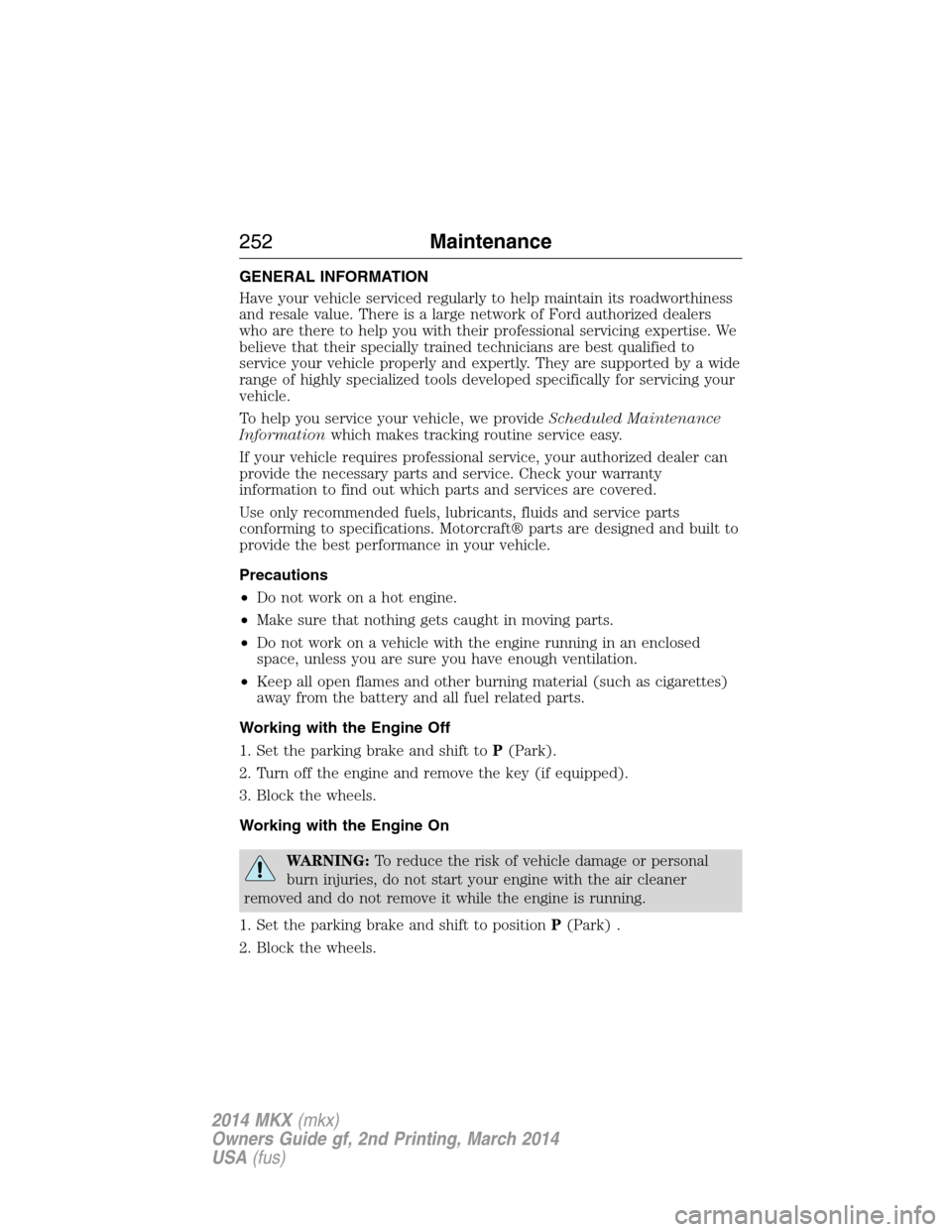
GENERAL INFORMATION
Have your vehicle serviced regularly to help maintain its roadworthiness
and resale value. There is a large network of Ford authorized dealers
who are there to help you with their professional servicing expertise. We
believe that their specially trained technicians are best qualified to
service your vehicle properly and expertly. They are supported by a wide
range of highly specialized tools developed specifically for servicing your
vehicle.
To help you service your vehicle, we provideScheduled Maintenance
Informationwhich makes tracking routine service easy.
If your vehicle requires professional service, your authorized dealer can
provide the necessary parts and service. Check your warranty
information to find out which parts and services are covered.
Use only recommended fuels, lubricants, fluids and service parts
conforming to specifications. Motorcraft® parts are designed and built to
provide the best performance in your vehicle.
Precautions
•Do not work on a hot engine.
•Make sure that nothing gets caught in moving parts.
•Do not work on a vehicle with the engine running in an enclosed
space, unless you are sure you have enough ventilation.
•Keep all open flames and other burning material (such as cigarettes)
away from the battery and all fuel related parts.
Working with the Engine Off
1. Set the parking brake and shift toP(Park).
2. Turn off the engine and remove the key (if equipped).
3. Block the wheels.
Working with the Engine On
WARNING:To reduce the risk of vehicle damage or personal
burn injuries, do not start your engine with the air cleaner
removed and do not remove it while the engine is running.
1. Set the parking brake and shift to positionP(Park) .
2. Block the wheels.
252Maintenance
2014 MKX(mkx)
Owners Guide gf, 2nd Printing, March 2014
USA(fus)
Page 338 of 455
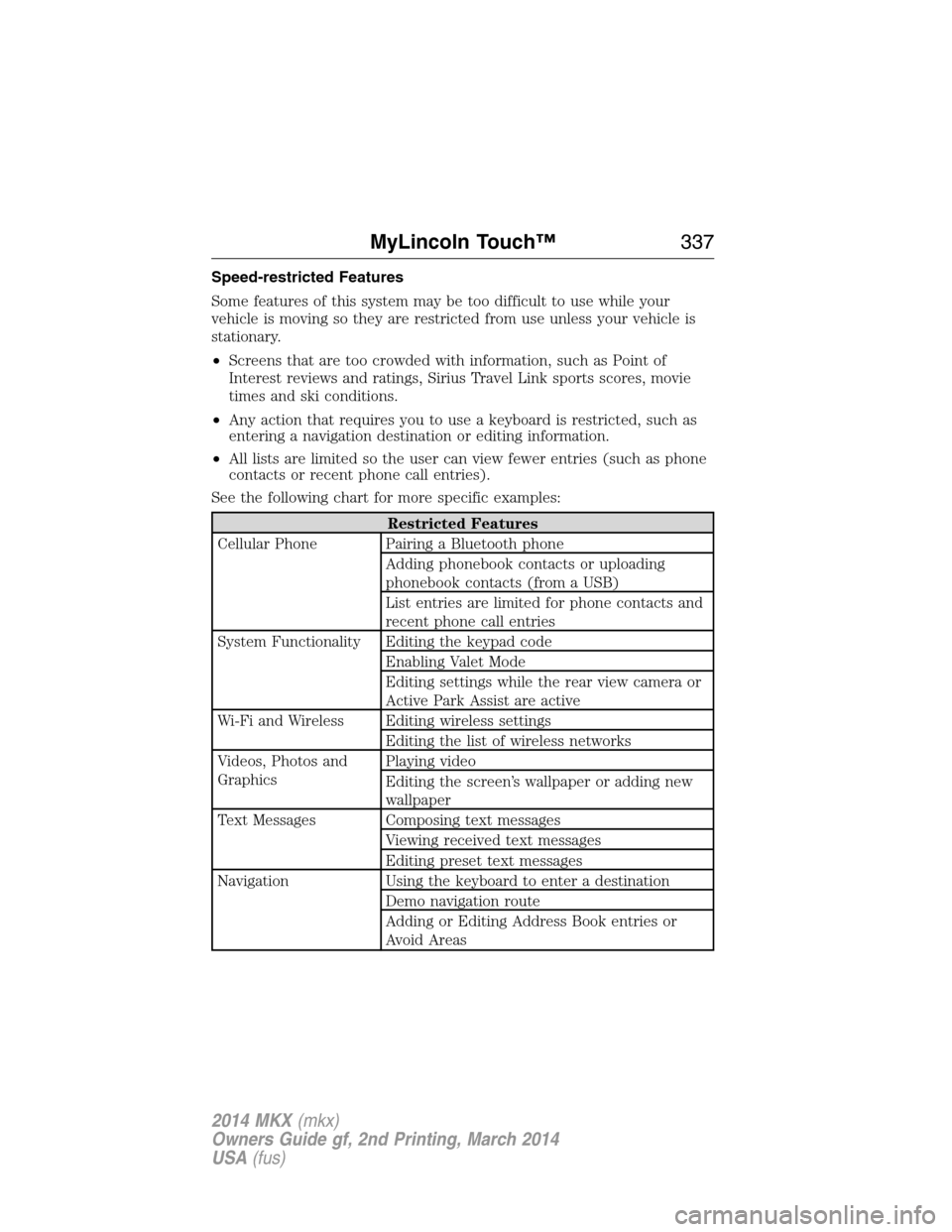
Speed-restricted Features
Some features of this system may be too difficult to use while your
vehicle is moving so they are restricted from use unless your vehicle is
stationary.
•Screens that are too crowded with information, such as Point of
Interest reviews and ratings, Sirius Travel Link sports scores, movie
times and ski conditions.
•Any action that requires you to use a keyboard is restricted, such as
entering a navigation destination or editing information.
•All lists are limited so the user can view fewer entries (such as phone
contacts or recent phone call entries).
See the following chart for more specific examples:
Restricted Features
Cellular Phone Pairing a Bluetooth phone
Adding phonebook contacts or uploading
phonebook contacts (from a USB)
List entries are limited for phone contacts and
recent phone call entries
System Functionality Editing the keypad code
Enabling Valet Mode
Editing settings while the rear view camera or
Active Park Assist are active
Wi-Fi and Wireless Editing wireless settings
Editing the list of wireless networks
Videos, Photos and
GraphicsPlaying video
Editing the screen’s wallpaper or adding new
wallpaper
Text Messages Composing text messages
Viewing received text messages
Editing preset text messages
Navigation Using the keyboard to enter a destination
Demo navigation route
Adding or Editing Address Book entries or
Avoid Areas
MyLincoln Touch™337
2014 MKX(mkx)
Owners Guide gf, 2nd Printing, March 2014
USA(fus)
Page 357 of 455
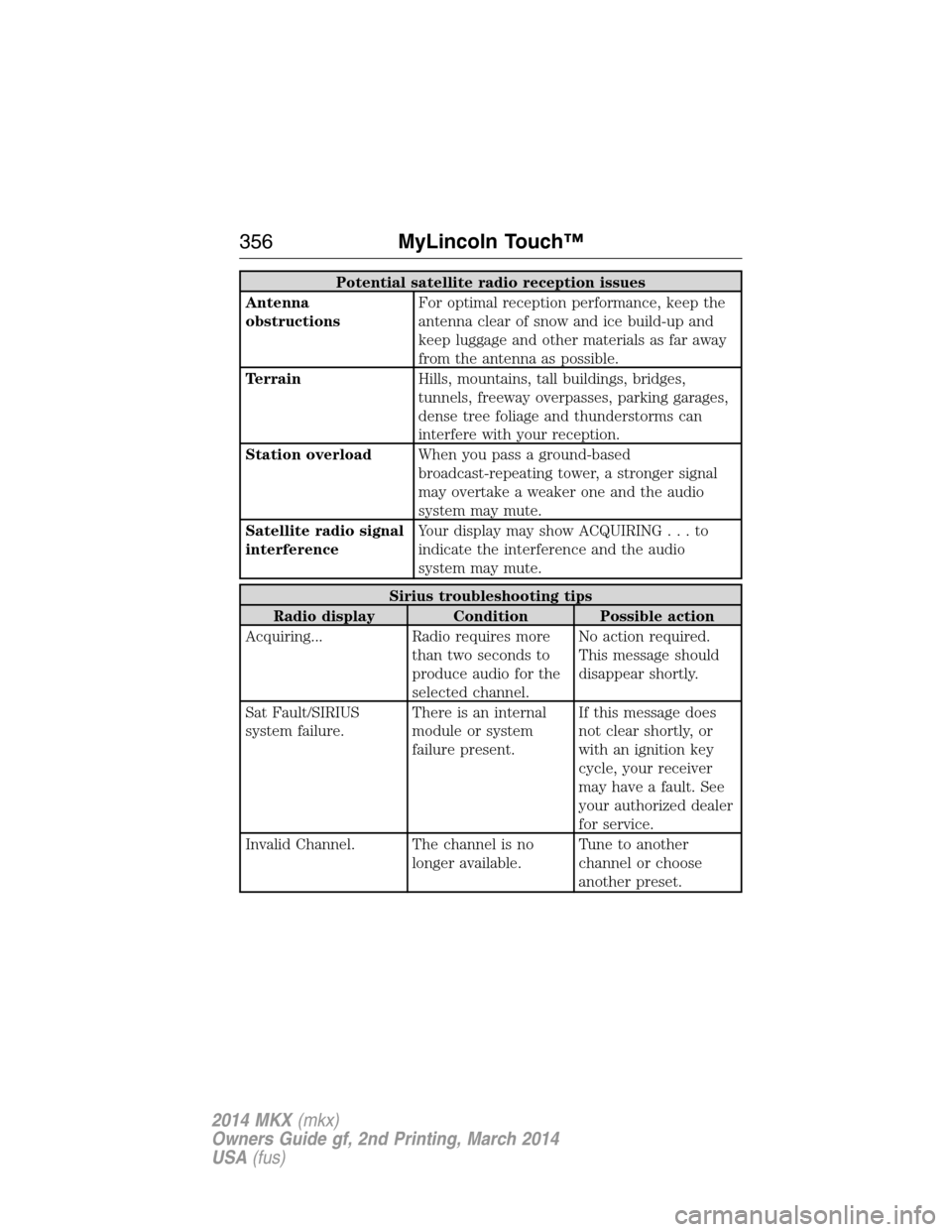
Potential satellite radio reception issues
Antenna
obstructionsFor optimal reception performance, keep the
antenna clear of snow and ice build-up and
keep luggage and other materials as far away
from the antenna as possible.
TerrainHills, mountains, tall buildings, bridges,
tunnels, freeway overpasses, parking garages,
dense tree foliage and thunderstorms can
interfere with your reception.
Station overloadWhen you pass a ground-based
broadcast-repeating tower, a stronger signal
may overtake a weaker one and the audio
system may mute.
Satellite radio signal
interferenceYour display may show ACQUIRING...to
indicate the interference and the audio
system may mute.
Sirius troubleshooting tips
Radio display Condition Possible action
Acquiring... Radio requires more
than two seconds to
produce audio for the
selected channel.No action required.
This message should
disappear shortly.
Sat Fault/SIRIUS
system failure.There is an internal
module or system
failure present.If this message does
not clear shortly, or
with an ignition key
cycle, your receiver
may have a fault. See
your authorized dealer
for service.
Invalid Channel. The channel is no
longer available.Tune to another
channel or choose
another preset.
356MyLincoln Touch™
2014 MKX(mkx)
Owners Guide gf, 2nd Printing, March 2014
USA(fus)
Page 388 of 455
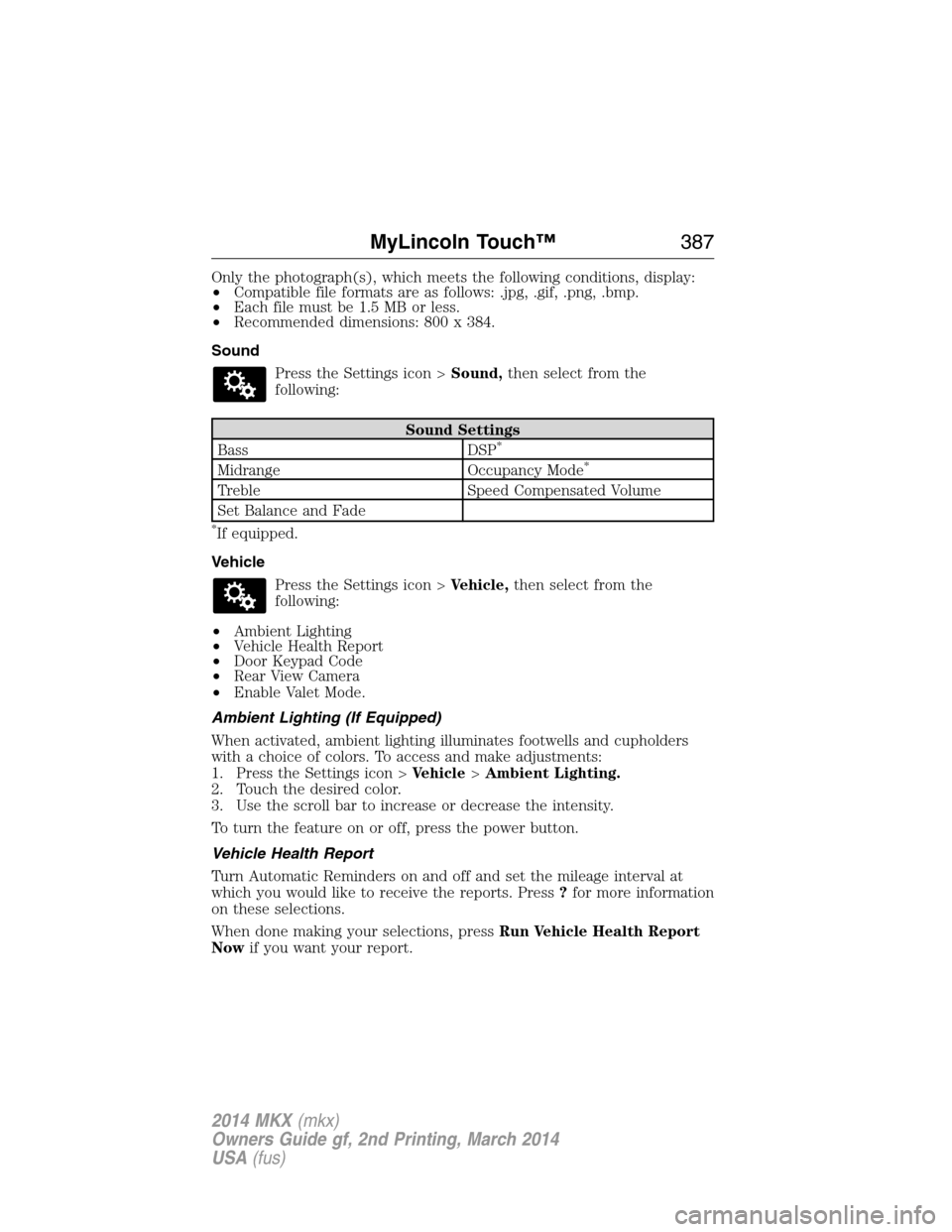
Only the photograph(s), which meets the following conditions, display:
•Compatible file formats are as follows: .jpg, .gif, .png, .bmp.
•Each file must be 1.5 MB or less.
•Recommended dimensions: 800 x 384.
Sound
Press the Settings icon >Sound,then select from the
following:
Sound Settings
Bass DSP*
Midrange Occupancy Mode*
Treble Speed Compensated Volume
Set Balance and Fade
*If equipped.
Vehicle
Press the Settings icon >Vehicle,then select from the
following:
•Ambient Lighting
•Vehicle Health Report
•Door Keypad Code
•Rear View Camera
•Enable Valet Mode.
Ambient Lighting (If Equipped)
When activated, ambient lighting illuminates footwells and cupholders
with a choice of colors. To access and make adjustments:
1. Press the Settings icon >Vehicle>Ambient Lighting.
2. Touch the desired color.
3. Use the scroll bar to increase or decrease the intensity.
To turn the feature on or off, press the power button.
Vehicle Health Report
Turn Automatic Reminders on and off and set the mileage interval at
which you would like to receive the reports. Press?for more information
on these selections.
When done making your selections, pressRun Vehicle Health Report
Nowif you want your report.
MyLincoln Touch™387
2014 MKX(mkx)
Owners Guide gf, 2nd Printing, March 2014
USA(fus)
Page 389 of 455
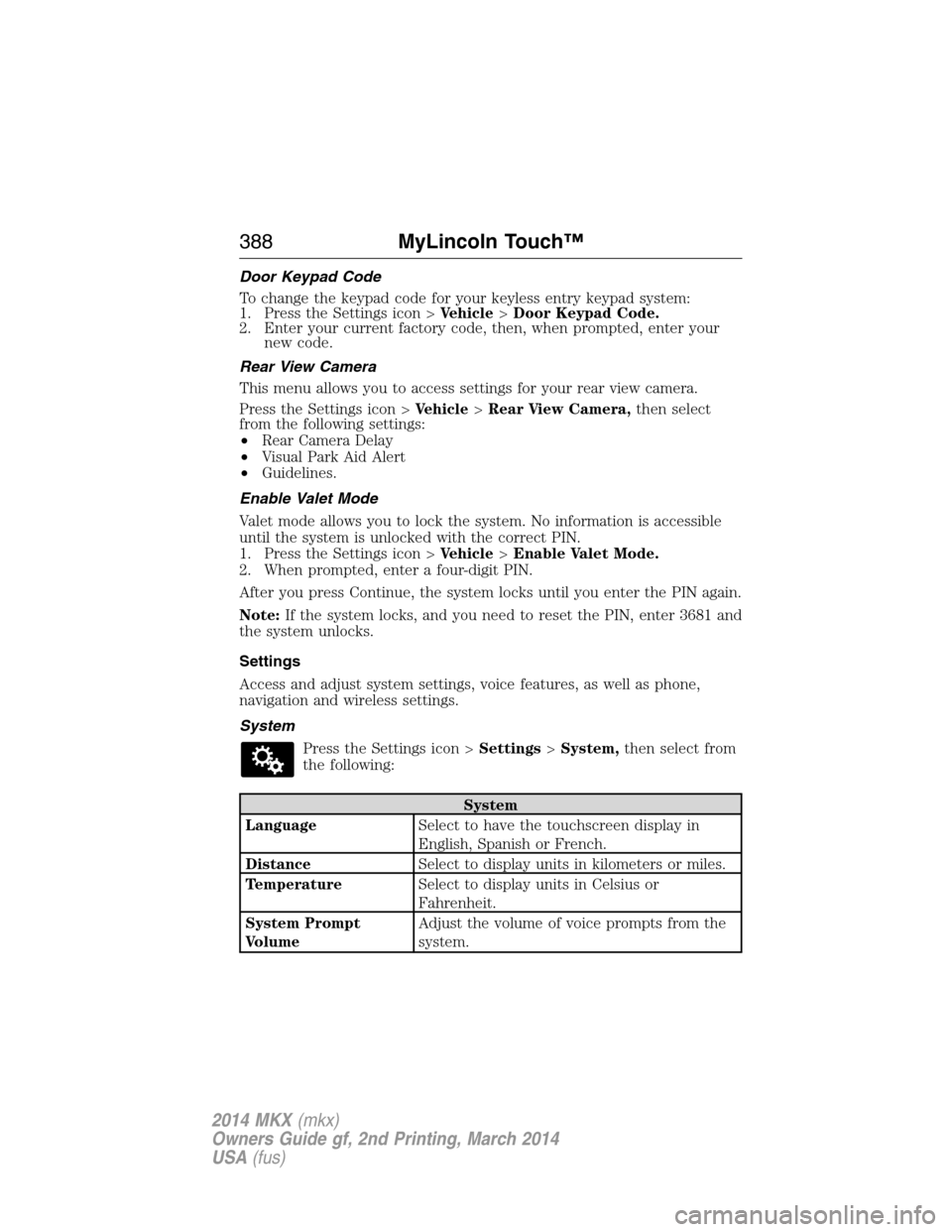
Door Keypad Code
To change the keypad code for your keyless entry keypad system:
1. Press the Settings icon >Vehicle>Door Keypad Code.
2. Enter your current factory code, then, when prompted, enter your
new code.
Rear View Camera
This menu allows you to access settings for your rear view camera.
Press the Settings icon >Vehicle>Rear View Camera,then select
from the following settings:
•Rear Camera Delay
•Visual Park Aid Alert
•Guidelines.
Enable Valet Mode
Valet mode allows you to lock the system. No information is accessible
until the system is unlocked with the correct PIN.
1. Press the Settings icon >Vehicle>Enable Valet Mode.
2. When prompted, enter a four-digit PIN.
After you press Continue, the system locks until you enter the PIN again.
Note:If the system locks, and you need to reset the PIN, enter 3681 and
the system unlocks.
Settings
Access and adjust system settings, voice features, as well as phone,
navigation and wireless settings.
System
Press the Settings icon >Settings>System,then select from
the following:
System
LanguageSelect to have the touchscreen display in
English, Spanish or French.
DistanceSelect to display units in kilometers or miles.
TemperatureSelect to display units in Celsius or
Fahrenheit.
System Prompt
VolumeAdjust the volume of voice prompts from the
system.
388MyLincoln Touch™
2014 MKX(mkx)
Owners Guide gf, 2nd Printing, March 2014
USA(fus)
Page 390 of 455
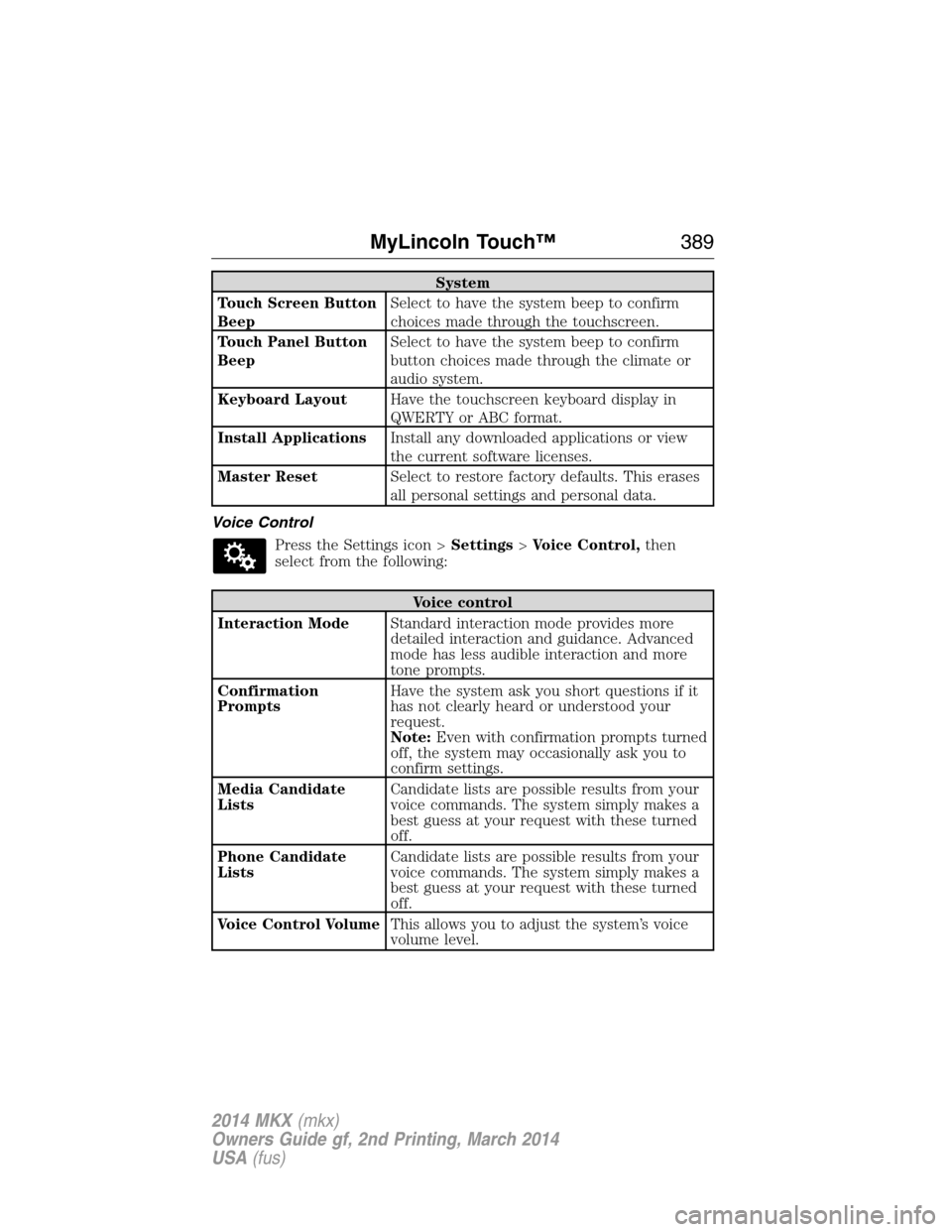
System
Touch Screen Button
BeepSelect to have the system beep to confirm
choices made through the touchscreen.
Touch Panel Button
BeepSelect to have the system beep to confirm
button choices made through the climate or
audio system.
Keyboard LayoutHave the touchscreen keyboard display in
QWERTY or ABC format.
Install ApplicationsInstall any downloaded applications or view
the current software licenses.
Master ResetSelect to restore factory defaults. This erases
all personal settings and personal data.
Voice Control
Press the Settings icon >Settings>Voice Control,then
select from the following:
Voice control
Interaction ModeStandard interaction mode provides more
detailed interaction and guidance. Advanced
mode has less audible interaction and more
tone prompts.
Confirmation
PromptsHave the system ask you short questions if it
has not clearly heard or understood your
request.
Note:Even with confirmation prompts turned
off, the system may occasionally ask you to
confirm settings.
Media Candidate
ListsCandidate lists are possible results from your
voice commands. The system simply makes a
best guess at your request with these turned
off.
Phone Candidate
ListsCandidate lists are possible results from your
voice commands. The system simply makes a
best guess at your request with these turned
off.
Voice Control VolumeThis allows you to adjust the system’s voice
volume level.
MyLincoln Touch™389
2014 MKX(mkx)
Owners Guide gf, 2nd Printing, March 2014
USA(fus)
Page 403 of 455
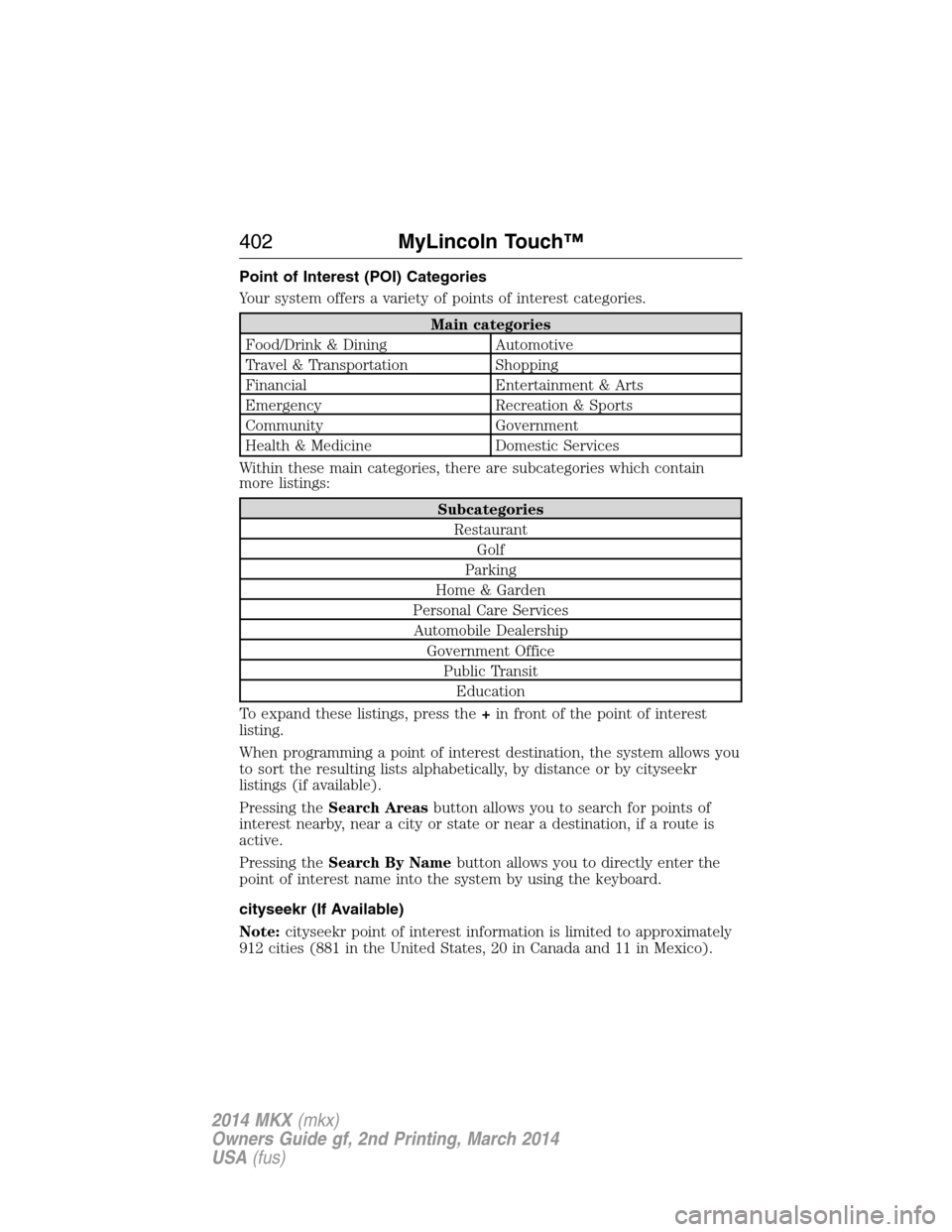
Point of Interest (POI) Categories
Your system offers a variety of points of interest categories.
Main categories
Food/Drink & Dining Automotive
Travel & Transportation Shopping
Financial Entertainment & Arts
Emergency Recreation & Sports
Community Government
Health & Medicine Domestic Services
Within these main categories, there are subcategories which contain
more listings:
Subcategories
Restaurant
Golf
Parking
Home & Garden
Personal Care Services
Automobile Dealership
Government Office
Public Transit
Education
To expand these listings, press the+in front of the point of interest
listing.
When programming a point of interest destination, the system allows you
to sort the resulting lists alphabetically, by distance or by cityseekr
listings (if available).
Pressing theSearch Areasbutton allows you to search for points of
interest nearby, near a city or state or near a destination, if a route is
active.
Pressing theSearch By Namebutton allows you to directly enter the
point of interest name into the system by using the keyboard.
cityseekr (If Available)
Note:cityseekr point of interest information is limited to approximately
912 cities (881 in the United States, 20 in Canada and 11 in Mexico).
402MyLincoln Touch™
2014 MKX(mkx)
Owners Guide gf, 2nd Printing, March 2014
USA(fus)
Page 451 of 455
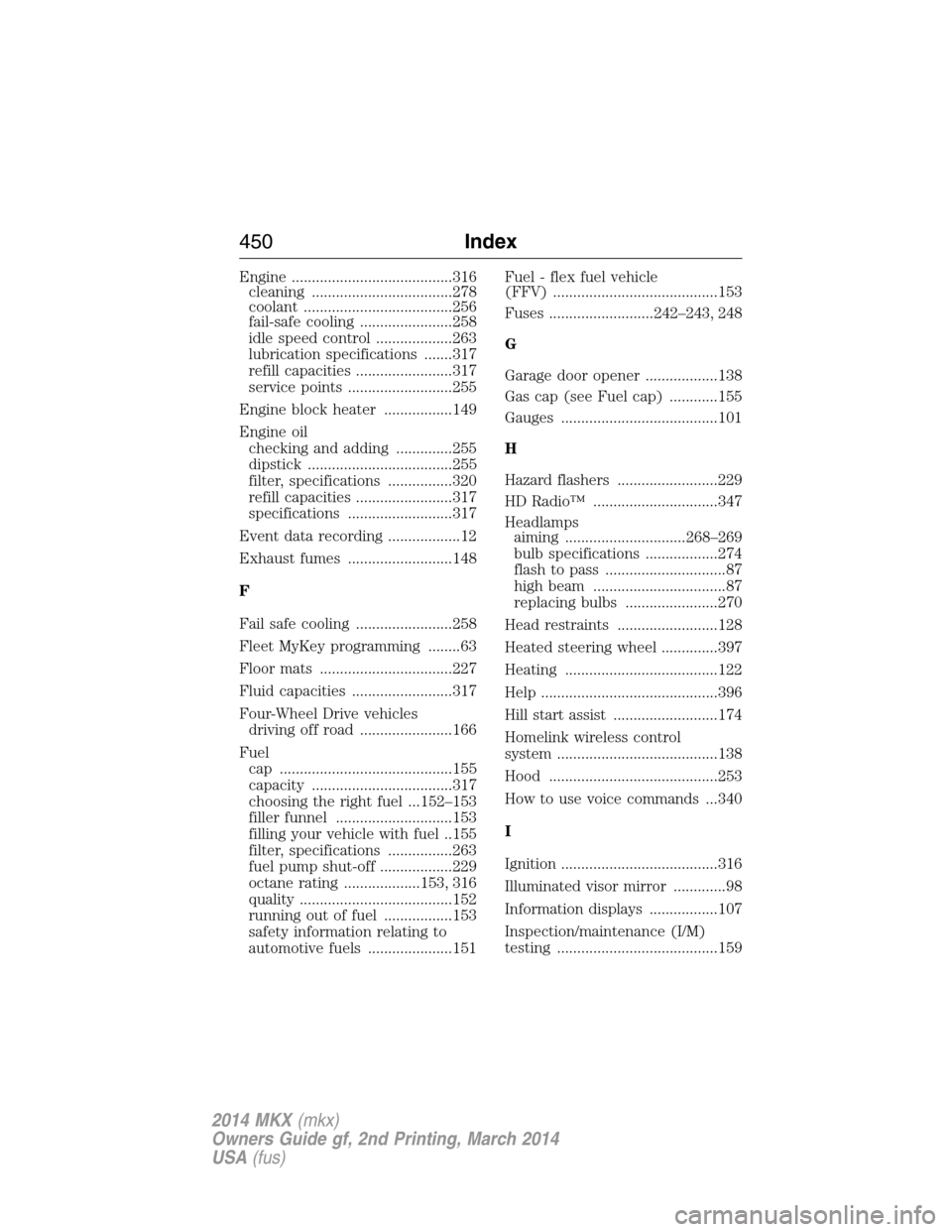
Engine ........................................316
cleaning ...................................278
coolant .....................................256
fail-safe cooling .......................258
idle speed control ...................263
lubrication specifications .......317
refill capacities ........................317
service points ..........................255
Engine block heater .................149
Engine oil
checking and adding ..............255
dipstick ....................................255
filter, specifications ................320
refill capacities ........................317
specifications ..........................317
Event data recording ..................12
Exhaust fumes ..........................148
F
Fail safe cooling ........................258
Fleet MyKey programming ........63
Floor mats .................................227
Fluid capacities .........................317
Four-Wheel Drive vehicles
driving off road .......................166
Fuel
cap ...........................................155
capacity ...................................317
choosing the right fuel ...152–153
filler funnel .............................153
filling your vehicle with fuel ..155
filter, specifications ................263
fuel pump shut-off ..................229
octane rating ...................153, 316
quality ......................................152
running out of fuel .................153
safety information relating to
automotive fuels .....................151Fuel - flex fuel vehicle
(FFV) .........................................153
Fuses ..........................242–243, 248
G
Garage door opener ..................138
Gas cap (see Fuel cap) ............155
Gauges .......................................101
H
Hazard flashers .........................229
HD Radio™ ...............................347
Headlamps
aiming ..............................268–269
bulb specifications ..................274
flash to pass ..............................87
high beam .................................87
replacing bulbs .......................270
Head restraints .........................128
Heated steering wheel ..............397
Heating ......................................122
Help ............................................396
Hill start assist ..........................174
Homelink wireless control
system ........................................138
Hood ..........................................253
How to use voice commands ...340
I
Ignition .......................................316
Illuminated visor mirror .............98
Information displays .................107
Inspection/maintenance (I/M)
testing ........................................159
450Index
2014 MKX(mkx)
Owners Guide gf, 2nd Printing, March 2014
USA(fus)
Page 452 of 455
Instrument panel
cleaning ...................................280
cluster ......................................101
Intelligent Access Key ................58
J
Jack ............................................308
positioning ...............................308
storage .....................................308
Jump-starting your vehicle ......230
K
Keyless entry system
autolock .....................................69
keypad .......................................75
locking and unlocking doors ....76
programming entry code .........75
Keys .............................................77
L
Lamps
bulb replacement
specifications chart ................274
headlamps, flash to pass ..........87
interior lamps .....................92–93
replacing bulbs .......................270
LATCH anchors ...........................28
Liftgate ..........................68, 71, 208
Lights, warning and indicator ..101
Listening to music ....................344
Load limits .................................208
Locks
autolock .....................................69
childproof ..................................32
doors ..........................................67
Lubricant specifications ...........317Lug nuts ....................................314
M
Making and receiving calls .......367
MAP DVD - Loading and
Unloading ..................................367
Map icons ..................................407
Map mode ..................................406
Map preferences .......................404
Map updates ..............................409
Message center .........................107
warning messages ...................113
Mirrors ...................................95, 97
fold away ...................................96
programmable memory ............59
side view mirrors (power) .......95
Moon roof ....................................99
Motorcraft® parts .............276, 320
MyFord Touch™ system ..........332
MyKey ..........................................63
MyLincoln Touch™ system ......330
N
Navigation features ...................400
Navigation voice commands ....410
Notifications ..............................380
O
Octane rating ............................153
P
Pairing other phones ................367
Pairing your phone ...................366
Index451
2014 MKX(mkx)
Owners Guide gf, 2nd Printing, March 2014
USA(fus)
Page 453 of 455
Pairing your phone for the first
time ............................................366
Parental MyKey programming ...63
Parking brake ............................174
Parts (see Motorcraft®
parts) .........................................320
Passenger Occupant
Classification Sensor ...................48
Phone settings ..................370, 392
Phone voice commands ............372
POI categories ...........................402
Point of Interest (POI) .............402
Power distribution box (see
Fuses) ........................................243
Power door locks ........................67
Power liftgate ..............................71
Power mirrors .............................95
Powerpoint ................................143
Power steering ..........................203
fluid, checking and adding ....262
fluid, refill capacity ................317
fluid, specifications .................317
Power Windows ...........................94
Privacy information ..................338
Push button start system .........145
Q
Quick touch buttons .................408
R
Radio ..........................................330
AM/FM .....................................346
Single CD ................................330
Radio reception .........................328Radio voice commands .............351
Rear heated seats .....................136
Rear view camera
display ................................180, 388
Rear window defroster .............122
Receiving a text message .........370
Recommendations for
attaching safety restraints for
children ........................................24
Relays ................................242–243
Remote entry system
illuminated entry ................70–71
locking/unlocking doors ...........67
opening the trunk .....................68
replacing the batteries .............58
Reverse sensing system ...........180
Roadside assistance ..................228
Roll stability control .................178
Roof rack ...................................207
Route preferences ....................404
S
Safety Belt Maintenance ............42
Safety belts (see Safety
restraints) ..............................35, 38
Safety defects, reporting ..........241
Safety information ....................336
Safety restraints ..............35–36, 38
Belt-Minder® ............................39
Belt-Minder®,
deactivating/activating .............41
extension assembly ..................38
for adults .............................35–36
for children ...............................24
Occupant Classification
Sensor ........................................48
452Index
2014 MKX(mkx)
Owners Guide gf, 2nd Printing, March 2014
USA(fus)