information display LINCOLN MKX 2016 Owners Manual
[x] Cancel search | Manufacturer: LINCOLN, Model Year: 2016, Model line: MKX, Model: LINCOLN MKX 2016Pages: 563, PDF Size: 4.96 MB
Page 445 of 563
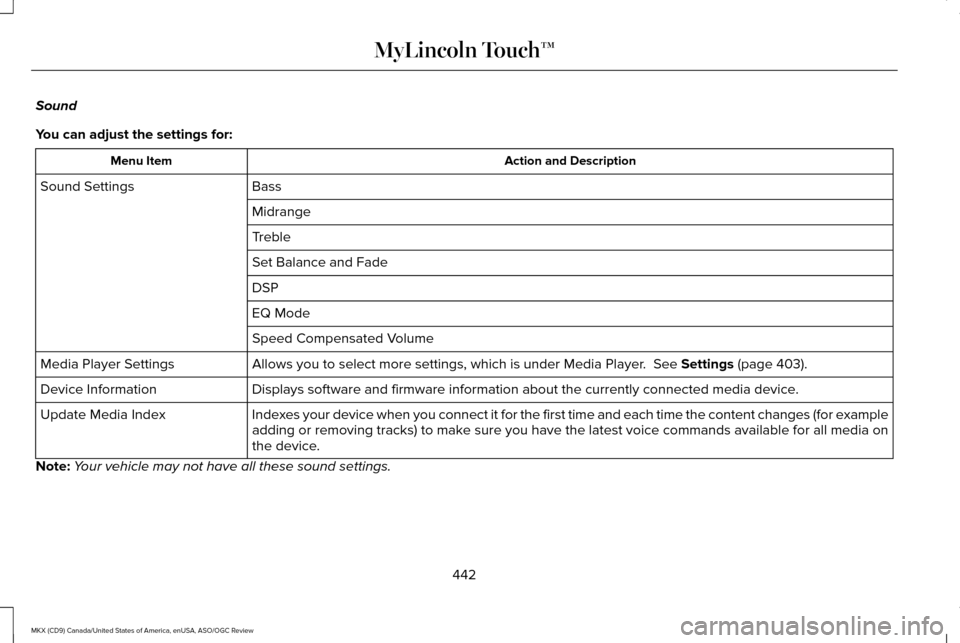
Sound
You can adjust the settings for:
Action and Description
Menu Item
Bass
Sound Settings
Midrange
Treble
Set Balance and Fade
DSP
EQ Mode
Speed Compensated Volume
Allows you to select more settings, which is under Media Player. See Settings (page 403).
Media Player Settings
Displays software and firmware information about the currently connected\
media device.
Device Information
Indexes your device when you connect it for the first time and each time the \
content changes (for example
adding or removing tracks) to make sure you have the latest voice commands available for all media on
the device.
Update Media Index
Note: Your vehicle may not have all these sound settings.
442
MKX (CD9) Canada/United States of America, enUSA, ASO/OGC Review MyLincoln Touch™
Page 450 of 563
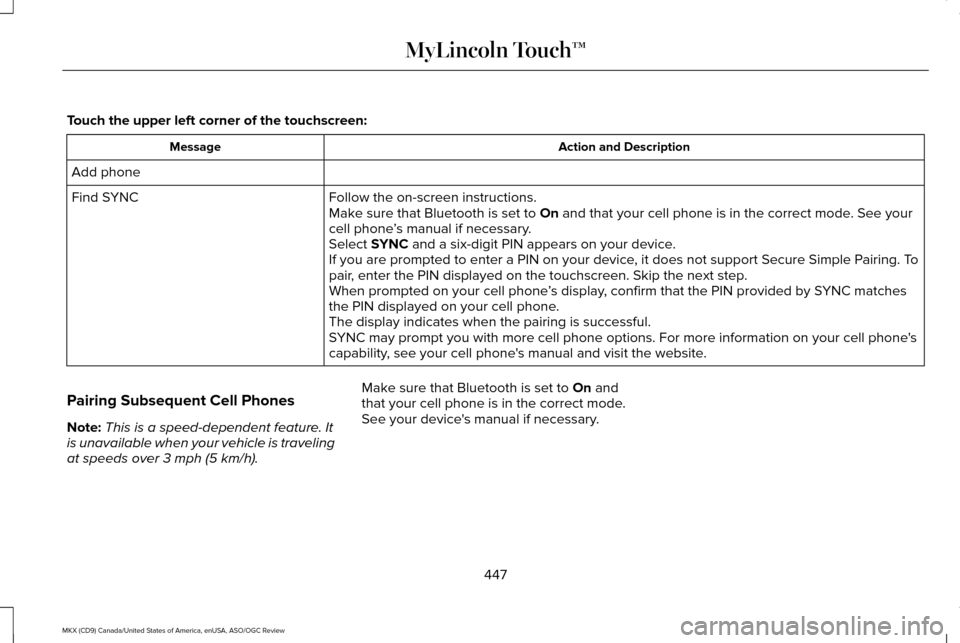
Touch the upper left corner of the touchscreen:
Action and Description
Message
Add phone Follow the on-screen instructions.
Find SYNC
Make sure that Bluetooth is set to On and that your cell phone is in the correct mode. See your
cell phone ’s manual if necessary.
Select
SYNC and a six-digit PIN appears on your device.
If you are prompted to enter a PIN on your device, it does not support Secure Simple Pairing. To
pair, enter the PIN displayed on the touchscreen. Skip the next step.
When prompted on your cell phone ’s display, confirm that the PIN provided by SYNC matches
the PIN displayed on your cell phone.
The display indicates when the pairing is successful.
SYNC may prompt you with more cell phone options. For more information on\
your cell phone's
capability, see your cell phone's manual and visit the website.
Pairing Subsequent Cell Phones
Note: This is a speed-dependent feature. It
is unavailable when your vehicle is traveling
at speeds over
3 mph (5 km/h). Make sure that Bluetooth is set to
On and
that your cell phone is in the correct mode.
See your device's manual if necessary.
447
MKX (CD9) Canada/United States of America, enUSA, ASO/OGC Review MyLincoln Touch™
Page 451 of 563
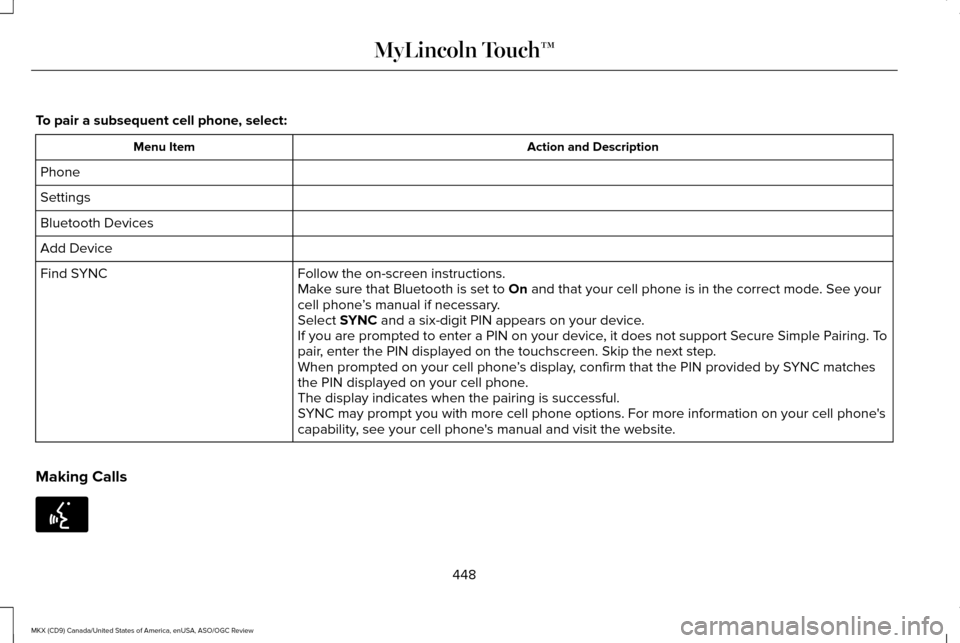
To pair a subsequent cell phone, select:
Action and Description
Menu Item
Phone
Settings
Bluetooth Devices
Add Device Follow the on-screen instructions.
Find SYNC
Make sure that Bluetooth is set to On and that your cell phone is in the correct mode. See your
cell phone ’s manual if necessary.
Select
SYNC and a six-digit PIN appears on your device.
If you are prompted to enter a PIN on your device, it does not support Secure Simple Pairing. To
pair, enter the PIN displayed on the touchscreen. Skip the next step.
When prompted on your cell phone ’s display, confirm that the PIN provided by SYNC matches
the PIN displayed on your cell phone.
The display indicates when the pairing is successful.
SYNC may prompt you with more cell phone options. For more information on\
your cell phone's
capability, see your cell phone's manual and visit the website.
Making Calls 448
MKX (CD9) Canada/United States of America, enUSA, ASO/OGC Review MyLincoln Touch™E142599
Page 452 of 563
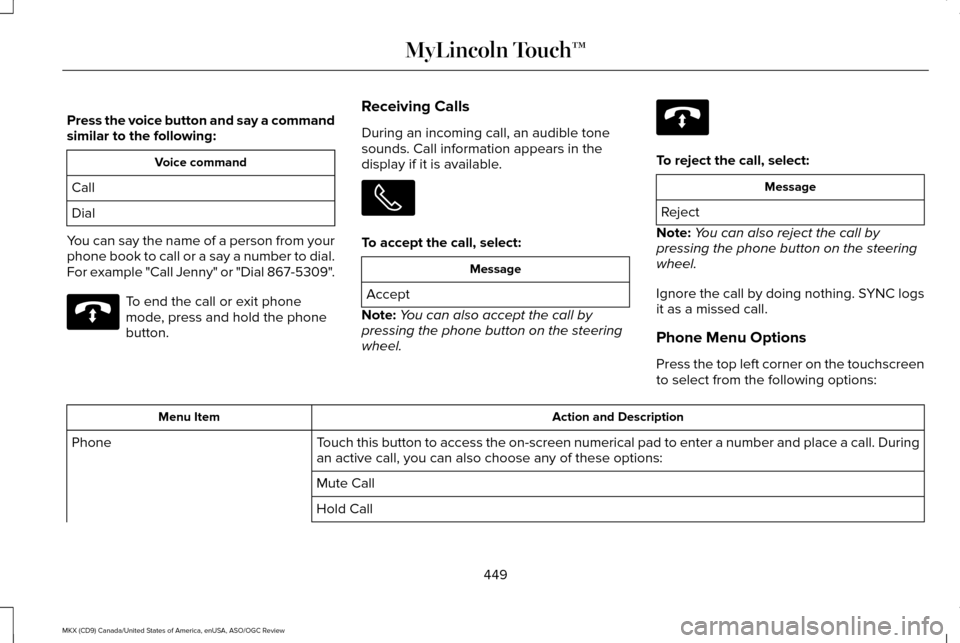
Press the voice button and say a command
similar to the following:
Voice command
Call
Dial
You can say the name of a person from your
phone book to call or a say a number to dial.
For example "Call Jenny" or "Dial 867-5309". To end the call or exit phone
mode, press and hold the phone
button.
Receiving Calls
During an incoming call, an audible tone
sounds. Call information appears in the
display if it is available. To accept the call, select:
Message
Accept
Note: You can also accept the call by
pressing the phone button on the steering
wheel. To reject the call, select:
Message
Reject
Note: You can also reject the call by
pressing the phone button on the steering
wheel.
Ignore the call by doing nothing. SYNC logs
it as a missed call.
Phone Menu Options
Press the top left corner on the touchscreen
to select from the following options: Action and Description
Menu Item
Touch this button to access the on-screen numerical pad to enter a number\
and place a call. During
an active call, you can also choose any of these options:
Phone
Mute Call
Hold Call
449
MKX (CD9) Canada/United States of America, enUSA, ASO/OGC Review MyLincoln Touch™E142632 E142632
Page 453 of 563

Action and Description
Menu Item
Privacy
Join Calls
End
Select to call stored contacts.
Quick Dial
Touch this button to access and call any contacts in your previously down\
loaded phonebook. The
system places the entries in alphabetical categories summarized at the t\
op of the screen
Phonebook
To turn on contact picture settings, if your device supports this feature\
, select:
Phone
Settings
Manage Phonebook
Display Photos from Phonebook
Certain smartphones may support transferring street addresses when liste\
d with phonebook contact
information. If your cell phone supports this feature, you can select and use these addresses as
destinations and save them as favorites.
Note: This is a cell phone-dependent feature. If your cell phone does not support downloading call
history using Bluetooth, SYNC keeps track of calls made with the SYNC system.
Call History
After you connect your Bluetooth-enabled cell phone to SYNC, you can access any previously
dialed, received or missed calls. You can also choose to save these to:
450
MKX (CD9) Canada/United States of America, enUSA, ASO/OGC Review MyLincoln Touch™
Page 456 of 563
When a new message arrives, an audible
tone sounds and the screen displays a
pop-up with the caller name and ID, if
supported by your cell phone. You can
select:
Action and Description
Message Action and Description
Message
To view the text message.
View
For SYNC to read the
message to you.
Listen
To call the contact.
Dial
To exit the screen.
Ignore
Phone Settings
To enter the phone settings menu select: Action and Description
Message
Phone
Settings
Then any of the following: Connect, disconnect, add or delete a device, as well as save it as a favorite.
Bluetooth Devices
To turn Bluetooth off or on.
Bluetooth
If you want all calls to go directly to your voicemail and not ring in t\
he vehicle. When this feature
is on, text message notifications do not ring inside the cabin either.
Do Not Disturb
Turn the 911 Assist feature on and off. See Information (page 455).
911 Assist
453
MKX (CD9) Canada/United States of America, enUSA, ASO/OGC Review MyLincoln Touch™
Page 467 of 563
Sirius Travel Link Voice Commands
Press the voice button on the steering
wheel controls. When prompted, say any
of the following or a similar command:
Voice command
Show Traffic
Show Weather
Help
Alerts If your vehicle is equipped with
Navigation, touch the I
(Information) button to access
these features. If your vehicle is not
equipped with Navigation, touch the corner
of the touchscreen with the green tab. Press Alerts, then choose from any of the
following services: Action and Description
Menu Item
The complete message
View
The message
Delete
Messages
Delete All
This screen displays any system messages
(such as an SD card fault).
Note: The system alerts you to any
messages by turning the information icon
yellow. After you read or delete the
messages, the icon returns to white.
Calendar If your vehicle is equipped with
Navigation, touch the I
(Information) button to access
these features. If your vehicle is not
equipped with Navigation, touch the corner
of the touchscreen with the green tab. Press Calendar. You can view the current
calendar by day, week or month.
911 Assist
(If Equipped) WARNINGS
Unless the 911 Assist setting is set on
before a crash, the system will not dial
for help, which could delay response time,
potentially increasing the risk of serious
injury or death after a crash. Do not wait for 911 Assist to make an
emergency call if you can do it yourself.
Dial emergency services immediately to
avoid delayed response time, which could
increase the risk of serious injury or death
after a crash. If you do not hear 911 Assist
within five seconds of the crash, the system
or phone may be damaged or non-functional. Always place your phone in a secure
location in your vehicle so it does not
become a projectile or damaged in a crash.
Failure to do so may cause serious injury to
someone or damage the phone, which could
prevent 911 Assist from working properly. 464
MKX (CD9) Canada/United States of America, enUSA, ASO/OGC Review MyLincoln Touch™E142599 E142608 E142608
Page 468 of 563
Note:
The SYNC 911 Assist feature must be
set on prior to the incident.
Note: Before setting this feature on, make
sure that you read the 911 Assist Privacy
Notice later in this section for important
information.
Note: If any user turns 911 Assist on or off,
that setting applies for all paired phones. If
911 Assist is turned off, either a voice
message plays or a display message (or
icon) comes on (or both) when your vehicle
is started after a previously paired phone
connects.
Note: Every phone operates differently.
While SYNC 911 Assist works with most
cellular phones, some may have trouble
using this feature.
If a crash deploys an airbag, excluding knee
airbags and rear inflatable safety belts where
fitted or activates the fuel pump shut-off, your
SYNC-equipped vehicle may be able to
contact emergency services by dialing 911
through a paired and connected
Bluetooth-enabled phone. For more
information about the 911 Assist feature visit: Website
visit www.SYNCMyRide.com www.SYNCMyRide.cawww.syncmaroute.ca
See Supplementary Restraints System
(page 44). Important information regarding
airbag deployment is in this chapter.
See
Roadside Emergencies (page 272).
Important information regarding the fuel
pump shut-off is in this chapter.
Setting 911 Assist On If your vehicle is equipped with Navigation,
touch the I (Information) button to access
these features. If your vehicle is not
equipped with Navigation, touch the corner
of the touchscreen with the green tab. Then
select:
Menu Item
Apps
911 Assist
On You can also access 911 Assist by pressing
the Setting icon and then selecting:
Menu Item
Settings
Phone
911 Assist
465
MKX (CD9) Canada/United States of America, enUSA, ASO/OGC Review MyLincoln Touch™E142608 E142607
Page 472 of 563
Where Am I?
For information about your current location,
select:
Action and Descrip-
tion
Menu Item
View your vehicle's
current location, if
your vehicle is
equipped with
navigation. If your
vehicle is not
equipped with
Where Am I? Action and Descrip-
tion
Menu Item
navigation, nothing
displays.
CLIMATE
Touch the lower right corner on the
touchscreen to access your climate control
features. Depending on your vehicle line and
option package, your climate screen may
look different from this screen. Note:
You can switch temperature units
between Fahrenheit and Celsius. See
Settings (page 403).
469
MKX (CD9) Canada/United States of America, enUSA, ASO/OGC Review MyLincoln Touch™
Page 479 of 563
To expand these listings, press the + in front
of the listing.
The system also allows you to sort
alphabetically, by distance or by cityseekr
listings (if available).
cityseekr
Note:
cityseekr point of interest (POI)
information is limited to approximately 912
cities (881 in the United States, 20 in Canada
and 11 in Mexico). cityseekr, when available, is a service that
provides more information about certain
points of interest such as restaurants, hotels
and attractions. When you have selected a point of interest,
the location and information appear, such as
address and phone number. If cityseekr lists
the point of interest, more information is
available, such as a brief description,
check-in and checkout times or restaurant
hours.
For a longer review, a list of services and
facilities, the average room, meal price or
the website press:
Menu Item
More Information
This screen displays the point of interest icon
such as: Hotel
Coffeehouse Food & Drink
Nightlife
Attraction
This icon appears when your
selection exists in multiple
categories within the system.
When you are viewing more information
for hotels, cityseekr also tells you if the
hotel has certain services and facilities
using icons, such as:
• Restaurant
• Business center
• Handicap facilities
• Laundry
• Refrigerator
476
MKX (CD9) Canada/United States of America, enUSA, ASO/OGC Review MyLincoln Touch™E142634 E143884 E142636 E142637 E142638 E142639 E142640