information display LINCOLN MKX 2016 Owners Manual
[x] Cancel search | Manufacturer: LINCOLN, Model Year: 2016, Model line: MKX, Model: LINCOLN MKX 2016Pages: 563, PDF Size: 4.96 MB
Page 251 of 563
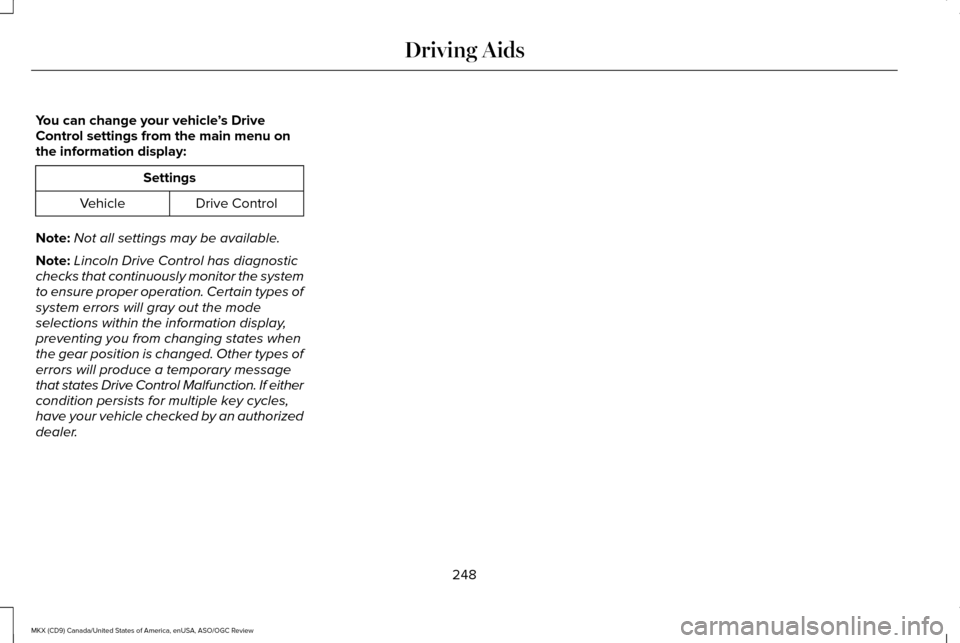
You can change your vehicle
’s Drive
Control settings from the main menu on
the information display: Settings
Drive Control
Vehicle
Note: Not all settings may be available.
Note: Lincoln Drive Control has diagnostic
checks that continuously monitor the system
to ensure proper operation. Certain types of
system errors will gray out the mode
selections within the information display,
preventing you from changing states when
the gear position is changed. Other types of
errors will produce a temporary message
that states Drive Control Malfunction. If either
condition persists for multiple key cycles,
have your vehicle checked by an authorized
dealer.
248
MKX (CD9) Canada/United States of America, enUSA, ASO/OGC Review Driving Aids
Page 265 of 563
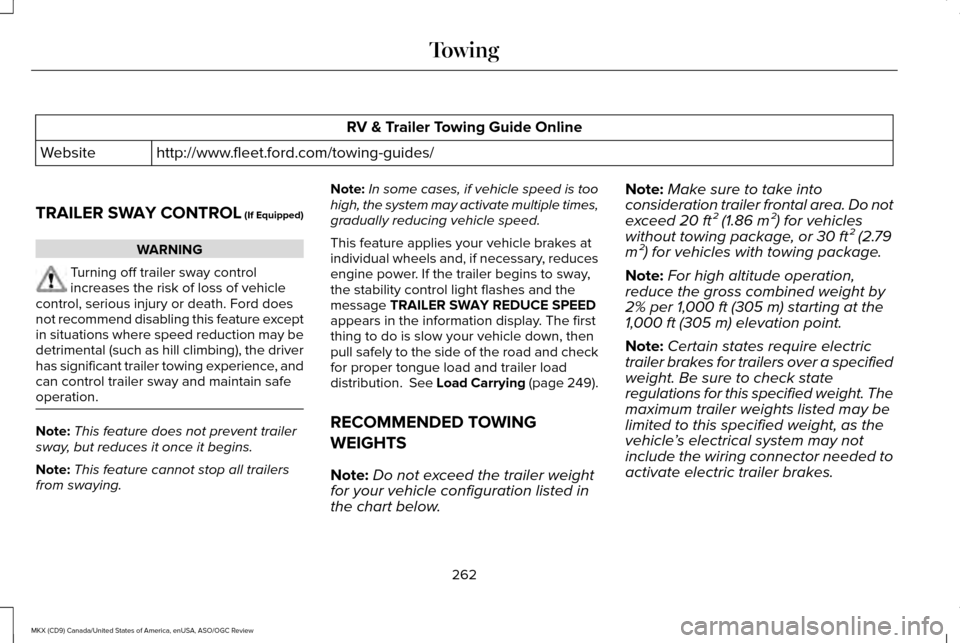
RV & Trailer Towing Guide Online
http://www.fleet.ford.com/towing-guides/
Website
TRAILER SWAY CONTROL (If Equipped) WARNING
Turning off trailer sway control
increases the risk of loss of vehicle
control, serious injury or death. Ford does
not recommend disabling this feature except
in situations where speed reduction may be
detrimental (such as hill climbing), the driver
has significant trailer towing experience, and
can control trailer sway and maintain safe
operation. Note:
This feature does not prevent trailer
sway, but reduces it once it begins.
Note: This feature cannot stop all trailers
from swaying. Note:
In some cases, if vehicle speed is too
high, the system may activate multiple times,
gradually reducing vehicle speed.
This feature applies your vehicle brakes at
individual wheels and, if necessary, reduces
engine power. If the trailer begins to sway,
the stability control light flashes and the
message TRAILER SWAY REDUCE SPEED
appears in the information display. The first
thing to do is slow your vehicle down, then
pull safely to the side of the road and check
for proper tongue load and trailer load
distribution.
See Load Carrying (page 249).
RECOMMENDED TOWING
WEIGHTS
Note: Do not exceed the trailer weight
for your vehicle configuration listed in
the chart below. Note:
Make sure to take into
consideration trailer frontal area. Do not
exceed 20 ft² (1.86 m²) for vehicles
without towing package, or 30 ft² (2.79
m²) for vehicles with towing package.
Note: For high altitude operation,
reduce the gross combined weight by
2% per
1,000 ft (305 m) starting at the
1,000 ft (305 m) elevation point.
Note: Certain states require electric
trailer brakes for trailers over a specified
weight. Be sure to check state
regulations for this specified weight. The
maximum trailer weights listed may be
limited to this specified weight, as the
vehicle ’s electrical system may not
include the wiring connector needed to
activate electric trailer brakes.
262
MKX (CD9) Canada/United States of America, enUSA, ASO/OGC Review Towing
Page 271 of 563
2. Select Neutral Tow under the Vehicle
Settings menu in the information display.
See
General Information (page 114).
3. Press and hold the OK button to start the
neutral tow process.
4. Press the brake pedal and select
N on
the push-button transmission.
5. Turn the ignition off by pressing the engine START button without pressing
the brake pedal.
If the process is completes successfully:
• the
N on the push-button transmission
blinks slowly
• Neutral Tow Engaged turn ignition off
for towing
appears in the information
display.
Note: If the parking brake is applied, Neutral
Tow remove park brake for towing appears
in the information display.
Note: Do not exceed 65 mph (105 km/h). Note:
Start the engine and allow it to run for
five minutes at the beginning of each day
and every six hours (or fewer). Shut the
engine off and verify that
Neutral tow
engaged appears in the display before
continuing to tow.
Exit Neutral Tow mode, make sure the
ignition is on (engine can be on or off ), press
the brake pedal and select
P on the
push-button transmission.
If the process is completed successfully,
Neutral Tow disengaged
appears in the
information display and both the instrument
cluster and push-button transmission display
P
.
268
MKX (CD9) Canada/United States of America, enUSA, ASO/OGC Review Towing
Page 290 of 563
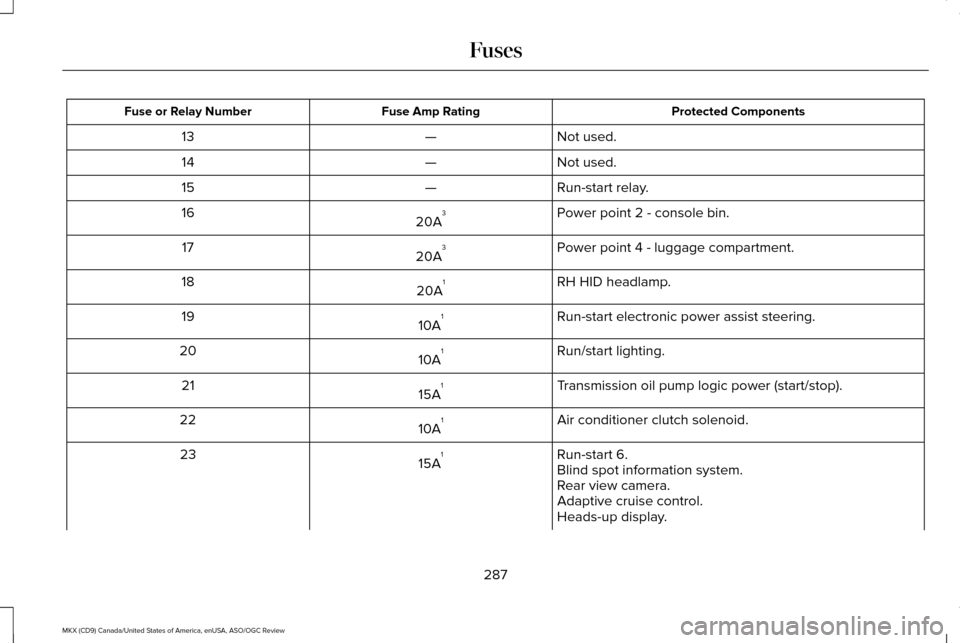
Protected Components
Fuse Amp Rating
Fuse or Relay Number
Not used.
—
13
Not used.
—
14
Run-start relay.
—
15
Power point 2 - console bin.
20A 3
16
Power point 4 - luggage compartment.
20A 3
17
RH HID headlamp.
20A 1
18
Run-start electronic power assist steering.
10A 1
19
Run/start lighting.
10A 1
20
Transmission oil pump logic power (start/stop).
15A 1
21
Air conditioner clutch solenoid.
10A 1
22
Run-start 6.
15A 1
23
Blind spot information system.
Rear view camera.
Adaptive cruise control.
Heads-up display.
287
MKX (CD9) Canada/United States of America, enUSA, ASO/OGC Review Fuses
Page 312 of 563
3.
Remove the engine oil filler cap and use
a funnel to pour the engine oil into the
opening.
4. Wipe off any spilled oil.
5. Replace the filler cap. Turn it until you feel a strong resistance.
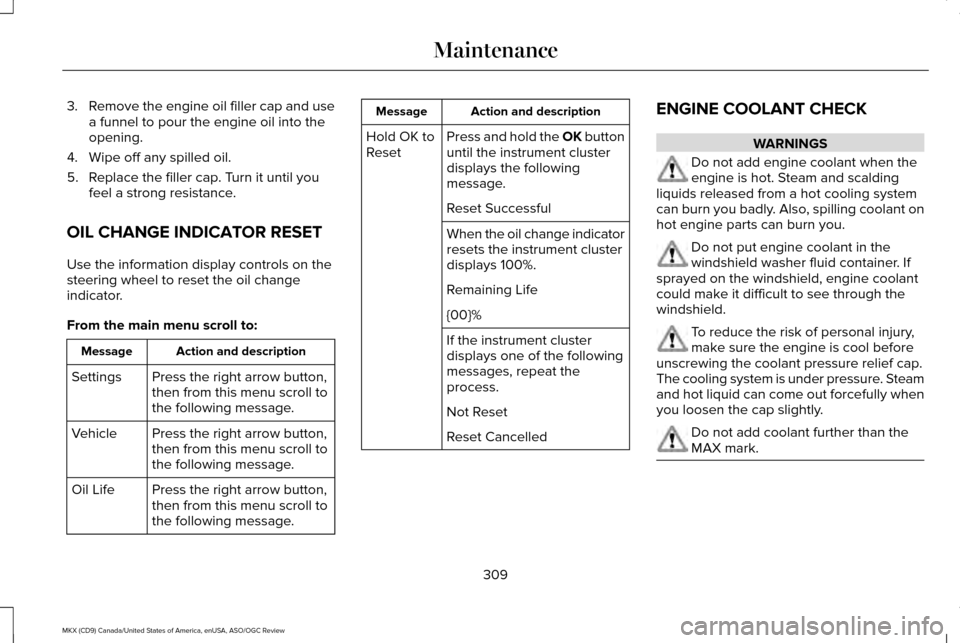
OIL CHANGE INDICATOR RESET
Use the information display controls on the
steering wheel to reset the oil change
indicator.
From the main menu scroll to: Action and description
Message
Press the right arrow button,
then from this menu scroll to
the following message.
Settings
Press the right arrow button,
then from this menu scroll to
the following message.
Vehicle
Press the right arrow button,
then from this menu scroll to
the following message.
Oil Life Action and description
Message
Press and hold the OK button
until the instrument cluster
displays the following
message.
Hold OK to
Reset
Reset Successful
When the oil change indicator
resets the instrument cluster
displays 100%.
Remaining Life
{00}%
If the instrument cluster
displays one of the following
messages, repeat the
process.
Not Reset
Reset Cancelled ENGINE COOLANT CHECK WARNINGS
Do not add engine coolant when the
engine is hot. Steam and scalding
liquids released from a hot cooling system
can burn you badly. Also, spilling coolant on
hot engine parts can burn you. Do not put engine coolant in the
windshield washer fluid container. If
sprayed on the windshield, engine coolant
could make it difficult to see through the
windshield. To reduce the risk of personal injury,
make sure the engine is cool before
unscrewing the coolant pressure relief cap.
The cooling system is under pressure. Steam
and hot liquid can come out forcefully when
you loosen the cap slightly. Do not add coolant further than the
MAX mark.
309
MKX (CD9) Canada/United States of America, enUSA, ASO/OGC Review Maintenance
Page 315 of 563
How Fail-Safe Cooling Works
If the engine begins to overheat, the engine
coolant temperature gauge moves to the red
(hot) area and:
A high engine temperature
message appears in the
information display.
The service engine soon indicator
appears in the information display.
If the engine reaches a preset
over-temperature condition, the engine
automatically switches to alternating cylinder
operation. Each disabled cylinder acts as an
air pump and cools the engine.
If this occurs, your vehicle still operates.
However:
• The engine power becomes limited.
• The air conditioning system becomes
disabled.
Continued operation increases the engine
temperature and the engine completely
shuts down, causing steering and braking
effort to increase. Once the engine temperature cools, the
engine can be re-started. Take your vehicle
to an authorized dealer as soon as possible
to minimize engine damage.
When Fail-Safe Mode Is Activated
WARNINGS
Fail-safe mode is for use during
emergencies only. Operate your
vehicle in fail-safe mode only as long as
necessary to bring your vehicle to rest in a
safe location and seek immediate repairs.
When in fail-safe mode, your vehicle will have
limited power, will not be able to maintain
high-speed operation, and may completely
shut down without warning, potentially losing
engine power, power steering assist, and
power brake assist, which may increase the
possibility of a crash resulting in serious
injury. Never remove the coolant reservoir
cap while the engine is running or hot. Your vehicle has limited engine power when
in the fail-safe mode. Drive your vehicle with
caution. Your vehicle does not maintain
high-speed operation and the engine
operates poorly.
Remember that the engine is capable of
automatically shutting down to prevent
engine damage. In this situation:
1. Pull off the road as soon as safely
possible and switch off the engine.
2. Tow your vehicle to an authorized dealer.
3. If this is not possible, wait a short period
for the engine to cool.
4. Check the coolant level and add if low.
5. Re-start the engine and drive your vehicle
to an authorized dealer.
Note: Driving your vehicle without repair
increases the chance of engine damage.
See an authorized dealer as soon as
possible.
312
MKX (CD9) Canada/United States of America, enUSA, ASO/OGC Review Maintenance
Page 320 of 563
For longer, trouble-free operation, keep the
top of the battery clean and dry. Also, make
certain the battery cables are always tightly
fastened to the battery terminals.
If you see any corrosion on the battery or
terminals, remove the cables from the
terminals and clean with a wire brush. You
can neutralize the acid with a solution of
baking soda and water.
When a battery replacement is required, the
battery should only be replaced with a Ford
recommended replacement battery that
matches the electrical requirements of the
vehicle.
Because your vehicle
’s engine is
electronically-controlled by a computer,
some engine control settings are maintained
by power from the low voltage battery. Some
engine computer settings, like the idle trim
and fuel trim strategy, optimize the
driveability and performance of the engine. Some other computer settings, like the clock
and radio station presets, are also maintained
in memory by power from the low voltage
battery. When a technician disconnects and
connects the low voltage battery, these
settings are erased.
Note:
Until you switch the ignition to the on
position, you will receive a message in your
information display stating that your vehicle
is not in park.
Complete the following procedure in order
to restore the settings:
1. With the vehicle at a complete stop, set the parking brake.
2. Shift the transmission into P.
3. Turn off all accessories.
4. Step on the brake pedal and start the vehicle. 5. Run the engine until it reaches normal
operating temperature. While the engine
is warming up, complete the following:
Reset the clock. See Audio System
(page 388). Reset the power windows
bounce-back feature. See Windows and
Mirrors (page 100).
Reset the radio station
presets. See Audio System (page 388).
6. Allow the engine to idle for at least one minute. If the engine turns off, step on
the accelerator to start the engine.
7. While the engine is running, step on the brake pedal and shift the transmission to
N.
8. Allow the engine to run for at least one minute by pressing on the accelerator
pedal.
9. Drive your vehicle at least 10 miles (16 kilometers) to completely relearn the idle
and fuel trim strategy.
Note: Certain features may not operate if
the Battery Monitor System is not reset with
a scan tool following a jump start or battery
replacement. Normal electrical accessory
operation should resume after your vehicle
is left undisturbed for 8 hours.
317
MKX (CD9) Canada/United States of America, enUSA, ASO/OGC Review Maintenance
Page 396 of 563
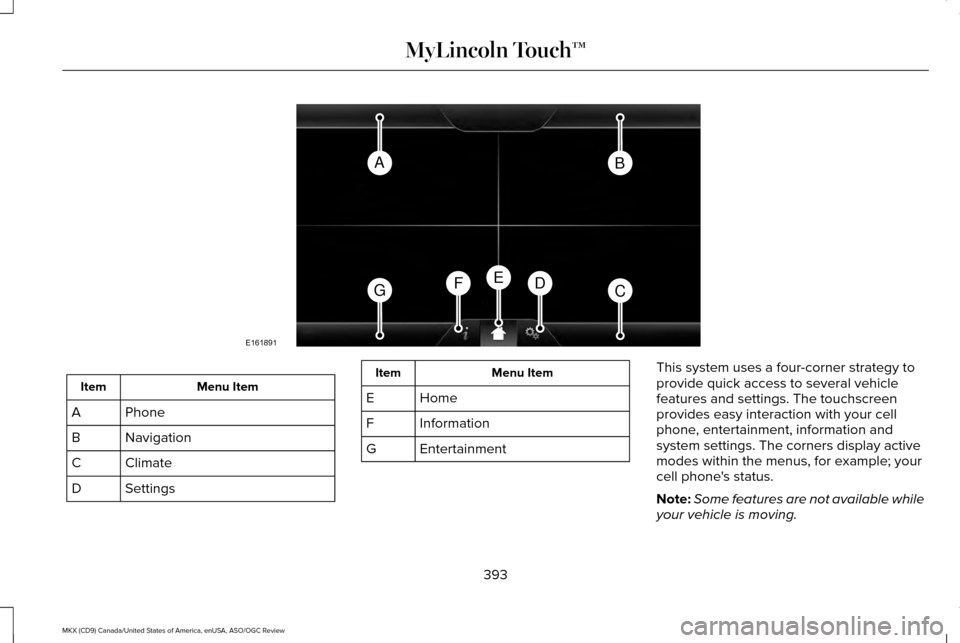
Menu Item
Item
Phone
A
Navigation
B
Climate
C
Settings
D Menu Item
Item
Home
E
Information
F
Entertainment
G This system uses a four-corner strategy to
provide quick access to several vehicle
features and settings. The touchscreen
provides easy interaction with your cell
phone, entertainment, information and
system settings. The corners display active
modes within the menus, for example; your
cell phone's status.
Note:
Some features are not available while
your vehicle is moving.
393
MKX (CD9) Canada/United States of America, enUSA, ASO/OGC Review MyLincoln Touch™AB
GCDFE
E161891
Page 418 of 563
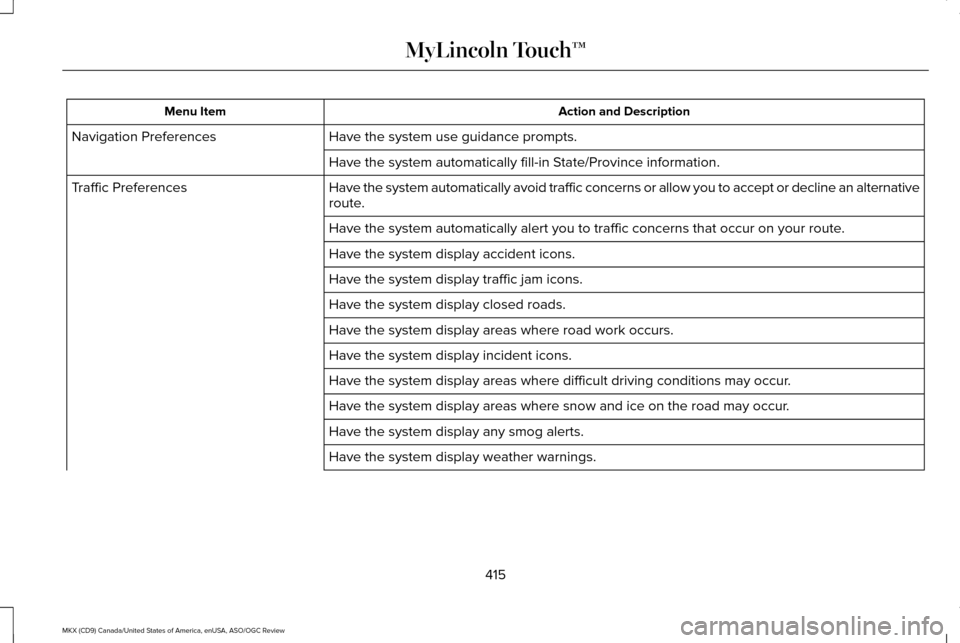
Action and Description
Menu Item
Have the system use guidance prompts.
Navigation Preferences
Have the system automatically fill-in State/Province information.
Have the system automatically avoid traffic concerns or allow you to acc\
ept or decline an alternative
route.
Traffic Preferences
Have the system automatically alert you to traffic concerns that occur o\
n your route.
Have the system display accident icons.
Have the system display traffic jam icons.
Have the system display closed roads.
Have the system display areas where road work occurs.
Have the system display incident icons.
Have the system display areas where difficult driving conditions may occ\
ur.
Have the system display areas where snow and ice on the road may occur.
Have the system display any smog alerts.
Have the system display weather warnings.
415
MKX (CD9) Canada/United States of America, enUSA, ASO/OGC Review MyLincoln Touch™
Page 428 of 563
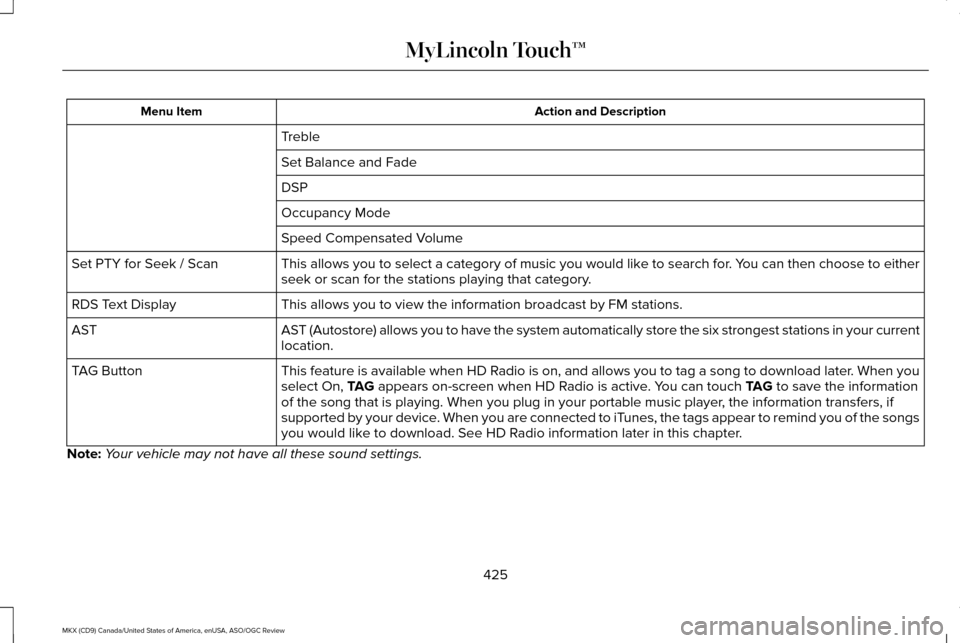
Action and Description
Menu Item
Treble
Set Balance and Fade
DSP
Occupancy Mode
Speed Compensated Volume
This allows you to select a category of music you would like to search for. You can then choose to either
seek or scan for the stations playing that category.
Set PTY for Seek / Scan
This allows you to view the information broadcast by FM stations.
RDS Text Display
AST (Autostore) allows you to have the system automatically store the si\
x strongest stations in your current
location.
AST
This feature is available when HD Radio is on, and allows you to tag a song to download later. When you
select On, TAG appears on-screen when HD Radio is active. You can touch TAG to save the information
of the song that is playing. When you plug in your portable music player\
, the information transfers, if
supported by your device. When you are connected to iTunes, the tags appear to remind you of the songs
you would like to download. See HD Radio information later in this chapter.
TAG Button
Note: Your vehicle may not have all these sound settings.
425
MKX (CD9) Canada/United States of America, enUSA, ASO/OGC Review MyLincoln Touch™