Front LINCOLN MKX 2016 Owner's Guide
[x] Cancel search | Manufacturer: LINCOLN, Model Year: 2016, Model line: MKX, Model: LINCOLN MKX 2016Pages: 563, PDF Size: 4.96 MB
Page 63 of 563
PRINCIPLE OF OPERATION
MyKey allows you to program keys with
restricted driving modes to promote good
driving habits. All but one of the keys can be
activated with these restricted modes.
Any keys that remain unprogrammed are
referred to as administrator keys or admin
keys. They can be used to:
•
Create a MyKey.
• Program configurable MyKey settings.
• Clear all MyKey features.
When you have created a MyKey, you can
access the following information by using
the information display to determine:
• How many admin keys and MyKeys are
programmed to your vehicle.
• The total distance your vehicle traveled
with a MyKey.
Note: Switch the vehicle on to use the
system.
Note: All MyKeys are programmed to the
same settings. You cannot program them
individually. Note:
For vehicles equipped with
push-button start, when both a MyKey and
an admin remote transmitter are present,
the admin remote transmitter will be
recognized by the vehicle while switching
the vehicle on to start the vehicle.
Non-configurable Settings
The following settings cannot be changed
by an admin key user:
• Safety belt reminder. You cannot disable
this feature. The audio system will mute
when the front seat passengers ’ safety
belts are not fastened.
• Early low fuel or charge. The low-fuel or
low charge warning activates earlier,
giving the MyKey user more time to refuel
or recharge.
• Driver assist features, if equipped on your
vehicle, are forced on: parking aid and
Blind Spot Information System (BLIS) with
cross traffic alert.
• Satellite radio adult content restrictions,
if equipped on your vehicle. Configurable Settings
With an admin key, you can configure certain
MyKey settings when you first create a
MyKey and before you recycle the key or
restart the vehicle. You can also change the
settings afterward with an admin key.
•
A vehicle speed limit can be set.
Warnings will be shown in the display
followed by an audible tone when your
vehicle reaches the set speed. You
cannot override the set speed by fully
depressing the accelerator pedal or by
setting cruise control. WARNING
Do not set MyKey maximum speed limit
to a limit that will prevent the driver
from maintaining a safe speed considering
posted speed limits and prevailing road
conditions. The driver is always responsible
to drive in accordance with local laws and
prevailing conditions. Failure to do so could
result in accident or injury. 60
MKX (CD9) Canada/United States of America, enUSA, ASO/OGC Review MyKey™
Page 70 of 563
LOCKING AND UNLOCKING
You can use the power door lock control or
the remote control to lock and unlock your
vehicle.
Power Door Locks
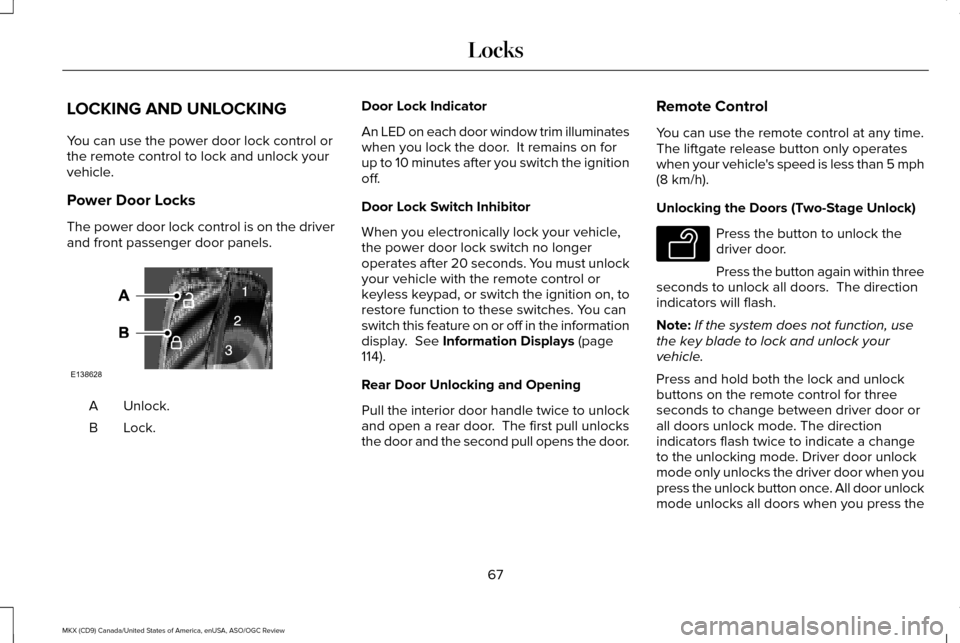
The power door lock control is on the driver
and front passenger door panels.
Unlock.
A
Lock.B Door Lock Indicator
An LED on each door window trim illuminates
when you lock the door. It remains on for
up to 10 minutes after you switch the ignition
off.
Door Lock Switch Inhibitor
When you electronically lock your vehicle,
the power door lock switch no longer
operates after 20 seconds. You must unlock
your vehicle with the remote control or
keyless keypad, or switch the ignition on, to
restore function to these switches. You can
switch this feature on or off in the information
display. See Information Displays (page
114).
Rear Door Unlocking and Opening
Pull the interior door handle twice to unlock
and open a rear door. The first pull unlocks
the door and the second pull opens the door. Remote Control
You can use the remote control at any time.
The liftgate release button only operates
when your vehicle's speed is less than 5 mph
(8 km/h)
.
Unlocking the Doors (Two-Stage Unlock) Press the button to unlock the
driver door.
Press the button again within three
seconds to unlock all doors. The direction
indicators will flash.
Note: If the system does not function, use
the key blade to lock and unlock your
vehicle.
Press and hold both the lock and unlock
buttons on the remote control for three
seconds to change between driver door or
all doors unlock mode. The direction
indicators flash twice to indicate a change
to the unlocking mode. Driver door unlock
mode only unlocks the driver door when you
press the unlock button once. All door unlock
mode unlocks all doors when you press the
67
MKX (CD9) Canada/United States of America, enUSA, ASO/OGC Review LocksE138628 E138629
Page 72 of 563
Right-Hand Side
Turn counterclockwise to lock.
Unlocking the Doors
If the central locking function does not
operate, unlock the driver door and then
unlock all other doors individually by pulling
the interior door handles.
Note:
When the doors have been unlocked
using this method, the doors must be locked
individually until the central locking function
has been repaired.
Activating Intelligent Access
The intelligent access key must be within
3.3 ft (1 m) of your vehicle.
At a Door
Pull an exterior door handle to unlock and
open the door. Make sure not to touch the
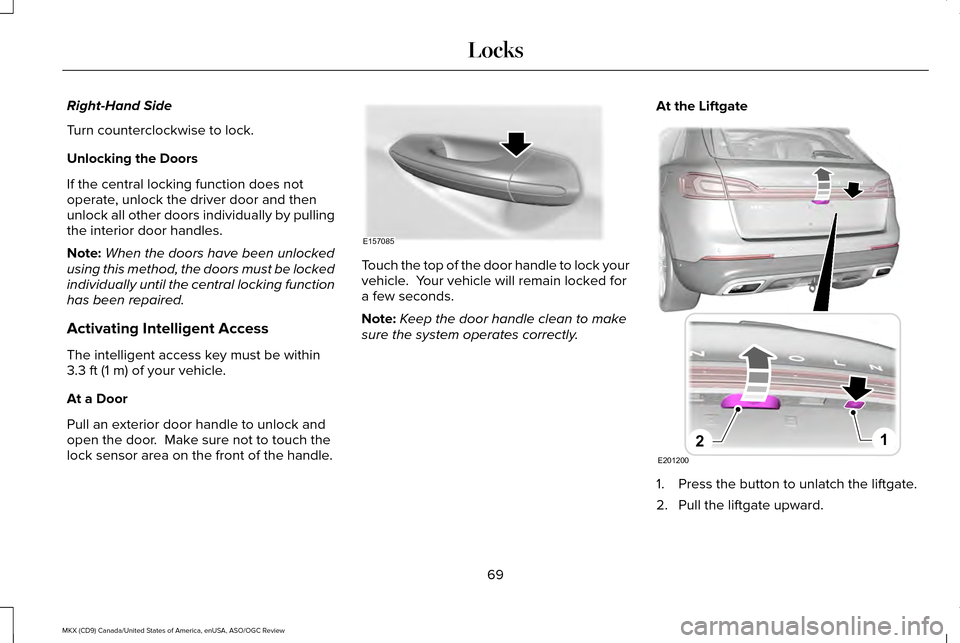
lock sensor area on the front of the handle. Touch the top of the door handle to lock your
vehicle. Your vehicle will remain locked for
a few seconds.
Note:
Keep the door handle clean to make
sure the system operates correctly. At the Liftgate
1. Press the button to unlatch the liftgate.
2. Pull the liftgate upward.
69
MKX (CD9) Canada/United States of America, enUSA, ASO/OGC Review LocksE157085 E201200
12
Page 73 of 563
Smart Unlocks for Intelligent Access
Keys
This helps to prevent you from locking your
key inside the passenger compartment or
rear cargo area.
When you electronically lock your vehicle
with any door open, transmission in park (P)
and the ignition off, the system searches for
an intelligent access key inside your vehicle
after you close the last door. If the system
finds a key, all of the doors immediately
unlock and the horn sounds twice, indicating
that a key is inside.
You can override the smart unlock feature
and intentionally lock the intelligent access
key inside your vehicle. To do this, lock your
vehicle after you have closed all the doors
by:
•
Using the keyless entry keypad.
• Pressing the lock button on another
intelligent access key.
• Touching the locking area on the handle
with another intelligent access key in
your hand. When you open one of the front doors and
lock your vehicle using the power door lock
control, all doors will lock then unlock if:
•
The ignition is on.
• The ignition is off and the transmission
is not in park (P).
Auto Relock
If you press the unlock button on the remote
control and do not open a door within 45
seconds, your vehicle locks and the alarm
arms. You can switch this feature on or off
in the information display. See Information
Displays (page 114).
Autolock
Autolock locks all the doors when:
• All doors are closed.
• The ignition is on.
• You shift into any gear putting your
vehicle in motion.
• Your vehicle's speed is greater than
12 mph (20 km/h)
. Autolock repeats when:
•
You open then close any door while the
ignition is on and your vehicle's speed is
less than
9 mph (15 km/h).
• Your vehicle's speed is greater than
12 mph (20 km/h)
.
Enabling or Disabling
To enable or disable the autolock feature,
contact an authorized dealer.
Autounlock
Autounlock unlocks all the doors when:
• The ignition is on, all the doors are closed
and your vehicle's speed is greater than
12 mph (20 km/h)
.
• You stop your vehicle and switch the
ignition off or to accessory.
• You open the driver door within 10
minutes of switching the ignition off or to
accessory.
Note: The doors do not autounlock if you
electronically lock your vehicle after you
switch the ignition off and before you open
the driver door.
70
MKX (CD9) Canada/United States of America, enUSA, ASO/OGC Review Locks
Page 86 of 563
ADJUSTING THE STEERING WHEEL
- VEHICLES WITH: MANUAL
ADJUSTABLE STEERING COLUMN
WARNING
Do not adjust the steering wheel when
your vehicle is moving.
Note:
Make sure that you are sitting in the
correct position. See Sitting in the Correct
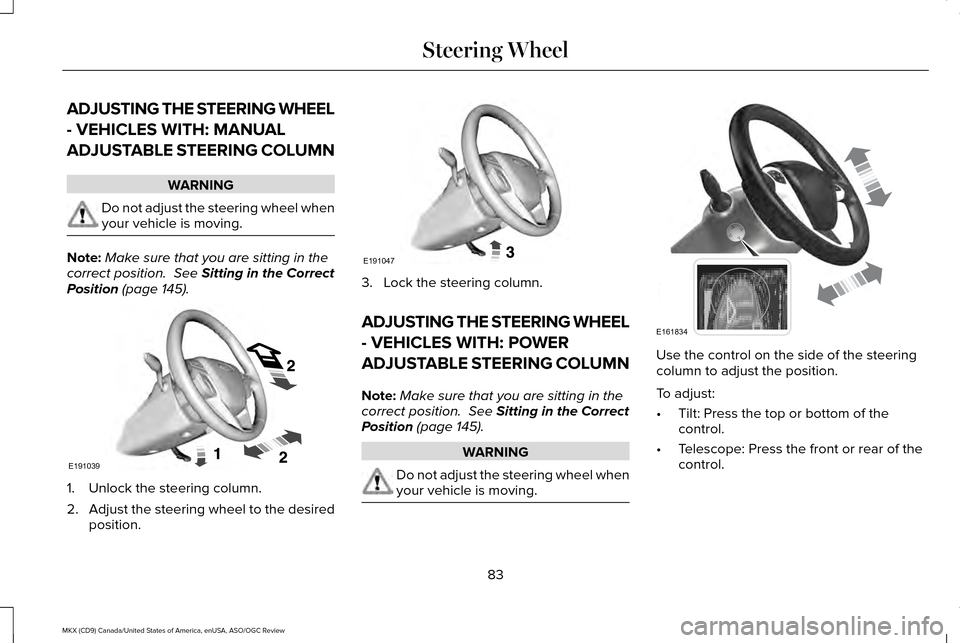
Position (page 145). 1. Unlock the steering column.
2.
Adjust the steering wheel to the desired
position. 3. Lock the steering column.
ADJUSTING THE STEERING WHEEL
- VEHICLES WITH: POWER
ADJUSTABLE STEERING COLUMN
Note:
Make sure that you are sitting in the
correct position.
See Sitting in the Correct
Position (page 145). WARNING
Do not adjust the steering wheel when
your vehicle is moving. Use the control on the side of the steering
column to adjust the position.
To adjust:
•
Tilt: Press the top or bottom of the
control.
• Telescope: Press the front or rear of the
control.
83
MKX (CD9) Canada/United States of America, enUSA, ASO/OGC Review Steering WheelE191039 E191047 E161834
Page 92 of 563
Note:
When you set the wiper system to
intermittent wipe and the autowiper system
is on, the autowiper sensitivity setting adjusts
the wiper speed according to the moisture
on the windshield only. Use the wiper lever
to wipe the windshield on-demand.
Keep the outside of the windshield clean.
The rain sensor is very sensitive. If the area
around the mirror is dirty, then the wipers
may operate if dirt, mist or insects hit the
windshield.
WINDSHIELD WASHERS
Note: Do not operate the washers when the
washer reservoir is empty. This may cause
the washer pump to overheat. To operate the washers and spray the
windshield, pull the lever toward you.
A wipe will occur a few seconds after
washing to clear any remaining washer fluid.
This feature can be switched on or off in the
information display. See General
Information (page 114).
Front Camera Washer
(If Equipped)
Operating the windshield washer will also
operate the front camera washer. REAR WINDOW WIPER AND
WASHERS
Rear Window Wiper
Note:
Make sure you switch the rear window
wiper and ignition off before using an
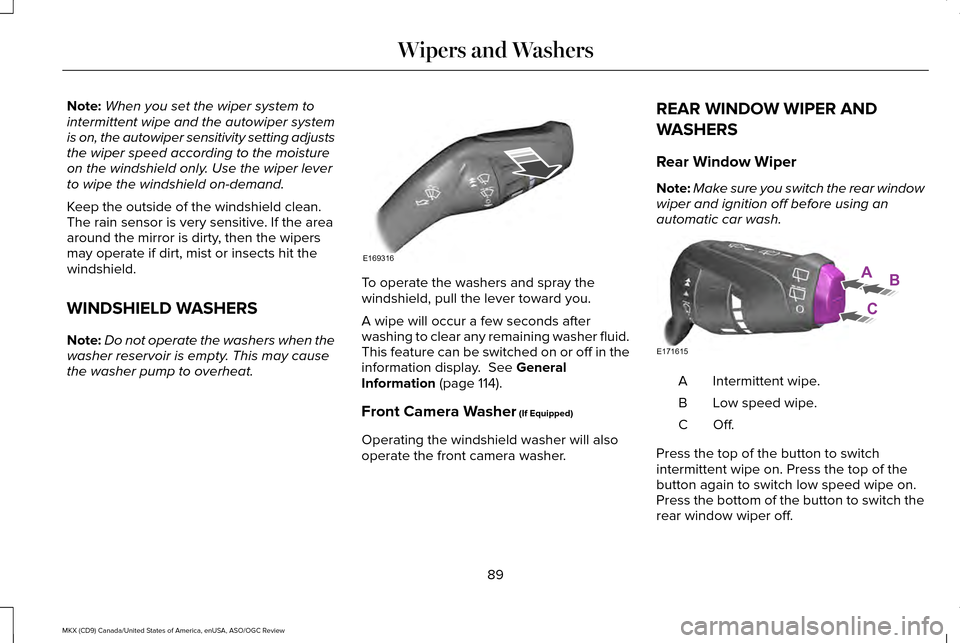
automatic car wash. Intermittent wipe.
A
Low speed wipe.
B
Off.C
Press the top of the button to switch
intermittent wipe on. Press the top of the
button again to switch low speed wipe on.
Press the bottom of the button to switch the
rear window wiper off.
89
MKX (CD9) Canada/United States of America, enUSA, ASO/OGC Review Wipers and WashersE169316 AB
C
E171615
Page 93 of 563
When you switch on the front wipers and
move the gearshift lever to reverse (R), rear
intermittent wipe automatically turns on.
Rear Window Washer
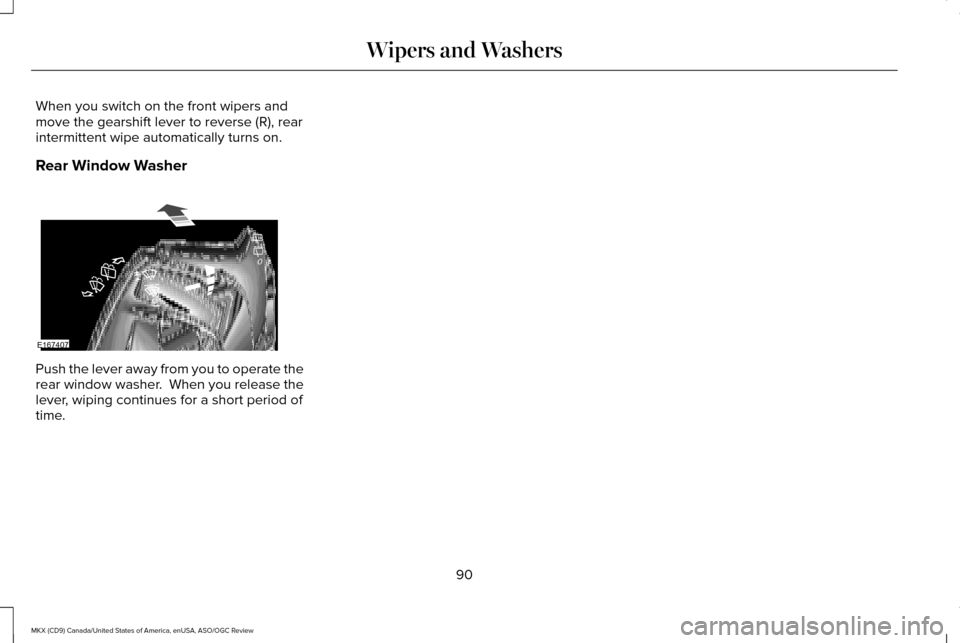
Push the lever away from you to operate the
rear window washer. When you release the
lever, wiping continues for a short period of
time.
90
MKX (CD9) Canada/United States of America, enUSA, ASO/OGC Review Wipers and WashersE167407
Page 98 of 563
When switched off in the information display,
the daytime running lamps are off in all
lighting control switch positions.
AUTOMATIC HIGH BEAM
CONTROL (If Equipped)
The system will automatically turn on your
high beams if it is dark enough and no other
traffic is present. When it detects the
headlights of an approaching vehicle, the tail
lamps of the preceding vehicle or street
lighting, the system will turn off the high
beams before they distract other drivers. The
low beams remain on.
Note: If it appears that automatic control of
the high beams is not functioning properly,
check the windshield in front of the camera
for a blockage. A clear view of the road is
required for proper system operation. Have
any windshield damage in the area of the
camera ’s field-of-view repaired. Note:
If the system detects a blockage, for
example bird droppings, bug splatter, snow
or ice, the system will go into low beam
mode until you clear the blockage. A
message may also appear in the instrument
cluster display noting the front camera is
blocked.
Note: Typical road dust, dirt and water spots
will not affect the performance of the
automatic high beam system . However, in
cold or inclement weather conditions, you
will notice a decrease in the availability of
the high beam system, especially at start up.
If you want to change the beam state
independently of the system, you may switch
the high beams on or off using the
multifunction switch. Automatic control will
resume when conditions are correct.
Note: Modification of the vehicle ride height
such as using much larger tires, may
degrade feature performance.
A camera sensor, centrally mounted behind
the windshield of your vehicle, continuously
monitors conditions to decide when to switch
the high beams off and on. Once the system is active, the high beams
will switch on if:
•
the ambient light level is low enough
• there is no traffic in front of the vehicle
• the vehicle speed is greater than
approximately 32 mph (52 km/h)
The high beams will switch off if:
• the system detects the headlamps of an
approaching vehicle or the tail lamps of
a preceding vehicle.
• vehicle speed falls below approximately
27 mph (44 km/h)
• the ambient light level is high enough
that high beams are not required
• the system detects severe rain, snow or
fog
• the camera is blocked
Activating the System
Switch on the system using the information
display and autolamps.
See Information
Displays (page 114). See Autolamps (page
92).
95
MKX (CD9) Canada/United States of America, enUSA, ASO/OGC Review Lighting
Page 100 of 563
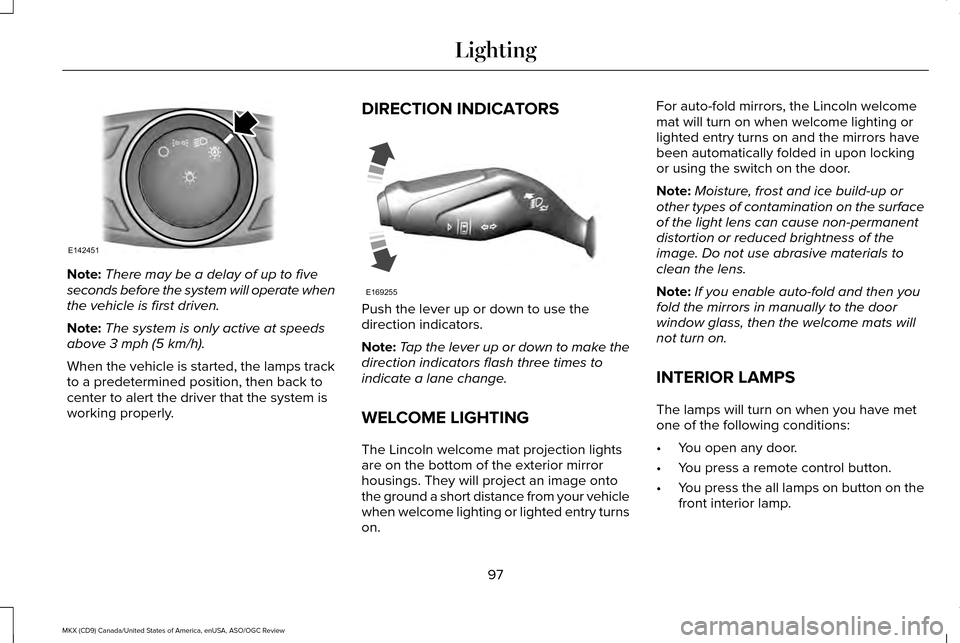
Note:
There may be a delay of up to five
seconds before the system will operate when
the vehicle is first driven.
Note: The system is only active at speeds
above 3 mph (5 km/h).
When the vehicle is started, the lamps track
to a predetermined position, then back to
center to alert the driver that the system is
working properly. DIRECTION INDICATORS
Push the lever up or down to use the
direction indicators.
Note:
Tap the lever up or down to make the
direction indicators flash three times to
indicate a lane change.
WELCOME LIGHTING
The Lincoln welcome mat projection lights
are on the bottom of the exterior mirror
housings. They will project an image onto
the ground a short distance from your vehicle
when welcome lighting or lighted entry turns
on. For auto-fold mirrors, the Lincoln welcome
mat will turn on when welcome lighting or
lighted entry turns on and the mirrors have
been automatically folded in upon locking
or using the switch on the door.
Note:
Moisture, frost and ice build-up or
other types of contamination on the surface
of the light lens can cause non-permanent
distortion or reduced brightness of the
image. Do not use abrasive materials to
clean the lens.
Note: If you enable auto-fold and then you
fold the mirrors in manually to the door
window glass, then the welcome mats will
not turn on.
INTERIOR LAMPS
The lamps will turn on when you have met
one of the following conditions:
• You open any door.
• You press a remote control button.
• You press the all lamps on button on the
front interior lamp.
97
MKX (CD9) Canada/United States of America, enUSA, ASO/OGC Review LightingE142451 E169255
Page 101 of 563
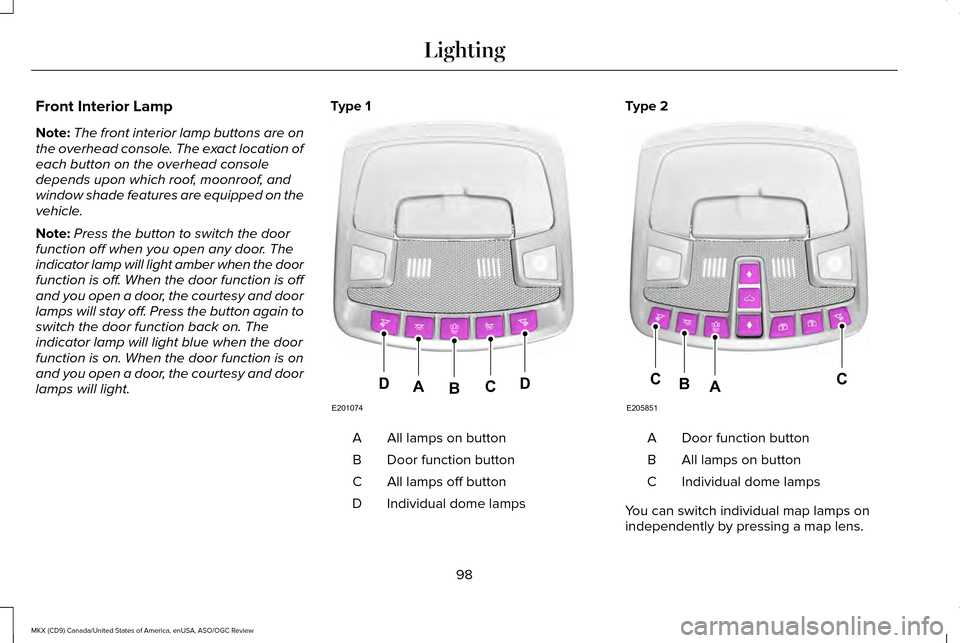
Front Interior Lamp
Note:
The front interior lamp buttons are on
the overhead console. The exact location of
each button on the overhead console
depends upon which roof, moonroof, and
window shade features are equipped on the
vehicle.
Note: Press the button to switch the door
function off when you open any door. The
indicator lamp will light amber when the door
function is off. When the door function is off
and you open a door, the courtesy and door
lamps will stay off. Press the button again to
switch the door function back on. The
indicator lamp will light blue when the door
function is on. When the door function is on
and you open a door, the courtesy and door
lamps will light. Type 1
All lamps on button
A
Door function button
B
All lamps off button
C
Individual dome lamps
D Type 2
Door function button
A
All lamps on button
B
Individual dome lamps
C
You can switch individual map lamps on
independently by pressing a map lens.
98
MKX (CD9) Canada/United States of America, enUSA, ASO/OGC Review LightingE201074
DDCAB E205851
CCAB