display LINCOLN MKX 2016 Owner's Guide
[x] Cancel search | Manufacturer: LINCOLN, Model Year: 2016, Model line: MKX, Model: LINCOLN MKX 2016Pages: 563, PDF Size: 4.96 MB
Page 113 of 563
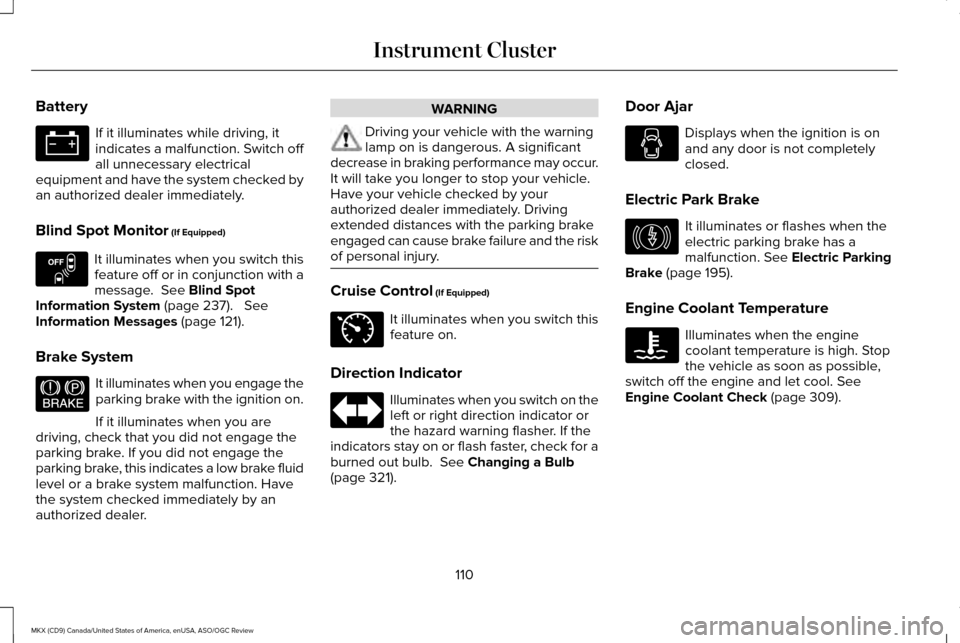
Battery
If it illuminates while driving, it
indicates a malfunction. Switch off
all unnecessary electrical
equipment and have the system checked by
an authorized dealer immediately.
Blind Spot Monitor (If Equipped) It illuminates when you switch this
feature off or in conjunction with a
message.
See Blind Spot
Information System (page 237). See
Information Messages (page 121).
Brake System It illuminates when you engage the
parking brake with the ignition on.
If it illuminates when you are
driving, check that you did not engage the
parking brake. If you did not engage the
parking brake, this indicates a low brake fluid
level or a brake system malfunction. Have
the system checked immediately by an
authorized dealer. WARNING
Driving your vehicle with the warning
lamp on is dangerous. A significant
decrease in braking performance may occur.
It will take you longer to stop your vehicle.
Have your vehicle checked by your
authorized dealer immediately. Driving
extended distances with the parking brake
engaged can cause brake failure and the risk
of personal injury. Cruise Control
(If Equipped)
It illuminates when you switch this
feature on.
Direction Indicator Illuminates when you switch on the
left or right direction indicator or
the hazard warning flasher. If the
indicators stay on or flash faster, check for a
burned out bulb.
See Changing a Bulb
(page 321). Door Ajar Displays when the ignition is on
and any door is not completely
closed.
Electric Park Brake It illuminates or flashes when the
electric parking brake has a
malfunction.
See Electric Parking
Brake (page 195).
Engine Coolant Temperature Illuminates when the engine
coolant temperature is high. Stop
the vehicle as soon as possible,
switch off the engine and let cool.
See
Engine Coolant Check (page 309).
110
MKX (CD9) Canada/United States of America, enUSA, ASO/OGC Review Instrument Cluster E151262 E144522 E71340 E146190
Page 114 of 563
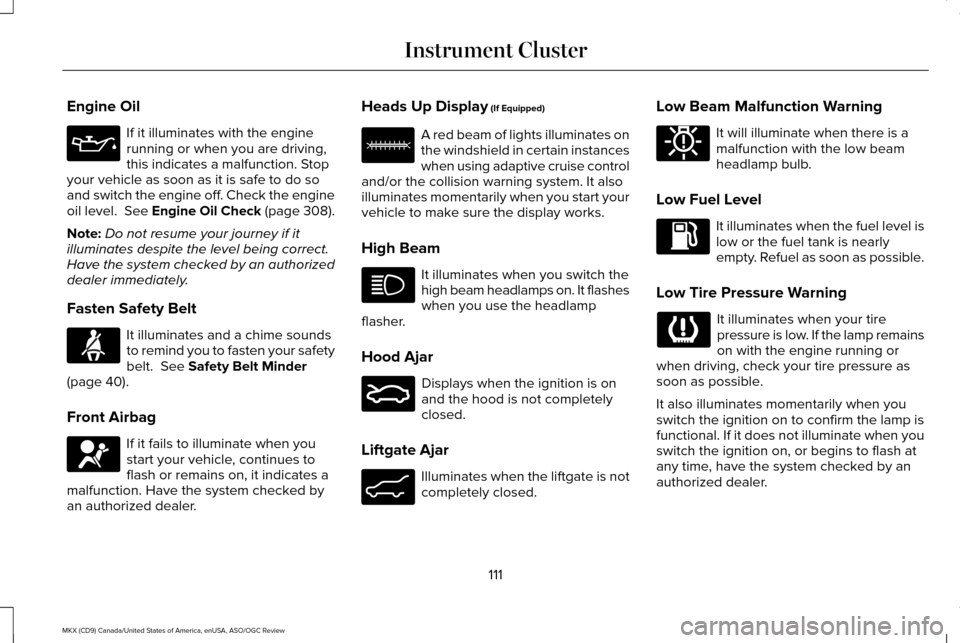
Engine Oil
If it illuminates with the engine
running or when you are driving,
this indicates a malfunction. Stop
your vehicle as soon as it is safe to do so
and switch the engine off. Check the engine
oil level. See Engine Oil Check (page 308).
Note: Do not resume your journey if it
illuminates despite the level being correct.
Have the system checked by an authorized
dealer immediately.
Fasten Safety Belt It illuminates and a chime sounds
to remind you to fasten your safety
belt. See Safety Belt Minder
(page 40).
Front Airbag If it fails to illuminate when you
start your vehicle, continues to
flash or remains on, it indicates a
malfunction. Have the system checked by
an authorized dealer. Heads Up Display
(If Equipped) A red beam of lights illuminates on
the windshield in certain instances
when using adaptive cruise control
and/or the collision warning system. It also
illuminates momentarily when you start your
vehicle to make sure the display works.
High Beam It illuminates when you switch the
high beam headlamps on. It flashes
when you use the headlamp
flasher.
Hood Ajar Displays when the ignition is on
and the hood is not completely
closed.
Liftgate Ajar Illuminates when the liftgate is not
completely closed.Low Beam Malfunction Warning It will illuminate when there is a
malfunction with the low beam
headlamp bulb.
Low Fuel Level It illuminates when the fuel level is
low or the fuel tank is nearly
empty. Refuel as soon as possible.
Low Tire Pressure Warning It illuminates when your tire
pressure is low. If the lamp remains
on with the engine running or
when driving, check your tire pressure as
soon as possible.
It also illuminates momentarily when you
switch the ignition on to confirm the lamp is
functional. If it does not illuminate when you
switch the ignition on, or begins to flash at
any time, have the system checked by an
authorized dealer.
111
MKX (CD9) Canada/United States of America, enUSA, ASO/OGC Review Instrument Cluster E156133 E159324 E162453 E181350
Page 117 of 563
GENERAL INFORMATION
WARNING
Driving while distracted can result in
loss of vehicle control, crash and injury.
We strongly recommend that you use
extreme caution when using any device that
may take your focus off the road. Your
primary responsibility is the safe operation
of your vehicle. We recommend against the
use of any hand-held device while driving
and encourage the use of voice-operated
systems when possible. Make sure you are
aware of all applicable local laws that may
affect the use of electronic devices while
driving. You can control various systems on your
vehicle using the information display controls
on the steering wheel. Corresponding
information appears in the information
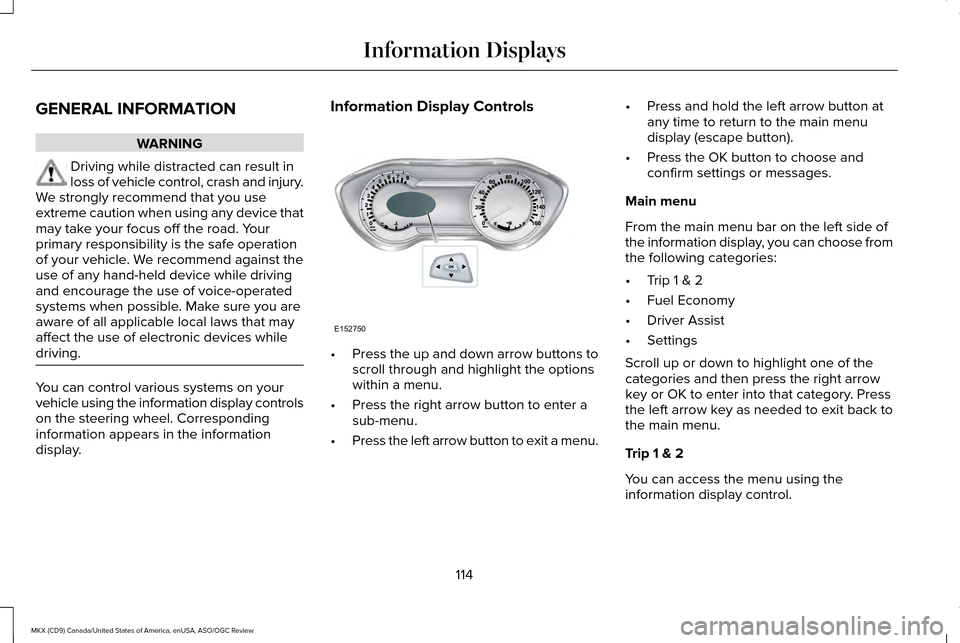
display. Information Display Controls
•
Press the up and down arrow buttons to
scroll through and highlight the options
within a menu.
• Press the right arrow button to enter a
sub-menu.
• Press the left arrow button to exit a menu. •
Press and hold the left arrow button at
any time to return to the main menu
display (escape button).
• Press the OK button to choose and
confirm settings or messages.
Main menu
From the main menu bar on the left side of
the information display, you can choose from
the following categories:
• Trip 1 & 2
• Fuel Economy
• Driver Assist
• Settings
Scroll up or down to highlight one of the
categories and then press the right arrow
key or OK to enter into that category. Press
the left arrow key as needed to exit back to
the main menu.
Trip 1 & 2
You can access the menu using the
information display control.
114
MKX (CD9) Canada/United States of America, enUSA, ASO/OGC Review Information DisplaysE152750
Page 118 of 563
Trip 1 & 2
Trip Timer
Trip Odometer
Average Fuel Economy
Digital Speedometer
Press and hold OK to reset the currently displayed trip information.
• Trip Timer— Timer stops when you switch off the vehicle and restarts when you resta\
rt the vehicle.
• Trip odometer — Shows the accumulated trip distance.
• Average fuel economy — Shows the average fuel economy for a given trip.
• Digital speedometer — Shows the current vehicle speed. Appears in the center of the speedomet\
er gauge.
Fuel Economy
Use the left or right arrow buttons to choose
the desired fuel economy display.
115
MKX (CD9) Canada/United States of America, enUSA, ASO/OGC Review Information Displays
Page 119 of 563

Fuel Economy
Instant Fuel Economy
Fuel History
Average Speed
• Instant Fuel Economy - Shows a visual graph of your instantaneous fuel e\
conomy since the function was last reset.
• Fuel History - Shows a bar chart of your fuel history.
• Average Speed - Displays the average speed you have driven.
Driver Assist
In this mode, you can configure different
driver setting choices. Note:
Some items are optional and may not
appear. Driver Assist
Traction Control - check enabled or uncheck disabled Sport or Normal
Steering in "D"
Adaptive Steering
Sport or Normal
Steering in "S"
Blind Spot - check enabled or uncheck disabled
Cross Traffic Alert - check enabled or uncheck disabled
116
MKX (CD9) Canada/United States of America, enUSA, ASO/OGC Review Information Displays
Page 120 of 563
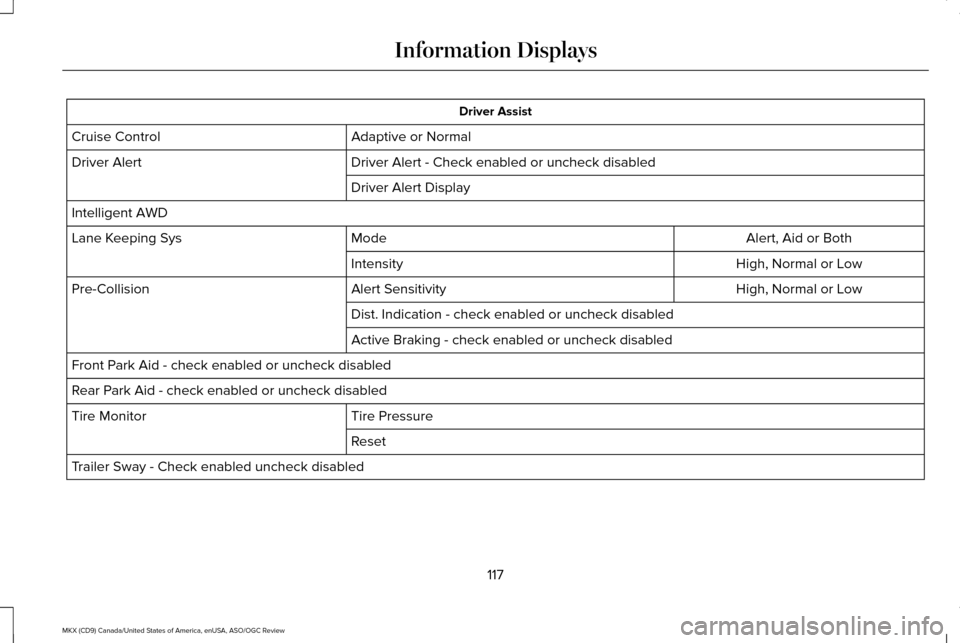
Driver Assist
Adaptive or Normal
Cruise Control
Driver Alert - Check enabled or uncheck disabled
Driver Alert
Driver Alert Display
Intelligent AWD Alert, Aid or Both
Mode
Lane Keeping Sys
High, Normal or Low
Intensity
High, Normal or Low
Alert Sensitivity
Pre-Collision
Dist. Indication - check enabled or uncheck disabled
Active Braking - check enabled or uncheck disabled
Front Park Aid - check enabled or uncheck disabled
Rear Park Aid - check enabled or uncheck disabled Tire Pressure
Tire Monitor
Reset
Trailer Sway - Check enabled uncheck disabled
117
MKX (CD9) Canada/United States of America, enUSA, ASO/OGC Review Information Displays
Page 121 of 563
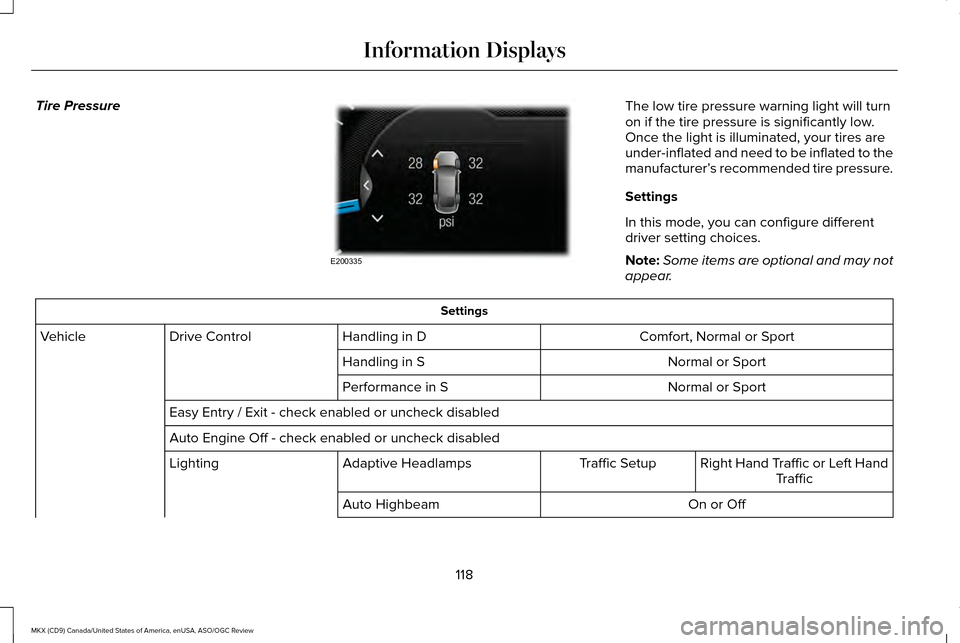
Tire Pressure
The low tire pressure warning light will turn
on if the tire pressure is significantly low.
Once the light is illuminated, your tires are
under-inflated and need to be inflated to the
manufacturer’
s recommended tire pressure.
Settings
In this mode, you can configure different
driver setting choices.
Note: Some items are optional and may not
appear. Settings
Comfort, Normal or Sport
Handling in D
Drive Control
Vehicle
Normal or Sport
Handling in S
Normal or Sport
Performance in S
Easy Entry / Exit - check enabled or uncheck disabled
Auto Engine Off - check enabled or uncheck disabled Right Hand Traffic or Left HandTraffic
Traffic Setup
Adaptive Headlamps
Lighting
On or Off
Auto Highbeam
118
MKX (CD9) Canada/United States of America, enUSA, ASO/OGC Review Information DisplaysE200335
Page 122 of 563
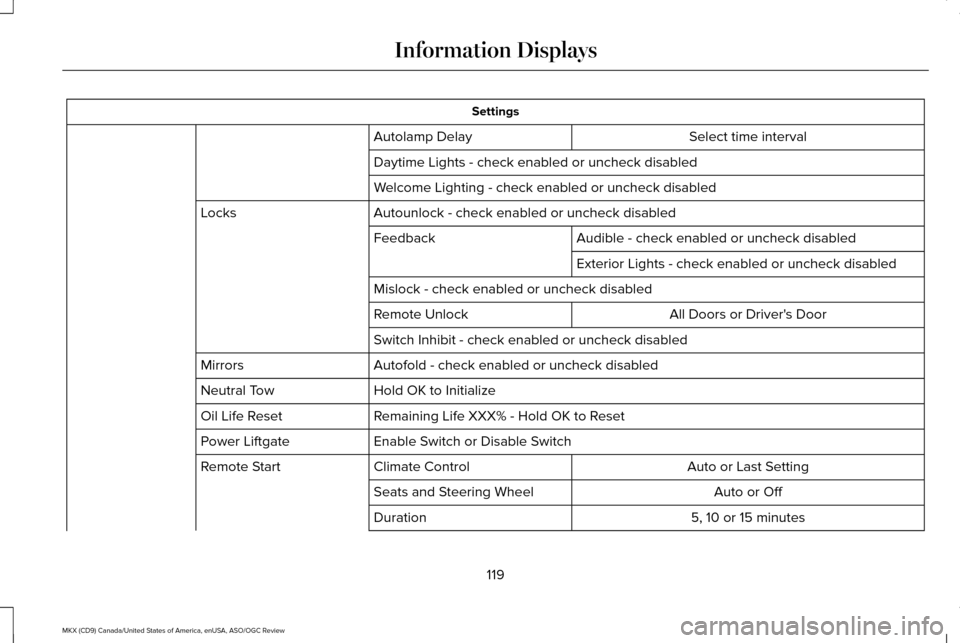
Settings
Select time interval
Autolamp Delay
Daytime Lights - check enabled or uncheck disabled
Welcome Lighting - check enabled or uncheck disabled
Autounlock - check enabled or uncheck disabled
Locks
Audible - check enabled or uncheck disabled
Feedback
Exterior Lights - check enabled or uncheck disabled
Mislock - check enabled or uncheck disabled All Doors or Driver's Door
Remote Unlock
Switch Inhibit - check enabled or uncheck disabled
Autofold - check enabled or uncheck disabled
Mirrors
Hold OK to Initialize
Neutral Tow
Remaining Life XXX% - Hold OK to Reset
Oil Life Reset
Enable Switch or Disable Switch
Power Liftgate
Auto or Last Setting
Climate Control
Remote Start
Auto or Off
Seats and Steering Wheel
5, 10 or 15 minutes
Duration
119
MKX (CD9) Canada/United States of America, enUSA, ASO/OGC Review Information Displays
Page 123 of 563
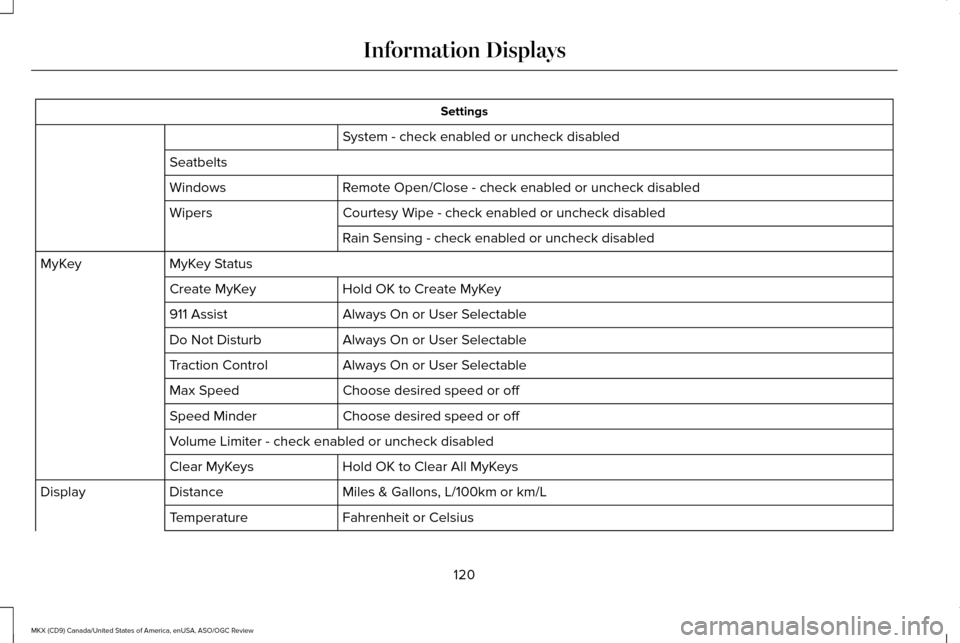
Settings
System - check enabled or uncheck disabled
Seatbelts Remote Open/Close - check enabled or uncheck disabled
Windows
Courtesy Wipe - check enabled or uncheck disabled
Wipers
Rain Sensing - check enabled or uncheck disabled
MyKey Status
MyKey
Hold OK to Create MyKey
Create MyKey
Always On or User Selectable
911 Assist
Always On or User Selectable
Do Not Disturb
Always On or User Selectable
Traction Control
Choose desired speed or off
Max Speed
Choose desired speed or off
Speed Minder
Volume Limiter - check enabled or uncheck disabled
Hold OK to Clear All MyKeys
Clear MyKeys
Miles & Gallons, L/100km or km/L
Distance
Display
Fahrenheit or Celsius
Temperature
120
MKX (CD9) Canada/United States of America, enUSA, ASO/OGC Review Information Displays
Page 124 of 563
Settings
psi, kPa or BAR
Tire Pressure
Choose your applicable setting
Language
Speedometer in km/h - check enabled or uncheck disabled
Note: Some MyKey items only appear if a MyKey is set.
INFORMATION MESSAGES
Note: Depending on the vehicle options
equipped with your vehicle, not all of the
messages display or are available. Certain
messages may be abbreviated or shortened
depending upon which cluster type you
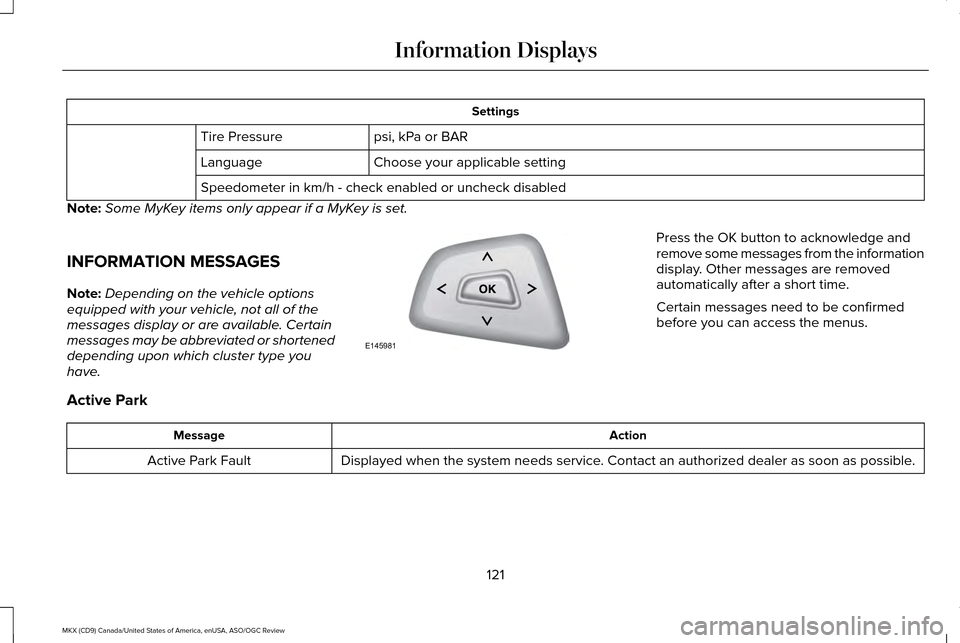
have. Press the OK button to acknowledge and
remove some messages from the information
display. Other messages are removed
automatically after a short time.
Certain messages need to be confirmed
before you can access the menus.
Active Park Action
Message
Displayed when the system needs service. Contact an authorized dealer as soon as possible.
Active Park Fault
121
MKX (CD9) Canada/United States of America, enUSA, ASO/OGC Review Information DisplaysE145981