display LINCOLN MKX 2016 Workshop Manual
[x] Cancel search | Manufacturer: LINCOLN, Model Year: 2016, Model line: MKX, Model: LINCOLN MKX 2016Pages: 563, PDF Size: 4.96 MB
Page 135 of 563
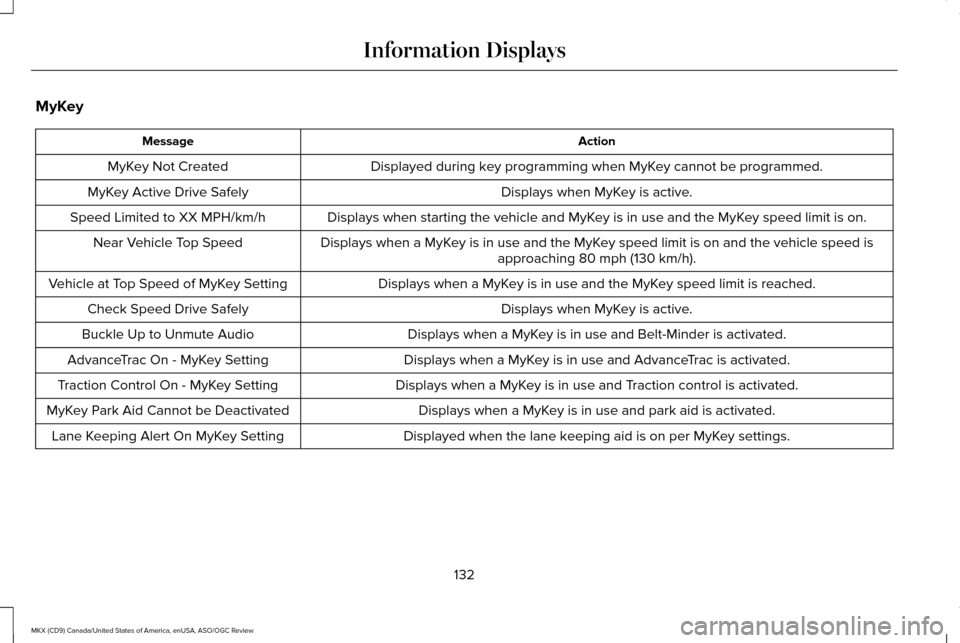
MyKey
Action
Message
Displayed during key programming when MyKey cannot be programmed.
MyKey Not Created
Displays when MyKey is active.
MyKey Active Drive Safely
Displays when starting the vehicle and MyKey is in use and the MyKey speed limit is on.
Speed Limited to XX MPH/km/h
Displays when a MyKey is in use and the MyKey speed limit is on and the vehicle speed isapproaching 80 mph (130 km/h).
Near Vehicle Top Speed
Displays when a MyKey is in use and the MyKey speed limit is reached.
Vehicle at Top Speed of MyKey Setting
Displays when MyKey is active.
Check Speed Drive Safely
Displays when a MyKey is in use and Belt-Minder is activated.
Buckle Up to Unmute Audio
Displays when a MyKey is in use and AdvanceTrac is activated.
AdvanceTrac On - MyKey Setting
Displays when a MyKey is in use and Traction control is activated.
Traction Control On - MyKey Setting
Displays when a MyKey is in use and park aid is activated.
MyKey Park Aid Cannot be Deactivated
Displayed when the lane keeping aid is on per MyKey settings.
Lane Keeping Alert On MyKey Setting
132
MKX (CD9) Canada/United States of America, enUSA, ASO/OGC Review Information Displays
Page 136 of 563
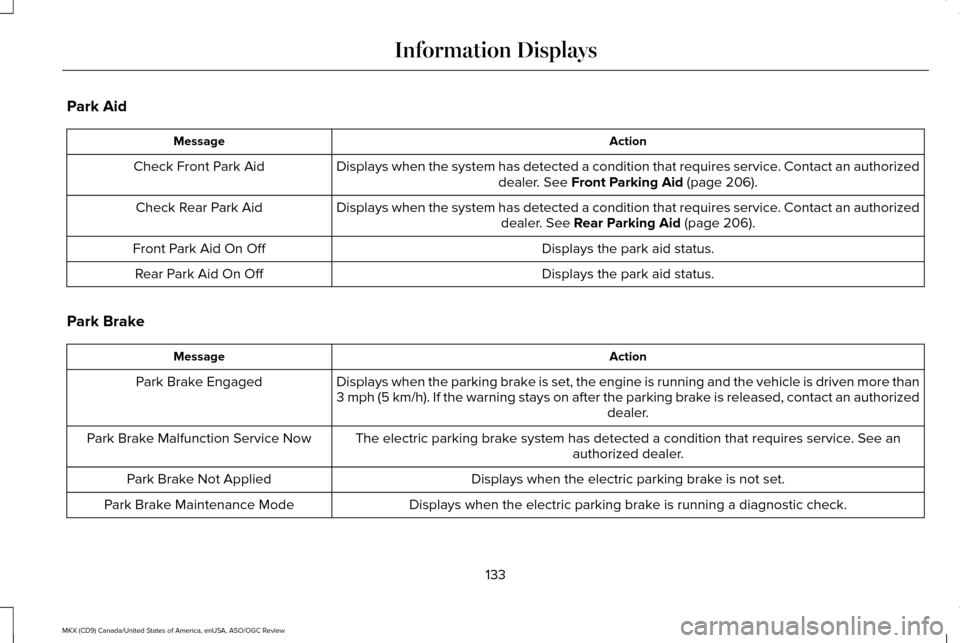
Park Aid
Action
Message
Displays when the system has detected a condition that requires service. Contact an authorizeddealer. See Front Parking Aid (page 206).
Check Front Park Aid
Displays when the system has detected a condition that requires service. Contact an authorizeddealer.
See Rear Parking Aid (page 206).
Check Rear Park Aid
Displays the park aid status.
Front Park Aid On Off
Displays the park aid status.
Rear Park Aid On Off
Park Brake Action
Message
Displays when the parking brake is set, the engine is running and the vehicle is driven more than
3 mph (5 km/h). If the warning stays on after the parking brake is released, contact an authorized dealer.
Park Brake Engaged
The electric parking brake system has detected a condition that requires service. See anauthorized dealer.
Park Brake Malfunction Service Now
Displays when the electric parking brake is not set.
Park Brake Not Applied
Displays when the electric parking brake is running a diagnostic check.
Park Brake Maintenance Mode
133
MKX (CD9) Canada/United States of America, enUSA, ASO/OGC Review Information Displays
Page 137 of 563
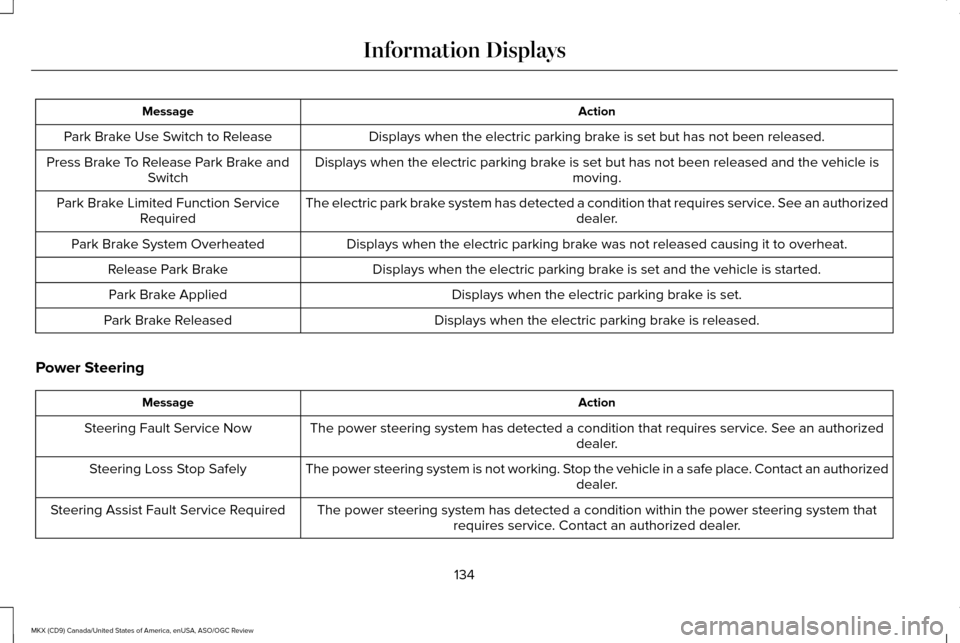
Action
Message
Displays when the electric parking brake is set but has not been released.
Park Brake Use Switch to Release
Displays when the electric parking brake is set but has not been released and the vehicle is moving.
Press Brake To Release Park Brake and
Switch
The electric park brake system has detected a condition that requires service. See an authorized dealer.
Park Brake Limited Function Service
Required
Displays when the electric parking brake was not released causing it to overheat.
Park Brake System Overheated
Displays when the electric parking brake is set and the vehicle is started.
Release Park Brake
Displays when the electric parking brake is set.
Park Brake Applied
Displays when the electric parking brake is released.
Park Brake Released
Power Steering Action
Message
The power steering system has detected a condition that requires service\
. See an authorized dealer.
Steering Fault Service Now
The power steering system is not working. Stop the vehicle in a safe place. Contact an authorized dealer.
Steering Loss Stop Safely
The power steering system has detected a condition within the power stee\
ring system thatrequires service. Contact an authorized dealer.
Steering Assist Fault Service Required
134
MKX (CD9) Canada/United States of America, enUSA, ASO/OGC Review Information Displays
Page 138 of 563
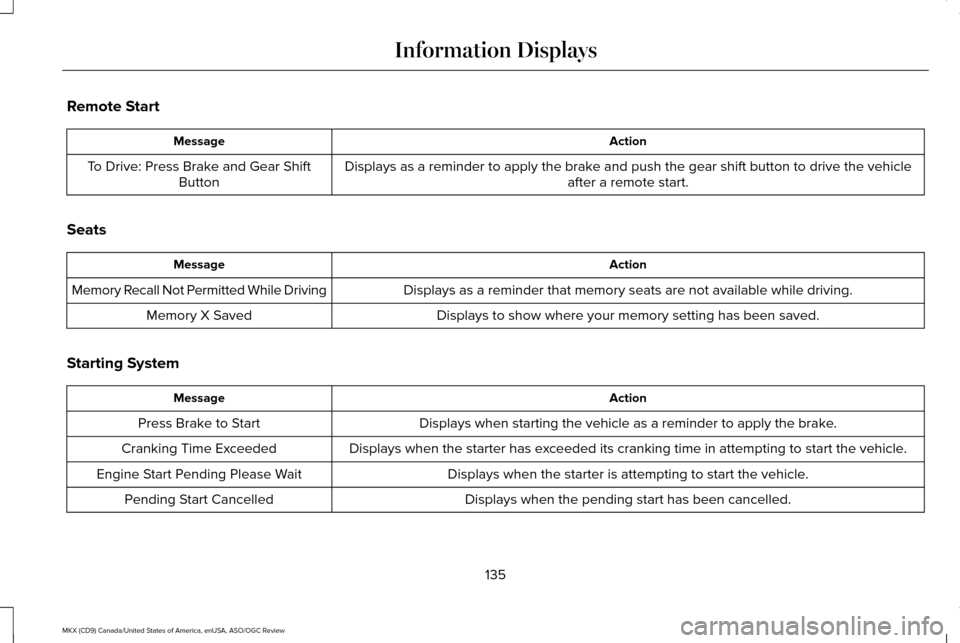
Remote Start
Action
Message
Displays as a reminder to apply the brake and push the gear shift button to drive the vehicle after a remote start.
To Drive: Press Brake and Gear Shift
Button
Seats Action
Message
Displays as a reminder that memory seats are not available while driving\
.
Memory Recall Not Permitted While Driving
Displays to show where your memory setting has been saved.
Memory X Saved
Starting System Action
Message
Displays when starting the vehicle as a reminder to apply the brake.
Press Brake to Start
Displays when the starter has exceeded its cranking time in attempting to start the vehicle.
Cranking Time Exceeded
Displays when the starter is attempting to start the vehicle.
Engine Start Pending Please Wait
Displays when the pending start has been cancelled.
Pending Start Cancelled
135
MKX (CD9) Canada/United States of America, enUSA, ASO/OGC Review Information Displays
Page 139 of 563
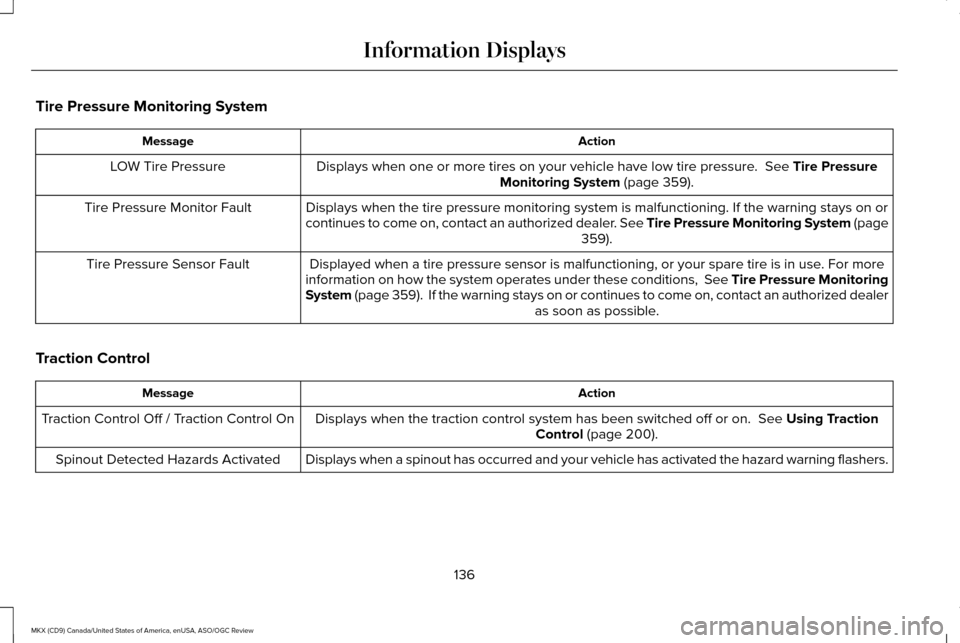
Tire Pressure Monitoring System
Action
Message
Displays when one or more tires on your vehicle have low tire pressure. See Tire Pressure
Monitoring System (page 359).
LOW Tire Pressure
Displays when the tire pressure monitoring system is malfunctioning. If \
the warning stays on or
continues to come on, contact an authorized dealer. See Tire Pressure Monitoring System (page 359
).
Tire Pressure Monitor Fault
Displayed when a tire pressure sensor is malfunctioning, or your spare t\
ire is in use. For more
information on how the system operates under these conditions, See Tire Pressure Monitoring
System (page 359). If the warning stays on or continues to come on, contact\
an authorized dealer as soon as possible.
Tire Pressure Sensor Fault
Traction Control Action
Message
Displays when the traction control system has been switched off or on.
See Using Traction
Control (page 200).
Traction Control Off / Traction Control On
Displays when a spinout has occurred and your vehicle has activated the \
hazard warning flashers.
Spinout Detected Hazards Activated
136
MKX (CD9) Canada/United States of America, enUSA, ASO/OGC Review Information Displays
Page 140 of 563
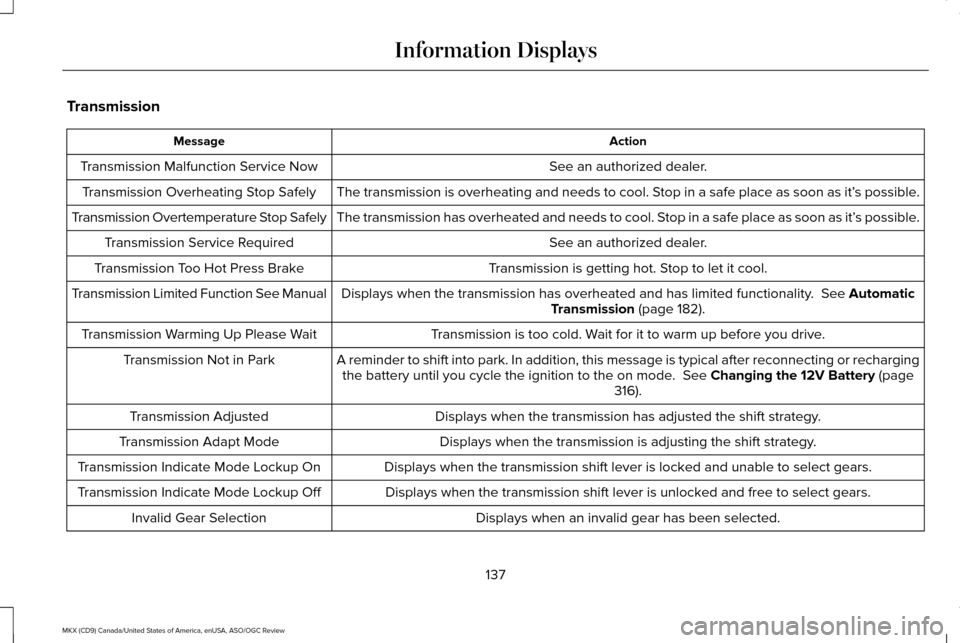
Transmission
Action
Message
See an authorized dealer.
Transmission Malfunction Service Now
The transmission is overheating and needs to cool. Stop in a safe place as soon as it’ s possible.
Transmission Overheating Stop Safely
The transmission has overheated and needs to cool. Stop in a safe place as soon as it’ s possible.
Transmission Overtemperature Stop Safely
See an authorized dealer.
Transmission Service Required
Transmission is getting hot. Stop to let it cool.
Transmission Too Hot Press Brake
Displays when the transmission has overheated and has limited functional\
ity. See Automatic
Transmission (page 182).
Transmission Limited Function See Manual
Transmission is too cold. Wait for it to warm up before you drive.
Transmission Warming Up Please Wait
A reminder to shift into park. In addition, this message is typical afte\
r reconnecting or rechargingthe battery until you cycle the ignition to the on mode.
See Changing the 12V Battery (page
316).
Transmission Not in Park
Displays when the transmission has adjusted the shift strategy.
Transmission Adjusted
Displays when the transmission is adjusting the shift strategy.
Transmission Adapt Mode
Displays when the transmission shift lever is locked and unable to select gears.
Transmission Indicate Mode Lockup On
Displays when the transmission shift lever is unlocked and free to select gears.
Transmission Indicate Mode Lockup Off
Displays when an invalid gear has been selected.
Invalid Gear Selection
137
MKX (CD9) Canada/United States of America, enUSA, ASO/OGC Review Information Displays
Page 141 of 563
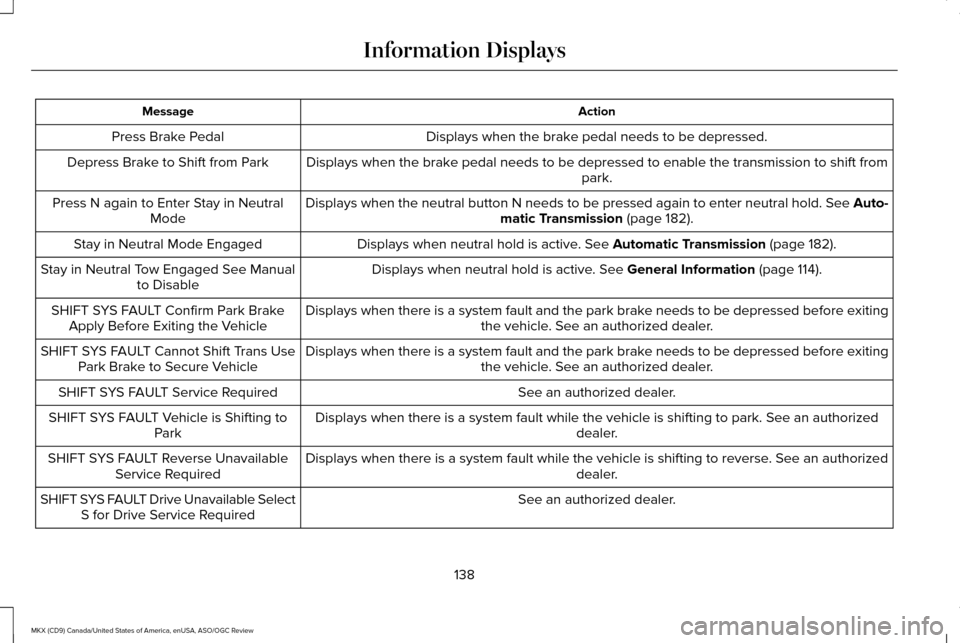
Action
Message
Displays when the brake pedal needs to be depressed.
Press Brake Pedal
Displays when the brake pedal needs to be depressed to enable the transmission to shift from park.
Depress Brake to Shift from Park
Displays when the neutral button N needs to be pressed again to enter ne\
utral hold. See Auto-matic Transmission (page 182).
Press N again to Enter Stay in Neutral
Mode
Displays when neutral hold is active.
See Automatic Transmission (page 182).
Stay in Neutral Mode Engaged
Displays when neutral hold is active.
See General Information (page 114).
Stay in Neutral Tow Engaged See Manual
to Disable
Displays when there is a system fault and the park brake needs to be depressed before exiting the vehicle. See an authorized dealer.
SHIFT SYS FAULT Confirm Park Brake
Apply Before Exiting the Vehicle
Displays when there is a system fault and the park brake needs to be depressed before exitingthe vehicle. See an authorized dealer.
SHIFT SYS FAULT Cannot Shift Trans Use
Park Brake to Secure Vehicle
See an authorized dealer.
SHIFT SYS FAULT Service Required
Displays when there is a system fault while the vehicle is shifting to p\
ark. See an authorized dealer.
SHIFT SYS FAULT Vehicle is Shifting to
Park
Displays when there is a system fault while the vehicle is shifting to r\
everse. See an authorized dealer.
SHIFT SYS FAULT Reverse Unavailable
Service Required
See an authorized dealer.
SHIFT SYS FAULT Drive Unavailable Select
S for Drive Service Required
138
MKX (CD9) Canada/United States of America, enUSA, ASO/OGC Review Information Displays
Page 142 of 563
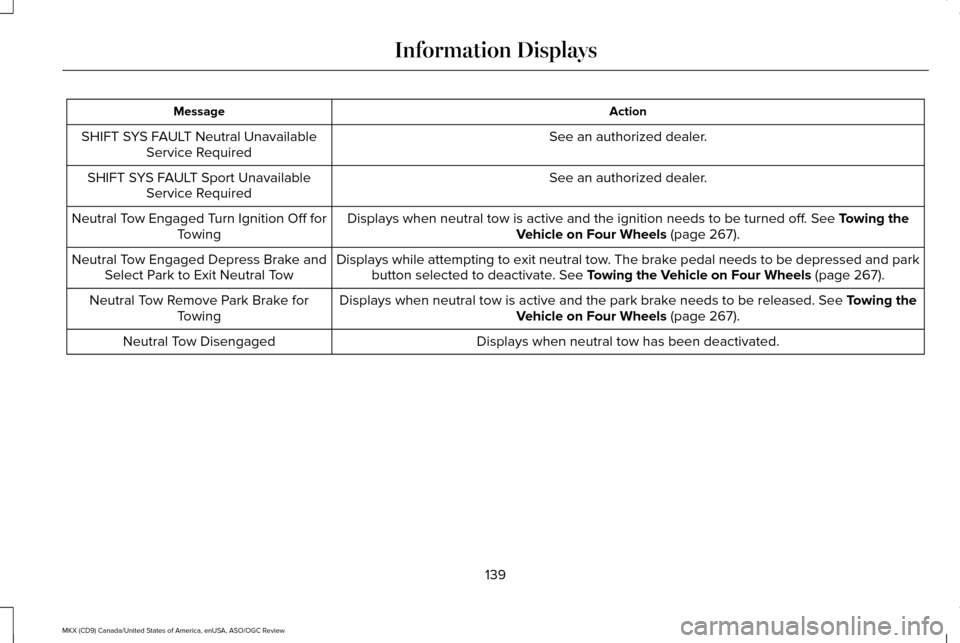
Action
Message
See an authorized dealer.
SHIFT SYS FAULT Neutral Unavailable
Service Required
See an authorized dealer.
SHIFT SYS FAULT Sport Unavailable
Service Required
Displays when neutral tow is active and the ignition needs to be turned \
off. See Towing the
Vehicle on Four Wheels (page 267).
Neutral Tow Engaged Turn Ignition Off for
Towing
Displays while attempting to exit neutral tow. The brake pedal needs to be depressed and parkbutton selected to deactivate.
See Towing the Vehicle on Four Wheels (page 267).
Neutral Tow Engaged Depress Brake and
Select Park to Exit Neutral Tow
Displays when neutral tow is active and the park brake needs to be released.
See Towing the
Vehicle on Four Wheels (page 267).
Neutral Tow Remove Park Brake for
Towing
Displays when neutral tow has been deactivated.
Neutral Tow Disengaged
139
MKX (CD9) Canada/United States of America, enUSA, ASO/OGC Review Information Displays
Page 147 of 563
Note:
Make sure you have a cabin air filter
installed at all times. This prevents foreign
objects from entering the system. Running
the system without a filter in place could
result in degradation or damage to the
system.
Replace the filter at regular intervals. See
Scheduled Maintenance (page 499).
For additional cabin air filter information, or
to replace the filter, see an authorized dealer.
REMOTE START
The remote start feature allows you to
pre-condition the interior of your vehicle. The
climate control system works to achieve
comfort according to your pre-selected
settings.
Note: You cannot adjust the system during
remote start operation. You cannot switch
on the displays or indicators during remote
start. Switch the ignition on to return the system
to its pre-selected settings. You can now
make adjustments normally, but you need to
switch certain vehicle-dependent features
back on, such as:
•
Heated seats.
• Cooled seats.
• Heated steering wheel.
• Heated mirrors.
• Heated rear window.
You can adjust the default remote start
settings using the information display
controls.
See Information Displays (page
114).
Automatic Settings
In hot weather, the system is set to 72°F
(22°C). The cooled seats are set to high (if
available, and selected to AUTO in the
information display).
In moderate weather, the system either heats
or cools (based on pre-selected settings).
The rear defroster, heated mirrors and
heated seats do not automatically switch on. In cold weather, the system is set to 72°F
(22°C). The heated seats are set to high (if
available, and selected to AUTO in the
information display). The rear defroster and
heated mirrors automatically switch on.
144
MKX (CD9) Canada/United States of America, enUSA, ASO/OGC Review Climate Control
Page 154 of 563
Lumbar and bolster mode
Massage mode
Upper lumbar
Back massage intensity adjustment
A
Lumbar decrease
Massage intensity decrease and off *
B
Lower lumbar**
Cushion massage intensity adjustment
C
Lumbar increase
Massage intensity increase
D
-
On and off
E
* The massage feature will default to an
alternating massage mode with back
massage intensity adjustment. The lumbar
and bolster feature will default to the middle
lumbar mode.
** Press C a second time to adjust the back
bolster. Press C a third time to adjust the
cushion bolster.
You can also adjust this feature through the
touchscreen. Press the Menu Settings icon, then
Vehicle. Choose Multi-Contour
Seats. When switched on, the system displays
directions for you to adjust the lumbar
settings in your seat or to set the massage
function.
To access and make adjustments to the
lumbar setting:
1. Choose the desired seat to adjust.
2. Press the + or - to adjust the lumbar
intensity.
To access and make adjustments to the
massage setting: 1. Press the Menu Settings icon, then
Vehicle. Choose Multi-Contour Seats.
2. Choose the desired seat to adjust.
3. Press OFF, LO or HI.
MEMORY FUNCTION (If Equipped) WARNINGS
Before activating the seat memory,
make sure that the area immediately
surrounding the seat is clear of obstructions
and that all occupants are clear of moving
parts.
151
MKX (CD9) Canada/United States of America, enUSA, ASO/OGC Review SeatsE142607