general information LINCOLN MKX 2017 User Guide
[x] Cancel search | Manufacturer: LINCOLN, Model Year: 2017, Model line: MKX, Model: LINCOLN MKX 2017Pages: 587, PDF Size: 5.4 MB
Page 63 of 587
Turning the Vehicle Off After Remote
Starting
Press the button once. The parking
lamps will turn off.
You may have to be closer to your
vehicle to remotely switch off your vehicle
after remote starting. This is due to the
added noise of your running vehicle.
You can disable or enable the remote start
system through the information display. See
General Information (page 114).
Remote Control Feedback
An LED on the remote control provides status
feedback of remote start or stop commands. Status
LED
Remote start or
extension successful
Solid green
Remote stop
successful; engine off
Solid red
Remote start or stopfailed
Blinking red
Waiting for status
update from vehicle
Blinking green
Memory Feature
You can program your intelligent access key
to recall memory positions.
See Memory
Function (page 152). REPLACING A LOST KEY OR
REMOTE CONTROL
Replacement keys or remote controls can
be purchased from an authorized dealer.
Authorized dealers can program remote
controls for your vehicle.
See Passive
Anti-Theft System (page 81).
60
MKX (CD9) Canada/United States of America, enUSA, First Printing Keys and Remote ControlsE138625
Page 75 of 587
Note:
The doors do not autounlock if you
electronically lock your vehicle after you
switch the ignition off and before you open
the driver door.
Enabling or Disabling
You can enable or disable the autounlock
feature in the information display or an
authorized dealer can do it for you. See
General Information (page 114).
Illuminated Entry
The interior lamps and some exterior lamps
illuminate when you unlock the doors with
the remote control.
The lamps turn off if:
• The ignition is on.
• You press the remote control lock button.
• 25 seconds have elapsed.
The lamps do not turn off if:
• You turn them on with the lamp control.
• Any door is open. Illuminated Exit
The interior lamps and some exterior lamps
illuminate when all doors are closed and you
switch the ignition off.
The lamps will turn off if all the doors remain
closed and:
•
25 seconds have elapsed.
• You press the push button ignition
switch.
Battery Saver
If you leave the courtesy lamps, interior
lamps or headlamps on, the battery saver
shuts them off 10 minutes after you switch
the ignition off.
Battery Saver for Intelligent Access Keys
If you leave the ignition switched on, it shuts
off when it detects a certain amount of
battery drain, or after 45 minutes. MANUAL LIFTGATE
(If Equipped) WARNINGS
It is extremely dangerous to ride in a
cargo area, inside or outside of a
vehicle. In a crash, people riding in these
areas are more likely to be seriously injured
or killed. Do not allow people to ride in any
area of your vehicle that is not equipped with
seats and safety belts. Be sure everyone in
your vehicle is in a seat and using a safety
belt properly. Failure to follow this warning
could result in serious personal injury or
death. Make sure to close and latch the
liftgate to prevent drawing exhaust
fumes into your vehicle. This will also prevent
passengers and cargo from falling out. If you
must drive with the liftgate open, keep the
vents or windows open so outside air comes
into your vehicle. Failure to follow this
warning could result in serious personal
injury. 72
MKX (CD9) Canada/United States of America, enUSA, First Printing Doors and Locks
Page 92 of 587
AUTOWIPERS (If Equipped)
Note: Fully defrost the windshield before you
switch the windshield wipers on.
Note: Make sure you switch the windshield
wipers off before entering a car wash.
Note: If streaks or smears appear on the
windshield, clean the windshield and the
wiper blades.
See Checking the Wiper
Blades (page 324). If that does not resolve
the issue, install new wiper blades. See
Changing the Wiper Blades (page 324).
Autowipers uses a rain sensor located in the
area around the interior mirror. The rain
sensor will continue to monitor the amount
of water on the windshield and automatically
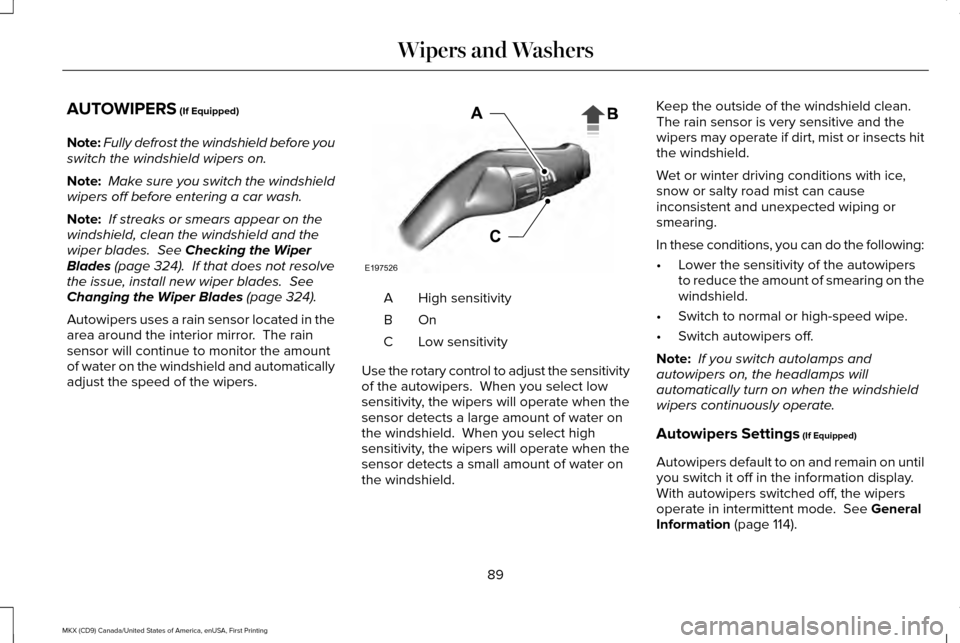
adjust the speed of the wipers. High sensitivity
A
OnB
Low sensitivity
C
Use the rotary control to adjust the sensitivity
of the autowipers. When you select low
sensitivity, the wipers will operate when the
sensor detects a large amount of water on
the windshield. When you select high
sensitivity, the wipers will operate when the
sensor detects a small amount of water on
the windshield. Keep the outside of the windshield clean.
The rain sensor is very sensitive and the
wipers may operate if dirt, mist or insects hit
the windshield.
Wet or winter driving conditions with ice,
snow or salty road mist can cause
inconsistent and unexpected wiping or
smearing.
In these conditions, you can do the following:
•
Lower the sensitivity of the autowipers
to reduce the amount of smearing on the
windshield.
• Switch to normal or high-speed wipe.
• Switch autowipers off.
Note: If you switch autolamps and
autowipers on, the headlamps will
automatically turn on when the windshield
wipers continuously operate.
Autowipers Settings
(If Equipped)
Autowipers default to on and remain on until
you switch it off in the information display.
With autowipers switched off, the wipers
operate in intermittent mode.
See General
Information (page 114).
89
MKX (CD9) Canada/United States of America, enUSA, First Printing Wipers and WashersE197526
Page 93 of 587
WINDSHIELD WASHERS
Note:
Do not operate the washers when the
washer reservoir is empty. This may cause
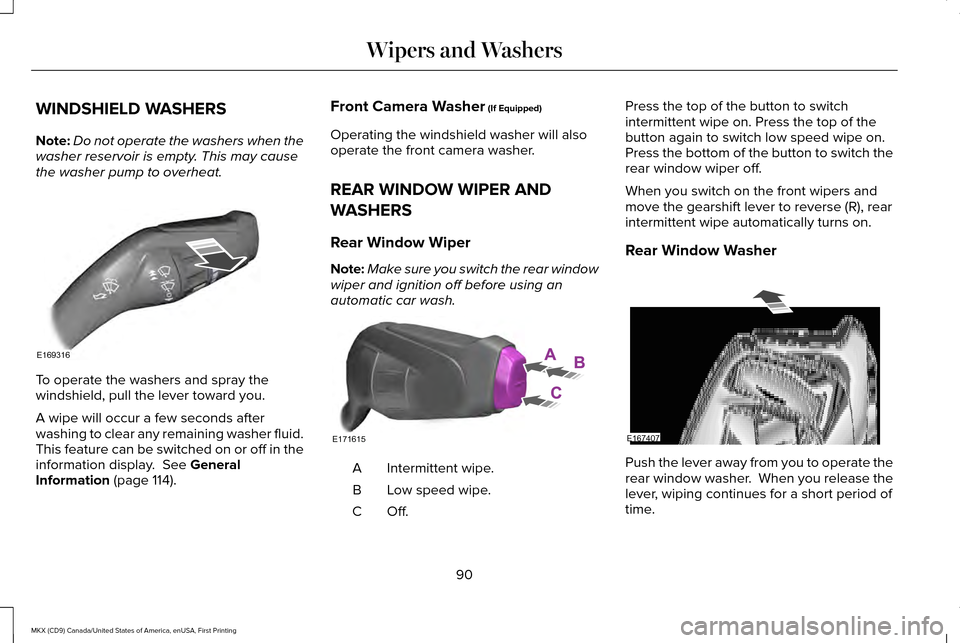
the washer pump to overheat. To operate the washers and spray the
windshield, pull the lever toward you.
A wipe will occur a few seconds after
washing to clear any remaining washer fluid.
This feature can be switched on or off in the
information display. See General
Information (page 114). Front Camera Washer
(If Equipped)
Operating the windshield washer will also
operate the front camera washer.
REAR WINDOW WIPER AND
WASHERS
Rear Window Wiper
Note: Make sure you switch the rear window
wiper and ignition off before using an
automatic car wash. Intermittent wipe.
A
Low speed wipe.
B
Off.C Press the top of the button to switch
intermittent wipe on. Press the top of the
button again to switch low speed wipe on.
Press the bottom of the button to switch the
rear window wiper off.
When you switch on the front wipers and
move the gearshift lever to reverse (R), rear
intermittent wipe automatically turns on.
Rear Window Washer
Push the lever away from you to operate the
rear window washer. When you release the
lever, wiping continues for a short period of
time.
90
MKX (CD9) Canada/United States of America, enUSA, First Printing Wipers and WashersE169316 E171615 E167407
Page 94 of 587
GENERAL INFORMATION
Condensation in Lamp Assemblies
Exterior lamps have vents to accommodate
normal changes in air pressure.
Condensation can be a natural by-product
of this design. When moist air enters the
lamp assembly through the vents, there is a
possibility that condensation can occur when
the temperature is cold. When normal
condensation occurs, a fine mist can form on
the interior of the lens. The fine mist
eventually clears and exits through the vents
during normal operation.
Clearing time may take as long as 48 hours
under dry weather conditions.
Examples of acceptable condensation are:
•
The presence of a fine mist (no streaks,
drip marks or large droplets).
• A fine mist covers less than 50% of the
lens. Examples of unacceptable condensation are:
•
A water puddle inside the lamp.
• Streaks, drip marks or large droplets
present on the interior of the lens.
If you see any unacceptable condensation,
have your vehicle checked by an authorized
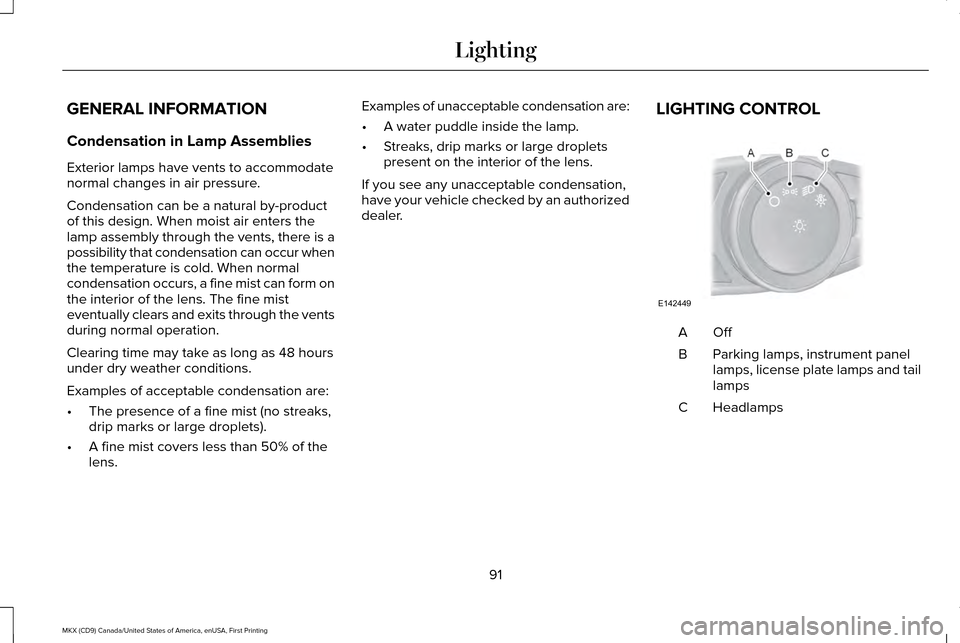
dealer. LIGHTING CONTROL OffA
Parking lamps, instrument panel
lamps, license plate lamps and tail
lamps
B
Headlamps
C
91
MKX (CD9) Canada/United States of America, enUSA, First Printing LightingE142449
Page 104 of 587
Window Lock
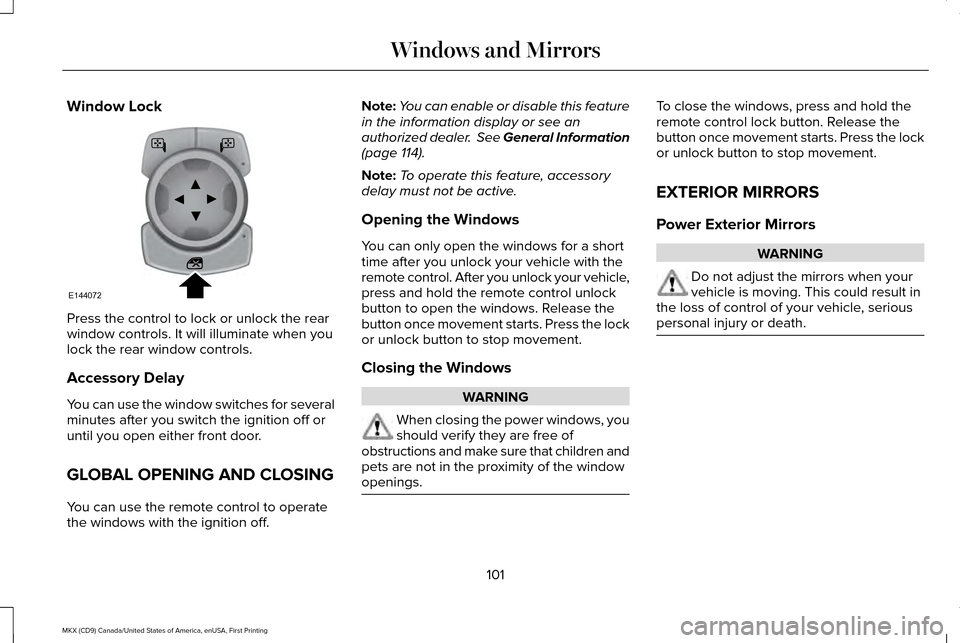
Press the control to lock or unlock the rear
window controls. It will illuminate when you
lock the rear window controls.
Accessory Delay
You can use the window switches for several
minutes after you switch the ignition off or
until you open either front door.
GLOBAL OPENING AND CLOSING
You can use the remote control to operate
the windows with the ignition off. Note:
You can enable or disable this feature
in the information display or see an
authorized dealer. See General Information
(page 114).
Note: To operate this feature, accessory
delay must not be active.
Opening the Windows
You can only open the windows for a short
time after you unlock your vehicle with the
remote control. After you unlock your vehicle,
press and hold the remote control unlock
button to open the windows. Release the
button once movement starts. Press the lock
or unlock button to stop movement.
Closing the Windows WARNING
When closing the power windows, you
should verify they are free of
obstructions and make sure that children and
pets are not in the proximity of the window
openings. To close the windows, press and hold the
remote control lock button. Release the
button once movement starts. Press the lock
or unlock button to stop movement.
EXTERIOR MIRRORS
Power Exterior Mirrors
WARNING
Do not adjust the mirrors when your
vehicle is moving. This could result in
the loss of control of your vehicle, serious
personal injury or death. 101
MKX (CD9) Canada/United States of America, enUSA, First Printing Windows and MirrorsE144072
Page 105 of 587
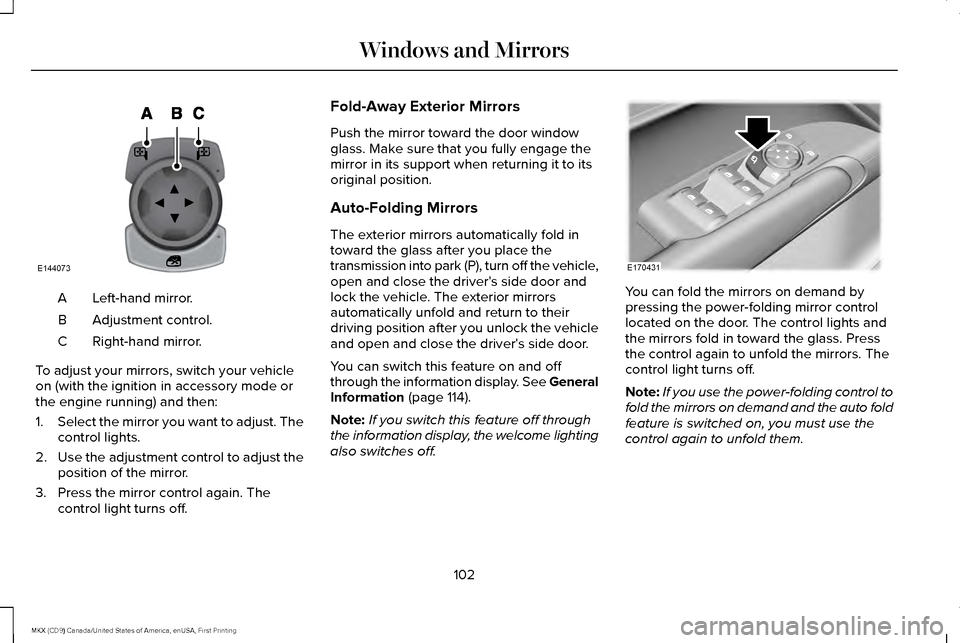
Left-hand mirror.
A
Adjustment control.
B
Right-hand mirror.
C
To adjust your mirrors, switch your vehicle
on (with the ignition in accessory mode or
the engine running) and then:
1. Select the mirror you want to adjust. The
control lights.
2. Use the adjustment control to adjust the
position of the mirror.
3. Press the mirror control again. The control light turns off. Fold-Away Exterior Mirrors
Push the mirror toward the door window
glass. Make sure that you fully engage the
mirror in its support when returning it to its
original position.
Auto-Folding Mirrors
The exterior mirrors automatically fold in
toward the glass after you place the
transmission into park (P), turn off the vehicle,
open and close the driver's side door and
lock the vehicle. The exterior mirrors
automatically unfold and return to their
driving position after you unlock the vehicle
and open and close the driver's side door.
You can switch this feature on and off
through the information display. See General
Information (page 114).
Note: If you switch this feature off through
the information display, the welcome lighting
also switches off. You can fold the mirrors on demand by
pressing the power-folding mirror control
located on the door. The control lights and
the mirrors fold in toward the glass. Press
the control again to unfold the mirrors. The
control light turns off.
Note:
If you use the power-folding control to
fold the mirrors on demand and the auto fold
feature is switched on, you must use the
control again to unfold them.
102
MKX (CD9) Canada/United States of America, enUSA, First Printing Windows and MirrorsE144073 E170431
Page 111 of 587
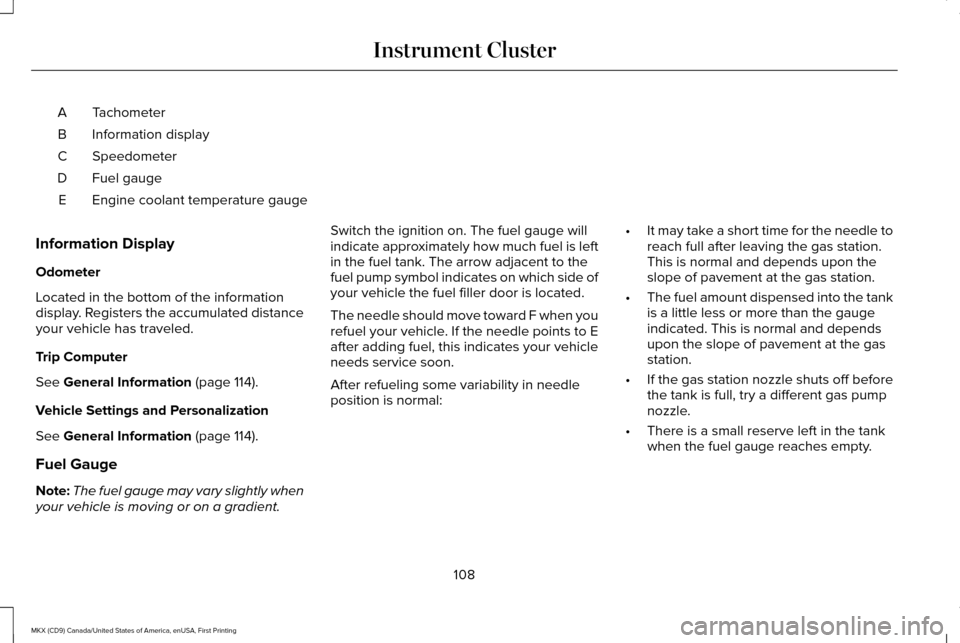
Tachometer
A
Information display
B
Speedometer
C
Fuel gauge
D
Engine coolant temperature gauge
E
Information Display
Odometer
Located in the bottom of the information
display. Registers the accumulated distance
your vehicle has traveled.
Trip Computer
See General Information (page 114).
Vehicle Settings and Personalization
See
General Information (page 114).
Fuel Gauge
Note: The fuel gauge may vary slightly when
your vehicle is moving or on a gradient. Switch the ignition on. The fuel gauge will
indicate approximately how much fuel is left
in the fuel tank. The arrow adjacent to the
fuel pump symbol indicates on which side of
your vehicle the fuel filler door is located.
The needle should move toward F when you
refuel your vehicle. If the needle points to E
after adding fuel, this indicates your vehicle
needs service soon.
After refueling some variability in needle
position is normal:
•
It may take a short time for the needle to
reach full after leaving the gas station.
This is normal and depends upon the
slope of pavement at the gas station.
• The fuel amount dispensed into the tank
is a little less or more than the gauge
indicated. This is normal and depends
upon the slope of pavement at the gas
station.
• If the gas station nozzle shuts off before
the tank is full, try a different gas pump
nozzle.
• There is a small reserve left in the tank
when the fuel gauge reaches empty.
108
MKX (CD9) Canada/United States of America, enUSA, First Printing Instrument Cluster
Page 117 of 587
GENERAL INFORMATION
WARNING
Driving while distracted can result in
loss of vehicle control, crash and injury.
We strongly recommend that you use
extreme caution when using any device that
may take your focus off the road. Your
primary responsibility is the safe operation
of your vehicle. We recommend against the
use of any hand-held device while driving
and encourage the use of voice-operated
systems when possible. Make sure you are
aware of all applicable local laws that may
affect the use of electronic devices while
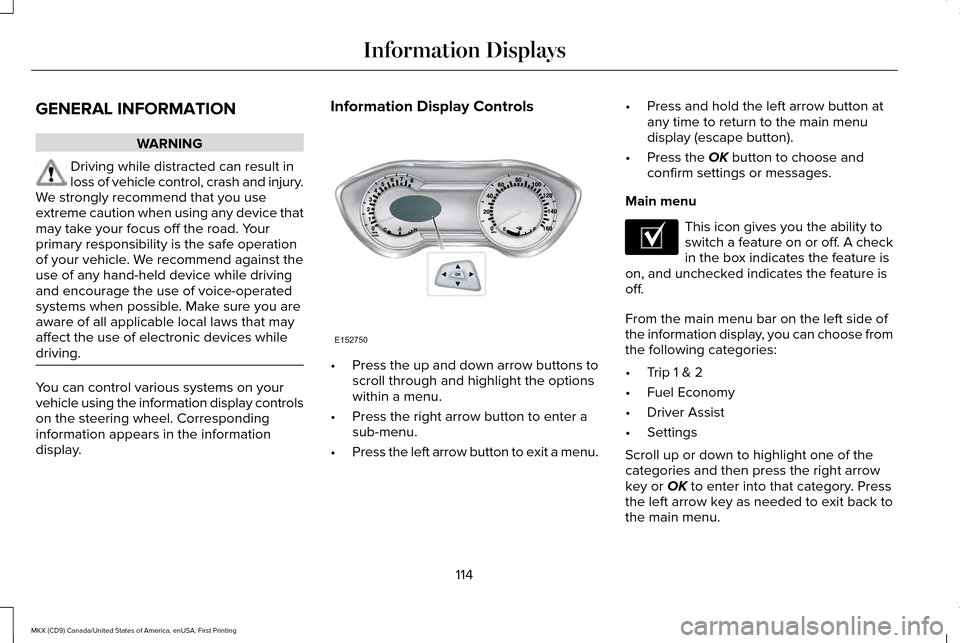
driving. You can control various systems on your
vehicle using the information display controls
on the steering wheel. Corresponding
information appears in the information
display. Information Display Controls
•
Press the up and down arrow buttons to
scroll through and highlight the options
within a menu.
• Press the right arrow button to enter a
sub-menu.
• Press the left arrow button to exit a menu. •
Press and hold the left arrow button at
any time to return to the main menu
display (escape button).
• Press the OK button to choose and
confirm settings or messages.
Main menu This icon gives you the ability to
switch a feature on or off. A check
in the box indicates the feature is
on, and unchecked indicates the feature is
off.
From the main menu bar on the left side of
the information display, you can choose from
the following categories:
• Trip 1 & 2
• Fuel Economy
• Driver Assist
• Settings
Scroll up or down to highlight one of the
categories and then press the right arrow
key or
OK to enter into that category. Press
the left arrow key as needed to exit back to
the main menu.
114
MKX (CD9) Canada/United States of America, enUSA, First Printing Information DisplaysE152750 E204495
Page 142 of 587
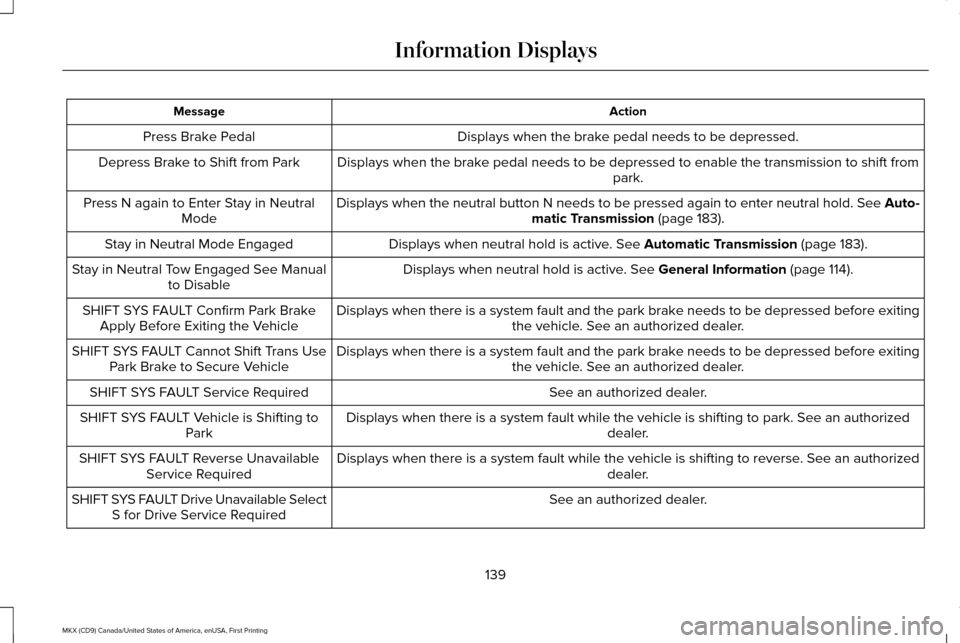
Action
Message
Displays when the brake pedal needs to be depressed.
Press Brake Pedal
Displays when the brake pedal needs to be depressed to enable the transmission to shift from park.
Depress Brake to Shift from Park
Displays when the neutral button N needs to be pressed again to enter ne\
utral hold. See Auto-matic Transmission (page 183).
Press N again to Enter Stay in Neutral
Mode
Displays when neutral hold is active.
See Automatic Transmission (page 183).
Stay in Neutral Mode Engaged
Displays when neutral hold is active.
See General Information (page 114).
Stay in Neutral Tow Engaged See Manual
to Disable
Displays when there is a system fault and the park brake needs to be depressed before exiting the vehicle. See an authorized dealer.
SHIFT SYS FAULT Confirm Park Brake
Apply Before Exiting the Vehicle
Displays when there is a system fault and the park brake needs to be depressed before exitingthe vehicle. See an authorized dealer.
SHIFT SYS FAULT Cannot Shift Trans Use
Park Brake to Secure Vehicle
See an authorized dealer.
SHIFT SYS FAULT Service Required
Displays when there is a system fault while the vehicle is shifting to p\
ark. See an authorized dealer.
SHIFT SYS FAULT Vehicle is Shifting to
Park
Displays when there is a system fault while the vehicle is shifting to r\
everse. See an authorized dealer.
SHIFT SYS FAULT Reverse Unavailable
Service Required
See an authorized dealer.
SHIFT SYS FAULT Drive Unavailable Select
S for Drive Service Required
139
MKX (CD9) Canada/United States of America, enUSA, First Printing Information Displays