general information LINCOLN MKX 2017 Service Manual
[x] Cancel search | Manufacturer: LINCOLN, Model Year: 2017, Model line: MKX, Model: LINCOLN MKX 2017Pages: 587, PDF Size: 5.4 MB
Page 362 of 587
A. T: Indicates a type of tire, designated
by the Tire and Rim Association, that is
intended for temporary service on cars,
sport-utility vehicles, minivans and light
trucks.
B.
145: Indicates the nominal width of
the tire in millimeters from sidewall edge
to sidewall edge. In general, the larger
the number, the wider the tire.
C.
80: Indicates the aspect ratio, which
gives the tire's ratio of height to width.
Numbers of 70 or lower indicate a short
sidewall.
D.
D: Indicates a diagonal type tire.
R:
Indicates a radial type tire.
E.
16: Indicates the wheel or rim
diameter in inches. If you change your
wheel size, you will have to purchase
new tires to match the new wheel
diameter. Location of the Tire Label
You will find a Tire Label containing tire
inflation pressure by tire size and other
important information located on the
B-Pillar or the edge of the driver’
s door.
Inflating Your Tires
Safe operation of your vehicle requires
that your tires are properly inflated.
Remember that a tire can lose up to half
of its air pressure without appearing flat.
Every day before you drive, check your
tires. If one looks lower than the others,
use a tire gauge to check pressure of all
tires and adjust if required.
At least once a month and before long
trips, inspect each tire and check the tire
pressure with a tire gauge (including
spare, if equipped). Inflate all tires to the
inflation pressure recommended by Ford
Motor Company. You are strongly urged to buy a reliable
tire pressure gauge, as automatic
service station gauges may be
inaccurate. Ford recommends the use
of a digital or dial-type tire pressure
gauge rather than a stick-type tire
pressure gauge.
Use the recommended cold inflation
pressure for optimum tire performance
and wear. Under-inflation or
over-inflation may cause uneven
treadwear patterns.
WARNING
Under-inflation is the most common
cause of tire failures and may result
in severe tire cracking, tread separation
or blowout, with unexpected loss of
vehicle control and increased risk of
injury. Under-inflation increases sidewall
flexing and rolling resistance, resulting
in heat buildup and internal damage to
the tire. It also may result in unnecessary
tire stress, irregular wear, loss of vehicle
control and accidents. A tire can lose up
to half of its air pressure and not appear
to be flat! 359
MKX (CD9) Canada/United States of America, enUSA, First Printing Wheels and Tires
Page 402 of 587
GENERAL INFORMATION
Radio Frequencies and Reception
Factors
AM and FM frequencies are established by
the Federal Communications Commission
(FCC) and the Canadian Radio and
Telecommunications Commission (CRTC).
Those frequencies are:
•
AM: 530, 540-1700, 1710 kHz
• FM: 87.9-107.7, 107.9 MHz Radio Reception Factors
The further you travel from an AM or FM station, the weaker the signal and the weaker the reception.
Distance and strength
Hills, mountains, tall buildings, bridges, tunnels, freeway overpasses, \
parking garages, dense tree foliage and
thunderstorms can interfere with the reception.
Terrain
When you pass a ground-based broadcast repeating tower, a stronger signal may overtake a weaker one and
result in the audio system muting.
Station overload
CD and CD Player Information
Note: CD units play commercially pressed
4.7 in (12 cm) audio compact discs only. Due
to technical incompatibility, certain
recordable and re-recordable compact discs
may not function correctly when used in Ford
CD players. Note:
Do not insert CDs with homemade
paper (adhesive) labels into the CD player
as the label may peel and cause the CD to
become jammed. You should use a
permanent felt tip marker rather than
adhesive labels on your homemade CDs.
Ballpoint pens may damage CDs. Please
contact an authorized dealer for further
information. Note:
Do not use any irregularly shaped
discs or discs with a scratch protection film
attached.
Always handle discs by their edges only.
Clean the disc with an approved CD cleaner
only. Wipe it from the center of the disc
toward the edge. Do not clean in a circular
motion.
399
MKX (CD9) Canada/United States of America, enUSA, First Printing Audio System
Page 406 of 587
GENERAL INFORMATION
WARNING
Driving while distracted can result in
loss of vehicle control, crash and injury.
We strongly recommend that you use
extreme caution when using any device that
may take your focus off the road. Your
primary responsibility is the safe operation
of your vehicle. We recommend against the
use of any hand-held device while driving
and encourage the use of voice-operated
systems when possible. Make sure you are
aware of all applicable local laws that may
affect the use of electronic devices while
driving. Getting to Know Your System
The SYNC 3 system allows you to interact
with a variety of features using the
touchscreen and voice commands. By
integrating with your Bluetooth-enabled
phone, the touchscreen provides easy
interaction with audio, multimedia, climate
control, navigation, and your phone's SYNC
3 compatible apps.
Using the Touchscreen
To operate the touchscreen, you can simply
touch the item or option that you want to
select. The button changes color when you
select it.
The SYNC 3 layout allows you to quickly
select the feature you wish to use.
403
MKX (CD9) Canada/United States of America, enUSA, First Printing SYNC™ 3
Page 423 of 587
download continues where it left off at the
next Wi-Fi connected opportunity. Upon
activation of an update, a banner displays
on the touchscreen indicating the system
update. Select the icon to see more detail.
This icon displays for two ignition cycles.
To switch this feature off:
Menu Item
Settings
General In this menu selection, you
can change the selection for
automatic updates to OFF.
Automatic
System
Updates
Support
The SYNC support team is available to help
you with any questions you are not able to
answer on your own.
Monday-Saturday, 8:30am-8:00pm EST. United States: 1-800-521-4140.
Canada: 1-800-387-9333.
Times are subject to change due to holidays.
Privacy Information
When you connect a cellular phone to SYNC
3, the system creates a profile within your
vehicle that links to that cellular phone. This
profile helps in offering you more cellular
features and operating more efficiently.
Among other things, this profile may contain
data about your cellular phone book, text
messages (read and unread), and call history,
including history of calls when your cell
phone was not connected to the system. In
addition, if you connect a media device, the
system creates and retains an index of
supported media content. The system also
records a short diagnostic log of
approximately 10 minutes of all recent system
activity. The log profile and other system data
may be used to improve the system and help
diagnose any problems that may occur.The cellular profile, media device index, and
diagnostic log remain in your vehicle unless
you delete them and are generally accessible
only in your vehicle when the cellular phone
or media player is connected.
If you no longer plan to use the system or
your vehicle, we recommend you perform a
Master Reset to erase all stored information.
You can find more information about the
Master Reset in General Settings. See
Settings (page 472). System data cannot be
accessed without special equipment and
access to your vehicle's SYNC 3 module. The
Lincoln Motor Company does not access the
system data for any purpose other than as
described absent consent, a court order, or
where required by law enforcement, other
government authorities, or other third parties
acting with lawful authority. Other parties
may seek to access the information
independently of The Lincoln Motor
Company.
420
MKX (CD9) Canada/United States of America, enUSA, First Printing SYNC™ 3
Page 486 of 587
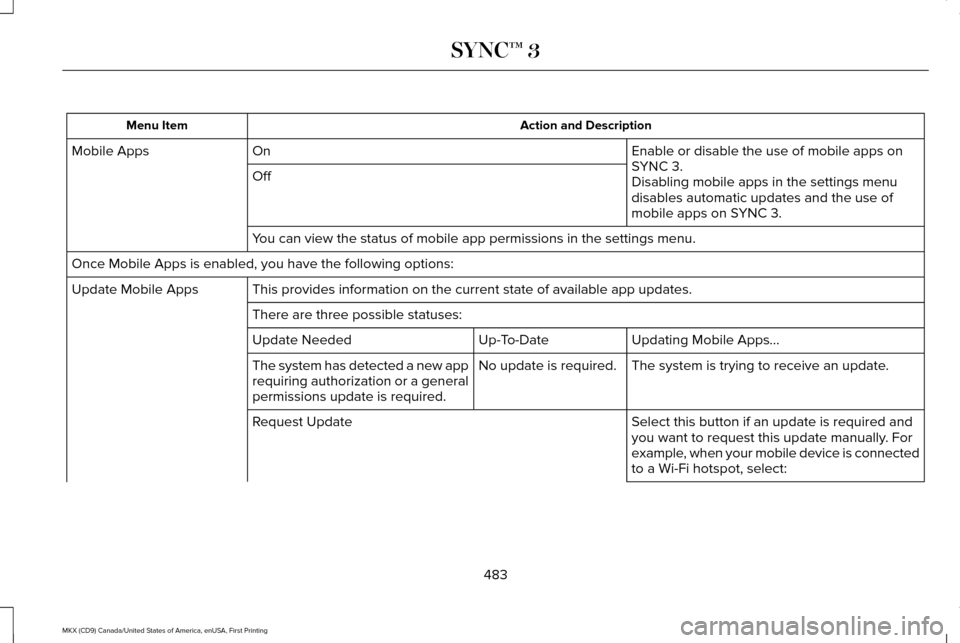
Action and Description
Menu Item
Enable or disable the use of mobile apps on
SYNC 3.
On
Mobile Apps
Off Disabling mobile apps in the settings menu
disables automatic updates and the use of
mobile apps on SYNC 3.
You can view the status of mobile app permissions in the settings menu.
Once Mobile Apps is enabled, you have the following options: This provides information on the current state of available app updates.\
Update Mobile Apps
There are three possible statuses: Updating Mobile Apps\b
Up-To-Date
Update Needed
The system is trying to receive an update.
No update is required.
The system has detected a new app
requiring authorization or a general
permissions update is required.
Select this button if an update is required and
you want to request this update manually. For
example, when your mobile device is connected
to a Wi-Fi hotspot, select:
Request Update
483
MKX (CD9) Canada/United States of America, enUSA, First Printing SYNC™ 3
Page 506 of 587
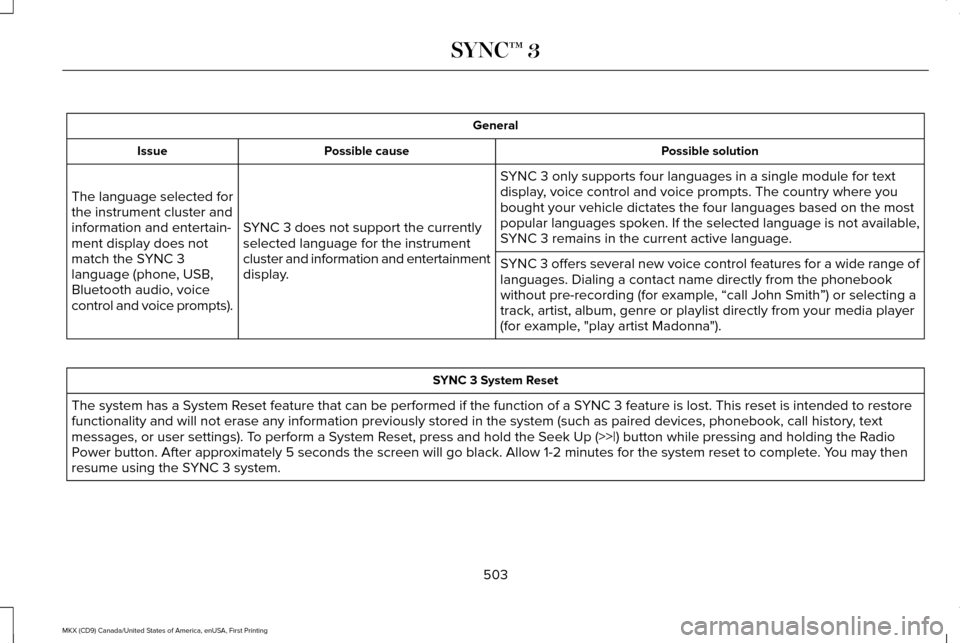
General
Possible solution
Possible cause
Issue
SYNC 3 only supports four languages in a single module for text
display, voice control and voice prompts. The country where you
bought your vehicle dictates the four languages based on the most
popular languages spoken. If the selected language is not available,
SYNC 3 remains in the current active language.
SYNC 3 does not support the currently
selected language for the instrument
cluster and information and entertainment
display.
The language selected for
the instrument cluster and
information and entertain-
ment display does not
match the SYNC 3
language (phone, USB,
Bluetooth audio, voice
control and voice prompts).
SYNC 3 offers several new voice control features for a wide range of
languages. Dialing a contact name directly from the phonebook
without pre-recording (for example, “call John Smith
”) or selecting a
track, artist, album, genre or playlist directly from your media player
(for example, "play artist Madonna"). SYNC 3 System Reset
The system has a System Reset feature that can be performed if the function of a SYNC 3 feature is lost. This reset is intended to restore
functionality and will not erase any information previously stored in th\
e system (such as paired devices, phonebook, call history , text
messages, or user settings). To perform a System Reset, press and hold the Seek Up (>>|) button while pressing and holdi\
ng the Radio
Power button. After approximately 5 seconds the screen will go black. Allow 1-2 minutes for the s\
ystem reset to complete. You may then
resume using the SYNC 3 system.
503
MKX (CD9) Canada/United States of America, enUSA, First Printing SYNC™ 3
Page 513 of 587
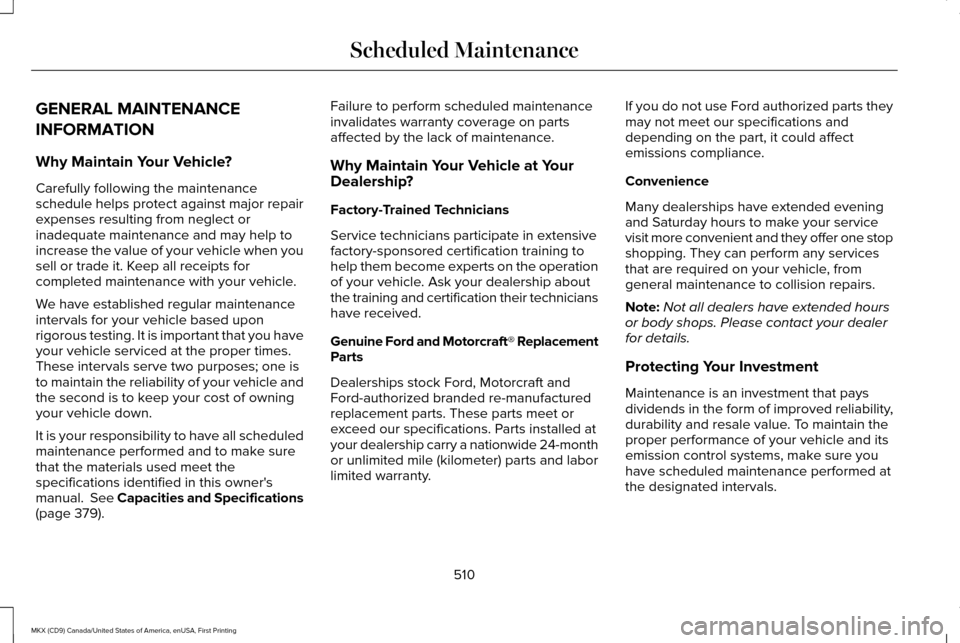
GENERAL MAINTENANCE
INFORMATION
Why Maintain Your Vehicle?
Carefully following the maintenance
schedule helps protect against major repair
expenses resulting from neglect or
inadequate maintenance and may help to
increase the value of your vehicle when you
sell or trade it. Keep all receipts for
completed maintenance with your vehicle.
We have established regular maintenance
intervals for your vehicle based upon
rigorous testing. It is important that you have
your vehicle serviced at the proper times.
These intervals serve two purposes; one is
to maintain the reliability of your vehicle and
the second is to keep your cost of owning
your vehicle down.
It is your responsibility to have all scheduled
maintenance performed and to make sure
that the materials used meet the
specifications identified in this owner's
manual. See Capacities and Specifications
(page 379).
Failure to perform scheduled maintenance
invalidates warranty coverage on parts
affected by the lack of maintenance.
Why Maintain Your Vehicle at Your
Dealership?
Factory-Trained Technicians
Service technicians participate in extensive
factory-sponsored certification training to
help them become experts on the operation
of your vehicle. Ask your dealership about
the training and certification their technicians
have received.
Genuine Ford and Motorcraft® Replacement
Parts
Dealerships stock Ford, Motorcraft and
Ford-authorized branded re-manufactured
replacement parts. These parts meet or
exceed our specifications. Parts installed at
your dealership carry a nationwide 24-month
or unlimited mile (kilometer) parts and labor
limited warranty.
If you do not use Ford authorized parts they
may not meet our specifications and
depending on the part, it could affect
emissions compliance.
Convenience
Many dealerships have extended evening
and Saturday hours to make your service
visit more convenient and they offer one stop
shopping. They can perform any services
that are required on your vehicle, from
general maintenance to collision repairs.
Note:
Not all dealers have extended hours
or body shops. Please contact your dealer
for details.
Protecting Your Investment
Maintenance is an investment that pays
dividends in the form of improved reliability,
durability and resale value. To maintain the
proper performance of your vehicle and its
emission control systems, make sure you
have scheduled maintenance performed at
the designated intervals.
510
MKX (CD9) Canada/United States of America, enUSA, First Printing Scheduled Maintenance
Page 517 of 587
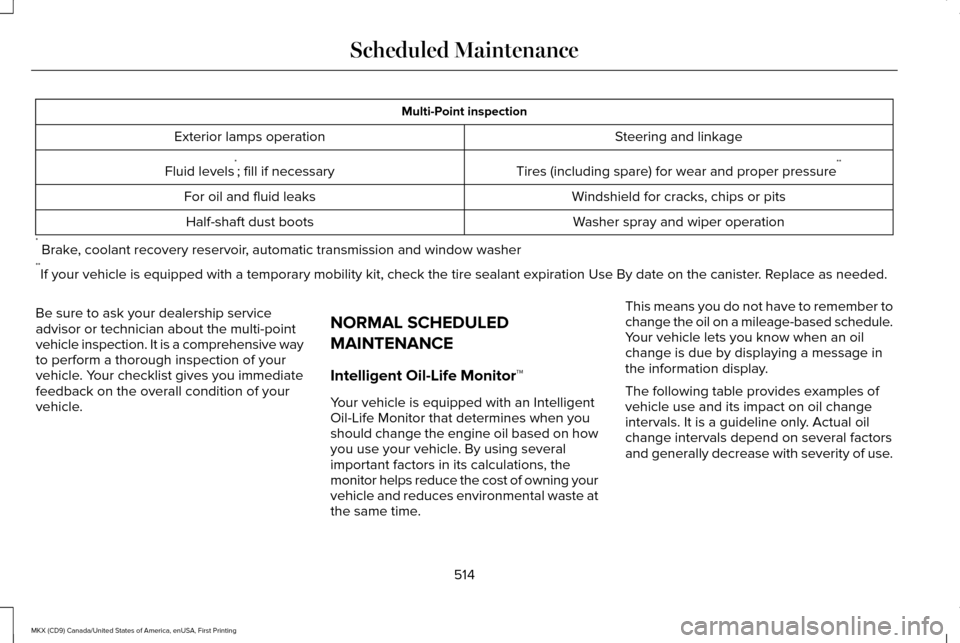
Multi-Point inspection
Steering and linkage
Exterior lamps operation
Tires (including spare) for wear and proper pressure**
Fluid levels *
; fill if necessary
Windshield for cracks, chips or pits
For oil and fluid leaks
Washer spray and wiper operation
Half-shaft dust boots
* Brake, coolant recovery reservoir, automatic transmission and window washer
** If your vehicle is equipped with a temporary mobility kit, check the tir\
e sealant expiration Use By date on the canister. Replace as needed.
Be sure to ask your dealership service
advisor or technician about the multi-point
vehicle inspection. It is a comprehensive way
to perform a thorough inspection of your
vehicle. Your checklist gives you immediate
feedback on the overall condition of your
vehicle. NORMAL SCHEDULED
MAINTENANCE
Intelligent Oil-Life Monitor™
Your vehicle is equipped with an Intelligent
Oil-Life Monitor that determines when you
should change the engine oil based on how
you use your vehicle. By using several
important factors in its calculations, the
monitor helps reduce the cost of owning your
vehicle and reduces environmental waste at
the same time.This means you do not have to remember to
change the oil on a mileage-based schedule.
Your vehicle lets you know when an oil
change is due by displaying a message in
the information display.
The following table provides examples of
vehicle use and its impact on oil change
intervals. It is a guideline only. Actual oil
change intervals depend on several factors
and generally decrease with severity of use.
514
MKX (CD9) Canada/United States of America, enUSA, First Printing Scheduled Maintenance
Page 549 of 587
EXPORT RESTRICTIONS: You acknowledge
that the SOFTWARE is subject to U.S. and
European Union export jurisdiction. You
agree to comply with all applicable
international and national laws that apply to
the SOFTWARE, including the U.S. Export
Administration Regulations, as well as
end-user, end-use and destination
restrictions issued by U.S. and other
governments.
TRADEMARKS: This EULA does not grant
you any rights in connection with any
trademarks or service marks of FORD
MOTOR COMPANY, its affiliates, and third
party software and service providers.
PRODUCT SUPPORT: Please refer to FORD
MOTOR COMPANY instructions provided in
the documentation for the DEVICES product
support, such as the vehicle owner guide.
Should you have any questions concerning
this EULA, or if you desire to contact FORD
MOTOR COMPANY for any other reason,
please refer to the address provided in the
documentation for the DEVICES. No Liability for Certain Damages:
EXCEPT
AS PROHIBITED BY LAW, FORD MOTOR
COMPANY, ANY THIRD PARTY SOFTWARE
OR SERVICES SUPPLIERS, AND THEIR
AFFILIATES SHALL HAVE NO LIABILITY FOR
ANY INDIRECT, SPECIAL, CONSEQUENTIAL
OR INCIDENTAL DAMAGES ARISING FROM
OR IN CONNECTION WITH THE USE OR
PERFORMANCE OF THE SOFTWARE. THIS
LIMITATION SHALL APPLY EVEN IF ANY
REMEDY FAILS OF ITS ESSENTIAL
PURPOSE. THERE ARE NO WARRANTIES
OTHER THAN THOSE THAT MAY BE
EXPRESSLY PROVIDED FOR YOUR NEW
VEHICLE.
SYNC® Automotive Important Safety
Information Read and follow instructions:
• Before using your SYNC® system, read
and follow all instructions and safety
information provided in this end user
manual ("Owner Guide".) Not following
precautions found in the Owner Guide
can lead to an accident or other serious
injuries. General Operation
•
Voice Command Control
: Certain
functions within the SYNC® system may
be accomplished using voice commands.
Using voice commands while driving
helps you to operate the system without
removing your hands from the wheel or
eyes from the road.
• Prolonged Views of Screen:
Do not
access any function requiring a
prolonged view of the screen while you
are driving. Pull over in a safe and legal
manner before attempting to access a
function of the system requiring
prolonged attention.
• Volume Setting: Do not raise the volume
excessively. Keep the volume at a level
where you can still hear outside traffic
and emergency signals while driving.
Driving while unable to hear these
sounds could cause an accident.
546
MKX (CD9) Canada/United States of America, enUSA, First Printing Appendices
Page 554 of 587
(c) Small claims court. You may also litigate
any dispute in small claims court in your
county of residence or FORD MOTOR
COMPANY’S principal place of business, if
the dispute meets all requirements to be
heard in the small claims court. You may
litigate in small claims court whether or not
You negotiated informally first.
(d) Binding arbitration. If You and FORD
MOTOR COMPANY, do not resolve any
dispute by informal negotiation or in small
claims court, any other effort to resolve the
dispute will be conducted exclusively by
binding arbitration. You are giving up the
right to litigate (or participate in as a party or
class member) all disputes in court before a
judge or jury. Instead, all disputes will be
resolved before a neutral arbitrator, whose
decision will be final except for a limited right
of appeal under the Federal Arbitration Act.
Any court with jurisdiction over the parties
may enforce the arbitrator’ s award.(e) Class action waiver.
Any proceedings to
resolve or litigate any dispute in any forum
will be conducted solely on an individual
basis. Neither you nor FORD MOTOR
COMPANY, will seek to have any dispute
heard as a class action, as a private attorney
general action, or in any other proceeding
in which any party acts or proposes to act in
a representative capacity. No arbitration or
proceeding will be combined with another
without the prior written consent of all parties
to all affected arbitrations or proceedings.
(f ) Arbitration procedure.
Any arbitration
will be conducted by the American
Arbitration Association (the “ AAA”), under its
Commercial Arbitration Rules. If You are an
individual and use the SOFTWARE for
personal or vehicle use, or if the value of the
dispute is $75,000 or less whether or not
You are an individual or how You use the
SOFTWARE, the AAA Supplementary
Procedures for Consumer-Related Disputes
will also apply. To commence arbitration,
submit a Commercial Arbitration Rules
Demand for Arbitration form to the AAA. You
may request a telephonic or in-person
hearing by following the AAA rules. In a dispute involving $10,000 or less, any
hearing will be telephonic unless the
arbitrator finds good cause to hold an
in-person hearing instead. For more
information, see adr.org or call
1-800-778-7879. You agree to commence
arbitration only in your county of residence
or FORD MOTOR COMPANY’S principal
place of business. The arbitrator may award
the same damages to You individually as a
court could. The arbitrator may award
declaratory or injunctive relief only to You
individually, and only to the extent required
to satisfy Your individual claim.
(g) Arbitration fees and incentives.
•
I. Disputes involving $75,000 or less.
FORD MOTOR COMPANY will promptly
reimburse your filing fees and pay the
AAA’ s and arbitrator’ s fees and
expenses. If you reject FORD MOTOR
COMPANY’S last written settlement offer
made before the arbitrator was appointed
(“last written offer”), your dispute goes
all the way to an arbitrator’ s decision
(called an “award”), and the arbitrator
awards you more than the last written
offer, FORD MOTOR COMPANY will give
551
MKX (CD9) Canada/United States of America, enUSA, First Printing Appendices