lights LINCOLN MKX 2017 Owner's Manual
[x] Cancel search | Manufacturer: LINCOLN, Model Year: 2017, Model line: MKX, Model: LINCOLN MKX 2017Pages: 587, PDF Size: 5.4 MB
Page 268 of 587
Trailer lamps are required on most towed
vehicles. Make sure all running lights, brake
lights, turn signals and hazard lights are
working.
Before Towing a Trailer
Practice turning, stopping and backing up to
get the feel of your vehicle-trailer
combination before starting on a trip. When
turning, make wider turns so the trailer
wheels clear curbs and other obstacles.
When Towing a Trailer
•
Do not drive faster than 70 mph (113
km/h) during the first 500 miles (800
kilometers).
• Do not make full-throttle starts.
• Check your hitch, electrical connections
and trailer wheel lug nuts thoroughly after
you have traveled 50 miles (80
kilometers).
• When stopped in congested or heavy
traffic during hot weather, place the
gearshift in position P to aid engine and
transmission cooling and to help A/C
performance. •
Turn off the speed control with heavy
loads or in hilly terrain. The speed control
may turn off automatically when you are
towing on long, steep grades.
• Shift to a lower gear when driving down
a long or steep hill. Do not apply the
brakes continuously, as they may
overheat and become less effective.
• If your transmission is equipped with a
Grade Assist or Tow/Haul feature, use
this feature when towing. This provides
engine braking and helps eliminate
excessive transmission shifting for
optimum fuel economy and transmission
cooling.
• Allow more distance for stopping with a
trailer attached. Anticipate stops and
brake gradually.
• Avoid parking on a grade. However, if
you must park on a grade:
1. Turn the steering wheel to point your vehicle tires away from traffic flow.
2. Set your vehicle parking brake.
3. Place the automatic transmission in position
P. 4. Place wheel chocks in front and back of
the trailer wheels. (Chocks not included
with vehicle.)
Launching or Retrieving a Boat or
Personal Watercraft (PWC)
Note: Disconnect the wiring to the trailer
before
backing the trailer into the water.
Note: Reconnect the wiring to the trailer
after
removing the trailer from the water.
When backing down a ramp during boat
launching or retrieval:
• Do not allow the static water level to rise
above the bottom edge of the rear
bumper.
• Do not allow waves to break higher than
6 inches (15 centimeters) above the
bottom edge of the rear bumper.
Exceeding these limits may allow water to
enter vehicle components:
• Causing internal damage to the
components.
• Affecting driveability, emissions, and
reliability.
265
MKX (CD9) Canada/United States of America, enUSA, First Printing Towing
Page 272 of 587
There are also some things you may want to
avoid doing because they reduce your fuel
economy:
•
Avoid sudden or hard accelerations.
• Avoid revving the engine before turning
off the car.
• Avoid long idle periods.
• Do not warm up your vehicle on cold
mornings.
• Reduce the use of air conditioning and
heat.
• Avoid using speed control in hilly terrain.
• Do not rest your foot on the brake pedal
while driving.
• Avoid carrying unnecessary weight.
• Avoid adding particular accessories to
your vehicle (e.g. bug deflectors,
rollbars/light bars, running boards, ski
racks).
• Avoid driving with the wheels out of
alignment. DRIVING THROUGH WATER WARNING
Do not drive through flowing or deep
water as you may lose control of your
vehicle. Note:
Driving through standing water can
cause vehicle damage.
Note: Engine damage can occur if water
enters the air filter.
Before driving through standing water, check
the depth. Never drive through water that is
higher than the bottom of the front rocker
area of your vehicle. When driving through standing water, drive
very slowly and do not stop your vehicle.
Your brake performance and traction may
be limited. After driving through water and
as soon as it is safe to do so:
•
Lightly press the brake pedal to dry the
brakes and to check that they work.
• Check that the horn works.
• Check that the exterior lights work.
• Turn the steering wheel to check that the
steering power assist works.
269
MKX (CD9) Canada/United States of America, enUSA, First Printing Driving HintsE176360
Page 347 of 587
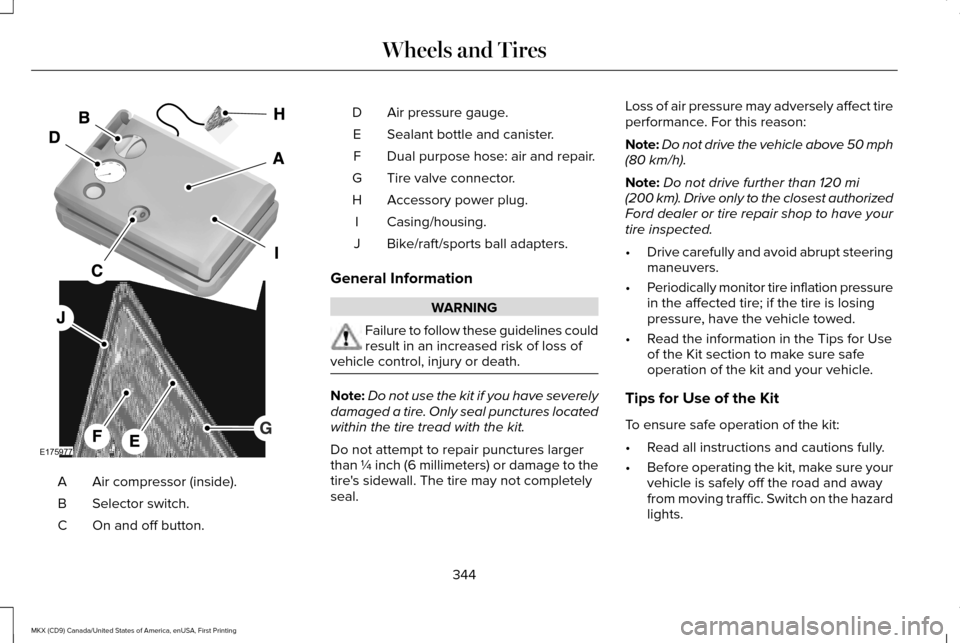
Air compressor (inside).
A
Selector switch.
B
On and off button.
C Air pressure gauge.
D
Sealant bottle and canister.
E
Dual purpose hose: air and repair.
F
Tire valve connector.
G
Accessory power plug.
H
Casing/housing.
I
Bike/raft/sports ball adapters.
J
General Information WARNING
Failure to follow these guidelines could
result in an increased risk of loss of
vehicle control, injury or death. Note:
Do not use the kit if you have severely
damaged a tire. Only seal punctures located
within the tire tread with the kit.
Do not attempt to repair punctures larger
than ¼ inch (6 millimeters) or damage to the
tire's sidewall. The tire may not completely
seal. Loss of air pressure may adversely affect tire
performance. For this reason:
Note:
Do not drive the vehicle above 50 mph
(80 km/h).
Note: Do not drive further than
120 mi
(200 km). Drive only to the closest authorized
Ford dealer or tire repair shop to have your
tire inspected.
• Drive carefully and avoid abrupt steering
maneuvers.
• Periodically monitor tire inflation pressure
in the affected tire; if the tire is losing
pressure, have the vehicle towed.
• Read the information in the Tips for Use
of the Kit section to make sure safe
operation of the kit and your vehicle.
Tips for Use of the Kit
To ensure safe operation of the kit:
• Read all instructions and cautions fully.
• Before operating the kit, make sure your
vehicle is safely off the road and away
from moving traffic. Switch on the hazard
lights.
344
MKX (CD9) Canada/United States of America, enUSA, First Printing Wheels and TiresE175977
Page 349 of 587
WARNINGS
Do not run the engine during kit
operation unless the vehicle is
outdoors or in a well-ventilated area. Preparation: Park the vehicle in a safe, level
and secure area, away from moving traffic.
Switch the hazard lights on. Apply the
parking brake and switch the engine off.
Inspect the flat tire for visible damage.
Sealant compound contains latex. Use
appropriate precautions to avoid any allergic
reactions.
Do not remove any foreign object that has
pierced the tire. If a puncture is located in
the tire sidewall, stop and call roadside
assistance.
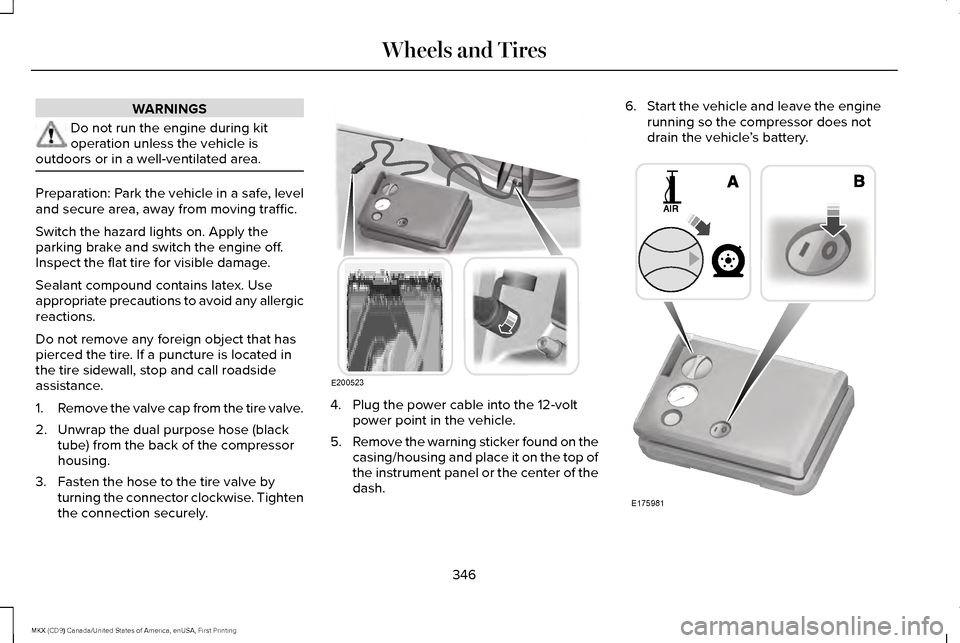
1.
Remove the valve cap from the tire valve.
2. Unwrap the dual purpose hose (black tube) from the back of the compressor
housing.
3. Fasten the hose to the tire valve by turning the connector clockwise. Tighten
the connection securely. 4. Plug the power cable into the 12-volt
power point in the vehicle.
5. Remove the warning sticker found on the
casing/housing and place it on the top of
the instrument panel or the center of the
dash. 6. Start the vehicle and leave the engine
running so the compressor does not
drain the vehicle ’s battery. 346
MKX (CD9) Canada/United States of America, enUSA, First Printing Wheels and TiresE200523 E175981
Page 451 of 587
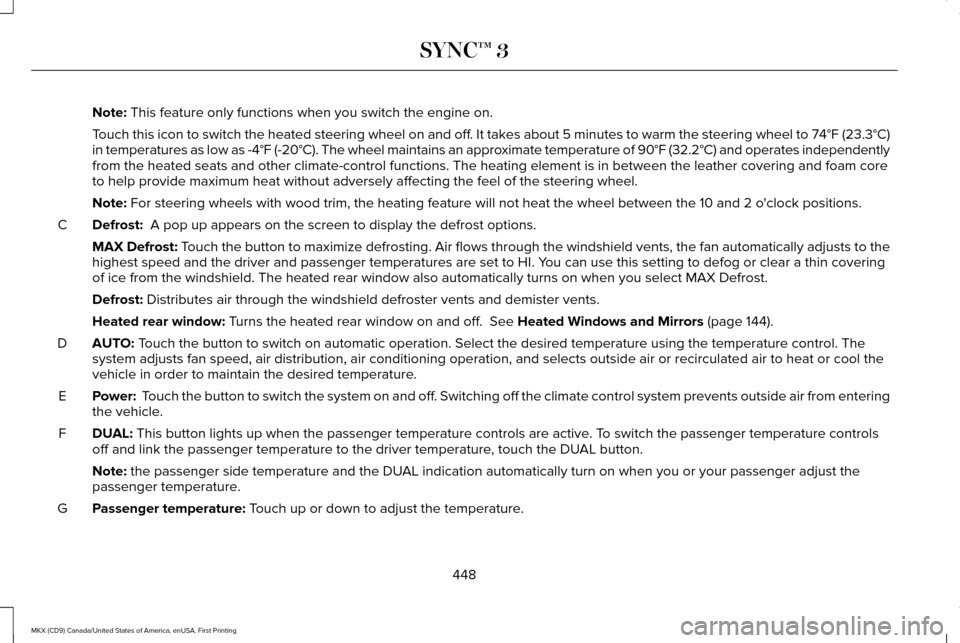
Note: This feature only functions when you switch the engine on.
Touch this icon to switch the heated steering wheel on and off. It takes about 5 minutes to warm the steering wheel to 74°F (23.3°C)
in temperatures as low as -4°F (-20°C). The wheel maintains an a\
pproximate temperature of 90°F (32.2°C) and operates independently
from the heated seats and other climate-control functions. The heating e\
lement is in between the leather covering and foam core
to help provide maximum heat without adversely affecting the feel of the\
steering wheel.
Note:
For steering wheels with wood trim, the heating feature will not heat t\
he wheel between the 10 and 2 o'clock positions.
Defrost:
A pop up appears on the screen to display the defrost options.
C
MAX Defrost: Touch the button to maximize defrosting. Air flows through the windshield\
vents, the fan automatically adjusts to the
highest speed and the driver and passenger temperatures are set to HI. Y\
ou can use this setting to defog or clear a thin covering
of ice from the windshield. The heated rear window also automatically tu\
rns on when you select MAX Defrost.
Defrost:
Distributes air through the windshield defroster vents and demister vent\
s.
Heated rear window:
Turns the heated rear window on and off. See Heated Windows and Mirrors (page 144).
AUTO:
Touch the button to switch on automatic operation. Select the desired tem\
perature using the temperature control. The
system adjusts fan speed, air distribution, air conditioning operation, \
and selects outside air or recirculated air to heat or cool the
vehicle in order to maintain the desired temperature.
D
Power:
Touch the button to switch the system on and off. Switching off the climate control system prevents outside air from enteri\
ng
the vehicle.
E
DUAL:
This button lights up when the passenger temperature controls are activ\
e. To switch the passenger temperature controls
off and link the passenger temperature to the driver temperature, touch the DUAL button.
F
Note:
the passenger side temperature and the DUAL indication automatically turn on when you or your passenger adjust th\
e
passenger temperature.
Passenger temperature:
Touch up or down to adjust the temperature.
G
448
MKX (CD9) Canada/United States of America, enUSA, First Printing SYNC™ 3
Page 462 of 587
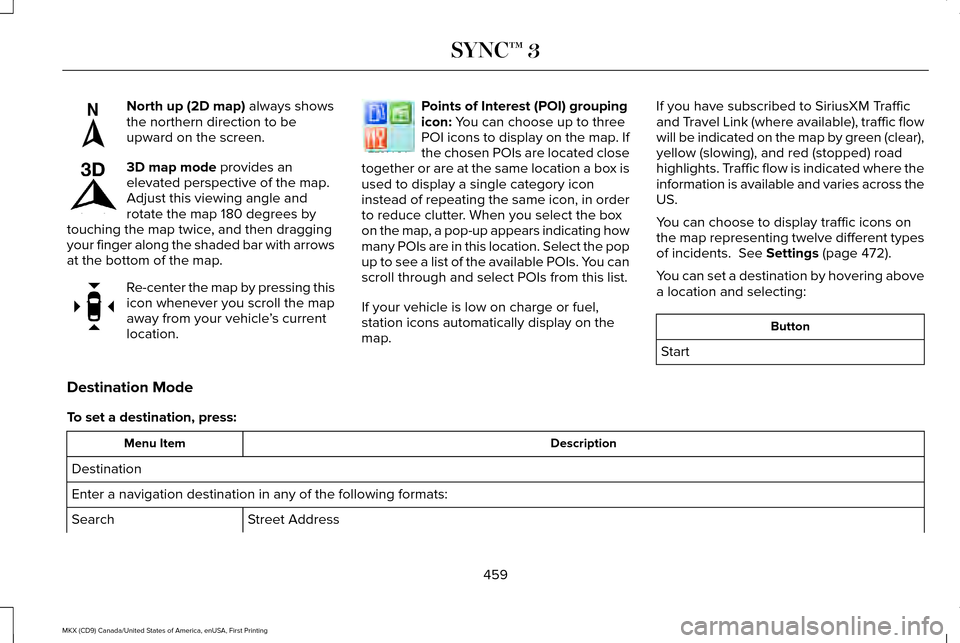
North up (2D map) always shows
the northern direction to be
upward on the screen. 3D map mode
provides an
elevated perspective of the map.
Adjust this viewing angle and
rotate the map 180 degrees by
touching the map twice, and then dragging
your finger along the shaded bar with arrows
at the bottom of the map. Re-center the map by pressing this
icon whenever you scroll the map
away from your vehicle
’s current
location. Points of Interest (POI) grouping
icon:
You can choose up to three
POI icons to display on the map. If
the chosen POIs are located close
together or are at the same location a box is
used to display a single category icon
instead of repeating the same icon, in order
to reduce clutter. When you select the box
on the map, a pop-up appears indicating how
many POIs are in this location. Select the pop
up to see a list of the available POIs. You can
scroll through and select POIs from this list.
If your vehicle is low on charge or fuel,
station icons automatically display on the
map. If you have subscribed to SiriusXM Traffic
and Travel Link (where available), traffic flow
will be indicated on the map by green (clear),
yellow (slowing), and red (stopped) road
highlights. Traffic flow is indicated where the
information is available and varies across the
US.
You can choose to display traffic icons on
the map representing twelve different types
of incidents.
See Settings (page 472).
You can set a destination by hovering above
a location and selecting: Button
Start
Destination Mode
To set a destination, press: Description
Menu Item
Destination
Enter a navigation destination in any of the following formats: Street Address
Search
459
MKX (CD9) Canada/United States of America, enUSA, First Printing SYNC™ 3E207749 E207748 E207751 E207754
Page 515 of 587
Make sure to change your vehicle
’s oils and
fluids at the specified intervals or in
conjunction with a repair. Flushing is a viable
way to change fluid for many vehicle
sub-systems during scheduled maintenance. It is critical that systems are flushed only with
new fluid that is the same as that required
to fill and operate the system or using a
Ford-approved flushing chemical.
Owner Checks and Services
Make sure you perform the following basic
maintenance checks and inspections every
month or at six-month intervals. Check every month
Engine oil level.
Function of all interior and exterior lights.
Tires (including spare) for wear and proper pressure. Windshield washer fluid level. Check every six months
Battery connections. Clean if necessary.
Body and door drain holes for obstructions. Clean if necessary. Cooling system fluid level and coolant strength.
Door weatherstrips for wear. Lubricate if necessary.
Hinges, latches and outside locks for proper operation. Lubricate if necessary. Parking brake for proper operation.
512
MKX (CD9) Canada/United States of America, enUSA, First Printing Scheduled Maintenance
Page 578 of 587
Cleaning Products.........................................331
Materials................................................................331
Cleaning the Engine
....................................333
Cleaning the Exterior...................................332 Exterior Chrome Parts.......................................332
Exterior Plastic Parts..........................................333
Stripes or Graphics.............................................333
Underbody...........................................................333
Under Hood.........................................................333
Cleaning the Instrument Panel and Instrument Cluster Lens...........................336
Cleaning the Interior....................................334 Cleaning Black Label or Presidential
Interior ...............................................................335
Cleaning the Wheels...................................337
Cleaning the Windows and Wiper Blades...........................................................334
Clearing All MyKeys.......................................63
Climate............................................................446
Climate Control
...............................................141
Climate Controlled Seats............................156 Cooled Seats........................................................157
Coolant Check See: Engine Coolant Check..............................314
Crash Sensors and Airbag Indicator
..........53
Creating a MyKey...........................................62 Programming/Changing Configurable
Settings...............................................................62 Cross Traffic Alert.........................................242
False Alerts..........................................................245
Switching the System Off and On..................246
System Errors......................................................246
System Lights, Messages and Audible
Alerts.................................................................245
System Limitations.............................................245
Using the System...............................................242
Cruise Control
.................................................86
Principle of Operation.......................................224
Type 1.......................................................................86
Type 2......................................................................87
Cruise control See: Using Cruise Control................................224
Customer Assistance
..................................278
D
Data Recording
..................................................9
Event Data Recording...........................................10
Service Data Recording.........................................9
Daytime Running Lamps
...............................94
Type 1 - Conventional
(Non-Configurable)..........................................94
Type 2 - Configurable..........................................94
Direction Indicators
........................................97
Doors and Locks.............................................68 Drive Control
..................................................251
LINCOLN DRIVE CONTROL.............................251
Driver Alert.....................................................233 PRINCIPLE OF OPERATION............................233
USING DRIVER ALERT......................................233
Driver and Passenger Airbags....................46 Children and Airbags...........................................47
Proper Driver and Front Passenger Seating
Adjustment.........................................................47
Driver and Passenger Knee Airbags.........52
Driving Aids....................................................233
Driving Hints
..................................................268
Driving Through Water...............................269
DRL See: Daytime Running Lamps...........................94
E
Economical Driving......................................268
Electric Parking Brake..................................196 Applying the Electric Parking Brake...............
196
Battery With No Charge....................................198
Releasing the Electric Parking Brake.............197
Emission Control System............................180 On-Board Diagnostics (OBD-II).........................
181
Readiness for Inspection and Maintenance (I/M) Testing......................................................182
575
MKX (CD9) Canada/United States of America, enUSA, First Printing Index
Page 586 of 587
Setting the Gap Distance.................................227
Switching Adaptive Cruise Control Off........229
Switching Adaptive Cruise Control On.........
226
Switching to Normal Cruise Control..............232
System Not Available.........................................231
Using All-Wheel Drive..................................189 Driving In Special Conditions With All-Wheel
Drive (AWD)......................................................189
Using Cruise Control
...................................224
Switching Cruise Control Off...........................225
Switching Cruise Control On...........................224
Using MyKey With Remote Start Systems
..........................................................66
Using Snow Chains......................................366
Using Stability Control................................205
Using Summer Tires....................................365
Using Traction Control................................202 Switching the System Off.................................202
System Indicator Lights and Messages.......202
Using a Switch....................................................202
Using the Information Display Controls.......202
Using Voice Recognition............................422 Audio Voice Commands...................................424
Climate Voice Commands...............................425
Mobile App Voice Commands........................429
Navigation Voice Commands..........................428
Phone Voice Commands..................................426 SiriusXM Traffic and Travel Link Voice
Commands......................................................430
Voice Settings Commands................................431
Utilizing the Mediation/Arbitration Program (Canada Only)
..............................................281
V
Vehicle Care
...................................................331
General Information............................................331
Vehicle Certification Label
.........................383
Vehicle Identification Number..................383
Vehicle Storage.............................................338
Battery...................................................................339
Body.......................................................................338
Brakes...................................................................339
Cooling system...................................................339
Engine...................................................................339
Fuel system..........................................................339
General..................................................................338
Miscellaneous......................................................339
Removing Vehicle From Storage....................339
Tires.......................................................................339
Ventilation See: Climate Control............................................141
VIN See: Vehicle Identification Number...............383
Voice Control
...................................................86 W
Warning Lamps and Indicators..................109
Adaptive Cruise Control....................................109
Adaptive Steering...............................................109
Anti-Lock Braking System..................................110
Autohold Active....................................................110
Autohold Unavailable..........................................110
Automatic High Beam Control..........................110
Battery.....................................................................110
Blind Spot Monitor...............................................110
Brake System........................................................110
Cruise Control.......................................................110
Direction Indicator.................................................111
Door Ajar.................................................................111
Electric Park Brake................................................111
Engine Coolant Temperature.............................111
Engine Oil................................................................111
Fasten Seatbelt......................................................111
Front Airbag............................................................111
Heads Up Display..................................................111
High Beam...............................................................111
Hood Ajar...............................................................112
Liftgate Ajar............................................................112
Low Beam Malfunction Warning.......................
112
Low Fuel Level......................................................112
Low Tire Pressure Warning................................112
Low Washer Fluid.................................................112
583
MKX (CD9) Canada/United States of America, enUSA, First Printing Index