power LINCOLN MKX 2017 Owner's Manual
[x] Cancel search | Manufacturer: LINCOLN, Model Year: 2017, Model line: MKX, Model: LINCOLN MKX 2017Pages: 587, PDF Size: 5.4 MB
Page 133 of 587
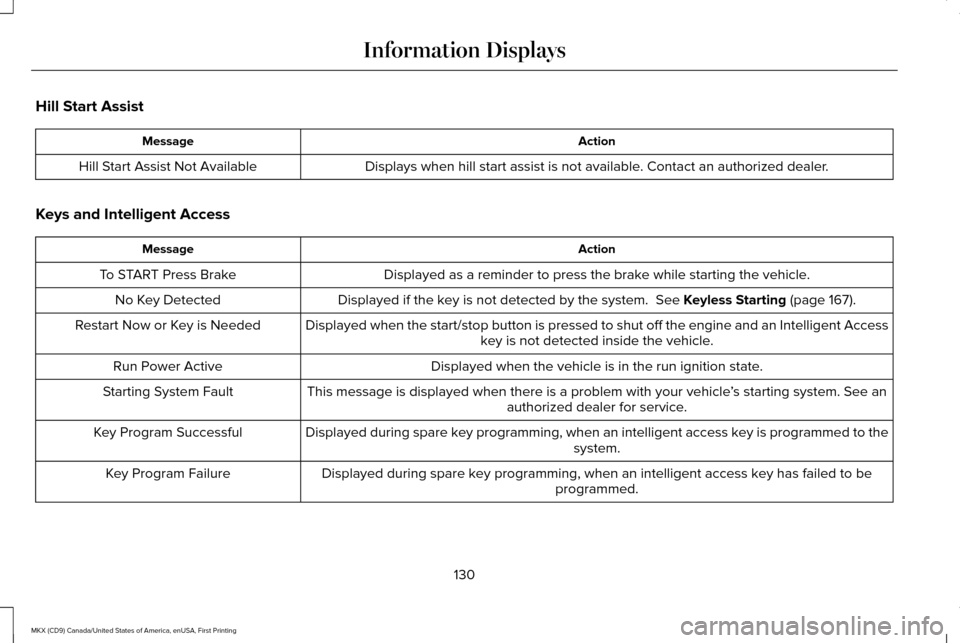
Hill Start Assist
Action
Message
Displays when hill start assist is not available. Contact an authorized dealer.
Hill Start Assist Not Available
Keys and Intelligent Access Action
Message
Displayed as a reminder to press the brake while starting the vehicle.
To START Press Brake
Displayed if the key is not detected by the system. See Keyless Starting (page 167).
No Key Detected
Displayed when the start/stop button is pressed to shut off the engine a\
nd an Intelligent Accesskey is not detected inside the vehicle.
Restart Now or Key is Needed
Displayed when the vehicle is in the run ignition state.
Run Power Active
This message is displayed when there is a problem with your vehicle ’s starting system. See an
authorized dealer for service.
Starting System Fault
Displayed during spare key programming, when an intelligent access key is programmed to the system.
Key Program Successful
Displayed during spare key programming, when an intelligent access key has failed to be programmed.
Key Program Failure
130
MKX (CD9) Canada/United States of America, enUSA, First Printing Information Displays
Page 135 of 587
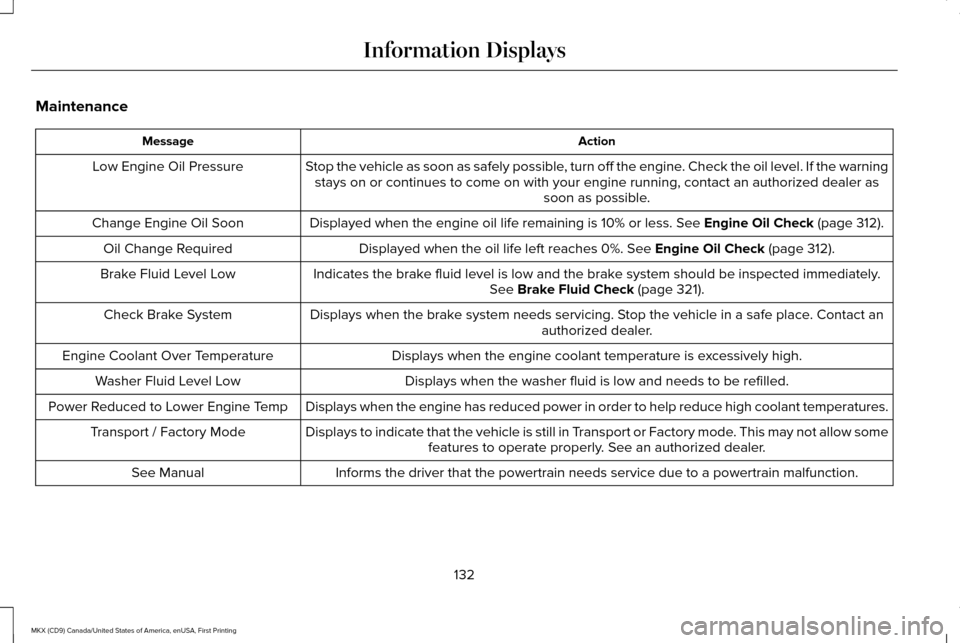
Maintenance
Action
Message
Stop the vehicle as soon as safely possible, turn off the engine. Check the oil level. If the warningstays on or continues to come on with your engine running, contact an au\
thorized dealer as soon as possible.
Low Engine Oil Pressure
Displayed when the engine oil life remaining is 10% or less. See Engine Oil Check (page 312).
Change Engine Oil Soon
Displayed when the oil life left reaches 0%.
See Engine Oil Check (page 312).
Oil Change Required
Indicates the brake fluid level is low and the brake system should be inspected immediately.See
Brake Fluid Check (page 321).
Brake Fluid Level Low
Displays when the brake system needs servicing. Stop the vehicle in a safe place. Contact an authorized dealer.
Check Brake System
Displays when the engine coolant temperature is excessively high.
Engine Coolant Over Temperature
Displays when the washer fluid is low and needs to be refilled.
Washer Fluid Level Low
Displays when the engine has reduced power in order to help reduce high \
coolant temperatures.
Power Reduced to Lower Engine Temp
Displays to indicate that the vehicle is still in Transport or Factory mode. This may not allow somefeatures to operate properly. See an authorized dealer.
Transport / Factory Mode
Informs the driver that the powertrain needs service due to a powertrain\
malfunction.
See Manual
132
MKX (CD9) Canada/United States of America, enUSA, First Printing Information Displays
Page 138 of 587
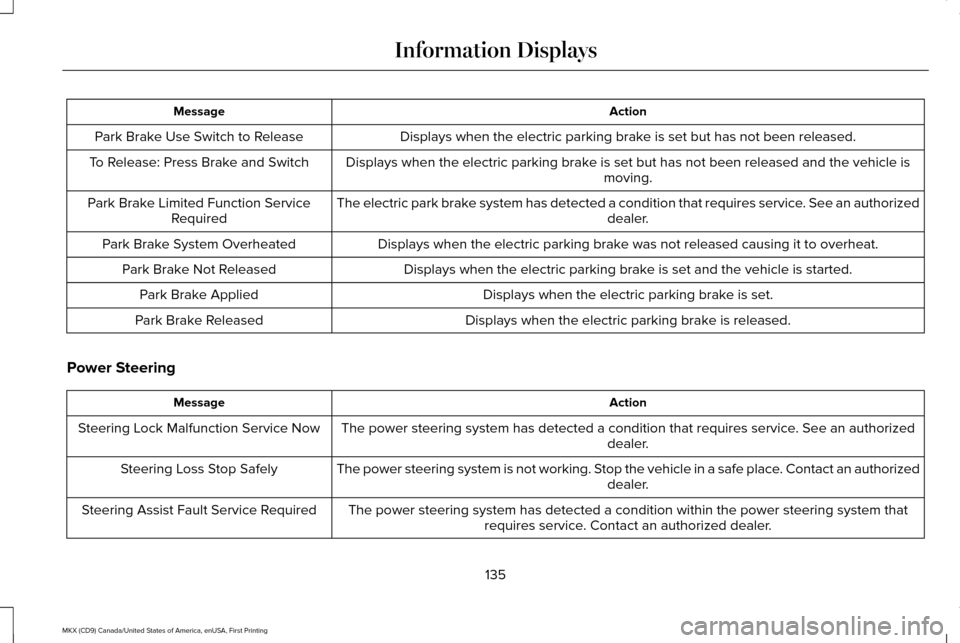
Action
Message
Displays when the electric parking brake is set but has not been released.
Park Brake Use Switch to Release
Displays when the electric parking brake is set but has not been released and the vehicle is moving.
To Release: Press Brake and Switch
The electric park brake system has detected a condition that requires service. See an authorized dealer.
Park Brake Limited Function Service
Required
Displays when the electric parking brake was not released causing it to overheat.
Park Brake System Overheated
Displays when the electric parking brake is set and the vehicle is started.
Park Brake Not Released
Displays when the electric parking brake is set.
Park Brake Applied
Displays when the electric parking brake is released.
Park Brake Released
Power Steering Action
Message
The power steering system has detected a condition that requires service\
. See an authorized dealer.
Steering Lock Malfunction Service Now
The power steering system is not working. Stop the vehicle in a safe place. Contact an authorized dealer.
Steering Loss Stop Safely
The power steering system has detected a condition within the power stee\
ring system thatrequires service. Contact an authorized dealer.
Steering Assist Fault Service Required
135
MKX (CD9) Canada/United States of America, enUSA, First Printing Information Displays
Page 145 of 587
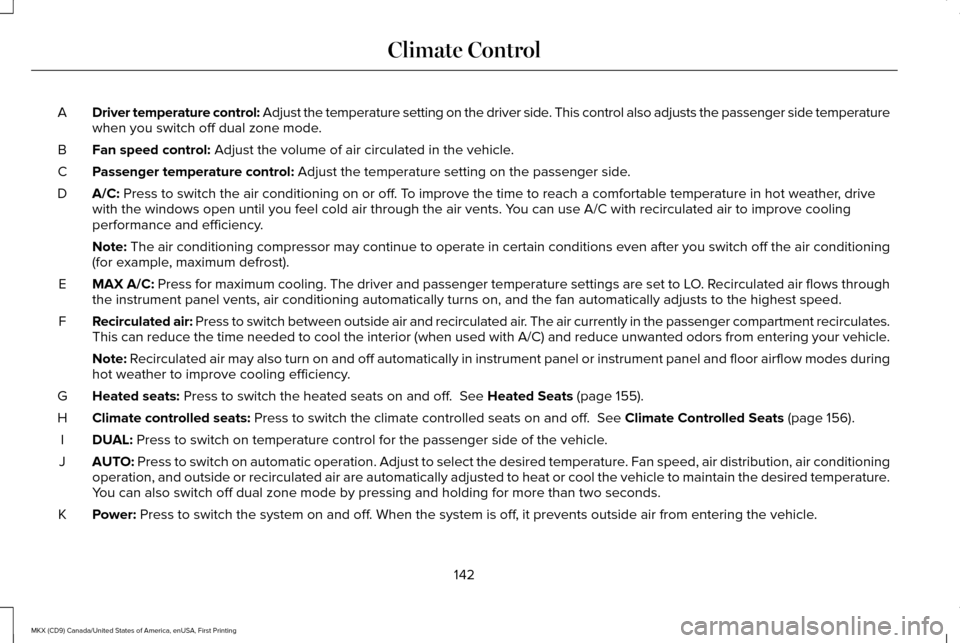
Driver temperature control: Adjust the temperature setting on the driver side. This control also adjusts the passenger side temperature
when you switch off dual zone mode.
A
Fan speed control: Adjust the volume of air circulated in the vehicle.
B
Passenger temperature control:
Adjust the temperature setting on the passenger side.
C
A/C:
Press to switch the air conditioning on or off. To improve the time to reach a comfortable temperature in hot weather, drive
with the windows open until you feel cold air through the air vents. You can use A/C with recirculated air to improve cooling
performance and efficiency.
D
Note:
The air conditioning compressor may continue to operate in certain cond\
itions even after you switch off the air conditioning
(for example, maximum defrost).
MAX A/C:
Press for maximum cooling. The driver and passenger temperature setting\
s are set to LO. Recirculated air flows through
the instrument panel vents, air conditioning automatically turns on, and\
the fan automatically adjusts to the highest speed.
E
Recirculated air: Press to switch between outside air and recirculated air. The air currently in the passenger compartment recirculates.
This can reduce the time needed to cool the interior (when used with A/\
C) and reduce unwanted odors from entering your vehicle.
F
Note:
Recirculated air may also turn on and off automatically in instrument pan\
el or instrument panel and floor airflow modes during
hot weather to improve cooling efficiency.
Heated seats:
Press to switch the heated seats on and off. See Heated Seats (page 155).
G
Climate controlled seats:
Press to switch the climate controlled seats on and off. See Climate Controlled Seats (page 156).
H
DUAL:
Press to switch on temperature control for the passenger side of the ve\
hicle.
I
AUTO:
Press to switch on automatic operation. Adjust to select the desired te\
mperature. Fan speed, air distribution, air conditioning
operation, and outside or recirculated air are automatically adjusted to\
heat or cool the vehicle to maintain the desired temperature .
You can also switch off dual zone mode by pressing and holding for more t\
han two seconds.
J
Power:
Press to switch the system on and off. When the system is off, it prevents outside air from entering the vehicle.
K
142
MKX (CD9) Canada/United States of America, enUSA, First Printing Climate Control
Page 152 of 587
Installing the Head Restraint
Align the steel stems into the guide sleeves
and push the head restraint down until it
locks.
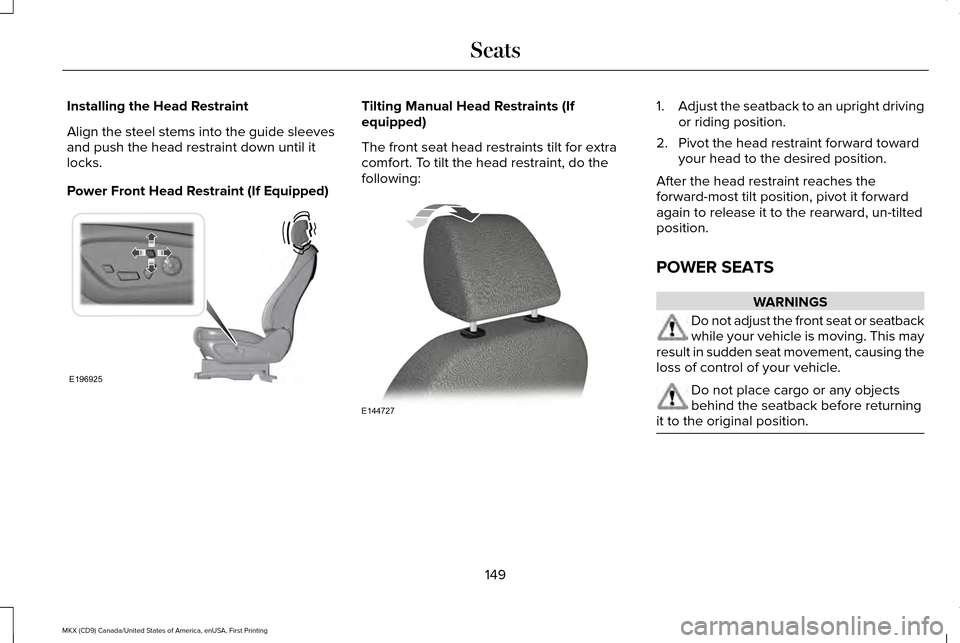
Power Front Head Restraint (If Equipped) Tilting Manual Head Restraints (If
equipped)
The front seat head restraints tilt for extra
comfort. To tilt the head restraint, do the
following: 1.
Adjust the seatback to an upright driving
or riding position.
2. Pivot the head restraint forward toward your head to the desired position.
After the head restraint reaches the
forward-most tilt position, pivot it forward
again to release it to the rearward, un-tilted
position.
POWER SEATS WARNINGS
Do not adjust the front seat or seatback
while your vehicle is moving. This may
result in sudden seat movement, causing the
loss of control of your vehicle. Do not place cargo or any objects
behind the seatback before returning
it to the original position. 149
MKX (CD9) Canada/United States of America, enUSA, First Printing SeatsE196925 E144727
Page 154 of 587
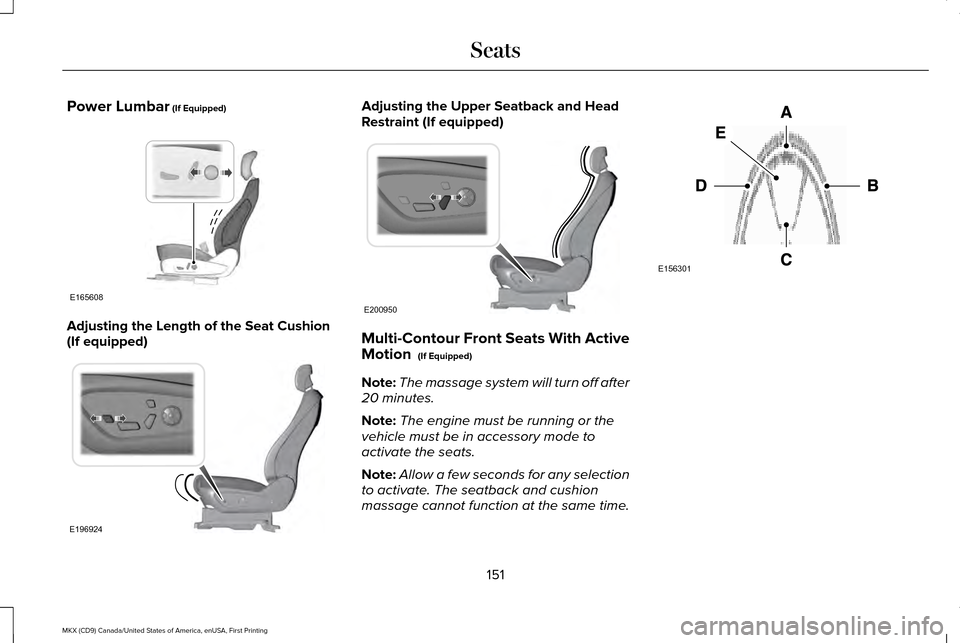
Power Lumbar (If Equipped)
Adjusting the Length of the Seat Cushion
(If equipped) Adjusting the Upper Seatback and Head
Restraint (If equipped)
Multi-Contour Front Seats With Active
Motion
(If Equipped)
Note: The massage system will turn off after
20 minutes.
Note: The engine must be running or the
vehicle must be in accessory mode to
activate the seats.
Note: Allow a few seconds for any selection
to activate. The seatback and cushion
massage cannot function at the same time. 151
MKX (CD9) Canada/United States of America, enUSA, First Printing SeatsE165608 E196924 E200950 E156301
Page 156 of 587
WARNINGS
Do not use the memory function when
your vehicle is moving.
This feature automatically recalls the position
of the following:
•
Driver seat.
• Power mirrors.
• Optional power adjustable foot pedals.
• Optional power steering column.
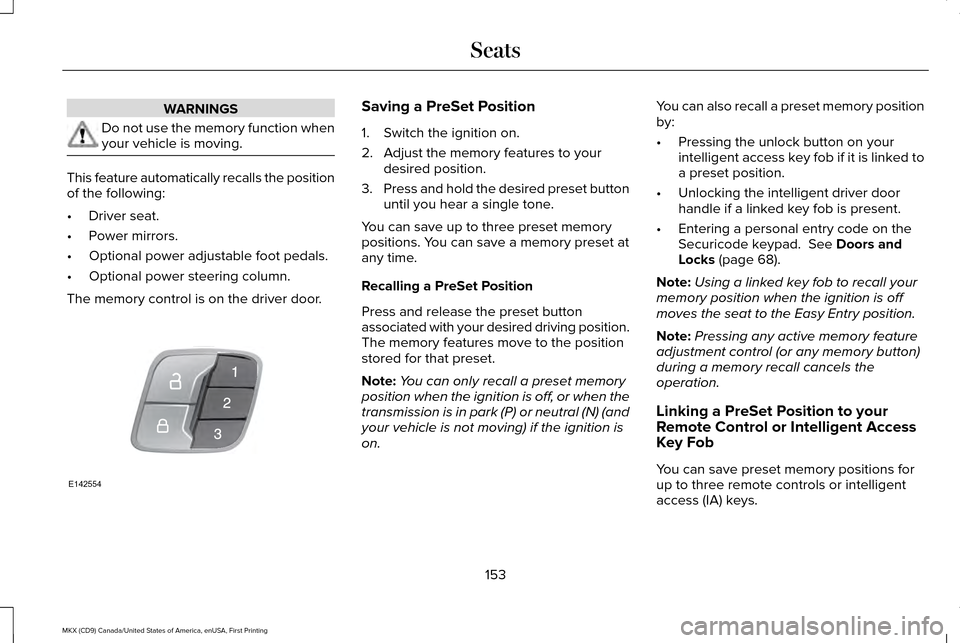
The memory control is on the driver door. Saving a PreSet Position
1. Switch the ignition on.
2. Adjust the memory features to your
desired position.
3. Press and hold the desired preset button
until you hear a single tone.
You can save up to three preset memory
positions. You can save a memory preset at
any time.
Recalling a PreSet Position
Press and release the preset button
associated with your desired driving position.
The memory features move to the position
stored for that preset.
Note: You can only recall a preset memory
position when the ignition is off, or when the
transmission is in park (P) or neutral (N) (and
your vehicle is not moving) if the ignition is
on. You can also recall a preset memory position
by:
•
Pressing the unlock button on your
intelligent access key fob if it is linked to
a preset position.
• Unlocking the intelligent driver door
handle if a linked key fob is present.
• Entering a personal entry code on the
Securicode keypad. See Doors and
Locks (page 68).
Note: Using a linked key fob to recall your
memory position when the ignition is off
moves the seat to the Easy Entry position.
Note: Pressing any active memory feature
adjustment control (or any memory button)
during a memory recall cancels the
operation.
Linking a PreSet Position to your
Remote Control or Intelligent Access
Key Fob
You can save preset memory positions for
up to three remote controls or intelligent
access (IA) keys.
153
MKX (CD9) Canada/United States of America, enUSA, First Printing SeatsE142554
Page 157 of 587
1. With the ignition on, move the memory
positions to the desired positions.
2. Press and hold the desired preset button
for about five seconds. A tone sounds
after about two seconds. Continue
holding until you hear a second tone.
3. Within three seconds, press the lock button on the remote control you are
linking.
To unlink a remote control, follow the same
procedure – except in step 3, press the
unlock button on the remote control.
Note: If more than one linked remote control
or intelligent access key is in range, the
memory function moves to the settings of
the first key to initiate a memory recall.
Easy Entry and Exit Feature
If you enable the easy entry and exit feature,
it automatically moves the driver seat
position rearward up to 2 in (5 cm) when you
switch the ignition off.
The driver seat will return to its previous
position when you switch the ignition on. You can enable or disable this feature in the
information display.
See Information
Displays (page 114).
REAR SEATS
Adjusting the Rear Seats WARNING
To prevent possible damage to the
seat or safety belts, make sure that the
safety belts are not buckled when folding
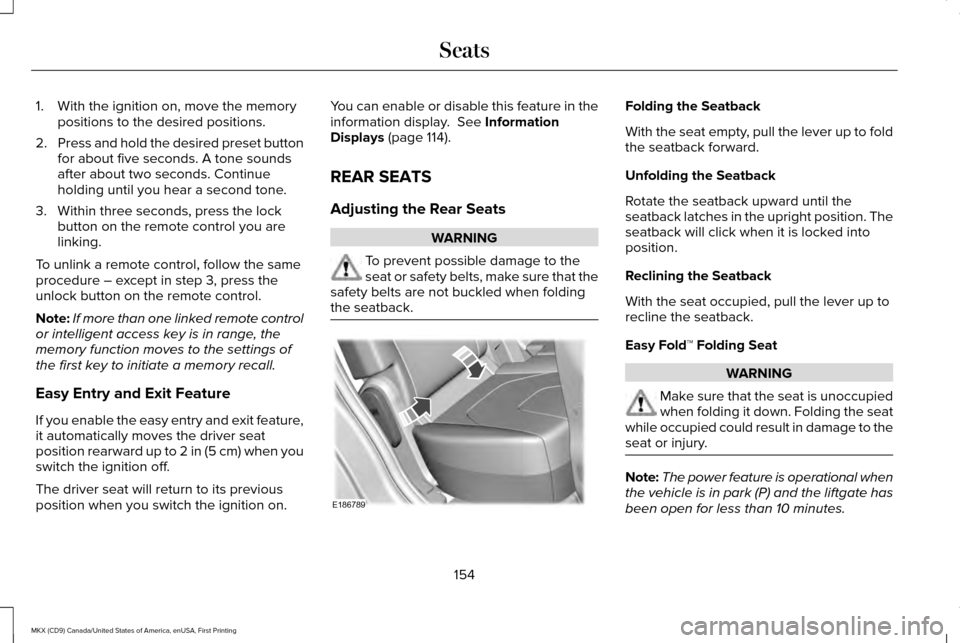
the seatback. Folding the Seatback
With the seat empty, pull the lever up to fold
the seatback forward.
Unfolding the Seatback
Rotate the seatback upward until the
seatback latches in the upright position. The
seatback will click when it is locked into
position.
Reclining the Seatback
With the seat occupied, pull the lever up to
recline the seatback.
Easy Fold™ Folding Seat
WARNING
Make sure that the seat is unoccupied
when folding it down. Folding the seat
while occupied could result in damage to the
seat or injury. Note:
The power feature is operational when
the vehicle is in park (P) and the liftgate has
been open for less than 10 minutes.
154
MKX (CD9) Canada/United States of America, enUSA, First Printing SeatsE186789
Page 166 of 587
12 Volt DC Power Point
WARNINGS
Do not plug optional electrical
accessories into the cigar lighter
socket. Incorrect use of the cigar lighter can
cause damage not covered by the vehicle
warranty, and can result in fire or serious
injury. Do not use a power point for operating
a cigar lighter. Incorrect use of the
power points can cause damage not covered
by the vehicle warranty, and can result in fire
or serious injury. Note:
When you switch the ignition on, you
can use the socket to power 12 volt
appliances with a maximum current rating
of 15 amps.
If the power supply does not work after you
switch the ignition off, switch the ignition on.
Note: Do not hang any accessory from the
accessory plug.
Note: Do not use the power point over the
vehicle capacity of 12 volt DC 180 watts or
a fuse may blow. Note:
Always keep the power point caps
closed when not in use.
Do not insert objects other than an accessory
plug into the power point. This will damage
the power point and blow the fuse.
Run the vehicle for full capacity use of the
power point.
To prevent the battery from running out of
charge:
• Do not use the power point longer than
necessary when the vehicle is not
running.
• Do not leave devices plugged in
overnight or when you park your vehicle
for extended periods.
Locations
Power points may be in the following
locations:
• On the lower instrument panel.
• Inside the center console.
• On the rear of the center console.
• In the rear cargo area. 110 Volt AC Power Point (If Equipped) WARNING
Do not keep electrical devices plugged
in the power point whenever the
device is not in use. Do not use any
extension cord with the 110 volt AC power
point, since it will defeat the safety protection
design. Doing so may cause the power point
to overload due to powering multiple devices
that can reach beyond the 150 watt load limit
and could result in fire or serious injury. Note:
The power point will turn off when the
ignition is switched off or the battery voltage
drops below 11 volts.
Use the power point for powering electric
devices that require up to 150 watts. It is on
the rear of the center console.
163
MKX (CD9) Canada/United States of America, enUSA, First Printing Auxiliary Power Points
Page 167 of 587
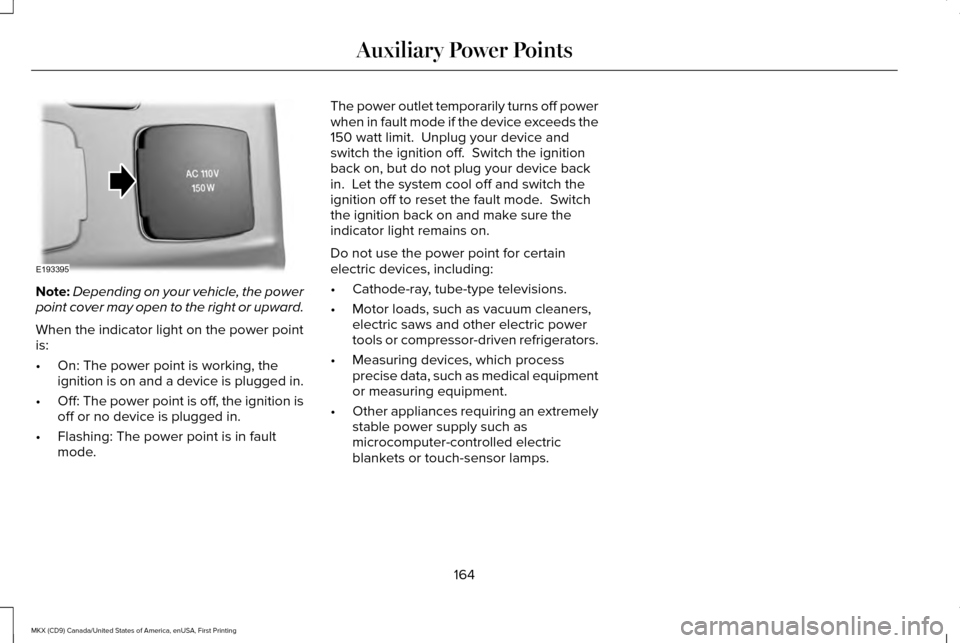
Note:
Depending on your vehicle, the power
point cover may open to the right or upward.
When the indicator light on the power point
is:
• On: The power point is working, the
ignition is on and a device is plugged in.
• Off: The power point is off, the ignition is
off or no device is plugged in.
• Flashing: The power point is in fault
mode. The power outlet temporarily turns off power
when in fault mode if the device exceeds the
150 watt limit. Unplug your device and
switch the ignition off. Switch the ignition
back on, but do not plug your device back
in. Let the system cool off and switch the
ignition off to reset the fault mode. Switch
the ignition back on and make sure the
indicator light remains on.
Do not use the power point for certain
electric devices, including:
•
Cathode-ray, tube-type televisions.
• Motor loads, such as vacuum cleaners,
electric saws and other electric power
tools or compressor-driven refrigerators.
• Measuring devices, which process
precise data, such as medical equipment
or measuring equipment.
• Other appliances requiring an extremely
stable power supply such as
microcomputer-controlled electric
blankets or touch-sensor lamps.
164
MKX (CD9) Canada/United States of America, enUSA, First Printing Auxiliary Power PointsE193395