power LINCOLN MKX 2017 Service Manual
[x] Cancel search | Manufacturer: LINCOLN, Model Year: 2017, Model line: MKX, Model: LINCOLN MKX 2017Pages: 587, PDF Size: 5.4 MB
Page 205 of 587
PRINCIPLE OF OPERATION
The traction control system helps avoid drive
wheel spin and loss of traction.
If your vehicle begins to slide, the system
applies the brakes to individual wheels and,
when needed, reduces engine power at the
same time. If the wheels spin when
accelerating on slippery or loose surfaces,
the system reduces engine power in order
to increase traction.
USING TRACTION CONTROL WARNING
The stability and traction control light
illuminates steadily if the system
detects a failure. Make sure you did not
manually disable the traction control system
using the information display controls or the
switch. If the stability control and traction
control light is still illuminating steadily, have
the system serviced by an authorized dealer
immediately. Operating your vehicle with the
traction control disabled could lead to an
increased risk of loss of vehicle control,
vehicle rollover, personal injury and death. The system automatically turns on each time
you switch the ignition on.
If your vehicle is stuck in mud or snow,
switching traction control off may be
beneficial as this allows the wheels to spin.
Note:
When you switch traction control off,
stability control remains fully active. Switching the System Off
When you switch the system off or on, a
message appears in the information display
showing system status.
You can switch the system off by either using
the information display controls or the switch.
Using the Information Display Controls
You can switch this feature off or on in the
information display. See General Information
(page 114).
Using a Switch
(If Equipped)
Use the traction control switch on the
instrument panel to switch the system off or
on.
System Indicator Lights and Messages The stability and traction control
light:
202
MKX (CD9) Canada/United States of America, enUSA, First Printing Traction ControlE138639
Page 207 of 587
PRINCIPLE OF OPERATION
WARNINGS
Vehicle modifications involving braking
system, aftermarket roof racks,
suspension, steering system, tire
construction and wheel and tire size may
change the handling characteristics of your
vehicle and may adversely affect the
performance of the electronic stability control
system. In addition, installing any stereo
loudspeakers may interfere with and
adversely affect the electronic stability
control system. Install any aftermarket stereo
loudspeaker as far as possible from the front
center console, the tunnel, and the front
seats in order to minimize the risk of
interfering with the electronic stability control
sensors. Reducing the effectiveness of the
electronic stability control system could lead
to an increased risk of loss of vehicle control,
vehicle rollover, personal injury and death. WARNINGS
Remember that even advanced
technology cannot defy the laws of
physics. It’ s always possible to lose control
of a vehicle due to inappropriate driver input
for the conditions. Aggressive driving on any
road condition can cause you to lose control
of your vehicle increasing the risk of personal
injury or property damage. Activation of the
electronic stability control system is an
indication that at least some of the tires have
exceeded their ability to grip the road; this
could reduce the operator’ s ability to control
the vehicle potentially resulting in a loss of
vehicle control, vehicle rollover, personal
injury and death. If your electronic stability
control system activates, SLOW DOWN. The system automatically turns on each time
you switch the ignition on.
If a fault occurs in either the stability control
or the traction control system, you may
experience the following conditions:•
The stability and traction control light
illuminates steadily.
• The stability control and traction control
systems do not enhance your vehicle's
ability to maintain traction of the wheels.
If a driving condition activates either the
stability control or the traction control system
you may experience the following conditions:
• The stability and traction control light
flashes.
• Your vehicle slows down.
• Reduced engine power.
• A vibration in the brake pedal.
• The brake pedal is stiffer than usual.
• If the driving condition is severe and your
foot is not on the brake, the brake pedal
may move as the system applies higher
brake force.
The stability control system has several
features built into it to help you maintain
control of your vehicle:
204
MKX (CD9) Canada/United States of America, enUSA, First Printing Stability Control
Page 208 of 587
Electronic Stability Control
The system enhances your vehicle
’s ability
to prevent skids or lateral slides by applying
brakes to one or more of the wheels
individually and, if necessary, reducing
engine power.
Roll Stability Control
The system enhances your vehicle ’s ability
to prevent rollovers by detecting your
vehicle ’s roll motion and the rate at which it
changes by applying the brakes to one or
more wheels individually.
Traction Control
The system enhances your vehicle ’s ability
to maintain traction of the wheels by
detecting and controlling wheel spin. See
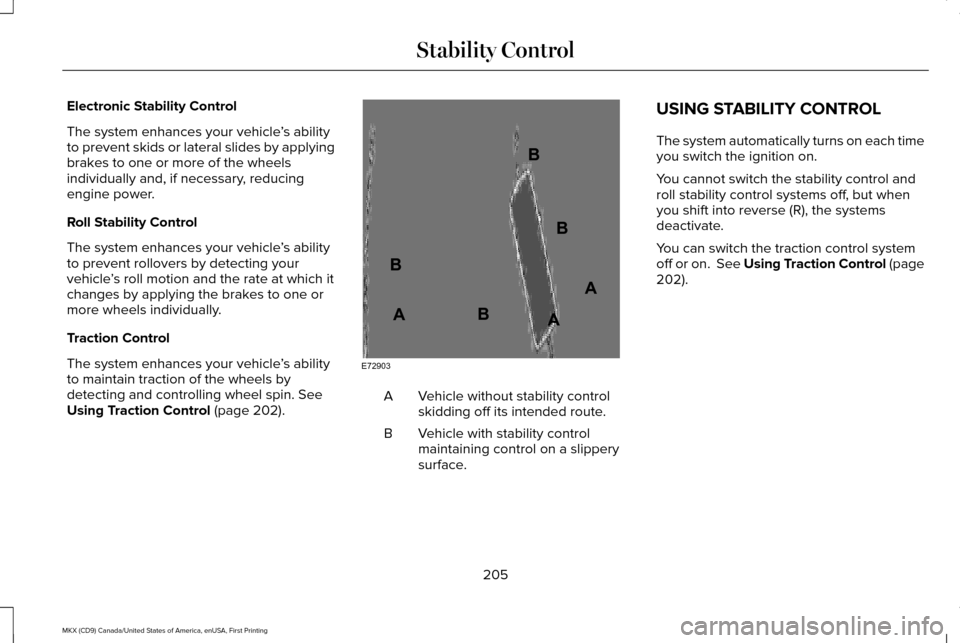
Using Traction Control (page 202). Vehicle without stability control
skidding off its intended route.
A
Vehicle with stability control
maintaining control on a slippery
surface.
B USING STABILITY CONTROL
The system automatically turns on each time
you switch the ignition on.
You cannot switch the stability control and
roll stability control systems off, but when
you shift into reverse (R), the systems
deactivate.
You can switch the traction control system
off or on.
See Using Traction Control (page
202).
205
MKX (CD9) Canada/United States of America, enUSA, First Printing Stability ControlE72903A
AA
B
BB
B
Page 249 of 587
There may be certain instances when there
is a false alert by the Cross Traffic Alert
system that illuminates the alert indicator
with no vehicle in the coverage zone. Some
amount of false alerts are normal; they are
temporary and self-correct.
System Errors
If Cross Traffic Alert senses a problem with
the left or right sensor a message will appear
in the information display. See Information
Messages (page 121).
Switching the System Off and On
You can temporarily switch Cross Traffic Alert
off in the information display.
See General
Information (page 114). When you switch
Cross Traffic Alert off, you will not receive
alerts and the information display will display
a system off message.
Note: The Cross Traffic Alert switches on
whenever the ignition is switched on and
ready to provide appropriate alerts when
the transmission is in reverse (R). Cross
Traffic Alert will not remember the last
selected on or off setting. You can also have Cross Traffic Alert
switched off permanently at an authorized
dealer. Once switched off permanently, the
system can only be switched back on at an
authorized dealer.
STEERING
Electric Power Steering
WARNINGS
The electric power steering system has
diagnostic checks that continuously
monitor the system. If a fault is detected, a
message displays in the information display.
Stop your vehicle as soon as it is safe to do
so. Switch the ignition off. After at least 10
seconds, switch the ignition on and watch
the information display for a steering system
warning message. If a steering system
warning message returns, have the system
checked as soon as possible. WARNINGS
If the system detects an error, you may
not feel a difference in the steering,
however a serious condition may exist. Have
your vehicle checked as soon as possible,
failure to do so may result in loss of steering
control. Your vehicle has an electric power steering
system. There is no fluid reservoir. No
maintenance is required.
If your vehicle loses electrical power while
you are driving, electric power steering
assistance is lost. The steering system still
operates and you can steer your vehicle
manually. Manually steering your vehicle
requires more effort.
Extreme continuous steering may increase
the effort required for you to steer your
vehicle. This increased effort prevents
overheating and permanent damage to the
steering system. You do not lose the ability
to steer your vehicle manually. Typical
steering and driving maneuvers allow the
system to cool and return to normal
operation.
246
MKX (CD9) Canada/United States of America, enUSA, First Printing Driving Aids
Page 250 of 587
Steering Tips
If the steering wanders or pulls, check for:
•
Correct tire pressures.
• Uneven tire wear.
• Loose or worn suspension components.
• Loose or worn steering components.
• Improper vehicle alignment.
Note: A high crown in the road or high
crosswinds may also make the steering
seem to wander or pull.
Adaptive Learning
The electronic power steering system
adaptive learning helps correct road
irregularities and improves overall handling
and steering feel. It communicates with the
brake system to help operate advanced
stability control and accident avoidance
systems. Additionally, whenever the battery
is disconnected or a new battery installed,
you must drive your vehicle a short distance
before the system relearns the strategy and
reactivates all systems. Adaptive Steering (If Equipped) WARNING
The adaptive steering system has
diagnostic checks that continuously
monitor the system. If a fault is detected a
message displays in the information display.
Stop your vehicle as soon as it is safe to do
so. This warning message may clear if the
fault is no longer present. If an adaptive
steering system warning message appears
each time you start your vehicle, have the
system checked as soon as possible. The adaptive steering system continually
changes the steering ratio with changes to
vehicle speed, optimizing the steering
response in all conditions.
The adaptive steering system is designed
with a locking device. While the lock is
engaged, your vehicle returns to a fixed
steering ratio. You may also notice a sound
when you start or turn off your vehicle as the
lock is disengaged or engaged. If your
vehicle loses electrical power or detects a
fault while you are driving, the lock engages
and you are able to continue steering. Duringthis time it is possible that the steering wheel
may not be straight when the vehicle is
driving straight ahead. During this time you
may notice that the steering wheel angle
required to steer the vehicle may be
different. Extreme operating conditions may
also cause the lock to engage. This strategy
prevents overheating and permanent
damage to the adaptive steering system.
Typical steering and driving maneuvers allow
the system to cool and return to normal
operation.
PRE-COLLISION ASSIST
(If Equipped)
WARNINGS
At all times, you are responsible for
controlling your vehicle, supervising
the system and intervening, if required.
Failure to take care may result in the loss of
control of your vehicle, serious personal
injury or death.
247
MKX (CD9) Canada/United States of America, enUSA, First Printing Driving Aids
Page 254 of 587
Action
Cause
Contact an authorized dealer to have the radar checked for propercoverage and operation.
Radar is out of alignment due to a front end impact.
Clean the outside of the windshield in front of the camera.
The windshield in front of the camera is dirty or obstructed in some
way.
Wait a short time. It may take several minutes for the camera to detectthat there is no obstruction.
The windshield in front of the camera is clean but the message remains
in the display.
Note: Proper system operation requires a
clear view of the road by the camera. Have
any windshield damage in the area of the
camera's field of view repaired.
Note: If something hits the front end of your
vehicle or damage occurs, the radar sensing
zone may change. This could cause missed
or false vehicle detections. Contact an
authorized dealer to have the radar checked
for proper coverage and operation. Note:
If your vehicle detects excessive heat
at the camera or a potential misalignment
condition, a message may display in the
information display indicating temporary
sensor unavailability. This message
deactivates automatically when operational
conditions are corrected (for example, when
the ambient temperature around the sensor
decreases or the sensor automatically
recalibrates successfully). DRIVE CONTROL (If Equipped)
LINCOLN DRIVE CONTROL
Lincoln Drive Control delivers the Lincoln
driving experience through a suite of
sophisticated electronic vehicle systems.
These systems continuously monitor your
driving inputs and the road conditions to
optimize ride comfort, steering, handling,
powertrain response and sound. You can
251
MKX (CD9) Canada/United States of America, enUSA, First Printing Driving Aids
Page 255 of 587
preset your preferences for these systems
within the information display. Lincoln Drive
Control will respond to your preferences
based on what gear position you select. This
provides a single location to control multiple
systems performance settings.
Lincoln Drive Control consists of the
following systems:
•
Continuously controlled damping
dynamically adjusts the shock absorbers
stiffness in real time to match the road
surface and driver inputs. This system
continuously monitors your vehicle ’s
motion (roll, pitch, bounce), suspension
position, load, speed, road conditions,
and steering to adjust the suspension
damping for optimal vehicle control.
• Electronically power-assisted steering
adjusts steering effort and feel based on
your vehicle speed and your inputs.
• Adaptive steering optimizes your
vehicle's steering response based on
your steering wheel input, changes in
vehicle speed and other conditions. •
Active noise control utilizes your vehicle
electronics to enhance the acoustic
experience.
• Electronic stability control and traction
control maintain your vehicle control in
adverse conditions or high performance
driving.
• Electronic throttle control enhances the
powertrain response to your inputs.
Using Lincoln Drive Control
You can configure which of the Drive Control
modes are active when your vehicle is in
drive (D) or in Sport (S). The configuration
remains active until modified from the main
menu on the information display. These systems have a range of modes which
you can choose from in order to customize
your ideal driving experience:
•
Comfort – Provides a more relaxed
driving experience, maximizing comfort.
Your steering effort decreases and the
suspension movement is more fluid.
Comfort mode is ideal when you desire
enhanced traveling comfort.
• Normal – Delivers a balanced
combination of comfortable, controlled
ride and confident handling. This mode
provides an engaging drive experience
and a direct connection to the road
without sacrificing any of the composure
demanded from a luxury vehicle.
• Sport – Provides a sportier driving
experience. The suspension stiffens, with
an emphasis on handling and control.
The engine responds more directly to
your inputs and takes on a more powerful
tone. Sport mode is ideal for use during
more spirited driving.
You can change your vehicle ’s Drive Control
settings from the main menu on the
information display. See General
Information (page 114).
252
MKX (CD9) Canada/United States of America, enUSA, First Printing Driving Aids
Page 265 of 587
RV & Trailer Towing Guide Online
http://www.fleet.ford.com/towing-guides/
Website
TRAILER SWAY CONTROL (If Equipped) WARNING
Turning off trailer sway control
increases the risk of loss of vehicle
control, serious injury or death. Ford does
not recommend disabling this feature except
in situations where speed reduction may be
detrimental (such as hill climbing), the driver
has significant trailer towing experience, and
can control trailer sway and maintain safe
operation. Note:
This feature does not prevent trailer
sway, but reduces it once it begins.
Note: This feature cannot stop all trailers
from swaying. Note:
In some cases, if vehicle speed is too
high, the system may activate multiple times,
gradually reducing vehicle speed.
This feature applies your vehicle brakes at
individual wheels and, if necessary, reduces
engine power. If the trailer begins to sway,
the stability control light flashes and the
message TRAILER SWAY REDUCE SPEED
appears in the information display. The first
thing to do is slow your vehicle down, then
pull safely to the side of the road and check
for proper tongue load and trailer load
distribution.
See Load Carrying (page 254).
RECOMMENDED TOWING
WEIGHTS
Note: Do not exceed the trailer weight
for your vehicle configuration listed in
the chart below. Note:
Make sure to take into
consideration trailer frontal area. Do not
exceed 20 ft² (1.86 m²) for vehicles
without towing package, or 30 ft² (2.79
m²) for vehicles with towing package.
Note: For high altitude operation,
reduce the gross combined weight by
2% per
1,000 ft (305 m) starting at the
1,000 ft (305 m) elevation point.
Note: Certain states require electric
trailer brakes for trailers over a specified
weight. Be sure to check state
regulations for this specified weight. The
maximum trailer weights listed may be
limited to this specified weight, as the
vehicle ’s electrical system may not
include the wiring connector needed to
activate electric trailer brakes.
262
MKX (CD9) Canada/United States of America, enUSA, First Printing Towing
Page 266 of 587
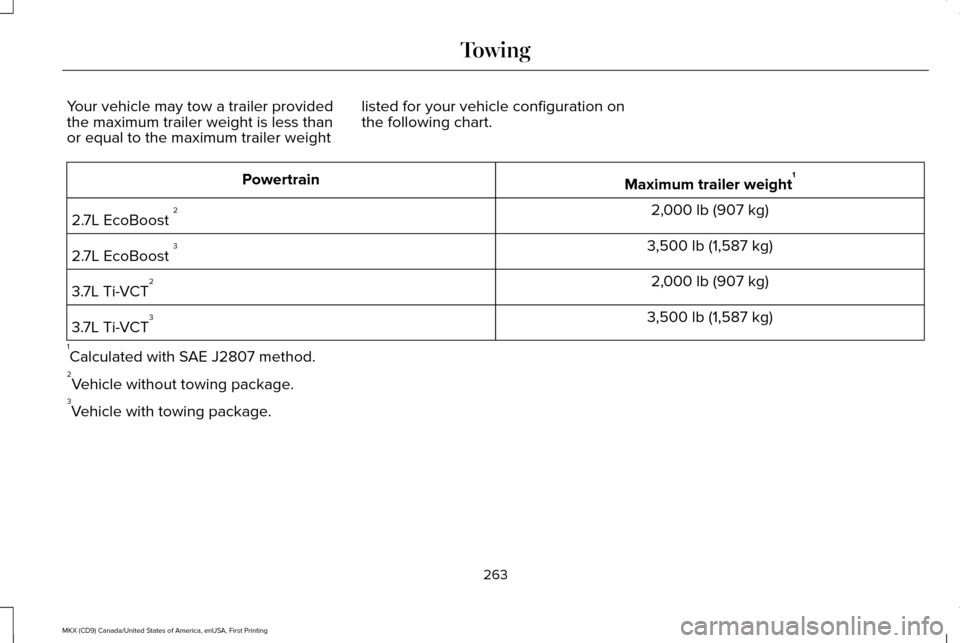
Your vehicle may tow a trailer provided
the maximum trailer weight is less than
or equal to the maximum trailer weight
listed for your vehicle configuration on
the following chart. Maximum trailer weight
1
Powertrain
2,000 lb (907 kg)
2.7L EcoBoost 2
3,500 lb (1,587 kg)
2.7L EcoBoost 3
2,000 lb (907 kg)
3.7L Ti-VCT 2
3,500 lb (1,587 kg)
3.7L Ti-VCT 3
1 Calculated with SAE J2807 method.
2 Vehicle without towing package.
3 Vehicle with towing package.
263
MKX (CD9) Canada/United States of America, enUSA, First Printing Towing
Page 267 of 587
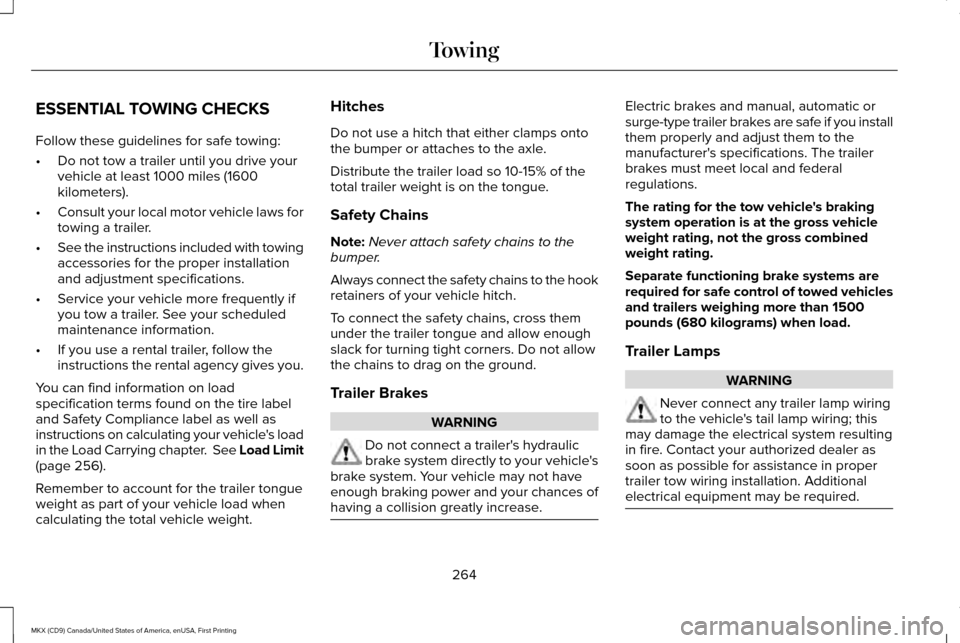
ESSENTIAL TOWING CHECKS
Follow these guidelines for safe towing:
•
Do not tow a trailer until you drive your
vehicle at least 1000 miles (1600
kilometers).
• Consult your local motor vehicle laws for
towing a trailer.
• See the instructions included with towing
accessories for the proper installation
and adjustment specifications.
• Service your vehicle more frequently if
you tow a trailer. See your scheduled
maintenance information.
• If you use a rental trailer, follow the
instructions the rental agency gives you.
You can find information on load
specification terms found on the tire label
and Safety Compliance label as well as
instructions on calculating your vehicle's load
in the Load Carrying chapter. See Load Limit
(page 256).
Remember to account for the trailer tongue
weight as part of your vehicle load when
calculating the total vehicle weight. Hitches
Do not use a hitch that either clamps onto
the bumper or attaches to the axle.
Distribute the trailer load so 10-15% of the
total trailer weight is on the tongue.
Safety Chains
Note:
Never attach safety chains to the
bumper.
Always connect the safety chains to the hook
retainers of your vehicle hitch.
To connect the safety chains, cross them
under the trailer tongue and allow enough
slack for turning tight corners. Do not allow
the chains to drag on the ground.
Trailer Brakes WARNING
Do not connect a trailer's hydraulic
brake system directly to your vehicle's
brake system. Your vehicle may not have
enough braking power and your chances of
having a collision greatly increase. Electric brakes and manual, automatic or
surge-type trailer brakes are safe if you install
them properly and adjust them to the
manufacturer's specifications. The trailer
brakes must meet local and federal
regulations.
The rating for the tow vehicle's braking
system operation is at the gross vehicle
weight rating, not the gross combined
weight rating.
Separate functioning brake systems are
required for safe control of towed vehicles
and trailers weighing more than 1500
pounds (680 kilograms) when load.
Trailer Lamps
WARNING
Never connect any trailer lamp wiring
to the vehicle's tail lamp wiring; this
may damage the electrical system resulting
in fire. Contact your authorized dealer as
soon as possible for assistance in proper
trailer tow wiring installation. Additional
electrical equipment may be required. 264
MKX (CD9) Canada/United States of America, enUSA, First Printing Towing