key LINCOLN MKX 2017 Workshop Manual
[x] Cancel search | Manufacturer: LINCOLN, Model Year: 2017, Model line: MKX, Model: LINCOLN MKX 2017Pages: 587, PDF Size: 5.4 MB
Page 276 of 587
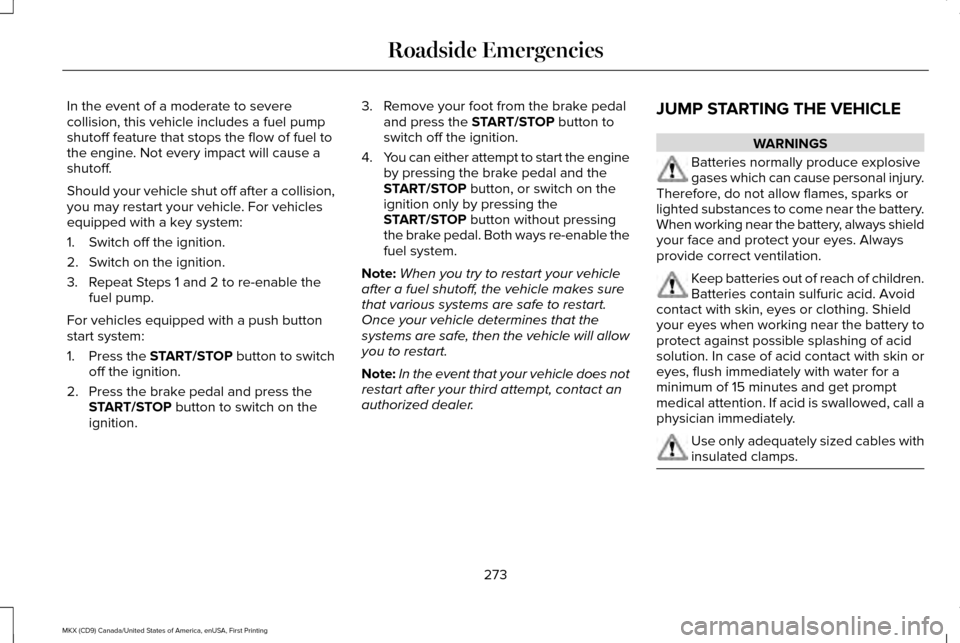
In the event of a moderate to severe
collision, this vehicle includes a fuel pump
shutoff feature that stops the flow of fuel to
the engine. Not every impact will cause a
shutoff.
Should your vehicle shut off after a collision,
you may restart your vehicle. For vehicles
equipped with a key system:
1. Switch off the ignition.
2. Switch on the ignition.
3. Repeat Steps 1 and 2 to re-enable the
fuel pump.
For vehicles equipped with a push button
start system:
1. Press the START/STOP button to switch
off the ignition.
2. Press the brake pedal and press the START/STOP button to switch on the
ignition. 3. Remove your foot from the brake pedal
and press the
START/STOP button to
switch off the ignition.
4. You can either attempt to start the engine
by pressing the brake pedal and the
START/STOP
button, or switch on the
ignition only by pressing the
START/STOP
button without pressing
the brake pedal. Both ways re-enable the
fuel system.
Note: When you try to restart your vehicle
after a fuel shutoff, the vehicle makes sure
that various systems are safe to restart.
Once your vehicle determines that the
systems are safe, then the vehicle will allow
you to restart.
Note: In the event that your vehicle does not
restart after your third attempt, contact an
authorized dealer. JUMP STARTING THE VEHICLE WARNINGS
Batteries normally produce explosive
gases which can cause personal injury.
Therefore, do not allow flames, sparks or
lighted substances to come near the battery.
When working near the battery, always shield
your face and protect your eyes. Always
provide correct ventilation. Keep batteries out of reach of children.
Batteries contain sulfuric acid. Avoid
contact with skin, eyes or clothing. Shield
your eyes when working near the battery to
protect against possible splashing of acid
solution. In case of acid contact with skin or
eyes, flush immediately with water for a
minimum of 15 minutes and get prompt
medical attention. If acid is swallowed, call a
physician immediately. Use only adequately sized cables with
insulated clamps.
273
MKX (CD9) Canada/United States of America, enUSA, First Printing Roadside Emergencies
Page 302 of 587
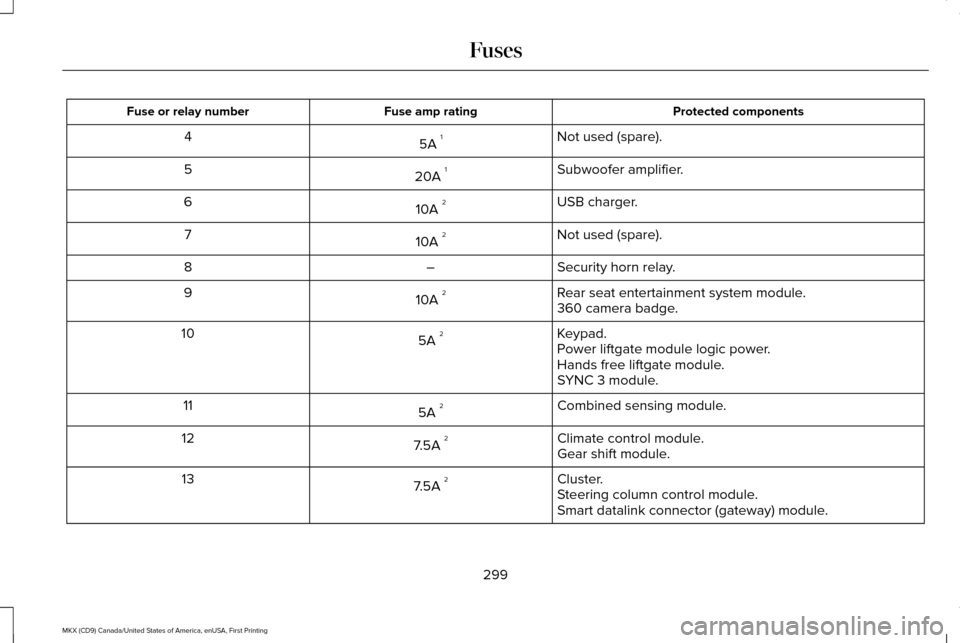
Protected components
Fuse amp rating
Fuse or relay number
Not used (spare).
5A 1
4
Subwoofer amplifier.
20A 1
5
USB charger.
10A 2
6
Not used (spare).
10A 2
7
Security horn relay.
–
8
Rear seat entertainment system module.
10A 2
9
360 camera badge.
Keypad.
5A 2
10
Power liftgate module logic power.
Hands free liftgate module.
SYNC 3 module.
Combined sensing module.
5A 2
11
Climate control module.
7.5A 2
12
Gear shift module.
Cluster.
7.5A 2
13
Steering column control module.
Smart datalink connector (gateway) module.
299
MKX (CD9) Canada/United States of America, enUSA, First Printing Fuses
Page 420 of 587
•
Screens crowded with information, such
as Point of Interest reviews and ratings,
SiriusXM Traffic and Travel Link sports
scores, movie times or ski conditions. •
Any action that requires you to use a
keyboard is restricted, such as entering
a navigation destination or editing
information.
• All lists are limited so the user can view
fewer entries (such as phone contacts or
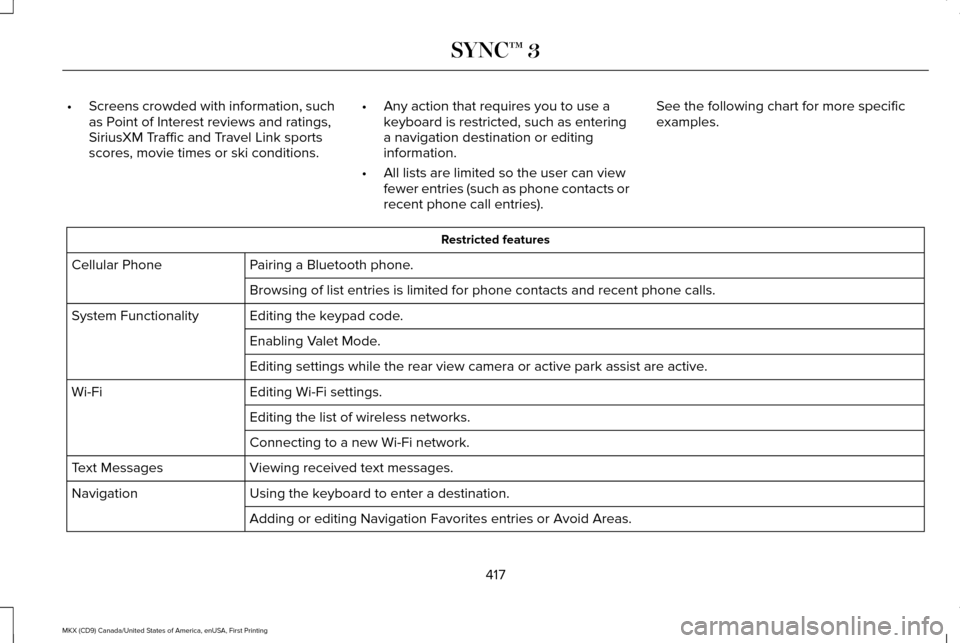
recent phone call entries). See the following chart for more specific
examples. Restricted features
Pairing a Bluetooth phone.
Cellular Phone
Browsing of list entries is limited for phone contacts and recent phone \
calls.
Editing the keypad code.
System Functionality
Enabling Valet Mode.
Editing settings while the rear view camera or active park assist are ac\
tive.
Editing Wi-Fi settings.
Wi-Fi
Editing the list of wireless networks.
Connecting to a new Wi-Fi network.
Viewing received text messages.
Text Messages
Using the keyboard to enter a destination.
Navigation
Adding or editing Navigation Favorites entries or Avoid Areas.
417
MKX (CD9) Canada/United States of America, enUSA, First Printing SYNC™ 3
Page 441 of 587
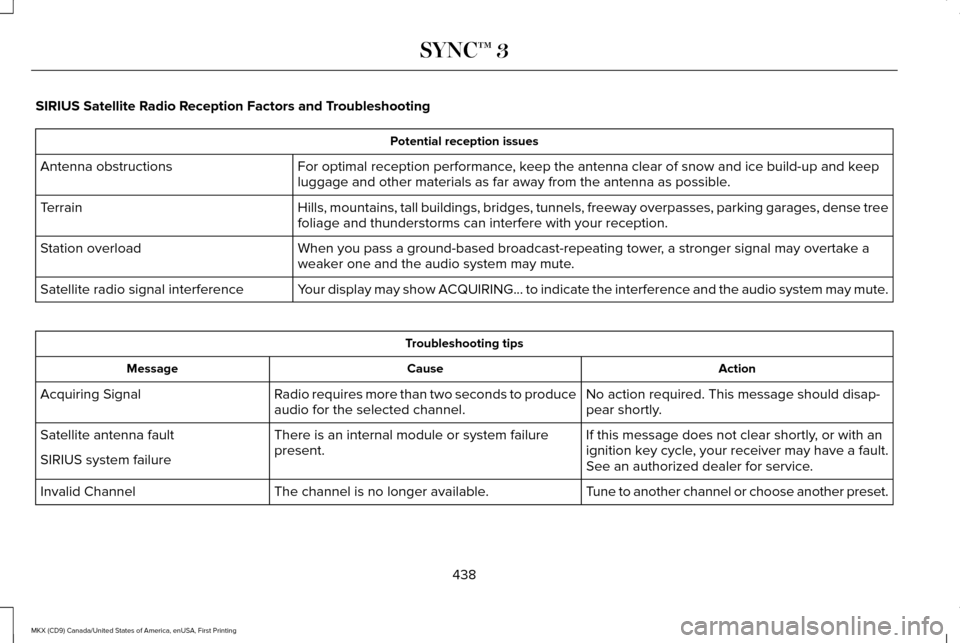
SIRIUS Satellite Radio Reception Factors and Troubleshooting
Potential reception issues
For optimal reception performance, keep the antenna clear of snow and ice build-up and keep
luggage and other materials as far away from the antenna as possible.
Antenna obstructions
Hills, mountains, tall buildings, bridges, tunnels, freeway overpasses, \
parking garages, dense tree
foliage and thunderstorms can interfere with your reception.
Terrain
When you pass a ground-based broadcast-repeating tower, a stronger signal may overtake a
weaker one and the audio system may mute.
Station overload
Your display may show ACQUIRING... to indicate the interference and the a\
udio system may mute.
Satellite radio signal interference Troubleshooting tips
Action
Cause
Message
No action required. This message should disap-
pear shortly.
Radio requires more than two seconds to produce
audio for the selected channel.
Acquiring Signal
If this message does not clear shortly, or with an
ignition key cycle, your receiver may have a fault.
See an authorized dealer for service.
There is an internal module or system failure
present.
Satellite antenna fault
SIRIUS system failure
Tune to another channel or choose another preset.
The channel is no longer available.
Invalid Channel
438
MKX (CD9) Canada/United States of America, enUSA, First Printing SYNC™ 3
Page 456 of 587

Action and Description
Menu Item
Item
You can place a call by selecting an entry from this list.
You can also sort the calls by selecting the drop down menu at the top of\
the screen. You can choose: Missed
Outgoing
Incoming
All
All of your contacts from your phone display in alphabetical order.
Contacts
B
Selecting this button allows you to choose a
specific letter to view.
A-Z Jump
Displays the name of your phone and takes you to the phone settings options.
Phone Settings
C
From this menu, you can pair subsequent devices, set ring tones and aler\
ts. See Settings (page 472).
Displays all recent text messages.
Text Messages
D
Use this keypad to dial in a phone number.
Phone Keypad
E
Use the backspace button to delete numbers.
Press this button to begin a call.
Call
Touch this button to send all calls directly to your voicemail. New text \
message notifications are not
displayed on the screen and all ringtones and alerts are set to silent.
Do Not Disturb
F
Users with phones having voice services may
see a button to access the feature. For
example, iPhone users see a Siri button. A
press and hold of the voice button on the
steering wheel also accesses this feature. 453
MKX (CD9) Canada/United States of America, enUSA, First Printing SYNC™ 3
Page 458 of 587
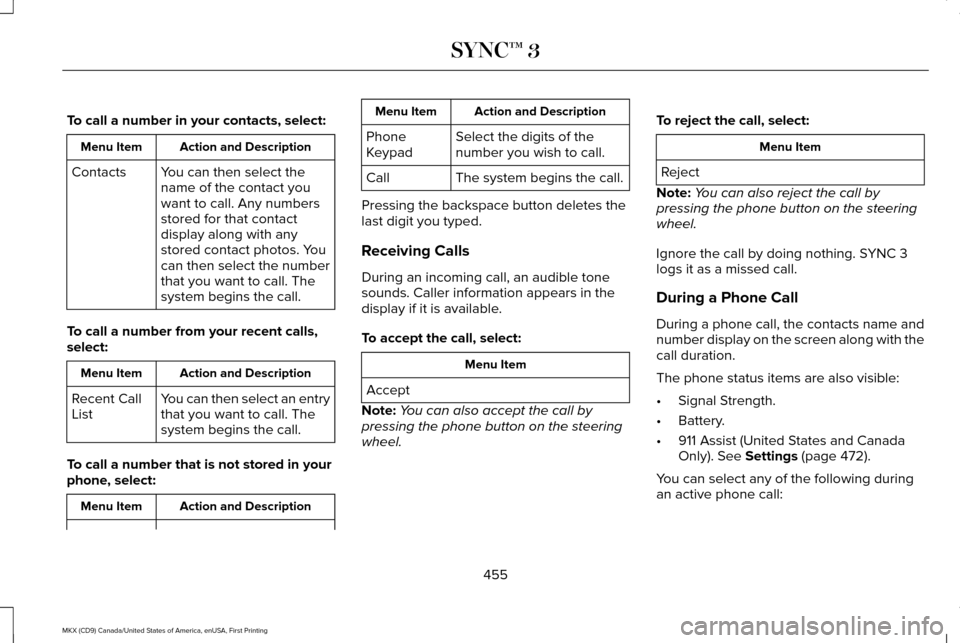
To call a number in your contacts, select:
Action and Description
Menu Item
You can then select the
name of the contact you
want to call. Any numbers
stored for that contact
display along with any
stored contact photos. You
can then select the number
that you want to call. The
system begins the call.
Contacts
To call a number from your recent calls,
select: Action and Description
Menu Item
You can then select an entry
that you want to call. The
system begins the call.
Recent Call
List
To call a number that is not stored in your
phone, select: Action and Description
Menu Item Action and Description
Menu Item
Select the digits of the
number you wish to call.
Phone
Keypad
The system begins the call.
Call
Pressing the backspace button deletes the
last digit you typed.
Receiving Calls
During an incoming call, an audible tone
sounds. Caller information appears in the
display if it is available.
To accept the call, select: Menu Item
Accept
Note: You can also accept the call by
pressing the phone button on the steering
wheel. To reject the call, select: Menu Item
Reject
Note: You can also reject the call by
pressing the phone button on the steering
wheel.
Ignore the call by doing nothing. SYNC 3
logs it as a missed call.
During a Phone Call
During a phone call, the contacts name and
number display on the screen along with the
call duration.
The phone status items are also visible:
• Signal Strength.
• Battery.
• 911 Assist (United States and Canada
Only). See Settings (page 472).
You can select any of the following during
an active phone call:
455
MKX (CD9) Canada/United States of America, enUSA, First Printing SYNC™ 3
Page 459 of 587
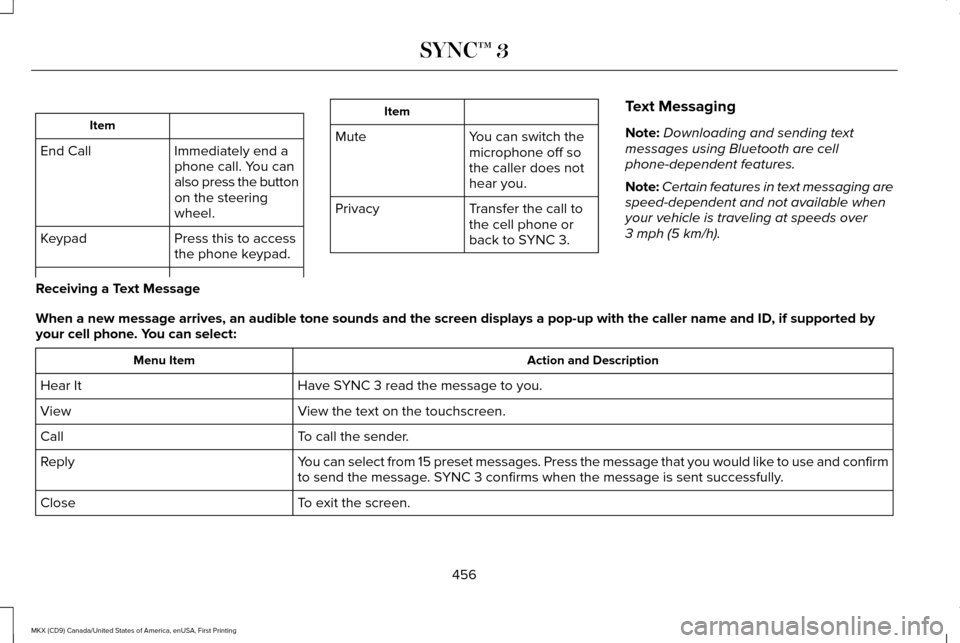
Item
Immediately end a
phone call. You can
also press the button
on the steering
wheel.
End Call
Press this to access
the phone keypad.
Keypad Item
Mute You can switch the
microphone off so
the caller does not
hear you.
Transfer the call to
the cell phone or
back to SYNC 3.
Privacy Text Messaging
Note:
Downloading and sending text
messages using Bluetooth are cell
phone-dependent features.
Note: Certain features in text messaging are
speed-dependent and not available when
your vehicle is traveling at speeds over
3 mph (5 km/h).
Receiving a Text Message
When a new message arrives, an audible tone sounds and the screen displa\
ys a pop-up with the caller name and ID, if supported by
your cell phone. You can select: Action and Description
Menu Item
Have SYNC 3 read the message to you.
Hear It
View the text on the touchscreen.
View
To call the sender.
Call
You can select from 15 preset messages. Press the message that you would \
like to use and confirm
to send the message. SYNC 3 confirms when the message is sent successfully.
Reply
To exit the screen.
Close
456
MKX (CD9) Canada/United States of America, enUSA, First Printing SYNC™ 3
Page 489 of 587
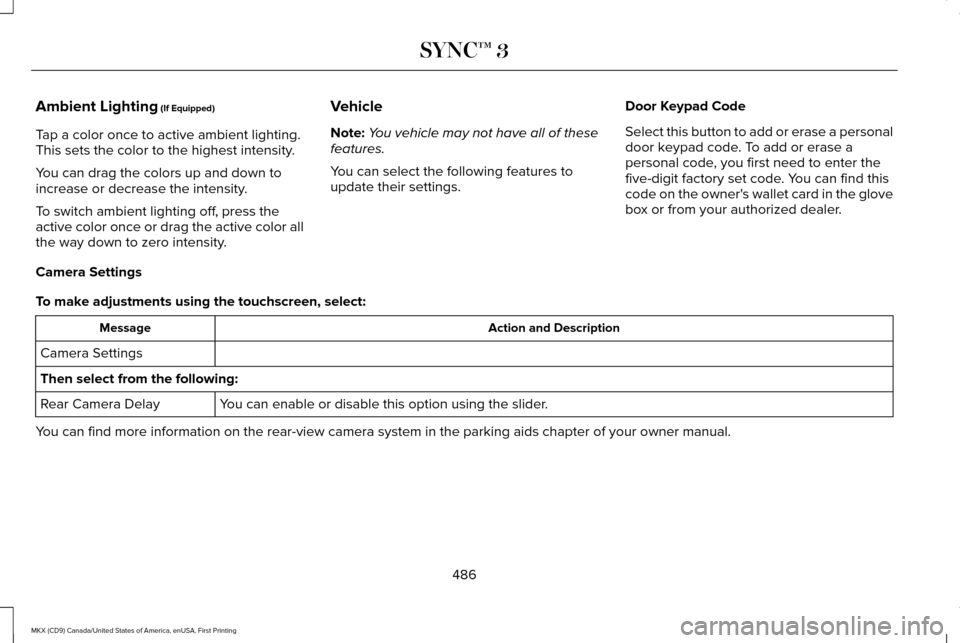
Ambient Lighting (If Equipped)
Tap a color once to active ambient lighting.
This sets the color to the highest intensity.
You can drag the colors up and down to
increase or decrease the intensity.
To switch ambient lighting off, press the
active color once or drag the active color all
the way down to zero intensity. Vehicle
Note:
You vehicle may not have all of these
features.
You can select the following features to
update their settings. Door Keypad Code
Select this button to add or erase a personal
door keypad code. To add or erase a
personal code, you first need to enter the
five-digit factory set code. You can find this
code on the owner's wallet card in the glove
box or from your authorized dealer.
Camera Settings
To make adjustments using the touchscreen, select: Action and Description
Message
Camera Settings
Then select from the following: You can enable or disable this option using the slider.
Rear Camera Delay
You can find more information on the rear-view camera system in the parki\
ng aids chapter of your owner manual.
486
MKX (CD9) Canada/United States of America, enUSA, First Printing SYNC™ 3
Page 504 of 587
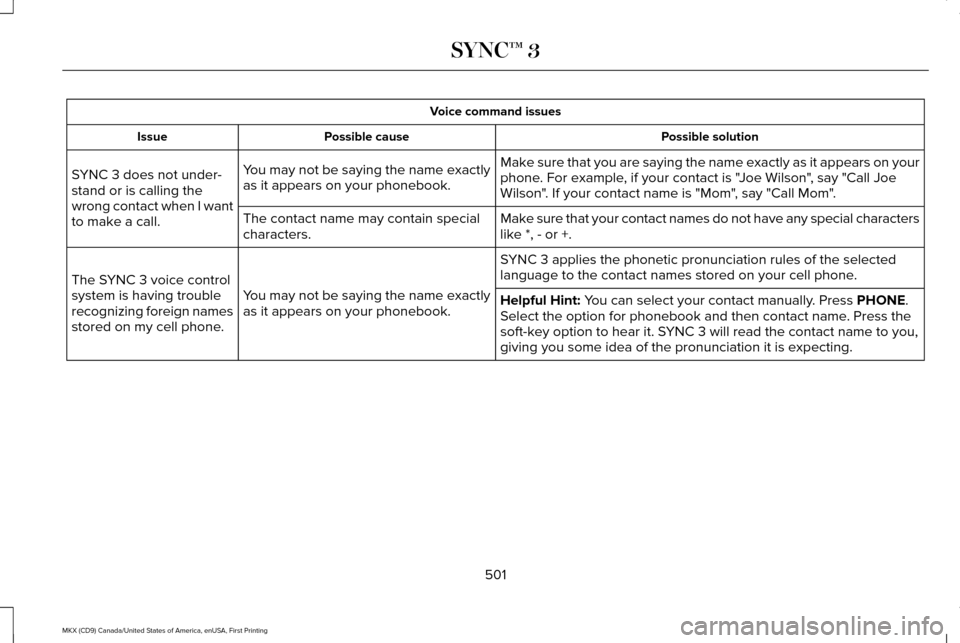
Voice command issues
Possible solution
Possible cause
Issue
Make sure that you are saying the name exactly as it appears on your
phone. For example, if your contact is "Joe Wilson", say "Call Joe
Wilson". If your contact name is "Mom", say "Call Mom".
You may not be saying the name exactly
as it appears on your phonebook.
SYNC 3 does not under-
stand or is calling the
wrong contact when I want
to make a call.
Make sure that your contact names do not have any special characters
like *, - or +.
The contact name may contain special
characters.
SYNC 3 applies the phonetic pronunciation rules of the selected
language to the contact names stored on your cell phone.
You may not be saying the name exactly
as it appears on your phonebook.
The SYNC 3 voice control
system is having trouble
recognizing foreign names
stored on my cell phone.
Helpful Hint: You can select your contact manually. Press PHONE.
Select the option for phonebook and then contact name. Press the
soft-key option to hear it. SYNC 3 will read the contact name to you,
giving you some idea of the pronunciation it is expecting.
501
MKX (CD9) Canada/United States of America, enUSA, First Printing SYNC™ 3
Page 576 of 587
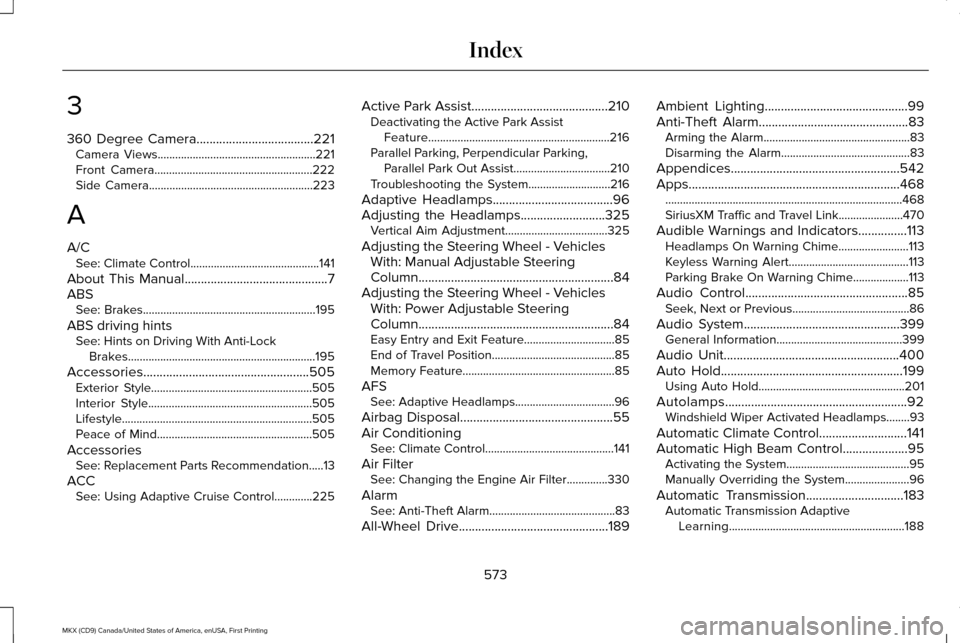
3
360 Degree Camera....................................221
Camera Views......................................................221
Front Camera......................................................222
Side Camera........................................................223
A
A/C See: Climate Control............................................141
About This Manual............................................7
ABS See: Brakes...........................................................195
ABS driving hints See: Hints on Driving With Anti-Lock
Brakes................................................................195
Accessories...................................................505 Exterior Style.......................................................505
Interior Style........................................................505
Lifestyle.................................................................505
Peace of Mind.....................................................505
Accessories See: Replacement Parts Recommendation.....13
ACC See: Using Adaptive Cruise Control.............225 Active Park Assist
..........................................210
Deactivating the Active Park Assist
Feature..............................................................216
Parallel Parking, Perpendicular Parking, Parallel Park Out Assist.................................210
Troubleshooting the System............................216
Adaptive Headlamps
.....................................96
Adjusting the Headlamps..........................325 Vertical Aim Adjustment...................................325
Adjusting the Steering Wheel - Vehicles With: Manual Adjustable Steering
Column............................................................84
Adjusting the Steering Wheel - Vehicles With: Power Adjustable Steering
Column............................................................84
Easy Entry and Exit Feature...............................85
End of Travel Position..........................................85
Memory Feature....................................................85
AFS See: Adaptive Headlamps..................................
96
Airbag Disposal
...............................................55
Air Conditioning See: Climate Control............................................141
Air Filter See: Changing the Engine Air Filter..............330
Alarm See: Anti-Theft Alarm...........................................83
All-Wheel Drive..............................................189 Ambient Lighting............................................99
Anti-Theft Alarm
..............................................83
Arming the Alarm..................................................83
Disarming the Alarm............................................83
Appendices....................................................542
Apps .................................................................
468
........................................................................\
.........468
SiriusXM Traffic and Travel Link......................470
Audible Warnings and Indicators...............113 Headlamps On Warning Chime........................113
Keyless Warning Alert.........................................113
Parking Brake On Warning Chime
...................113
Audio Control
..................................................85
Seek, Next or Previous........................................86
Audio System................................................399 General Information...........................................399
Audio Unit
......................................................400
Auto Hold........................................................199 Using Auto Hold..................................................201
Autolamps........................................................92 Windshield Wiper Activated Headlamps........93
Automatic Climate Control...........................141
Automatic High Beam Control....................95 Activating the System..........................................95
Manually Overriding the System......................
96
Automatic Transmission..............................183 Automatic Transmission Adaptive
Learning............................................................188
573
MKX (CD9) Canada/United States of America, enUSA, First Printing Index