phone LINCOLN MKX 2017 Workshop Manual
[x] Cancel search | Manufacturer: LINCOLN, Model Year: 2017, Model line: MKX, Model: LINCOLN MKX 2017Pages: 587, PDF Size: 5.4 MB
Page 492 of 587
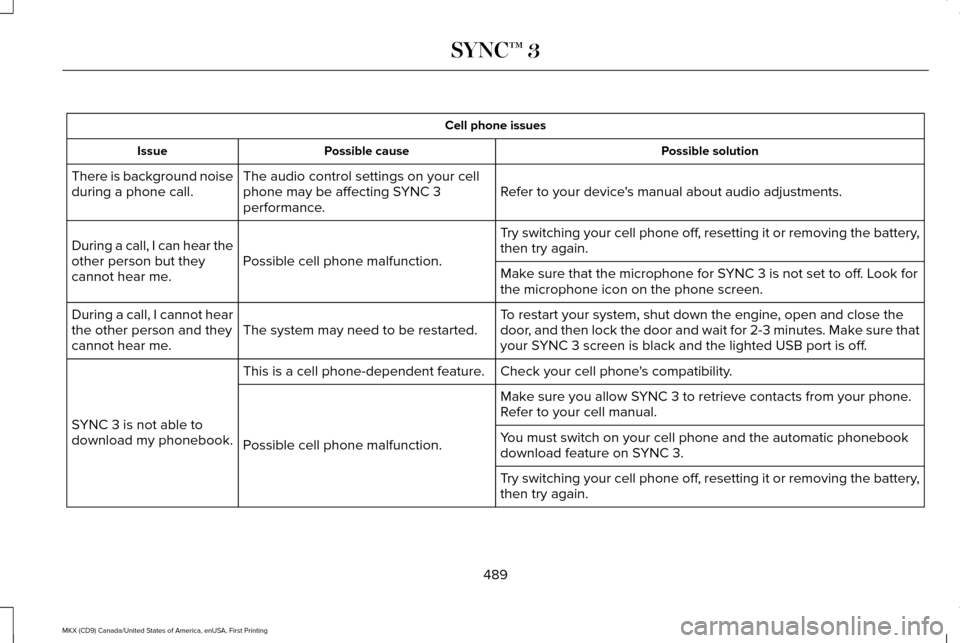
Cell phone issues
Possible solution
Possible cause
Issue
Refer to your device's manual about audio adjustments.
The audio control settings on your cell
phone may be affecting SYNC 3
performance.
There is background noise
during a phone call.
Try switching your cell phone off, resetting it or removing the battery,
then try again.
Possible cell phone malfunction.
During a call, I can hear the
other person but they
cannot hear me.
Make sure that the microphone for SYNC 3 is not set to off. Look for
the microphone icon on the phone screen.
To restart your system, shut down the engine, open and close the
door, and then lock the door and wait for 2-3 minutes. Make sure that
your SYNC 3 screen is black and the lighted USB port is off.
The system may need to be restarted.
During a call, I cannot hear
the other person and they
cannot hear me.
Check your cell phone's compatibility.
This is a cell phone-dependent feature.
SYNC 3 is not able to
download my phonebook. Make sure you allow SYNC 3 to retrieve contacts from your phone.
Refer to your cell manual.
Possible cell phone malfunction. You must switch on your cell phone and the automatic phonebook
download feature on SYNC 3.
Try switching your cell phone off, resetting it or removing the battery,
then try again.
489
MKX (CD9) Canada/United States of America, enUSA, First Printing SYNC™ 3
Page 493 of 587
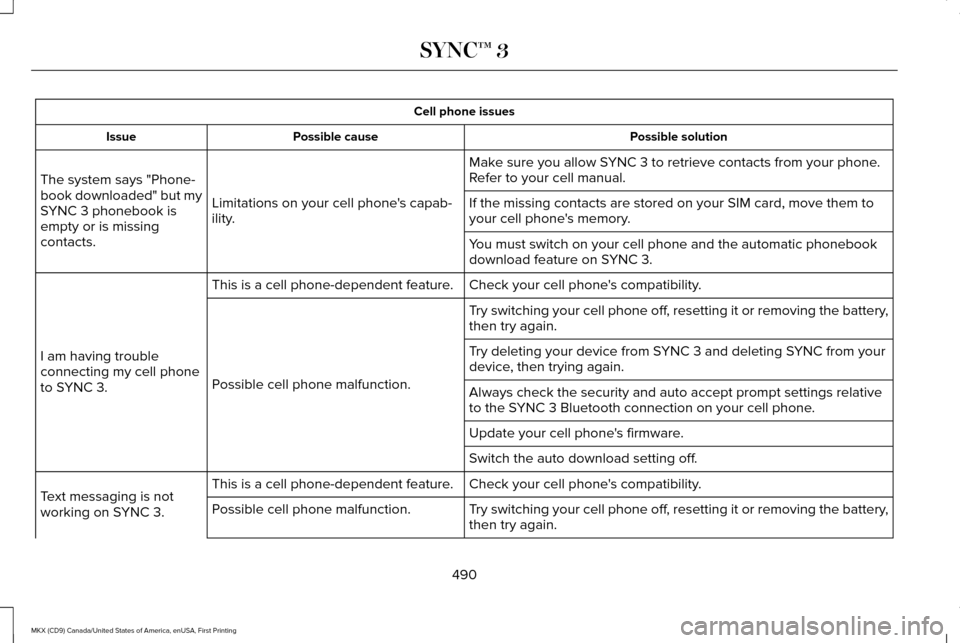
Cell phone issues
Possible solution
Possible cause
Issue
Make sure you allow SYNC 3 to retrieve contacts from your phone.
Refer to your cell manual.
Limitations on your cell phone's capab-
ility.
The system says "Phone-
book downloaded" but my
SYNC 3 phonebook is
empty or is missing
contacts. If the missing contacts are stored on your SIM card, move them to
your cell phone's memory.
You must switch on your cell phone and the automatic phonebook
download feature on SYNC 3.
Check your cell phone's compatibility.
This is a cell phone-dependent feature.
I am having trouble
connecting my cell phone
to SYNC 3. Try switching your cell phone off, resetting it or removing the battery,
then try again.
Possible cell phone malfunction. Try deleting your device from SYNC 3 and deleting SYNC from your
device, then trying again.
Always check the security and auto accept prompt settings relative
to the SYNC 3 Bluetooth connection on your cell phone.
Update your cell phone's firmware.
Switch the auto download setting off.
Check your cell phone's compatibility.
This is a cell phone-dependent feature.
Text messaging is not
working on SYNC 3. Try switching your cell phone off, resetting it or removing the battery,
then try again.
Possible cell phone malfunction.
490
MKX (CD9) Canada/United States of America, enUSA, First Printing SYNC™ 3
Page 494 of 587
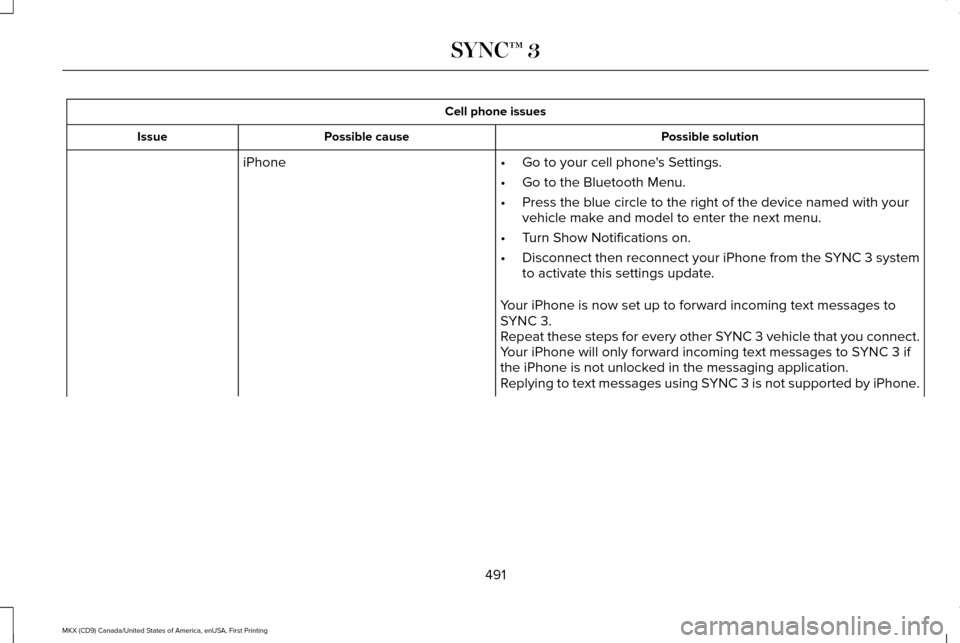
Cell phone issues
Possible solution
Possible cause
Issue
iPhone •Go to your cell phone's Settings.
• Go to the Bluetooth Menu.
• Press the blue circle to the right of the device named with your
vehicle make and model to enter the next menu.
• Turn Show Notifications on.
• Disconnect then reconnect your iPhone from the SYNC 3 system
to activate this settings update.
Your iPhone is now set up to forward incoming text messages to
SYNC 3.
Repeat these steps for every other SYNC 3 vehicle that you connect.
Your iPhone will only forward incoming text messages to SYNC 3 if
the iPhone is not unlocked in the messaging application.
Replying to text messages using SYNC 3 is not supported by iPhone.
491
MKX (CD9) Canada/United States of America, enUSA, First Printing SYNC™ 3
Page 495 of 587
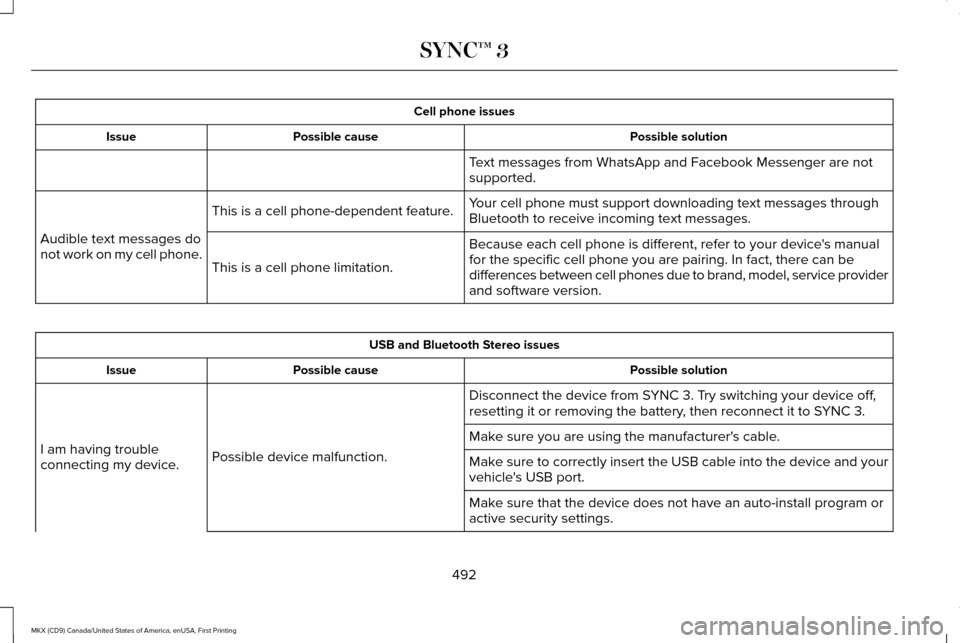
Cell phone issues
Possible solution
Possible cause
Issue
Text messages from WhatsApp and Facebook Messenger are not
supported.
Your cell phone must support downloading text messages through
Bluetooth to receive incoming text messages.
This is a cell phone-dependent feature.
Audible text messages do
not work on my cell phone. Because each cell phone is different, refer to your device's manual
for the specific cell phone you are pairing. In fact, there can be
differences between cell phones due to brand, model, service provider
and software version.
This is a cell phone limitation. USB and Bluetooth Stereo issues
Possible solution
Possible cause
Issue
Disconnect the device from SYNC 3. Try switching your device off,
resetting it or removing the battery, then reconnect it to SYNC 3.
Possible device malfunction.
I am having trouble
connecting my device. Make sure you are using the manufacturer's cable.
Make sure to correctly insert the USB cable into the device and your
vehicle's USB port.
Make sure that the device does not have an auto-install program or
active security settings.
492
MKX (CD9) Canada/United States of America, enUSA, First Printing SYNC™ 3
Page 498 of 587
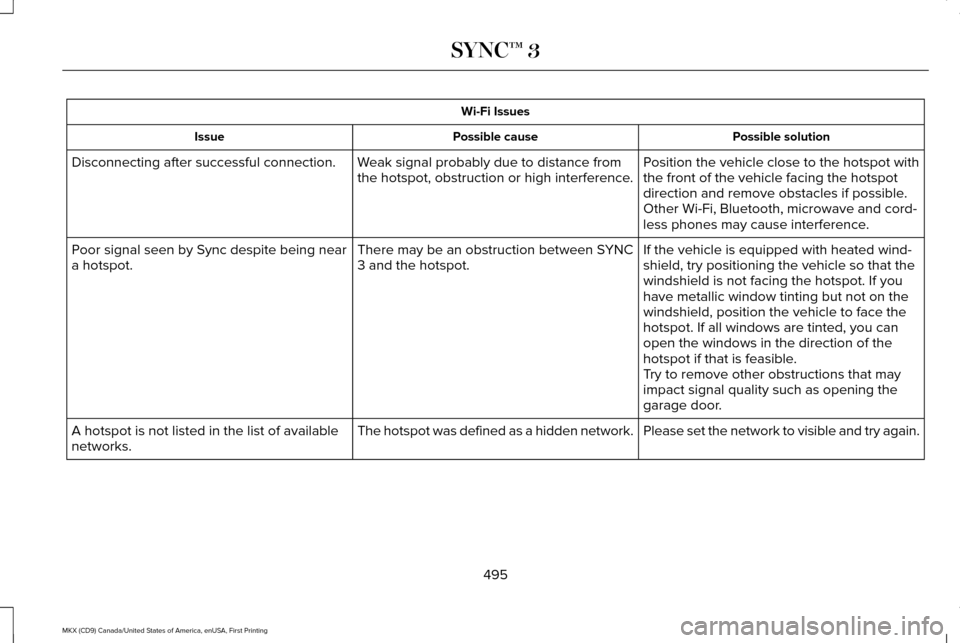
Wi-Fi Issues
Possible solution
Possible cause
Issue
Position the vehicle close to the hotspot with
the front of the vehicle facing the hotspot
direction and remove obstacles if possible.
Other Wi-Fi, Bluetooth, microwave and cord-
less phones may cause interference.
Weak signal probably due to distance from
the hotspot, obstruction or high interference.
Disconnecting after successful connection.
If the vehicle is equipped with heated wind-
shield, try positioning the vehicle so that the
windshield is not facing the hotspot. If you
have metallic window tinting but not on the
windshield, position the vehicle to face the
hotspot. If all windows are tinted, you can
open the windows in the direction of the
hotspot if that is feasible.
There may be an obstruction between SYNC
3 and the hotspot.
Poor signal seen by Sync despite being near
a hotspot.
Try to remove other obstructions that may
impact signal quality such as opening the
garage door.
Please set the network to visible and try again.
The hotspot was defined as a hidden network.
A hotspot is not listed in the list of available
networks.
495
MKX (CD9) Canada/United States of America, enUSA, First Printing SYNC™ 3
Page 499 of 587
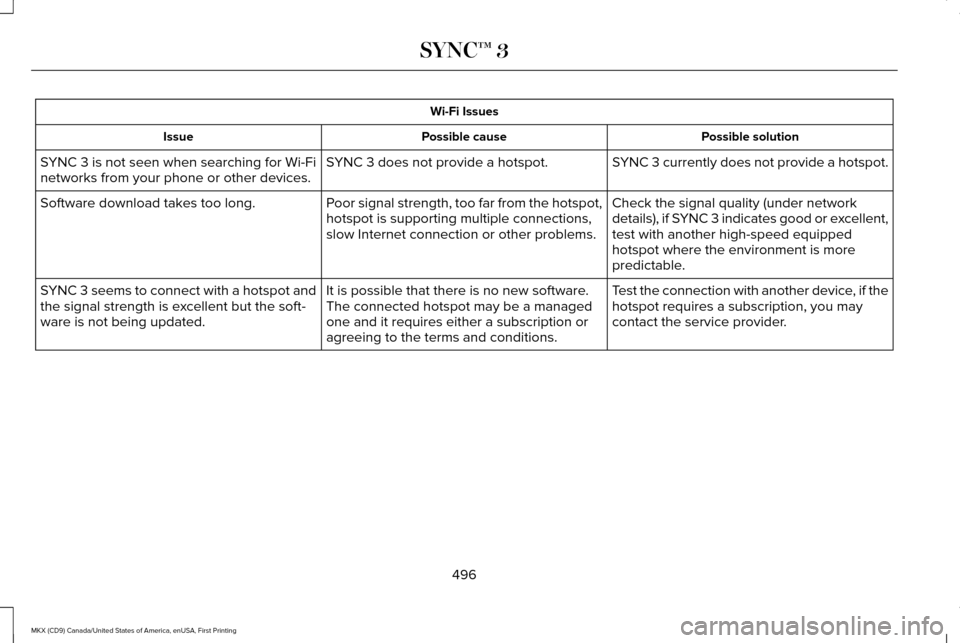
Wi-Fi Issues
Possible solution
Possible cause
Issue
SYNC 3 currently does not provide a hotspot.
SYNC 3 does not provide a hotspot.
SYNC 3 is not seen when searching for Wi-Fi
networks from your phone or other devices.
Check the signal quality (under network
details), if SYNC 3 indicates good or excellent,
test with another high-speed equipped
hotspot where the environment is more
predictable.
Poor signal strength, too far from the hotspot,
hotspot is supporting multiple connections,
slow Internet connection or other problems.
Software download takes too long.
Test the connection with another device, if the
hotspot requires a subscription, you may
contact the service provider.
It is possible that there is no new software.
The connected hotspot may be a managed
one and it requires either a subscription or
agreeing to the terms and conditions.
SYNC 3 seems to connect with a hotspot and
the signal strength is excellent but the soft-
ware is not being updated.
496
MKX (CD9) Canada/United States of America, enUSA, First Printing SYNC™ 3
Page 500 of 587
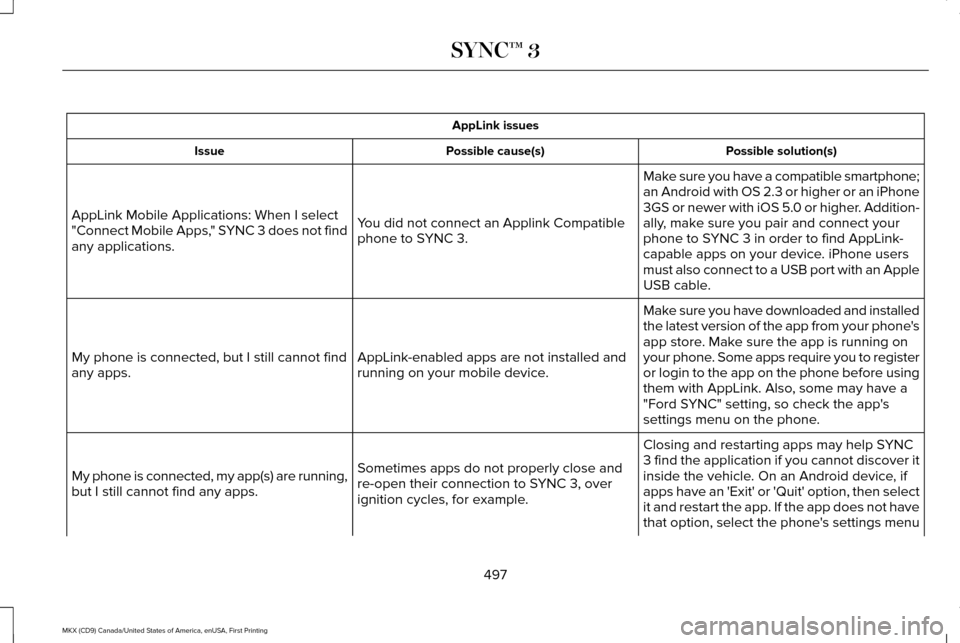
AppLink issues
Possible solution(s)
Possible cause(s)
Issue
Make sure you have a compatible smartphone;
an Android with OS 2.3 or higher or an iPhone
3GS or newer with iOS 5.0 or higher. Addition-
ally, make sure you pair and connect your
phone to SYNC 3 in order to find AppLink-
capable apps on your device. iPhone users
must also connect to a USB port with an Apple
USB cable.
You did not connect an Applink Compatible
phone to SYNC 3.
AppLink Mobile Applications: When I select
"Connect Mobile Apps," SYNC 3 does not find
any applications.
Make sure you have downloaded and installed
the latest version of the app from your phone's
app store. Make sure the app is running on
your phone. Some apps require you to register
or login to the app on the phone before using
them with AppLink. Also, some may have a
"Ford SYNC" setting, so check the app's
settings menu on the phone.
AppLink-enabled apps are not installed and
running on your mobile device.
My phone is connected, but I still cannot find
any apps.
Closing and restarting apps may help SYNC
3 find the application if you cannot discover it
inside the vehicle. On an Android device, if
apps have an 'Exit' or 'Quit' option, then select
it and restart the app. If the app does not have
that option, select the phone's settings menu
Sometimes apps do not properly close and
re-open their connection to SYNC 3, over
ignition cycles, for example.
My phone is connected, my app(s) are running,
but I still cannot find any apps.
497
MKX (CD9) Canada/United States of America, enUSA, First Printing SYNC™ 3
Page 501 of 587
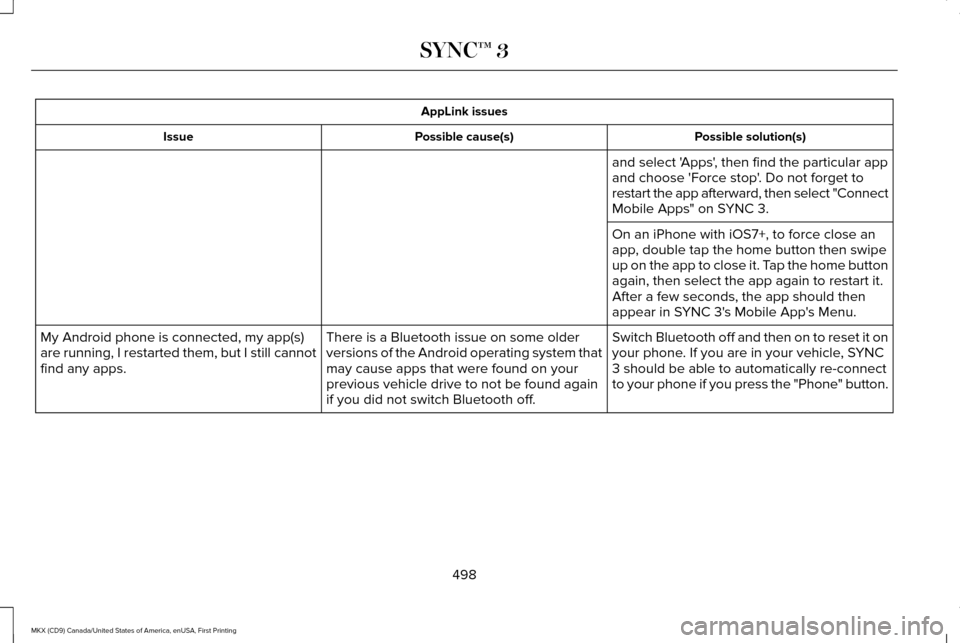
AppLink issues
Possible solution(s)
Possible cause(s)
Issue
and select 'Apps', then find the particular app
and choose 'Force stop'. Do not forget to
restart the app afterward, then select "Connect
Mobile Apps" on SYNC 3.
On an iPhone with iOS7+, to force close an
app, double tap the home button then swipe
up on the app to close it. Tap the home button
again, then select the app again to restart it.
After a few seconds, the app should then
appear in SYNC 3's Mobile App's Menu.
Switch Bluetooth off and then on to reset it on
your phone. If you are in your vehicle, SYNC
3 should be able to automatically re-connect
to your phone if you press the "Phone" button.
There is a Bluetooth issue on some older
versions of the Android operating system that
may cause apps that were found on your
previous vehicle drive to not be found again
if you did not switch Bluetooth off.
My Android phone is connected, my app(s)
are running, I restarted them, but I still cannot
find any apps.
498
MKX (CD9) Canada/United States of America, enUSA, First Printing SYNC™ 3
Page 502 of 587
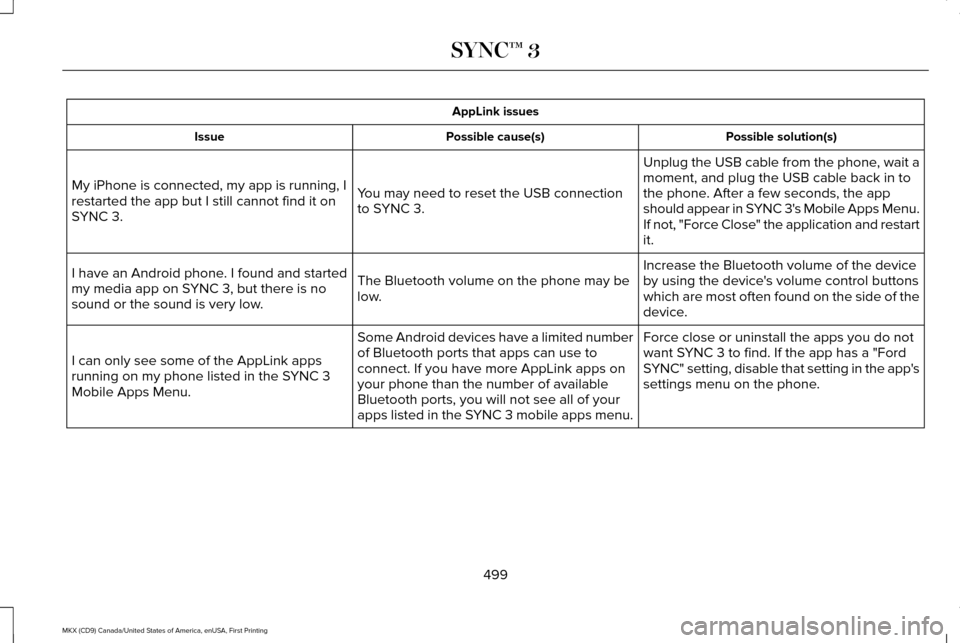
AppLink issues
Possible solution(s)
Possible cause(s)
Issue
Unplug the USB cable from the phone, wait a
moment, and plug the USB cable back in to
the phone. After a few seconds, the app
should appear in SYNC 3's Mobile Apps Menu.
If not, "Force Close" the application and restart
it.
You may need to reset the USB connection
to SYNC 3.
My iPhone is connected, my app is running, I
restarted the app but I still cannot find it on
SYNC 3.
Increase the Bluetooth volume of the device
by using the device's volume control buttons
which are most often found on the side of the
device.
The Bluetooth volume on the phone may be
low.
I have an Android phone. I found and started
my media app on SYNC 3, but there is no
sound or the sound is very low.
Force close or uninstall the apps you do not
want SYNC 3 to find. If the app has a "Ford
SYNC" setting, disable that setting in the app's
settings menu on the phone.
Some Android devices have a limited number
of Bluetooth ports that apps can use to
connect. If you have more AppLink apps on
your phone than the number of available
Bluetooth ports, you will not see all of your
apps listed in the SYNC 3 mobile apps menu.
I can only see some of the AppLink apps
running on my phone listed in the SYNC 3
Mobile Apps Menu.
499
MKX (CD9) Canada/United States of America, enUSA, First Printing SYNC™ 3
Page 503 of 587
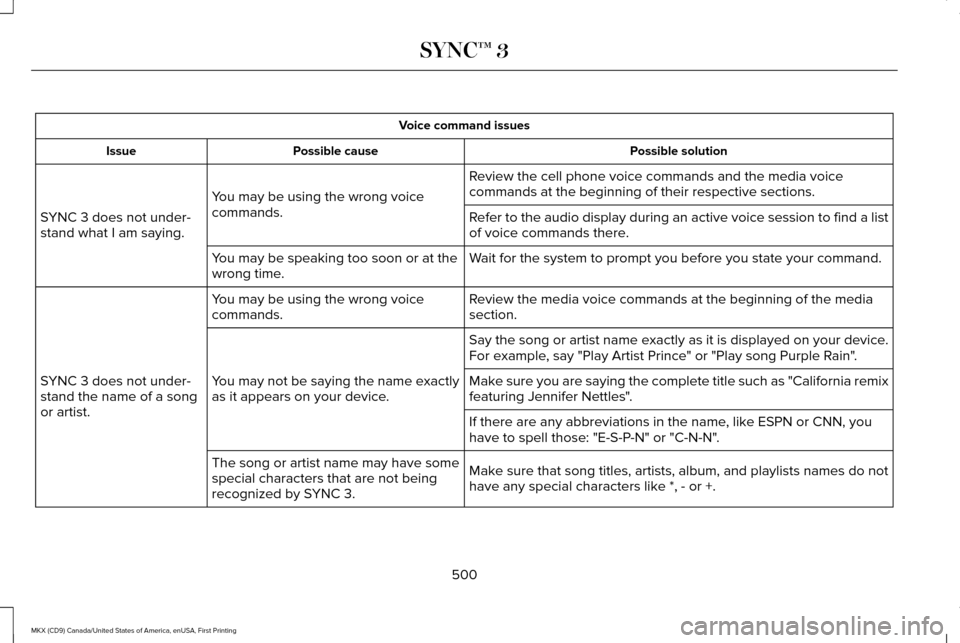
Voice command issues
Possible solution
Possible cause
Issue
Review the cell phone voice commands and the media voice
commands at the beginning of their respective sections.
You may be using the wrong voice
commands.
SYNC 3 does not under-
stand what I am saying. Refer to the audio display during an active voice session to find a list
of voice commands there.
Wait for the system to prompt you before you state your command.
You may be speaking too soon or at the
wrong time.
Review the media voice commands at the beginning of the media
section.
You may be using the wrong voice
commands.
SYNC 3 does not under-
stand the name of a song
or artist. Say the song or artist name exactly as it is displayed on your device.
For example, say "Play Artist Prince" or "Play song Purple Rain".
You may not be saying the name exactly
as it appears on your device. Make sure you are saying the complete title such as "California remix
featuring Jennifer Nettles".
If there are any abbreviations in the name, like ESPN or CNN, you
have to spell those: "E-S-P-N" or "C-N-N".
Make sure that song titles, artists, album, and playlists names do not
have any special characters like *, - or +.
The song or artist name may have some
special characters that are not being
recognized by SYNC 3.
500
MKX (CD9) Canada/United States of America, enUSA, First Printing SYNC™ 3