steering wheel LINCOLN MKX 2017 Workshop Manual
[x] Cancel search | Manufacturer: LINCOLN, Model Year: 2017, Model line: MKX, Model: LINCOLN MKX 2017Pages: 587, PDF Size: 5.4 MB
Page 451 of 587
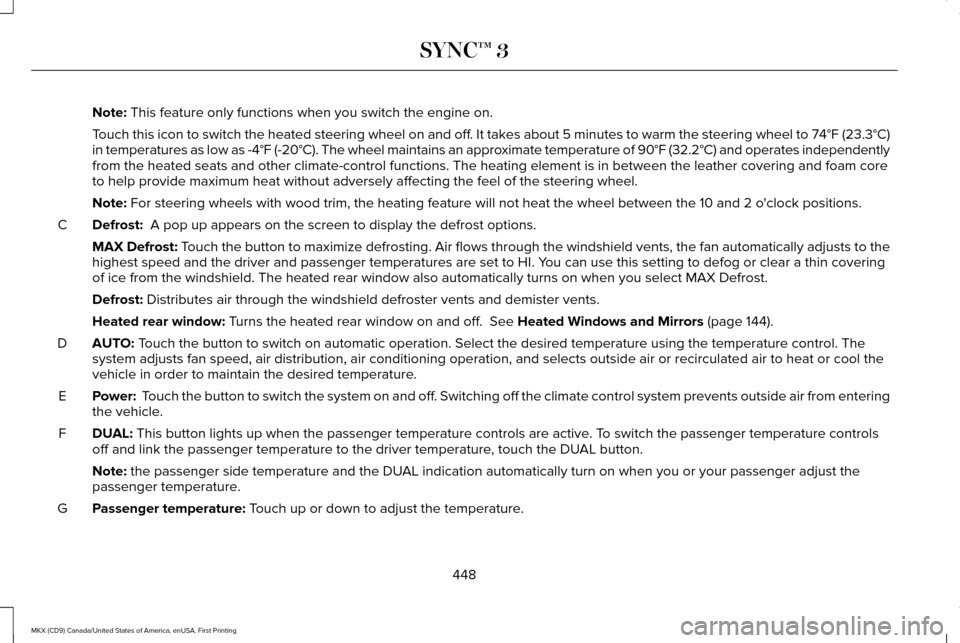
Note: This feature only functions when you switch the engine on.
Touch this icon to switch the heated steering wheel on and off. It takes about 5 minutes to warm the steering wheel to 74°F (23.3°C)
in temperatures as low as -4°F (-20°C). The wheel maintains an a\
pproximate temperature of 90°F (32.2°C) and operates independently
from the heated seats and other climate-control functions. The heating e\
lement is in between the leather covering and foam core
to help provide maximum heat without adversely affecting the feel of the\
steering wheel.
Note:
For steering wheels with wood trim, the heating feature will not heat t\
he wheel between the 10 and 2 o'clock positions.
Defrost:
A pop up appears on the screen to display the defrost options.
C
MAX Defrost: Touch the button to maximize defrosting. Air flows through the windshield\
vents, the fan automatically adjusts to the
highest speed and the driver and passenger temperatures are set to HI. Y\
ou can use this setting to defog or clear a thin covering
of ice from the windshield. The heated rear window also automatically tu\
rns on when you select MAX Defrost.
Defrost:
Distributes air through the windshield defroster vents and demister vent\
s.
Heated rear window:
Turns the heated rear window on and off. See Heated Windows and Mirrors (page 144).
AUTO:
Touch the button to switch on automatic operation. Select the desired tem\
perature using the temperature control. The
system adjusts fan speed, air distribution, air conditioning operation, \
and selects outside air or recirculated air to heat or cool the
vehicle in order to maintain the desired temperature.
D
Power:
Touch the button to switch the system on and off. Switching off the climate control system prevents outside air from enteri\
ng
the vehicle.
E
DUAL:
This button lights up when the passenger temperature controls are activ\
e. To switch the passenger temperature controls
off and link the passenger temperature to the driver temperature, touch the DUAL button.
F
Note:
the passenger side temperature and the DUAL indication automatically turn on when you or your passenger adjust th\
e
passenger temperature.
Passenger temperature:
Touch up or down to adjust the temperature.
G
448
MKX (CD9) Canada/United States of America, enUSA, First Printing SYNC™ 3
Page 456 of 587

Action and Description
Menu Item
Item
You can place a call by selecting an entry from this list.
You can also sort the calls by selecting the drop down menu at the top of\
the screen. You can choose: Missed
Outgoing
Incoming
All
All of your contacts from your phone display in alphabetical order.
Contacts
B
Selecting this button allows you to choose a
specific letter to view.
A-Z Jump
Displays the name of your phone and takes you to the phone settings options.
Phone Settings
C
From this menu, you can pair subsequent devices, set ring tones and aler\
ts. See Settings (page 472).
Displays all recent text messages.
Text Messages
D
Use this keypad to dial in a phone number.
Phone Keypad
E
Use the backspace button to delete numbers.
Press this button to begin a call.
Call
Touch this button to send all calls directly to your voicemail. New text \
message notifications are not
displayed on the screen and all ringtones and alerts are set to silent.
Do Not Disturb
F
Users with phones having voice services may
see a button to access the feature. For
example, iPhone users see a Siri button. A
press and hold of the voice button on the
steering wheel also accesses this feature. 453
MKX (CD9) Canada/United States of America, enUSA, First Printing SYNC™ 3
Page 458 of 587
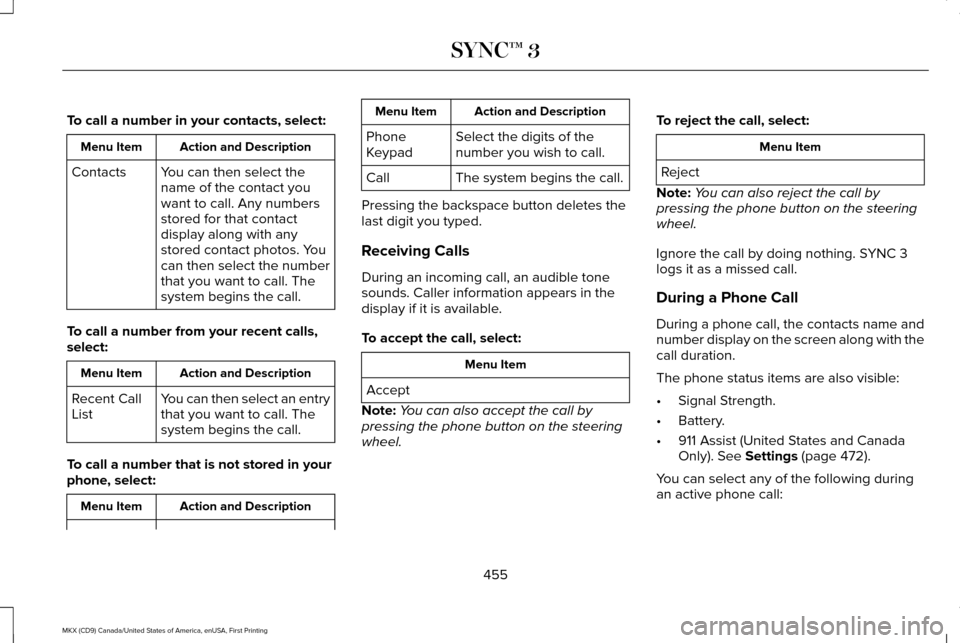
To call a number in your contacts, select:
Action and Description
Menu Item
You can then select the
name of the contact you
want to call. Any numbers
stored for that contact
display along with any
stored contact photos. You
can then select the number
that you want to call. The
system begins the call.
Contacts
To call a number from your recent calls,
select: Action and Description
Menu Item
You can then select an entry
that you want to call. The
system begins the call.
Recent Call
List
To call a number that is not stored in your
phone, select: Action and Description
Menu Item Action and Description
Menu Item
Select the digits of the
number you wish to call.
Phone
Keypad
The system begins the call.
Call
Pressing the backspace button deletes the
last digit you typed.
Receiving Calls
During an incoming call, an audible tone
sounds. Caller information appears in the
display if it is available.
To accept the call, select: Menu Item
Accept
Note: You can also accept the call by
pressing the phone button on the steering
wheel. To reject the call, select: Menu Item
Reject
Note: You can also reject the call by
pressing the phone button on the steering
wheel.
Ignore the call by doing nothing. SYNC 3
logs it as a missed call.
During a Phone Call
During a phone call, the contacts name and
number display on the screen along with the
call duration.
The phone status items are also visible:
• Signal Strength.
• Battery.
• 911 Assist (United States and Canada
Only). See Settings (page 472).
You can select any of the following during
an active phone call:
455
MKX (CD9) Canada/United States of America, enUSA, First Printing SYNC™ 3
Page 459 of 587
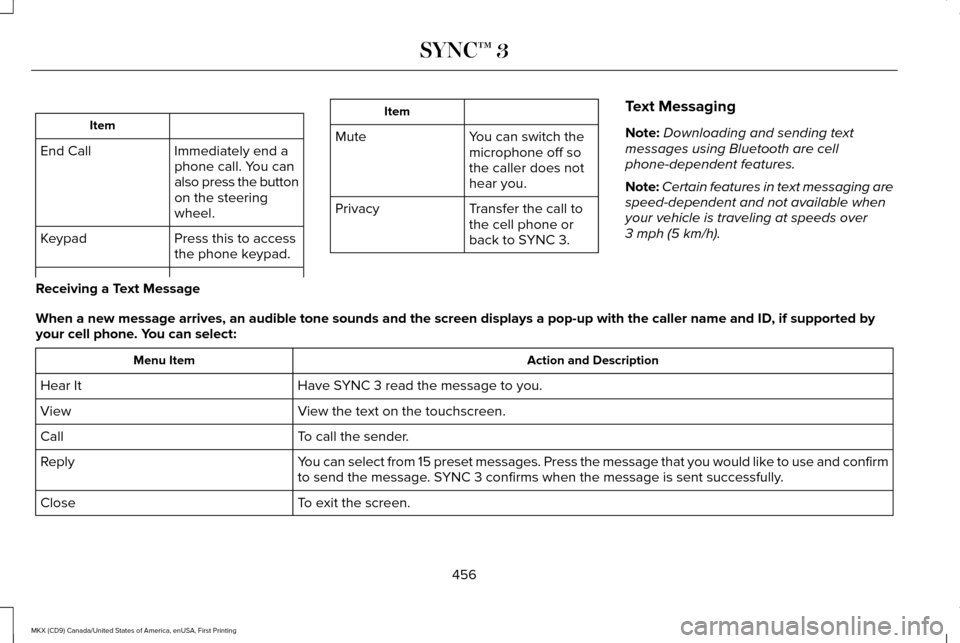
Item
Immediately end a
phone call. You can
also press the button
on the steering
wheel.
End Call
Press this to access
the phone keypad.
Keypad Item
Mute You can switch the
microphone off so
the caller does not
hear you.
Transfer the call to
the cell phone or
back to SYNC 3.
Privacy Text Messaging
Note:
Downloading and sending text
messages using Bluetooth are cell
phone-dependent features.
Note: Certain features in text messaging are
speed-dependent and not available when
your vehicle is traveling at speeds over
3 mph (5 km/h).
Receiving a Text Message
When a new message arrives, an audible tone sounds and the screen displa\
ys a pop-up with the caller name and ID, if supported by
your cell phone. You can select: Action and Description
Menu Item
Have SYNC 3 read the message to you.
Hear It
View the text on the touchscreen.
View
To call the sender.
Call
You can select from 15 preset messages. Press the message that you would \
like to use and confirm
to send the message. SYNC 3 confirms when the message is sent successfully.
Reply
To exit the screen.
Close
456
MKX (CD9) Canada/United States of America, enUSA, First Printing SYNC™ 3
Page 471 of 587
•
Pool
• Wi-Fi
Attractions include nearby landmarks,
amusement parks, historic buildings and
more. cityseeker can provide information
such as star rating, reviews, hour of operation
and admission price.
SiriusXM Traffic and Travel Link
SiriusXM Traffic and Travel Link is available
on vehicles equipped with navigation and
only in select markets. You must activate and
subscribe to receive SiriusXM Traffic and
Travel Link information. It helps you locate
the best gas prices, find movie listings, get
current traffic alerts, view the weather map,
get accurate ski conditions and see current
sports scores. See Apps (page 468).
The system calculates a reasonable efficient
route based on available speed limits, traffic,
and road conditions. You may know a local
short cut that is more efficient at a given time
than the route provided by SYNC 3, but you
should expect a slight difference in minutes
or miles with the SYNC 3 route. Navigation Map Updates
Annual navigation map updates are available
for purchase through your dealership, by
calling 1-866-462-8837 in the United States
and Canada or 01-800-557-5539 in Mexico.
You can also visit:
Website
www.navigation.com/sync
You need to specify the make and model of
your vehicle to determine if there is an
update available.
HERE is the digital map provider for the
navigation application. If you find map data
errors, you may report them directly to HERE
by going to www.here.com/mapcreator.
HERE evaluates all reported map errors and
responds with the result of their investigation
by e-mail.
Map coverage includes the USA (including
Puerto Rico and the US Virgin Islands),
Canada and Mexico. APPS
The system enables voice, steering wheel,
and touch screen control of SYNC 3 AppLink
enabled smartphone apps. Once an app is
running through AppLink, you can control
main features of the app through voice
commands and steering wheel controls.
Note:
Available AppLink enabled apps will
vary by market.
Note: You must pair and connect your
smartphone via Bluetooth to SYNC 3 to
access AppLink.
Note: iPhone users need to connect the
phone to the USB port.
Note: For information on available apps,
supported smartphone devices and
troubleshooting tips please visit: Websites
owner.lincoln.com
www.syncmyride.ca
468
MKX (CD9) Canada/United States of America, enUSA, First Printing SYNC™ 3
Page 519 of 587
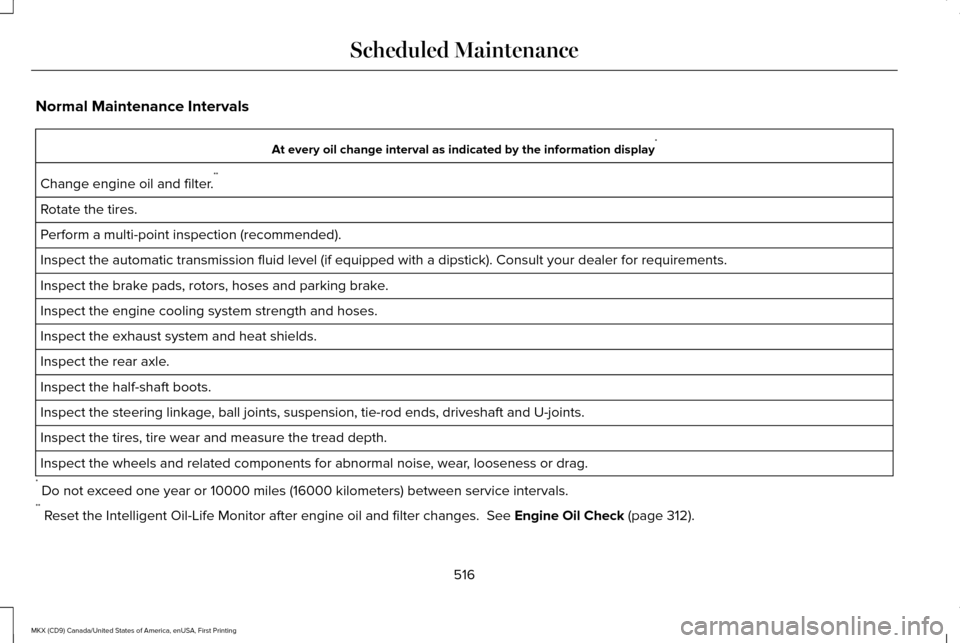
Normal Maintenance Intervals
At every oil change interval as indicated by the information display
*
Change engine oil and filter. **
Rotate the tires.
Perform a multi-point inspection (recommended).
Inspect the automatic transmission fluid level (if equipped with a dips\
tick). Consult your dealer for requirements.
Inspect the brake pads, rotors, hoses and parking brake.
Inspect the engine cooling system strength and hoses.
Inspect the exhaust system and heat shields.
Inspect the rear axle.
Inspect the half-shaft boots.
Inspect the steering linkage, ball joints, suspension, tie-rod ends, driveshaft and U-joints.
Inspect the tires, tire wear and measure the tread depth.
Inspect the wheels and related components for abnormal noise, wear, looseness or drag.
* Do not exceed one year or 10000 miles (16000 kilometers) between service interv\
als.
** Reset the Intelligent Oil-Life Monitor after engine oil and filter change\
s. See Engine Oil Check (page 312).
516
MKX (CD9) Canada/United States of America, enUSA, First Printing Scheduled Maintenance
Page 576 of 587
3
360 Degree Camera....................................221
Camera Views......................................................221
Front Camera......................................................222
Side Camera........................................................223
A
A/C See: Climate Control............................................141
About This Manual............................................7
ABS See: Brakes...........................................................195
ABS driving hints See: Hints on Driving With Anti-Lock
Brakes................................................................195
Accessories...................................................505 Exterior Style.......................................................505
Interior Style........................................................505
Lifestyle.................................................................505
Peace of Mind.....................................................505
Accessories See: Replacement Parts Recommendation.....13
ACC See: Using Adaptive Cruise Control.............225 Active Park Assist
..........................................210
Deactivating the Active Park Assist
Feature..............................................................216
Parallel Parking, Perpendicular Parking, Parallel Park Out Assist.................................210
Troubleshooting the System............................216
Adaptive Headlamps
.....................................96
Adjusting the Headlamps..........................325 Vertical Aim Adjustment...................................325
Adjusting the Steering Wheel - Vehicles With: Manual Adjustable Steering
Column............................................................84
Adjusting the Steering Wheel - Vehicles With: Power Adjustable Steering
Column............................................................84
Easy Entry and Exit Feature...............................85
End of Travel Position..........................................85
Memory Feature....................................................85
AFS See: Adaptive Headlamps..................................
96
Airbag Disposal
...............................................55
Air Conditioning See: Climate Control............................................141
Air Filter See: Changing the Engine Air Filter..............330
Alarm See: Anti-Theft Alarm...........................................83
All-Wheel Drive..............................................189 Ambient Lighting............................................99
Anti-Theft Alarm
..............................................83
Arming the Alarm..................................................83
Disarming the Alarm............................................83
Appendices....................................................542
Apps .................................................................
468
........................................................................\
.........468
SiriusXM Traffic and Travel Link......................470
Audible Warnings and Indicators...............113 Headlamps On Warning Chime........................113
Keyless Warning Alert.........................................113
Parking Brake On Warning Chime
...................113
Audio Control
..................................................85
Seek, Next or Previous........................................86
Audio System................................................399 General Information...........................................399
Audio Unit
......................................................400
Auto Hold........................................................199 Using Auto Hold..................................................201
Autolamps........................................................92 Windshield Wiper Activated Headlamps........93
Automatic Climate Control...........................141
Automatic High Beam Control....................95 Activating the System..........................................95
Manually Overriding the System......................
96
Automatic Transmission..............................183 Automatic Transmission Adaptive
Learning............................................................188
573
MKX (CD9) Canada/United States of America, enUSA, First Printing Index
Page 580 of 587
Fuses...............................................................286
Fuse Specification Chart............................286
Passenger Compartment Fuse Panel...........297
Power Distribution Box.....................................286
G
Garage Door Opener See: Universal Garage Door Opener.............
158
Gauges.............................................................107 Engine Coolant Temperature Gauge.............109
Fuel Gauge...........................................................108
Information Display.............................................108
General Information on Radio Frequencies..................................................56
Intelligent Access.................................................56
General Maintenance Information............510 Multi-Point Inspection.........................................513
Owner Checks and Services............................512
Protecting Your Investment..............................510
Why Maintain Your Vehicle?.............................
510
Why Maintain Your Vehicle at Your Dealership?......................................................510
Getting Assistance Outside the U.S. and Canada.........................................................282
Getting the Services You Need................278 Away From Home...............................................278 Global Opening and Closing
.......................101
Closing the Windows..........................................101
Opening the Windows........................................101
Glove Box
........................................................165
Manual Entry.........................................................165
H
Hazard Warning Flashers
...........................272
Headlamp Adjusting See: Adjusting the Headlamps.......................325
Headlamp Exit Delay.....................................94
Head Restraints
.............................................146
Front seat manual head restraints..................147
Rear seat center head restraint.......................148
Rear seat outboard head restraints................148
Heated Seats
..................................................155
Front Seats............................................................155
Rear Seats.............................................................156
Heated Steering Wheel
.................................87
Heated Windows and Mirrors....................144 Heated Exterior Mirrors.....................................144
Heated Rear Window.........................................144
Heated Wiper Park..............................................144
Heating See: Climate Control............................................141
Hill Start Assist...............................................198 Switching the System On and Off...................
199 Using Hill Start Assist.........................................199
Hints on Controlling the Interior Climate..........................................................143
Cooling the Interior Quickly..............................144
General Hints........................................................143
Heating the Interior Quickly..............................143
Recommended Settings for Cooling .............144
Recommended Settings for Heating..............143
Side Window Defogging in Cold Weather.............................................................144
Hints on Driving With Anti-Lock Brakes...........................................................195
Home Screen.................................................421
Hood Lock See: Opening and Closing the Hood............306
I
In California (U.S. Only)...............................279
Information Display Control.........................87
Information Displays
......................................114
General Information.............................................114
Information Messages..................................121 Active Park.............................................................121
Adaptive Cruise Control....................................122
Adaptive Steering................................................123
AdvanceTrac ™.......................................................123
Airbag.....................................................................124
577
MKX (CD9) Canada/United States of America, enUSA, First Printing Index
Page 584 of 587
Roadside Emergencies................................271
Roof Racks and Load Carriers..................256
Running-In
See: Breaking-In.................................................268
Running Out of Fuel......................................175
Adding Fuel From a Portable Fuel
Container...........................................................175
Filling a Portable Fuel Container.....................175
S
Safety Canopy™
...............................................52
Safety Precautions........................................173
Scheduled Maintenance Record
.............522
Scheduled Maintenance.............................510
Seatbelt Extension..........................................43
Seatbelt Height Adjustment.........................39
Seatbelt Reminder..........................................40 Belt-Minder™...........................................................40
Seatbelts...........................................................34 Principle of Operation..........................................34
Seatbelt Warning Lamp and Indicator Chime..............................................................39
Conditions of operation......................................40
Seats.................................................................146
Security ...............................................................
81
Settings...........................................................472 911 Assist...............................................................478 Ambient Lighting................................................486
Bluetooth..............................................................474
Clock......................................................................474
Display...................................................................487
General
..................................................................484
Media Player........................................................473
Mobile Apps.........................................................482
Navigation............................................................480
Phone.....................................................................475
Radio......................................................................479
Sound....................................................................472
Valet Mode...........................................................488
Vehicle..................................................................\
.486
Voice Control.......................................................487
Wi-Fi.......................................................................485
Side Airbags
......................................................51
Side Sensing System..................................209
Obstacle Distance Indicator............................209
Sitting in the Correct Position....................146
Snow Chains See: Using Snow Chains..................................
366
Special Notices
.................................................13
New Vehicle Limited Warranty...........................13
On Board Diagnostics Data Link Connector............................................................14
Special Instructions...............................................13 Special Operating Conditions Scheduled
Maintenance................................................518
Exceptions ............................................................520
Speed Control See: Cruise Control............................................224
Stability Control
............................................204
Principle of Operation.......................................204
Starting a Gasoline Engine.........................168 Automatic Engine Shutdown............................
170
Failure to Start......................................................169
Guarding Against Exhaust Fumes....................171
Important Ventilating Information.....................171
Stopping the Engine When Your Vehicle is Moving...............................................................170
Stopping the Engine When Your Vehicle is Stationary..........................................................170
Vehicles with Keyless Start...............................168
Starting and Stopping the Engine.............167 General Information............................................167
Steering..........................................................246 Adaptive Steering...............................................247
Electric Power Steering....................................246
Steering Wheel................................................84
Storage Compartments
...............................165
Sunroof See: Moonroof.....................................................105
Sun Visors.......................................................105 Illuminated Vanity Mirror...................................105
581
MKX (CD9) Canada/United States of America, enUSA, First Printing Index
Page 586 of 587
Setting the Gap Distance.................................227
Switching Adaptive Cruise Control Off........229
Switching Adaptive Cruise Control On.........
226
Switching to Normal Cruise Control..............232
System Not Available.........................................231
Using All-Wheel Drive..................................189 Driving In Special Conditions With All-Wheel
Drive (AWD)......................................................189
Using Cruise Control
...................................224
Switching Cruise Control Off...........................225
Switching Cruise Control On...........................224
Using MyKey With Remote Start Systems
..........................................................66
Using Snow Chains......................................366
Using Stability Control................................205
Using Summer Tires....................................365
Using Traction Control................................202 Switching the System Off.................................202
System Indicator Lights and Messages.......202
Using a Switch....................................................202
Using the Information Display Controls.......202
Using Voice Recognition............................422 Audio Voice Commands...................................424
Climate Voice Commands...............................425
Mobile App Voice Commands........................429
Navigation Voice Commands..........................428
Phone Voice Commands..................................426 SiriusXM Traffic and Travel Link Voice
Commands......................................................430
Voice Settings Commands................................431
Utilizing the Mediation/Arbitration Program (Canada Only)
..............................................281
V
Vehicle Care
...................................................331
General Information............................................331
Vehicle Certification Label
.........................383
Vehicle Identification Number..................383
Vehicle Storage.............................................338
Battery...................................................................339
Body.......................................................................338
Brakes...................................................................339
Cooling system...................................................339
Engine...................................................................339
Fuel system..........................................................339
General..................................................................338
Miscellaneous......................................................339
Removing Vehicle From Storage....................339
Tires.......................................................................339
Ventilation See: Climate Control............................................141
VIN See: Vehicle Identification Number...............383
Voice Control
...................................................86 W
Warning Lamps and Indicators..................109
Adaptive Cruise Control....................................109
Adaptive Steering...............................................109
Anti-Lock Braking System..................................110
Autohold Active....................................................110
Autohold Unavailable..........................................110
Automatic High Beam Control..........................110
Battery.....................................................................110
Blind Spot Monitor...............................................110
Brake System........................................................110
Cruise Control.......................................................110
Direction Indicator.................................................111
Door Ajar.................................................................111
Electric Park Brake................................................111
Engine Coolant Temperature.............................111
Engine Oil................................................................111
Fasten Seatbelt......................................................111
Front Airbag............................................................111
Heads Up Display..................................................111
High Beam...............................................................111
Hood Ajar...............................................................112
Liftgate Ajar............................................................112
Low Beam Malfunction Warning.......................
112
Low Fuel Level......................................................112
Low Tire Pressure Warning................................112
Low Washer Fluid.................................................112
583
MKX (CD9) Canada/United States of America, enUSA, First Printing Index