wheel LINCOLN MKX 2018 Owners Manual
[x] Cancel search | Manufacturer: LINCOLN, Model Year: 2018, Model line: MKX, Model: LINCOLN MKX 2018Pages: 603, PDF Size: 4.94 MB
Page 383 of 603

Wheel pilot boreA
Inspect the wheel pilot hole and mountingsurface prior to installation. Remove anyvisible corrosion or loose particles.
380
MKX (CD9) Canada/United States of America, enUSA, Edition date: 201707, First Printing
Wheels and TiresE145950
Page 390 of 603
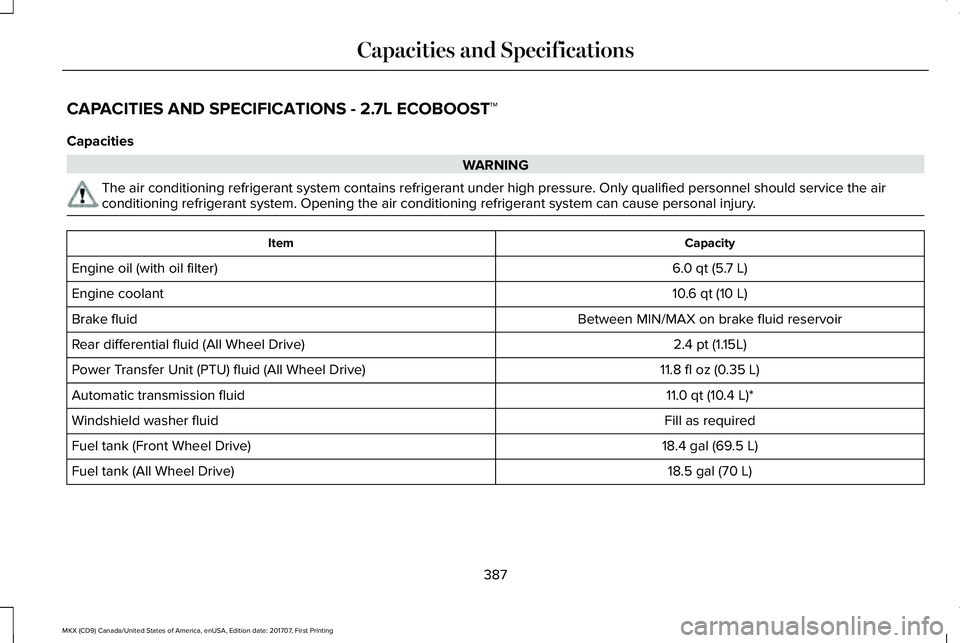
CAPACITIES AND SPECIFICATIONS - 2.7L ECOBOOST™
Capacities
WARNING
The air conditioning refrigerant system contains refrigerant under high pressure. Only qualified personnel should service the airconditioning refrigerant system. Opening the air conditioning refrigerant system can cause personal injury.
CapacityItem
6.0 qt (5.7 L)Engine oil (with oil filter)
10.6 qt (10 L)Engine coolant
Between MIN/MAX on brake fluid reservoirBrake fluid
2.4 pt (1.15L)Rear differential fluid (All Wheel Drive)
11.8 fl oz (0.35 L)Power Transfer Unit (PTU) fluid (All Wheel Drive)
11.0 qt (10.4 L)*Automatic transmission fluid
Fill as requiredWindshield washer fluid
18.4 gal (69.5 L)Fuel tank (Front Wheel Drive)
18.5 gal (70 L)Fuel tank (All Wheel Drive)
387
MKX (CD9) Canada/United States of America, enUSA, Edition date: 201707, First Printing
Capacities and Specifications
Page 392 of 603
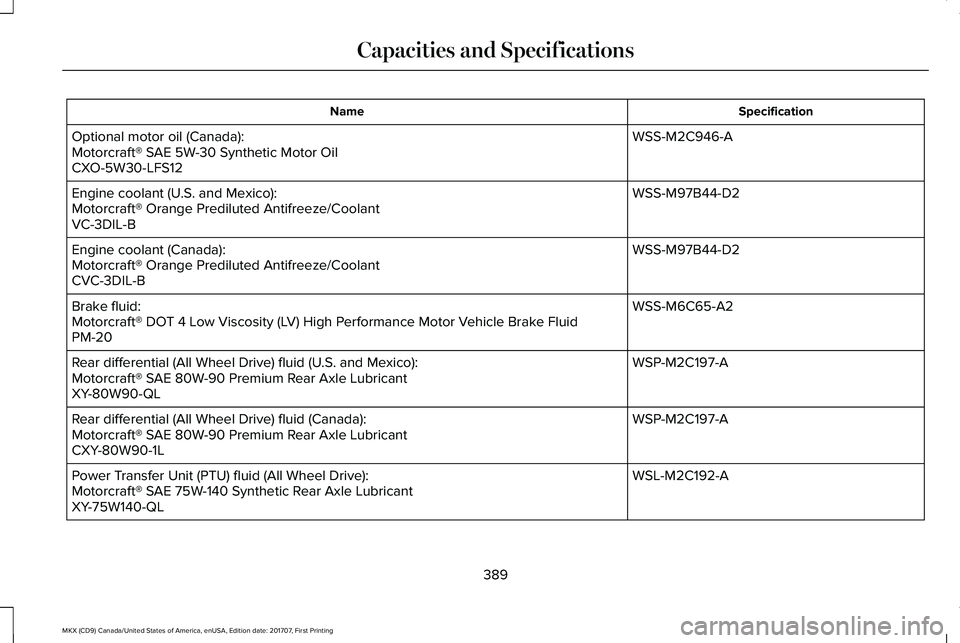
SpecificationName
WSS-M2C946-AOptional motor oil (Canada):Motorcraft® SAE 5W-30 Synthetic Motor OilCXO-5W30-LFS12
WSS-M97B44-D2Engine coolant (U.S. and Mexico):Motorcraft® Orange Prediluted Antifreeze/CoolantVC-3DIL-B
WSS-M97B44-D2Engine coolant (Canada):Motorcraft® Orange Prediluted Antifreeze/CoolantCVC-3DIL-B
WSS-M6C65-A2Brake fluid:Motorcraft® DOT 4 Low Viscosity (LV) High Performance Motor Vehicle Brake FluidPM-20
WSP-M2C197-ARear differential (All Wheel Drive) fluid (U.S. and Mexico):Motorcraft® SAE 80W-90 Premium Rear Axle LubricantXY-80W90-QL
WSP-M2C197-ARear differential (All Wheel Drive) fluid (Canada):Motorcraft® SAE 80W-90 Premium Rear Axle LubricantCXY-80W90-1L
WSL-M2C192-APower Transfer Unit (PTU) fluid (All Wheel Drive):Motorcraft® SAE 75W-140 Synthetic Rear Axle LubricantXY-75W140-QL
389
MKX (CD9) Canada/United States of America, enUSA, Edition date: 201707, First Printing
Capacities and Specifications
Page 397 of 603
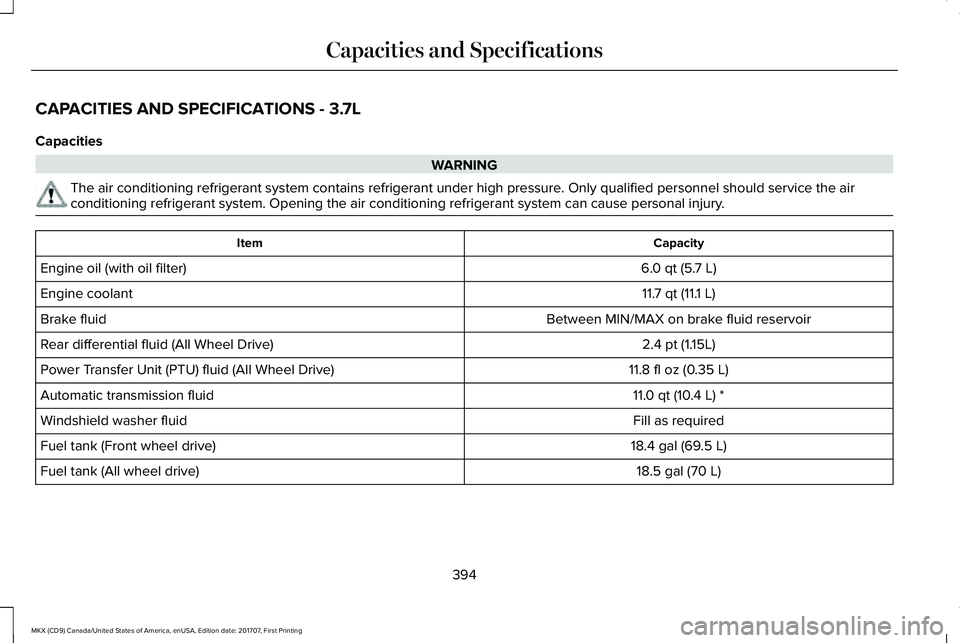
CAPACITIES AND SPECIFICATIONS - 3.7L
Capacities
WARNING
The air conditioning refrigerant system contains refrigerant under high pressure. Only qualified personnel should service the airconditioning refrigerant system. Opening the air conditioning refrigerant system can cause personal injury.
CapacityItem
6.0 qt (5.7 L)Engine oil (with oil filter)
11.7 qt (11.1 L)Engine coolant
Between MIN/MAX on brake fluid reservoirBrake fluid
2.4 pt (1.15L)Rear differential fluid (All Wheel Drive)
11.8 fl oz (0.35 L)Power Transfer Unit (PTU) fluid (All Wheel Drive)
11.0 qt (10.4 L) *Automatic transmission fluid
Fill as requiredWindshield washer fluid
18.4 gal (69.5 L)Fuel tank (Front wheel drive)
18.5 gal (70 L)Fuel tank (All wheel drive)
394
MKX (CD9) Canada/United States of America, enUSA, Edition date: 201707, First Printing
Capacities and Specifications
Page 399 of 603
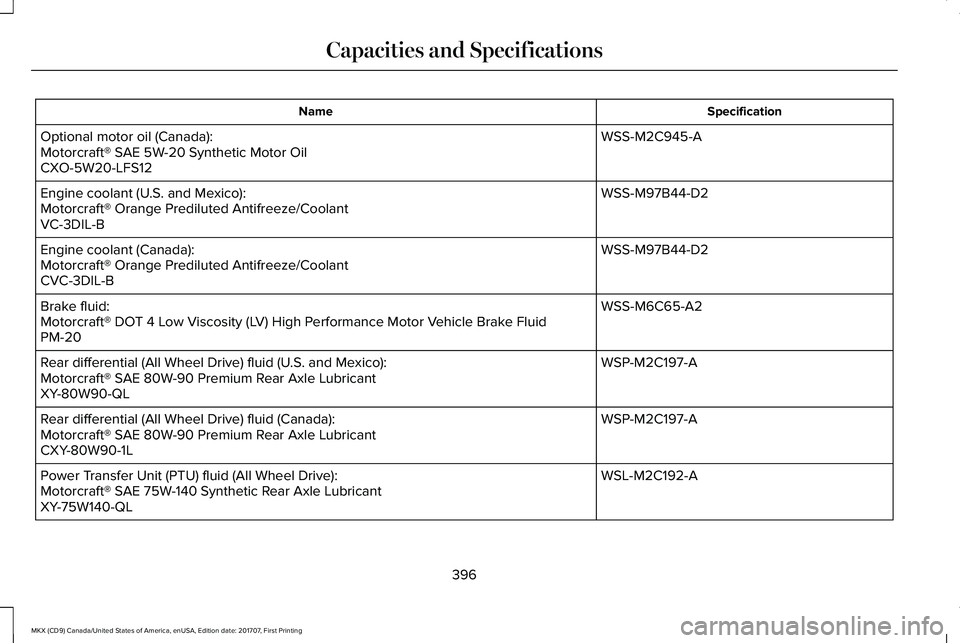
SpecificationName
WSS-M2C945-AOptional motor oil (Canada):Motorcraft® SAE 5W-20 Synthetic Motor OilCXO-5W20-LFS12
WSS-M97B44-D2Engine coolant (U.S. and Mexico):Motorcraft® Orange Prediluted Antifreeze/CoolantVC-3DIL-B
WSS-M97B44-D2Engine coolant (Canada):Motorcraft® Orange Prediluted Antifreeze/CoolantCVC-3DIL-B
WSS-M6C65-A2Brake fluid:Motorcraft® DOT 4 Low Viscosity (LV) High Performance Motor Vehicle Brake FluidPM-20
WSP-M2C197-ARear differential (All Wheel Drive) fluid (U.S. and Mexico):Motorcraft® SAE 80W-90 Premium Rear Axle LubricantXY-80W90-QL
WSP-M2C197-ARear differential (All Wheel Drive) fluid (Canada):Motorcraft® SAE 80W-90 Premium Rear Axle LubricantCXY-80W90-1L
WSL-M2C192-APower Transfer Unit (PTU) fluid (All Wheel Drive):Motorcraft® SAE 75W-140 Synthetic Rear Axle LubricantXY-75W140-QL
396
MKX (CD9) Canada/United States of America, enUSA, Edition date: 201707, First Printing
Capacities and Specifications
Page 413 of 603
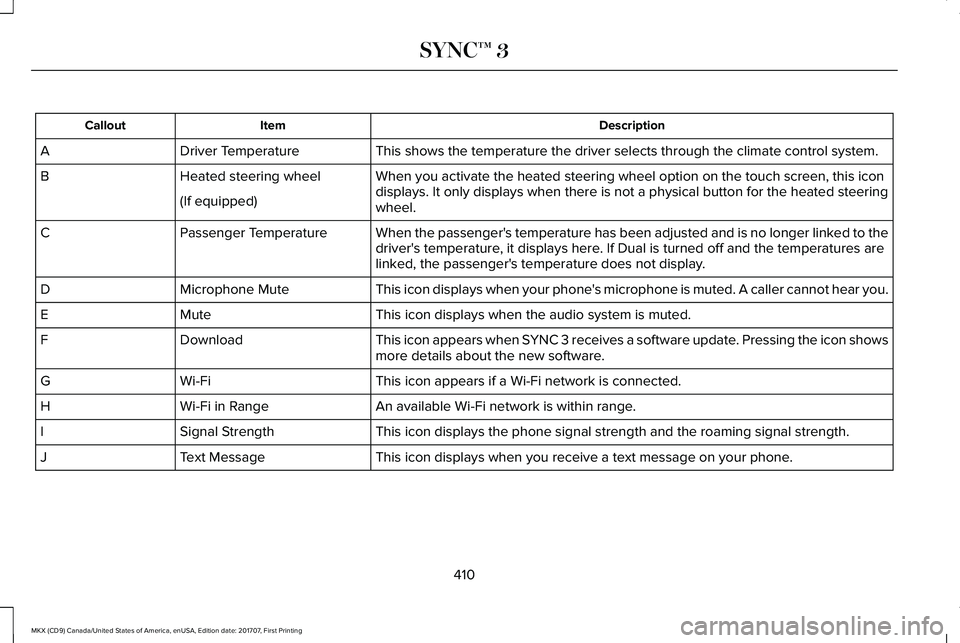
DescriptionItemCallout
This shows the temperature the driver selects through the climate control system.Driver TemperatureA
When you activate the heated steering wheel option on the touch screen, this icondisplays. It only displays when there is not a physical button for the heated steeringwheel.
Heated steering wheelB
(If equipped)
When the passenger's temperature has been adjusted and is no longer linked to thedriver's temperature, it displays here. If Dual is turned off and the temperatures arelinked, the passenger's temperature does not display.
Passenger TemperatureC
This icon displays when your phone's microphone is muted. A caller cannot hear you.Microphone MuteD
This icon displays when the audio system is muted.MuteE
This icon appears when SYNC 3 receives a software update. Pressing the icon showsmore details about the new software.DownloadF
This icon appears if a Wi-Fi network is connected.Wi-FiG
An available Wi-Fi network is within range.Wi-Fi in RangeH
This icon displays the phone signal strength and the roaming signal strength.Signal StrengthI
This icon displays when you receive a text message on your phone.Text MessageJ
410
MKX (CD9) Canada/United States of America, enUSA, Edition date: 201707, First Printing
SYNC™ 3
Page 415 of 603
FunctionsFeature Bar Item
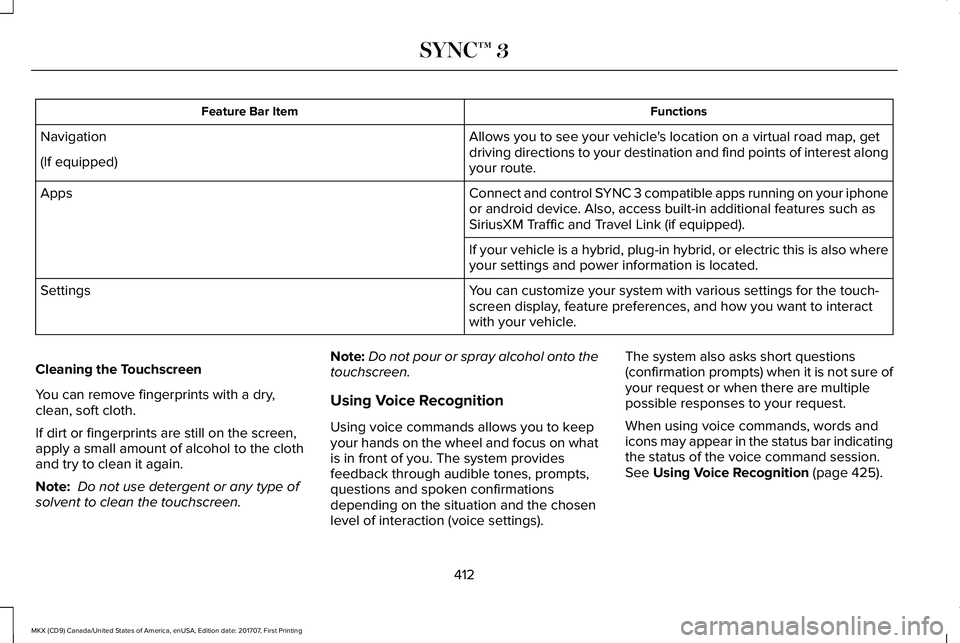
Allows you to see your vehicle's location on a virtual road map, getdriving directions to your destination and find points of interest alongyour route.
Navigation
(If equipped)
Connect and control SYNC 3 compatible apps running on your iphoneor android device. Also, access built-in additional features such asSiriusXM Traffic and Travel Link (if equipped).
Apps
If your vehicle is a hybrid, plug-in hybrid, or electric this is also whereyour settings and power information is located.
You can customize your system with various settings for the touch-screen display, feature preferences, and how you want to interactwith your vehicle.
Settings
Cleaning the Touchscreen
You can remove fingerprints with a dry,clean, soft cloth.
If dirt or fingerprints are still on the screen,apply a small amount of alcohol to the clothand try to clean it again.
Note: Do not use detergent or any type ofsolvent to clean the touchscreen.
Note:Do not pour or spray alcohol onto thetouchscreen.
Using Voice Recognition
Using voice commands allows you to keepyour hands on the wheel and focus on whatis in front of you. The system providesfeedback through audible tones, prompts,questions and spoken confirmationsdepending on the situation and the chosenlevel of interaction (voice settings).
The system also asks short questions(confirmation prompts) when it is not sure ofyour request or when there are multiplepossible responses to your request.
When using voice commands, words andicons may appear in the status bar indicatingthe status of the voice command session.See Using Voice Recognition (page 425).
412
MKX (CD9) Canada/United States of America, enUSA, Edition date: 201707, First Printing
SYNC™ 3
Page 418 of 603
InformationOption
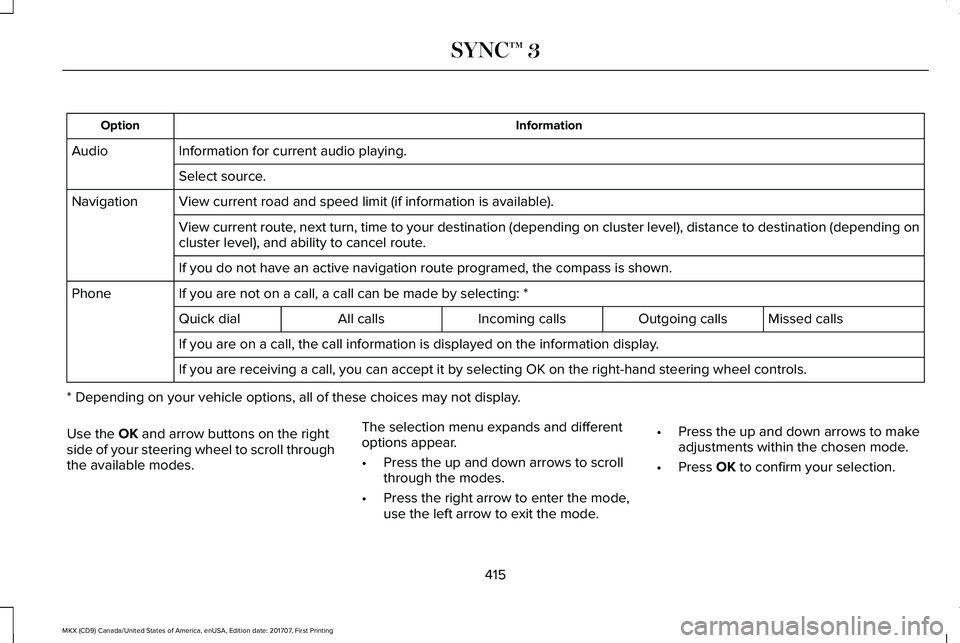
Information for current audio playing.Audio
Select source.
View current road and speed limit (if information is available).Navigation
View current route, next turn, time to your destination (depending on cluster level), distance to destination (depending oncluster level), and ability to cancel route.
If you do not have an active navigation route programed, the compass is shown.
If you are not on a call, a call can be made by selecting: *Phone
Missed callsOutgoing callsIncoming callsAll callsQuick dial
If you are on a call, the call information is displayed on the information display.
If you are receiving a call, you can accept it by selecting OK on the right-hand steering wheel controls.
* Depending on your vehicle options, all of these choices may not display.
Use the OK and arrow buttons on the rightside of your steering wheel to scroll throughthe available modes.
The selection menu expands and differentoptions appear.
•Press the up and down arrows to scrollthrough the modes.
•Press the right arrow to enter the mode,use the left arrow to exit the mode.
•Press the up and down arrows to makeadjustments within the chosen mode.
•Press OK to confirm your selection.
415
MKX (CD9) Canada/United States of America, enUSA, Edition date: 201707, First Printing
SYNC™ 3
Page 419 of 603
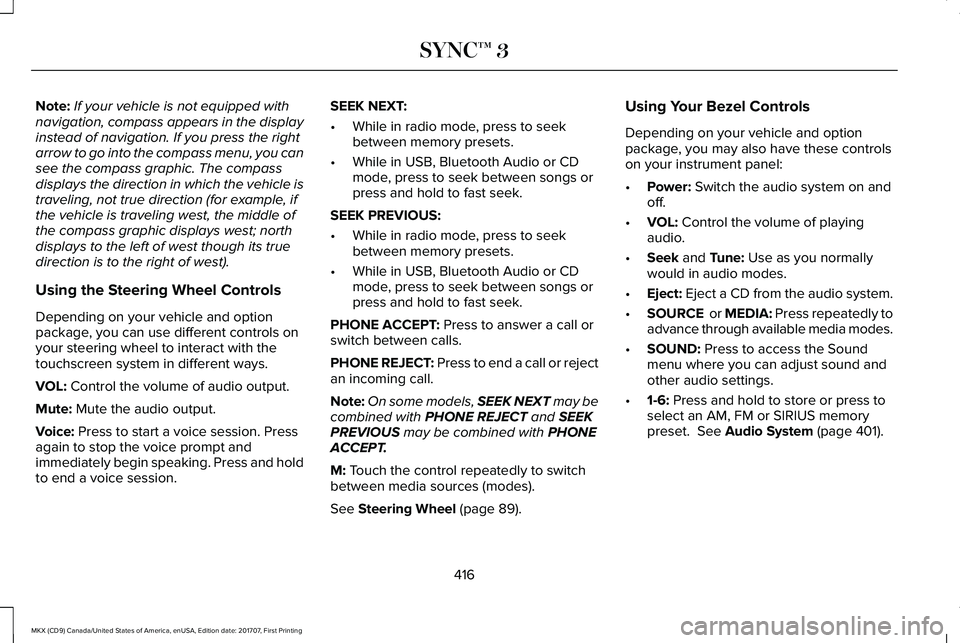
Note:If your vehicle is not equipped withnavigation, compass appears in the displayinstead of navigation. If you press the rightarrow to go into the compass menu, you cansee the compass graphic. The compassdisplays the direction in which the vehicle istraveling, not true direction (for example, ifthe vehicle is traveling west, the middle ofthe compass graphic displays west; northdisplays to the left of west though its truedirection is to the right of west).
Using the Steering Wheel Controls
Depending on your vehicle and optionpackage, you can use different controls onyour steering wheel to interact with thetouchscreen system in different ways.
VOL: Control the volume of audio output.
Mute: Mute the audio output.
Voice: Press to start a voice session. Pressagain to stop the voice prompt andimmediately begin speaking. Press and holdto end a voice session.
SEEK NEXT:
•While in radio mode, press to seekbetween memory presets.
•While in USB, Bluetooth Audio or CDmode, press to seek between songs orpress and hold to fast seek.
SEEK PREVIOUS:
•While in radio mode, press to seekbetween memory presets.
•While in USB, Bluetooth Audio or CDmode, press to seek between songs orpress and hold to fast seek.
PHONE ACCEPT: Press to answer a call orswitch between calls.
PHONE REJECT: Press to end a call or rejectan incoming call.
Note:On some models, SEEK NEXT may becombined with PHONE REJECT and SEEKPREVIOUS may be combined with PHONEACCEPT.
M: Touch the control repeatedly to switchbetween media sources (modes).
See Steering Wheel (page 89).
Using Your Bezel Controls
Depending on your vehicle and optionpackage, you may also have these controlson your instrument panel:
•Power: Switch the audio system on andoff.
•VOL: Control the volume of playingaudio.
•Seek and Tune: Use as you normallywould in audio modes.
•Eject: Eject a CD from the audio system.
•SOURCE or MEDIA: Press repeatedly toadvance through available media modes.
•SOUND: Press to access the Soundmenu where you can adjust sound andother audio settings.
•1-6: Press and hold to store or press toselect an AM, FM or SIRIUS memorypreset. See Audio System (page 401).
416
MKX (CD9) Canada/United States of America, enUSA, Edition date: 201707, First Printing
SYNC™ 3
Page 421 of 603
To make sure that 911 Assist works correctly:
•SYNC must be powered and workingproperly at the time of the incident andthroughout feature activation and use.
•The 911 Assist feature must be set onbefore the incident.
•You must pair and connect aBluetooth-enabled and compatible cellphone to SYNC.
•A connected Bluetooth-enabled phonemust have the ability to make andmaintain an outgoing call at the time ofthe incident.
•A connected Bluetooth-enabled phonemust have adequate network coverage,battery power and signal strength.
•The vehicle must have battery power andbe located in the U.S., Canada or in aterritory in which 911 is the emergencynumber.
In the Event of a Crash
Not all crashes will deploy an airbag oractivate the fuel pump shut-off (the triggersfor 911 Assist). If a connected cell phonesustains damage or loses its connection toSYNC during a crash, SYNC will search forand try to connect to a previously paired cellphone; SYNC will then attempt to call theemergency services.
Before making the call:
•SYNC provides a short window of time(about 10 seconds) to cancel the call. Ifyou fail to cancel the call, SYNC attemptsto dial 911.
•SYNC says the following, or a similarmessage: "SYNC will attempt to call 911,to cancel the call, press Cancel on yourscreen or press and hold the phonebutton on your steering wheel."
If you do not cancel the call, and SYNCmakes a successful call, a pre-recordedmessage plays for the 911 operator, and thenthe occupant(s) in your vehicle is able to talkwith the operator. Be prepared to provideyour name, phone number and locationimmediately, because not all 911 systems arecapable of receiving this informationelectronically.
911 Assist May Not Work If
•Your cellular phone or 911 Assisthardware sustains damage in a crash.
•The vehicle's battery or the SYNC systemhas no power.
•The phone(s) thrown from your vehicleare the ones paired and connected tothe system.
911 Assist Privacy Notice
When you switch on 911 Assist, it maydisclose to emergency services that yourvehicle has been in a crash involving thedeployment of an airbag or activation of thefuel pump shut-off. Certain versions orupdates to 911 Assist may also be capable
418
MKX (CD9) Canada/United States of America, enUSA, Edition date: 201707, First Printing
SYNC™ 3