wheel LINCOLN MKX 2018 Owners Manual
[x] Cancel search | Manufacturer: LINCOLN, Model Year: 2018, Model line: MKX, Model: LINCOLN MKX 2018Pages: 603, PDF Size: 4.94 MB
Page 428 of 603
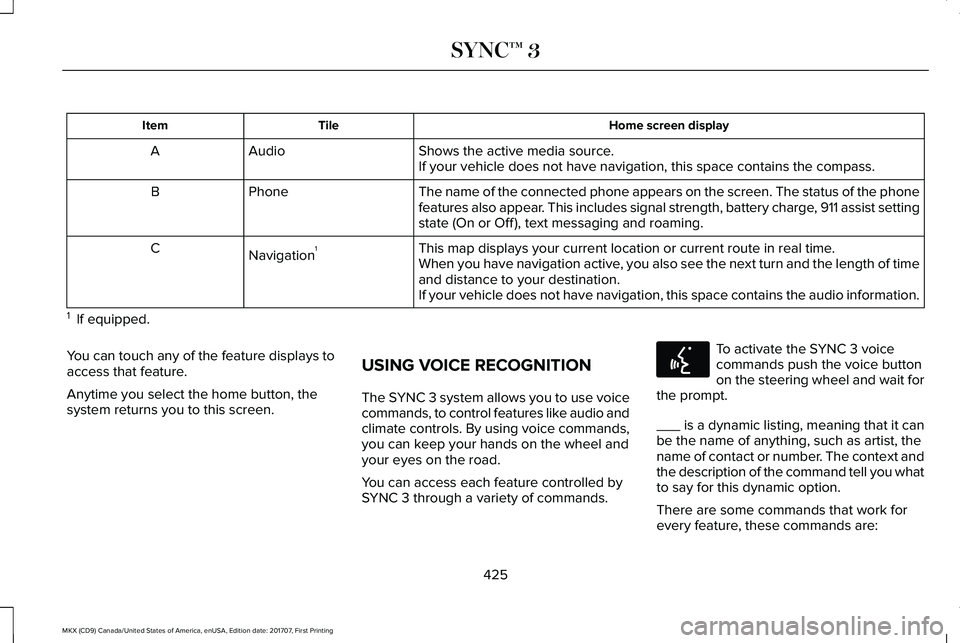
Home screen displayTileItem
Shows the active media source.AudioAIf your vehicle does not have navigation, this space contains the compass.
The name of the connected phone appears on the screen. The status of the phonefeatures also appear. This includes signal strength, battery charge, 911 assist settingstate (On or Off ), text messaging and roaming.
PhoneB
This map displays your current location or current route in real time.Navigation1CWhen you have navigation active, you also see the next turn and the length of timeand distance to your destination.If your vehicle does not have navigation, this space contains the audio information.
1 If equipped.
You can touch any of the feature displays toaccess that feature.
Anytime you select the home button, thesystem returns you to this screen.
USING VOICE RECOGNITION
The SYNC 3 system allows you to use voicecommands, to control features like audio andclimate controls. By using voice commands,you can keep your hands on the wheel andyour eyes on the road.
You can access each feature controlled bySYNC 3 through a variety of commands.
To activate the SYNC 3 voicecommands push the voice buttonon the steering wheel and wait forthe prompt.
___ is a dynamic listing, meaning that it canbe the name of anything, such as artist, thename of contact or number. The context andthe description of the command tell you whatto say for this dynamic option.
There are some commands that work forevery feature, these commands are:
425
MKX (CD9) Canada/United States of America, enUSA, Edition date: 201707, First Printing
SYNC™ 3E142599
Page 453 of 603
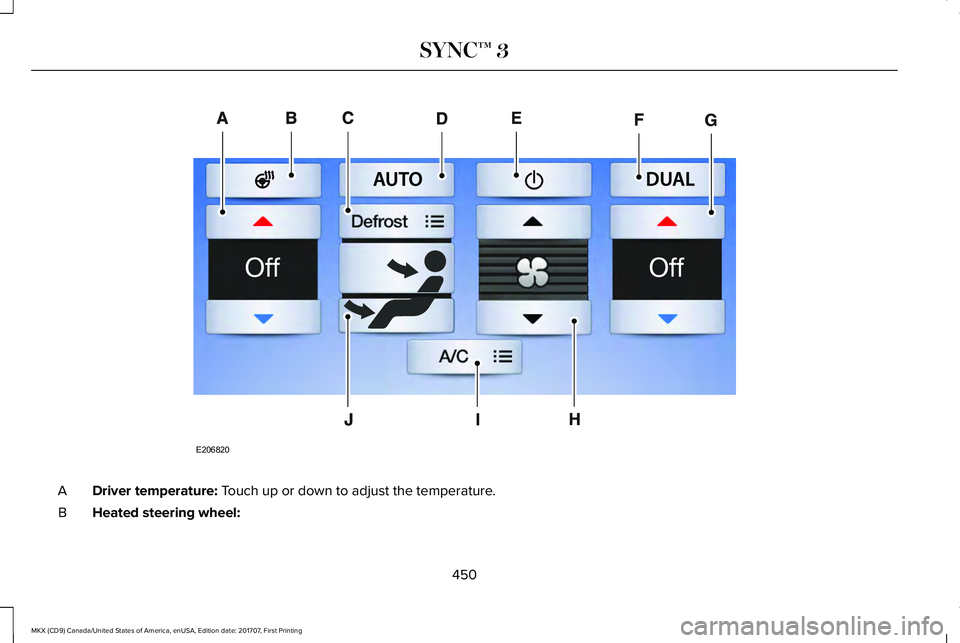
Driver temperature: Touch up or down to adjust the temperature.A
Heated steering wheel:B
450
MKX (CD9) Canada/United States of America, enUSA, Edition date: 201707, First Printing
SYNC™ 3E206820
Page 454 of 603
Note: This feature only functions when you switch the engine on.
Touch this icon to switch the heated steering wheel on and off. It takes about 5 minutes to warm the steering wheel to 74°F (23.3°C)in temperatures as low as -4°F (-20°C). The wheel maintains an approximate temperature of 90°F (32.2°C) and operates independentlyfrom the heated seats and other climate-control functions. The heating element is in between the leather covering and foam coreto help provide maximum heat without adversely affecting the feel of the steering wheel.
Note: For steering wheels with wood trim, the heating feature will not heat the wheel between the 10 and 2 o'clock positions.
Defrost: A pop up appears on the screen to display the defrost options.C
MAX Defrost: Touch the button to maximize defrosting. Air flows through the windshield vents, the fan automatically adjusts to thehighest speed and the driver and passenger temperatures are set to HI. You can use this setting to defog or clear a thin coveringof ice from the windshield. The heated rear window also automatically turns on when you select MAX Defrost.
Defrost: Distributes air through the windshield defroster vents and demister vents.
Heated rear window: Turns the heated rear window on and off. See Heated Windows and Mirrors (page 148).
AUTO: Touch the button to switch on automatic operation. Select the desired temperature using the temperature control. Thesystem adjusts fan speed, air distribution, air conditioning operation, and selects outside air or recirculated air to heat or cool thevehicle in order to maintain the desired temperature.
D
Power: Touch the button to switch the system on and off. Switching off the climate control system prevents outside air from enteringthe vehicle.E
DUAL: This button lights up when the passenger temperature controls are active. To switch the passenger temperature controlsoff and link the passenger temperature to the driver temperature, touch the DUAL button.F
Note: the passenger side temperature and the DUAL indication automatically turn on when you or your passenger adjust thepassenger temperature.
Passenger temperature: Touch up or down to adjust the temperature.G
451
MKX (CD9) Canada/United States of America, enUSA, Edition date: 201707, First Printing
SYNC™ 3
Page 459 of 603
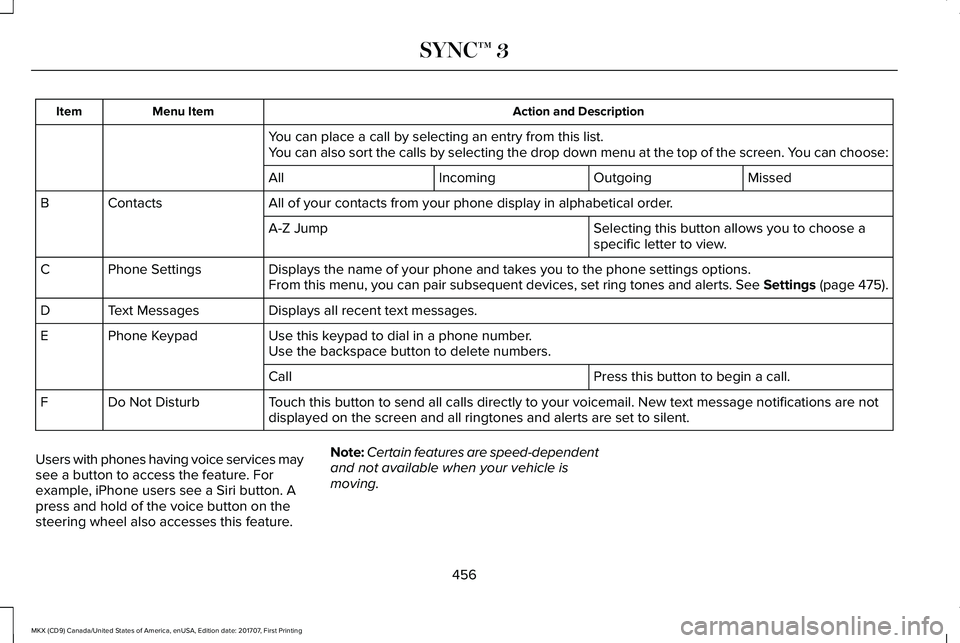
Action and DescriptionMenu ItemItem
You can place a call by selecting an entry from this list.You can also sort the calls by selecting the drop down menu at the top of the screen. You can choose:
MissedOutgoingIncomingAll
All of your contacts from your phone display in alphabetical order.ContactsB
Selecting this button allows you to choose aspecific letter to view.A-Z Jump
Displays the name of your phone and takes you to the phone settings options.Phone SettingsCFrom this menu, you can pair subsequent devices, set ring tones and alerts. See Settings (page 475).
Displays all recent text messages.Text MessagesD
Use this keypad to dial in a phone number.Phone KeypadEUse the backspace button to delete numbers.
Press this button to begin a call.Call
Touch this button to send all calls directly to your voicemail. New text message notifications are notdisplayed on the screen and all ringtones and alerts are set to silent.Do Not DisturbF
Users with phones having voice services maysee a button to access the feature. Forexample, iPhone users see a Siri button. Apress and hold of the voice button on thesteering wheel also accesses this feature.
Note:Certain features are speed-dependentand not available when your vehicle ismoving.
456
MKX (CD9) Canada/United States of America, enUSA, Edition date: 201707, First Printing
SYNC™ 3
Page 461 of 603
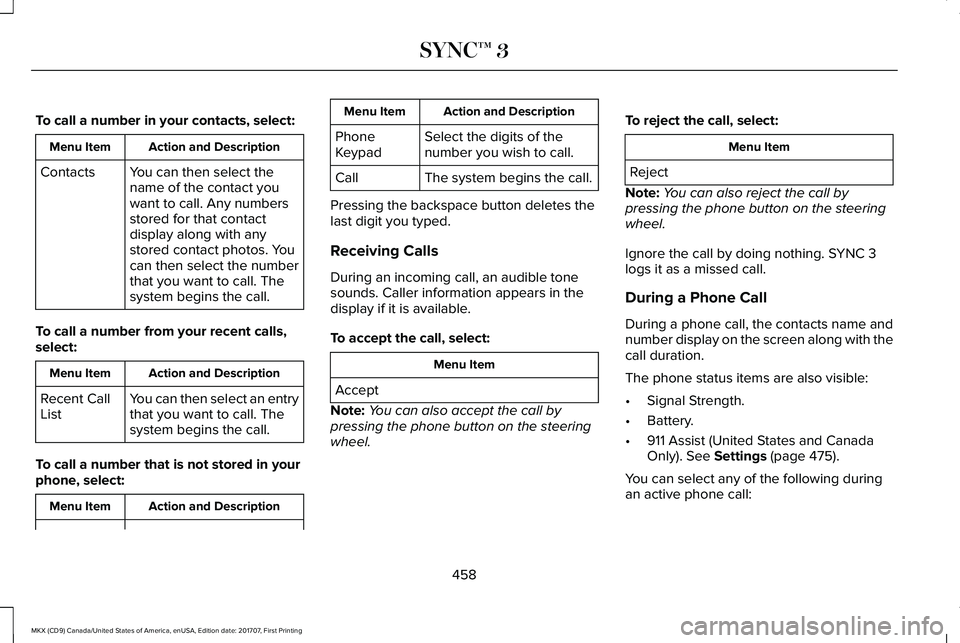
To call a number in your contacts, select:
Action and DescriptionMenu Item
You can then select thename of the contact youwant to call. Any numbersstored for that contactdisplay along with anystored contact photos. Youcan then select the numberthat you want to call. Thesystem begins the call.
Contacts
To call a number from your recent calls,select:
Action and DescriptionMenu Item
You can then select an entrythat you want to call. Thesystem begins the call.
Recent CallList
To call a number that is not stored in yourphone, select:
Action and DescriptionMenu Item
Action and DescriptionMenu Item
Select the digits of thenumber you wish to call.PhoneKeypad
The system begins the call.Call
Pressing the backspace button deletes thelast digit you typed.
Receiving Calls
During an incoming call, an audible tonesounds. Caller information appears in thedisplay if it is available.
To accept the call, select:
Menu Item
Accept
Note:You can also accept the call bypressing the phone button on the steeringwheel.
To reject the call, select:
Menu Item
Reject
Note:You can also reject the call bypressing the phone button on the steeringwheel.
Ignore the call by doing nothing. SYNC 3logs it as a missed call.
During a Phone Call
During a phone call, the contacts name andnumber display on the screen along with thecall duration.
The phone status items are also visible:
•Signal Strength.
•Battery.
•911 Assist (United States and CanadaOnly). See Settings (page 475).
You can select any of the following duringan active phone call:
458
MKX (CD9) Canada/United States of America, enUSA, Edition date: 201707, First Printing
SYNC™ 3
Page 462 of 603
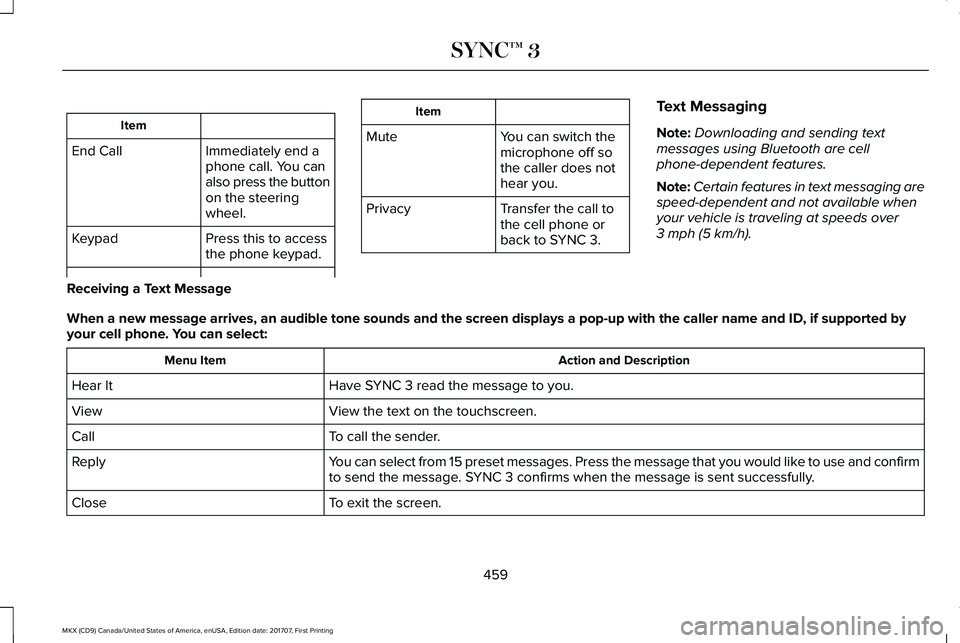
Item
Immediately end aphone call. You canalso press the buttonon the steeringwheel.
End Call
Press this to accessthe phone keypad.Keypad
Item
MuteYou can switch themicrophone off sothe caller does nothear you.
Transfer the call tothe cell phone orback to SYNC 3.
Privacy
Text Messaging
Note:Downloading and sending textmessages using Bluetooth are cellphone-dependent features.
Note:Certain features in text messaging arespeed-dependent and not available whenyour vehicle is traveling at speeds over3 mph (5 km/h).
Receiving a Text Message
When a new message arrives, an audible tone sounds and the screen displays a pop-up with the caller name and ID, if supported byyour cell phone. You can select:
Action and DescriptionMenu Item
Have SYNC 3 read the message to you.Hear It
View the text on the touchscreen.View
To call the sender.Call
You can select from 15 preset messages. Press the message that you would like to use and confirmto send the message. SYNC 3 confirms when the message is sent successfully.Reply
To exit the screen.Close
459
MKX (CD9) Canada/United States of America, enUSA, Edition date: 201707, First Printing
SYNC™ 3
Page 475 of 603
HERE is the digital map provider for thenavigation application. If you find map dataerrors, you may report them directly to HEREby going to www.here.com/mapcreator.HERE evaluates all reported map errors andresponds with the result of their investigationby e-mail.
Map coverage includes the USA (includingPuerto Rico and the US Virgin Islands),Canada and Mexico.
APPS
The system enables voice, steering wheel,and touch screen control of SYNC 3 AppLinkenabled smartphone apps. Once an app isrunning through AppLink, you can controlmain features of the app through voicecommands and steering wheel controls.
Note:Available AppLink enabled apps willvary by market.
Note:You must pair and connect yoursmartphone via Bluetooth to SYNC 3 toaccess AppLink.
Note:iPhone users need to connect thephone to the USB port.
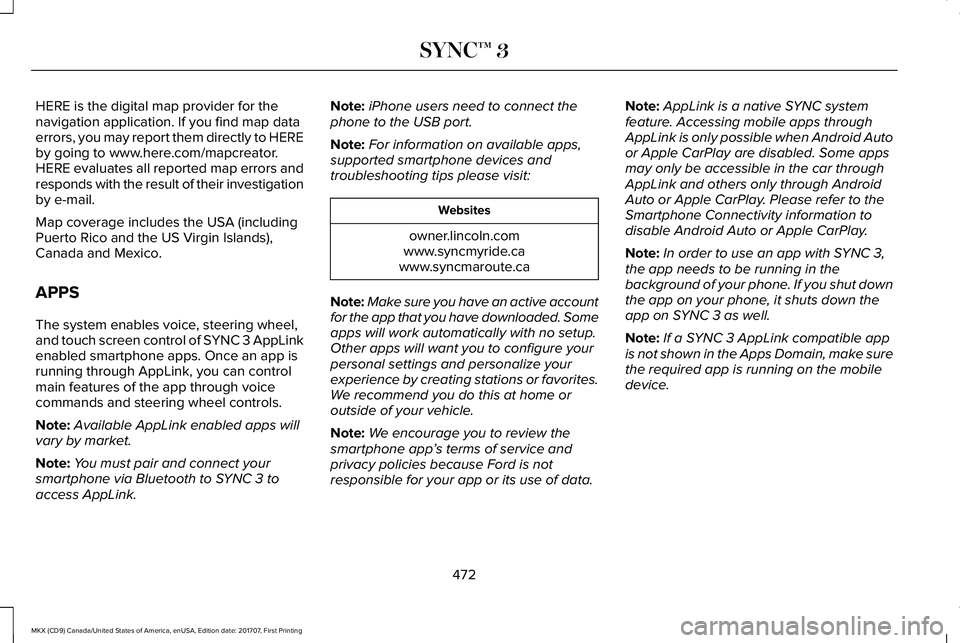
Note:For information on available apps,supported smartphone devices andtroubleshooting tips please visit:
Websites
owner.lincoln.comwww.syncmyride.cawww.syncmaroute.ca
Note:Make sure you have an active accountfor the app that you have downloaded. Someapps will work automatically with no setup.Other apps will want you to configure yourpersonal settings and personalize yourexperience by creating stations or favorites.We recommend you do this at home oroutside of your vehicle.
Note:We encourage you to review thesmartphone app’s terms of service andprivacy policies because Ford is notresponsible for your app or its use of data.
Note:AppLink is a native SYNC systemfeature. Accessing mobile apps throughAppLink is only possible when Android Autoor Apple CarPlay are disabled. Some appsmay only be accessible in the car throughAppLink and others only through AndroidAuto or Apple CarPlay. Please refer to theSmartphone Connectivity information todisable Android Auto or Apple CarPlay.
Note:In order to use an app with SYNC 3,the app needs to be running in thebackground of your phone. If you shut downthe app on your phone, it shuts down theapp on SYNC 3 as well.
Note:If a SYNC 3 AppLink compatible appis not shown in the Apps Domain, make surethe required app is running on the mobiledevice.
472
MKX (CD9) Canada/United States of America, enUSA, Edition date: 201707, First Printing
SYNC™ 3
Page 515 of 603
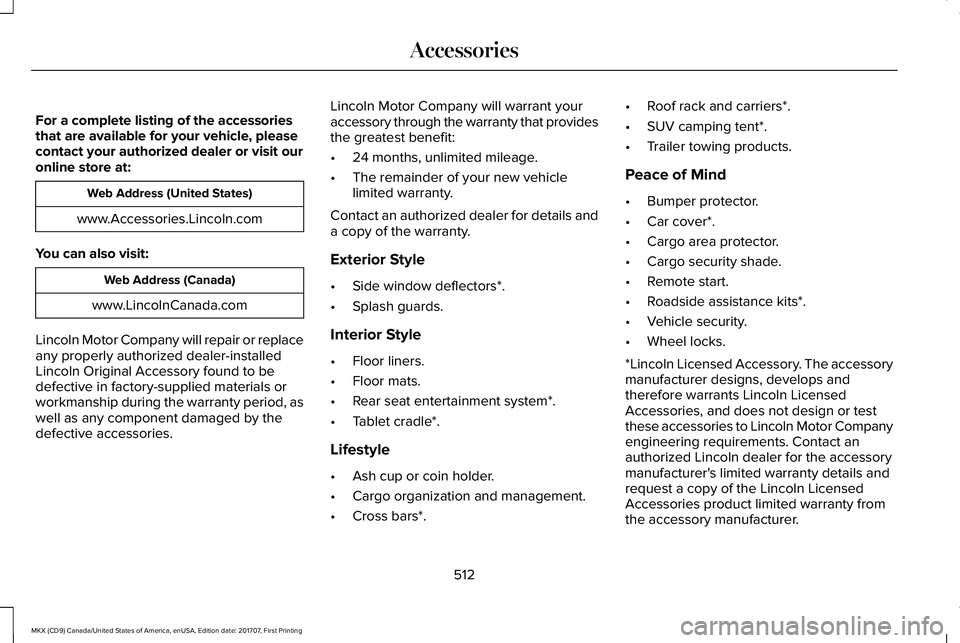
For a complete listing of the accessoriesthat are available for your vehicle, pleasecontact your authorized dealer or visit ouronline store at:
Web Address (United States)
www.Accessories.Lincoln.com
You can also visit:
Web Address (Canada)
www.LincolnCanada.com
Lincoln Motor Company will repair or replaceany properly authorized dealer-installedLincoln Original Accessory found to bedefective in factory-supplied materials orworkmanship during the warranty period, aswell as any component damaged by thedefective accessories.
Lincoln Motor Company will warrant youraccessory through the warranty that providesthe greatest benefit:
•24 months, unlimited mileage.
•The remainder of your new vehiclelimited warranty.
Contact an authorized dealer for details anda copy of the warranty.
Exterior Style
•Side window deflectors*.
•Splash guards.
Interior Style
•Floor liners.
•Floor mats.
•Rear seat entertainment system*.
•Tablet cradle*.
Lifestyle
•Ash cup or coin holder.
•Cargo organization and management.
•Cross bars*.
•Roof rack and carriers*.
•SUV camping tent*.
•Trailer towing products.
Peace of Mind
•Bumper protector.
•Car cover*.
•Cargo area protector.
•Cargo security shade.
•Remote start.
•Roadside assistance kits*.
•Vehicle security.
•Wheel locks.
*Lincoln Licensed Accessory. The accessorymanufacturer designs, develops andtherefore warrants Lincoln LicensedAccessories, and does not design or testthese accessories to Lincoln Motor Companyengineering requirements. Contact anauthorized Lincoln dealer for the accessorymanufacturer's limited warranty details andrequest a copy of the Lincoln LicensedAccessories product limited warranty fromthe accessory manufacturer.
512
MKX (CD9) Canada/United States of America, enUSA, Edition date: 201707, First Printing
Accessories
Page 526 of 603
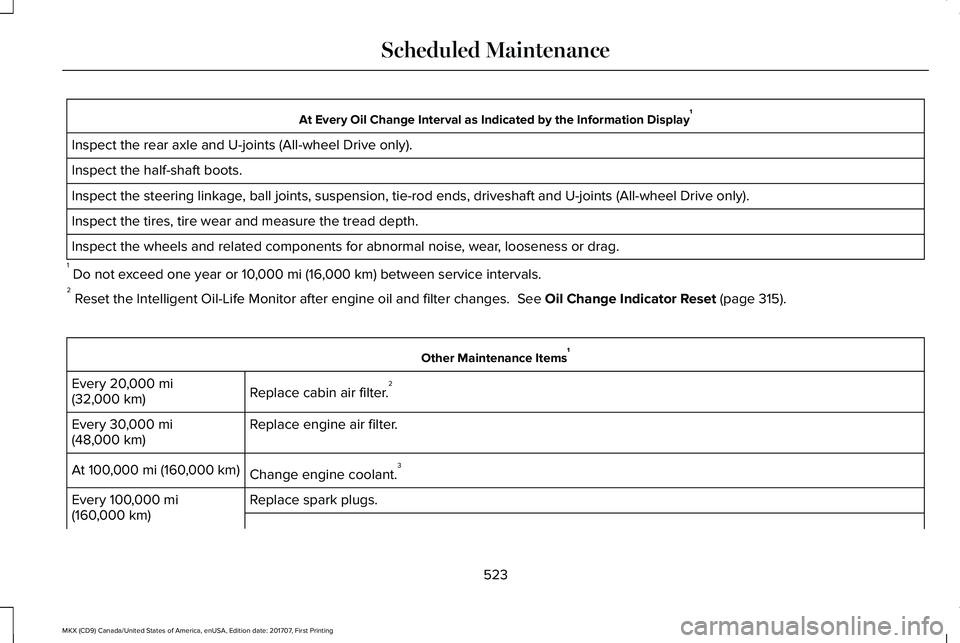
At Every Oil Change Interval as Indicated by the Information Display1
Inspect the rear axle and U-joints (All-wheel Drive only).
Inspect the half-shaft boots.
Inspect the steering linkage, ball joints, suspension, tie-rod ends, driveshaft and U-joints (All-wheel Drive only).
Inspect the tires, tire wear and measure the tread depth.
Inspect the wheels and related components for abnormal noise, wear, looseness or drag.
1 Do not exceed one year or 10,000 mi (16,000 km) between service intervals.2 Reset the Intelligent Oil-Life Monitor after engine oil and filter changes. See Oil Change Indicator Reset (page 315).
Other Maintenance Items1
Replace cabin air filter.2Every 20,000 mi(32,000 km)
Replace engine air filter.Every 30,000 mi(48,000 km)
Change engine coolant.3At 100,000 mi (160,000 km)
Replace spark plugs.Every 100,000 mi(160,000 km)
523
MKX (CD9) Canada/United States of America, enUSA, Edition date: 201707, First Printing
Scheduled Maintenance
Page 530 of 603
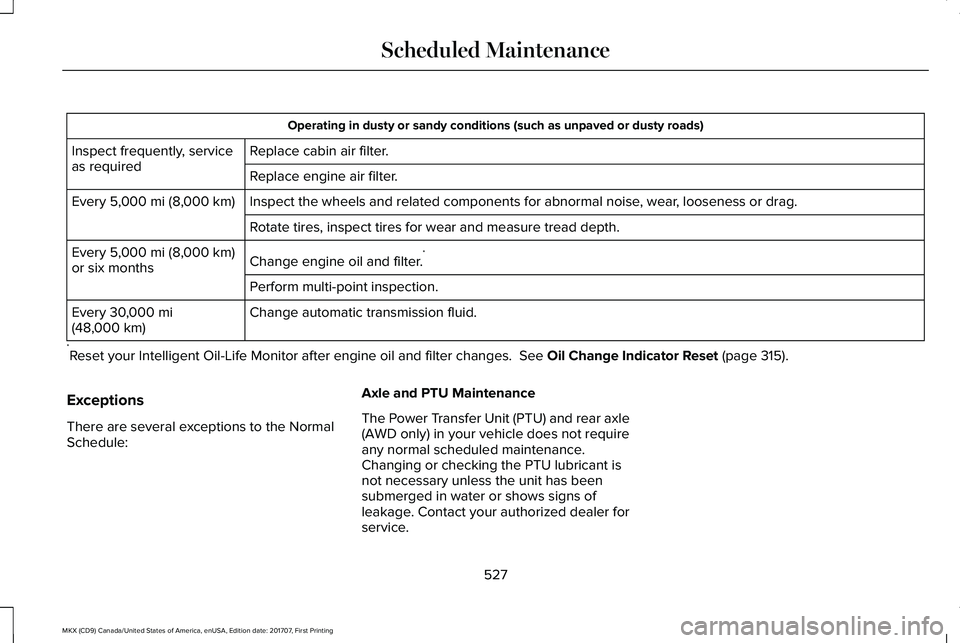
Operating in dusty or sandy conditions (such as unpaved or dusty roads)
Replace cabin air filter.Inspect frequently, serviceas requiredReplace engine air filter.
Inspect the wheels and related components for abnormal noise, wear, looseness or drag.Every 5,000 mi (8,000 km)
Rotate tires, inspect tires for wear and measure tread depth.
Change engine oil and filter.*Every 5,000 mi (8,000 km)or six months
Perform multi-point inspection.
Change automatic transmission fluid.Every 30,000 mi(48,000 km)
*Reset your Intelligent Oil-Life Monitor after engine oil and filter changes. See Oil Change Indicator Reset (page 315).
Exceptions
There are several exceptions to the NormalSchedule:
Axle and PTU Maintenance
The Power Transfer Unit (PTU) and rear axle(AWD only) in your vehicle does not requireany normal scheduled maintenance.Changing or checking the PTU lubricant isnot necessary unless the unit has beensubmerged in water or shows signs ofleakage. Contact your authorized dealer forservice.
527
MKX (CD9) Canada/United States of America, enUSA, Edition date: 201707, First Printing
Scheduled Maintenance