lock LINCOLN MKX 2018 Owners Manual
[x] Cancel search | Manufacturer: LINCOLN, Model Year: 2018, Model line: MKX, Model: LINCOLN MKX 2018Pages: 603, PDF Size: 4.94 MB
Page 378 of 603
When driving with the full-size dissimilarspare wheel and tire assembly, do not:
•Exceed 70 mph (113 km/h).
•Use more than one dissimilar sparewheel and tire assembly at a time.
•Use commercial car washing equipment.
•Use snow chains on the end of thevehicle with the dissimilar spare wheeland tire assembly.
The usage of a full-size dissimilar sparewheel and tire assembly can lead toimpairment of the following:
•Handling, stability and brakingperformance.
•Comfort and noise.
•Ground clearance and parking at curbs.
•Winter weather driving capability.
•Wet weather driving capability.
•All-wheel driving capability.
When driving with the full-size dissimilarspare wheel and tire assembly additionalcaution should be given to:
•Towing a trailer.
•Driving vehicles equipped with a camperbody.
•Driving vehicles with a load on the cargorack.
Drive cautiously when using a full-sizedissimilar spare wheel and tire assembly andseek service as soon as possible.
Tire Change Procedure
WARNINGS
When one of the front wheels is off theground, the transmission alone will notprevent the vehicle from moving or slippingoff the jack, even if the transmission is in park(P).
WARNINGS
To help prevent your vehicle frommoving when changing a wheel, shiftthe transmission into park (P), set the parkingbrake and use an appropriate block or wheelchock to secure the wheel diagonallyopposite to the wheel being changed. Forexample, when changing the front left wheel,place an appropriate block or wheel chockon the right rear wheel.
No person should place any portion oftheir body under a vehicle that issupported by a jack.
Do not attempt to change a tire on theside of the vehicle close to movingtraffic. Pull far enough off the road to avoidthe danger of being hit when operating thejack or changing the wheel.
Always use the jack provided asoriginal equipment with your vehicle.If using a jack other than the one provided,make sure the jack capacity is adequate forthe vehicle weight, including any vehiclecargo or modifications. If you are unsure ifthe jack capacity is adequate, contact theauthorized dealer.
375
MKX (CD9) Canada/United States of America, enUSA, Edition date: 201707, First Printing
Wheels and Tires
Page 379 of 603
Note:Passengers should not remain in yourvehicle when the vehicle is being jacked.
1. Park on a level surface, set the parkingbrake and activate the hazard flashers.
2. Place the transmission in park (P) andturn the engine off.
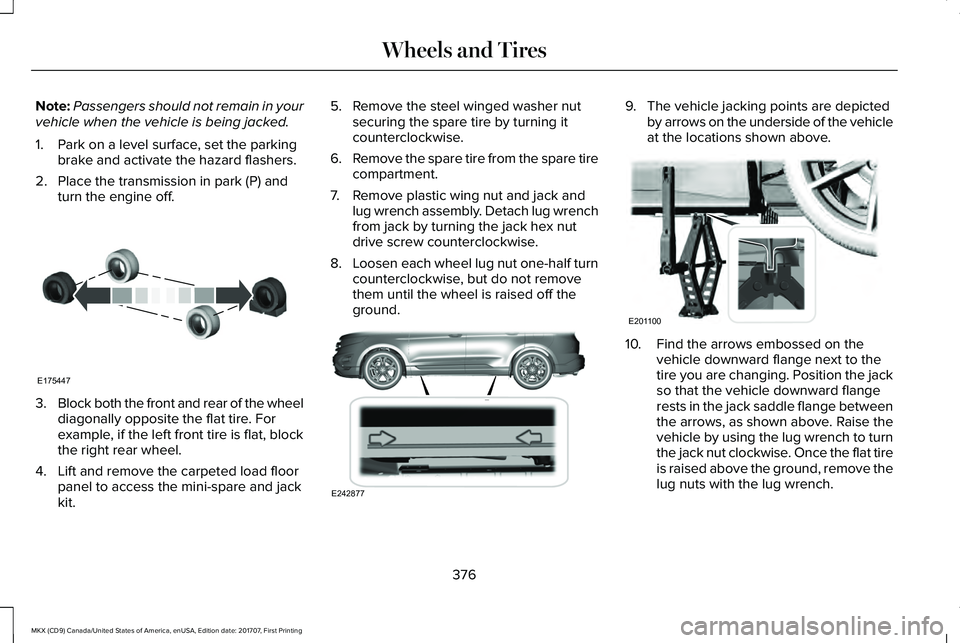
3.Block both the front and rear of the wheeldiagonally opposite the flat tire. Forexample, if the left front tire is flat, blockthe right rear wheel.
4. Lift and remove the carpeted load floorpanel to access the mini-spare and jackkit.
5. Remove the steel winged washer nutsecuring the spare tire by turning itcounterclockwise.
6.Remove the spare tire from the spare tirecompartment.
7. Remove plastic wing nut and jack andlug wrench assembly. Detach lug wrenchfrom jack by turning the jack hex nutdrive screw counterclockwise.
8.Loosen each wheel lug nut one-half turncounterclockwise, but do not removethem until the wheel is raised off theground.
9. The vehicle jacking points are depictedby arrows on the underside of the vehicleat the locations shown above.
10. Find the arrows embossed on thevehicle downward flange next to thetire you are changing. Position the jackso that the vehicle downward flangerests in the jack saddle flange betweenthe arrows, as shown above. Raise thevehicle by using the lug wrench to turnthe jack nut clockwise. Once the flat tireis raised above the ground, remove thelug nuts with the lug wrench.
376
MKX (CD9) Canada/United States of America, enUSA, Edition date: 201707, First Printing
Wheels and TiresE175447 E242877 E201100
Page 380 of 603
11.Replace the flat tire with the spare tire,making sure the valve stem is facingoutward. Reinstall the lug nuts until thewheel is snug against the hub. Do notfully tighten the lug nuts until the wheelhas been lowered.
12. Lower the wheel by turning the jackhandle counterclockwise.
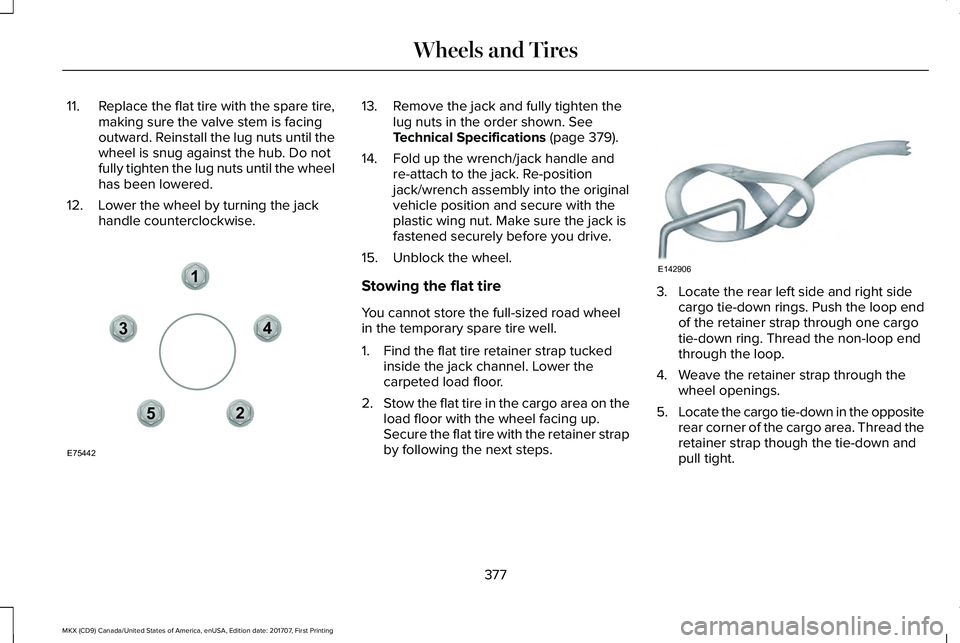
13. Remove the jack and fully tighten thelug nuts in the order shown. SeeTechnical Specifications (page 379).
14. Fold up the wrench/jack handle andre-attach to the jack. Re-positionjack/wrench assembly into the originalvehicle position and secure with theplastic wing nut. Make sure the jack isfastened securely before you drive.
15. Unblock the wheel.
Stowing the flat tire
You cannot store the full-sized road wheelin the temporary spare tire well.
1. Find the flat tire retainer strap tuckedinside the jack channel. Lower thecarpeted load floor.
2.Stow the flat tire in the cargo area on theload floor with the wheel facing up.Secure the flat tire with the retainer strapby following the next steps.
3. Locate the rear left side and right sidecargo tie-down rings. Push the loop endof the retainer strap through one cargotie-down ring. Thread the non-loop endthrough the loop.
4. Weave the retainer strap through thewheel openings.
5.Locate the cargo tie-down in the oppositerear corner of the cargo area. Thread theretainer strap though the tie-down andpull tight.
377
MKX (CD9) Canada/United States of America, enUSA, Edition date: 201707, First Printing
Wheels and Tires12
3
4
5
E75442 E142906
Page 394 of 603
SpecificationName
WSH-M1C231-BA/C refrigerant compressor oil:Motorcraft® PAG Refrigerant Compressor OilYN-12-D
ESB-M1C93-BMulti-purpose grease:Motorcraft® Multi-Purpose Grease SprayXL-5-A
-Lock cylinders (U.S.):Penetrating and Lock LubricantXL-1
-Lock cylinders (Canada):Penetrating FluidCXC-51-A
-Lock cylinders (Mexico):Penetrating and Lock LubricantMXL-1
If you use oil and fluids that do not meet thedefined specification and viscosity grade,this may lead to:
•Component damage which is notcovered by the vehicle warranty.
•Longer engine cranking periods.
•Increased emission levels.
•Reduced engine performance.
•Reduced fuel economy.
•Degraded brake performance.
391
MKX (CD9) Canada/United States of America, enUSA, Edition date: 201707, First Printing
Capacities and Specifications
Page 401 of 603
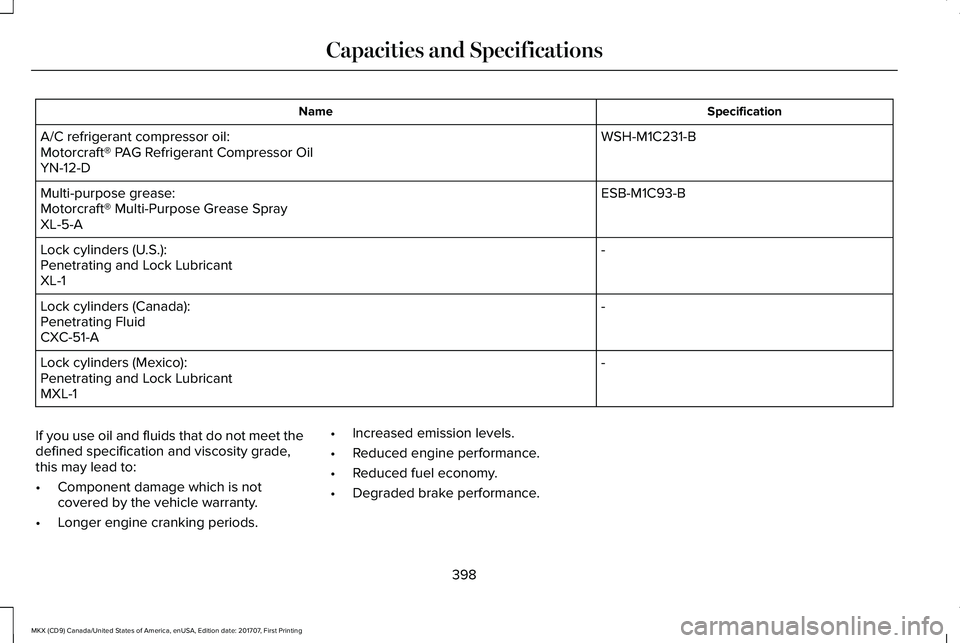
SpecificationName
WSH-M1C231-BA/C refrigerant compressor oil:Motorcraft® PAG Refrigerant Compressor OilYN-12-D
ESB-M1C93-BMulti-purpose grease:Motorcraft® Multi-Purpose Grease SprayXL-5-A
-Lock cylinders (U.S.):Penetrating and Lock LubricantXL-1
-Lock cylinders (Canada):Penetrating FluidCXC-51-A
-Lock cylinders (Mexico):Penetrating and Lock LubricantMXL-1
If you use oil and fluids that do not meet thedefined specification and viscosity grade,this may lead to:
•Component damage which is notcovered by the vehicle warranty.
•Longer engine cranking periods.
•Increased emission levels.
•Reduced engine performance.
•Reduced fuel economy.
•Degraded brake performance.
398
MKX (CD9) Canada/United States of America, enUSA, Edition date: 201707, First Printing
Capacities and Specifications
Page 411 of 603
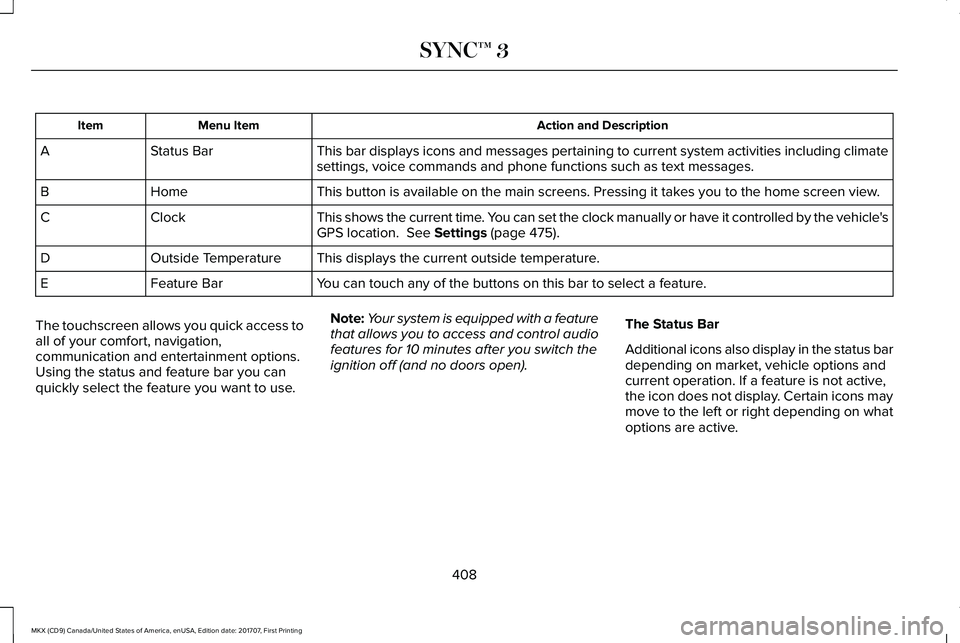
Action and DescriptionMenu ItemItem
This bar displays icons and messages pertaining to current system activities including climatesettings, voice commands and phone functions such as text messages.Status BarA
This button is available on the main screens. Pressing it takes you to the home screen view.HomeB
This shows the current time. You can set the clock manually or have it controlled by the vehicle'sGPS location. See Settings (page 475).ClockC
This displays the current outside temperature.Outside TemperatureD
You can touch any of the buttons on this bar to select a feature.Feature BarE
The touchscreen allows you quick access toall of your comfort, navigation,communication and entertainment options.Using the status and feature bar you canquickly select the feature you want to use.
Note:Your system is equipped with a featurethat allows you to access and control audiofeatures for 10 minutes after you switch theignition off (and no doors open).
The Status Bar
Additional icons also display in the status bardepending on market, vehicle options andcurrent operation. If a feature is not active,the icon does not display. Certain icons maymove to the left or right depending on whatoptions are active.
408
MKX (CD9) Canada/United States of America, enUSA, Edition date: 201707, First Printing
SYNC™ 3
Page 424 of 603
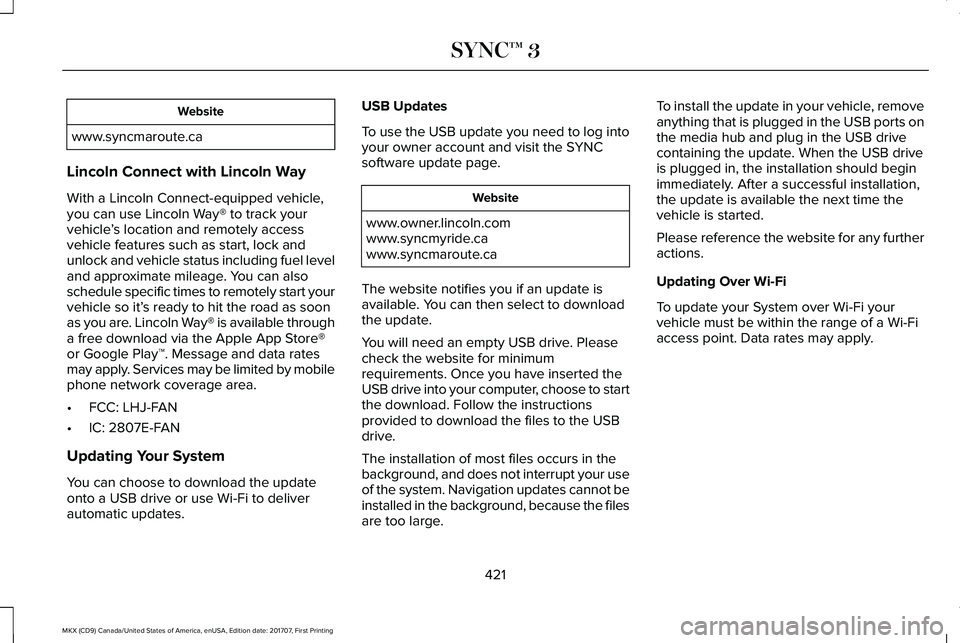
Website
www.syncmaroute.ca
Lincoln Connect with Lincoln Way
With a Lincoln Connect-equipped vehicle,you can use Lincoln Way® to track yourvehicle’s location and remotely accessvehicle features such as start, lock andunlock and vehicle status including fuel leveland approximate mileage. You can alsoschedule specific times to remotely start yourvehicle so it’s ready to hit the road as soonas you are. Lincoln Way® is available througha free download via the Apple App Store®or Google Play™. Message and data ratesmay apply. Services may be limited by mobilephone network coverage area.
•FCC: LHJ-FAN
•IC: 2807E-FAN
Updating Your System
You can choose to download the updateonto a USB drive or use Wi-Fi to deliverautomatic updates.
USB Updates
To use the USB update you need to log intoyour owner account and visit the SYNCsoftware update page.
Website
www.owner.lincoln.comwww.syncmyride.cawww.syncmaroute.ca
The website notifies you if an update isavailable. You can then select to downloadthe update.
You will need an empty USB drive. Pleasecheck the website for minimumrequirements. Once you have inserted theUSB drive into your computer, choose to startthe download. Follow the instructionsprovided to download the files to the USBdrive.
The installation of most files occurs in thebackground, and does not interrupt your useof the system. Navigation updates cannot beinstalled in the background, because the filesare too large.
To install the update in your vehicle, removeanything that is plugged in the USB ports onthe media hub and plug in the USB drivecontaining the update. When the USB driveis plugged in, the installation should beginimmediately. After a successful installation,the update is available the next time thevehicle is started.
Please reference the website for any furtheractions.
Updating Over Wi-Fi
To update your System over Wi-Fi yourvehicle must be within the range of a Wi-Fiaccess point. Data rates may apply.
421
MKX (CD9) Canada/United States of America, enUSA, Edition date: 201707, First Printing
SYNC™ 3
Page 433 of 603
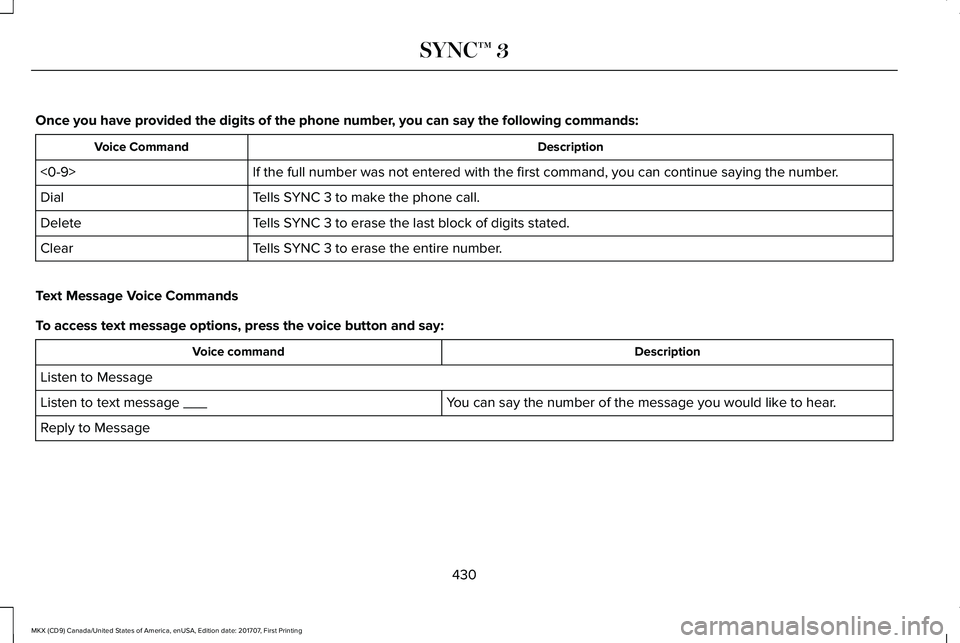
Once you have provided the digits of the phone number, you can say the following commands:
DescriptionVoice Command
If the full number was not entered with the first command, you can continue saying the number.<0-9>
Tells SYNC 3 to make the phone call.Dial
Tells SYNC 3 to erase the last block of digits stated.Delete
Tells SYNC 3 to erase the entire number.Clear
Text Message Voice Commands
To access text message options, press the voice button and say:
DescriptionVoice command
Listen to Message
You can say the number of the message you would like to hear.Listen to text message ___
Reply to Message
430
MKX (CD9) Canada/United States of America, enUSA, Edition date: 201707, First Printing
SYNC™ 3
Page 445 of 603
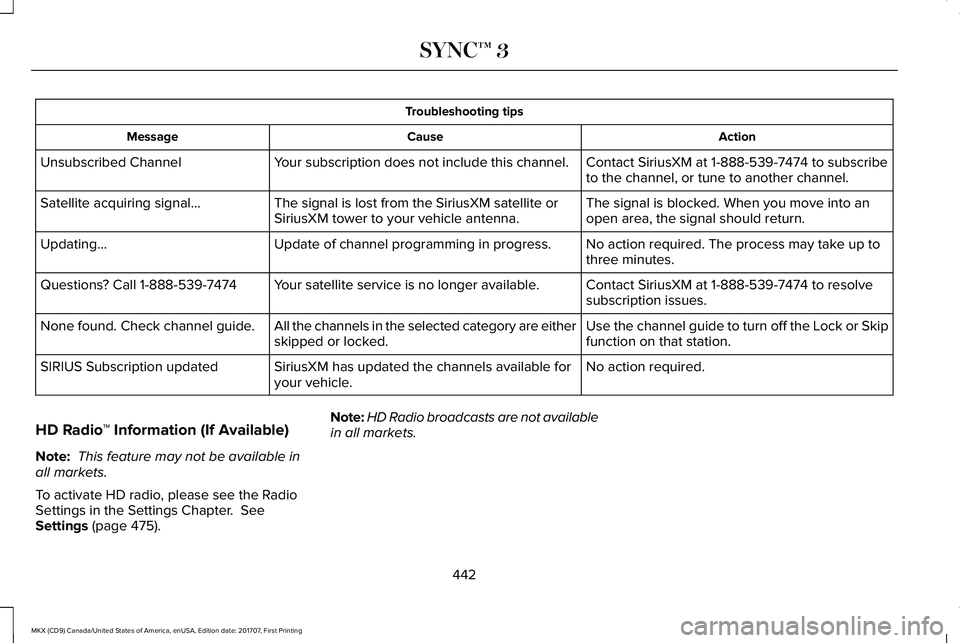
Troubleshooting tips
ActionCauseMessage
Contact SiriusXM at 1-888-539-7474 to subscribeto the channel, or tune to another channel.Your subscription does not include this channel.Unsubscribed Channel
The signal is blocked. When you move into anopen area, the signal should return.The signal is lost from the SiriusXM satellite orSiriusXM tower to your vehicle antenna.Satellite acquiring signal…
No action required. The process may take up tothree minutes.Update of channel programming in progress.Updating…
Contact SiriusXM at 1-888-539-7474 to resolvesubscription issues.Your satellite service is no longer available.Questions? Call 1-888-539-7474
Use the channel guide to turn off the Lock or Skipfunction on that station.All the channels in the selected category are eitherskipped or locked.None found. Check channel guide.
No action required.SiriusXM has updated the channels available foryour vehicle.SIRIUS Subscription updated
HD Radio™ Information (If Available)
Note: This feature may not be available inall markets.
To activate HD radio, please see the RadioSettings in the Settings Chapter. SeeSettings (page 475).
Note:HD Radio broadcasts are not availablein all markets.
442
MKX (CD9) Canada/United States of America, enUSA, Edition date: 201707, First Printing
SYNC™ 3
Page 454 of 603
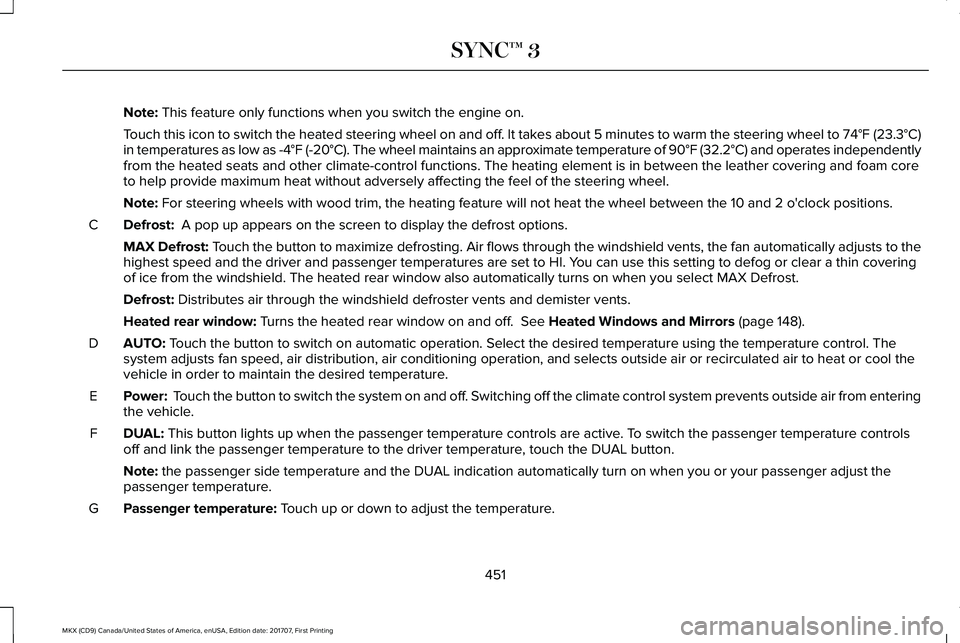
Note: This feature only functions when you switch the engine on.
Touch this icon to switch the heated steering wheel on and off. It takes about 5 minutes to warm the steering wheel to 74°F (23.3°C)in temperatures as low as -4°F (-20°C). The wheel maintains an approximate temperature of 90°F (32.2°C) and operates independentlyfrom the heated seats and other climate-control functions. The heating element is in between the leather covering and foam coreto help provide maximum heat without adversely affecting the feel of the steering wheel.
Note: For steering wheels with wood trim, the heating feature will not heat the wheel between the 10 and 2 o'clock positions.
Defrost: A pop up appears on the screen to display the defrost options.C
MAX Defrost: Touch the button to maximize defrosting. Air flows through the windshield vents, the fan automatically adjusts to thehighest speed and the driver and passenger temperatures are set to HI. You can use this setting to defog or clear a thin coveringof ice from the windshield. The heated rear window also automatically turns on when you select MAX Defrost.
Defrost: Distributes air through the windshield defroster vents and demister vents.
Heated rear window: Turns the heated rear window on and off. See Heated Windows and Mirrors (page 148).
AUTO: Touch the button to switch on automatic operation. Select the desired temperature using the temperature control. Thesystem adjusts fan speed, air distribution, air conditioning operation, and selects outside air or recirculated air to heat or cool thevehicle in order to maintain the desired temperature.
D
Power: Touch the button to switch the system on and off. Switching off the climate control system prevents outside air from enteringthe vehicle.E
DUAL: This button lights up when the passenger temperature controls are active. To switch the passenger temperature controlsoff and link the passenger temperature to the driver temperature, touch the DUAL button.F
Note: the passenger side temperature and the DUAL indication automatically turn on when you or your passenger adjust thepassenger temperature.
Passenger temperature: Touch up or down to adjust the temperature.G
451
MKX (CD9) Canada/United States of America, enUSA, Edition date: 201707, First Printing
SYNC™ 3