battery LINCOLN MKX 2018 User Guide
[x] Cancel search | Manufacturer: LINCOLN, Model Year: 2018, Model line: MKX, Model: LINCOLN MKX 2018Pages: 603, PDF Size: 4.94 MB
Page 85 of 603
Three warning tones sound as the liftgatebegins to power close. If there is a problemwith the open or close request, one of thefollowing may occur:
•A tone sounds if the ignition is on andthe transmission is not in park (P).
•A tone sounds if the battery voltage isbelow the minimum operating voltage.
•A tone sounds if the liftgate is not fullyclosed and your vehicle is moving at aspeed greater than 3 mph (5 km/h).
If the liftgate starts to close after it has fullyopened, this indicates there may beexcessive weight on the liftgate or a possiblestrut failure. A repetitive tone sounds andthe liftgate closes under control. Removeany excessive weight from the liftgate. If theliftgate continues to close after opening,have the system checked by an authorizeddealer.
Opening and Closing the Liftgate
WARNING
Make sure all persons are clear of thepower liftgate area before using thepower liftgate control.
Note: Make sure the area behind yourvehicle is free from obstruction and thatthere is enough room for you to operate theliftgate. Objects too close to your vehicle,for example a wall, garage door or anothervehicle may come into contact with themoving liftgate. This could damage theliftgate and its components.
Note:Be careful when opening or closingthe liftgate in a garage or other enclosedarea to avoid damaging the liftgate.
Note: Do not leave the liftgate open whiledriving. This could damage the liftgate andits components.
From the Instrument Panel
With the transmission in park (P),press the button on the instrumentpanel.
Remote Control
Press the button twice within threeseconds.
Outside Control Button
Opening the Liftgate
1. Unlock the liftgate with the remotecontrol or power door unlock control. Ifa passive key is within 3 ft (1 m) of theliftgate, the liftgate unlocks when youpress the liftgate release button.
82
MKX (CD9) Canada/United States of America, enUSA, Edition date: 201707, First Printing
LiftgateE138633 E138630
Page 87 of 603
Note:Once the liftgate has stopped moving,you can also manually move it to the desiredheight.
3.Press and hold the liftgate control buttonon the liftgate until a tone sounds,indicating programming is complete.
Note:You can only use the liftgate controlbutton to program the height.
Note:You cannot program the height if theliftgate position is too low.
The new open liftgate height is recalledwhen the power liftgate is opened. Tochange the programmed height, repeat theabove procedure. Once you open the powerliftgate, you can manually move it to adifferent height.
Note:The system recalls the newprogrammed height, even if you disconnectthe battery.
When operating the power liftgate after youhave programmed a lower height than fullyopen, you can fully open the liftgate bymanually pushing it upward to the maximumopen position.
Obstacle Detection
When Closing
The system stops when it detects anobstacle. A tone sounds and the systemreverses to open. Once you remove theobstacle, you can power close the liftgate.
Note:Entering your vehicle while the liftgateis closing can cause your vehicle to bounceand activate obstacle detection. To preventthis, let the power liftgate close completelybefore you enter your vehicle. Before drivingoff, check the instrument cluster for a liftgateor door ajar message or warning indicator.Failure to do this could result inunintentionally leaving the liftgate openwhile driving.
When Opening
The system stops when it detects anobstacle and a tone sounds. Once youremove the obstacle, you can continue tooperate the liftgate.
Hands-Free Feature (If Equipped)
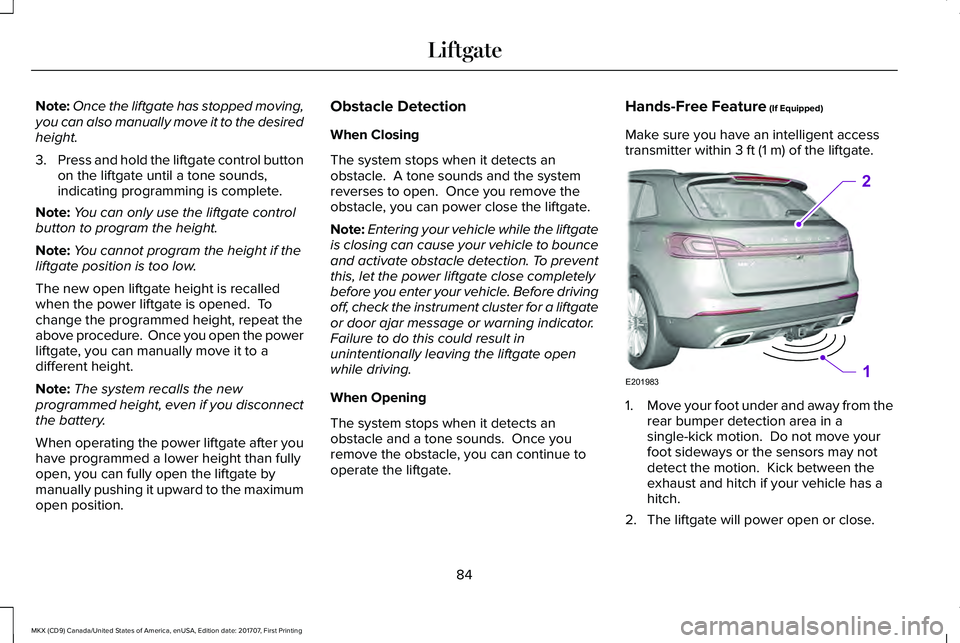
Make sure you have an intelligent accesstransmitter within 3 ft (1 m) of the liftgate.
1.Move your foot under and away from therear bumper detection area in asingle-kick motion. Do not move yourfoot sideways or the sensors may notdetect the motion. Kick between theexhaust and hitch if your vehicle has ahitch.
2. The liftgate will power open or close.
84
MKX (CD9) Canada/United States of America, enUSA, Edition date: 201707, First Printing
LiftgateE201983
2
1
Page 101 of 603
Windshield Wiper Activated Headlamps
When you switch the autolamps on, theheadlamps turn on within 10 seconds ofswitching the wipers on. They turn offapproximately 60 seconds after you switchthe windshield wipers off.
The headlamps do not turn on with thewipers:
•During a single wipe.
•When using the windshield washers.
•If the wipers are in intermittent mode.
Note:If you switch the autolamps and theautowipers on, the headlamps turn on whenthe windshield wipers continuously operate.
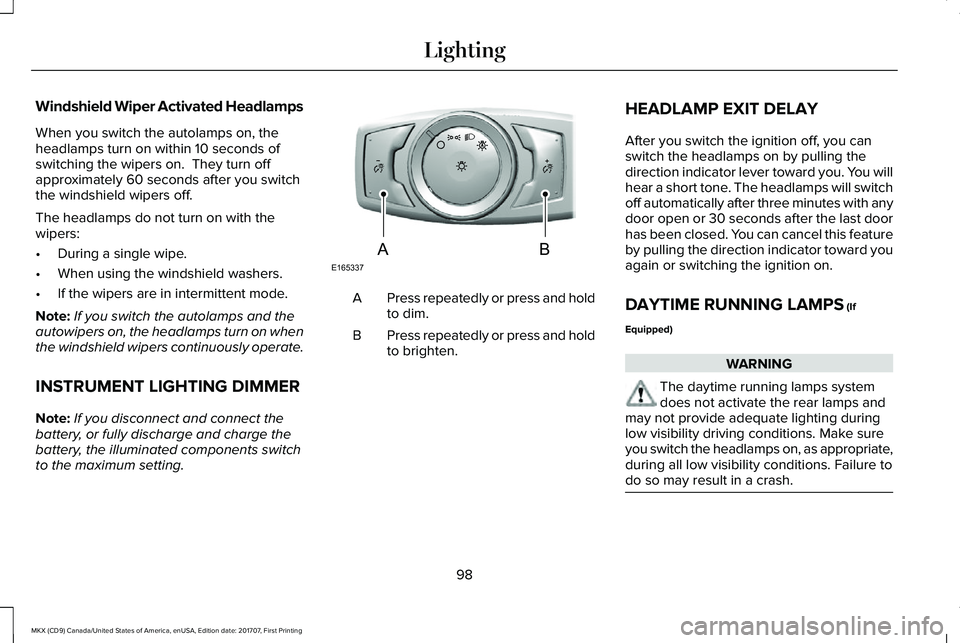
INSTRUMENT LIGHTING DIMMER
Note:If you disconnect and connect thebattery, or fully discharge and charge thebattery, the illuminated components switchto the maximum setting.
Press repeatedly or press and holdto dim.A
Press repeatedly or press and holdto brighten.B
HEADLAMP EXIT DELAY
After you switch the ignition off, you canswitch the headlamps on by pulling thedirection indicator lever toward you. You willhear a short tone. The headlamps will switchoff automatically after three minutes with anydoor open or 30 seconds after the last doorhas been closed. You can cancel this featureby pulling the direction indicator toward youagain or switching the ignition on.
DAYTIME RUNNING LAMPS (If
Equipped)
WARNING
The daytime running lamps systemdoes not activate the rear lamps andmay not provide adequate lighting duringlow visibility driving conditions. Make sureyou switch the headlamps on, as appropriate,during all low visibility conditions. Failure todo so may result in a crash.
98
MKX (CD9) Canada/United States of America, enUSA, Edition date: 201707, First Printing
LightingE165337AB
Page 117 of 603
Airbag Warning Lamp
If it does not illuminate when youswitch the ignition on, continuesto flash or remains on when theengine is running, this indicates amalfunction. Have your vehicle checked assoon as possible.
Anti-Lock Brake System Warning Lamp
If it illuminates when you aredriving, this indicates amalfunction. Your vehiclecontinues to have normal braking withoutthe anti-lock brake system function. Haveyour vehicle checked as soon as possible.
Auto Hold Active
It illuminates when the systemholds your vehicle stationary.
Auto Hold Unavailable
It illuminates when the system ison, but unavailable to hold yourvehicle stationary.
Automatic High Beam Control (If Equipped)
It illuminates when the systemautomatically turns the headlamphigh beam on.
See Automatic High Beam Control (page99).
Battery
If it illuminates while driving, itindicates a malfunction. Switch offall unnecessary electricalequipment and have the system checked byan authorized dealer immediately.
Blind Spot Information SystemIndicator (If Equipped)
It illuminates when you switch thesystem off.
See Blind Spot InformationSystem (page 244).
Brake System Warning Lamp
WARNING
Driving your vehicle with the warninglamp on is dangerous. A significantdecrease in braking performance may occur.It may take you longer to stop your vehicle.Have your vehicle checked as soon aspossible. Driving extended distances withthe parking brake engaged can cause brakefailure and the risk of personal injury.
It illuminates when you engage theparking brake and the ignition ison.
If it illuminates when your vehicle is moving,make sure the parking brake is disengaged. If the parking brake is disengaged, thisindicates low brake fluid level or a brakesystem fault. Have your vehicle checked assoon as possible.
Cruise Control Indicator (If Equipped)
It illuminates when you switch thesystem on.
114
MKX (CD9) Canada/United States of America, enUSA, Edition date: 201707, First Printing
Instrument ClusterE67017 E197933 E197934 E151262 E138644 E71340
Page 133 of 603
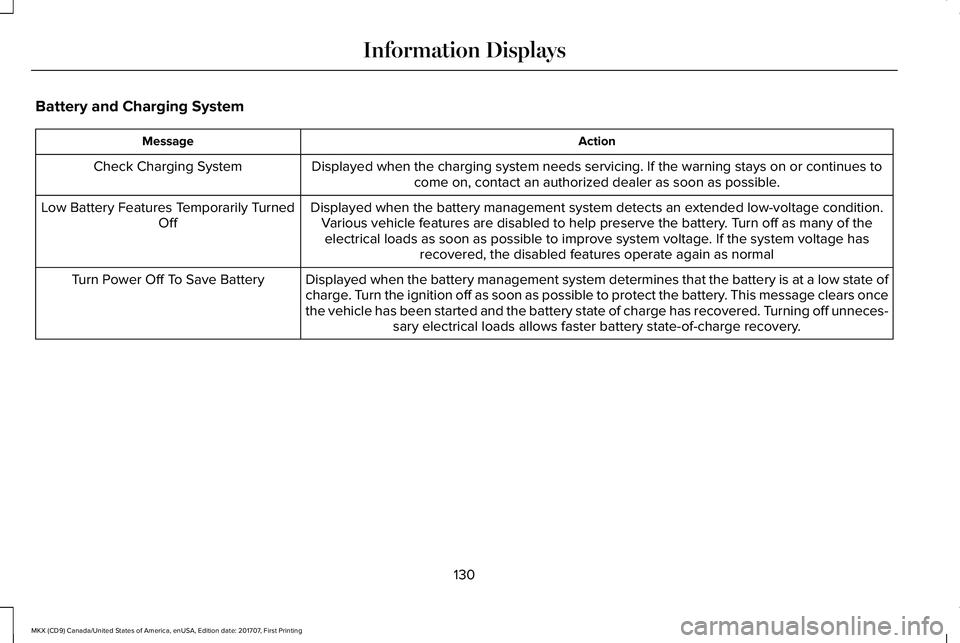
Battery and Charging System
ActionMessage
Displayed when the charging system needs servicing. If the warning stays on or continues tocome on, contact an authorized dealer as soon as possible.Check Charging System
Displayed when the battery management system detects an extended low-voltage condition.Various vehicle features are disabled to help preserve the battery. Turn off as many of theelectrical loads as soon as possible to improve system voltage. If the system voltage hasrecovered, the disabled features operate again as normal
Low Battery Features Temporarily TurnedOff
Displayed when the battery management system determines that the battery is at a low state ofcharge. Turn the ignition off as soon as possible to protect the battery. This message clears oncethe vehicle has been started and the battery state of charge has recovered. Turning off unneces-sary electrical loads allows faster battery state-of-charge recovery.
Turn Power Off To Save Battery
130
MKX (CD9) Canada/United States of America, enUSA, Edition date: 201707, First Printing
Information Displays
Page 138 of 603
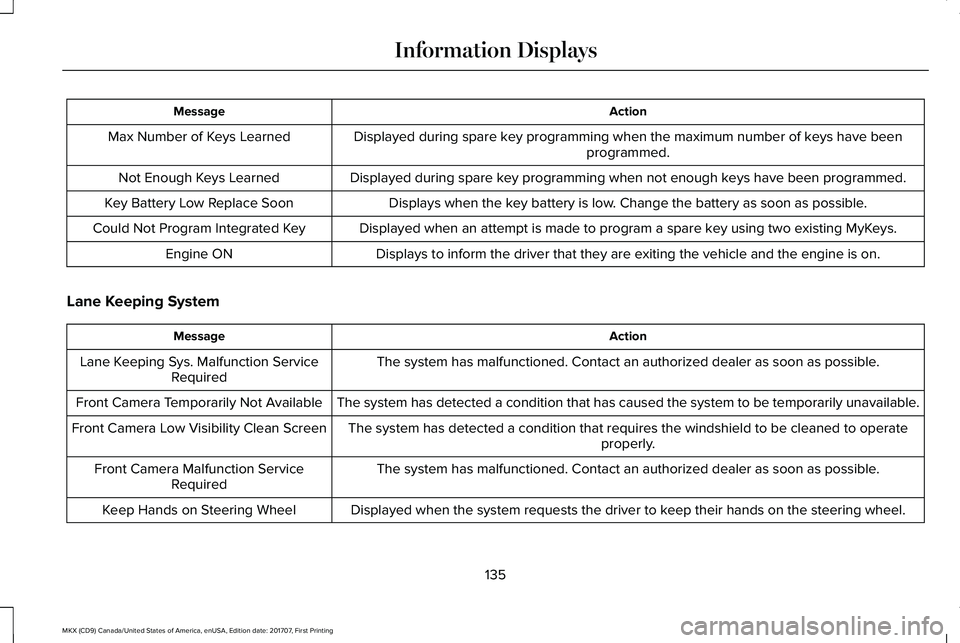
ActionMessage
Displayed during spare key programming when the maximum number of keys have beenprogrammed.Max Number of Keys Learned
Displayed during spare key programming when not enough keys have been programmed.Not Enough Keys Learned
Displays when the key battery is low. Change the battery as soon as possible.Key Battery Low Replace Soon
Displayed when an attempt is made to program a spare key using two existing MyKeys.Could Not Program Integrated Key
Displays to inform the driver that they are exiting the vehicle and the engine is on.Engine ON
Lane Keeping System
ActionMessage
The system has malfunctioned. Contact an authorized dealer as soon as possible.Lane Keeping Sys. Malfunction ServiceRequired
The system has detected a condition that has caused the system to be temporarily unavailable.Front Camera Temporarily Not Available
The system has detected a condition that requires the windshield to be cleaned to operateproperly.Front Camera Low Visibility Clean Screen
The system has malfunctioned. Contact an authorized dealer as soon as possible.Front Camera Malfunction ServiceRequired
Displayed when the system requests the driver to keep their hands on the steering wheel.Keep Hands on Steering Wheel
135
MKX (CD9) Canada/United States of America, enUSA, Edition date: 201707, First Printing
Information Displays
Page 145 of 603
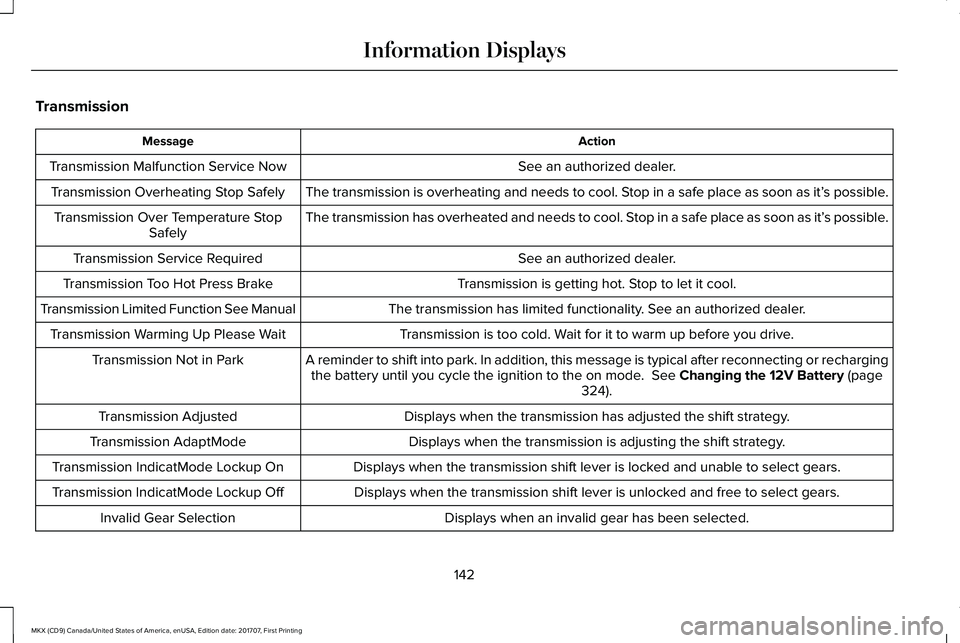
Transmission
ActionMessage
See an authorized dealer.Transmission Malfunction Service Now
The transmission is overheating and needs to cool. Stop in a safe place as soon as it’s possible.Transmission Overheating Stop Safely
The transmission has overheated and needs to cool. Stop in a safe place as soon as it’s possible.Transmission Over Temperature StopSafely
See an authorized dealer.Transmission Service Required
Transmission is getting hot. Stop to let it cool.Transmission Too Hot Press Brake
The transmission has limited functionality. See an authorized dealer.Transmission Limited Function See Manual
Transmission is too cold. Wait for it to warm up before you drive.Transmission Warming Up Please Wait
A reminder to shift into park. In addition, this message is typical after reconnecting or rechargingthe battery until you cycle the ignition to the on mode. See Changing the 12V Battery (page324).
Transmission Not in Park
Displays when the transmission has adjusted the shift strategy.Transmission Adjusted
Displays when the transmission is adjusting the shift strategy.Transmission AdaptMode
Displays when the transmission shift lever is locked and unable to select gears.Transmission IndicatMode Lockup On
Displays when the transmission shift lever is unlocked and free to select gears.Transmission IndicatMode Lockup Off
Displays when an invalid gear has been selected.Invalid Gear Selection
142
MKX (CD9) Canada/United States of America, enUSA, Edition date: 201707, First Printing
Information Displays
Page 166 of 603
(If Equipped)
HomeLink Wireless Control System
WARNINGS
Make sure that the garage door andsecurity device are free fromobstruction when you are programming. Donot program the system with the vehicle inthe garage.
Do not use the system with any garagedoor opener that does not have thesafety stop and reverse feature as requiredby U.S. Federal Safety Standards (thisincludes any garage door openermanufactured before April 1, 1982). A garagedoor opener which cannot detect an object,signaling the door to stop and reverse, doesnot meet current federal safety standards.Using a garage door opener without thesefeatures increases the risk of serious injuryor death.
Note:Make sure you keep the originalremote control transmitter for use in othervehicles as well as for future systemprogramming.
Note:We recommend that upon the sale orlease termination of your vehicle, you erasethe programmed function buttons for securityreasons. See Erasing the Function ButtonCodes later in this section.
Note:You can program a maximum of threedevices. To change or replace any of thethree devices after it has been initiallyprogrammed, you must first erase the currentsettings. See Erasing the Function ButtonCodes.
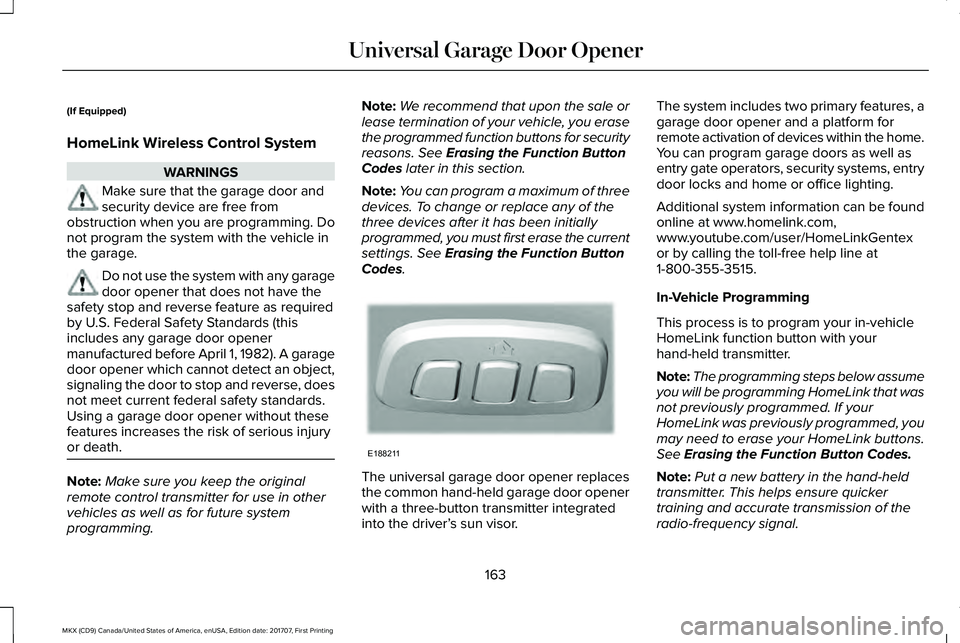
The universal garage door opener replacesthe common hand-held garage door openerwith a three-button transmitter integratedinto the driver’s sun visor.
The system includes two primary features, agarage door opener and a platform forremote activation of devices within the home.You can program garage doors as well asentry gate operators, security systems, entrydoor locks and home or office lighting.
Additional system information can be foundonline at www.homelink.com,www.youtube.com/user/HomeLinkGentexor by calling the toll-free help line at1-800-355-3515.
In-Vehicle Programming
This process is to program your in-vehicleHomeLink function button with yourhand-held transmitter.
Note:The programming steps below assumeyou will be programming HomeLink that wasnot previously programmed. If yourHomeLink was previously programmed, youmay need to erase your HomeLink buttons.See Erasing the Function Button Codes.
Note:Put a new battery in the hand-heldtransmitter. This helps ensure quickertraining and accurate transmission of theradio-frequency signal.
163
MKX (CD9) Canada/United States of America, enUSA, Edition date: 201707, First Printing
Universal Garage Door OpenerE188211
Page 170 of 603
12 Volt DC Power Point
WARNING
Do not plug optional electricalaccessories into the cigar lightersocket. Incorrect use of the cigar lighter cancause damage not covered by the vehiclewarranty, and can result in fire or seriousinjury.
Note:When you switch the ignition on, youcan use the socket to power 12 voltappliances with a maximum current ratingof 15 amps.
If the power supply does not work after youswitch the ignition off, switch the ignition on.Note:Do not hang any accessory from theaccessory plug.
Note:Do not use the power point over thevehicle capacity of 12 volt DC 180 watts ora fuse may blow.
Note:Always keep the power point capsclosed when not in use.
Do not insert objects other than an accessoryplug into the power point. This damages thepower point and may blow the fuse.
Run the vehicle for full capacity use of thepower point.
To prevent the battery from running out ofcharge:
•Do not use the power point longer thannecessary when the vehicle is notrunning.
•Do not leave devices plugged inovernight or when you park your vehiclefor extended periods.
Locations
Power points may be in the followinglocations:
•On the front of the center console.
•Inside the center console.
•On the rear of the center console.
•In the cargo area.
110 Volt AC Power Point (If Equipped)
WARNING
Do not keep electrical devices pluggedin the power point whenever thedevice is not in use. Do not use anyextension cord with the 110 volt AC powerpoint, since it will defeat the safety protectiondesign. Doing so may cause the power pointto overload due to powering multiple devicesthat can reach beyond the 150 watt load limitand could result in fire or serious injury.
Note:The power point turns off when youswitch off the ignition, or when the batteryvoltage drops below 11 volts.
You can use the power point for electricdevices that require up to 150 watts. It is onthe rear of the center console.
167
MKX (CD9) Canada/United States of America, enUSA, Edition date: 201707, First Printing
Auxiliary Power Points
Page 172 of 603
GLOVE BOX
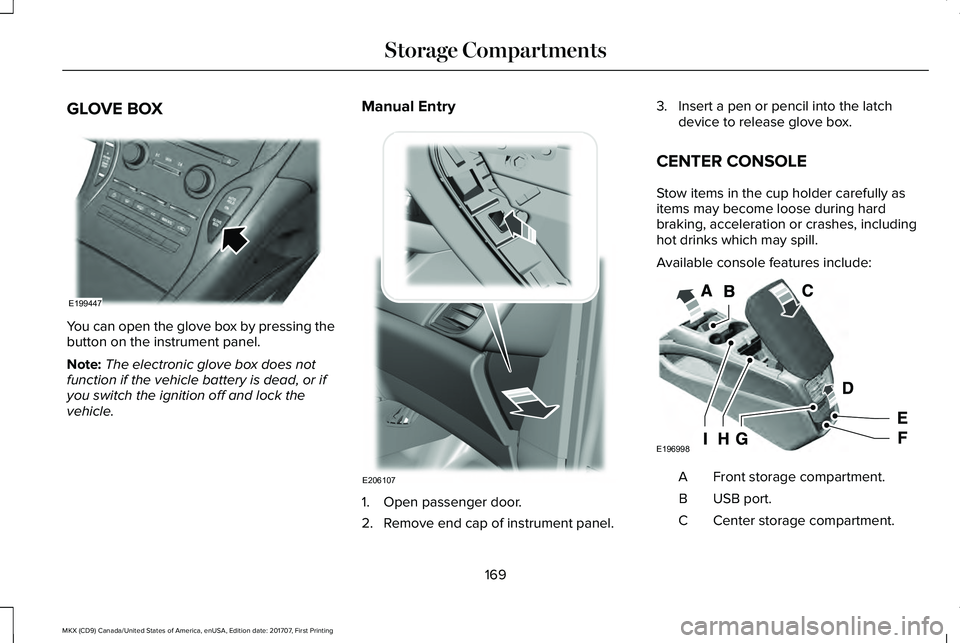
You can open the glove box by pressing thebutton on the instrument panel.
Note:The electronic glove box does notfunction if the vehicle battery is dead, or ifyou switch the ignition off and lock thevehicle.
Manual Entry
1. Open passenger door.
2. Remove end cap of instrument panel.
3. Insert a pen or pencil into the latchdevice to release glove box.
CENTER CONSOLE
Stow items in the cup holder carefully asitems may become loose during hardbraking, acceleration or crashes, includinghot drinks which may spill.
Available console features include:
Front storage compartment.A
USB port.B
Center storage compartment.C
169
MKX (CD9) Canada/United States of America, enUSA, Edition date: 201707, First Printing
Storage CompartmentsE199447 E206107 E196998