battery LINCOLN MKX 2018 Workshop Manual
[x] Cancel search | Manufacturer: LINCOLN, Model Year: 2018, Model line: MKX, Model: LINCOLN MKX 2018Pages: 603, PDF Size: 4.94 MB
Page 461 of 603
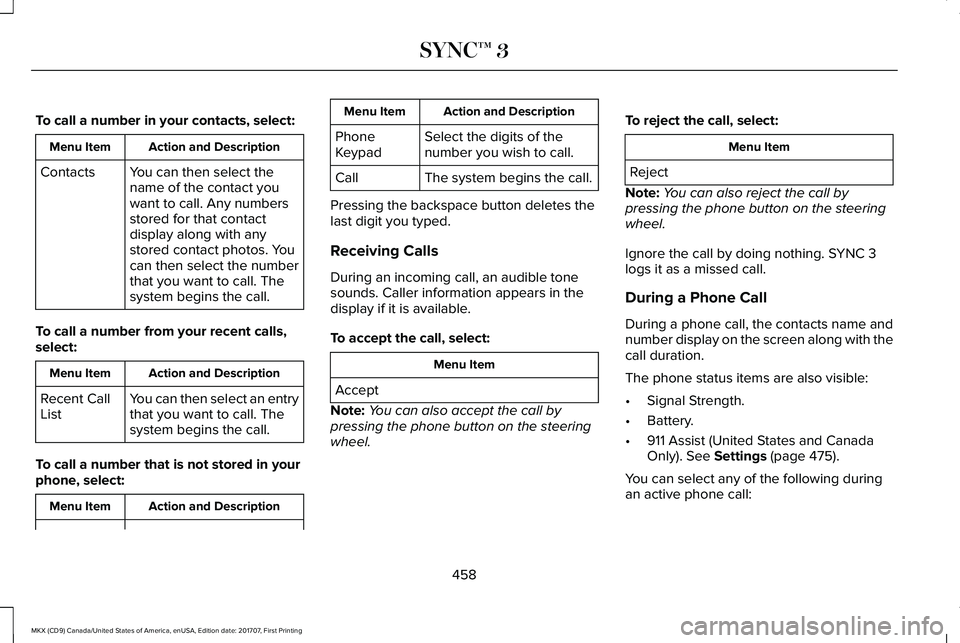
To call a number in your contacts, select:
Action and DescriptionMenu Item
You can then select thename of the contact youwant to call. Any numbersstored for that contactdisplay along with anystored contact photos. Youcan then select the numberthat you want to call. Thesystem begins the call.
Contacts
To call a number from your recent calls,select:
Action and DescriptionMenu Item
You can then select an entrythat you want to call. Thesystem begins the call.
Recent CallList
To call a number that is not stored in yourphone, select:
Action and DescriptionMenu Item
Action and DescriptionMenu Item
Select the digits of thenumber you wish to call.PhoneKeypad
The system begins the call.Call
Pressing the backspace button deletes thelast digit you typed.
Receiving Calls
During an incoming call, an audible tonesounds. Caller information appears in thedisplay if it is available.
To accept the call, select:
Menu Item
Accept
Note:You can also accept the call bypressing the phone button on the steeringwheel.
To reject the call, select:
Menu Item
Reject
Note:You can also reject the call bypressing the phone button on the steeringwheel.
Ignore the call by doing nothing. SYNC 3logs it as a missed call.
During a Phone Call
During a phone call, the contacts name andnumber display on the screen along with thecall duration.
The phone status items are also visible:
•Signal Strength.
•Battery.
•911 Assist (United States and CanadaOnly). See Settings (page 475).
You can select any of the following duringan active phone call:
458
MKX (CD9) Canada/United States of America, enUSA, Edition date: 201707, First Printing
SYNC™ 3
Page 485 of 603
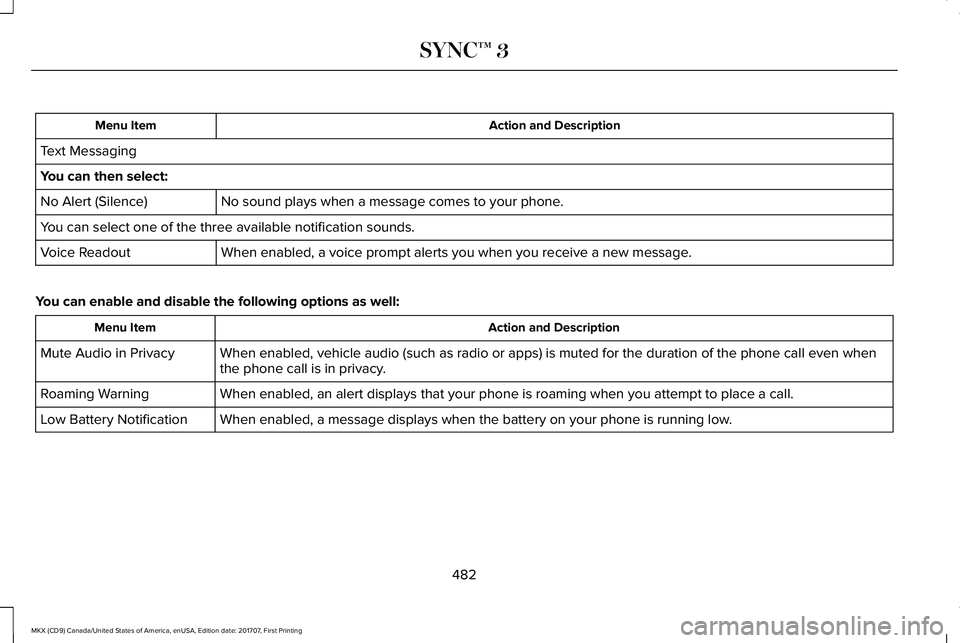
Action and DescriptionMenu Item
Text Messaging
You can then select:
No sound plays when a message comes to your phone.No Alert (Silence)
You can select one of the three available notification sounds.
When enabled, a voice prompt alerts you when you receive a new message.Voice Readout
You can enable and disable the following options as well:
Action and DescriptionMenu Item
When enabled, vehicle audio (such as radio or apps) is muted for the duration of the phone call even whenthe phone call is in privacy.Mute Audio in Privacy
When enabled, an alert displays that your phone is roaming when you attempt to place a call.Roaming Warning
When enabled, a message displays when the battery on your phone is running low.Low Battery Notification
482
MKX (CD9) Canada/United States of America, enUSA, Edition date: 201707, First Printing
SYNC™ 3
Page 499 of 603
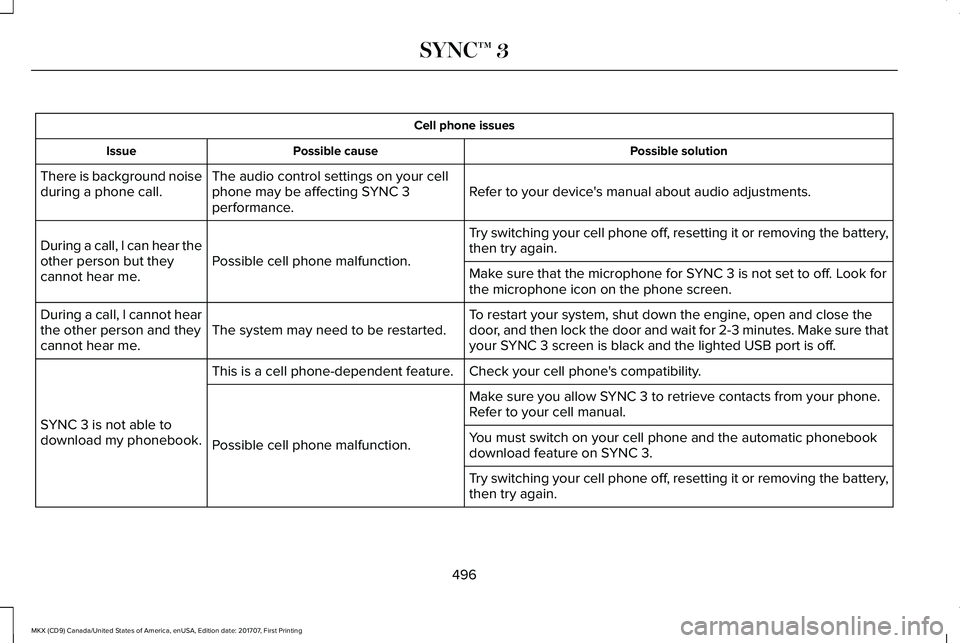
Cell phone issues
Possible solutionPossible causeIssue
Refer to your device's manual about audio adjustments.The audio control settings on your cellphone may be affecting SYNC 3performance.
There is background noiseduring a phone call.
Try switching your cell phone off, resetting it or removing the battery,then try again.Possible cell phone malfunction.During a call, I can hear theother person but theycannot hear me.Make sure that the microphone for SYNC 3 is not set to off. Look forthe microphone icon on the phone screen.
To restart your system, shut down the engine, open and close thedoor, and then lock the door and wait for 2-3 minutes. Make sure thatyour SYNC 3 screen is black and the lighted USB port is off.The system may need to be restarted.During a call, I cannot hearthe other person and theycannot hear me.
Check your cell phone's compatibility.This is a cell phone-dependent feature.
SYNC 3 is not able todownload my phonebook.
Make sure you allow SYNC 3 to retrieve contacts from your phone.Refer to your cell manual.
Possible cell phone malfunction.You must switch on your cell phone and the automatic phonebookdownload feature on SYNC 3.
Try switching your cell phone off, resetting it or removing the battery,then try again.
496
MKX (CD9) Canada/United States of America, enUSA, Edition date: 201707, First Printing
SYNC™ 3
Page 500 of 603
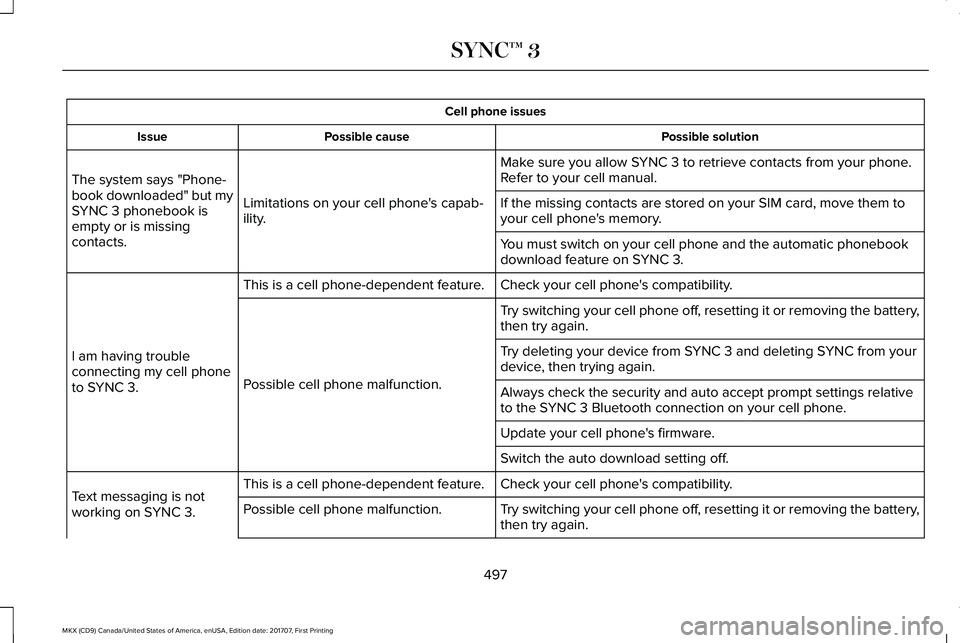
Cell phone issues
Possible solutionPossible causeIssue
Make sure you allow SYNC 3 to retrieve contacts from your phone.Refer to your cell manual.
Limitations on your cell phone's capab-ility.
The system says "Phone-book downloaded" but mySYNC 3 phonebook isempty or is missingcontacts.
If the missing contacts are stored on your SIM card, move them toyour cell phone's memory.
You must switch on your cell phone and the automatic phonebookdownload feature on SYNC 3.
Check your cell phone's compatibility.This is a cell phone-dependent feature.
I am having troubleconnecting my cell phoneto SYNC 3.
Try switching your cell phone off, resetting it or removing the battery,then try again.
Possible cell phone malfunction.
Try deleting your device from SYNC 3 and deleting SYNC from yourdevice, then trying again.
Always check the security and auto accept prompt settings relativeto the SYNC 3 Bluetooth connection on your cell phone.
Update your cell phone's firmware.
Switch the auto download setting off.
Check your cell phone's compatibility.This is a cell phone-dependent feature.Text messaging is notworking on SYNC 3.Try switching your cell phone off, resetting it or removing the battery,then try again.Possible cell phone malfunction.
497
MKX (CD9) Canada/United States of America, enUSA, Edition date: 201707, First Printing
SYNC™ 3
Page 502 of 603
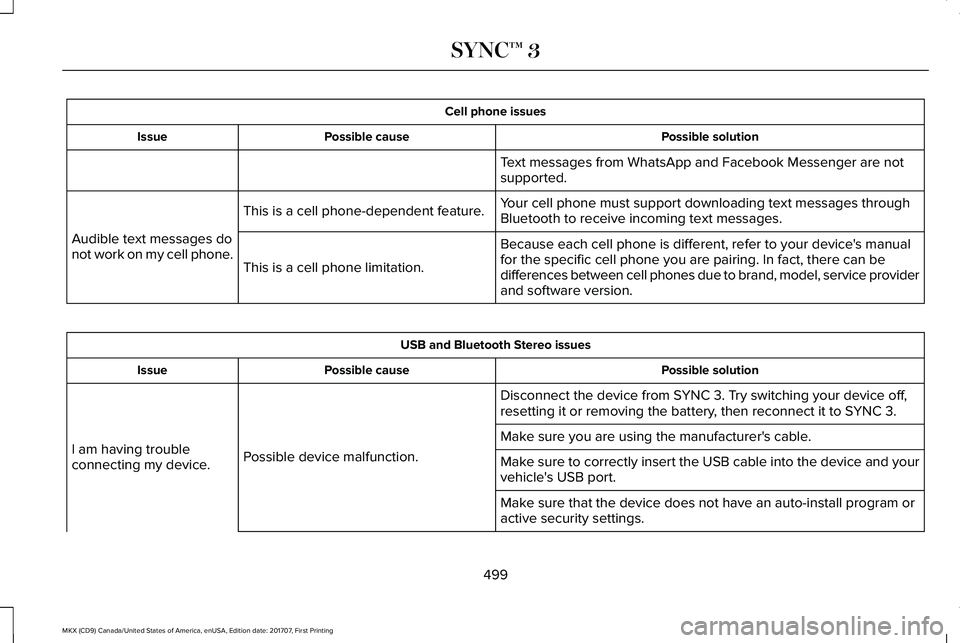
Cell phone issues
Possible solutionPossible causeIssue
Text messages from WhatsApp and Facebook Messenger are notsupported.
Your cell phone must support downloading text messages throughBluetooth to receive incoming text messages.This is a cell phone-dependent feature.
Audible text messages donot work on my cell phone.Because each cell phone is different, refer to your device's manualfor the specific cell phone you are pairing. In fact, there can bedifferences between cell phones due to brand, model, service providerand software version.
This is a cell phone limitation.
USB and Bluetooth Stereo issues
Possible solutionPossible causeIssue
Disconnect the device from SYNC 3. Try switching your device off,resetting it or removing the battery, then reconnect it to SYNC 3.
Possible device malfunction.I am having troubleconnecting my device.
Make sure you are using the manufacturer's cable.
Make sure to correctly insert the USB cable into the device and yourvehicle's USB port.
Make sure that the device does not have an auto-install program oractive security settings.
499
MKX (CD9) Canada/United States of America, enUSA, Edition date: 201707, First Printing
SYNC™ 3
Page 504 of 603
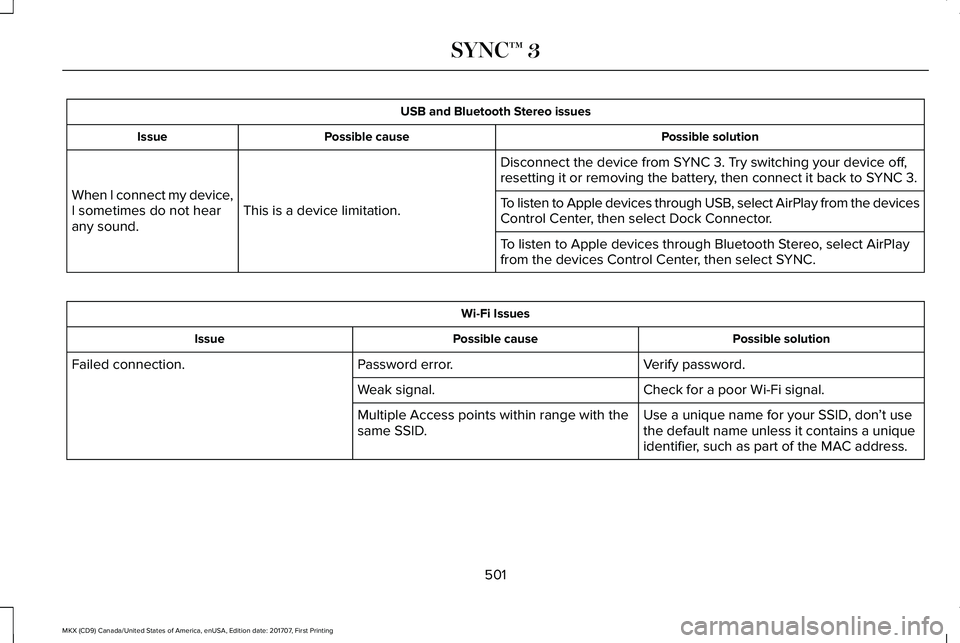
USB and Bluetooth Stereo issues
Possible solutionPossible causeIssue
Disconnect the device from SYNC 3. Try switching your device off,resetting it or removing the battery, then connect it back to SYNC 3.
This is a device limitation.When I connect my device,I sometimes do not hearany sound.
To listen to Apple devices through USB, select AirPlay from the devicesControl Center, then select Dock Connector.
To listen to Apple devices through Bluetooth Stereo, select AirPlayfrom the devices Control Center, then select SYNC.
Wi-Fi Issues
Possible solutionPossible causeIssue
Verify password.Password error.Failed connection.
Check for a poor Wi-Fi signal.Weak signal.
Use a unique name for your SSID, don’t usethe default name unless it contains a uniqueidentifier, such as part of the MAC address.
Multiple Access points within range with thesame SSID.
501
MKX (CD9) Canada/United States of America, enUSA, Edition date: 201707, First Printing
SYNC™ 3
Page 516 of 603
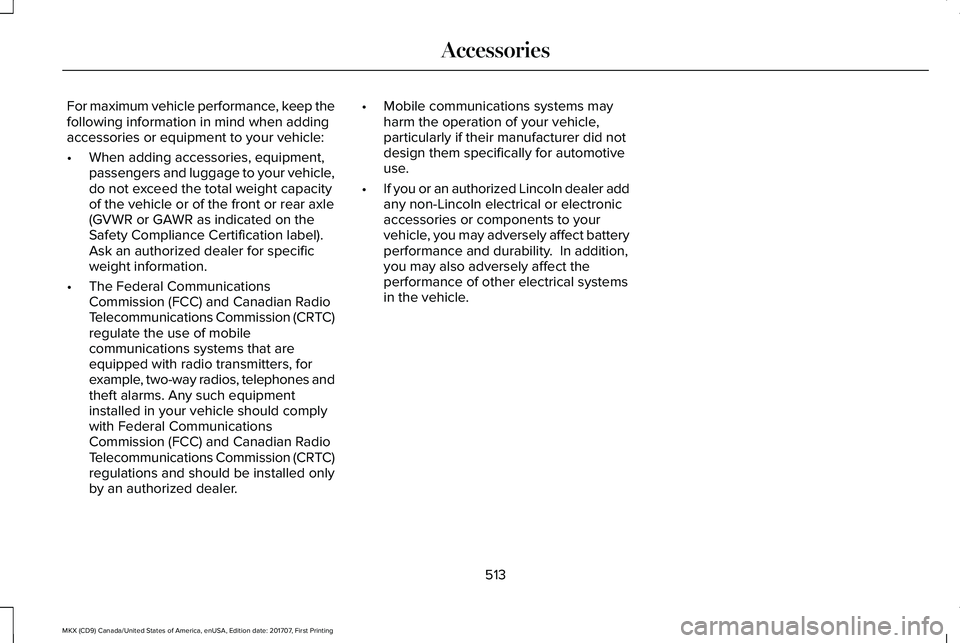
For maximum vehicle performance, keep thefollowing information in mind when addingaccessories or equipment to your vehicle:
•When adding accessories, equipment,passengers and luggage to your vehicle,do not exceed the total weight capacityof the vehicle or of the front or rear axle(GVWR or GAWR as indicated on theSafety Compliance Certification label). Ask an authorized dealer for specificweight information.
•The Federal CommunicationsCommission (FCC) and Canadian RadioTelecommunications Commission (CRTC)regulate the use of mobilecommunications systems that areequipped with radio transmitters, forexample, two-way radios, telephones andtheft alarms. Any such equipmentinstalled in your vehicle should complywith Federal CommunicationsCommission (FCC) and Canadian RadioTelecommunications Commission (CRTC)regulations and should be installed onlyby an authorized dealer.
•Mobile communications systems mayharm the operation of your vehicle,particularly if their manufacturer did notdesign them specifically for automotiveuse.
•If you or an authorized Lincoln dealer addany non-Lincoln electrical or electronicaccessories or components to yourvehicle, you may adversely affect batteryperformance and durability. In addition,you may also adversely affect theperformance of other electrical systemsin the vehicle.
513
MKX (CD9) Canada/United States of America, enUSA, Edition date: 201707, First Printing
Accessories
Page 517 of 603
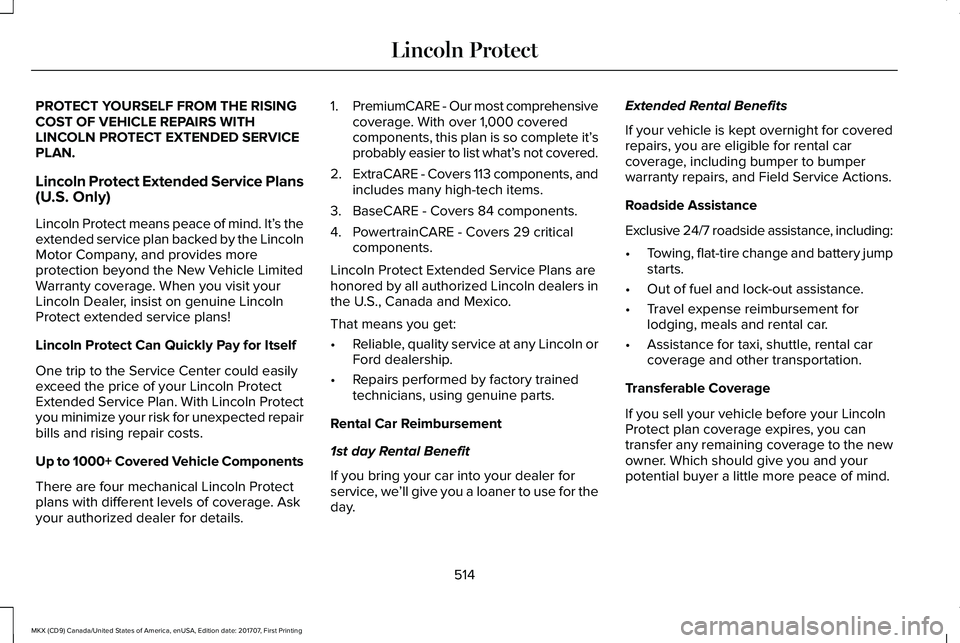
PROTECT YOURSELF FROM THE RISINGCOST OF VEHICLE REPAIRS WITHLINCOLN PROTECT EXTENDED SERVICEPLAN.
Lincoln Protect Extended Service Plans(U.S. Only)
Lincoln Protect means peace of mind. It’s theextended service plan backed by the LincolnMotor Company, and provides moreprotection beyond the New Vehicle LimitedWarranty coverage. When you visit yourLincoln Dealer, insist on genuine LincolnProtect extended service plans!
Lincoln Protect Can Quickly Pay for Itself
One trip to the Service Center could easilyexceed the price of your Lincoln ProtectExtended Service Plan. With Lincoln Protectyou minimize your risk for unexpected repairbills and rising repair costs.
Up to 1000+ Covered Vehicle Components
There are four mechanical Lincoln Protectplans with different levels of coverage. Askyour authorized dealer for details.
1.PremiumCARE - Our most comprehensivecoverage. With over 1,000 coveredcomponents, this plan is so complete it’sprobably easier to list what’s not covered.
2.ExtraCARE - Covers 113 components, andincludes many high-tech items.
3. BaseCARE - Covers 84 components.
4. PowertrainCARE - Covers 29 criticalcomponents.
Lincoln Protect Extended Service Plans arehonored by all authorized Lincoln dealers inthe U.S., Canada and Mexico.
That means you get:
•Reliable, quality service at any Lincoln orFord dealership.
•Repairs performed by factory trainedtechnicians, using genuine parts.
Rental Car Reimbursement
1st day Rental Benefit
If you bring your car into your dealer forservice, we’ll give you a loaner to use for theday.
Extended Rental Benefits
If your vehicle is kept overnight for coveredrepairs, you are eligible for rental carcoverage, including bumper to bumperwarranty repairs, and Field Service Actions.
Roadside Assistance
Exclusive 24/7 roadside assistance, including:
•Towing, flat-tire change and battery jumpstarts.
•Out of fuel and lock-out assistance.
•Travel expense reimbursement forlodging, meals and rental car.
•Assistance for taxi, shuttle, rental carcoverage and other transportation.
Transferable Coverage
If you sell your vehicle before your LincolnProtect plan coverage expires, you cantransfer any remaining coverage to the newowner. Which should give you and yourpotential buyer a little more peace of mind.
514
MKX (CD9) Canada/United States of America, enUSA, Edition date: 201707, First Printing
Lincoln Protect
Page 522 of 603
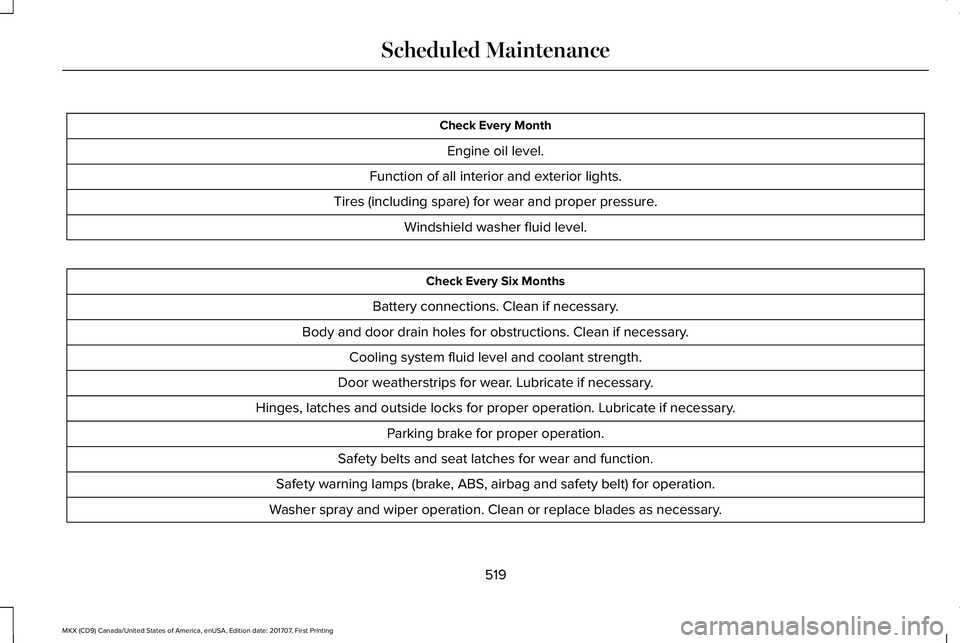
Check Every Month
Engine oil level.
Function of all interior and exterior lights.
Tires (including spare) for wear and proper pressure.
Windshield washer fluid level.
Check Every Six Months
Battery connections. Clean if necessary.
Body and door drain holes for obstructions. Clean if necessary.
Cooling system fluid level and coolant strength.
Door weatherstrips for wear. Lubricate if necessary.
Hinges, latches and outside locks for proper operation. Lubricate if necessary.
Parking brake for proper operation.
Safety belts and seat latches for wear and function.
Safety warning lamps (brake, ABS, airbag and safety belt) for operation.
Washer spray and wiper operation. Clean or replace blades as necessary.
519
MKX (CD9) Canada/United States of America, enUSA, Edition date: 201707, First Printing
Scheduled Maintenance
Page 523 of 603
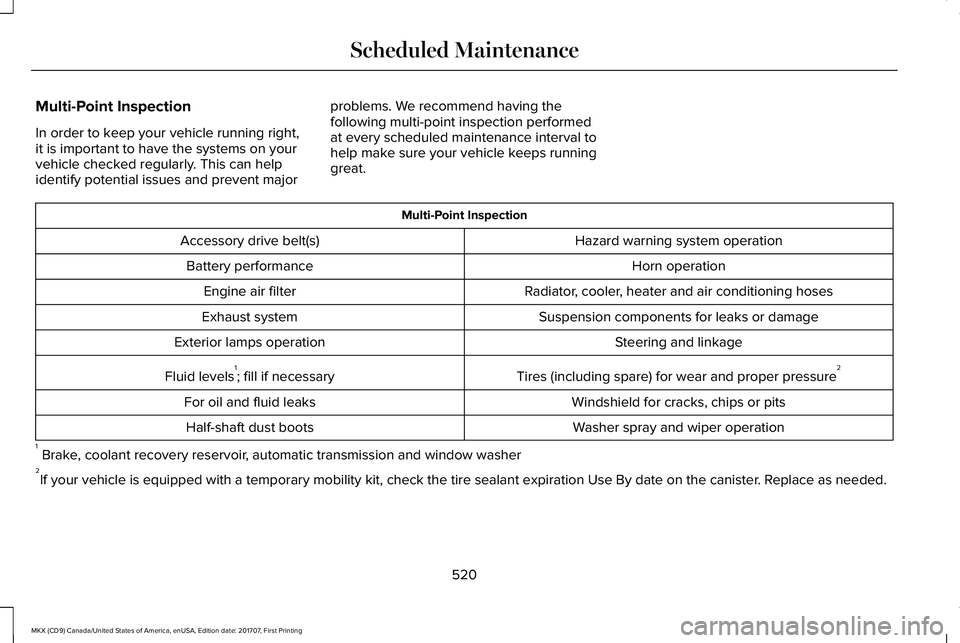
Multi-Point Inspection
In order to keep your vehicle running right,it is important to have the systems on yourvehicle checked regularly. This can helpidentify potential issues and prevent major
problems. We recommend having thefollowing multi-point inspection performedat every scheduled maintenance interval tohelp make sure your vehicle keeps runninggreat.
Multi-Point Inspection
Hazard warning system operationAccessory drive belt(s)
Horn operationBattery performance
Radiator, cooler, heater and air conditioning hosesEngine air filter
Suspension components for leaks or damageExhaust system
Steering and linkageExterior lamps operation
Tires (including spare) for wear and proper pressure2Fluid levels1; fill if necessary
Windshield for cracks, chips or pitsFor oil and fluid leaks
Washer spray and wiper operationHalf-shaft dust boots
1 Brake, coolant recovery reservoir, automatic transmission and window washer2If your vehicle is equipped with a temporary mobility kit, check the tire sealant expiration Use By date on the canister. Replace as needed.
520
MKX (CD9) Canada/United States of America, enUSA, Edition date: 201707, First Printing
Scheduled Maintenance